wheel AUDI TT ROADSTER 2018 Repair Manual
[x] Cancel search | Manufacturer: AUDI, Model Year: 2018, Model line: TT ROADSTER, Model: AUDI TT ROADSTER 2018Pages: 310, PDF Size: 46.95 MB
Page 274 of 310
Emergency assistance
Emergency assistance
Trunk escape latch
In case of an emergency , the rear lid can be
opened from the inside using the trunk escape
latch.
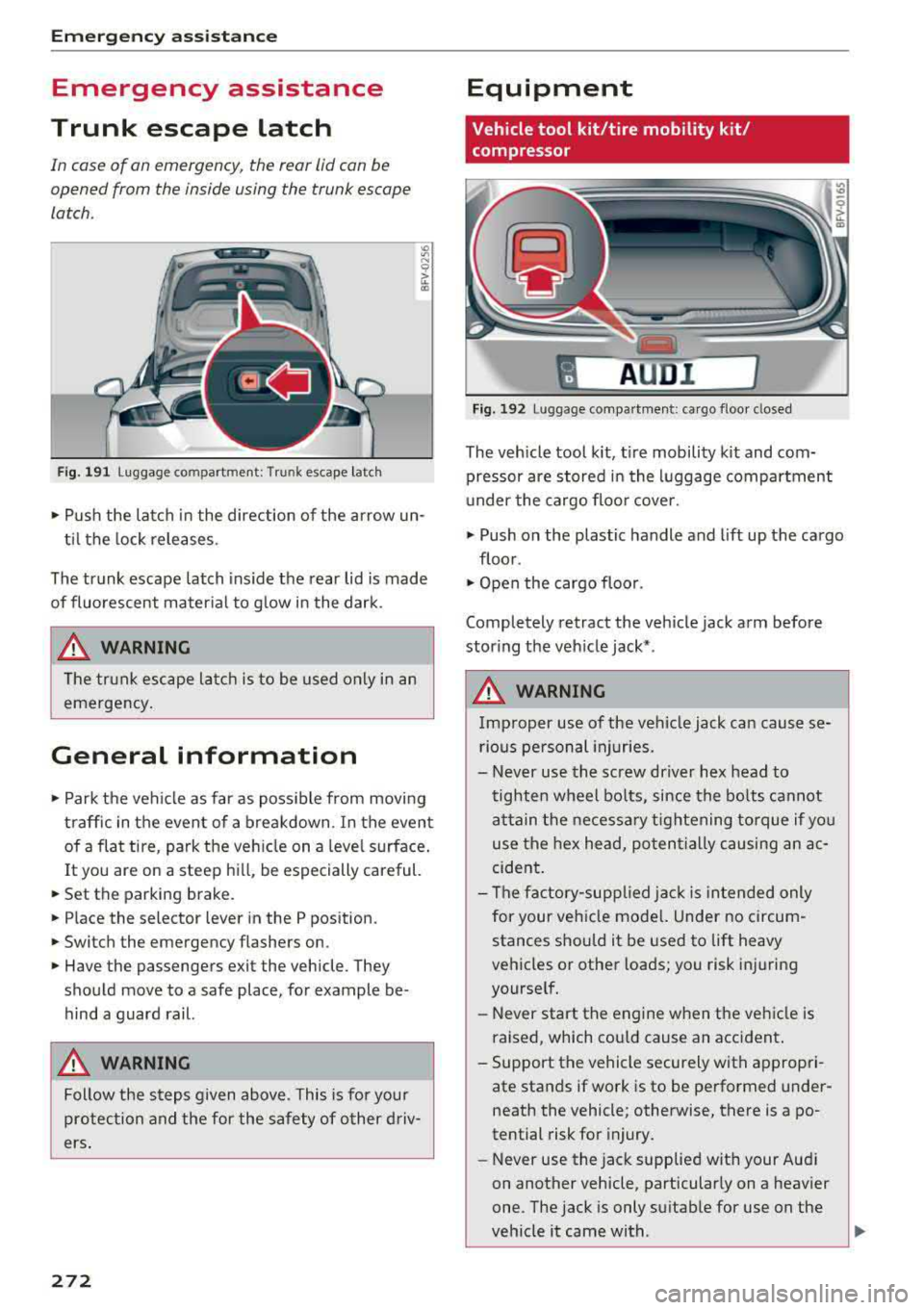
Fig. 191 L uggage compartment: Trunk escape latch
• Pu sh the latch in the direction of the arrow un
til the lock releases .
The trunk escape latch inside the rear lid is made
of fluorescent material to g low in the dark.
.&_ WARNING
The trunk escape latch is to be used only in an
emergency.
General information
• Park the vehicle as far as poss ible from moving
traffic in the event of a breakdown . In the event
of a flat tire , park the vehicle on a level surface .
It you are on a steep hill, be especially careful.
• Set the parking brake.
• Place the selector lever in the P position.
• Switch the emergency flashers on.
• Have the passengers exit the vehicle. They
should move to a safe place, for example be
hind a guard rail.
.&_ WARNING
Follow the steps given above . This is for your
protection and the for the safety of other driv
ers.
272
Equipment
Vehicle tool kit/tire mobility kit/
compressor
A UD i 1
Fig. 192 Lu ggage compartmen t: cargo floor closed
The vehicle tool kit, tire mobility kit and com·
pressor are stored in the luggage compartment
u nder the cargo floor cover.
• Push on the plastic handle and lift up the cargo
floor .
• Open the cargo floor.
Completely retract the vehicle jack arm before
storing the vehicle jack* .
.&_ WARNING
Improper use of the veh icle jack can cause se
rious personal injuries.
- Never use the screw driver hex head to
tighten wheel bolts, since the bolts cannot
attain the necessary tightening torque if you
use the hex head, potentially causing an ac
cident.
- The factory-supplied jack is intended only
for your vehicle mode l. Under no circum
stances should it be used to lift heavy
vehicles or other loads; you risk injuring
yourself.
- Never start the engine when the vehicle is
raised, which cou ld cause an accident .
- Support the vehicle securely with appropri
ate stands if work is to be performed under
neath the vehicle; otherwise, there is a
po
tential risk for injury.
- Never use the jack supplied with your Aud i
on another vehicle, particularly on a heavier
one. The jack is only suitable for use on the
vehicle it came with .
...
Page 277 of 310
Cl co .... N ,..._
N ...... 0 ,..._
Vl co
-If the tire is too severely damaged , see an
authorized Aud i dealer or authorized Aud i
Service Facility for assistance .
@ For the sake of the environment
You can give the used tire sealant bottle to an
author ized Audi dealer or authorized A udi
Service Facility for disposal.
@ Tips
Remember to obtain a new bottle of sea lant
from an authorized Audi dea ler or authorized
Audi Service Facility after repairing a tire.
Replacing wheels
Preparation
You must complete the preparation before
changing a tire .
"' Read and follow the important safety precau-
t ions
Q page 2 72, General information .
"' Set the parking brake .
"'Se lect the "P" selec to r l ever position.
"'Lay out the vehicle tool kit Q page 2 72 and the
spare tire
Q page 279 .
A WARNING ,-
You or your passenger could be injured while
changing a wheel if you do not follow these
safety precautions:
- If you have a flat tire, move a safe distance
off the road. Turn off the engine, turn the
emergency flashers on and use other warn
ing devices to alert other motorists.
- Make sure that passengers wait in a safe place away f rom the vehicle and well away
from the road and traffic .
- To help prevent the vehicle from moving suddenly and possibly slipping off the jack,
always fully set the parking brake and block
the front and back of the wheel diagonally
opposite the w heel be ing changed. Whe n
one front whee l is lifted off the ground,
pla cing the A utoma tic Transm ission in P
(Park) will
not prevent the ve hicle from
moving .
Emergen cy as sis tanc e
-Before you change a wheel, be sure the
ground is level and firm . If necessary, use a
sturdy board under the jack.
- Always store the vehicle too l kit, the jack
and the replaced tire in the luggage com
partment
<=) page 183.
(D Tips
Obey all laws .
Removing the cover
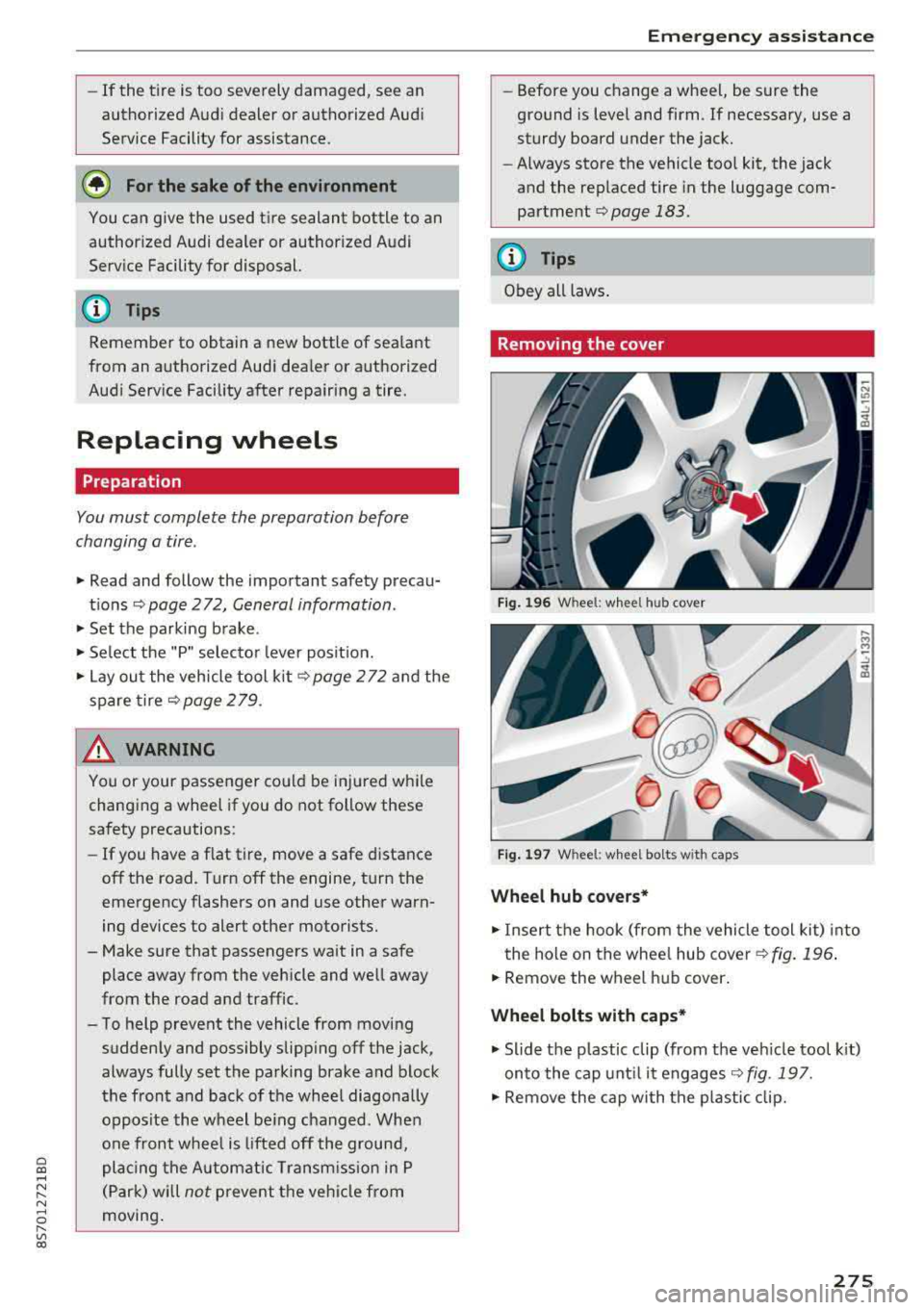
Fig. 196 W heel: wh eel hu b cov er
F ig. 1 97 Wheel: wh eel bol ts with cap s
Wheel hub covers*
"'Insert the hook (from the vehicle tool kit) into
the hole on the whee l hub cover
Q fig. 196 .
"'Remove the wheel h ub cover .
Wheel bolts with caps *
"'Slide the p lastic clip (from the veh icle too l kit)
onto the cap unt il it engages
Q fig . 197.
"' Remove the cap with the p lastic clip.
275
Page 278 of 310
Emerg enc y assis ta nce
Loosening the wheel bolts
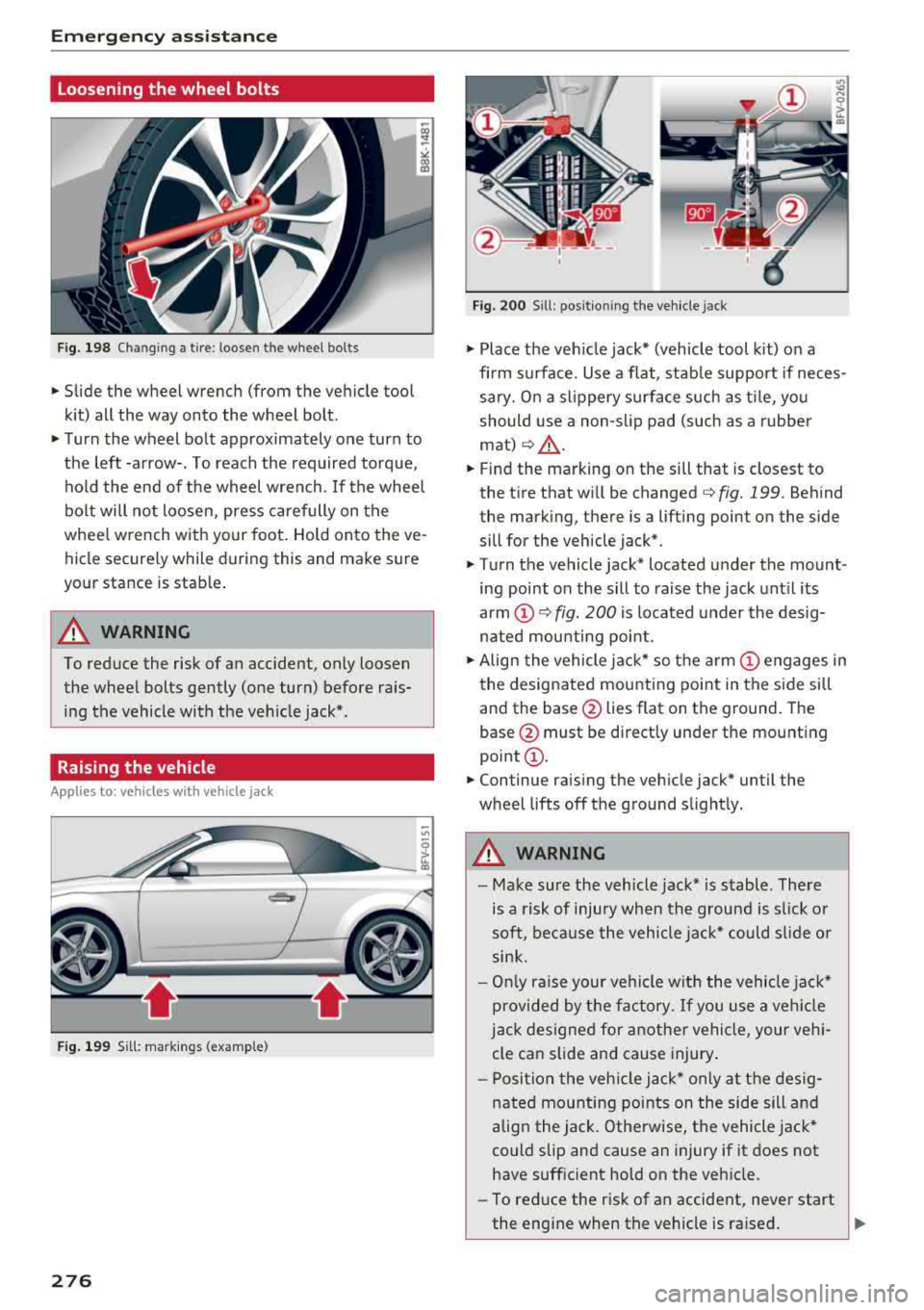
Fig. 198 Chan gin g a tire : loosen t he wheel bolts
.,. Slide the wheel wrench (from the vehicle tool
k it) all the way onto the wheel bolt.
.,. Turn the wheel bolt approximately one turn to
the left -arrow-. To reach the required torque, hold the end of the wheel wrench. If the wheel
bolt will not loosen, press carefully on the
whee l wrench with your foot. Hold onto the ve
hicle securely while during this and make sure
your stance is stable .
A WARNING
To reduce the risk of an accident, only loosen
the wheel bolts gently (one turn) before rais
ing the vehicle with the veh icle jack*.
Raising the vehicle
A ppl ies to: ve hicles w ith vehicle jack
- ,t.------,:
Fig. 199 Sill: markings (examp le)
276
Fig. 200 S ill : pos ition ing the vehicle jack
.,. Place the veh icle jack* (vehicle tool kit) on a
firm s urface. Use a f lat, stab le support if neces
sary. On a slippery surface such as ti le, you
should use a non-slip pad (such as a rubber
mat) <=>& .
.,. Find the marking on the sill that is closest to
the tire that will be changed
c> fig. 199. Behind
the marking, there is a lifting point on the side
sill for the vehicle jack* .
.,. Turn the vehicle jack* located u nder the mount
ing point on the sill to raise the jack until its
arm
(D c> fig. 200 i s located under the desig
nated mou nting point .
.,. Align the vehicle jack* so the a rm (!) engages in
the designated mounting point in the side sill
and the base @lies flat on the ground. The
base @ must be directly under the mounting
point @.
.,. Continue raising the vehicle jack* until the
wheel lifts off the ground slightly.
A WARNING
- Make sure the vehicle jack* is stable . There
is a risk of injury when the ground is s lick or
soft, because the vehicle jac k* could sl ide or
sink.
- On ly raise your vehicle w ith the vehicle jac k*
provided by the factory. If you use a ve hicle
j a ck designed for anothe r vehicle, your veh i
cle can slide and cause injury .
- Posi tion the veh icle jack* only at the des ig
nated mounting points on the side sill and
align the jack . Otherwise, the vehicle jack*
could slip and cause an injury if it does not
have sufficient hold on the vehicle.
- To reduce the risk of an accident, never start
the engine when the vehicle is ra ised.
Page 279 of 310
Cl co .... N ,....
N ...... 0 ,....
Vl co
-To reduce the risk of injury, support the ve
hicle securely with suitab le stands if work is
to be performed underneath the vehicle.
- To help prevent injury to yourself and your
passengers:
- Do not ra ise the vehicle until you are sure
the jack is securely engaged .
- Passengers must not remain in the vehicle
when it is jacked up.
- Make sure that passengers wait in a safe
p lace away from the vehicle a nd well away
from the road and t raffic.
- Make sure jack posit ion is correct, adjust
as necessary and then cont inue to raise
the jack.
- If work has to be done under the v ehicle,
ensure that it is safely s upported on su ita
b le stands
-risk of inju ry!
- Never start the engine when the vehicle is
on the jac k
-risk of accident!
(D Note
Do not lift the vehicle by the sill . Position the
veh icle jack* only at the des ignated mounting
points on the side s il l. Otherwise, yo ur vehicle
w ill be damaged.
Removing and mounting a wheel
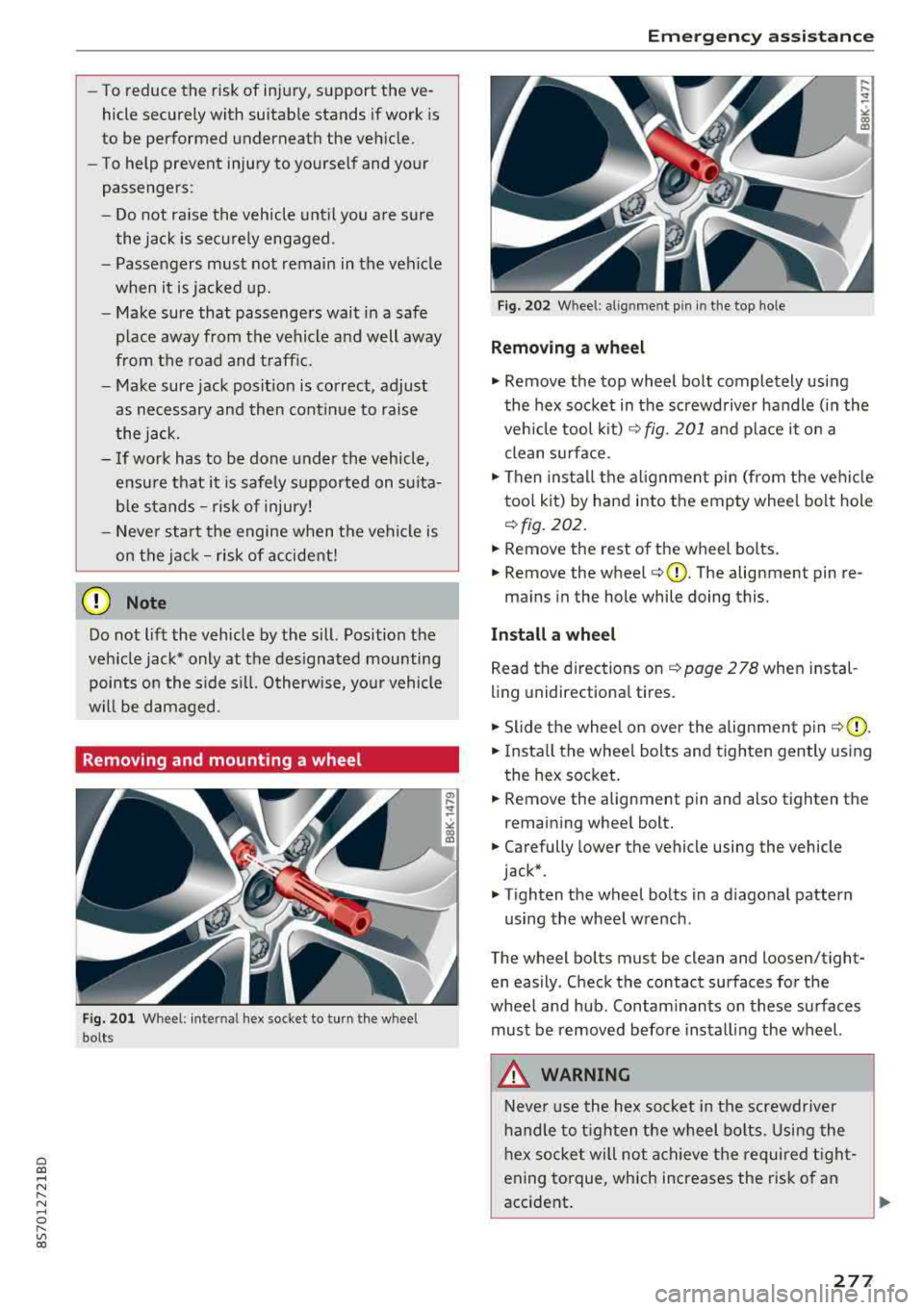
Fi g. 2 01 Wheel : internal hex socket to turn the wheel
bolts
Em ergen cy as sis tanc e
Fig. 202 Whee l: alignment pin in the top ho le
Removing a wheel
.,. Remove the top wheel bolt completely using
the hex socket in th e screwdriver handle (in the
ve hicle tool kit) ¢
fig. 201 and p lace it on a
clean s urface.
.,. Then insta ll the alignment pin (from the ve hicl e
too l kit) by hand into the empty wheel bolt hole
<=> fig . 202.
.,. Remove the rest of the wheel bo lts.
.,. Remove the wheel <=>CD. The alignment pin re-
mains in the hole while doing this.
Install a wheel
Read the directions on <=> page 2 78 when in stal
ling unidirectiona l tires.
.,. Slide the wheel on over the alignment pin ¢ (D .
.,. Insta ll the whee l bolts and tighten gently us ing
t he hex socket .
.,. Remove the alignment pin and also tighten the
remain ing whee l bolt .
.,. Carefully lower the vehicle using the vehicle
jack* .
.,. Tighten the wheel bolts in a d iagonal pattern
using the wheel wrench .
The wheel bolts must be clean and loosen/tight
en easily . Check the contact surfaces for the
whee l and hub. Contam inants on these su rfaces
must be removed before installing the wheel.
_&. WARNING
Neve r use the hex socke t in the screwd river
handle to t igh ten the wheel bo lts . Using the
h ex socket will not ac hieve the required t ight
ening torque, which increases the risk of an
accident .
..,.
277
Page 280 of 310
Emergency assistance
{QJ Note
When removing or installing the wheel, the
rim could hit the brake rotor and damage the
rotor. Work carefully and have a second per
son help you.
(D Tips
- When mounting tires with unidirectional
tread design
make sure the tread pattern is
pointed the right way
¢ page 278.
-The wheel bolts should be clean and easy to
turn. Check for dirt and corrosion on the mating surfaces of both the wheel and the
hub. Remove all dirt from these surfaces be
fore remounting the wheel.
Unidirectional tires
A unidirectional tire profile is identified by arrows
that point in the running direction on the tire
sidewall. You must always adhere to the speci
fied running direction. This is necessary ensure
the tire 's optimum performance in regard to ad
hesion, running noise, friction and hydroplaning .
To benefit fully from the advantages of the uni
directional tire design, you should replace faulty
tires as soon as possible and restore the correct
running direction on all of the tires.
Finishing
.,. Reinstall the caps on the wheel bolts if neces
sary .
.,. Store the vehicle tool kit in its designated
place .
.,. If the removed wheel does not fit in the spare
wheel well, store it securely in the luggage
compartment
¢ page 183.
.,. Check the tire pressure on the installed wheel
as soon as possible.
.,. Check the tire pressure and store it in the Info
tainment system.
.,. The wheel bol t tightening specification must be
90 ft lbs (120 Nm) . Check it as soon as possible
with a torque wrench. Drive carefully until then.
.,. Have the faulty wheel replaced as quickly as
possible.
278
(D Tips
- If you notice that the wheel bolts are cor
roded and difficult to turn while changing a
tire, they should be replaced before you check the tightening torque.
- Drive at reduced speed until you have the
tightening torques checked.
Notes on wheel changing
Please read the information ¢ page 251 if you
are going to use a spare tire which is different
from the tires on your vehicle .
After you change a tire:
- Check the tire pressure on the spare immedi
ately after installation.
- Have the wheel bolt tightening torque
checked with a torque wrench as soon as pos
sible by your authorized Audi dealer or a
qualified service station.
- With steel and alloy wheel rims, the wheel
bolts are correctly tightened at a torque of
90
ft lbs (120 Nm).
- If you notice that the wheel bolts are corroded
and difficult to turn while changing a tire,
they should be replaced before you check the
tightening torque.
- Replace the flat tire with a new one and have
it installed on your vehicle as soon as possi
ble. Remount the wheel cover .
Until then, drive with extra care and at reduced
speeds.
A WARNING
- If you are going to equip your vehicle with
tires or rims which differ from those which
were factory installed, then be sure to read
the information
¢page 251.
-Always make sure the damaged wheel or
even a flat tire and the jack and tool kit are
properly secured in the luggage compart
ment and are not loose in the passenger
compartment.
- In an accident or sudden maneuver they
could fly forward, injuring anyone in the ve
hicle.
-
Page 281 of 310
Cl co .... N ,....
N ...... 0 ,....
Vl co
-Always stor e damaged whee l, jack and too ls
securely in the luggage compartment. Oth erwise, in an accident or sudden maneuver
they could fly forward, caus ing injury to pas
sengers in the vehicle .
Spare tire
General information
Applies to: veh icles wit h space -saving spa re t ire (compact
spa re t ire)
A U DI
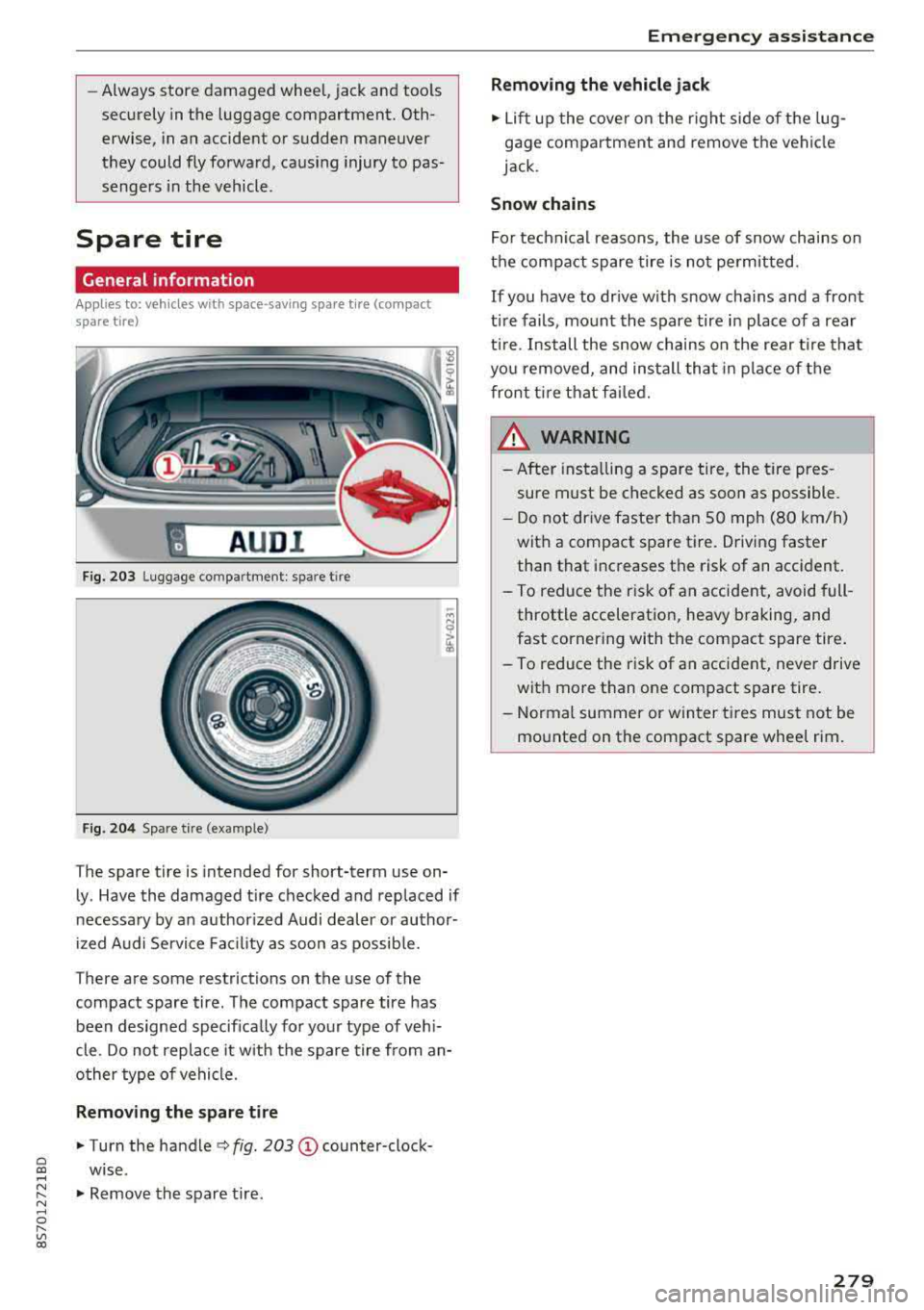
Fig. 203 Lugg age co mpar tment : spar e tir e
F ig . 204 Sp are t ire (ex ample)
The spare tire is intended for short-term use on
ly . Have the damaged t ire checked and replaced if
necessary by an author ized Audi dealer or author
i zed A udi Service Fac ility as soon as possib le.
T here are some restrictions on the use of the
compact spare tire . The compact spare tire has
been designed specifica lly for your type of veh i
cle . Do not replace it w ith the spare tire from an
o ther type of vehicle.
Removing the spare tire
.,. Turn the handle c::> fig . 203 (D counter-clock
wise.
.,. Remove the spare tire .
Emergen cy as sis tanc e
Removing the vehicle jack
.,. Lift up the cover on the right side of the lug
gage compartment and remove the vehicle
jack.
Snow chains
For technical reasons, the use of snow chains on
the compact spare tire is not pe rmit ted.
If you have to dr ive with snow chains and a front
t ire fails , mount the spare tire in place of a rear
t ir e. Install the snow chains on the rear t ire that
yo u removed, and ins tall that in place of the
front t ire that fai led.
_&, WARNING ..
- After insta lling a spare tire, the tire pres
sure must be checked as soon as possible .
- D o not dr ive faster than 50 mph (80 km/h)
with a compact spare tire. Driving faster
than that inc reases the risk of an accident.
- To reduce the r isk of an accident, avoid full
throttle acceleration, heavy braking, and
fast corner ing with the compact spare tire .
-
- To reduce the risk of an accident, neve r drive
with more than one compact spare tire .
- Normal summer or winter tires must not be mounted on the compact spare wheel rim.
279
Page 283 of 310
Cl co .... N ,....
N ...... 0 ,....
Vl co
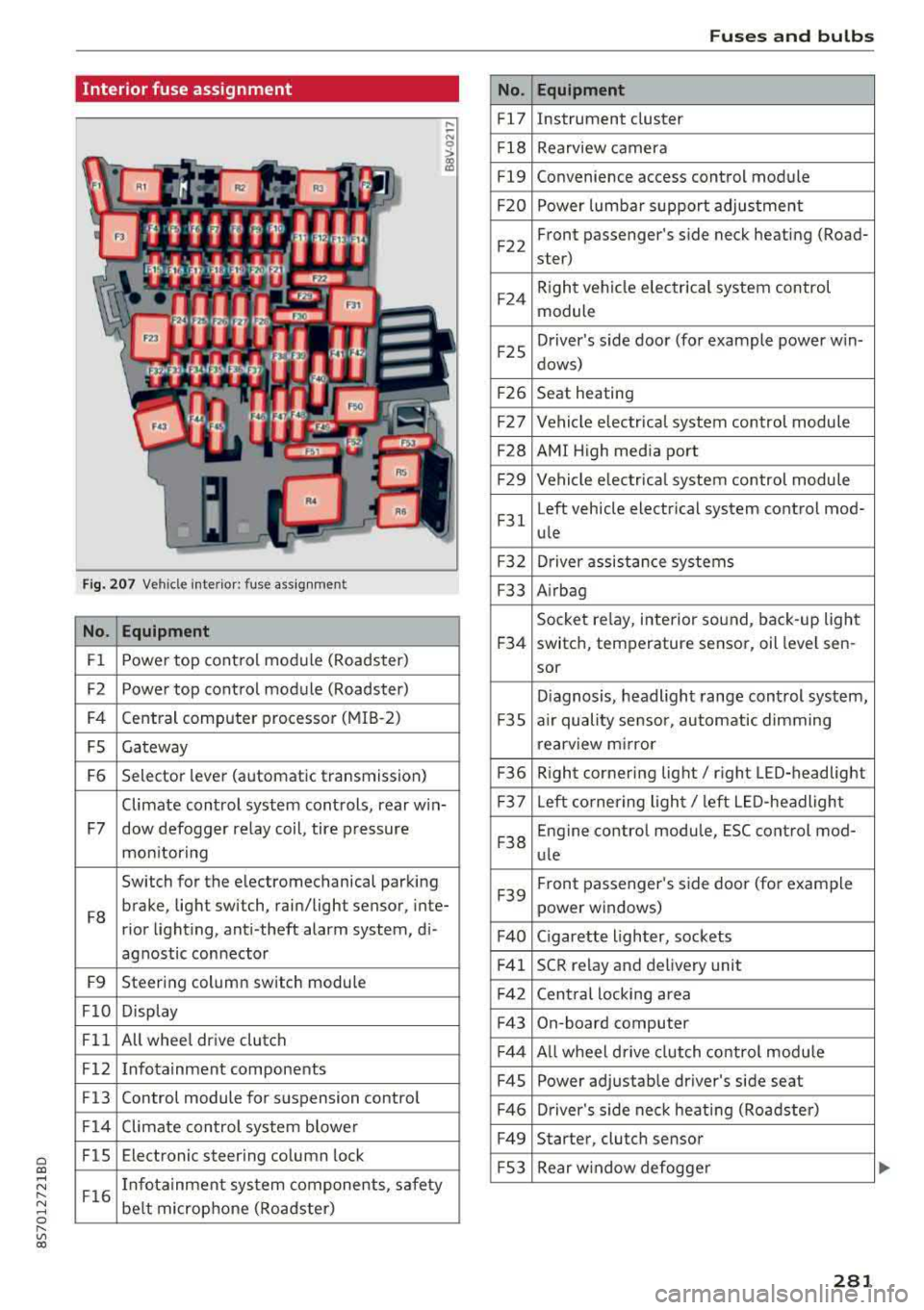
Interior fuse assignment
Fig. 207 Vehicle interior: fuse assignmen t
No. Equipment
Fl Power top cont
rol module (Roadster)
F2 Power top control module (Roadster)
F4 Central computer processor (MIB
-2)
FS Gateway
F6 Selector lever (automatic transmission)
Climate control system controls, rear w in-
F7 dow defogger relay coil, tire pressure
mon itoring
Switch for the electromechanical parking
F8 brake, light switch, rain/light sensor, inte-
rior lighting, anti -theft alarm system, di -
agnostic connector
F9 Steering column switch module
FlO Display
Fll All whee
l drive clutch
F12 Infotainment components
F13 Control module for suspension control
F14 Climate control system blowe r
FlS Electronic steering column
lock
F16 I
nfotainment system components, safety
be lt microphone (Roadster)
No.
Fl7
F1 8
Fl9
F20
F 22
F24
F 25
F 26
F 27
F28
F2 9
F 31
F3 2
F33
F 34
F 35
F36
F37
F3 8
F39
F40
F41
F 42
F43
F44
F45
F46
F49
F S3
Fuses and bulbs
Equipment
Instrument cluster
Rearview camera
Convenience access control module
Power lumbar support adjustment
Front passenger's side neck heating (Road-
ster)
R ight vehicle electrica l system control
module
Driver's s ide door (for example power w in-
dows)
Seat heating
Vehicle electrical system control module
AMI High media port
Vehicle e lectr ical system control module
Left vehicle electrical system contro l mod-
ule
Driver assistance systems
Airbag
Socket relay, inte rior sound , back-up light
switch, temperature sensor, oil leve l sen -
sor
Diagnosis, headlight range control system,
a ir quality sensor, automatic dimming
rearview mirror
R ight cornering light/ right LED-headlight
L eft cornering light/ left LED-headlight
Engine control module, ESC control mod-
ule
Front passenger's side door (for example
power windows)
C igarette lighter, sockets
SCR relay and delivery unit
Central locking area
On-board computer
A ll wheel d rive clutch control module
Power adjustable driver's side seat
Driver's side neck heating (Roadster)
Starter, clutch sensor
Rear window defogger
281
Page 293 of 310
Cl 00 .-< N r-N .-< 0 r-Vl 00
scope of maintenance and repairs which can be
carried out by vehicle owners.
Al so, sa fety a nd
en vir onment al
concerns place very strict limits
on the nature of repairs and adjustments to en
g ine and transm ission parts wh ich an owner can
perform .
Maintenance, adjustments and repairs usually re
qu ire special tools, test ing devices and other
equ ipment available to specially trained work
shop personnel in order to assure proper per
formance, rel iability and safety of the veh icle and
its many systems .
Improper maintenance, adjustments and repairs
can impair the operation and reliability of your
veh icle and even void your vehicle warranty .
Therefore, proof of servicing in accordance with
the ma intenance sc hedule may be a condition for
upho ld ing a possib le wa rranty claim made within
the warranty period.
Above all, operational safety can be adversely af
fected, creating unnecessa ry risks fo r you and
your passenger.
If i n doubt about any servicing, have it done by
your author ized Audi dealer or any other properly
equ ipped and qua lified workshop. We strongly
urge yo u to g ive your author ized Audi dealer the
opportunity to perform a ll scheduled ma inte
nance and necessary repairs. Your dealer has the
facilities, origina l parts and trained specialists to
keep your vehicle running properly .
Performing limited m aint ena nc e y our self
The follow ing pages describe a lim ited number of
p rocedures w hich can be per formed on your ve hi
cle with ordinary tools, should the need arise and
trained personnel be unavai lable . Before per
forming any of these procedures, always thor
ough ly read a ll of the app licab le text and carefu l
ly follow the instructions g iven . Always rigorously
observe the
W ARNING S provided .
Before you ch eck anything in the engine com
partment , always read a nd heed all WARNIN GS
c> & and c> & in Working in the engine compart
ment on page 233 . Con
sum er In form ation
A WARNING
--
- Ser ious personal injury may occur as a result
of improperly performed maintenance, ad
justments or repairs .
- Always be extremely careful when work ing
on the vehicle . Always follow commonly ac
cepted safety practices and general com mon sense. Never risk pe rsonal inj ury.
- Do not attempt any of the maintenance,
checks or repairs described on the following pages if you are not fu lly famil iar with these
or other proced ures with respect to the ve
h icle, or are uncerta in how to pro ceed.
- Do not do any work without the proper tools
and eq uipment. Have the necessary wo rk
done by your authorized Audi dealer or an
other proper ly equipped and qualified work
shop.
- The engine compartment of any motor vehi
cle is a potentially hazardous area . Never
reach into the area around or touch the radi
ator fan.
It is temperature controlled and
can switch on suddenly
-even when the en
g ine is off . The radiator fan switches on au
tomatically when the coolant reaches a cer
tain tempe rature and will cont inue to run
until the coolant temperature d rops.
- Always sw itch off the ignition before anyone
gets under the vehicle.
- Always support your veh icle with safety
stands if it is necessary to work underneath
the vehicle. The jack suppl ied with the veh i
cle is no t adequate for this pu rpose and
could collapse caus ing serious personal in
jury.
- I f you must wor k unde rneath the vehicle
with the wheels on the ground, always make
sure the vehicle is on level ground, that the
wheels are always securely blocked and that
the engine cannot be started.
- Always make sure the transmission se lector
lever (automatic transmiss ion) is in P (Park
position) and the park brake is applied.
II>
291
Page 296 of 310
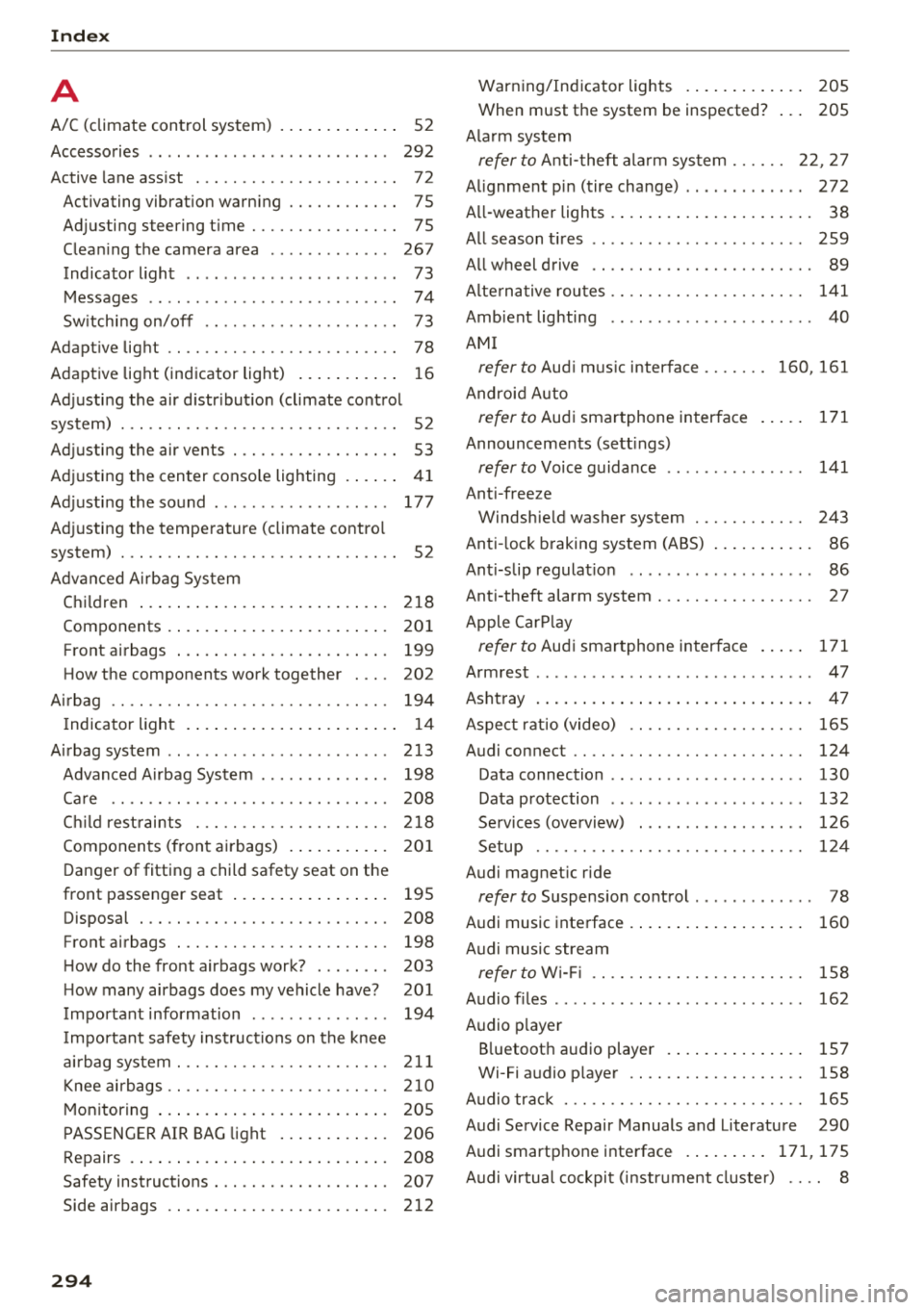
Index
A
A/C (climate control system) . . . . . . . . . . . . . 52
Accessories . . . . . . . . . . . . . . . . . . . . . . . . . . 292
Active lane assist . . . . . . . . . . . . . . . . . . . . . . 72
Activating vibration warning . . . . . . . . . . . . 75
Adjusting steering time . . . . . . . . . . . . . . . . 75
Cleaning the camera area . . . . . . . . . . . . . 267
Indicator l ight . . . . . . . . . . . . . . . . . . . . . . . 73
Messages . . . . . . . . . . . . . . . . . . . . . . . . . . . 74
Switching on/off . . . . . . . . . . . . . . . . . . . . . 73
Adaptive light . . . . . . . . . . . . . . . . . . . . . . . . . 78
Adaptive light (indicator light) . . . . . . . . . . . 16
Adjusting the air d istr ibut ion (climate control
system) . . . . . . . . . . . . . . . . . . . . . . . . . . . . . . 52
Adjusting the air vents . . . . . . . . . . . . . . . . . . 53
Adjusting the center console lighting . . . . . . 41
Adjusting the sound . . . . . . . . . . . . . . . . . . . 177
Adjusting the temperature (climate contro l
system) . . . . . . . . . . . . . . . . . . . . . . . . . . . . . . 52
Advanced Airbag System Children
....... .. .............. ....
Components ...... .............. ... .
Front airbags ..... .............. ... .
How the components work together ... .
Ai rba g .. .. .. .. .. ............. .. .. .. .
I ndicator light .... .............. .... .
Airbag system .. .. .. .............. ... .
Advanced Airbag System ....... .. .. .. .
Care
. . .. .. .. .. ............. .. .. .. .
Ch ild rest raints .............. .... .. .
Components (front airbags) .......... .
Danger of fitting a child safety seat on the
front passenger seat ................ .
Disposal ... .. .. ............. .... .. .
Front airbags ... ............. .... .. .
H ow do the front airbags work? . .. .. .. .
H ow many airbags does my vehicle have?
Important information .............. .
I mportant safety instructions on the knee
airbag system . .. ............. .. .. .. .
Knee airbags .. .. ............. .... .. .
Monitoring ....... .............. ... .
PASSENGER AIR BAG light ........... .
Repairs
Safety instructions ................ .. .
Side airbags .. .. ............. .... .. .
294
218
201
199
202
194 14
213 198
208
218
201
195
208 198
203 201
194
211
210
205
206 208
207
212 Warning/Indicator
lights . . . . . . . . . . . . . 205
When must the system be inspected? . . . 205
Ala rm system
refer to Anti-theft ala rm system . . . . . . 22, 27
Alignment pin (tire change) . . . . . . . . . . . . . 272
All-weather lights . . . . . . . . . . . . . . . . . . . . . . 38
All season tires . . . . . . . . . . . . . . . . . . . . . . . 259
All wheel drive . . . . . . . . . . . . . . . . . . . . . . . . 89
Alte rnative routes . . . . . . . . . . . . . . . . . . . . . 141
Ambient lighting . . . . . . . . . . . . . . . . . . . . . . 40
AMI
refer to Audi music interface . . . . . . . 160, 161
Android Auto
refer to Audi smartphone interface . . . . . 171
Announcements (sett ings)
refer to Voice guidance . . . . . . . . . . . . . . . 141
Anti-freeze Windshield washer system . . . . . . . . . . . . 243
Anti- lock braking system (ABS) . . . . . . . . . . . 86
Ant i-slip regulat ion . . . . . . . . . . . . . . . . . . . . 86
Anti-theft alarm system . . . . . . . . . . . . . . . . . 27
Apple CarPlay
refer to Audi smartphone interface . . . . . 171
Armrest . . . . . . . . . . . . . . . . . . . . . . . . . . . . . . 47
Ashtray . . . . . . . . . . . . . . . . . . . . . . . . . . . . . . 47
Aspect ratio (video) . . . . . . . . . . . . . . . . . . . 165
Audi connect . . . . . . . . . . . . . . . . . . . . . . . . . 124
Data connection . . . . . . . . . . . . . . . . . . . . . 130
Data protection . . . . . . . . . . . . . . . . . . . . . 132
Services (overview) . . . . . . . . . . . . . . . . . . 126
Setup . . . . . . . . . . . . . . . . . . . . . . . . . . . . . 124
Audi magnetic ride
refer to Suspension control . . . . . . . . . . . . . 78
Audi music interface . . . . . . . . . . . . . . . . . . . 160
Audi music stream
refer to Wi-Fi . . . . . . . . . . . . . . . . . . . . . . . 158
Audio files . . . . . . . . . . . . . . . . . . . . . . . . . . . 162
Audio player
B luetooth audio player . . . . . . . . . . . . . . . 157
Wi-Fi audio player . . . . . . . . . . . . . . . . . . . 158
Audio track . . . . . . . . . . . . . . . . . . . . . . . . . . 165
Audi Service Repair Manuals and Literature 290
Audi smartphone interface ......... 171,175
Audi virtual cockpit (instrument cluster) . . . . 8
Page 297 of 310
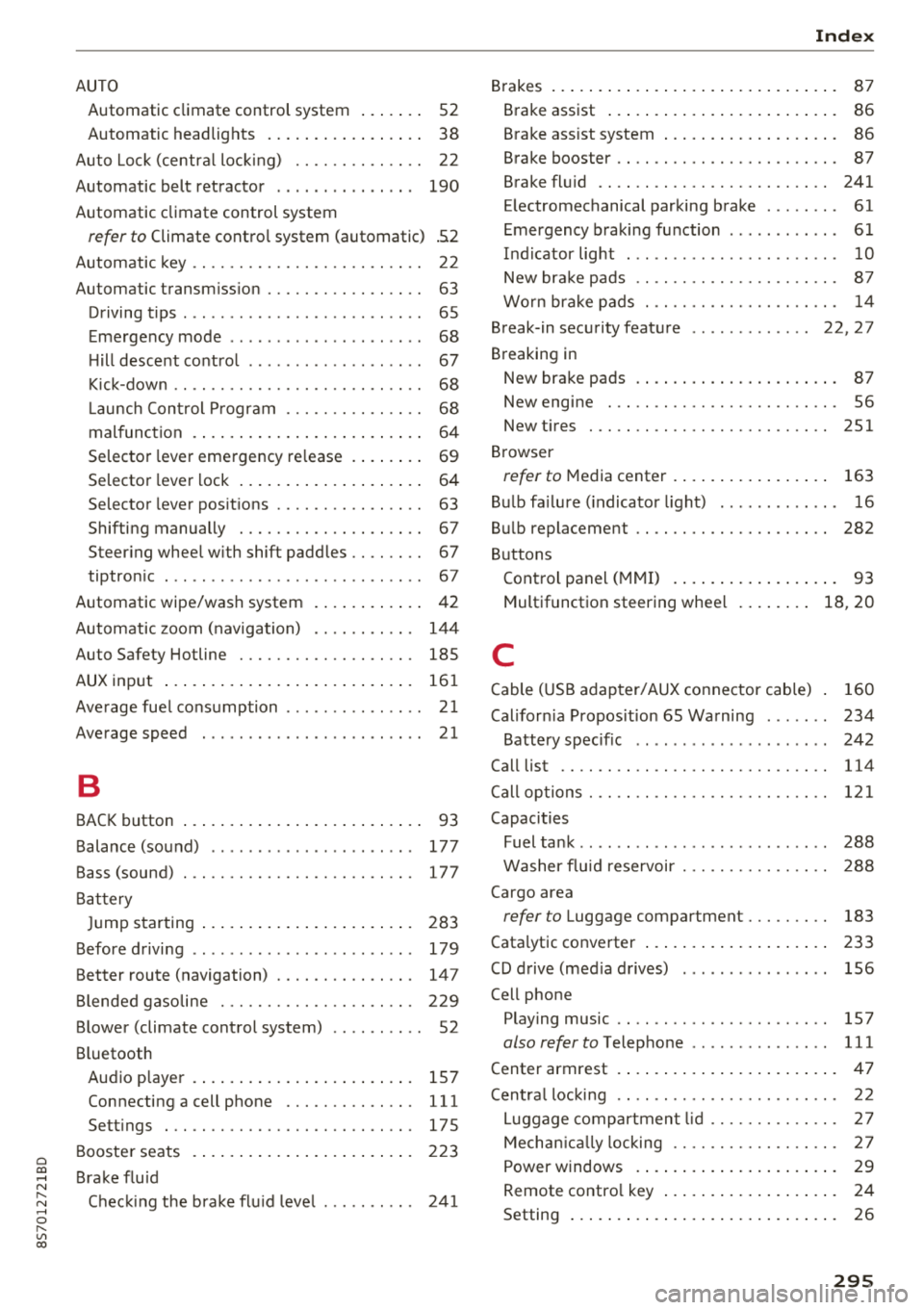
Cl 00 .-< N r-N .-< 0 r-Vl 00
AUTO Automatic climate control system . . . . . . . 52
Automatic headlights . . . . . . . . . . . . . . . . . 38
Auto Lock (central locking) . . . . . . . . . . . . . . 22
Automatic belt retractor . . . . . . . . . . . . . . .
190
Automatic climate control system
refer to Climate control system (automatic) .52
Automatic key . . . . . . . . . . . . . . . . . . . . . . . . . 22
Automatic transmission . . . . . . . . . . . . . . . . . 63
Driving tips . . . . . . . . . . . . . . . . . . . . . . . . . . 65
Emergency mode . . . . . . . . . . . . . . . . . . . . . 68
Hill descent control . . . . . . . . . . . . . . . . . . . 67
Kick-down . . . . . . . . . . . . . . . . . . . . . . . . . . . 68
La unch Control Program . . . . . . . . . . . . . . . 68
malfunction . . . . . . . . . . . . . . . . . . . . . . . . . 64
Selector lever emergency release . . . . . . . .
69
Selector lever lock . . . . . . . . . . . . . . . . . . . . 64
Selector lever positions . . . . . . . . . . . . . . . . 63
Shifting manually . . . . . . . . . . . . . . . . . . . . 67
Steering wheel with shift paddles . . . . . . . . 67
tiptronic . . . . . . . . . . . . . . . . . . . . . . . . . . . . 67
Automatic wipe/wash system . . . . . . . . . . . . 42
Automatic zoom (navigation) . . . . . . . . . . . 144
Index
Brakes . . . . . . . . . . . . . . . . . . . . . . . . . . . . . . . 87
Brake assist . . . . . . . . . . . . . . . . . . . . . . . . . 86
Brake assist system . . . . . . . . . . . . . . . . . . . 86
Brake booster . . . . . . . . . . . . . . . . . . . . . . . . 87
Brake fluid . . . . . . . . . . . . . . . . . . . . . . . . . 241
Electromechanical parking brake . . . . . . . . 61
Emergency braking function . . . . . . . . . . . . 61
Indicator light . . . . . . . . . . . . . . . . . . . . . . .
10
New brake pads . . . . . . . . . . . . . . . . . . . . . . 87
Worn brake pads . . . . . . . . . . . . . . . . . . . . . 14
Break-in security feature . . . . . . . . . . . . . 22, 2 7
Breaking in New brake pads . . . . . . . . . . . . . . . . . . . . . . 87
New engine . . . . . . . . . . . . . . . . . . . . . . . . . 56
New tires 251
Browser
refer to Media center . . . . . . . . . . . . . . . . . 163
Bulb failure (indicator light) . . . . . . . . . . . . . 16
Bulb replacement . . . . . . . . . . . . . . . . . . . . . 282
Buttons Control panel (MMI) . . . . . . . . . . . . . . . . . .
93
Multifunction steering wheel . . . . . . . . 18, 20
Auto Safety Hotline . . . . . . . . . . . . . . . . . . . 18S C
AUX input
Average fuel consumption ........... .. . . 161
21
Average speed . . . . . . . . . . . . . . . . . . . . . . . . 21
B
BACK button . . . . . . . . . . . . . . . . . . . . . . . . . . 93
Balance (sound) . . . . . . . . . . . . . . . . . . . . . . 177
Bass (sound) . . . . . . . . . . . . . . . . . . . . . . . . . 177
Battery Jump starting . . . . . . . . . . . . . . . . . . . . . . . 283
Before driving .. ................ ... .. .
Better route (navigation) ........ .. .. .. .
Blended gasoline
179
147
229
Blower (climate control system) . . . . . . . . . . 52
Bluetooth Audio player . . . . . . . . . . . . . . . . . . . . . . . . 157
Connecting a cell phone . . . . . . . . . . . . . . 111
Settings . . . . . . . . . . . . . . . . . . . . . . . . . . . 175
Booster seats
Brake fluid 223
Checking the brake flu id leve l . . . . . . . . . .
241
Cable (USB adapter/AUX connector cable) 160
California Proposition 65 Warning . . . . . . . 234
Battery specific . . . . . . . . . . . . . . . . . . . . . 242
Call list . . . . . . . . . . . . . . . . . . . . . . . . . . . . . 114
Call options . . . . . . . . . . . . . . . . . . . . . . . . . . 121
Capacities Fuel tank . . . . . . . . . . . . . . . . . . . . . . . . . . . 288
Washer fluid reservoir . . . . . . . . . . . . . . . . 288
Cargo area
refer to Luggage compartment. . . . . . . . . 183
Catalytic converter ... ................ . 233
CD drive (media drives) ............... . 156
Cell phone Pl
. · aying music . . . . . . . . . . . . . . . . . . . . . . . 157
also refer to Telephone . . . . . . . . . . . . . . . 111
Center armrest . . . . . . . . . . . . . . . . . . . . . . . .
47
Central locking . . . . . . . . . . . . . . . . . . . . . . . . 22
Luggage compartment lid . . . . . . . . . . . . . . 27
Mechanically locking . . . . . . . . . . . . . . . . . . 27
Power windows . . . . . . . . . . . . . . . . . . . . . . 29
Remote control key . . . . . . . . . . . . . . . . . . . 24
Setting . . . . . . . . . . . . . . . . . . . . . . . . . . . . . 26
295