display AUDI TT ROADSTER 2018 User Guide
[x] Cancel search | Manufacturer: AUDI, Model Year: 2018, Model line: TT ROADSTER, Model: AUDI TT ROADSTER 2018Pages: 310, PDF Size: 46.95 MB
Page 66 of 310
Driving
keep your foot on the brake in all selector
lever positions (except P) when the engine is
running. Otherwise, this increases the risk
of an accident.
- Do not inadvertently press the accelerator
pedal when the vehicle is stopped if a gear is
engaged. Otherwise the vehicle will start to
move immediately, even if the parking brake
is set . This could result in a crash.
- Do not press the accelerator pedal when changing the selector lever position while
the vehicle is stationary and the engine is
running.
- Never leave your vehicle with the engine
running while in gear.
If you must leave
your vehicle when the engine is running, set
the parking brake and move the selector lev
er to the "P" position.
- To decrease the risk of an accident, these
lector lever must be in the P position and
the parking brake must be set before open
ing the hood and working on a running en
gine. Always read and follow the applicable
warnings¢ page 233, Working in the en
gine compartment .
(D Note
Never let the vehicle roll downhill with engine
off and the selector lever in the "N" position,
because this could damage the automatic
transmission and catalytic converter .
{D) Tips
- Drive select: sporty shifting characteristics
can be selected using the
Dynamic driving
mode . The Infotainment display shows Sas
the selector lever position instead of D.
- If you accidentally select "N" while driving,
take your foot off the accelerator pedal im
mediately and wait for the engine to slow
down to idle before selecting "D" or "S".
- If there is a power failure, the selector lever
will not move out of the "P" position. The
emergency release can be used if this hap
pens. Left-hand drive
vehicles¢ page 69.
64
Selector lever lock
The selector lever lock prevents you from select
ing a gear accidentally, causing the vehicle to
roll .
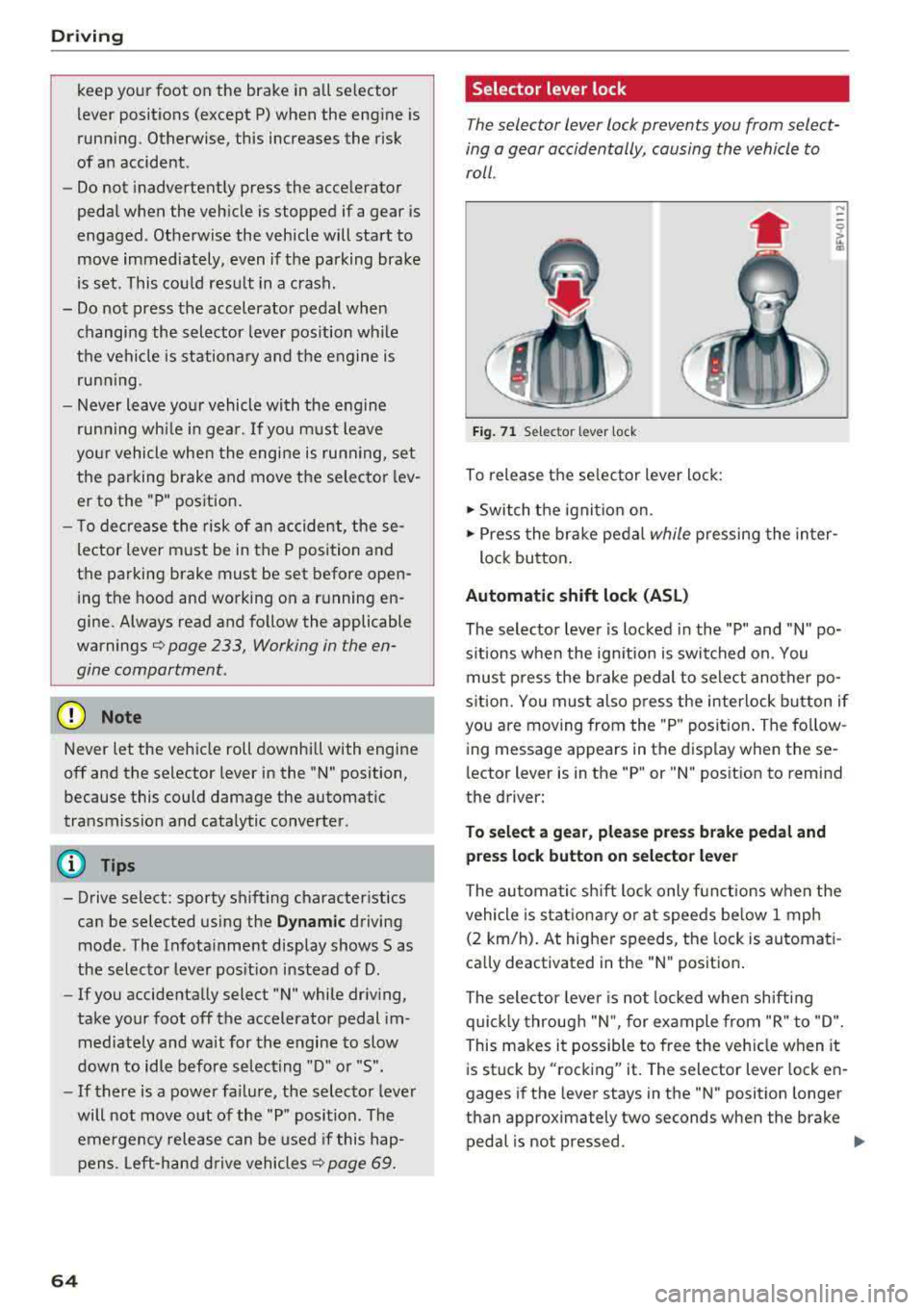
Fig. 71 Selector lever lock
To release the selector lever lock:
.., Switch the ignition on.
....
.., Press the brake pedal while pressing the inter-
lock button.
Automatic shift lock (ASL)
The selector lever is locked in the "P" and "N" po
sitions when the ignition is switched on. You
must press the brake pedal to select another po
sition. You must also press the interlock button if
you are moving from the "P" position. The follow
ing message appears in the display when these
lector lever is in the "P" or
"N" position to remind
the driver:
To select a gear, please press brake pedal and press lock button on selector lever
The automatic shift lock only functions when the
vehicle is stationary or at speeds below 1 mph
(2 km/h). At higher speeds, the lock is automati
cally deactivated in the "N" position.
The selector lever is not locked when shifting
quickly through "N", for example from "R" to "D".
This makes it possible to free the vehicle when it
is stuck by "rocking" it. The selector lever lock en
gages if the lever stays in the "N" position longer
than approximately two seconds when the brake
pedal is not pressed.
Iii>
Page 76 of 310
Ass is tance sy stem s
,.. Press the button to switch the system on and
off¢ fig. 78. The . or rl1 indicator light in
the instrument cluster turns on or off.
Ind icat or light s
• Read y: the i ndicator light t urns on when the
system is ready for use. The system can now be
operated.
rl1 Not read y: the indicator light turns on if the
system is swi tched on but is inoperab le. Th is may
be due to the following reasons:
- There is no lane marker line .
- The relevant lane marker lines are not detected (for example, mark ings in a construction zone
o r because they are obstructed by snow, dirt,
water or lighting).
- The veh icle speed is below the activation speed
of approximately 40 mph (65 km/h) (the speed
may vary depending on yo ur country).
- The lane is too narrow or too wide.
- The curve is too narrow .
- The driver's hands are not on the steering
wheel.
(D Tips
- Make sure the camera's field of view
¢
fig. 79 is not obstructed by stickers or
anything else . For informat ion on cleaning,
see¢ page 266 .
-In certain markets : if the system is switched
on, it will sw itch on automat ically each time
the ign it ion is switched on .
Indicator in Infotainment d isplay
Ap plies to: ve hicles w ith Aud i active lane assist
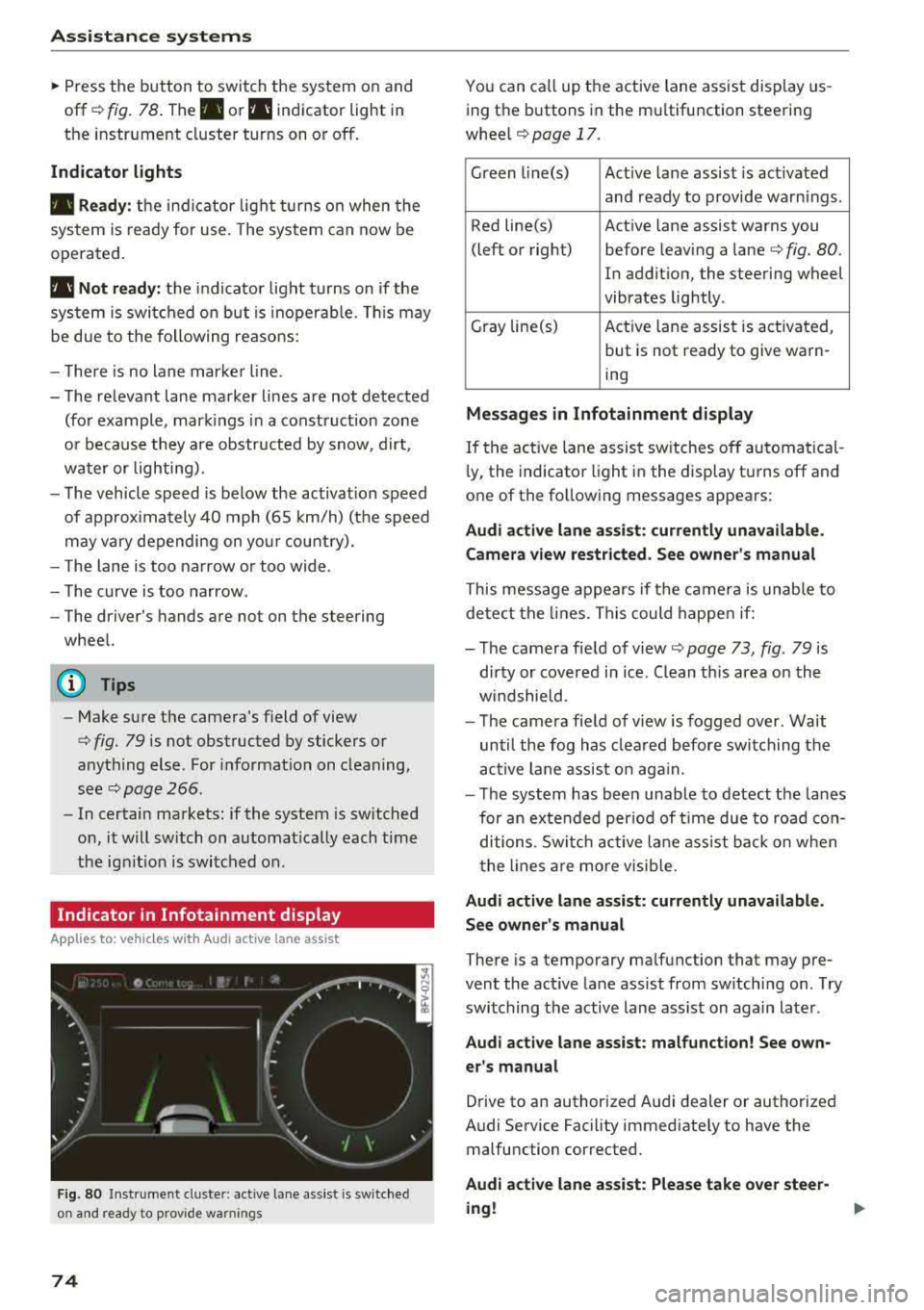
F ig. 80 Instrument cluste r: active lane ass ist is switched
on and ready to prov ide warnings
74
You can call up the active lane ass ist display us
ing the buttons in the mu ltifunction steering
wheel
¢ page 17.
Green l i ne(s) Act ive lane assist is act ivated
and ready to provide warnings .
Red line(s) Active lane assist warns you
(left or right) before leav ing a
lane¢ fig. 80.
In addition, the steering wheel
vibrates lightly .
Gray line(s) Act ive lane assist is activated,
but is not ready to give warn-
ing
M essag es in Infotainm ent disp la y
If the active lane assist sw itches off automatical
l y, the indicato r light i n the display turns off and
one of the following messages appears :
Audi a ctive l ane ass is t: currentl y unavailable.
Camera view restricted . See ow ner' s ma nual
This message appears if the camera is unable to
detect the lines. This could happe n if:
- The camera field of
view ¢ page 73, fig. 79 is
dirty or covered in ice . Clean th is area on the
w indshield.
- The camera fie ld of view is fogged over. Wait
until the fog has clea red before switching the
active lane assist on aga in.
- T he system has been unable to detect the lanes
for an extended per iod of t ime due to road con
ditions . Switch ac tive lane assist ba ck on w hen
the lines a re more visib le.
A udi acti ve l ane as sis t: cur rentl y una vailable.
Se e owner' s manual
There is a temporary malfunction that may pre
vent the act ive lane assist from sw itching on . T ry
switching the active lane assist on again later .
Audi active lane assi st: mal func tion! See own
er 's manual
Drive to an authorized Audi dealer or authorized
Audi Service Facility immediately to have the malfunction corrected.
Audi a ctive lane a ssi st: Plea se take over stee r
ing !
Page 77 of 310
Cl co .... N ,....
N
This message appears if you are not stee ring by
yourse lf . If this is th e case, active lane ass ist does
not switch off, but it is "not ready" to provide a
warning . The system can he lp you keep the veh i
cle in the lane. However, you are responsible for
driving the vehicle and must steer it yourself .
A WARNING
Note that messages may be delayed or not
displayed on vehicles with accessor ies mount
ed on the steer ing whee l, such as a stee ring
wheel sp inner knob. Always keep you r hands
on t he steering whee l.
Adjusting the steering time and vibration
warning
Appl ies to: vehicles with Audi act ive lane ass ist
You con adjust individual act ive lone assist set
tings in the Infotainment system.
Selec t in the Infotai nment system : I MENUI but
ton>
Vehicle > left con trol button > Driv er a ssis
tance > Audi acti ve lane assist
Steering time
1>
Early : in this setting, the correct ive steering hap
pens continuously to help keep the vehicle in the
center of the lane .
Late : in this setting, the system provides correc
tive steering just before a vehicle whee l touches a
detected lane ma rker line .
Vibration warning
You can switch the additional vibration warning
in the steering wheel o n or off.
(I) Tips
In certain markets: your settings are stored
automatically and assigned to the remote
cont rol key in use .
8 1l The co rrect ive stee rin g fu nctio n is not ava ilabl e in all mar ,..._
~ kets.
A ssi st a nce systems
Audi side assist
Description
Applies to: veh icles w ith Audi side assist
0, :;; 0
it m
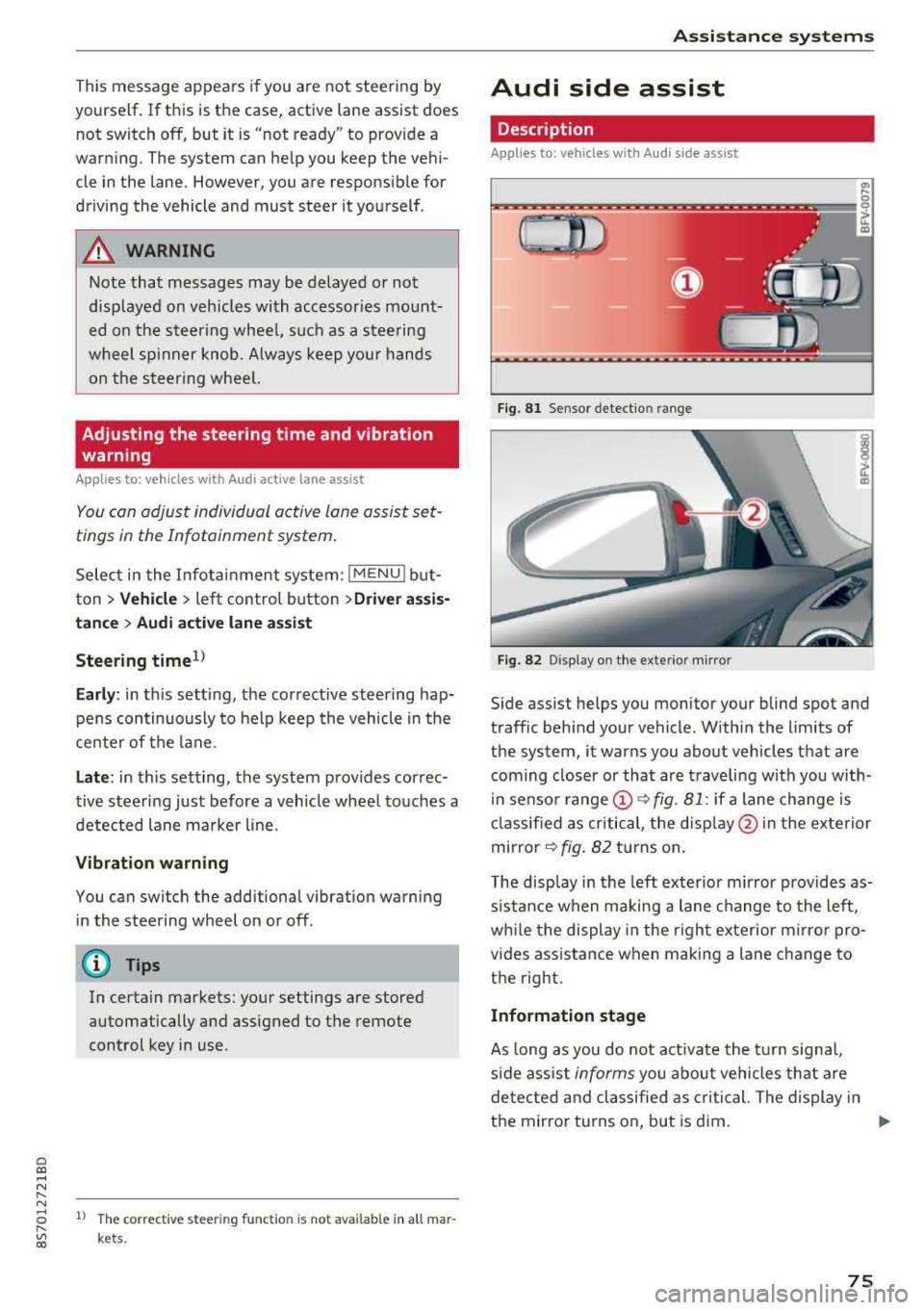
Fig . 81 Senso r de tect io n range
Fi g. 82 Disp lay on t he ex te ri or m irro r
Side assist helps you monitor your blind spot and
traff ic beh ind your vehicle . Withi n the limits of
the system , it warns you abo ut vehicles that are
coming closer or that a re t raveling with you with
i n senso r
range @~ fig. 81: if a lane change is
cla ssified as critical , the disp lay @ in the e xte rior
mirror
~ fig . 82 turns on .
T he display in the left exterio r m irror p rovides as
s istance when making a lane change to the left,
whi le the display in the r ight exterior mirro r pro
vides ass istance when m aking a lane change to
the right.
Information stage
As long as you do not act ivate the tu rn s igna l,
s ide ass ist
informs you about vehicles tha t are
detec ted and classifie d as critical. The display in
t h e mirror tu rns on, but is d im.
75
Page 78 of 310
Assistance systems
The display remains dim in the information stage
so that your view toward the front is not distur
bed .
Warning stage
If you activate the turn signa l, side assist warns
you abou t veh icles that are detected and classi
fied as critical. The display in the respective mir
ror blinks brightly. If this happens, check traffic
by glancing in the exterior mirrors and over your
shoulder
c:> .& in General information on
page
77.
(D Tips
You can ad just the brightness on of the dis
play on the rearview mirror
c:> page 77.
General information
Applies to: vehicles with Audi side assist
®
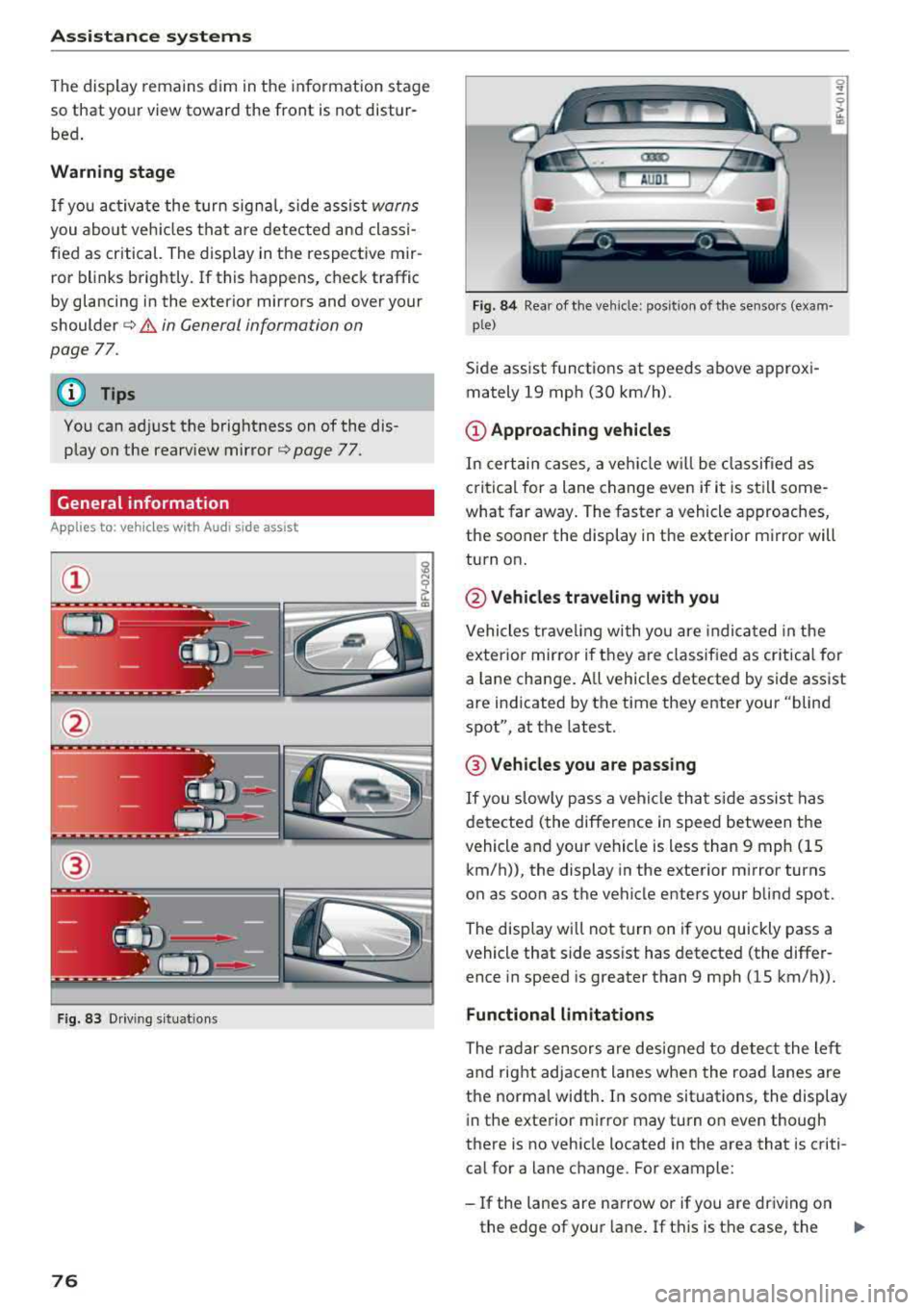
Fig. 83 Driving situat ions
76
Fig. 84 Rear of the veh icle: pos it ion of the sensors (exam·
p le)
Side assist funct ions at speeds above approxi
mately 19 mph (30 km/h) .
(D Approaching vehicles
In certain cases, a vehicle w ill be class ified as
c ritical for a lane change even if it is still some
what far away. The faster a vehicle approaches,
the sooner the display in the exterior m irror will
turn on.
@ Vehicles traveling with you
Vehicles traveling with you are indica ted in the
exterior mirror if t hey are classified as critical for
a lan e change. A ll vehicles detected by side assist
are indicated by the time they enter your "blind
spot", at the latest.
@ Vehicles you are passing
If you slowly pass a vehicle that side assist has
detected (the difference in speed between the
vehicle and your vehicle is less than 9 mph (15 km/h)), the display in the exterior mirror turns
on as soon as the vehicle enters your blind spot.
The display wi ll not turn on if you quickly pass a
vehicle that side ass ist has detected (the differ
ence in speed is greater than 9 mph (15 km/h)).
Functional limitations
The radar sensors are designed to detect the left
and right adjacent lanes when the road lanes are
the norma l width . In some situations, the display
in the exterior mirror may turn on even though
there is no vehicle located in the area that is criti
cal for a lane change. For example:
-If the lanes are narrow or if you are driving on
the edge of your lane . If this is the case, the
.,,_
Page 79 of 310
Cl 00 ... N r-N ... 0 r-Vl 00
system may have detected a vehicle in another
l ane that is
not adjacent to your current lane .
- If you are dr iving t hrough a curve . Side assist
may react to a vehicle that is one lane over
from the adjacent lane .
- If side assist reacts to other objects (such as
high or displaced guard rails) .
- In poor weat her condit ions . The side assist
functions a re limited.
D o no t cove r the radar
sensors ¢ fig. 84 wit h
sticke rs, deposits, bicycle whee ls o r othe r ob
jects , beca use they w ill impai r the f unct ion . For
information on cleaning,
see¢ page 266 .
A WARNING
-Always pay atte ntion to traffic and to the
area aro und yo ur vehicle. Side assist cannot
rep lace a dr ive r's attention. The dr ive r alone
is a lways responsib le for lane changes and
s imi lar driving maneuvers .
- In some situat ions, the system may not
function or its funct io n may be limited . For
example:
- If vehicles a re a ppro ac hi ng o r being le ft
behind very quickly. The display may not
tur n on in t ime .
- I n poo r weather cond itions s uch as heavy
rain, snow o r heavy mist .
- On very wide lanes, in t ight curves, o r if
there is a rise in the road s urface. Vehicles
in the adjacent lane may not be detected
beca use they are outs ide of the sensor
range.
{Ll) Note
The sensors can be disp laced by im pacts o r
damage to the bumpe r, whee l housing and
underbody. Th is can impa ir the system. Have
an authorized A udi dealer or autho rized Audi
Serv ice Facility c heck their fu nction.
(D Tips
- If the window g lass in the d river 's doo r or
front passenger 's doo r has been t inted, the
display in the exterior mirror may be i ncor
r ect .
-
Ass istance systems
- F or an exp lanat ion on co nf orm ity w it h t he
FCC regulat ions in the Un ite d States an d the
Indust ry Canada regulat ions, see
¢ page 293.
Switching on and off
App lies to : vehicles wi th Audi side ass ist
.. Select in the Infotainmen t system: I M ENU ! but
ton
> Vehicle > left control b utton > Driver a s
s istance > Audi side a ssist
If the system is activated, the disp lays in the ex
terior m irrors w ill turn on briefly when the igni
t ion is switched on .
Adjusting the display brightness
Applies to : vehicles wit h Audi s ide ass ist
The display brightness con be adjusted in the In
fotainment system .
.. Select in the Infotainment system: I MENU! but
ton
> Vehicle > left control button >Dri ver as
sistance > Audi side assist
The disp lay br ightness adjusts automatically to
the brightness of the surroundings, both in the
i nformation and in the wa rn ing stage. I n very
dark or very br ight surround ings, the automatic
adjustment w ill set the display to t he m inimum
o r max imum level. In such cases, yo u may notice
no ch ange when adj usting the br igh tne ss, or the
c h ange m ay only be noticeab le on ce t he sur
r oundings change.
Adjust the br ightness to a leve l w he re the d isplay
in th e i nfo rm atio n stage will not disrupt yo ur
v iew ahe ad. If yo u change the br igh tness , the d is
play in the exterio r mirror wi ll briefly show the
brightness leve l in the information stage . The
brig htness of th e warning stage is linked to the
brightness in the information stage and is adjust
ed along with the information stage.
(D Tips
- Side ass ist is not act ive while you are mak
ing the adjustment.
- Yo ur settings a re automat ica lly stored and
assigned to the remote control key be ing
used.
77
Page 81 of 310
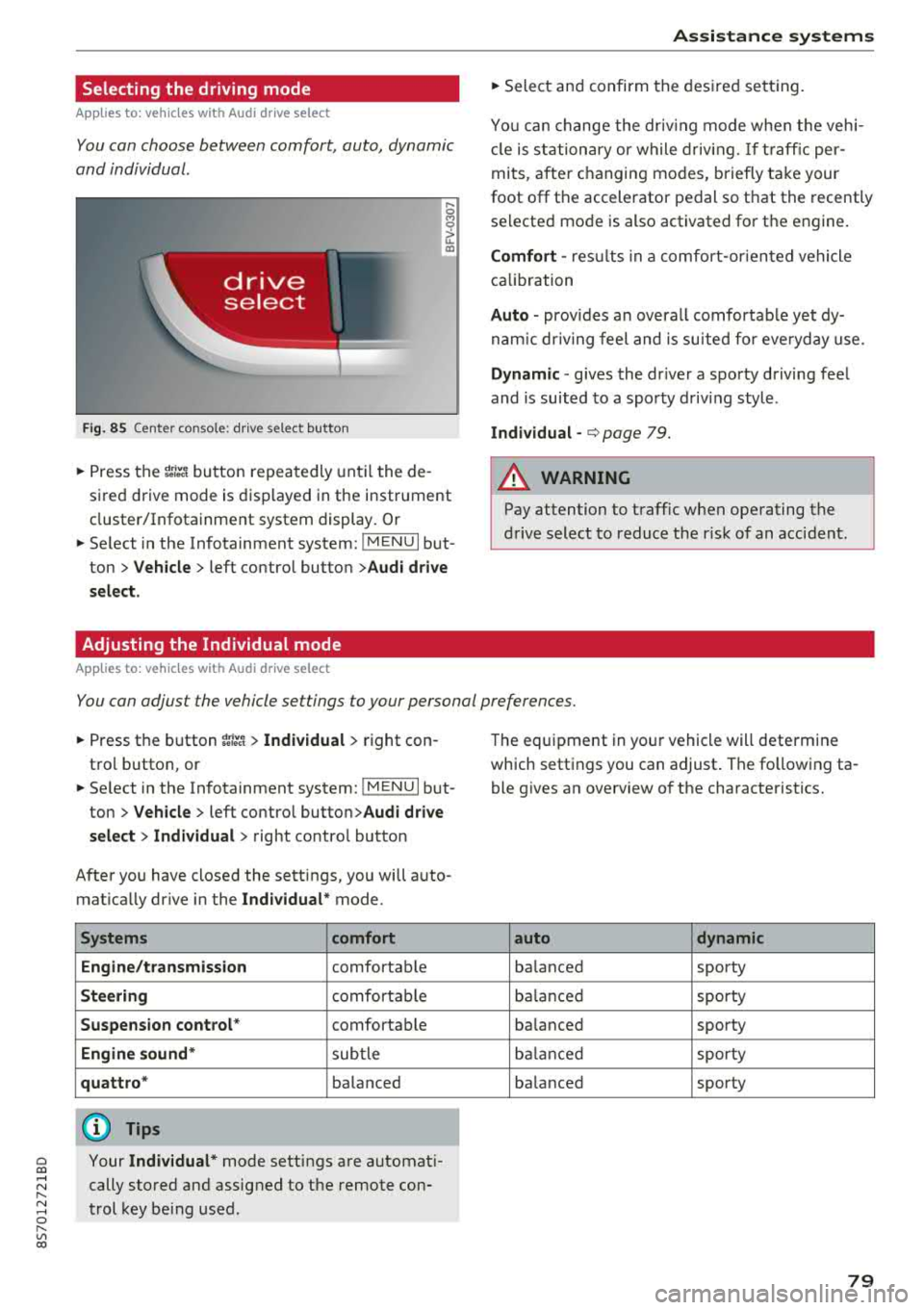
Selecting the driving mode
App lies to: ve hicles with Audi drive select
You can choose between comfort, auto, dynamic
and individual .
Fig. 85 Center conso le: drive select button
.... 0 M 0
G'. al
.. Press the ~i~ button repeatedly until the de
sired drive mode is displayed in the instrument
cluster/Infotainment system display . Or
.. Se lect in the Infotainment system: !MENUI but
ton >
Vehicle > left contro l button >Audi drive
select.
Adjusting the Individual mode
Applies to: ve hicles with Audi drive select
Assistance systems
.. Select and confirm the desired settin g.
You can change the driv in g mode when the veh i
cl e is stationary or while driving.
If traffic per
mits, after ch anging modes, briefly ta ke your
foot off t he accelerator pedal so that the recently
se lected mode is also activated for the engine.
Comfort -res ults in a comfo rt-orien ted vehicle
calibration
Auto -provides an overa ll comfortab le yet dy
namic driving feel and is suited for everyday use.
Dynamic -gives the driver a sporty driving fee l
and is suited to a spo rty driving style .
Individual -¢ page 79.
A WARNING ...__ -
Pay attention to traffic w hen operating the
drive select to reduce the r isk of an accident .
You can adjust the vehicle settings to your personal preferences .
.. Press the button ~:/:er. > Individual > right con
tro l button, or
.. Se lect in the Infotainment system: !MENUI b ut
ton>
Vehicle > left contro l button> Audi drive
select> Individual >
right contro l button
After you have closed the sett ings, you will a uto
mat ica lly dr ive in the
Individual* mode.
Systems comfort
Engine/transmission
comfortable
Steering comfortable
Suspension control * comfortable
Engine sound* subtle
quattro * balanced
(D Tips
~ Your Individual* mode settings are automat i-
;:::: cally stored and assigned to the remote con-r--
~ trol key being used. 0 r-Vl 00
T he equipment in yo ur vehicle will determine
which settings you can adjust . The fo llowing ta
ble gives an overview of the characteristics.
auto dynamic
balanced sporty
balanced sporty
ba lanced sporty
balanced sporty
ba lanced sporty
79
Page 83 of 310
Cl co .... N ,....
N .... 0 ,....
Vl co
Rear parking system
Description
A pplies to: ve hicles with rear park ing system
The rear parking system is an audible parking
aid .
Desc ripti on
There is a sensor in the rear bumper cover. If
these detect an obstacle, audible signals warn
you .
Make sure the sensors are not covered by stick
ers, deposits or any other obstructions as it may
impair the sensor function. For informat ion on
cleaning, see
c::;.page 266 .
The range at which the sensors begin to measure
is approximately:
side 3 ft (0.90 m)
rear
center 5.2 ft (1.60 m)
The closer you get to the obstacle, the shorter
the interval between the audible signals . A con
tinuous tone sounds when the obstacle is less
than approximately 1 foot (0.30 meters) away.
Do not cont inue back ing up
c::;. &. in General infor
mation on page 80,
c::;. @ in General information
on page 80!
If the distance to an obstacle remains constant,
the volume of the distance warning gradually
drops after about four seconds (this does not ap ply in the continuous tone range).
Acti vat ing
The rear parking assist activates a utomatically
when the reverse gear is engaged. A brief confir
mat ion tone will sound.
Parking systems
Parking system plus
Description
App lies to: vehicles wit h parking system pl us
Parking system plus provides audio and visual
signals when parking.
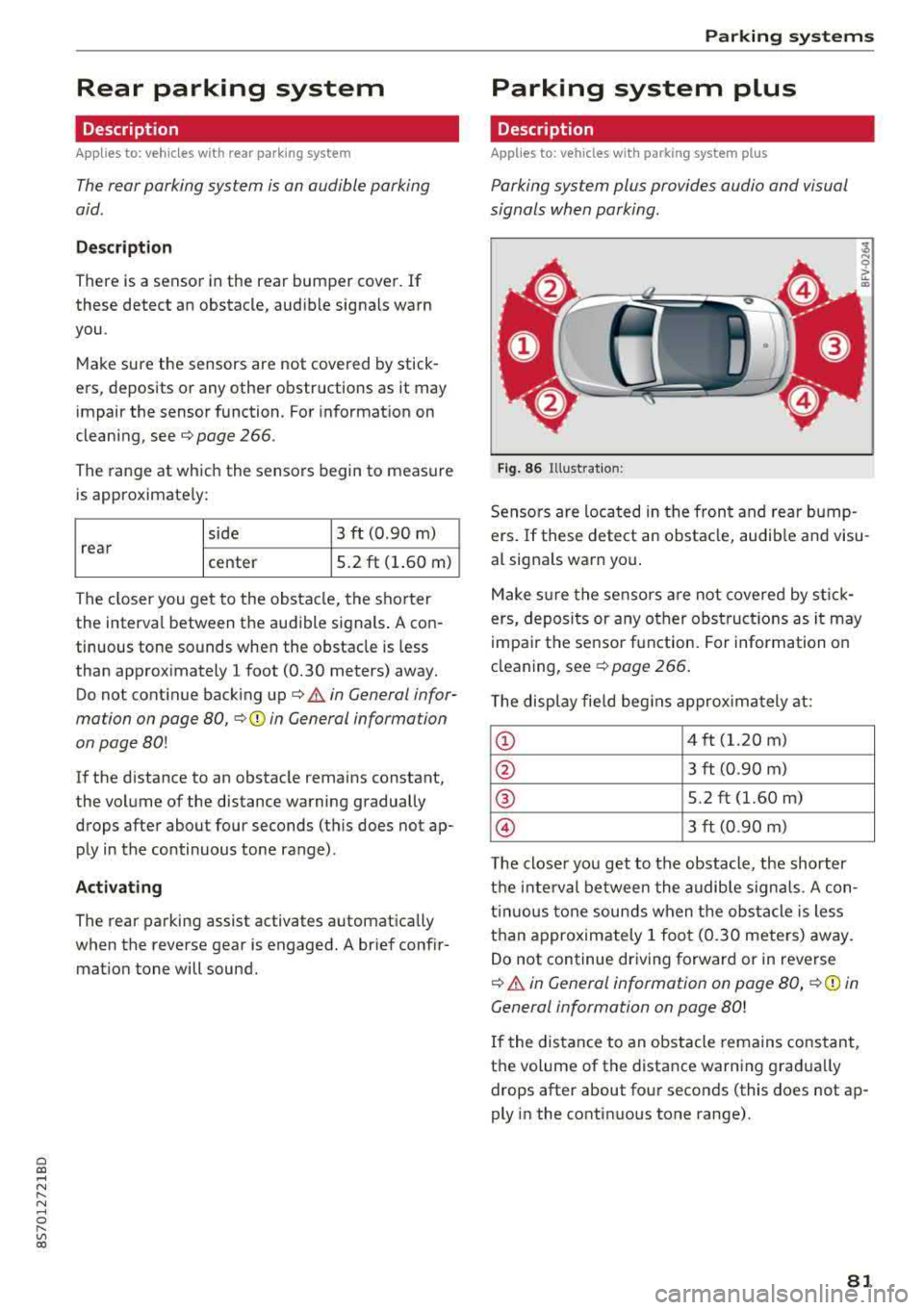
Fig . 86 Illust rat io n:
Sensors are located in the front and rear bump
ers. If these detect an obstacle, audib le and visu
al signals warn you .
Make s ure the sensors are not covered by st ick
ers, deposi ts or any other obstruc tions as it may
impa ir the se nsor function. For information on
cleaning, see
c::;. page 266 .
The display fie ld beg ins approx ima tely at:
CD 4 ft (1.20 m)
0 3 ft (0.90 m)
® 5.2 ft (1.60 m)
© 3 ft (0.90 m)
T he close r you get to the obstacle, the shorter
t h e i nte rval be twee n the audible signa ls . A con
t in u ous tone sounds when the obs tacle is less
than appro ximately 1 foot (0.30 meters) away.
Do not continue dr iving forward or in reverse
c::;. &. in General information on page 80, c::;. (D in
General information on page 80!
If the distance to an obstacle remains constant,
the volume of the distance warn ing gradua lly
drops after about four seconds (this does not ap
ply in the continuous tone range).
81
Page 84 of 310
Parking systems
Switching on/off
Applies to: ve hicles w ith pa rking system p lus
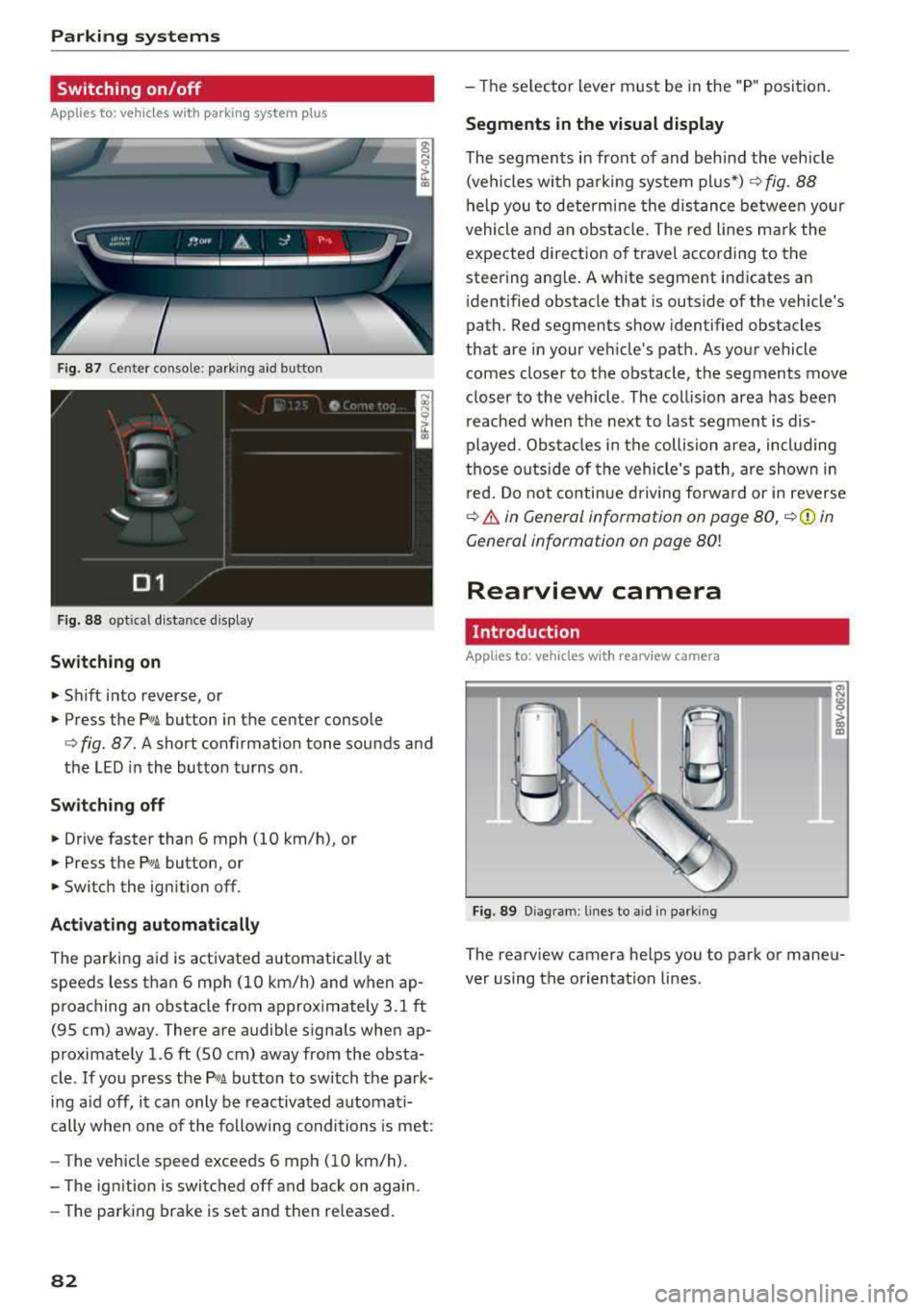
F ig. 87 Center console: parking aid button
Fig. 88 opt ical distance display
Switching on
• Shift into reverse, or
.. Press the PwA button in the center console
c> fig. 87. A short confirmat ion tone sounds and
the LED in the button turns on .
Switch ing off
.. Drive faster than 6 mph (10 km/h), or
• Press the P,, ,A button, or
.. Switch the ignition off.
Activating automatically
The parking aid is activated automatically at
speeds less than 6 mph (10 km/h) and when ap
proaching an obstacle from approximately 3.1 ft (95 cm) away. There are audible signals when ap
proximately 1.6
ft (SO cm) away from the obsta
cle .
If you press the p,,1.I! button to switch the park
ing a id off, it can only be reactivated automati
cally when one of the following conditions is met :
- The vehicle speed exceeds 6 mph (10 km/h).
- The ignition is switched off and back on again.
- The parking brake is set and then re leased.
82
- The selector lever must be in the "P " position.
Segments in the visual display
The segments in front of and behind the vehicle
(vehicles with parking system plus*)
c> fig. 88
help you to determine the distance between your
vehicle and an obstacle. The red lines mark the
expected direction of travel according to the
steering ang le. A white segment indicates an
identified obstacle that is outside of the vehicle's
path. Red segments show identified obstacles
that are in your vehicle's path. As your vehicle comes closer to the obstacle, the segments move
closer to the vehicle . The collision area has been
reached when the next to last segment is dis
played. Obstacles in the collision a rea, including
those outside of the vehicle 's path, are shown in
red. Do not continue driving forward or in reverse
c> .& in General information on page 80, c>(D in
General information on page
80!
Rearview camera
Introduction
App lies to: vehicles wit h rearv iew camera
Fig. 89 Diagram: lines to ai d in parking
The rearview camera helps you to park or maneu
ver using the orientation lines .
Page 85 of 310
Cl co .... N ,....
N ...... 0 ,....
Vl co
General information
Applies to: ve hicles with rearview camera
Fig . 90 Area covered (!) and area not covered @ by the
rea rview camera.
:;,
~;..------: :.·~- ---~ _.,- ,.,,.--------g
(Jo00oD ~
Fig. 91 Luggag e compartment lid: locat ion of the rear
view camera
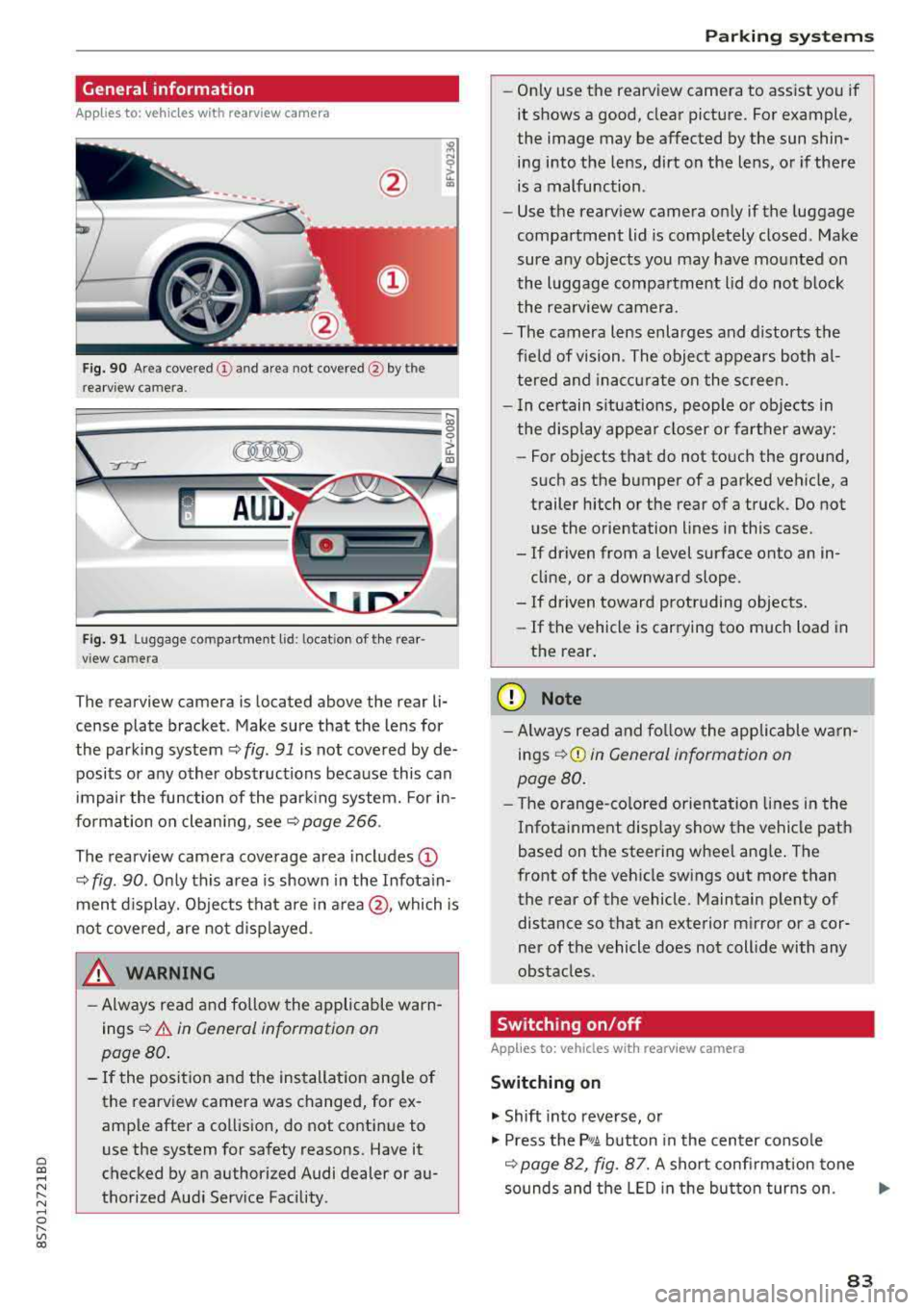
The rearview camera is located above the rear li
cense plate bracket. Make sure that the lens for
the parking system¢
fig. 91 is not covered by de
posits or any other obstructions because this can
impair the function of the parking system. For in
formation on cleaning, see¢
page 266 .
The rearview camera coverage area includes
(D
¢ fig. 90. Only this area is shown in the Infotain
ment display. Objects that are in
area @, which is
not covered, are not displayed.
A WARNING
-Always read and follow the applicable warn
ings ¢
A in General information on
page 80.
- If the position and the installation angle of
the rearv iew camera was changed, for ex
ample after a collision, do not continue to
use the system for safety reasons. Have it
checked by an authorized Audi dealer or au
thorized Audi Service Facility .
Parking systems
-Only use the rearview camera to assist you if
it shows a good, clear picture. For example,
the image may be affected by the sun shin
ing into the lens, dirt on the lens, or if there
is a malfunction.
- Use the rearview camera only if the luggage
compartment lid is completely closed. Make
sure any objects you may have mounted on
the luggage compartment lid do not block
the rearview camera.
- The camera lens enlarges and distorts the
field of vision. The object appears both al
tered and inaccurate on the screen.
- In certain situations, people or objects in
the display appear closer or farther away:
- For objects that do not touch the ground,
such as the bumper of a parked vehicle, a
trailer hitch or the rear of a truck. Do not use the orientation lines in this case.
- If driven from a level surface onto an in cline, or a downward slope .
- If driven toward protruding objects.
- If the vehicle is carrying too much load in
the rear.
(D Note
-Always read and follow the applicable warn
ings
¢ (D in General information on
page 80.
- The orange-colored orientation lines in the
Infotainment display show the vehicle path
based on the steering wheel angle. The
front of the vehicle swings out more than
the rear of the vehicle. Maintain plenty of
distance so that an exterior mirror or a cor
ner of the vehicle does not collide with any
obstacles.
Switching on/off
App lies to : vehicles wi th rearv iew camera
Switching on
.,. Shift into reverse, or
.,. Press the P,q.A button in the center console
¢ page 82, fig. 87. A short confirmation tone
sounds and the LED in the button turns on.
..,.
83
Page 86 of 310
Parking systems
Switching off
~ Drive faster than 6 mph (10 km/h), or
~ Press the P"'il button, or
~ Switch the ignition off .
(D Tips
-The visual display in the left part of the dis
play should help you detect the critical vehi
cle areas .
- You can change the volume of the signals
and the display
¢page 84.
Perpendicular parking
Applies to: vehicles with rearview camera
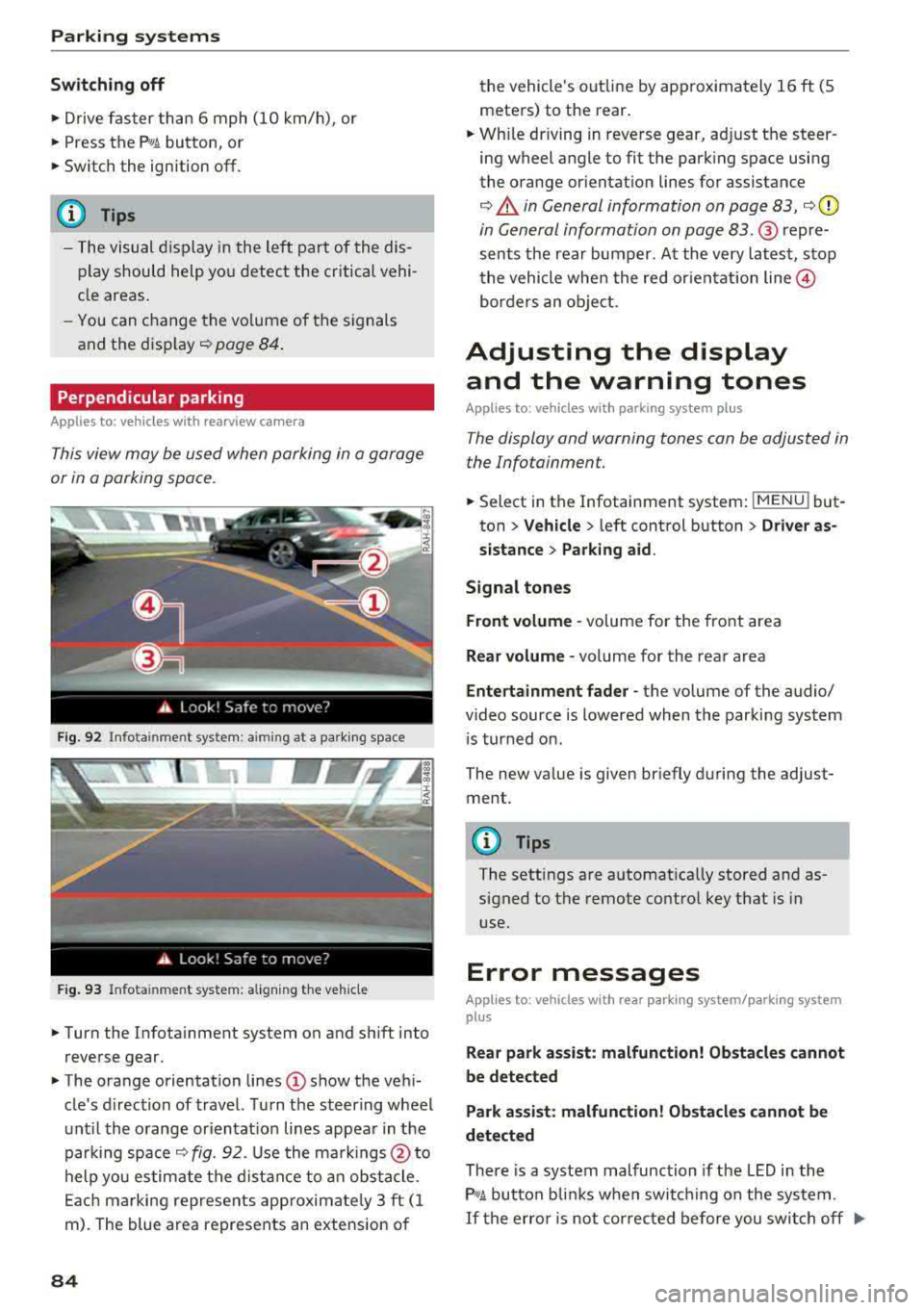
This view may be used when parking in a garage
or in a parking space.
F ig. 92 Info ta in ment system: a im ing at a park ing space
Fig. 93 Infota inme nt system: aligning the vehicle
~ Turn the Infota inment system on and shift into
reverse gear.
~ The orange orientation lines (D show the vehi
cle's d irection of travel. Turn the steering wheel
until the orange or ientat ion lines appear in the
parking space
¢ fig. 92. Use the markings @to
help you estimate the distance to an obstacle.
Each marking represents app roximate ly 3 ft (1
m). The blue area represents an extension of
84
the vehicle 's out line by approximately 16 ft (5
meters) to the rear.
~ Wh ile driving in reverse gear, adjust the steer
ing wheel angle to fit the parking space using
the orange orientation lines for assistance
¢ .&. in General information on page 83, ¢(D
in General information on page 83. ® repre
sents the rear bumper. At the very latest, stop
the vehicle when the red or ientat ion
line @
borders an object.
Adjusting the display
and the warning tones
Applies to: vehicles with parking system plus
The display and warning tones can be adjusted in
the Infotainment.
~ Select in the Infotainment system : IMENU! but
ton
> Vehicle > left control button > Driver as
sistance> Parking aid.
Signal tones
Front volume -
volume for the front area
Rear volume -volume for the rear area
Entertainment fader -the volume of the audio/
video source is lowered when the parking system
i s turned on.
The new value is given briefly during the adjust ment.
{!) Tips
The settings are automat ically stored and as
signed to the remote control key that is in
use.
Error messages
App lies to: vehicles with rear park ing system/parking system
plus
Rear park assist: malfunction! Obstacles cannot
be detected
Park assist: malfunction! Obstacles cannot be
detected
There is a system malfunction if the LED in the
P'1
1 .ll button blin ks when switc hing on the system .
If the error is not corrected before you switch off Ill-