display AUDI TT ROADSTER 2018 Owner's Guide
[x] Cancel search | Manufacturer: AUDI, Model Year: 2018, Model line: TT ROADSTER, Model: AUDI TT ROADSTER 2018Pages: 310, PDF Size: 46.95 MB
Page 113 of 310
Cl 00 .-< N r-N .-< 0 r-Vl 00
Telephone Introduction
Applies to: vehicles with telephone
To make phone coils in your vehicle using the
MMI, connect your cell phone to the MMI via
Bluetooth.
Handsfree
After you have connected your ce ll phone to the
MMI via Bluetooth, you can use the handsfree
system and operate telephone functions through
your MMI. You can make calls using the antenna
on your cell phone.
A WARNING
-Medical experts warn that cell phones can
interfere w ith the funct ion of pacemakers .
Always ma inta in a m inimum distance of
about 8 inches (20 cm) between the cell
phone antenna and the pacemake r.
-Do not carry the cell phone in a pocket di
rectly over the pacemaker when the phone
is switched on.
-Sw itch the cell phone off immediately if
you suspect it may be interfering w ith the
pacemaker.
-Do not use the voice recognition system*
¢
page 105 in emergencies because your
voice may change in stressful situations. It
may take longer to dial the number or the
system may not be able to dial it at all. Dial
the emergency number manually.
-Switch your cell phone off in areas where
there is a risk of an exp losion. These loca
t ions are not always clearly marked. This
may include gas stations, fuel and chemical
storage facilities or transport vehicles, or lo
cations where fue l vapors (such as propane
or gasoline vapor in vehicles or bui ldings),
chem icals or large quantities of dust parti
cles (such as flour, sawdust or metal) may
be present in the air. Th is also applies to all
ot her locations where you would normally
turn your vehicle engine off.
-The demands of traffic require your full at
tention. Always read the chapter ¢
page 93,
Traffic safety information .
-
Telephone
@ Note
Always fo llow the information found in Q@ in
Wi -Fi hotspot on page 130.
(D Tips
-To learn which Bluetooth connections and
which of the functions in your cell phone are supported, check with your cell phone serv
ice provider or the database for mobile devi
ces at www.aud iusa.com/bluetooth.
-The Bluetooth connection range is limited
to inside the vehicle. It can also be affected
by local condit ions and interference with
other devices .
Setup
Connecting a cell phone using Bluetooth
Applies to: vehicles with telephone
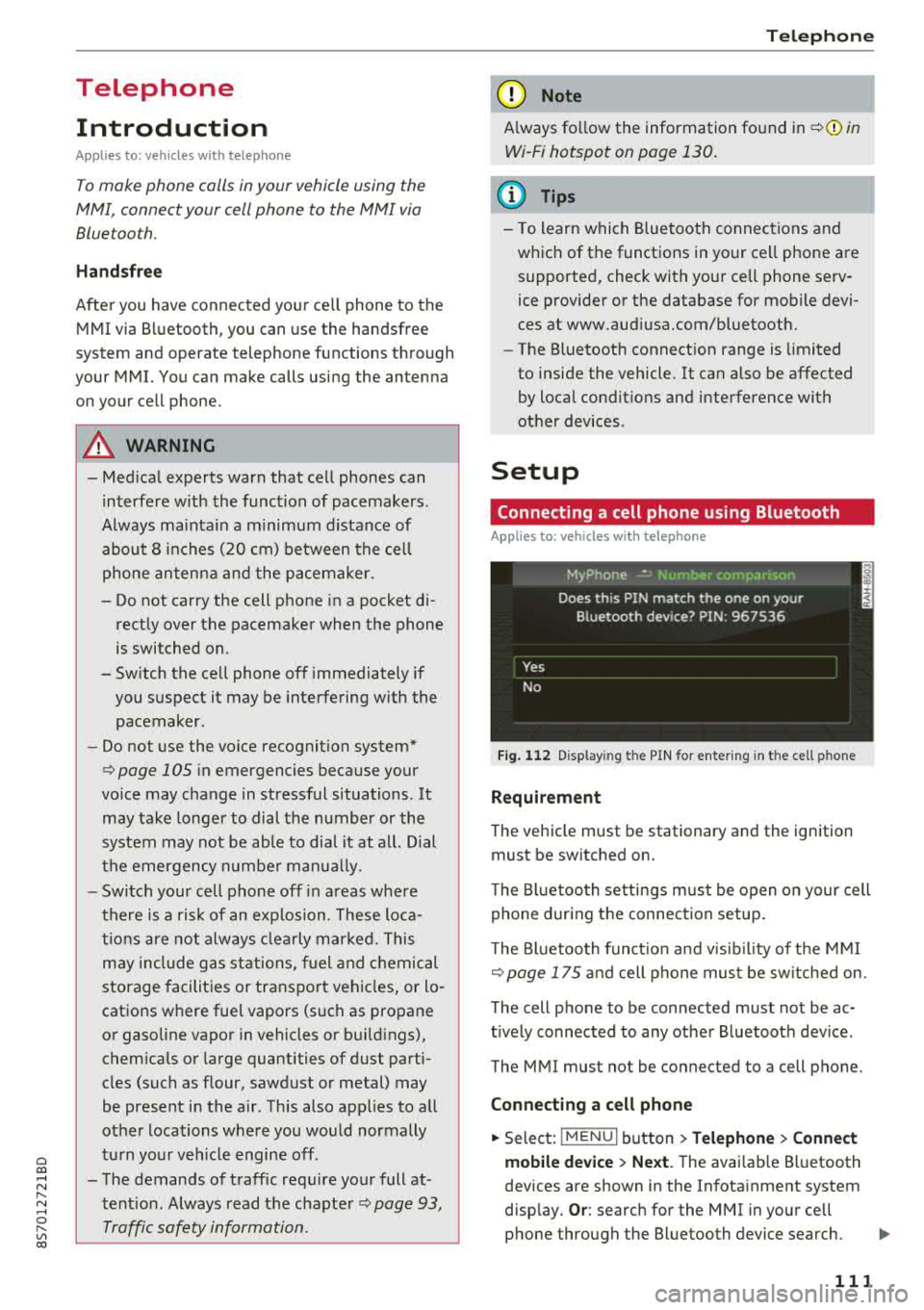
Fig. 112 Display ing t he PIN for enter ing in t he cell p hone
Requirement
T he vehicle must be stationary and the ignition
must be switched on.
T he Bl uetoo th settings must be open on your cell
phone during the connection setup .
T he Bluetooth funct io n and v is ibilit y of the MMI
Q page 175 and cell phone must be switched on.
The cell phone to be connected must not be ac
t ively connected to any other B luetooth dev ice .
The MMI must not be connected to a cell phone.
Connecting a cell phone
.,. Select: IMENU I button> Telephone> Connect
mobile device > Next .
The avai lab le Bluetooth
devices are shown in the Infotainment system
disp lay.
Or : search for the MMI in your cell
phone through the Bluetooth device search.
..,..
111
Page 114 of 310
Tele phone
~ Se lect and confirm the desired ce ll phone from
the list of disp layed Bluetooth devices.
~ The MMI generates a PIN for the connect ion
setup
¢ fig. 112 .
~ Select and confirm Y es.
~ Enter the PIN for connecting on your cell
phone .
Or: when the PIN is d isplayed on your
ce ll phone, co nfirm the P IN on your ce ll phone
and in t he M MI. The time a llowed for ente ring
the P IN is lim ited to app rox ima tely 30 seconds.
~ Pay attention to any additiona l system prompts
displayed on your cell phone, for example i f the
system s hou ld connect automatically in the fu
ture . Depending on the ce ll phone, you may
have to confirm downloading the directory sep
arately .
After conn ect ing succ essfully
After connecting successfully, a short message
with information about the connected profi les
will appear. You can also change profiles later.
Select:
! MENU ! button> Setting s> left control
button
> MMI se ttings > Conn ection manag er
¢page 175.
In addition, the cell phone contacts are automat ically loaded in the MMI directory. Th is process
can take several minutes, depend ing o n the num
ber of contacts .
@ Note
Always follow the information found in c:::;,il]) in
Wi-Fi hotspot on page 130.
(D Tips
- Making phone calls throug h the MMI is only
possib le using the
Handsfree Bluetooth pro
file.
- You can apply additional settings to con
nected mobile devices using the co nnect ion
manager
¢ page 174.
- You can also search for the MMI in your cell
phone us ing the Bluetooth device search.
- You only have to pair your device one t ime.
B luetooth dev ices that are already pa ired
automat ically connect to the MMI when the
Bluetooth function is sw itched on, they are
within range and t he ign it io n is switched on.
112
Th e last connected cell p hone is given first
priority .
- Au thoriz ing the M MI connec tion in your cell
phone wi ll make automatic connection pos
sible.
- Pay attention to any system prompts dis
played on your ce ll phone, for example if
the system should connect automatically in
the future. Depend ing on the ce ll phone,
you may also need to download the directo ry and confirm access to your text messages
separately .
- Whe n leaving the vehicle, the Bluetooth
connect io n to the cell phone will automati
cally d isconnect. Dependi ng on you r cell
phone, phone calls in prog ress may be auto
matically red irected from the MM I to you r
cell p ho ne a nd you can con tinue the c all on
your phone.
- Yo u can ob tain more i nfo rmat ion fro m you r
cell p ho ne serv ice p rovider or from yo ur cell
phone user guide . For in formation on using
the te lephone, visit www.audi usa .com/
bluetooth or contact an authorized Audi
dea ler or author ized Audi Service Facility.
- Applies to : vehicles without secondary
phone: Several cell phones can be paired to
the MMI, but only one cell phone can be ac
t ively connected to the M Ml.
- Applies to: vehicles without secondary
phone: If a Bluetooth device is a lready con
nected to the MMI, it will be d isconnected
w hen another device connects to the MMI.
Operating two telephones through the
MMI
You can connect two cell phones to the MMI, for
example your business cell phone as the primary
phone and your private cell phone as the secon dary phone. You can be reached in your vehicle
through both cell phones .
The first connected ce ll phone is d isplayed as the
pr imary phone in the MM I. The secon d cell phone
is connected as the secondary phone .
The directory from the connected pr ima ry phone
will a lways be d isplayed . If yo u wo uld like to use
t h e d irec to ry from the secondary phone, you
..,.
Page 115 of 310
Cl co .... N ,....
N .... 0 ,....
Vl co
must switch the primary and secondary phone
opage 113.
Connecting a cell phone as the primary
phone
Connect your cell phone to the MMI via Blue
tooth . The first connected cell phone is displayed
as the
Primary phone in the MMI.
See
o page 111, Connecting a cell phone using
Bluetooth.
Connecting a cell phone as the secondary
phone
Requirement : a cell phone must be connected to
the MMI as the primary phone.
Select:
IME NU! button> Telephone > right con
trol button
> Connect secondary telephone.
See o page 111, Connecting a cell phone using
Bluetooth.
Example: you have connected your business cell
phone to the MMI as the primary phone and your
private cell phone as the secondary phone . To be
ab le to call contacts from your private cell phone
d irectory, you must switch the primary and sec
ondary phone, s ince the directory from the pri
mary phone is always displayed.
Switching the primary and secondary phone
Requirement: a primary phone and a secondary
phone must be connected.
Switch primary and second. phone: select:
I MENU I button > Telephone > right control but
ton >
Switch primary and second. phone.
(D Tips
-Please note that only the directory from the
primary phone is always displayed.
- To view if your cell phone is connected as
the primary or secondary phone, go to the Connection manager
c:> page 174. Or : the
device name of the connected pr imary
phone is shown in the
Telephone menu
(such as myPhone).
-If the primary phone does not connect auto
ma tically to the MMI when the ign ition is
switched on, for example because it is out
Telephone
of the vehicle range or the Bluetooth func
tion is switched off, then a previously paired
secondary phone is automatically connected
as the primary phone.
- You can send and receive messages on your
primary phone as well as on your secondary
phone
c>page 113, fig. 113. You do not
need to switch your primary phone and sec
ondary phone for th is.
- You can also make your connected cell
phone the default phone by selecting
Set as
default telephone
i n the Connection man
ager
o page 175 .
Using the telephone
Opening the telephone
Applies to: vehicles wi th telepho ne
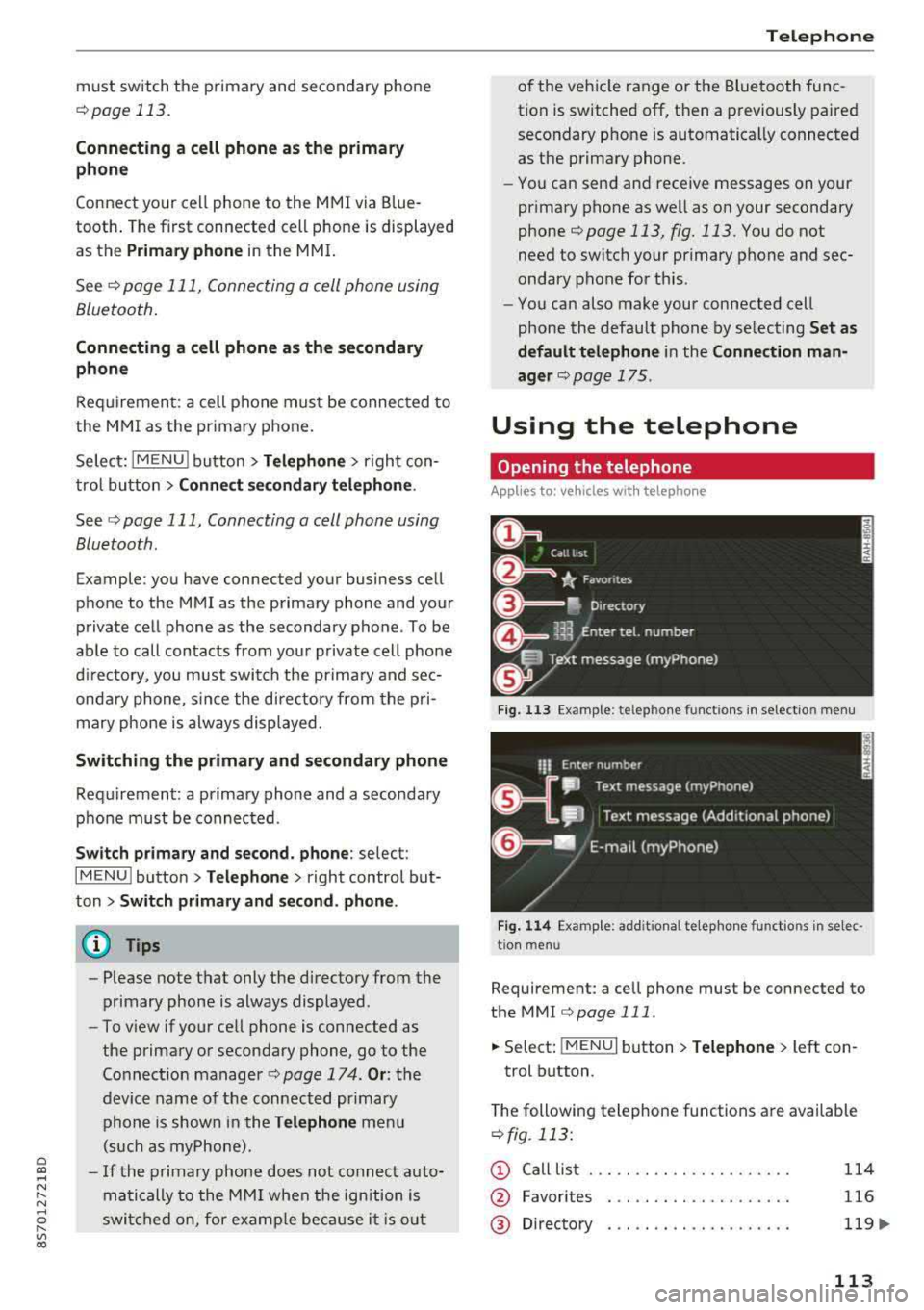
Fig. 113 Example : telepho ne functions in select io n menu
Fig. 114 Examp le: add it iona l te lephone functions in selec
tio n menu
Requirement: a cell phone must be connected to
the MMI
c>page 111.
.,. Select: ! MENUI button> Telephone> left con
trol button.
The following telephone functions are available
o fig. 113 :
(D Call list
@
®
Favorites
Directory
114
116
119.,.
113
Page 118 of 310
Tele phone
(D Tips
- To be notified of an incoming call during a
phone ca ll, the call waiting function in your
cell phone must be switched on when us ing
the hands-free profile
( Ha ndsfr ee).
- You can obtain more information from your
cell phone service prov ider or from your cell
phone user guide.
- When leaving the vehicle, the Bluetooth connection to the cell phone will automat i
cally disconnect. Depending on your cell
phone, phone calls in progress may be auto
matically redirected from the MMI to your
ce ll phone and yo u can cont in u e t he call on
you r phone.
- The display of an incom ing phone ca ll in the
Infotainment system d isp lay may still be
v is ible fo r a few seconds depending on the
ce ll phone in use . Using the
Replace or De
cline
functions may then end the active
phone ca ll.
Favorites
Applies to: vehicles with telephone
Up to 50 contacts, in addition to the voicemail
number, can be stored in any order in the favor
ites list.
~ Se lect: IMENUI button> Telephone > left con
trol button.
- Storing an e xist ing ph one number a s a fav or
ite :
select and confirm Recent calls/Directo ry.
Select and confirm a contact or phone number
from the list. Select: right control button>
S tor e as fav orit e . Enter a name for the favorite
or select a suggestion. Select and confirm
Save .
- Ren aming a stored f avorite :
select and confirm
Favorit es > a favorite from the list . Select the
right control button>
Rename fa vorite .
- Mo ving a sto red fa vo rite :
select and confirm
Favorit es > a favorite from the list . Select the
right control button>
Mo ve fa vor ite . Select
and confirm the location of the selected favor
i te.
- Delet ing a stor ed fav orit e: select and conf irm
Favorit es > a favorite from the list. Select the
116
right control button > Delete fa vo rite > Delete
thi s fav orite or Delete all fa vorite s.
Messages
Text messages
Applies to: cell phones with Bluetooth Message Access Profile
(MAP)
Depending on the cell phone being used and the
cell phone network contract, you can receive and
send text messages using the MMI.
Requirement
A cell phone must be connected to the MM I via
B luetoot h MAP ( Message Access Profi le)
¢ page 111 .
~ Select: !MENUI button> T ele phon e> left con
trol button >
t ex t me ssag e ( myPh one )/te xt
me ssage (second ary ph one )*.
Inbox
All rece ived text messages are displayed.
Sent te xt me ss a ges
A ll sent text messages are displayed .
Outbox
All t ext messages to be sent a re displayed.
© Tips
- Please note that you may have to activate
the receivi ng a nd se nding of text messages
in yo ur cel l phone depending on t he S IM
card be ing used (fo r example, when using a
Multi -S IM). Yo u can obtain more informa
tion from your ce ll phone service provider or
from your cell phone user guide .
- For more information on s upported cell
phones, visit www .a udiusa.com/b luetooth
or contact an a uthorized Audi dea ler or au
thorized Aud i Service Facility.
- You need a cell phone with Message Access
Prof ile that a lso supports the send ing func
t ion to be able to send text messages
through the MMI.
Page 119 of 310
Cl 00 .-< N r-N .-< 0 r-Vl 00
Write text message
Applies to: cell phones with Blue toot h Message Access Profile
(MAP)
"' Select: I MENU I button >Telephone > left con
trol button >
text message (myPhone) /text
message (secondary phone)*> Inbox
> right
control button.
Write text message
Select and confirm the desired template from
the list. Enter a recipient. Select and confirm
Send .
Reply*
Select and confirm the desired template from
the list. Select and confirm
Send.
Message options
Applies to: cell phones with Bluetooth Message Access Profile
(MAP)
"' Se lect: I MENU I button >Telephone> left con
trol button >
text message (myPhone)/text
message (secondary phone)*> Inbox /Sent /
Outbox
> right contro l button.
The fo llowing options may be avai lab le depend
ing on the se lected menu.
Reply*
A reply can be sent for the selected message in
the
Inbox .
Forward
The selected text message can be forwarded to a
different recipient.
Send again*
The selected text message can be resent.
Delete this text message*
The selected text message can be deleted.
Read out1
)
You can have the MMI read an open text mes
sage.
ll Not availab le in all languages .
Telephone
Text messaging settings*
To display when a new text message is received,
enab le the
Text message notifications. New text
messages are indicated with an
envelope~ in
the Infotainment system disp lay status line.
Connection manager
See c>p age 174.
Telephone settings
See c>page 121.
(D Tips
Messages that are deleted in the MMI are also
deleted in the cell phone automatically.
E-mail*
Applies to: cell phones with Bluetooth Message Access Profile
(MAP)
Depending on the type of cell phone used, you
can receive and send e-mails through the MMI .
Requirement: the Message Access Profile (MAP)
must be activated in the Bluetooth settings on
your ce ll phone and your cell phone must be con
nected to the MMI
c>page 111. You can find out
in your cell phone owner's manual if your cell
phone supports this function.
"' Select: !MENUI button> Telephone > left con
trol button >
e-mail (myPhone)/e-mail (secon
dary phone)*.
Write new e-mail
- Using a template :
select and confirm the de-
sired template from the list.
- Enter one or more recipients.
- Select and confirm
Send.
lnbox
All received e-mails are displayed.
Sent
All sen t e-m ails are displayed.
117
Page 120 of 310
Tele phone
Outbo x
All e -mails that wi ll be sent are d isplayed .
Drafts
All saved e -mails that have not been sent yet are
d isplayed .
@ Note
Always follow the information found in ¢@) in
Wi -Fi hotspot on page 130 .
(D Tips
-For more information on supported cell
phones, v is it www .aud iusa.com/bluetooth
or contact an author ized Audi dealer or au
thorized Audi Se rvice Facility .
- To ensure that your sent e -mails are re
ce ived , connect you r cell phone to the Wi-Fi
hotspot* in the vehicle so that the applica
ble e-ma il app on yo ur cell phone cont inues
to have Inte rne t access . If yo u are st ill not
r eceiving e-mails even though yo u have a
successful connection, then contact your e
mail serv ice provider or your ce ll phone
service provider .
Message options
Applies to: cell phones with Bluetooth Message Access Profile
(MAP)
~ Se lect : IMENUI button> Telephone > left con
tro l button >
e-mail (m yPhone )/e-m ail ( secon
dar y phone )* > lnbo x/Sent/Outbo x
> right
c ont ro l but ton.
The fo llowing options may be avai lab le depend
ing on th e se lected menu .
Store as template
Ten e-mail templates a re stored in the M MI. Yo u
can save up to te n addit io n al templates.
- Create an e-ma il.
- Se lect and confirm
Stor e as t emplat e.
Re sum e last edited e-mail
The last e-mai l in progr ess can be resum ed.
1> N ot a va ilable in a ll lang uages.
118
Reply *
A reply c an be sent fo r t he se lec ted e-ma il in the
Inbo x.
Reply to all *
A reply can be sent for the selected e-ma il in the
In box and it will be sent to all of the entered re
c ipients.
Forward
T he selected e-mail can be forwarded to a differ
ent rec ipient .
Delete this me ss a ge*
T he selected e -mail can be deleted.
Read out1>
Yo u can have the MMI r ead an open e -mail.
E-mail settings *
To display when a new e -ma il is received, activate
the
E-mail notific ation s. New e-ma ils are i ndicat
ed with an envelope
121 in the Infotainment sys
tem d isplay status lin e.
Connection m anager
See ¢ page 174 .
Te le phon e sett ings
See ¢ page 121.
(D Tips
Messages t hat are de lete d in t he MM I are also
a utomat ica lly dele ted in the connected ce ll
phone.
Listening to voicemail
Applies to: vehicles with telephone
~ Select: IME NUI button> Telephone > left con
trol button . Se lect and confirm
Call li st /Direc
tory /Favor ites > Voicem ail.
- Ente ring the voicemail number:
enter the de-
sired number. Se lect and confirm
OK. ..,.
Page 121 of 310
Cl co .... N ,....
N ...... 0 ,....
Vl co
-Dialing the voicemail number : select and con
firm
Voicemail.
(D Tips
- This service must be set up and act ivated in
advance by the cell phone service provider.
You can obtain more information from your
ce ll phone service prov ider.
-The voicemai l number depends on the cell
phone service provider.
Emergency call functions
Appl ies to: vehicles with te le phone
~ Select : I MENU I button >Telephone > left con
trol button >
Enter number > Enter emergency
coll number (for example, 911)
> OK .
A WARNING
-Because your phone works with radio sig
nals, a connection cannot be guaranteed un
der all circumstances . Do not rely on only
your phone when it comes to essent ial com
munication (such as a medica l emergency).
-Always follow the instructions given by the
emergency personnel during an emergency call and only end the call when they instruct
you to do so.
@ Tips
Emergency numbers are not the same every
where. Find out which emergency number is used in your current locat ion.
Telephone
Directory
Opening the directory
Applies to: vehicles with telephone
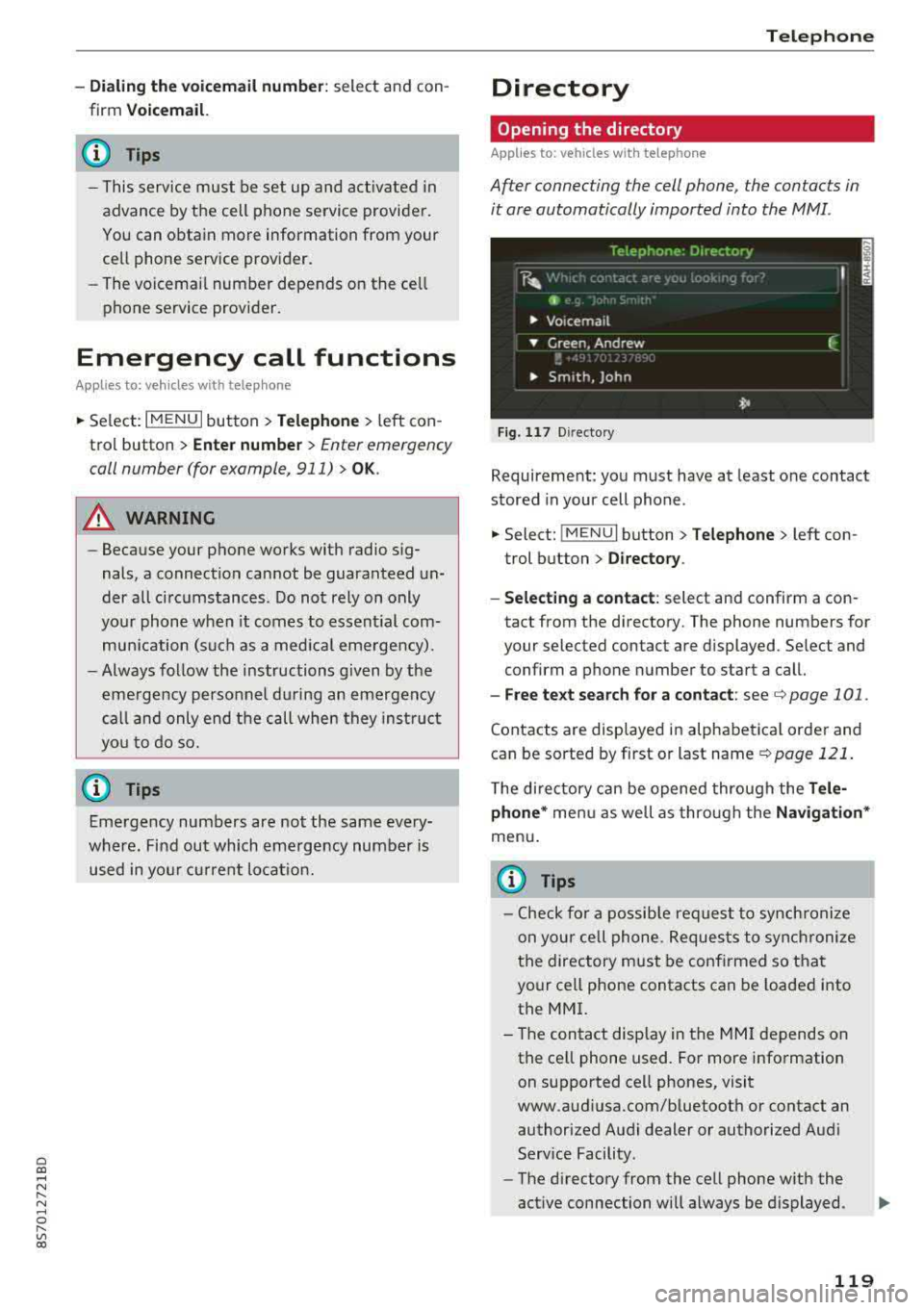
After connecting the cell phone, the contacts in
it ore automatically imported into the MMI.
Fig . 11 7 Direct ory
Requirement: you must have at least one contact
stored in your cell phone .
~ Select: !MENUI button> Telephone> left con
trol button >
Directory.
- Selecting a contact:
select and confirm a con
tact from the directory. The phone numbers for
your selected contact are displayed . Se lect and
confirm a phone number to start a call.
- Free te xt search for a contact: see c:> page 101 .
Contacts are displayed in alphabetical order and
can be sorted by first or last name
c:> page 121.
The directory can be opened through the Tele
phone *
menu as well as through the Navigation*
menu.
{i) Tips
-Check for a possible request to synchronize
on your cell phone. Requests to synchronize
the directory must be confirmed so that
your cell phone contacts can be loaded into
the MMI.
- The contact display in the
MMI depends on
the cell phone used. For more information on supported cell phones, visit
www.audiusa.com/bluetooth or contact an authorized Audi dealer or authorized Audi
Service Facility .
- The directory from the cell phone with the
active connection will always be displayed .
119
Page 127 of 310
Cl 00 .-< N r-N .-< 0 r-Vl 00
~ Select and confirm Enter PIN .
~ Enter the PIN for your SIM card.
~ Select and confirm OK.
~ To connect to the Internet automatically in the
future, select and then confirm
Yes.
~ Confirm the system prompt asking to connect
to the Internet with e ither
Yes, connect once or
Yes, always if required .
After connecting successfully
After connecting successfully, the s ignal strength
and connection type are displayed in the Info
tainment system status
line @/© Q page 102,
fig . 110 .
You can now use Aud i connect.
The list of avai lable Audi connect services is dis
p layed in the Infotainment system display.
Removing the Audi connect SIM card
~ Press on the Aud i connect SIM card briefly.
0 Note
- Audi con nect is designed for use only with
the pro vided Audi connect SIM card. Aud i
AG is not liable for the consequences of us
ing other SIM cards.
- If a SIM card of a different siz e is inserted in
the SIM card reader instead of an Audi con
nect mini SIM card, do not under any cir
cumstances remove this card yourself due
to the risk of damaging the SIM card reader .
Contact an authorized Audi dealer or au
thorized Audi Service Facility.
(D Tips
-You can connect a ce ll phone with Bluetooth
(handsfree) to make phone calls
Qpoge 111.
- Audi does not provide support for other SIM
cards. Audi recommends using only the pro
v ided SIM card.
- You can specify when the MMI connects to
the Internet
Q page 130. The Internet con
nection disconnects automatically once the
requested Audi connect service no longer re
quires any data packets.
Audi connect
Configuration through
myAudi
Activating/configuring specific Audi
connect services
App lies to: vehicles wit h Audi connect
Some Audi connect services must be activated/
configured through your personal myAudi ac
count before using them for the first time .
- If you do not have a personal myAudi account
yet, you can register on line at
www.audiusa.com/myaudi.
- Add your vehicle to your my Audi account.
- Activate/configure the Audi connect services
you would like for your vehicle in your myAudi
account.
- For some services, you may also have to enter
your myAudi user data or your myAudi PIN
when accessing services in the MMI to connect
your veh icle to myAudi.
For detailed information on configuration, visit
www.audiusa.com/myaudi.
Logging into myAudi in the vehicle
App lies to : vehicles wi th Audi connect
To use some Audi connect services (such as Twit
ter*), you must first connect your vehicle with
myAudi to transfer your personal settings from
your myAudi account.
~ Select: ! MENUI button> Audi connect> right
control button >
Log in.
~ Enter your myAudi user data. Or: enter your
eight-digit myAudi PIN.
~ Conf irm your entry w ith OK.
Then you can open your personal settings from
your myAud i account in your vehicle.
(D Tips
You can receive your myAudi PIN if you have
set up a myAudi account. For additional infor mation, see www.audiusa.com/myaudi.
125
Page 129 of 310
Cl 00 .-< N r-N .-< 0 r-Vl 00
Flight information
Applies to: vehicles with flight information
Information on flig hts and current arr ival/depa r
ture times in the selected searc h area .
.,. Select and confirm Flight information .
You can select the desired information using the
right control button.
City events
Applies to: vehicles with City events
Information on events in various categories in
the desired search area .
.. Select City Events > left control button > cate
gory.
Online news
Applies to: vehicles with online news
You can check the current headlines of your fa
vor ite pub lications in the MMI.
Requirement: your myAudi account must be sub
scr ibed to newsfeeds and your vehicle must be
connected to myAudi
~page 125.
.. Se lect : Online news > desired newsfeed > a
headline.
(D Tips
If you have not subscr ibed to any personal
newsfeeds in your myAud i account, pre-con
figured newsfeeds wi ll be displayed.
Twitter
Applies to: vehicles with Twitter
You can access the most important functions in
your Twitter account through your
MMI.
Requirement:
You must have connected your myAudi account
with Twitter. You can find additional information
at www.audiusa .com/myaudi.
You must have connected your vehicle with
myAudi
~page 125.
Audi connect
.. Select Twitter > left control button > desired
function
(for examp le, Trends ).
T he following categories can be selected in the
Twitter menu:
- My tweets: News Feed and the Tweets you have
posted are listed.
- Home : the Tweets for everyone you fo llow are
d isp layed.
- Trends : top ics on Twitter that are currently
popu lar within a country.
Different functions are ava ilable depending on
the Twitter category you have selected :
- New tweet: you can post a new tweet using
pre-made templates or using custom ized tem
plates in your myAudi account.
- Refresh : the se lected Twitter function is re
freshed.
- Favorite : mark a Tweet as favorite to show you
Liked it.
- Retweet : you can quote a Tweet to share it wit h
others.
(D Tips
- You can find additional information on con
necting your myAudi account to Twitter at
www.aud iusa.com/myaudi.
- Other settings suc h as account, language,
Tweet security and locat ion settings
cannot
be changed in the MMI. These changes m ust
be made on the Tw itter website.
- You can only connect
one Twitter account
w ith your myAudi account.
- Audi connect makes it possible to access
Twitter. Permanent availability cannot be
guaranteed, because that depends on Twit
ter.
Travel (travel guide)
Applies to: vehicles with Travel (travel guide)
You can use the Audi MMI connect opp to store
points of interest on your mobile device (such as a smartphone) and then use them for route
guidance in the
MMI .
Requirement:
127
Page 131 of 310
Cl 00 .-< N r-N .-< 0 r-Vl 00
@ Note
Always follow the information found in c::>((j) in
Wi-Fi hotspot on page 130.
(D Tips
For more information on the Wi-Fi audio play
er and supported devices, contact an author
ized Audi dealer or authorized Audi Service
Facility.
Additional options
App lies to: vehicles with Audi co nnect
"'Select : IMENUI button> Audi connect> right
control button.
The following options are available in the Audi
connect services overview:
About Audi connect
Here you will find legal information for Audi con
nect usage.
Login*
See c::> page 125, Logging into myAudi in the vehi
cle.
Connection manager
See c::>page 174 .
License subscription
The validity and expiration date of your licenses
are displayed. When the function is switched on
~. the message Warning before subscription
expires
will display to warn you that your license
is about to expire .
Refresh
The content of the selected Audi connect service
or the entire Audi connect list is updated.
Data privacy
Requirement: the ignition must be switched on.
Location and personal data are transmitted when
using Audi connect services. If you do not want
Audi connect
this information to be transmitted, activate data
privacy.
-Activate privacy : the data connection is switch
ed off . The Audi connect services will not be
available.
-Deactivate data privacy: if the data connection
is switched off, you can switch on the data con
nection for the use of all Audi connect services.
Select and confirm
Activate data connection.
Wi-Fi hotspot
Applies to: vehicles with Wi -Fi hotspot
You can use the MMI as a Wi-Fi hotspot to con
nect up to eight Wi-Fi devices to the Internet.
Requirement: the ignition must be switched on.
"'Select: !MENUI button> Telephone> right con-
trol button >
Wi-Fi settings .
The following settings can be selected:
Wi-Fi
The MMI Wi-Fi hotspot is deactivated at the fac
tory. Switch the Wi-Fi hotspot to
On before es
tablishing an Internet connection between your
vehicle and your Wi-Fi device.
-On: the MMI Wi-Fi hotspot is active and visible
to other devices. You can connect your Wi-Fi
device to the MMI and use the Internet connec
tion if necessary .
-Off: the MMI Wi-Fi hotspot is deactivated. An
Internet connection for Wi-Fi devices is not
possible .
A WARNING
--
-As the driver, do not allow usage of the Wi
Fi hotspot to distract you from driving, as
this could increase the risk of an accident.
-It is only safe to use tablets, laptops, mo
bile devices and other similar devices when
the vehicle is stationary because, like all
loose objects, they could be thrown around
the inside of the vehicle in a crash and cause
serious injuries. Store these types of devices
securely while driving.
...,
129