emergency towing AUDI TT ROADSTER 2018 Owners Manual
[x] Cancel search | Manufacturer: AUDI, Model Year: 2018, Model line: TT ROADSTER, Model: AUDI TT ROADSTER 2018Pages: 310, PDF Size: 46.95 MB
Page 4 of 310
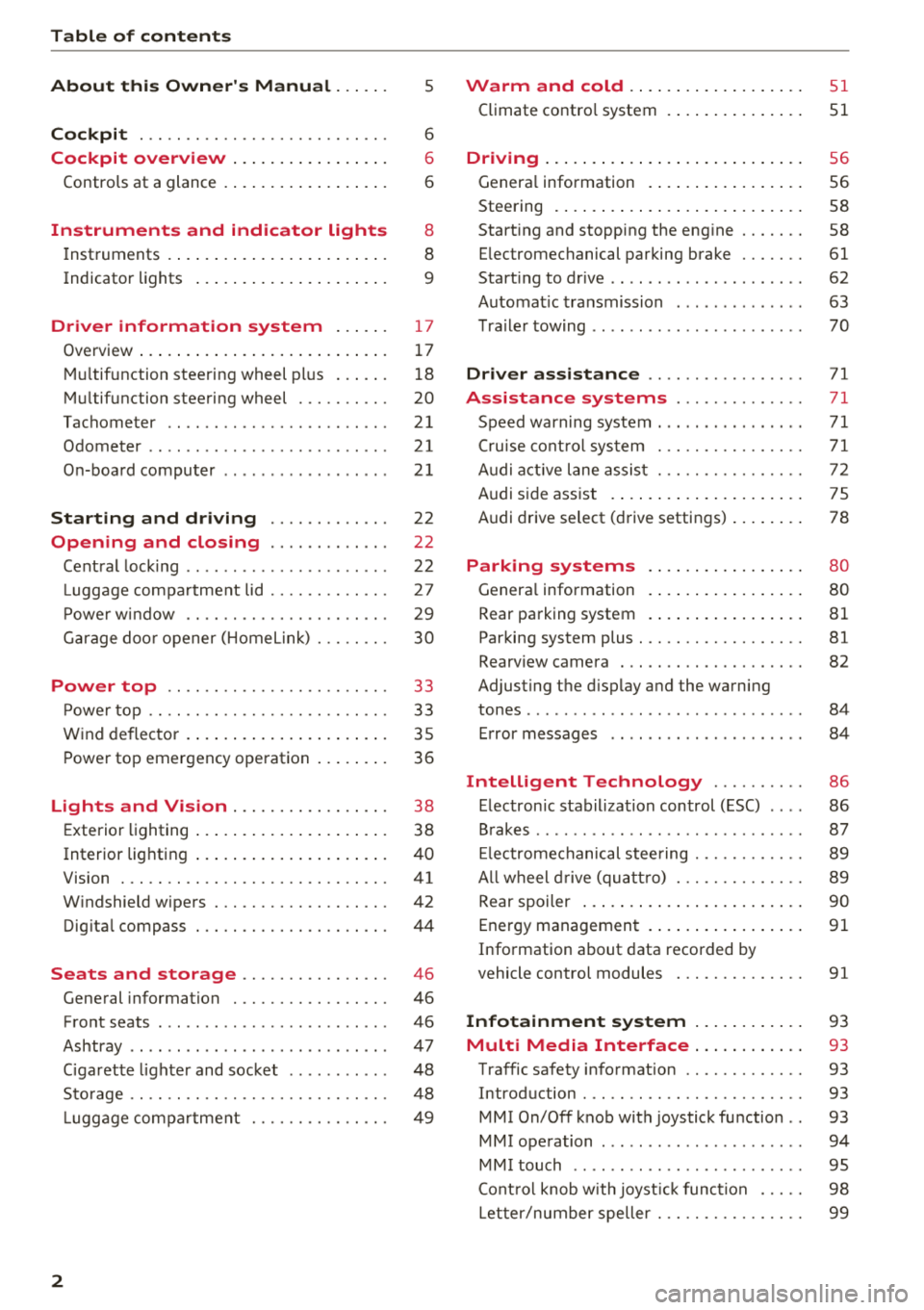
Table of contents
About this Owner's Manual. . . . . .
5
Cockpit . . . . . . . . . . . . . . . . . . . . . . . . . . . 6
Cockpit overview . . . . . . . . . . . . . . . . . 6
Controls at a glance . . . . . . . . . . . . . . . . . . 6
Instruments and indicator lights 8
Instruments . . . . . . . . . . . . . . . . . . . . . . . . 8
Indicato r lights . . . . . . . . . . . . . . . . . . . . . 9
Driver information system . . . . . . 17
Ove rview . . . . . . . . . . . . . . . . . . . . . . . . . . . 1 7
Mul tifunction stee ring wheel pl us . . . . . . 1 8
M ultifunction steering wheel . . . . . . . . . . 20
Tachometer . . . . . . . . . . . . . . . . . . . . . . . .
21
Odometer . . . . . . . . . . . . . . . . . . . . . . . . . . 21
On-boa rd computer . . . . . . . . . . . . . . . . . . 2 1
Starting and driving . . . . . . . . . . . . . 22
Opening and closing . . . . . . . . . . . . . 22
Cent ral lock ing . . . . . . . . . . . . . . . . . . . . . .
22
Luggage compa rtment lid . . . . . . . . . . . . . 27
P owe r w indow . . . . . . . . . . . . . . . . . . . . . . 29
G arage doo r opener (Home link) . . . . . . . . 30
Power top . . . . . . . . . . . . . . . . . . . . . . . . 3 3
P owe r top . . . . . . . . . . . . . . . . . . . . . . . . . . 33
W ind deflector . . . . . . . . . . . . . . . . . . . . . . 35
P ower top emergency ope ration . . . . . . . . 36
Lights and Vision . . . . . . . . . . . . . . . . . 3 8
E xte rior lighting . . . . . . . . . . . . . . . . . . . . . 38
Interior lighting . . . . . . . . . . . . . . . . . . . . . 40
V1s1on . . . . . . . . . . . . . . . . . . . . . . . . . . . . .
41
W indshield wipers . . . . . . . . . . . . . . . . . . . 42
Dig ita l compass . . . . . . . . . . . . . . . . . . . . . 44
Seats and storage . . . . . . . . . . . . . . . . 46
General information . . . . . . . . . . . . . . . . . 46
Front seats . . . . . . . . . . . . . . . . . . . . . . . . . 46
Ashtray . . . . . . . . . . . . . . . . . . . . . . . . . . . . 47
Ciga rette lighte r and socket . . . . . . . . . . . 48
Sto rage . . . . . . . . . . . . . . . . . . . . . . . . . . . . 48
L ugg age compa rtment . . . . . . . . . . . . . . . 49
2
Warm and cold .... ... .. ..... ... . .
Climate contro l system . .. .. ..... ... . .
Driving . .. .. .. .... .. ... .. ..... ... . .
Genera l information . .... .. ..... ... . .
Steering . ... .. .... .. ... .. ..... ... . .
Start ing and stopping the eng ine ..... . .
E lectromechanical par king brake ..... . .
Start ing to drive .. .. .. ... .. ..... ... . .
Automat ic transmission ............. .
T ra ile r towing .. .. .. .. .............. .
Driver assi stance .. .............. .
Assistance systems ............. .
Speed warning system .... .. ..... ... . .
Cru ise cont ro l sys tem
A udi active l ane assist . ............. . .
Audi s ide ass ist . ..... ... .. ..... ... . .
Audi drive select (drive settings) ... ... . .
Parking systems
Genera l information
Rear parking system
Par king system plus . .. ............. . .
Rearv iew camera . .. .. ............. . .
Adjusting the d isplay and the warning
51
51
56
56
58
58
61
62
63
70
71
71
71
71
72
75
78
80
80
81
81
82
tones ........ ... .. .. ............... 84
Error messages . . . . . . . . . . . . . . . . . . . . . 84
Intelligent Technology . . . . . . . . . . 86
E lectron ic stabilization control (ESC) . . . . 86
B rakes . . . . . . . . . . . . . . . . . . . . . . . . . . . . . 87
El ec tromechanical steering . . . . . . . . . . . . 89
A ll w heel drive (quatt ro) . . . . . . . . . . . . . . 89
Rear spoiler . . . . . . . . . . . . . . . . . . . . . . . . 90
Energy management . . . . . . . . . . . . . . . . .
91
Information about data recorded by
vehicle control modules . . . . . . . . . . . . . .
91
Infotainment system . . . . . . . . . . . . 93
Multi Media Interface . . . . . . . . . . . . 93
Traffic safety info rmation . . . . . . . . . . . . . 93
Introduction . . . . . . . . . . . . . . . . . . . . . . . . 93
MMI On/Off knob with joystick function . . 93
MMI operation . . . . . . . . . . . . . . . . . . . . . . 94
MM I touch . . . . . . . . . . . . . . . . . . . . . . . . . 95
Cont ro l knob w ith joyst ick function . . . . . 98
Letter/number speller . . . . . . . . . . . . . . . . 99
Page 72 of 310
Drivin g
Selector le ver em ergency r ele ase
.,. Press and hold the yellow release bu tton with
the screwdriver
c:::> fig. 76 .
.,. Press the lock button on the se lector lever (D
and move the lever into the N position .
.,. Clip the shift cover back into the shift gate after
us ing the emergency release .
If the ve hicle must be pushed or towed due to a
power failure (for example, the battery is dead),
the selector lever must first be moved to the N position us ing the emergency release mecha
n ism .
A WARNING
-Only activate the emergency release while
on a level su rface or a slight slope.
- Only move the selector lever out of the "P" pos it ion when the parking brake is set. If it
is not funct ioning, secu re the vehicle from
rolling using the b rake pedal o r othe r su ita
ble means, such as bloc king a front and a
rear whee l. An unsecured veh icle may roll
away, which increases the risk of an acci
dent.
Trailer towing
General information
Your Audi TT Roadster is not designed to tow a
trailer .
-
Towing a trailer w ith your Aud i TI Roadster is not
recommended and can cause damage to the car .
Damaged caused by tow ing a trailer is not cov
ered by your Audi Warranty .
70
Page 285 of 310
Cl 00 .-< N r--N .-< 0 r--Vl 00
Emergency situations
General
This chapter is intended for trained emergency
crews and working personnel who have the nec
essary tools and equipment to perform these
operations.
Starting by pushing or
towing
~ Note
Vehicles with an automatic transmission can
not be started by pushing or towing.
Starting with jumper
cables
If necessary, the engine can be started by con
necting it to the battery of another vehicle .
If the engine should fail to start because of a dis
charged or weak battery, the battery can be con
nected to the battery of
another vehicle, using a
pair of jumper cables to start the engine.
Jumper cables
Use only jumper cables of sufficiently large cross
section
to carry the starter current safely. Refer
to the manufacturer's specifications.
Use only jumper cables with
insulated terminal
clamps which are distinctly marked :
plus(+) cable in most cases colored red
minus(-) cable
in most cases colored black.
A WARNING -
Batteries contain electricity, acid, and gas.
Any of these can cause very serious or fatal in
jury. Follow the instructions below for safe
handling of your vehicle's battery .
-Always shield your eyes and avoid leaning
over the battery whenever possible.
-A dead battery can freeze at temperatures
around 32 °F (0 °C) . If the vehicle battery is
frozen, you must thaw it before connecting
the jump start cables. If you do not, this in-
Emergency situations
creases the risk of an explosion and chemi
cal burns. After jump starting the vehicle,
drive to an authorized Audi dealer or author ized Audi Service Facility immediately to
have the vehicle battery checked.
- Do not allow battery acid to contact eyes or
skin . Flush any contacted area with water
immediately.
- Improper use of a booster battery to start a
vehicle may cause an explosion .
- Vehicle batteries generate explosive gases .
Keep sparks, flame and lighted cigarettes
away from batteries.
- Do not try to jump start any vehicle with a
low acid level in the battery .
- The voltage of the booster battery must also
have a 12-Volt rating . The capacity (Ah) of
the booster battery should not be lower
than that of the discharged battery. Use of
batteries of different voltage or substantial
ly different "Ah " rating may cause an explo
sion and personal injury.
- Never charge a frozen battery. Gas trapped
in the ice may cause an explosion.
- Never charge or use a battery that has been
frozen. The battery case may have be weak
ened.
- Use of batteries of different voltage or sub
stantially different capacity (Ah) rating may
cause an explosion and injury. The capacity
(Ah) of the booster battery should not be
lower than that of the discharged battery.
- Before you check anything in the engine
compartment, always read and heed all
WARNINGS
c>page 233.
@ Note
- Applying a higher voltage booster battery
will cause expensive damage to sensitive
electronic components, such as control
units, relays, radio, etc.
- There must be no electrical contact between
the vehicles as otherwise current could al
ready start to flow as soon as the positive
( + ) terminals are connected.
283
Page 287 of 310
-When connecting jumper cables, make sure
that they cannot get ca ught in any mov ing
parts in the engine compartment.
- Do not bend over the batteries - danger of
chem ica l burns!
- The battery cell lock ing screws must be
t ightened sec ure ly.
- Be fore you check anything in the e ngine
compartment, a lways read and hee d all
WAR NINGS
q page 233 .
(D Note
Impro per hook -up of jum pe r cables can r uin
the gene rato r.
- Always connect POSITI VE (+ ) to POS ITIV E
( + ), and NEGATIVE( -) to NEGAT IVE( -)
g roun d post of t he battery mana ger contro l
u nit.
- Check that a ll sc rew p lugs on t he battery
cells are screwed in firmly. I f not, t ighten
plugs prior to connecting clamp on negative
batte ry terminal.
- Please note that the procedure fo r con nect
i ng a jumper cab le as desc ribed above ap
p lies specifica lly to the case of yo ur vehicle
being jump starte d. When you are giv ing a
ju mp s ta rt to anothe r vehicle, do
not con
n ect the neg ative (-) cab le to the neg ative
(-) t ermin al on the di sch arged b attery @
q fig. 210. In ste ad , securely connec t the
nega tive ( -) cab le to either a solid me tal
com ponent that is f irm ly bolted to the e n
gine block o r to the engine bloc k itself. If
the battery that is be ing cha rge d does not
vent to the outs ide, escap ing battery gas
could ignite and exp lode!
Towing with a tow truck
General hints
Your Audi requires special handling for towi ng .
The fo llow ing information is to be used by com
mercia l tow tr uck operators who know how to op-
a e rate the ir equip ment safe ly. co ....
~ - Never tow your Audi. Towing will cause dam-
"' 8 age to the engine and transmission . r--Vl co
Emergency situations
-Never wrap the safety chains or winch cables
around the brake lines .
- To prevent unnecessa ry damage , your Audi
must be transported with a flatbed truck.
- To load the vehicle on to the flatbed, use the
towing loop found in the vehicle tools and at
tach to the front or rear anchorage
¢ page 285 and ¢ page 286 .
A WARNING
-A veh icle being towed is not safe for passen-
ge rs. Neve r allow anyone to ride in a vehicle
b eing towed, fo r any r eason.
Front towing loop
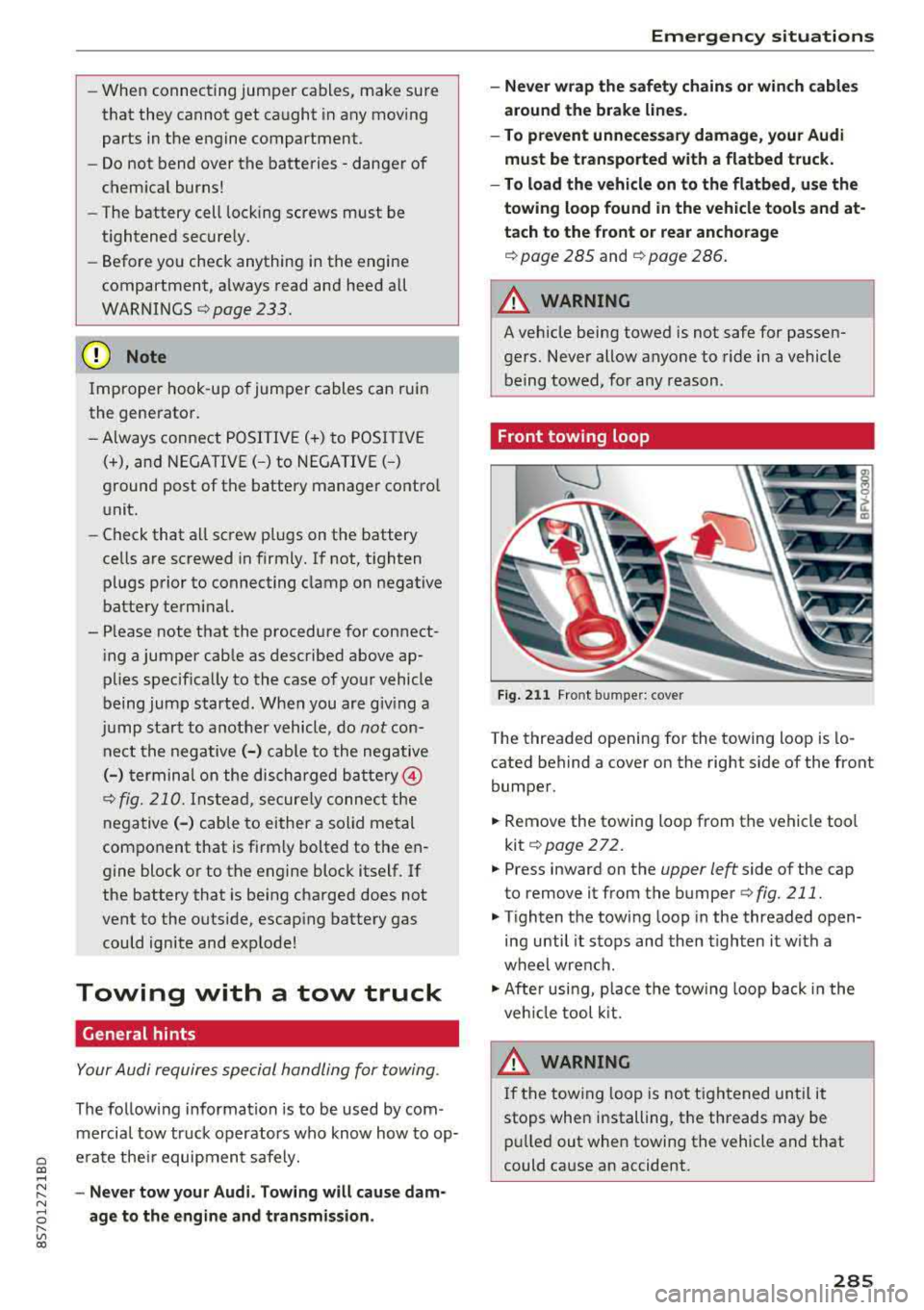
Fig. 2 11 Front bumper: cover
-
The threaded opening for the towing loop is lo
cated behind a cover on the right side of the front
bumper.
.,. Remove the towing loop from the vehicle too l
kit
¢ page 272.
.,. Press inward on the upper left side of the cap
to remove it from the bumper
¢fig. 211.
.,. Tighten the tow ing loop in the threaded open
ing until it sto ps and then tighten it w ith a
whe el wrench .
.,. After usi ng, p lace the tow ing loop b ack i n the
ve hicl e tool kit.
WARNING
If the towing loop is not ti ghtened until it
stops whe n installing, t he threads may be
pull ed out when towing the vehicle a nd that
could ca use an accident.
285
Page 288 of 310
Emergency situations
Rear towing loop
0
-M 0
ct Cl)
Fig. 212 Rear bumper: i nstalling the towing loop
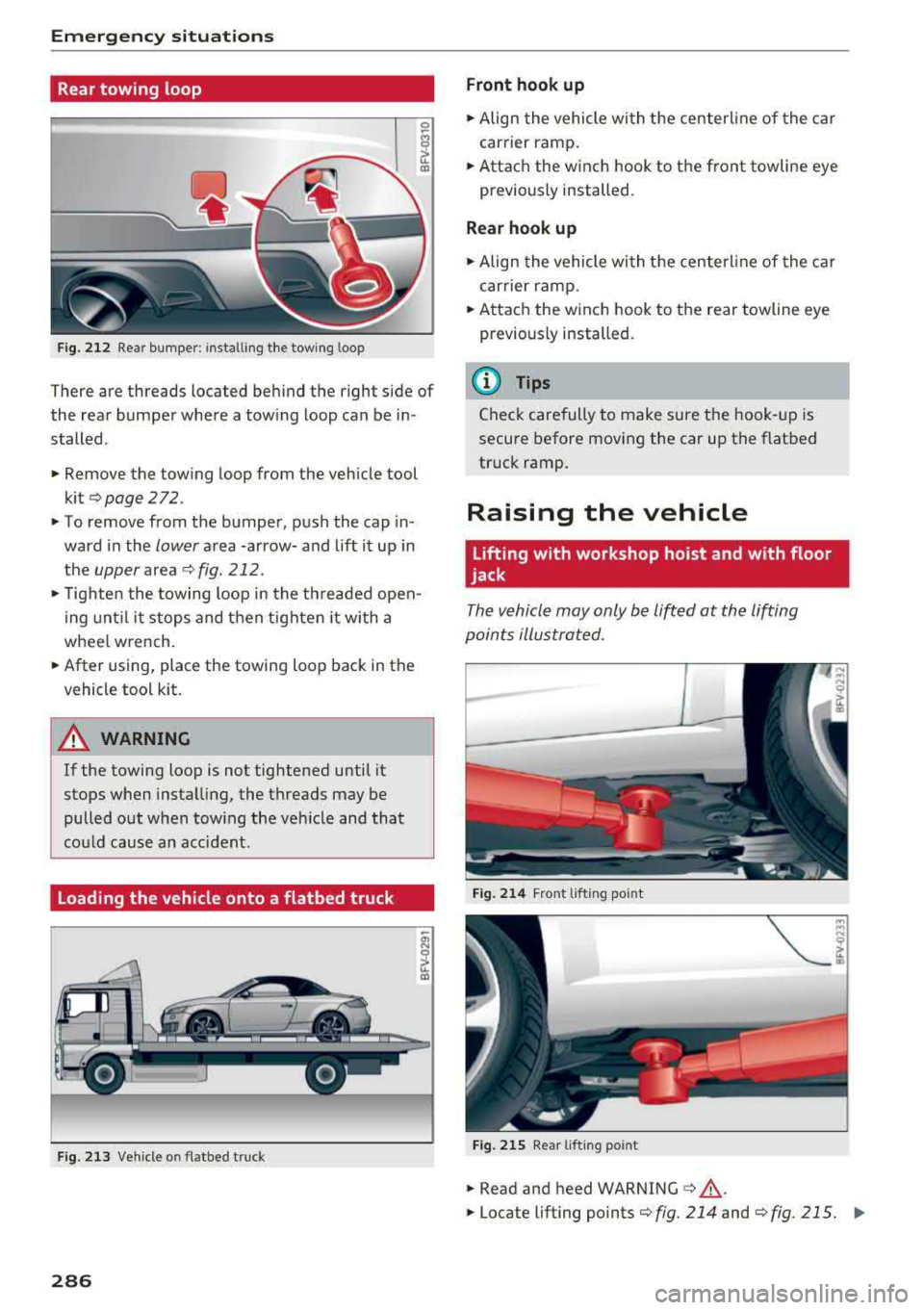
There are threads located behind the right side of
the rear bumper where a towing loop can be in
stalled.
.. Remove the towing loop from the vehicle tool
kit
Q page 272.
.. To remove from the bumper, push the cap in
ward in the
lower area -arrow- and lift it up in
the
upper area ¢ fig. 212 .
.,. Tighten the towing loop in the threaded open
ing until it stops and then tighten it with a
whee l w rench .
.. After using, place the towing loop back in the
vehicle tool kit.
A WARNING
If the towing loop is not tightened until it
stops when installing, the threads may be
pulled out when tow ing the vehicle and that
cou ld cause an accident.
Loading the vehicle onto a flatbed truck
Fig. 213 Vehicle o n flatbed tru ck
286
Front hook up
.. Align the vehicle with the center line of the car
carrier ramp.
.. Attach the winch hook to the front towline eye
pr eviously installed.
Rear hook up
.,. Align the vehicle with the centerl ine of the car
carrier ramp .
.. Attach the winch hook to the rear towline eye
previously installed.
(D Tips
Check carefully to make sure the hook-up is
secure before moving the car up the flatbed
truck ramp .
Raising the vehicle
Lifting with workshop hoist and with floor
jack
The vehicle may only be lifted at the lifting
points illustrated .
Fig. 214 Front lifting point
Fig. 215 Rear lif ting po int
.,. Read and heed WARNING ¢&, .
.. Locate lifting points ¢fig. 214 and ¢fig . 215. II>