handbrake BMW 650I COUPE&CONVERTIBLE 2006 Owners Manual
[x] Cancel search | Manufacturer: BMW, Model Year: 2006, Model line: 650I COUPE&CONVERTIBLE, Model: BMW 650I COUPE&CONVERTIBLE 2006Pages: 242, PDF Size: 8.47 MB
Page 14 of 242
At a glance
13Reference
Controls
Driving tips
Communications
Navigation
Entertainment
Mobility
Indicator and warning lamps
The concept
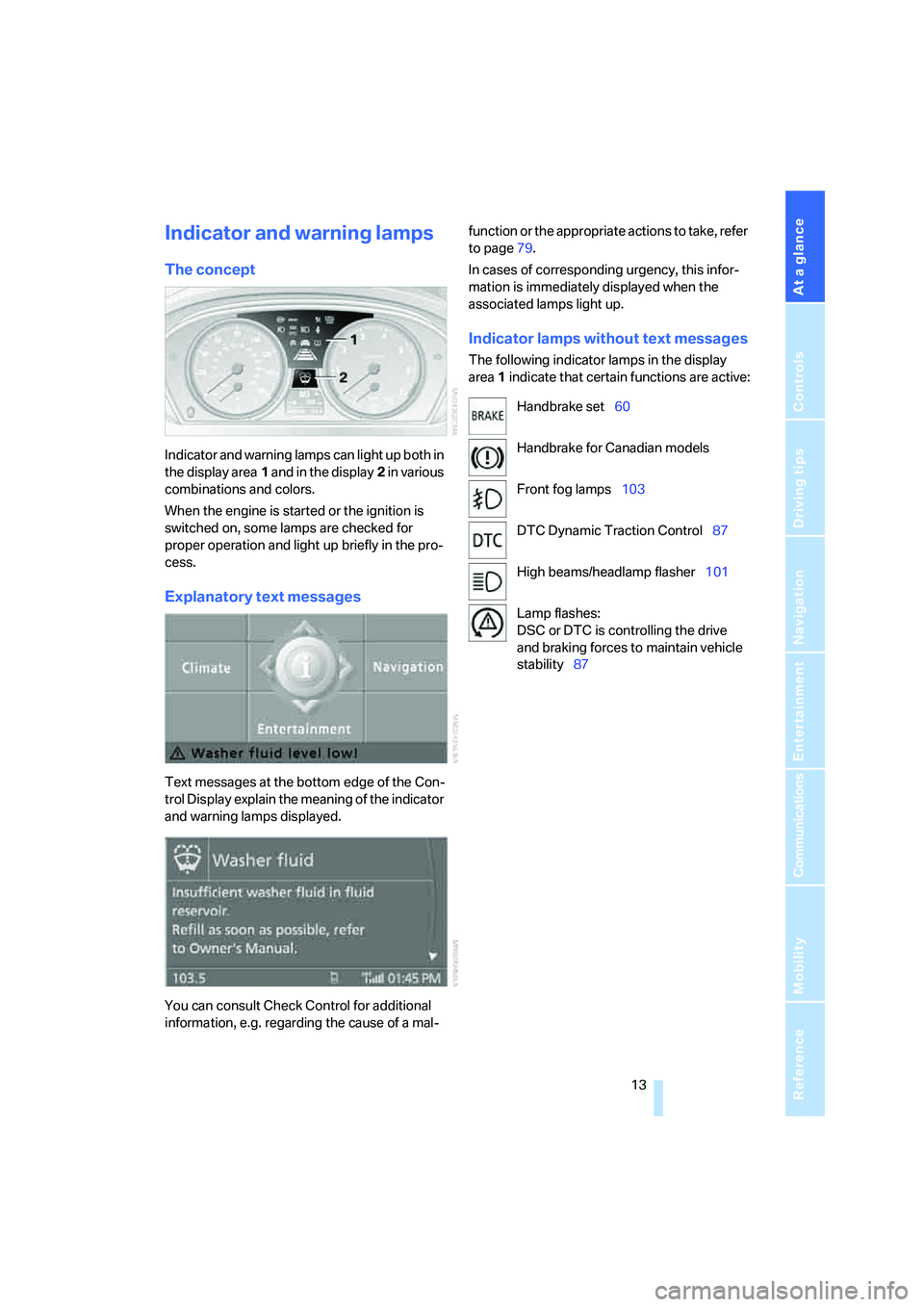
Indicator and warning lamps can light up both in
the display area1 and in the display2 in various
combinations and colors.
When the engine is started or the ignition is
switched on, some lamps are checked for
proper operation and light up briefly in the pro-
cess.
Explanatory text messages
Text messages at the bottom edge of the Con-
trol Display explain the meaning of the indicator
and warning lamps displayed.
You can consult Check Control for additional
information, e.g. regarding the cause of a mal-function or the appropriate actions to take, refer
to page79.
In cases of corresponding urgency, this infor-
mation is immediately displayed when the
associated lamps light up.
Indicator lamps without text messages
The following indicator lamps in the display
area1 indicate that certain functions are active:
Handbrake set60
Handbrake for Canadian models
Front fog lamps103
DTC Dynamic Traction Control87
High beams/headlamp flasher101
Lamp flashes:
DSC or DTC is controlling the drive
and braking forces to maintain vehicle
stability87
Page 60 of 242
Controls
59Reference
At a glance
Driving tips
Communications
Navigation
Entertainment
Mobility
Starting engine
Do not run the engine in closed rooms,
otherwise the inhaling of toxic exhaust
gases can cause unconsciousness and death.
The exhaust gases contain carbon monoxide,
an odorless and colorless, but highly toxic gas.
Never leave an unattended vehicle with the
engine running, as such a vehicle represents a
potential safety hazard.
Before leaving the vehicle with the engine run-
ning, set the selector lever to the idling or the
P position and set the handbrake, otherwise the
vehicle can begin to roll.<
When starting the engine, do not press the
accelerator pedal.
Do not allow the engine to warm up by leaving it
running while the vehicle remains stationary.
Instead, begin to drive immediately at a moder-
ate engine speed.
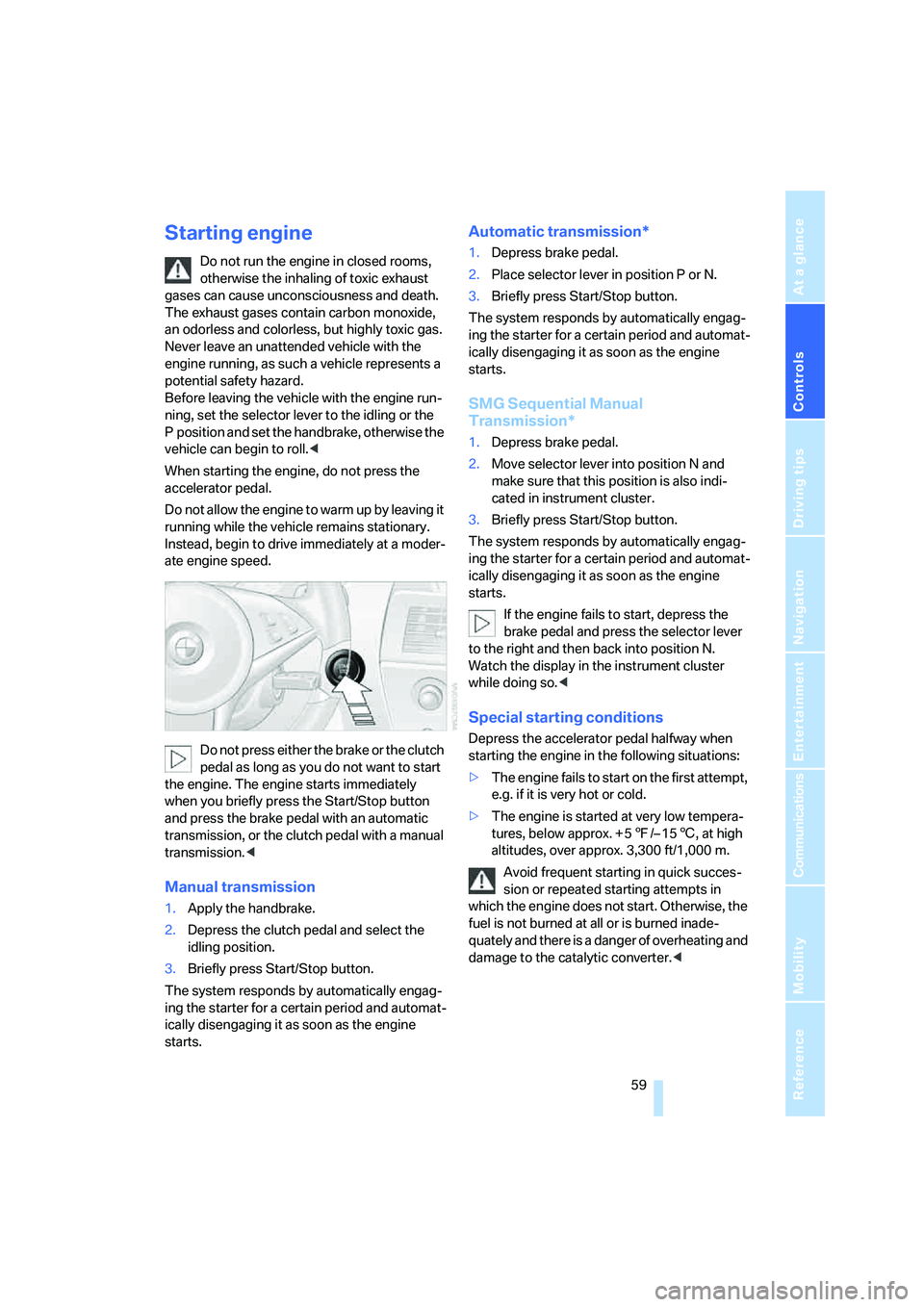
Do not press either the brake or the clutch
pedal as long as you do not want to start
the engine. The engine starts immediately
when you briefly press the Start/Stop button
and press the brake pedal with an automatic
transmission, or the clutch pedal with a manual
transmission.<
Manual transmission
1.Apply the handbrake.
2.Depress the clutch pedal and select the
idling position.
3.Briefly press Start/Stop button.
The system responds by automatically engag-
ing the starter for a certain period and automat-
ically disengaging it as soon as the engine
starts.
Automatic transmission*
1.Depress brake pedal.
2.Place selector lever in position P or N.
3.Briefly press Start/Stop button.
The system responds by automatically engag-
ing the starter for a certain period and automat-
ically disengaging it as soon as the engine
starts.
SMG Sequential Manual
Transmission*
1.Depress brake pedal.
2.Move selector lever into position N and
make sure that this position is also indi-
cated in instrument cluster.
3.Briefly press Start/Stop button.
The system responds by automatically engag-
ing the starter for a certain period and automat-
ically disengaging it as soon as the engine
starts.
If the engine fails to start, depress the
brake pedal and press the selector lever
to the right and then back into position N.
Watch the display in the instrument cluster
while doing so.<
Special starting conditions
Depress the accelerator pedal halfway when
starting the engine in the following situations:
>The engine fails to start on the first attempt,
e.g. if it is very hot or cold.
>The engine is started at very low tempera-
tures, below approx. + 57/– 156, at high
altitudes, over approx. 3,300 ft/1,000 m.
Avoid frequent starting in quick succes-
sion or repeated starting attempts in
which the engine does not start. Otherwise, the
fuel is not burned at all or is burned inade-
quately and there is a danger of overheating and
damage to the catalytic converter.<
Page 61 of 242
Driving
60
Switching engine off
Do not remove the remote control from
the ignition lock while the vehicle is roll-
ing, otherwise the steering wheel lock would
engage while steering.
When leaving the vehicle, always take the
remote control with you.
When parking on a downhill incline, apply the
handbrake, as otherwise the vehicle could roll
away.<
Manual transmission
1.Briefly press Start/Stop button with vehicle
stopped.
2.Shift into first gear or reverse.
3.Apply handbrake.
SMG Sequential Manual
Transmission*
1.Apply handbrake.
2.Move selector lever into a drive position.
3.Briefly press Start/Stop button.
If the position N is engaged when the
engine is switched off, this is pointed out
visually and acoustically.
Automatic transmission*
1.Move selector lever into position P with
vehicle stopped.
2.Briefly press Start/Stop button.
Handbrake
The handbrake is primarily intended to prevent
the vehicle from rolling while parked; it brakes
the rear wheels.
Indicator lamp
The indicator lamp lights up, and a sig-
nal also sounds when starting off. The
handbrake is engaged.
Indicator lamp for Canadian models.
Engaging
The lever engages automatically.
Releasing
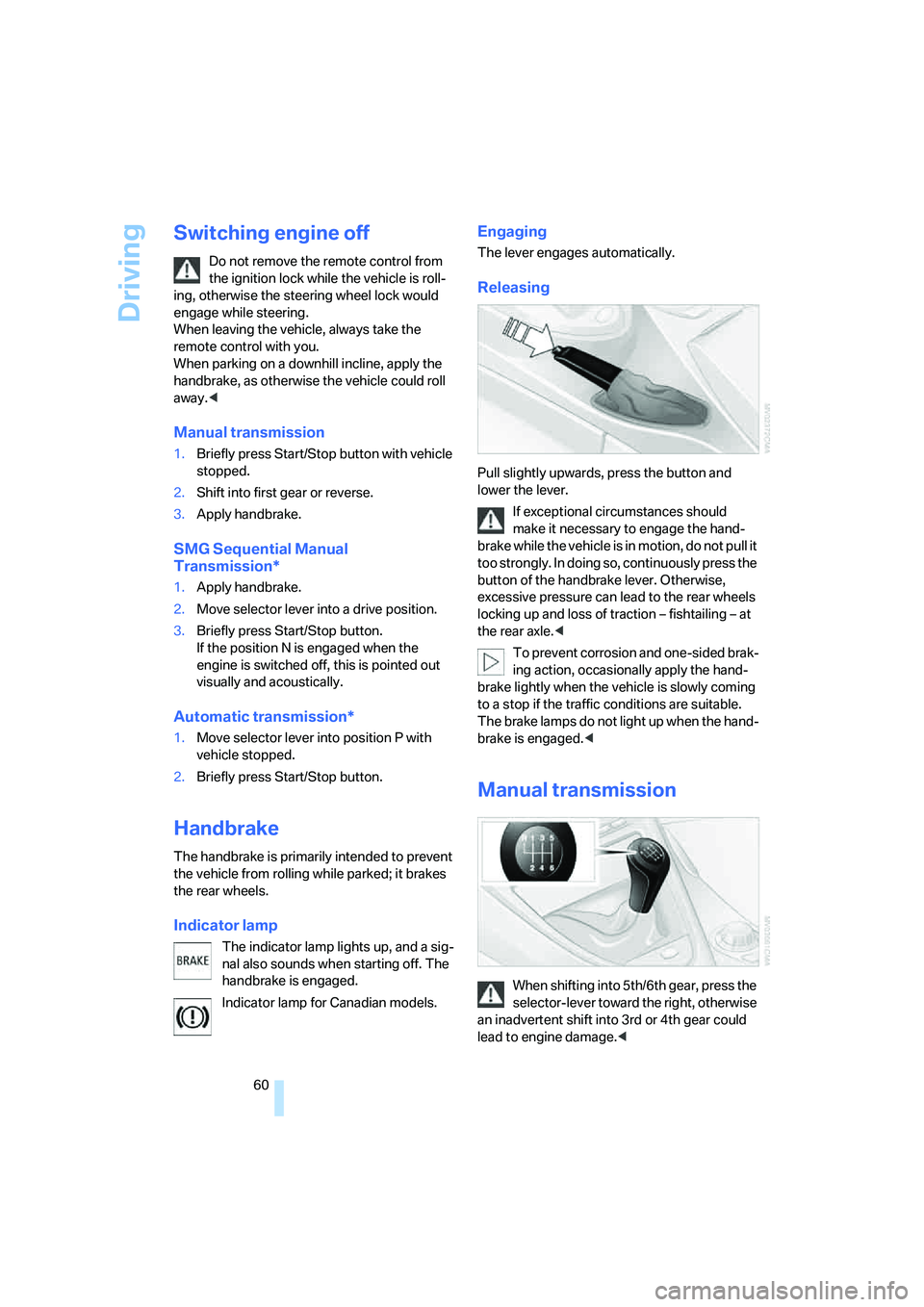
Pull slightly upwards, press the button and
lower the lever.
If exceptional circumstances should
make it necessary to engage the hand-
brake while the vehicle is in motion, do not pull it
too strongly. In doing so, continuously press the
button of the handbrake lever. Otherwise,
excessive pressure can lead to the rear wheels
locking up and loss of traction – fishtailing – at
the rear axle.<
To prevent corrosion and one-sided brak-
ing action, occasionally apply the hand-
brake lightly when the vehicle is slowly coming
to a stop if the traffic conditions are suitable.
The brake lamps do not light up when the hand-
brake is engaged.<
Manual transmission
When shifting into 5th/6th gear, press the
selector-lever toward the right, otherwise
an inadvertent shift into 3rd or 4th gear could
lead to engine damage.<
Page 63 of 242
Driving
62 In the following situations, SMG thinks for you:
>Upshifts and downshifts are executed only
when they will result in a plausible combina-
tion of engine and vehicle speed; thus, for
example, the system will not execute a
downshift that would cause the engine to
overrev.
>When the vehicle is stationary, the trans-
mission automatically downshifts into first
gear.
>Shortly before dropping below a gear-
dependent minimum speed, the transmis-
sion downshifts automatically even without
your intervention.
D Drive mode
In the Drive mode, all forward gears are shifted
automatically.
To switch from Sequential to Drive mode:
briefly press the selector-lever to the right
toward D.
Kick-down: for rapid acceleration, e.g. passing,
press the accelerator pedal as far down as it will
go. You achieve maximum acceleration.
To switch back to the Sequential mode: press
selector-lever to the right again toward D or
shift using the shifting paddles or the selector-
lever.
Start off quickly on slopes. Do not hold
the vehicle on a hill by applying the throt-
tle, but engage the handbrake instead. Other-
wise, overheating can occur in the region of the
transmission.<
Gear changes
Using selector-lever
>To upshift, pull the selector-lever back.
>To downshift, push the selector-lever for-
ward.
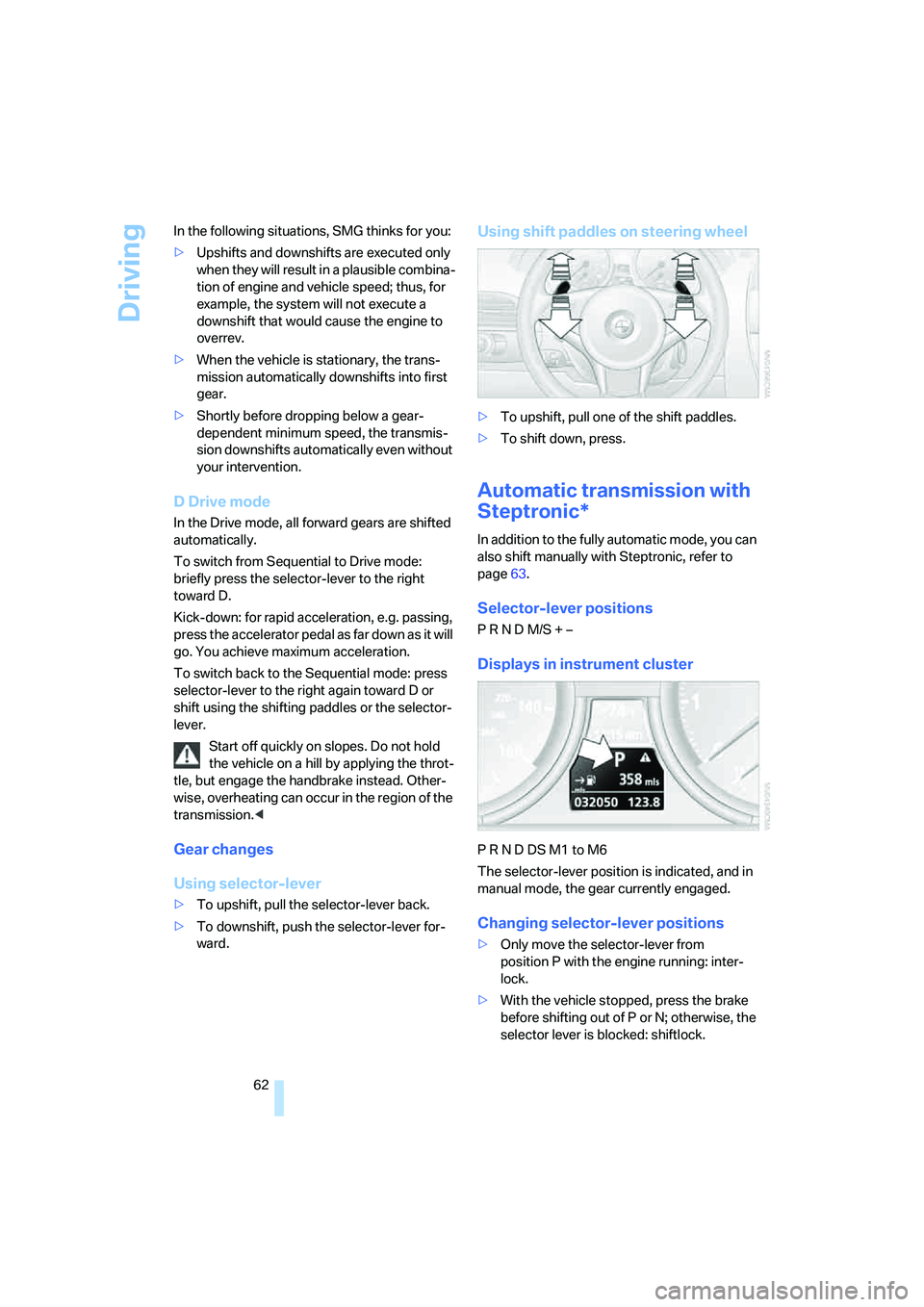
Using shift paddles on steering wheel
>To upshift, pull one of the shift paddles.
>To shift down, press.
Automatic transmission with
Steptronic*
In addition to the fully automatic mode, you can
also shift manually with Steptronic, refer to
page63.
Selector-lever positions
P R N D M/S + –
Displays in instrument cluster
P R N D DS M1 to M6
The selector-lever position is indicated, and in
manual mode, the gear currently engaged.
Changing selector-lever positions
>Only move the selector-lever from
position P with the engine running: inter-
lock.
>With the vehicle stopped, press the brake
before shifting out of P or N; otherwise, the
selector lever is blocked: shiftlock.
Page 120 of 242
Driving tips
119Reference
At a glance
Controls
Communications
Navigation
Entertainment
Mobility
Mobile communications devices in
vehicle
BMW advises against using mobile com-
munications devices, e.g. mobile phones,
inside the vehicle without a direct connection to
an external antenna. Otherwise, the vehicle
electronics and mobile communications device
can interfere with each other. In addition, there
is no assurance that the radiation emitted dur-
ing transmission will be conveyed out of the
vehicle interior.<
Hydroplaning
When driving on wet or slushy roads,
reduce road speed. If you do not, a wedge
of water can form between tires and road sur-
face. This phenomenon is referred to as hydro-
planing, and is characterized by a partial or
complete loss of contact between the tires and
the road surface, ultimately undermining your
ability to steer and brake the vehicle.<
The risk of hydroplaning increases as the tread
depth of the tires decreases, also refer to Mini-
mum tire tread on page191.
Driving through water
Do not drive through water on the road if it
is deeper than 1 ft/30 cm, and then only at
walking speed at the most. Otherwise, the vehi-
cle's engine, the electrical systems and the
transmission may be damaged.<
Using handbrake on inclines
On inclines, do not hold the vehicle with
the clutch; use the handbrake. Otherwise
greater clutch wear will result.<
SMG Sequential Manual Transmission
Start off quickly on slopes. Do not hold
the vehicle on a hill by applying the throt-
tle, but engage the handbrake instead. Other-
wise overheating can occur in the transmission
region.<
Starting assistant
The starting assistant enables you to start off
conveniently on slopes. The parking brake is
not required for this purpose.
1.Hold the vehicle with the footbrake.
2.Release the footbrake and immediately
drive off quickly.
The starting assistant holds the vehicle
for approx. 2 seconds after releasing the
footbrake. Depending on the load, the vehicle
m a y a l s o ro l l b a ck s li g h t ly d u ri n g t h is t im e . A f t er
releasing the footbrake, immediately start
quickly; otherwise, the starting assistant no
longer holds the vehicle after approx. 2 seconds
and it begins to roll back.<
Braking safely
Your BMW is equipped with ABS as a standard
feature. In situations that require it, it is best to
brake with full force. Since the vehicle maintains
steering responsiveness, you can still avoid
possible obstacles with a minimum of steering
effort.
Pulsation at the brake pedal combines with
sounds from the hydraulic circuits to indicate to
the driver that ABS is in its active mode.
Do not drive with your foot resting on the
brake pedal. Even light but consistent
pedal pressure can lead to high temperatures,
brake wear and possibly even brake failure.<
Driving in wet conditions
When driving on wet roads or in heavy rain, it is
a good idea to apply light pressure to the brake
pedal every few miles. Monitor traffic conditions
to ensure that this maneuver does not endan-
ger other road users. The heat generated in this
process helps dry the pads and rotors to ensure
that full braking efficiency will then be available
when you need it.
Hills
To prevent overheating and thus reduced
efficiency of the brake system, downshift
to a gear in which only minimal brake applica-
tions are needed when descending long or
Page 198 of 242
Mobility
197Reference
At a glance
Controls
Driving tips
Communications
Navigation
Entertainment
You can also call BMW of North America at
1-800-831-1117 or visit the website at
www.bmwusa.com to obtain this information.
Do not use oil additives; under some cir-
cumstances, they can harm your
engine.<
Viscosity grades
The viscosity is a measure of the thickness of
the oil and is specified in SAE grades.
The choice of the right SAE grade is based on
the climatic conditions in the region in which
you normally drive your BMW.
Approved oils belong to the SAE grades
5W-40 and 5W-30.<
These oils can be used for driving at all outside
temperatures.
Coolant
Do not open the cooling system when the
engine is hot. Escaping coolant can cause
burns.<
Coolant consists of water and coolant additive.
Not all commercially available additives are suit-
able for your BMW. Ask your BMW center for
suitable additives.
Only use suitable additives, otherwise
engine damage may result. The additives
present a health hazard.<
Always observe all applicable environ-
mental laws and regulations when dis-
posing of used coolant additives.<
Checking coolant level
1.The engine must be at ambient tempera-
ture.
2.Turn the cap of the expansion tank counter-
clockwise to allow any accumulated pres-
sure to escape, then continue turning to
open.
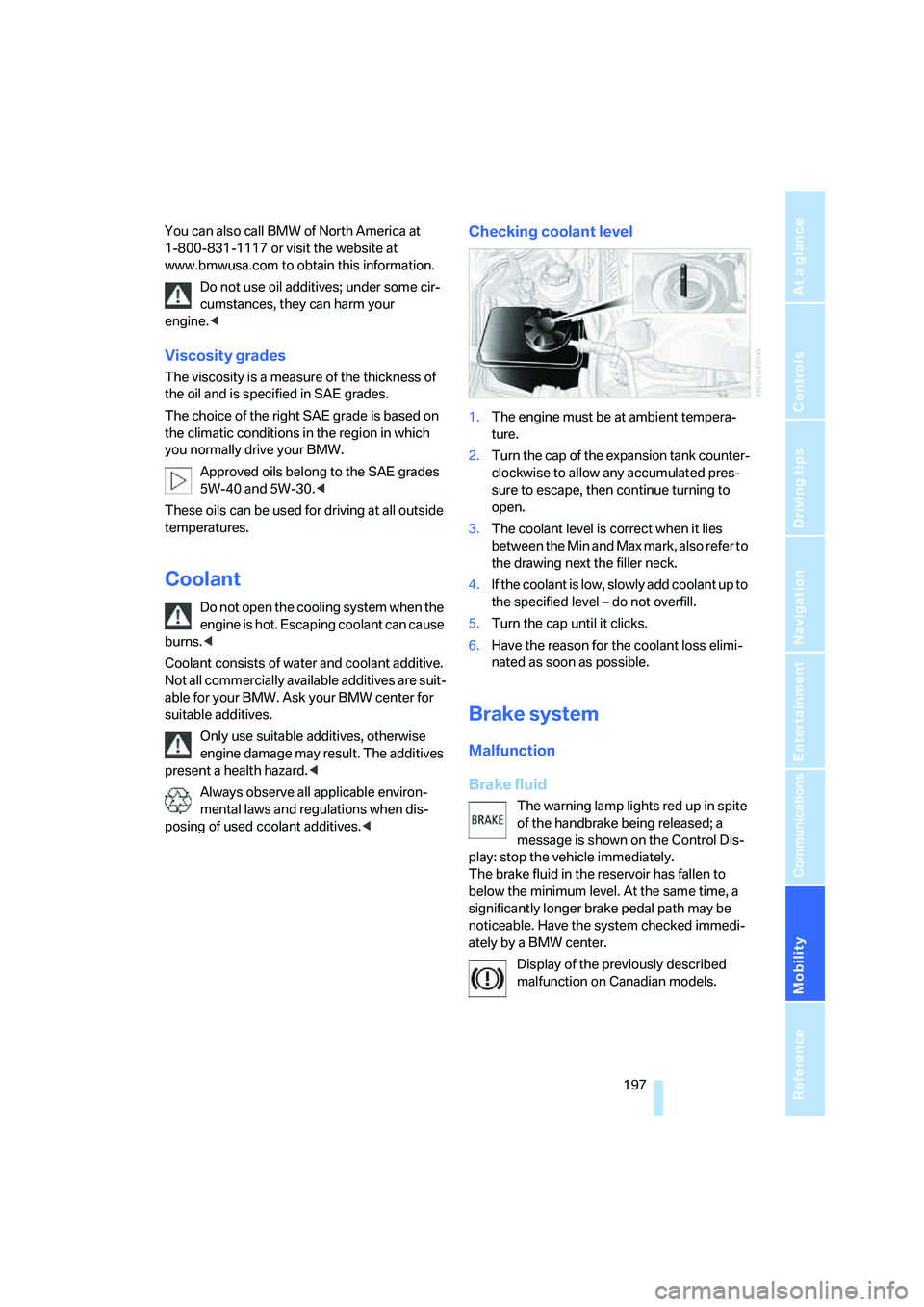
3.The coolant level is correct when it lies
between the Min and Max mark, also refer to
the drawing next the filler neck.
4.If the coolant is low, slowly add coolant up to
the specified level – do not overfill.
5.Turn the cap until it clicks.
6.Have the reason for the coolant loss elimi-
nated as soon as possible.
Brake system
Malfunction
Brake fluid
The warning lamp lights red up in spite
of the handbrake being released; a
message is shown on the Control Dis-
play: stop the vehicle immediately.
The brake fluid in the reservoir has fallen to
below the minimum level. At the same time, a
significantly longer brake pedal path may be
noticeable. Have the system checked immedi-
ately by a BMW center.
Display of the previously described
malfunction on Canadian models.
Page 199 of 242
Under the hood
198 When you continue driving, an increased
brake pedal path can be necessary, and
significantly longer braking distances may be
required. Please adapt your driving style
accordingly.<
Brake pads
The warning lamp lights red up in spite
of the handbrake being released; a
message is shown on the Control Dis-
play:
The brake pads have reached their minimum
pad thickness. Have the brake pads replaced as
soon as possible.
Display of the previously described
malfunction on Canadian models.
For your own safety: use only brake pads
that BMW has approved for your particu-
lar vehicle model. As BMW cannot assess the
suitability of other brake pads for use on your
vehicle, BMW is unable to assume continued
responsibility for the vehicle's operating safety
if non-approved pads are installed.<
Page 225 of 242
Everything from A to Z
224 Brake pads198
– breaking-in118
Brakes
– ABS Antilock Brake
System86
– brake fluid197
– brake force display92
– brake pads198
– breaking-in118
– CBC Cornering Brake
Control86
– handbrake60
Brake system118
– brake fluid level197
– brake pads118,198
– brake rotors120
– breaking-in118
– warning lamp13,197
Brake wear warning
– brake pads198
– warning lamp198
Braking
– electronic brake-force
distribution86
– refer to Braking safely119
Braking safely119
Breakdown assistance181
Breakdown services, refer to
Roadside Assistance207
Breaking-in118
Breaking-in the clutch118
Breaking-in the
differential118
"Brightness"83,96
– with BMW Night Vision99
Brightness of Control
Display83
Button for starting engine58
Buttons on steering wheel11
Bypassing route sections140
C
California Proposition 65
Warning6
"Call"172
Call
– accepting170
– displaying accepted172
– ending171
– in absence172
– starting171
Calling
– from phone book171
– from Top 8 list172
– redialing172
Capacity of luggage
compartment217
Car care, refer to the Caring
for your vehicle brochure
Car-care products, refer to the
Caring for your vehicle
brochure
"Car Data"76
Care200
– refer to the Caring for your
vehicle brochure
Cargo loading
– securing cargo121
– stowing cargo121
– vehicle120
Caring for artificial leather,
refer to the Caring for your
vehicle brochure
Caring for leather, refer to the
Caring for your vehicle
brochure
Caring for light-alloy wheels,
refer to the Caring for your
vehicle brochure
Caring for plastic, refer to the
Caring for your vehicle
brochure
Caring for the carpet, refer to
the Caring for your vehicle
brochure
Caring for the vehicle finish,
refer to the Caring for your
vehicle brochureCar key, refer to Keys/remote
control28
Car phone166
– installation location, refer to
Center armrest112
– refer to Mobile phone166
– refer to separate operating
instructions
Car radio, refer to Radio148
Car wash120
– refer to Before driving into a
car wash120
– refer to the Caring for your
vehicle brochure
– with comfort access38
Catalytic converter, refer to
Hot exhaust system118
"Categories"155
CBC Cornering Brake
Control86
CBS Condition Based
Service199
"CD"144,157
CD changer157
– controls144
– fast forward/reverse161
– installation location
161
– playing a track159
– random play sequence160
– repeating a track160
– selecting a CD157
– selecting a track158
– switching on/off144
– tone control145
– volume145
CD player157
– controls144
– fast forward/reverse161
– playing a track159
– random play sequence160
– repeating a track160
– selecting a track158
– switching on/off144
– tone control145
– volume145
Center armrest, adjusting
height112
Center console14
"Central locking"30
Page 229 of 242
Everything from A to Z
228
F
"Fader", refer to Tone
control146
Fader, refer to Tone
control146
Failure messages, refer to
Check Control79
False alarms, refer to Avoiding
unintentional alarms36
Fastening safety belts, refer to
Safety belts51
Fastest route for
navigation134
Fast forward
– CD changer161
– CD player161
"Fast route" for
navigation135
"Favorites" calling up with
radio151
Filling capacities217
First aid, refer to First-aid
kit207
First-aid kit207
Flashing when locking and
unlocking, refer to Setting
acknowledgment signals31
Flashlight, refer to
Rechargeable flashlight111
Flat tire
– Flat Tire Monitor88
– run-flat tires89,91,192
– Tire Pressure Monitor89
Flat Tire Monitor88
– false alarms88
– initializing system88
– limits of system88
– show chains193
– warning lamp89
"FM", reception
range144,148
FM, waveband148
Fog lamps103
– indicator lamp13,103
Folding into raised position
convertible top
compartment floor,
Convertible35Footbrake, refer to Braking
safely119
Footwell lighting, refer to
Interior lamps103
For specified oil grades, refer
to Approved engine oils196
For your own safety6
Freeway, refer to Route
criteria134
Front airbags92
Front passenger airbags
deactivating
93
"FTM"89
FTM, refer to Flat Tire
Monitor88
Fuel
– average consumption75
– display75
– fuel specifications187
– high-quality brands187
– quality187
– specifications187
– tank capacity186
Fuel display, refer to Fuel
gauge75
Fuel filler door186
– releasing in the event of
electrical malfunction186
Fuel gauge75
"Full screen" with BMW Night
Vision99
Fuses205
G
Garage-door opener, refer to
Integrated universal remote
control110
Gasoline
– refer to Average fuel
consumption75
– refer to Fuel
specifications187
– refer to Required fuel187
Gasoline display, refer to Fuel
gauge75Gear changes
– automatic transmission with
Steptronic62
– SMG Sequential Manual
Transmission62
Gear display
– automatic transmission with
Steptronic62
– SMG Sequential Manual
Transmission61
Gearshift lever
– automatic transmission with
Steptronic62
– manual transmission60
– SMG Sequential Manual
Transmission61
General driving notes118
Glass sunroof, electric with
raise function40
– comfort operation with
comfort access37
– convenience operation32
– moving manually41
– remote control31
Glove compartment111
– rechargeable flashlight111
GPS navigation, refer to
Navigation system124
Grills, refer to Ventilation107
Gross vehicle weight, refer to
Weights217
H
Handbrake60
– indicator lamp13,60
Hands-free system, refer to
Microphone14
Hazard warning flashers15
HD, refer to High Definition
Radio152
Head airbags92
Headlamp control,
automatic100
Headlamp flasher64
Page 230 of 242
Reference 229
At a glance
Controls
Driving tips
Communications
Navigation
Entertainment
Mobility
Headlamps
– care, refer to the Caring for
your vehicle brochure
– cleaning, refer to Wiper
system66
– replacing bulbs201
Head Light, refer to Adaptive
Head Light101
Head restraints
– front50
– removing50
– sitting safely47
"Head-Up Display"96
Head-Up Display95
Heated
– mirrors, refer to Automatic
functions53
– rear window106
– seats52
– steering wheel54
Heater105
Heating
– exterior mirrors53
– interior104
– rear window106
– residual heat107
– seats52
– steering wheel54
Heating with engine switched
off, refer to Residual
heat107
Heavy cargo, refer to Securing
cargo121
Height, refer to
Dimensions215
Height adjustment
– seats48
– steering wheel53
High-beam assistant102
High beams101
– headlamp flasher101
– indicator lamp13
– replacing bulbs202
High Definition Radio152
High water, refer to Driving
through water119
Hills119
"Home address" in
navigation134Homepage4
Hood194
Horn10
Hotel function33
– unlocking manually33
Hot exhaust system118
"Hour memo"83
"House number" for desti-
nation entry128
Hydraulic brake assistant,
refer to DBC Dynamic Brake
Control86
Hydroplaning119
– also refer to Minimum tread
depth191
I
IBOC, refer to High Definition
Radio152
Ice, refer to Outside temper-
ature warning74
ID3-Tag, refer to Information
about track159
iDrive16
– adjusting brightness83
– assistance window20
– changing date and time82
– changing language84
– changing menu page19
– changing settings82
– changing unit of measure
units and display form84
– controller16
– controls16
– displaying menus17
– selecting menu item19
– selecting or confirming
entry19
– start menu17
– status information20
– symbols18
Ignition58
– switched off58
– switched on58
Ignition key, refer to Keys/
remote control28
Ignition key position 1, refer to
Radio readiness58Ignition key position 2, refer to
Ignition on58
Ignition lock58
– starting engine with comfort
access37
Indicator/warning lamps
– active steering92
– airbags94
– DSC13,87
– DTC13,87
– Flat Tire Monitor89
– fog lamps13,103
– handbrake13,60
– safety belt warning52
– TPM Tire Pressure
Monitor91
Indicator and warning lamps,
overview13
Individually programmable
buttons on steering
wheel54
Individual settings, refer to
Personal Profile29
Inflation pressure, refer to Tire
inflation pressure188
Inflation pressure monitoring
– refer to Flat Tire Monitor88
– refer to Tire Pressure
Monitor89
Information
– on another location130
– on current position130
– on destination location130
"Information" for
navigation130
"Information on
destination"132
Initializing
– Flat Tire Monitor88
– radio, refer to Storing
stations150
– refer to Power failure204
– seat, mirror and steering
wheel memory49
– time and date82
"Input map"130
Installation location
– CD changer161
– navigation drive124