bulb BMW M4 2016 Owners Manual
[x] Cancel search | Manufacturer: BMW, Model Year: 2016, Model line: M4, Model: BMW M4 2016Pages: 228, PDF Size: 4.88 MB
Page 193 of 228
Replacing partsVehicle equipmentThis chapter describes all standard, national
and special equipment provided in the model
series. Equipment not available in the vehicle is
therefore also described, for example the se‐
lected special equipment or national version.
This also applies to safety-relevant functions
and systems. Comply with the relevant na‐
tional regulations when using the correspond‐
ing functions and systems.
On-board tool kit
The on-board toolkit is located in a compart‐
ment on the right in the boot. Open the cover.
Replacing the wiper blades Note ATTENTION
The windscreen can be damaged if the
wiper arm drops onto the windscreen without
wiper blades fitted. Danger of damage to prop‐
erty. Hold the wiper arm firmly when changing
the wiper blades and do not put the wipers into
contact with the windscreen unless wiper
blades are fitted.◀
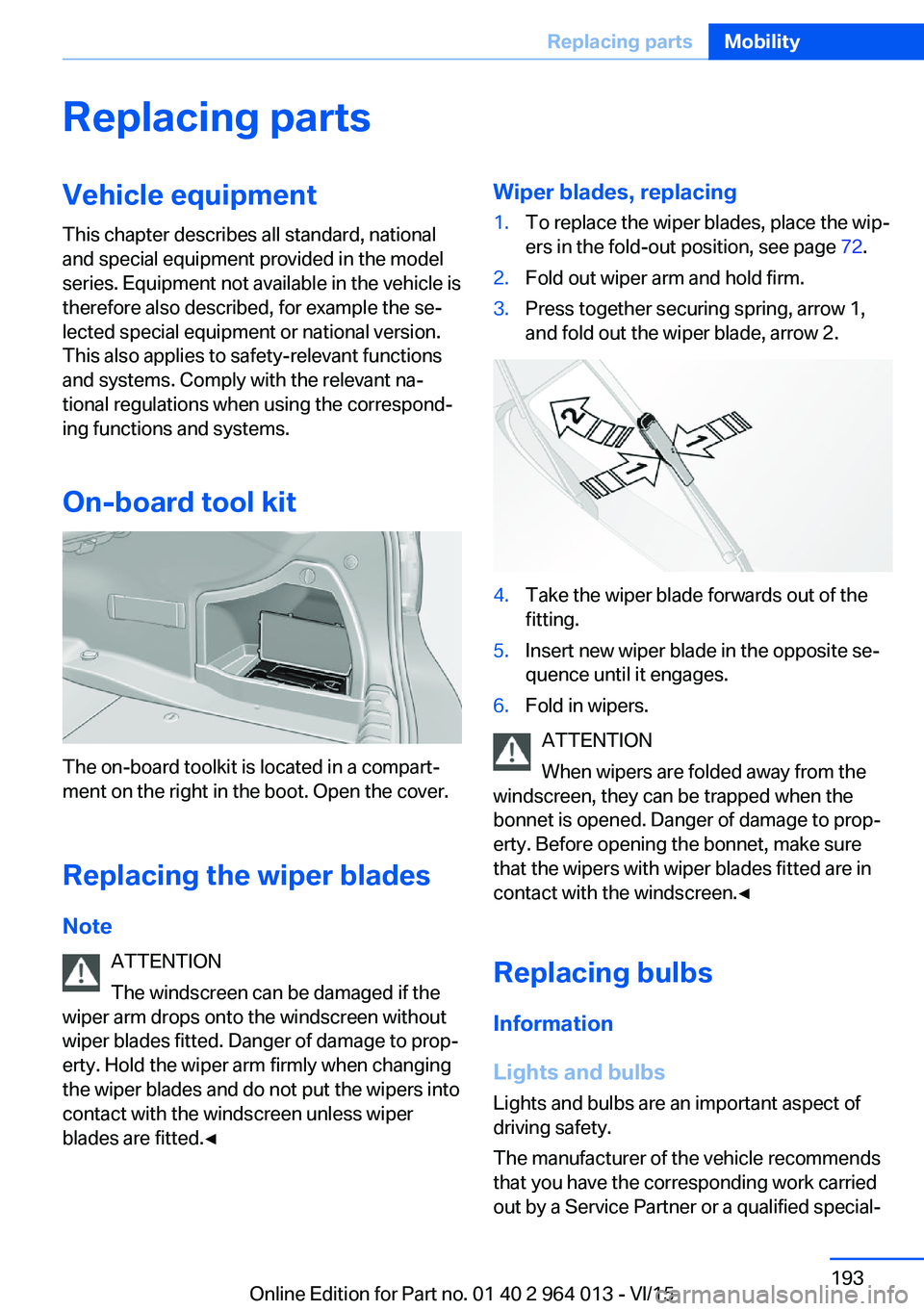
Wiper blades, replacing1.To replace the wiper blades, place the wip‐
ers in the fold-out position, see page 72.2.Fold out wiper arm and hold firm.3.Press together securing spring, arrow 1,
and fold out the wiper blade, arrow 2.4.Take the wiper blade forwards out of the
fitting.5.Insert new wiper blade in the opposite se‐
quence until it engages.6.Fold in wipers.
ATTENTION
When wipers are folded away from the
windscreen, they can be trapped when the
bonnet is opened. Danger of damage to prop‐
erty. Before opening the bonnet, make sure
that the wipers with wiper blades fitted are in
contact with the windscreen.◀
Replacing bulbs
Information
Lights and bulbs
Lights and bulbs are an important aspect of
driving safety.
The manufacturer of the vehicle recommends
that you have the corresponding work carried
out by a Service Partner or a qualified special‐
Seite 193Replacing partsMobility193
Online Edition for Part no. 01 40 2 964 013 - VI/15
Page 194 of 228
ist workshop, if you are not familiar with it or it
is not described here.
A box containing spare bulbs is available from
a Service Partner or a qualified specialist work‐
shop.
WARNING
Lamps can become hot during operation.
Contact with the lamps can lead to burns. Dan‐
ger of injury. Only replace lamps in cooled-
down condition.◀
WARNING
Short circuits can occur when working on
switched on lighting systems. Danger of injury
or damage to property. Switch the respective
lights off when working on the lighting system.
Observe the possibly enclosed notes of the
lamp manufacturer.◀
DANGER
High voltages can be applied to the light‐
ing system. Danger of fatal injury. Have work
on the lighting system including replacing the
lamps performed by a Service Partner or a
qualified specialist workshop.◀
ATTENTION
Dirty lamps have a reduced lifetime. Dan‐
ger of damage to property. Do not touch the
glass of new lamps with your bare hands. Use
a clean tissue, cloth or similar, or hold the bulb
by its base.◀
Light-emitting diodes, LEDs
Some equipment versions have light-emitting
diodes behind a cover as a light source.
These resemble conventional lasers and are
classified by legislation as Class 1 light-emit‐
ting diodes.
WARNING
Excessively intense brightness can irri‐
tate or harm the retina of the eye. Danger of in‐
jury. Do not look directly at the headlights orother light sources for a sustained period. Do
not remove covers from LEDs.◀
Headlight glass
During cool or humid weather, the exterior
lights can mist over. When driving with the light
switched on, the condensation disappears af‐
ter a short time. There is no need to replace
the headlight glass.
If the headlights do not demist, even when
driving with the lights switched on and increas‐ ing moisture builds up, for example water
droplets in the lights, have these checked by a
Service Partner or a qualified specialist work‐
shop.
Headlight adjustment The adjustments of the headlight can be affec‐
ted by changing lights and bulbs. Have the
headlight adjustment checked and if necessary
corrected by a Service Partner or a qualified
specialist workshop after changing lights and
lamps.
Front lights, replacing the bulbs
Xenon headlight Notes DANGER
High voltages can be applied to the light‐
ing system. Danger of fatal injury. Have work
on the lighting system including replacing the
lamps performed by a Service Partner or a
qualified specialist workshop.◀
These bulbs have a very long service life and
are highly unlikely to fail. Frequent switching
on and off shortens the service life.Seite 194MobilityReplacing parts194
Online Edition for Part no. 01 40 2 964 013 - VI/15
Page 195 of 228
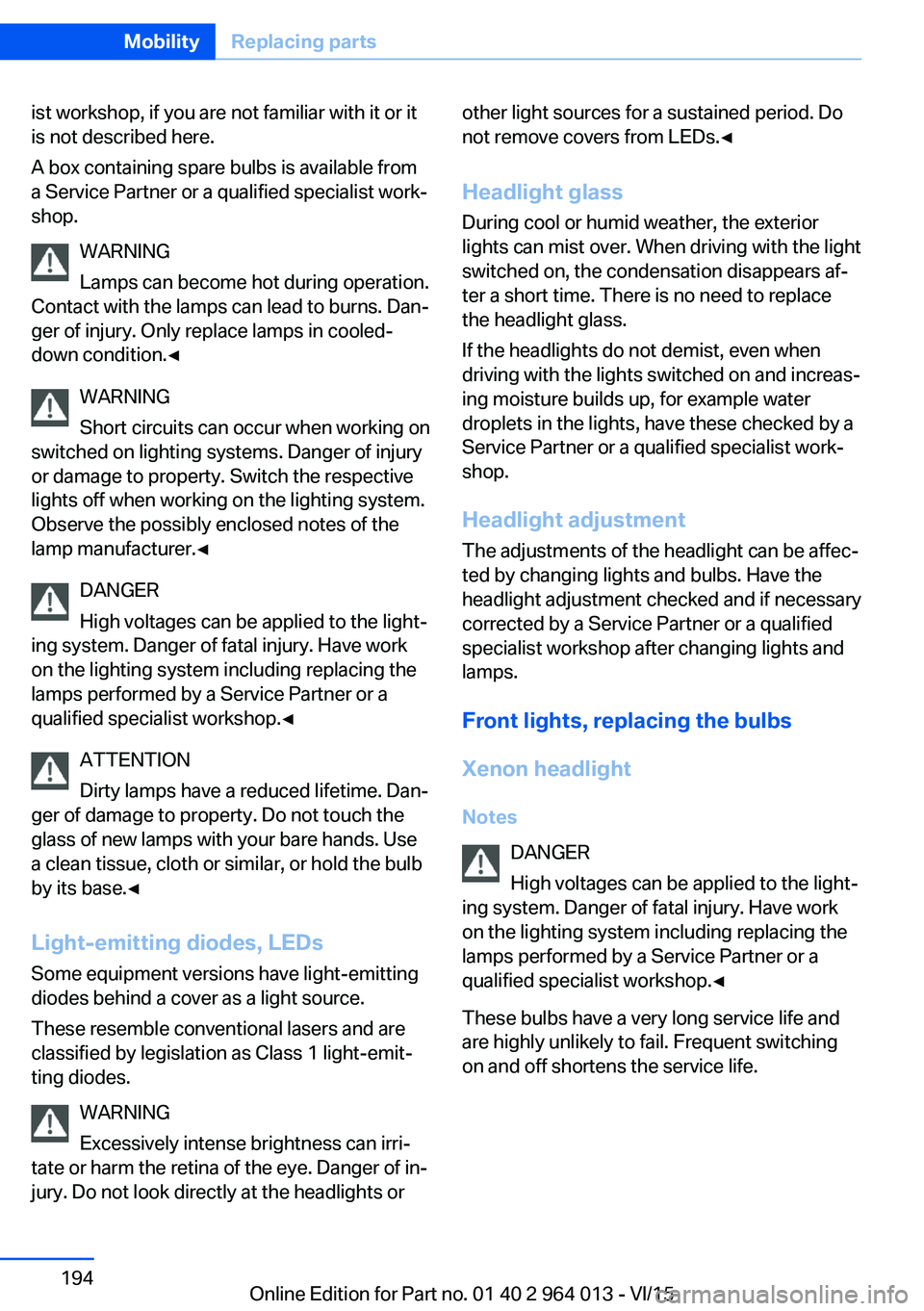
Headlights1Side lights/daytime driving lights2Low-beam headlights/high-beam head‐
lights/headlight flasher3Turn indicator
The low-beam headlights and high-beam
headlights use xenon technology.
The side lights and daytime driving lights use
LED technology.
Contact a Service Partner or a qualified spe‐
cialist workshop in the case of a defect.
Turn indicator
Follow the general information, see page 193.
21 Watts bulb, PY21W.
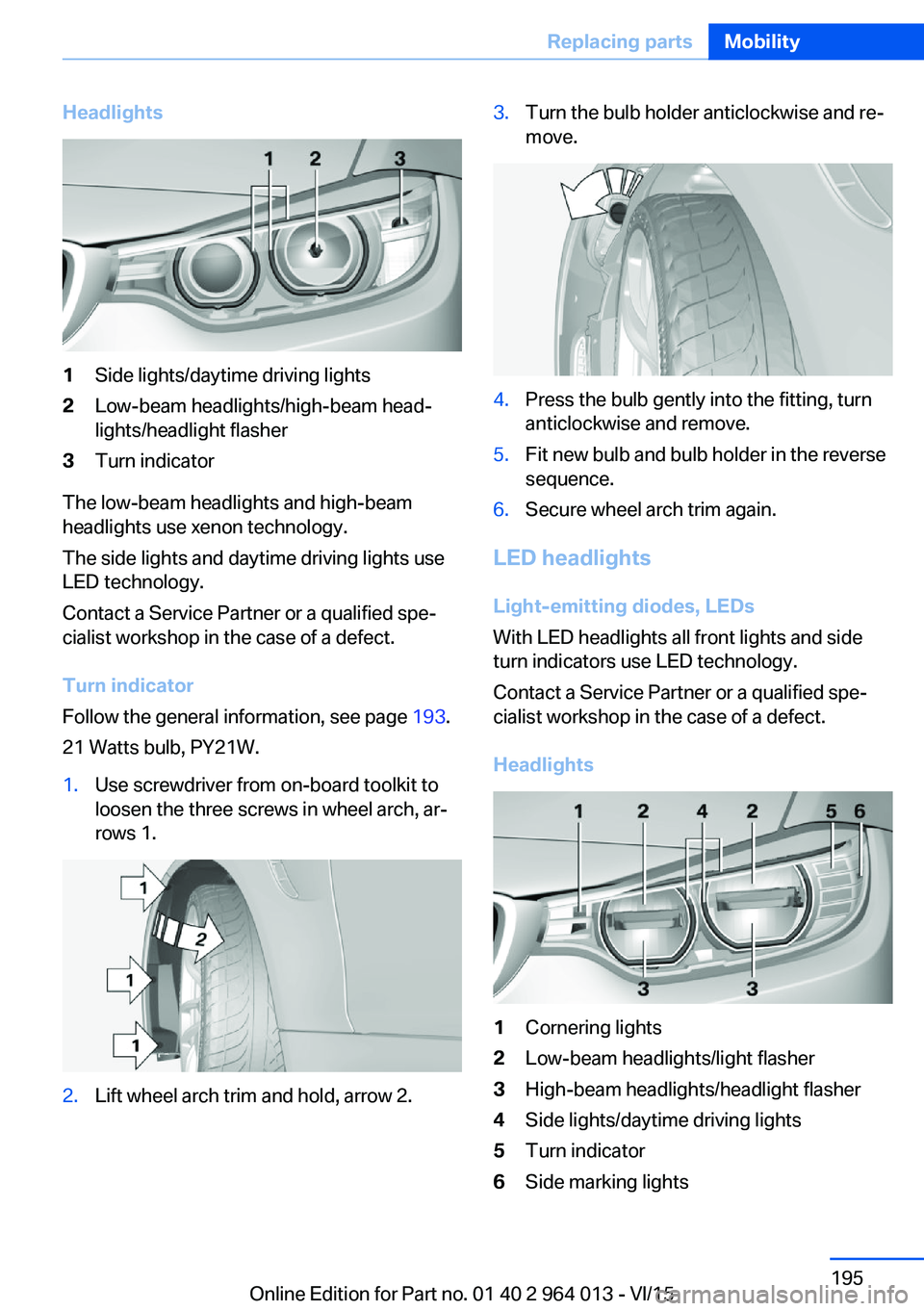
1.Use screwdriver from on-board toolkit to
loosen the three screws in wheel arch, ar‐
rows 1.2.Lift wheel arch trim and hold, arrow 2.3.Turn the bulb holder anticlockwise and re‐
move.4.Press the bulb gently into the fitting, turn
anticlockwise and remove.5.Fit new bulb and bulb holder in the reverse
sequence.6.Secure wheel arch trim again.
LED headlights
Light-emitting diodes, LEDs
With LED headlights all front lights and side
turn indicators use LED technology.
Contact a Service Partner or a qualified spe‐
cialist workshop in the case of a defect.
Headlights
1Cornering lights2Low-beam headlights/light flasher3High-beam headlights/headlight flasher4Side lights/daytime driving lights5Turn indicator6Side marking lightsSeite 195Replacing partsMobility195
Online Edition for Part no. 01 40 2 964 013 - VI/15
Page 196 of 228
In the event of a defect, contact the Service
Centre.
Turn indicator in exterior mirror Turn indicators in the exterior mirrors are de‐
signed in the LED technology. Contact a Serv‐
ice Partner or a qualified specialist workshop in
the case of a defect.
Rear lights, replacing the bulbs
Overview1Turn indicator2Reversing lights3Rear fog lights4Tail lights5Brake light
Replacing bulbs of outer rear lights
General
Follow the general information, see page 193.
Turn indicator: 21 watt bulb, P21WLL.
Brake lights: 21 Watts, H21WLL bulb.
Tail lights are designed in LED technology.
Contact a Service Partner or a qualified spe‐
cialist workshop in the case of a defect.
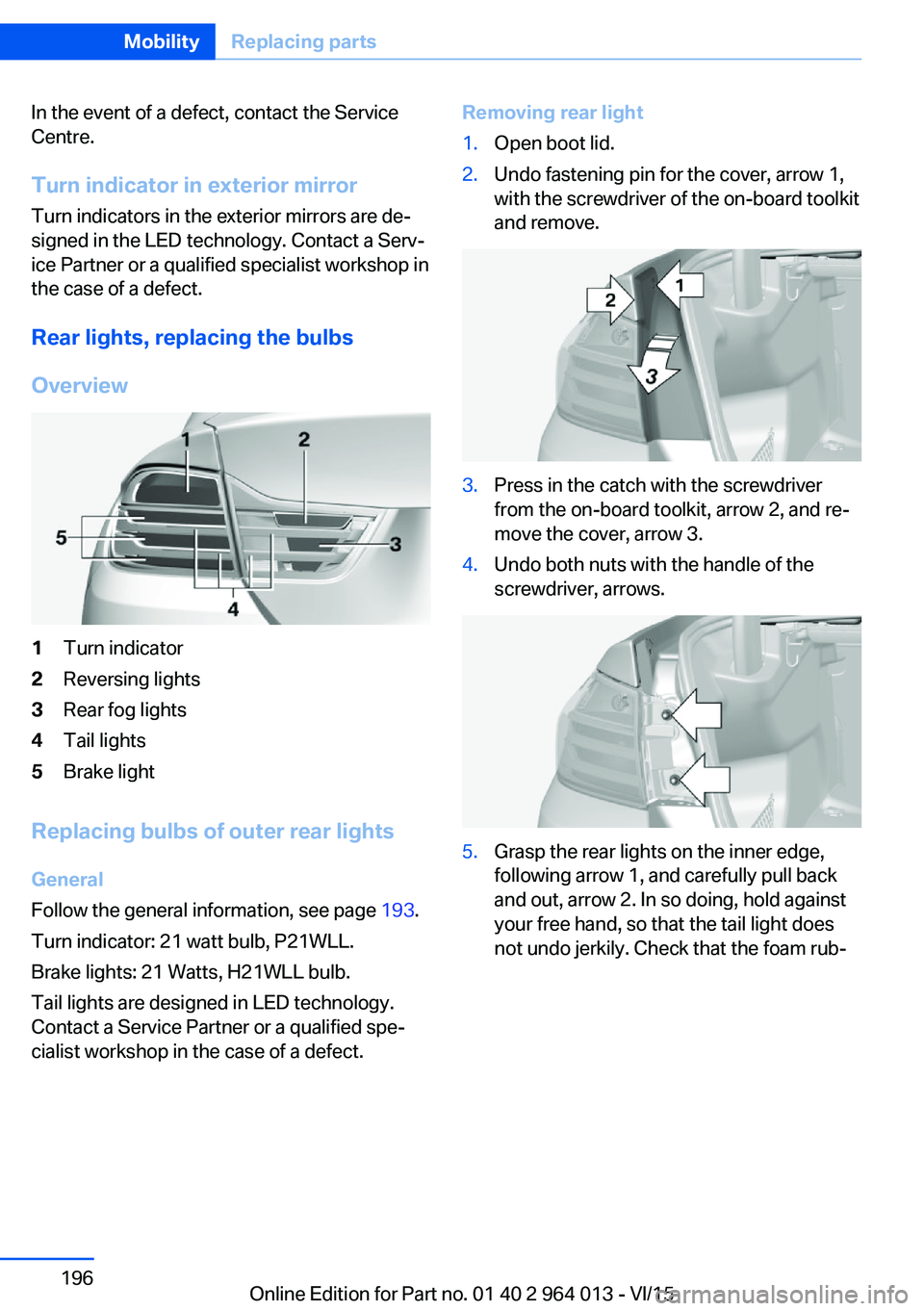
Removing rear light1.Open boot lid.2.Undo fastening pin for the cover, arrow 1,
with the screwdriver of the on-board toolkit
and remove.3.Press in the catch with the screwdriver
from the on-board toolkit, arrow 2, and re‐
move the cover, arrow 3.4.Undo both nuts with the handle of the
screwdriver, arrows.5.Grasp the rear lights on the inner edge,
following arrow 1, and carefully pull back
and out, arrow 2. In so doing, hold against
your free hand, so that the tail light does
not undo jerkily. Check that the foam rub‐Seite 196MobilityReplacing parts196
Online Edition for Part no. 01 40 2 964 013 - VI/15
Page 197 of 228
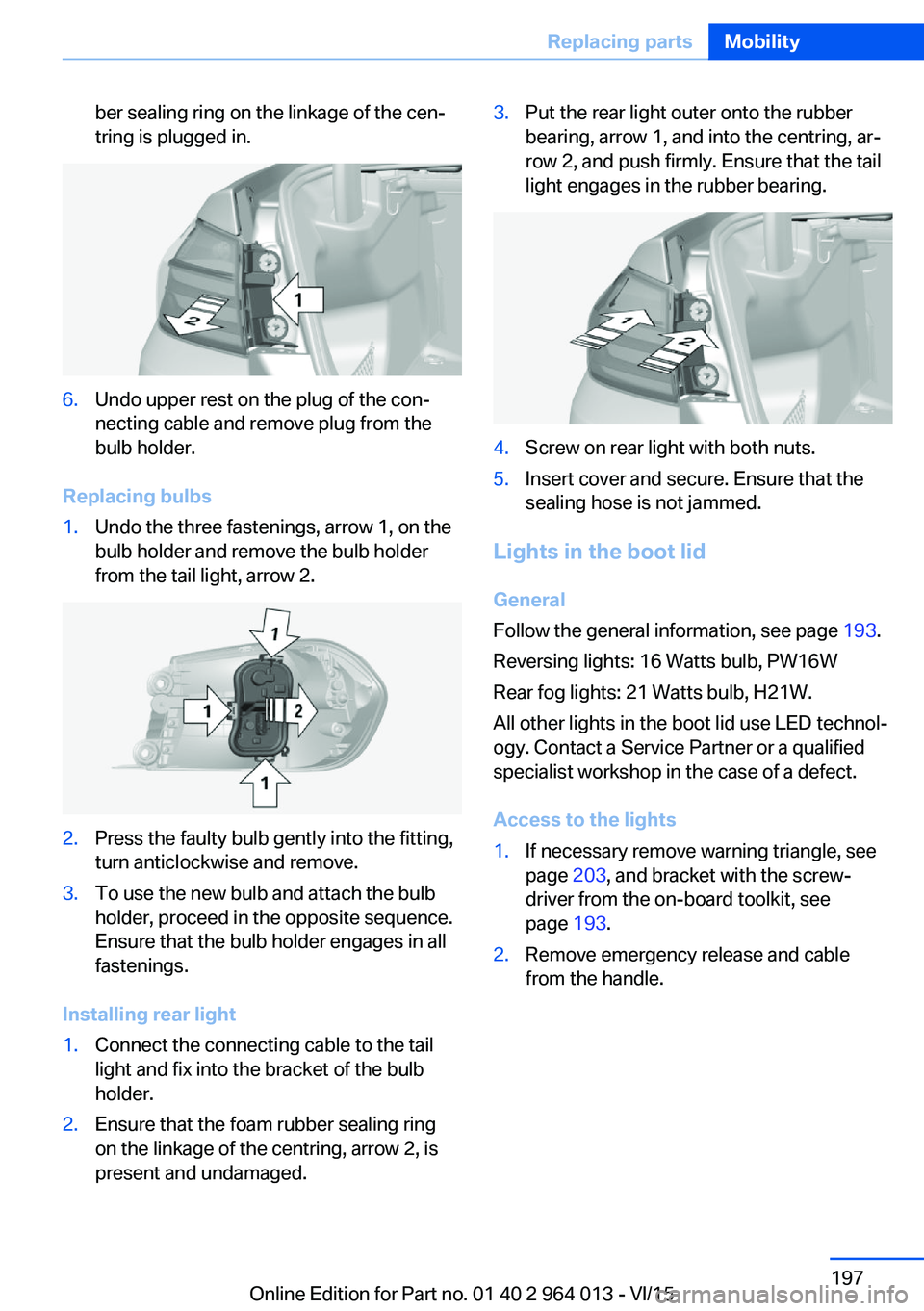
ber sealing ring on the linkage of the cen‐
tring is plugged in.6.Undo upper rest on the plug of the con‐
necting cable and remove plug from the
bulb holder.
Replacing bulbs
1.Undo the three fastenings, arrow 1, on the
bulb holder and remove the bulb holder
from the tail light, arrow 2.2.Press the faulty bulb gently into the fitting,
turn anticlockwise and remove.3.To use the new bulb and attach the bulb
holder, proceed in the opposite sequence.
Ensure that the bulb holder engages in all
fastenings.
Installing rear light
1.Connect the connecting cable to the tail
light and fix into the bracket of the bulb
holder.2.Ensure that the foam rubber sealing ring
on the linkage of the centring, arrow 2, is
present and undamaged.3.Put the rear light outer onto the rubber
bearing, arrow 1, and into the centring, ar‐
row 2, and push firmly. Ensure that the tail
light engages in the rubber bearing.4.Screw on rear light with both nuts.5.Insert cover and secure. Ensure that the
sealing hose is not jammed.
Lights in the boot lid
General
Follow the general information, see page 193.
Reversing lights: 16 Watts bulb, PW16W
Rear fog lights: 21 Watts bulb, H21W.
All other lights in the boot lid use LED technol‐
ogy. Contact a Service Partner or a qualified
specialist workshop in the case of a defect.
Access to the lights
1.If necessary remove warning triangle, see
page 203, and bracket with the screw‐
driver from the on-board toolkit, see
page 193.2.Remove emergency release and cable
from the handle.Seite 197Replacing partsMobility197
Online Edition for Part no. 01 40 2 964 013 - VI/15
Page 198 of 228
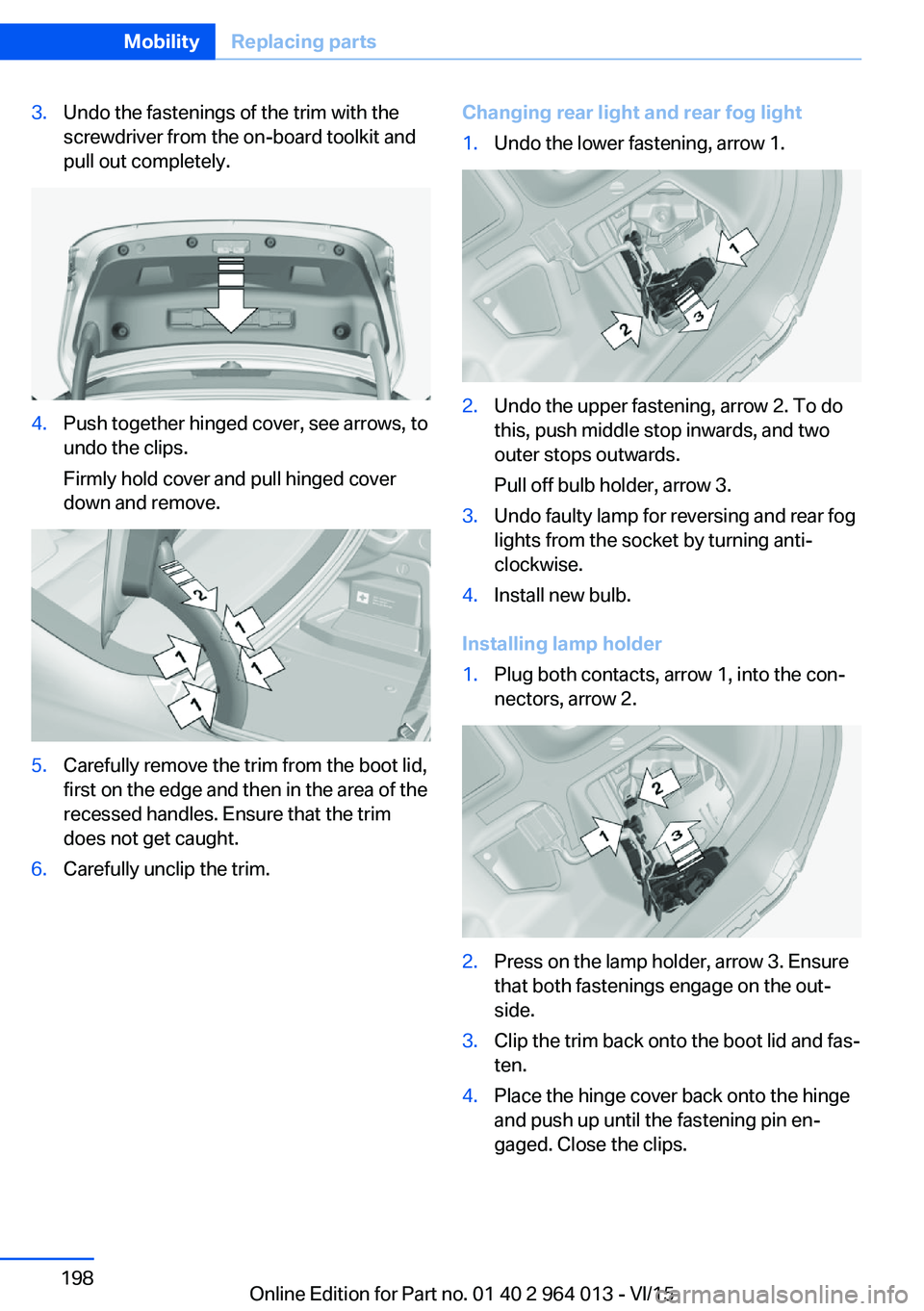
3.Undo the fastenings of the trim with the
screwdriver from the on-board toolkit and
pull out completely.4.Push together hinged cover, see arrows, to
undo the clips.
Firmly hold cover and pull hinged cover
down and remove.5.Carefully remove the trim from the boot lid,
first on the edge and then in the area of the
recessed handles. Ensure that the trim
does not get caught.6.Carefully unclip the trim.Changing rear light and rear fog light1.Undo the lower fastening, arrow 1.2.Undo the upper fastening, arrow 2. To do
this, push middle stop inwards, and two
outer stops outwards.
Pull off bulb holder, arrow 3.3.Undo faulty lamp for reversing and rear fog
lights from the socket by turning anti-
clockwise.4.Install new bulb.
Installing lamp holder
1.Plug both contacts, arrow 1, into the con‐
nectors, arrow 2.2.Press on the lamp holder, arrow 3. Ensure
that both fastenings engage on the out‐
side.3.Clip the trim back onto the boot lid and fas‐
ten.4.Place the hinge cover back onto the hinge
and push up until the fastening pin en‐
gaged. Close the clips.Seite 198MobilityReplacing parts198
Online Edition for Part no. 01 40 2 964 013 - VI/15
Page 219 of 228
Breakdown, wheelchange 199
Brightness of the Control Dis‐ play 94
Bulb change, rear 196
Bulb change, xenon head‐ light 194
Buttons on the steering wheel 12
Button, start/stop 65
C
Camera, rear-view cam‐ era 134
Camera, Side View 136
Camera, Top View 138
Carbon ceramic brakes M 160
Car care 209
Care, displays 211
Care products 209
Care, vehicle 209
Car jack 199
Car key, see Remote con‐ trol 32
Carpet, care 211
Carrying children safely 58
Car washes 208
Catalytic converter, see Hot exhaust system 163
CBS, Condition Based Serv‐ ice 191
Central key, see Remote con‐ trol 32
Central locking system 38
Central screen, see Control Display 16
Centre armrest 154
Centre console 14
Ceramic brakes 160
Changes, technical, see Your own safety 7
Changing bulb, rear 196
Charcoal canister 146
Chassis, electronic 126 Chassis number, see Vehicle
identification number 9
Check control 80
Checking the oil level elec‐ tronically 185
Child's seats 58
Children, carrying 58
Child restraints 58
Child seat classes, ISOFIX 61
Child seat mounting 59
Child seat mountings, ISO‐ FIX 61
Chrome parts, care 210
Cigarette lighter 149
Cleaning displays 211
Clock 85
Closing/opening using door lock 37
Closing/opening with remote control 35
Coat hooks 155
Cockpit 12
Comfort Access 39
Comfort closing with the re‐ mote control 36
Comfort opening with the re‐ mote control 36
Compound brakes 160
Compressor 178
Computer, see on-board computer 90
Condensate under the vehi‐ cle 165
Condensation on win‐ dows 146
Condition Based Service, CBS 191
Confirmation signals 42
ConnectedDrive 6
ConnectedDrive services 6
Connecting electrical applian‐ ces 150
Contactless opening of boot lid 40
Control Display 16
Control display, settings 93 Controller 17
Control systems, driving sta‐ bility 123
Coolant 189
Coolant temperature 84
Cooling effect, maximum 145
Cooling function 145
Cooling system 189
Cornering light 100
Corrosion of brake discs 164
Courtesy light when unlock‐ ing 35
Courtesy light with the vehi‐ cle locked 36
Cruise Control 129
Cupholder 155
Current fuel consumption 86
D
Damage, tyres 176
Damper control 126
Data, technical 214
Date 85
Daytime driving lights 100
Deactivation, airbags 106
Defrosting, see Defrosting windows 146
Defrosting windows 146
Defrost, see Defrosting win‐ dows 146
Deleting personal data 23
Differential lock 126
Digital clock 85
Digital speed 85
Digital speedometer 85
Dimensions 214
Dimmable exterior mirrors 56
Dimming rear-view mirror 56
Dipping headlights, see High- beam assistance 100
Display in windscreen 94
Display lighting, see Instru‐ ment lighting 102
Displays, cleaning 211 Seite 219Everything from A to ZReference219
Online Edition for Part no. 01 40 2 964 013 - VI/15
Page 222 of 228
Journey computer 92
Jump-starting connection, starting assistance 204
Jump starting, see starting assistance 203
K
Key/remote control 32
Keyless Go, see Comfort Ac‐ cess 39
Key memory, see Personal Profile 33
Key switch for front passen‐ ger airbags 106
L
Labelling of recommended tyres 177
Lane boundary, warning 115
Lane change warning 117
Lane departure warning 115
Language, on the control dis‐ play 94
Lashing eyes, securing load 166
Lashing straps, securing load 166
Launch Control 77
Laying up out of use 211
Laying up, vehicle 211
Leather, care 210
LED light, replacing the bulbs 195
LEDs, light-emitting di‐ odes 194
Left-hand traffic, light set‐ ting 102
Lenses of camera, care 211
Light alloy wheels, care 210
Light-emitting diodes, LEDs 194
Lighter 149
Lighting 98 Light in the exterior mirror,
see Lane Change Warn‐
ing 117
Lights 98
Lights and light bulbs 193
Light switch 98
LIM button, see Manual Speed Limiter 119
Load 166
Loads 166
Lock, door 37
Locking/unlocking using door lock 37
Locking/unlocking with re‐ mote control 35
Locking, automatic 42
Locking settings 41
Locking via the boot lid 38
Lock, wheel studs 199
Low-beam headlights 98
Lower back support 50
Low Speed Assistant 74
Luggage rack, see Roof rack 167
Lumbar support 50
M
Maintenance 191
Maintenance require‐ ment 191
Maintenance, service require‐ ment 87
Maintenance System BMW 191
Malfunction displays, see Check control 80
Manual air distribution 146
Manual air flow 146
Manual gearbox 73
Manual operation, door lock 37
Manual operation, exterior mirrors 56
Manual operation, fuel filler flap 172 Manual operation, Park Dis‐
tance Control, PDC 132
Manual operation, rear-view camera 134
Manual operation, Side View 137
Manual operation, Top View 138
Manual Speed Limiter 119
Maximum cooling effect 145
Maximum speed range 165
Maximum speed, winter tyres 177
M Carbon ceramic brakes 160
M compound brakes 160
M differential, active 126
MDM, M Dynamic Mode 125
M double clutch transmis‐ sion 74
M Drive 123
M Driver's Package, driving instructions 165
M Dynamic Mode MDM 125
Memory, seat, mirror 54
M Engine Dynamics Con‐ trol 78
Menu in the instrument clus‐ ter 90
Menus, see iDrive operating principle 18
Message of a flat tyre 108, 109
Messages, see Check con‐ trol 80
Microfilter 146
Minimum tread depth, tyres 176
Mirror, memory 54
Mirrors 55
Mobile communication equip‐ ment 163
Mobility system 178
Moisture in the headlight 194
Monitor, see Control Dis‐ play 16 Seite 222ReferenceEverything from A to Z222
Online Edition for Part no. 01 40 2 964 013 - VI/15
Page 224 of 228
Replacement fuse 200
Replacement of parts 193
Replacement of wheels/ tyres 177
Replacing bulbs 193
Replacing bulbs, front 194
Replacing bulbs, LED head‐ lights 195
Replacing parts 193
Replacing the battery, vehicle battery 199
Replacing the battery, vehicle remote control 33
Replacing wiper blades 193
RES button, see Cruise Con‐ trol 129
Reserve warning, see Range 85
Reset, Tyre Pressure Monitor TPM 107
Restraint systems for chil‐ dren 58
Retreaded tyres 177
Reuse 192
Reversing light 196
Revolution counter 84
Right-hand traffic, light set‐ ting 102
Rim cleaner 210
Roller sunblinds 45
RON petrol grade 174
Roof load 215
Roof rack 167
Rope for tow-starting/ towing 206
RPA runflat indicator 109
Rubber parts, care 210
Runflat indicator RPA 109
Running in 162
Running in brake discs 162
Running in brake pads 162
S
Safe seated position 48 Safety package, see Active
Protection 120
Safety systems, airbags 104
Saving fuel 168
Saving settings for seat, mir‐ ror 54
Screen, see Control Dis‐ play 16
Screwdriver, see On-board toolkit 193
Screw thread, see Thread for towing eye 207
Sealing compound 178
Seat and mirror memory 54
Seat belt reminder for driver's and front passenger's
seat 53
Seat belt reminder for rear seats 53
Seat belts 52
Seat belts, care 211
Seat heating, front 50
Seats 48
Securing load 166
Selection list in the instru‐ ment cluster 90
Selector lever 74
Selector lever position 74
Sensors, care 211
Sequential mode 75
Service history 88
Service requirement, dis‐ play 87
Service requirements, Condi‐ tion Based Service
CBS 191
Services, ConnectedDrive 6
Servotronic 127
Settings, locking/unlock‐ ing 41
Settings, M Drive 123
Settings on the control dis‐ play 93
Settings, seats/head re‐ straints 48
Shift Lights 96 Shift point indicator 88
Side airbags 104
Side lights 98
Side View 136
Signals on unlocking 42
Sliding/tilting roof 45
Smallest turning circle 214
Snow chains 181
Socket 150
Socket in rear passenger compartment 150
Socket, on-board diagnosis, OBD 192
SOS button 202
Sound 6
Spanner, see On-board tool‐ kit 193
Spare fuse 200
Special equipment, standard equipment 7
Special ID, remote control 33
Specified engine oil grades 187
Speed, displaying maxi‐ mum 88
Speed Limit Device, see Man‐ ual Speed Limiter 119
Speed limiter, manual 119
Speed Limit Information 88
Speed Limit Information, on- board computer 92
Speed limit, see Manual Speed Limiter 119
Speed warning 92
Split-screen 22
Split-screen view, split- screen 22
Sport displays, torque dis‐ play, power display 92
Stability control systems 123
Standard view, Head-Up Dis‐ play 95
Start/stop button 65
Start function with malfunc‐ tion 33
Starting assistance 203 Seite 224ReferenceEverything from A to Z224
Online Edition for Part no. 01 40 2 964 013 - VI/15
Page 225 of 228
Starting assistance, seeDSC 124
Starting, see Engine start 66
Starting the engine 66
Starting the engine, starting assistance 203
Status control display, tyres 107
Status information, iDrive 21
Status of the Owner's Handbook 7
Steering support 127
Steering wheel, adjusting 57
Steering wheel heating 57
Stopping the engine 67
Storage compartments 153
Storage options 153
Storage, tyres 178
Storage, vehicle 211
Suitable engine oil grades 187
Summer tyres, tread 176
Sunblinds, sun guard 45
Sun visor 149
Supplementary text mes‐ sage 83
Surround view 133
Switches, see Driving area 12
Switching off the engine 67
Switch-on times, independ‐ ent ventilation 148
Symbols 6
Symbols in the status field 21
Symbols used 6
System states of the driving dynamics 86
T
Tailgate opening 38
Tail lights 199
Tank display 84
Technical changes, see Your own safety 7
Technical data 214
Technology, BMW M 160 Telephone 6
Temperature, automatic air conditioning 145
Temperature display, outside temperature 84
Temperature, engine oil 84
Tensioning bands, securing load 166
Text message, supplemen‐ tary 83
Thiefproof wheel studs 199
Thread for towing eye 207
Through-loading system 151
Tilt alarm sensor 43
Tilting down, passenger's mirror 56
Tool 193
Topping up engine oil 186
Top View 137
Total weight 215
Total weight, permitted 215
Touchpad 19
Tourist function, see Left- hand/right-hand traffic 102
Tow eye, see Towing eye 206
Towing 204
Towing eye 206
Towing truck 205
Tow-starting 204
TPM Tyre Pressure Moni‐ tor 107
Tread, tyres 176
Trip distance recorder 84
Triple turn signal 70
Turn indicator rear, changing bulb 196
Turn indicators, operation 70
Turning circle 214
Turning circle lines, rear-view camera 135
Tyre damage 176
Tyre pressure monitoring, see RPA 109
Tyre Pressure Monitor TPM 107 Tyre pressures 175
Tyre replacement 177
Tyre sealant 178
Tyres, everything about wheels and tyres 175
Tyre tread 176
U
Units of measure 94
Unloaded weight 215
Unlocking/locking using door lock 37
Unlocking/locking with re‐ mote control 35
Unlocking, settings 41
Updates after going to press 7
Upholstery care 210
USB interface 150
V Vanity mirror 149
Vehicle battery 199
Vehicle battery, chang‐ ing 199
Vehicle equipment 7
Vehicle for tow-starting/ towing 205
Vehicle identification num‐ ber 9
Vehicle paintwork 209
Vehicle, running in 162
Ventilation 147
Ventilation, see Independent ventilation 147
VIN, see Vehicle identification number 9
Voice control system 25
W Wading 163
Warning indicators, see Check control 80 Seite 225Everything from A to ZReference225
Online Edition for Part no. 01 40 2 964 013 - VI/15