scr BMW X5 3.0Si 2010 E70 Service Manual
[x] Cancel search | Manufacturer: BMW, Model Year: 2010, Model line: X5 3.0Si, Model: BMW X5 3.0Si 2010 E70Pages: 300, PDF Size: 12.41 MB
Page 258 of 300
Replacing components
256 3.Apply gentle pressure to the bulb while
turning it to the left for removal and replace-
ment.
4.Insert the bulb socket in the liftgate and
engage it.
5.Replace the cover.
License plate lamp
5-Watt bulb, C5W
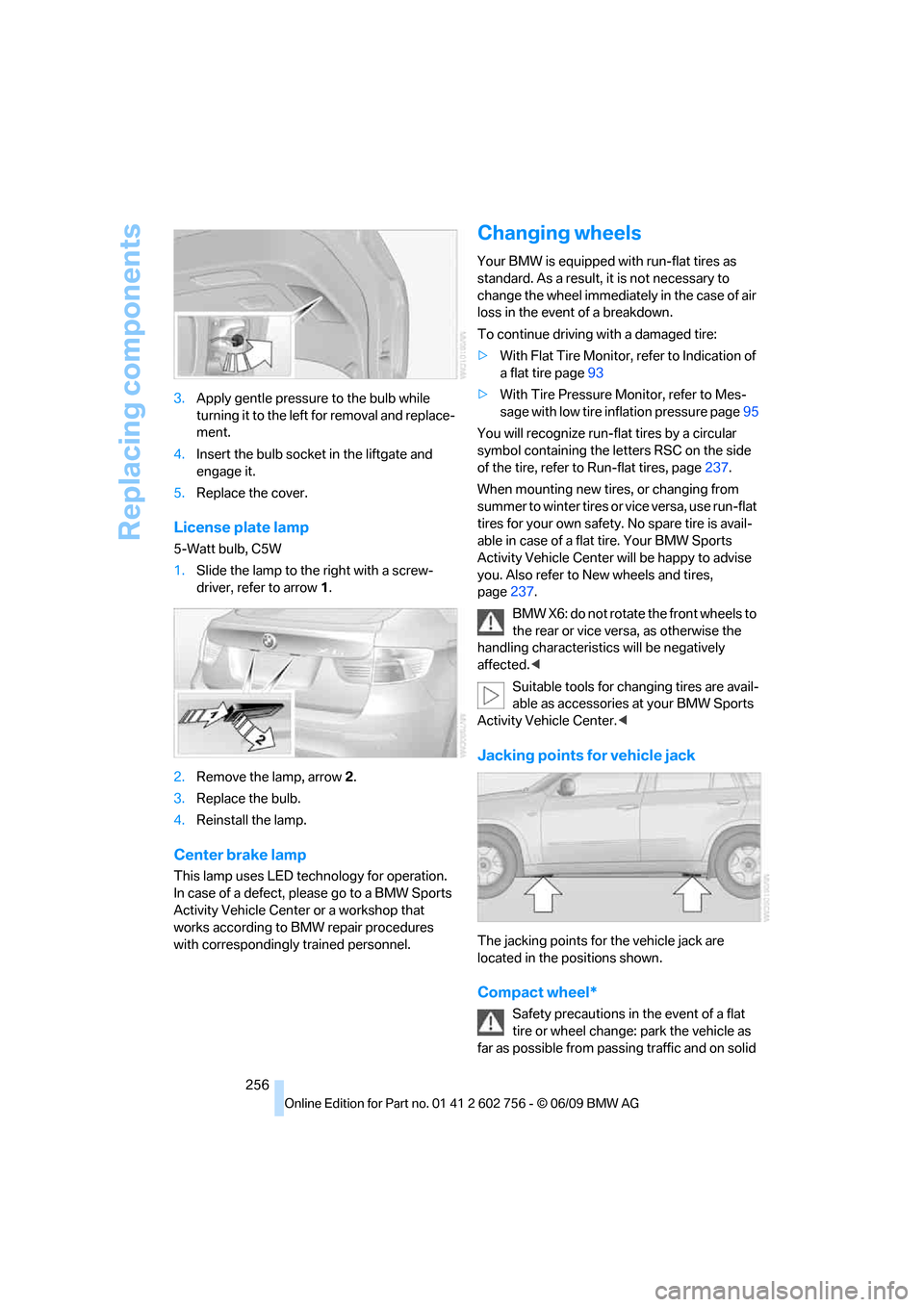
1.Slide the lamp to the right with a screw-
driver, refer to arrow1.
2.Remove the lamp, arrow2.
3.Replace the bulb.
4.Reinstall the lamp.
Center brake lamp
This lamp uses LED technology for operation.
In case of a defect, please go to a BMW Sports
Activity Vehicle Center or a workshop that
works according to BMW repair procedures
with correspondingly trained personnel.
Changing wheels
Your BMW is equipped with run-flat tires as
standard. As a result, it is not necessary to
change the wheel immediately in the case of air
loss in the event of a breakdown.
To continue driving with a damaged tire:
>With Flat Tire Monitor, refer to Indication of
a flat tire page93
>With Tire Pressure Monitor, refer to Mes-
sage with low tire inflation pressure page95
You will recognize run-flat tires by a circular
symbol containing the letters RSC on the side
of the tire, refer to Run-flat tires, page237.
When mounting new tires, or changing from
s u m m e r t o w i n t e r t i r e s o r v i c e v e r s a , u s e r u n - f l a t
tires for your own safety. No spare tire is avail-
able in case of a flat tire. Your BMW Sports
Activity Vehicle Center will be happy to advise
you. Also refer to New wheels and tires,
page237.
BMW X6: do not rotate the front wheels to
the rear or vice versa, as otherwise the
handling characteristics will be negatively
affected.<
Suitable tools for changing tires are avail-
able as accessories at your BMW Sports
Activity Vehicle Center.<
Jacking points for vehicle jack
The jacking points for the vehicle jack are
located in the positions shown.
Compact wheel*
Safety precautions in the event of a flat
tire or wheel change: park the vehicle as
far as possible from passing traffic and on solid
ba8_e70ag.book Seite 256 Freitag, 5. Juni 2009 11:42 11
Page 259 of 300
Mobility
257Reference
At a glance
Controls
Driving tips
Communications
Navigation
Entertainment
ground. Switch on the hazard warning flashers.
Set the parking brake and engage transmission
position P.
Have all vehicle occupants get out of the vehicle
and ensure that they remain outside the imme-
diate area in a safe place, such as behind a
guardrail.
If a warning triangle
* or portable hazard warning
lamp
* is required, set it up on the roadside at an
appropriate distance from the rear of the vehi-
cle. Comply with all safety guidelines and regu-
lations.
Change the wheel only on a level, firm surface
which is not slippery. The vehicle or the jack
could slip to the side if you attempt to raise the
vehicle on a soft or slippery surface such as
snow, ice, tiles, etc.
Position the jack on a firm support surface.
Do not use a wooden block or similar object as a
support base for the jack, as this would prevent
it from extending to its full support height and
reduce its load-carrying capacity.
To avoid serious or fatal injury: never lie under
the vehicle, and never start the engine while it is
supported by the jack.<
What you will need
To avoid rattling noises later on, note the posi-
tions of the tools before removing them, then
return them to their initial positions after com-
pleting work.
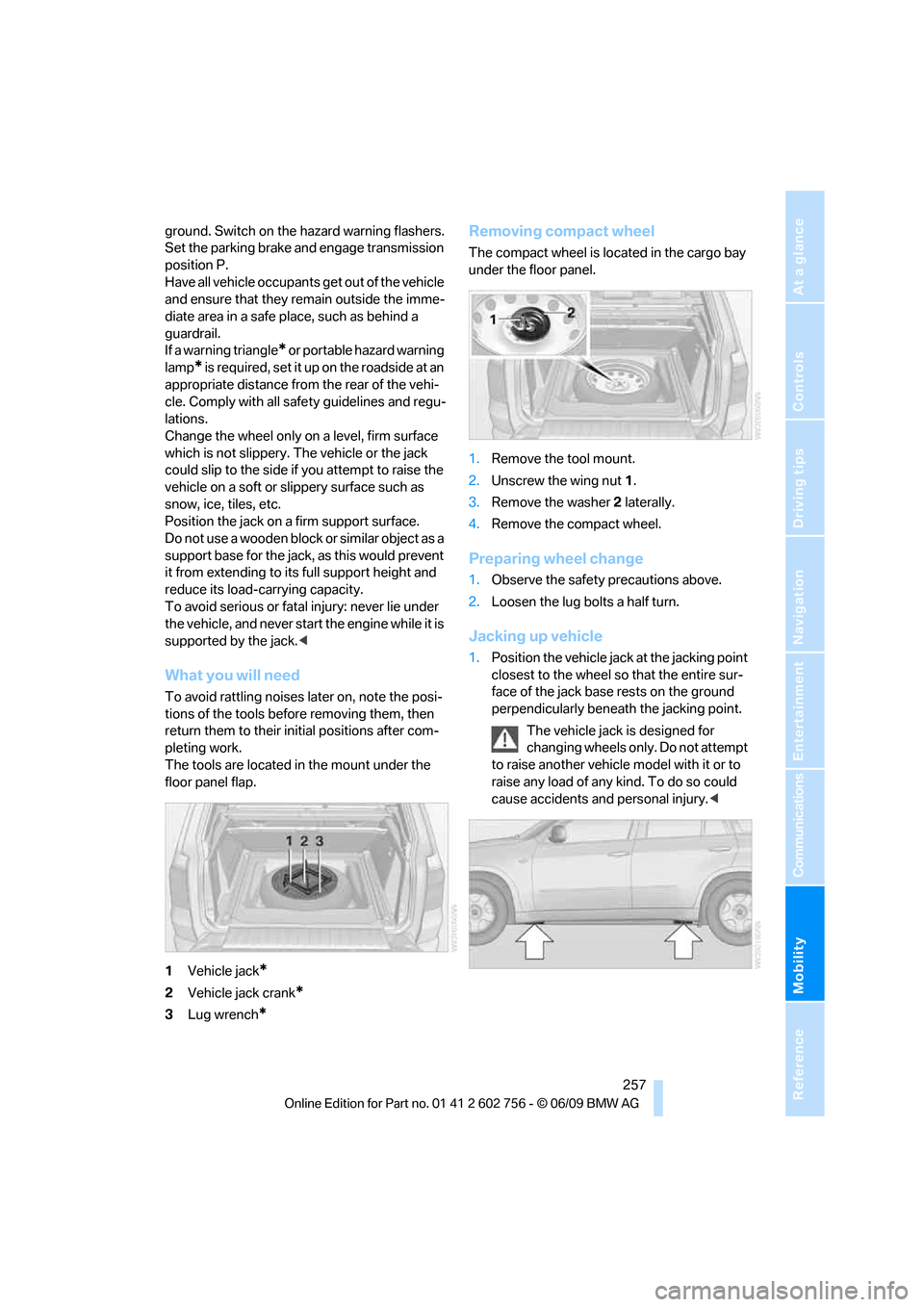
The tools are located in the mount under the
floor panel flap.
1Vehicle jack
*
2Vehicle jack crank*
3Lug wrench*
Removing compact wheel
The compact wheel is located in the cargo bay
under the floor panel.
1.Remove the tool mount.
2.Unscrew the wing nut 1.
3.Remove the washer 2 laterally.
4.Remove the compact wheel.
Preparing wheel change
1.Observe the safety precautions above.
2.Loosen the lug bolts a half turn.
Jacking up vehicle
1.Position the vehicle jack at the jacking point
closest to the wheel so that the entire sur-
face of the jack base rests on the ground
perpendicularly beneath the jacking point.
The vehicle jack is designed for
changing wheels only. Do not attempt
to raise another vehicle model with it or to
raise any load of any kind. To do so could
cause accidents and personal injury.<
ba8_e70ag.book Seite 257 Freitag, 5. Juni 2009 11:42 11
Page 260 of 300
Replacing components
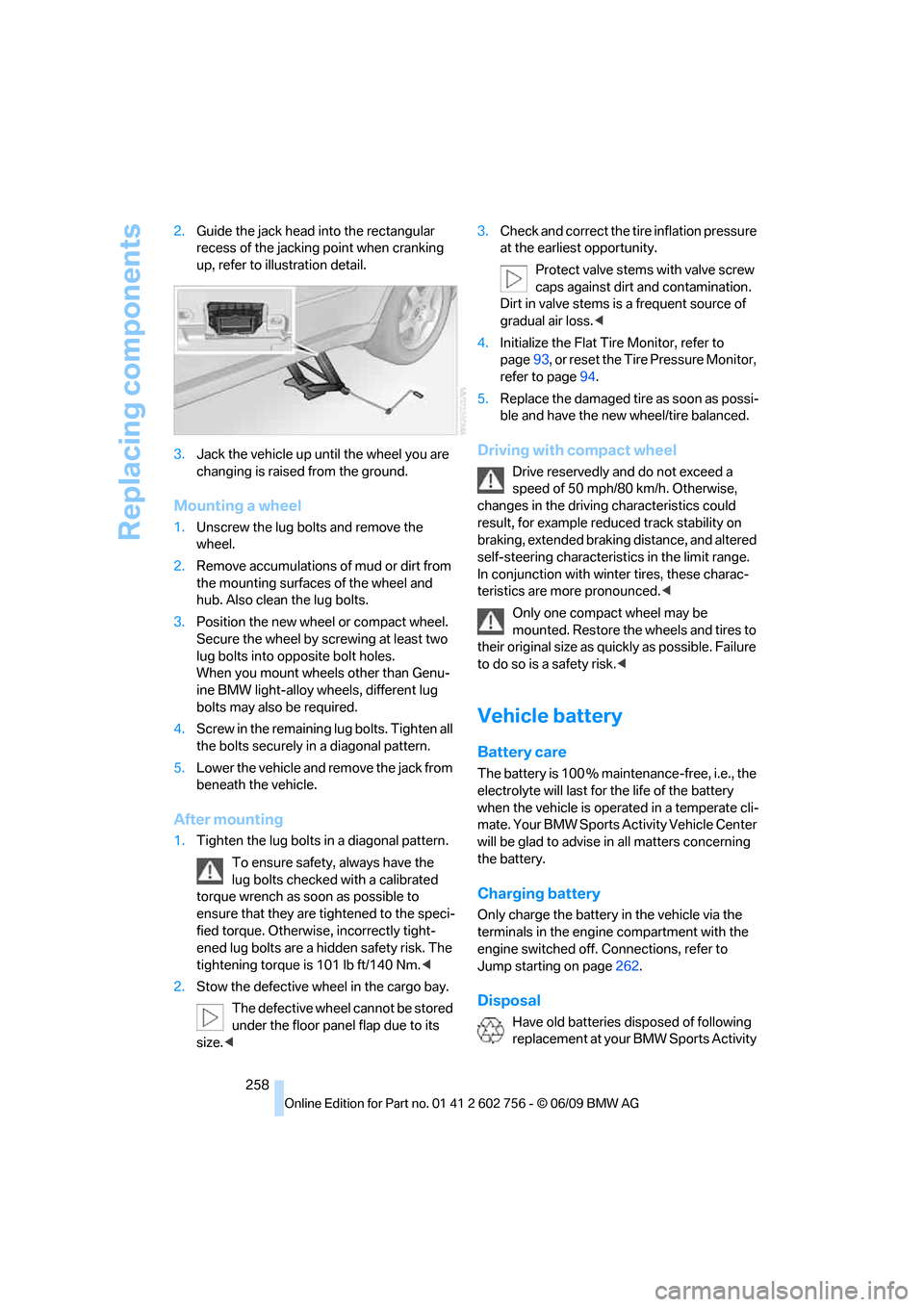
258 2.Guide the jack head into the rectangular
recess of the jacking point when cranking
up, refer to illustration detail.
3.Jack the vehicle up until the wheel you are
changing is raised from the ground.
Mounting a wheel
1.Unscrew the lug bolts and remove the
wheel.
2.Remove accumulations of mud or dirt from
the mounting surfaces of the wheel and
hub. Also clean the lug bolts.
3.Position the new wheel or compact wheel.
Secure the wheel by screwing at least two
lug bolts into opposite bolt holes.
When you mount wheels other than Genu-
ine BMW light-alloy wheels, different lug
bolts may also be required.
4.Screw in the remaining lug bolts. Tighten all
the bolts securely in a diagonal pattern.
5.Lower the vehicle and remove the jack from
beneath the vehicle.
After mounting
1.Tighten the lug bolts in a diagonal pattern.
To ensure safety, always have the
lug bolts checked with a calibrated
torque wrench as soon as possible to
ensure that they are tightened to the speci-
fied torque. Otherwise, incorrectly tight-
ened lug bolts are a hidden safety risk. The
tightening torque is 101 lb ft/140 Nm.<
2.Stow the defective wheel in the cargo bay.
The defective wheel cannot be stored
under the floor panel flap due to its
size.<3.Check and correct the tire inflation pressure
at the earliest opportunity.
Protect valve stems with valve screw
caps against dirt and contamination.
Dirt in valve stems is a frequent source of
gradual air loss.<
4.Initialize the Flat Tire Monitor, refer to
page93, or reset the Tire Pressure Monitor,
refer to page94.
5.Replace the damaged tire as soon as possi-
ble and have the new wheel/tire balanced.
Driving with compact wheel
Drive reservedly and do not exceed a
speed of 50 mph/80 km/h. Otherwise,
changes in the driving characteristics could
result, for example reduced track stability on
braking, extended braking distance, and altered
self-steering characteristics in the limit range.
In conjunction with winter tires, these charac-
teristics are more pronounced.<
Only one compact wheel may be
mounted. Restore the wheels and tires to
their original size as quickly as possible. Failure
to do so is a safety risk.<
Vehicle battery
Battery care
The battery is 100 % maintenance-free, i.e., the
electrolyte will last for the life of the battery
when the vehicle is operated in a temperate cli-
mate. Your BMW Sports Activity Vehicle Center
will be glad to advise in all matters concerning
the battery.
Charging battery
Only charge the battery in the vehicle via the
terminals in the engine compartment with the
engine switched off. Connections, refer to
Jump starting on page262.
Disposal
Have old batteries disposed of following
replacement at your BMW Sports Activity
ba8_e70ag.book Seite 258 Freitag, 5. Juni 2009 11:42 11
Page 261 of 300
Mobility
259Reference
At a glance
Controls
Driving tips
Communications
Navigation
Entertainment
Vehicle Center or bring them to a collection
point. Maintain the battery in an upright position
for transport and storage. Always restrain the
battery to prevent it from tipping over during
transport.<
Power failure
Following a temporary power failure, e.g. due to
a discharged battery, the use of some equip-
ment will be restricted, requiring its reinitializa-
tion. In the same way, individual settings are lost
and must be updated again:
>Seat, mirror and steering wheel memory
The positions must be stored again, refer to
page45.
>Time and Date
The values must be updated again, refer to
pages79, 80.
>Radio
Radio stations must be stored again, refer
to page164.
>Navigation system
You must wait until the system becomes
functional again, refer to page157.
>Glass sunroof/panorama glass sunroof
It may only be possible to raise the glass
sunroof/panorama glass sunroof The sys-
tem must be initialized, refer to page42.
>Digital compass
The system must be calibrated, refer to
page118.
>Active steering
The system automatically initializes for a
short time as you drive. During this time, the
system is deactivated, refer to page97.
>xDrive
The system automatically initializes as you
drive. During this time, indicator lamps light
up. If the lamps do not disappear during the
current trip, have the system checked.
Before removing the vehicle from stor-
age, consult your BMW Sports Activity
Vehicle Center.<
Fuses
Never attempt to repair a blown fuse and
do not replace a defective fuse with a sub-
stitute of another color or amperage rating, as
this could lead to a circuit overload, ultimately
resulting in a fire in the vehicle.<
A pair of plastic tweezers and instructions for
fuse allocation is stored with the fuses in the
cargo bay.
Spare fuses can be obtained from your BMW
Sports Activity Vehicle.
In interior
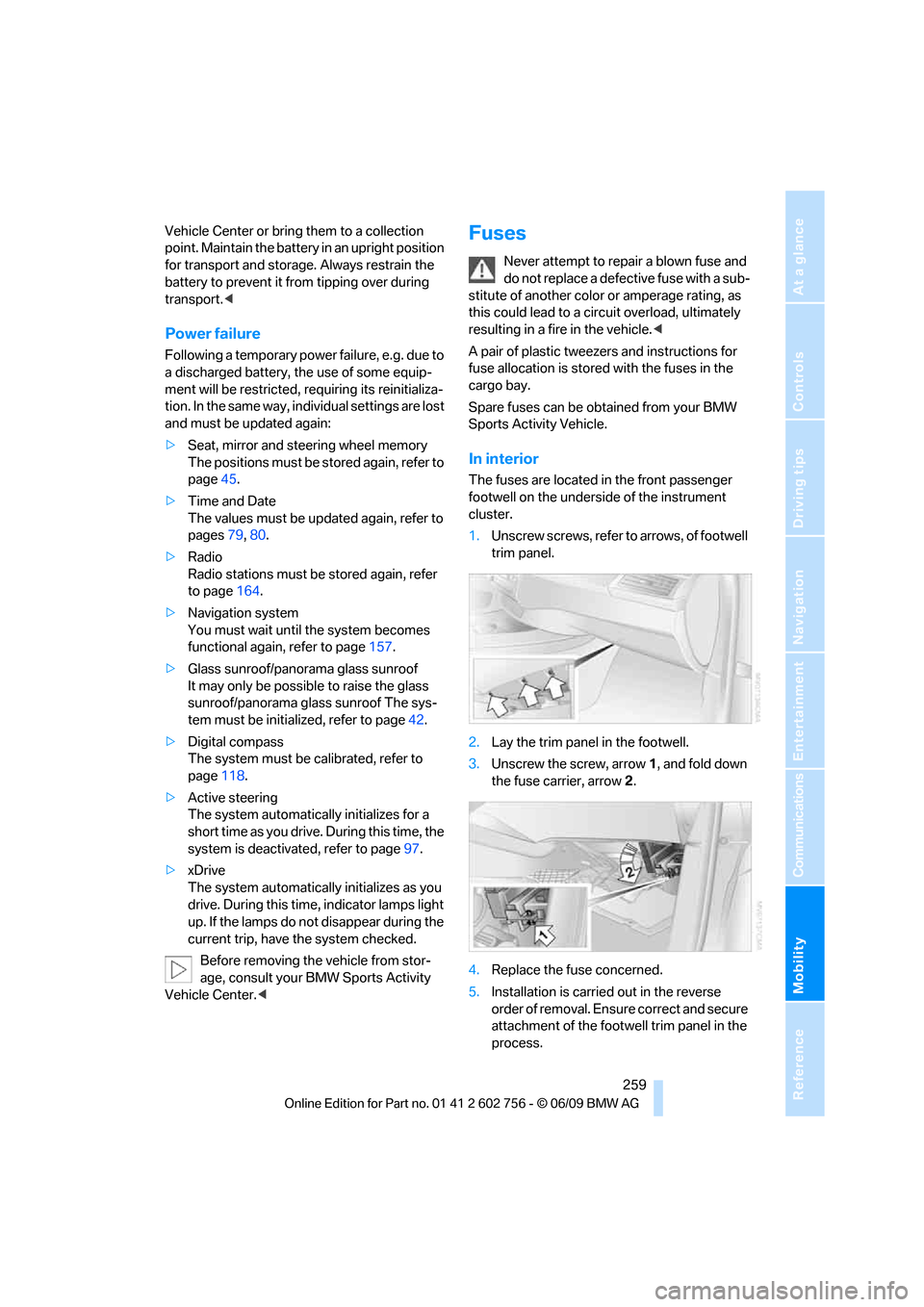
The fuses are located in the front passenger
footwell on the underside of the instrument
cluster.
1.Unscrew screws, refer to arrows, of footwell
trim panel.
2.Lay the trim panel in the footwell.
3.Unscrew the screw, arrow1, and fold down
the fuse carrier, arrow2.
4.Replace the fuse concerned.
5.Installation is carried out in the reverse
order of removal. Ensure correct and secure
attachment of the footwell trim panel in the
process.
ba8_e70ag.book Seite 259 Freitag, 5. Juni 2009 11:42 11
Page 263 of 300
Mobility
261Reference
At a glance
Controls
Driving tips
Communications
Navigation
Entertainment
Giving and receiving assistance
Emergency request
Conditions for an emergency request:
>Full preparation package mobile phone.
With this equipment, an emergency request
is still possible when no mobile phone is
paired in the vehicle.
>BMW Assist is activated.
Activating BMW Assist, refer to page215.
>Radio readiness is switched on.
>The BMW Assist system is logged in on a
wireless communications network.
>The emergency request system is opera-
ble.
When the contract of participation with BMW
Assist expires, the BMW Assist system can be
deactivated by a BMW Sports Activity Vehicle
Center without having to visit a workshop. Once
the BMW Assist system has been deactivated,
emergency requests are not possible. The
BMW Assist system be reactivated by a BMW
Sports Activity Vehicle Center after signing a
new contract.
Initiating an emergency request
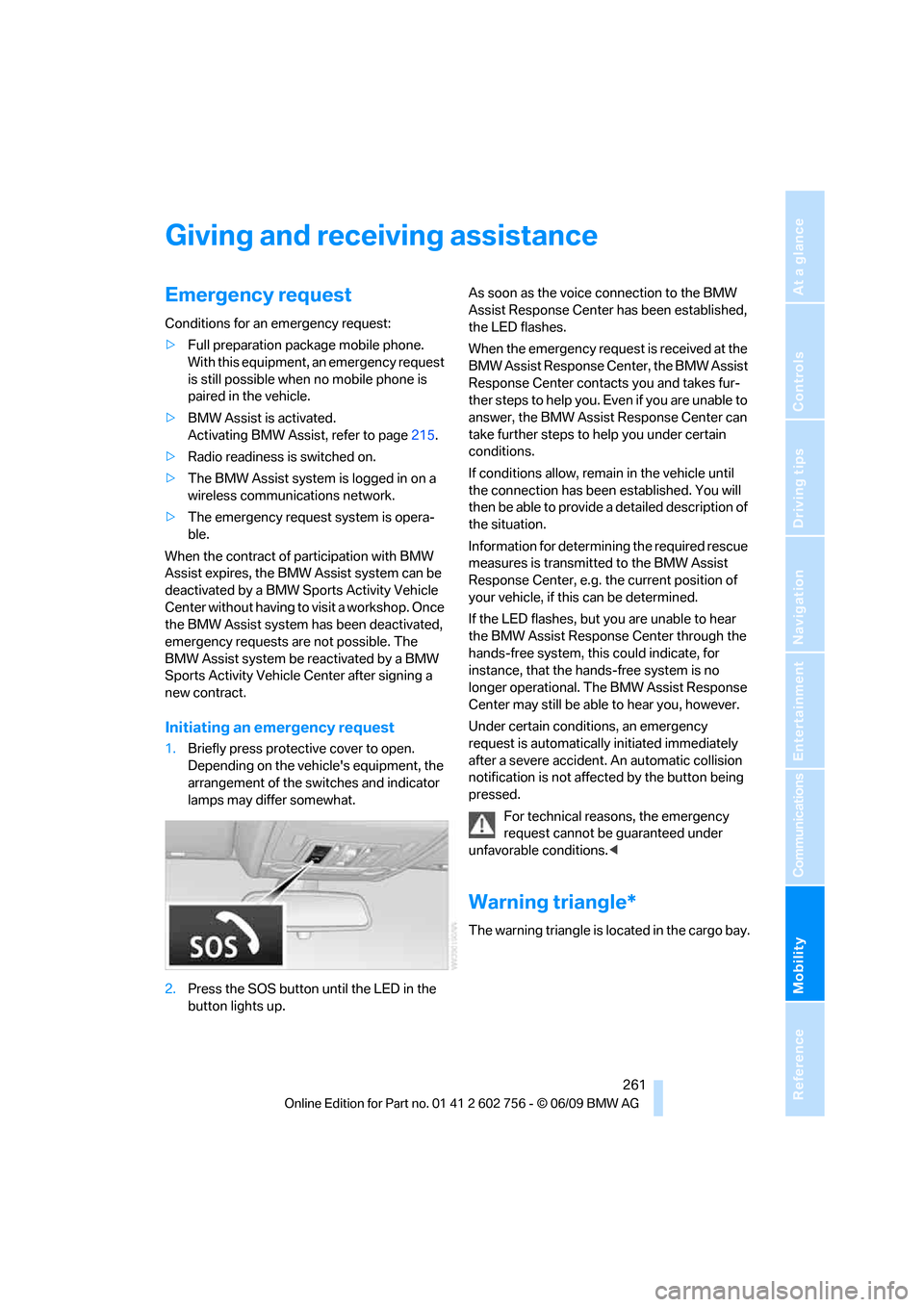
1.Briefly press protective cover to open.
Depending on the vehicle's equipment, the
arrangement of the switches and indicator
lamps may differ somewhat.
2.Press the SOS button until the LED in the
button lights up.As soon as the voice connection to the BMW
Assist Response Center has been established,
the LED flashes.
When the emergency request is received at the
BMW Assist Response Center, the BMW Assist
Response Center contacts you and takes fur-
ther steps to help you. Even if you are unable to
answer, the BMW Assist Response Center can
take further steps to help you under certain
conditions.
If conditions allow, remain in the vehicle until
the connection has been established. You will
then be able to provide a detailed description of
the situation.
Information for determining the required rescue
measures is transmitted to the BMW Assist
Response Center, e.g. the current position of
your vehicle, if this can be determined.
If the LED flashes, but you are unable to hear
the BMW Assist Response Center through the
hands-free system, this could indicate, for
instance, that the hands-free system is no
longer operational. The BMW Assist Response
Center may still be able to hear you, however.
Under certain conditions, an emergency
request is automatically initiated immediately
after a severe accident. An automatic collision
notification is not affected by the button being
pressed.
For technical reasons, the emergency
request cannot be guaranteed under
unfavorable conditions.<
Warning triangle*
The warning triangle is located in the cargo bay.
ba8_e70ag.book Seite 261 Freitag, 5. Juni 2009 11:42 11
Page 265 of 300
Mobility
263Reference
At a glance
Controls
Driving tips
Communications
Navigation
Entertainment
Your BMW has a special nut as body ground
or negative pole.
5.Attach the second end of the cable to the
negative terminal of the battery or to the
engine or body ground of the vehicle to be
started.
Starting engine
1.Start the engine on the assisting vehicle
and allow it to run at idle for several minutes
at slightly increased speed.
2.Start the engine on the other vehicle in the
usual way.
If the first starting attempt is not successful,
wait a few minutes before another attempt
in order to allow the discharged battery to
recharge.
3.Let the engines run for a few minutes.
4.Disconnect the jumper cables by reversing
the connection sequence.
Check the battery and recharge if necessary.
Never use spray fluids to start the
engine.<
Tow-starting and towing
Observe applicable laws and regulations
for tow-starting and towing.<
Do not transport any passengers other
than the driver in a vehicle that is being
towed.<
Using a tow fitting
The screw-on tow-fitting must always be car-
ried in the vehicle. It can be screwed in at the
front or rear of the BMW.It is located in the toolkit under the floor panel
flap in the cargo bay, refer to page250.
Use only the tow fitting provided with the
vehicle and screw it all the way in. Use the
tow fitting for towing only on roads. Avoid lateral
loading of the tow fitting, e.g. do not lift the vehi-
cle by the tow fitting. Otherwise damage to the
tow fitting and the vehicle can occur.<
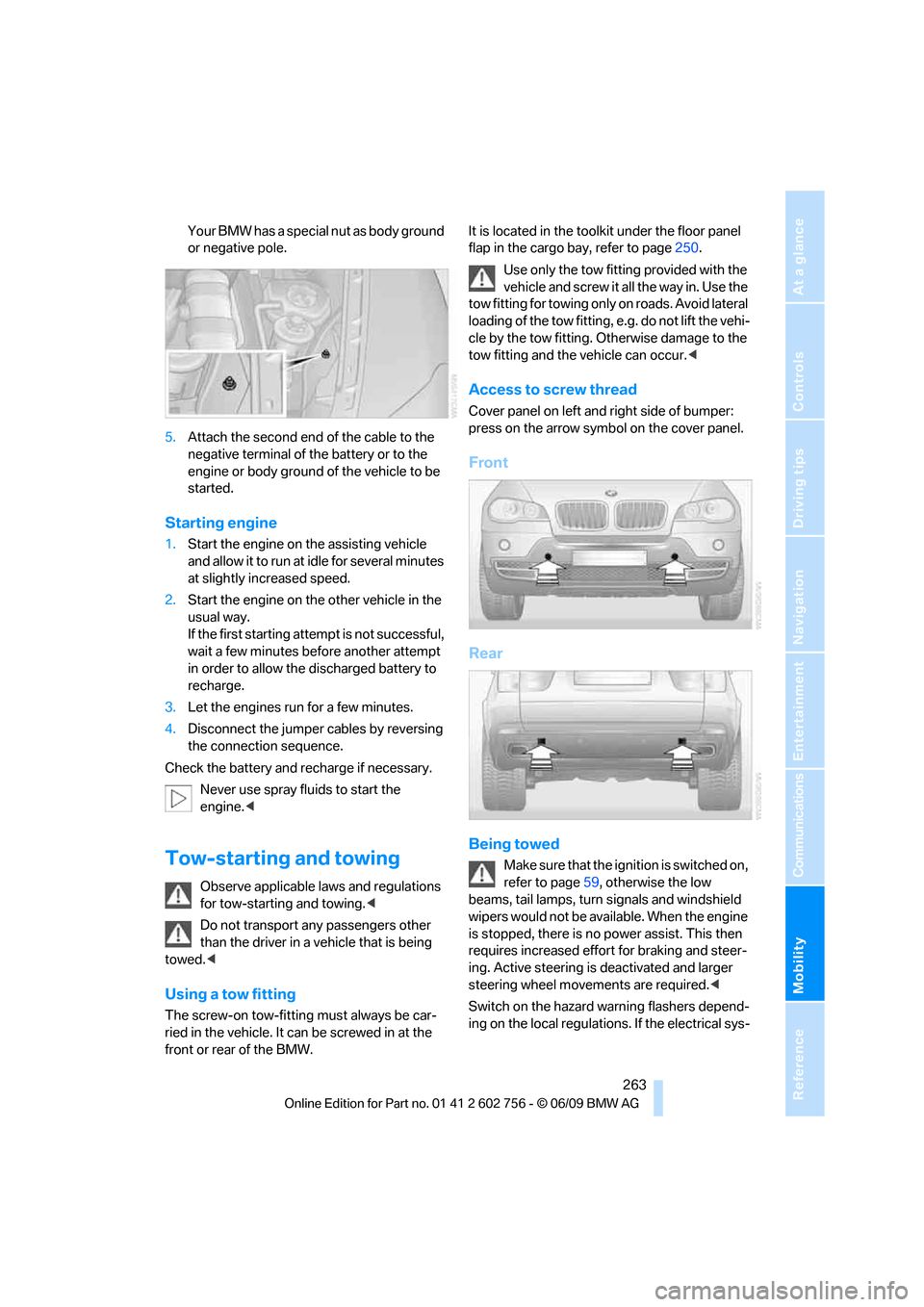
Access to screw thread
Cover panel on left and right side of bumper:
press on the arrow symbol on the cover panel.
Front
Rear
Being towed
Make sure that the ignition is switched on,
refer to page59, otherwise the low
beams, tail lamps, turn signals and windshield
wipers would not be available. When the engine
is stopped, there is no power assist. This then
requires increased effort for braking and steer-
ing. Active steering is deactivated and larger
steering wheel movements are required.<
Switch on the hazard warning flashers depend-
ing on the local regulations. If the electrical sys-
ba8_e70ag.book Seite 263 Freitag, 5. Juni 2009 11:42 11
Page 275 of 300
Reference 273
At a glance
Controls
Driving tips
Communications
Navigation
Entertainment
Mobility
Short commands of voice activation
system
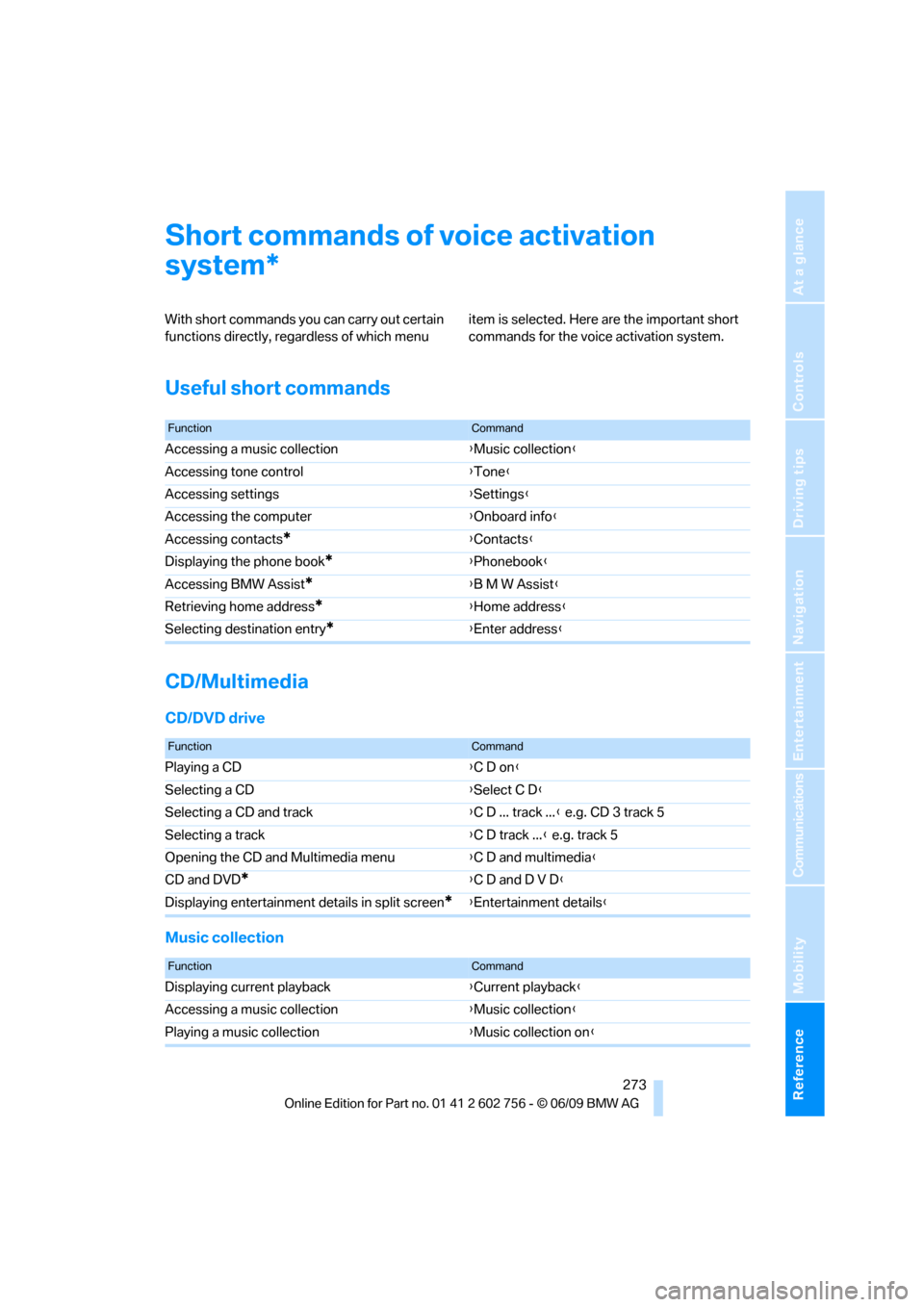
With short commands you can carry out certain
functions directly, regardless of which menu item is selected. Here are the important short
commands for the voice activation system.
Useful short commands
CD/Multimedia
CD/DVD drive
Music collection
*
FunctionCommand
Accessing a music collection{Music collection}
Accessing tone control{Tone}
Accessing settings{Settings}
Accessing the computer{Onboard info}
Accessing contacts
*{Contacts}
Displaying the phone book
*{Phonebook}
Accessing BMW Assist
*{B M W Assist}
Retrieving home address
*{Home address}
Selecting destination entry
*{Enter address}
FunctionCommand
Playing a CD{C D on}
Selecting a CD{Select C D}
Selecting a CD and track{C D ... track ...} e.g. CD 3 track 5
Selecting a track{C D track ...} e.g. track 5
Opening the CD and Multimedia menu{C D and multimedia}
CD and DVD
*{C D and D V D}
Displaying entertainment details in split screen
*{Entertainment details}
FunctionCommand
Displaying current playback{Current playback}
Accessing a music collection{Music collection}
Playing a music collection{Music collection on}
ba8_e70ag.book Seite 273 Freitag, 5. Juni 2009 11:42 11
Page 278 of 300
Short commands of voice activation system
276
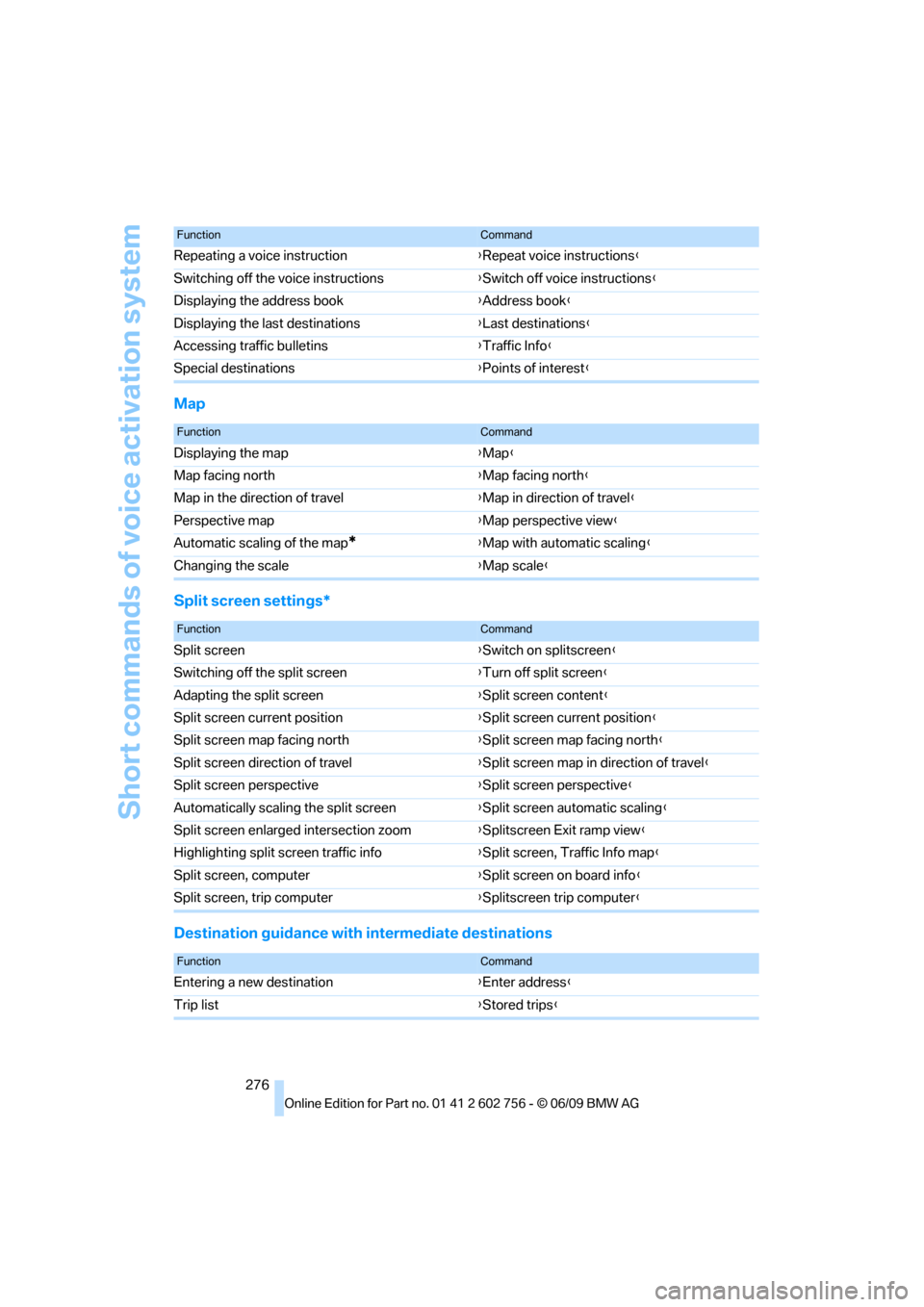
Map
Split screen settings*
Destination guidance with intermediate destinations
Repeating a voice instruction{Repeat voice instructions}
Switching off the voice instructions{Switch off voice instructions}
Displaying the address book{Address book}
Displaying the last destinations{Last destinations}
Accessing traffic bulletins{Traffic Info}
Special destinations{Points of interest}
FunctionCommand
FunctionCommand
Displaying the map{Map}
Map facing north{Map facing north}
Map in the direction of travel{Map in direction of travel}
Perspective map{Map perspective view}
Automatic scaling of the map
*{Map with automatic scaling}
Changing the scale{Map scale}
FunctionCommand
Split screen{Switch on splitscreen}
Switching off the split screen{Turn off split screen}
Adapting the split screen{Split screen content}
Split screen current position{Split screen current position}
Split screen map facing north{Split screen map facing north}
Split screen direction of travel{Split screen map in direction of travel}
Split screen perspective{Split screen perspective}
Automatically scaling the split screen{Split screen automatic scaling}
Split screen enlarged intersection zoom{Splitscreen Exit ramp view}
Highlighting split screen traffic info{Split screen, Traffic Info map}
Split screen, computer{Split screen on board info}
Split screen, trip computer{Splitscreen trip computer}
FunctionCommand
Entering a new destination{Enter address}
Trip list{Stored trips}
ba8_e70ag.book Seite 276 Freitag, 5. Juni 2009 11:42 11
Page 286 of 300
Everything from A to Z
284 Emergency operation, refer to
Manual operation
– door lock29
– driver's door29
– fuel filler door224
– liftgate31
– transmission lock, automatic
transmission66
Emergency request261
Emergency services, refer to
Roadside Assistance262
Engine
– breaking-in130
– data268
– oil temperature72
– overheated, refer to Coolant
temperature72
– speed268
– starting60
– starting, with comfort
access36
– switching off60
Engine compartment240
Engine coolant243
Engine oil
– adding242
– additives, refer to Approved
engine oils243
– approved engine oil243
– checking oil level241
– electronic oil level check241
– temperature72
Engine oil temperature72
Engine output, refer to Engine
data268
Engine overheating, refer to
Coolant temperature72
Engine speed268
Engine starting, refer to
Starting engine60
Entering special destinations
by name145
Entertainment sound output
on/off160
Entry map for destination146
Equalizer, tone setting161ESP Electronic Stability
Program, refer to DSC
Dynamic Stability
Control88
Event Data Recorders245
Exhaust system, refer to Hot
exhaust system131
Extended connectivity of the
music player in the mobile
phone183
Exterior mirrors52
– adjusting52
– automatic dimming
feature53
– automatic heating
52
– folding in and out52
– tilting down passenger-side
exterior mirror53
External audio device119
Eye for tow-starting and
towing, refer to Tow
fitting263
F
Failure messages, refer to
Check Control77
False alarm, refer to Avoiding
unintentional alarms35
Fastening safety belts, refer to
Safety belts49
– warning lamp50
Fastest route for
navigation150
Fast forward
– CD changer173
– CD player173
Fault displays, refer to Check
Control77
Filler neck for washer fluid69
First aid, refer to First-aid
kit262
First-aid kit262
Fixing system, adaptive124
Flashing during locking/
unlocking, refer to Setting
confirmation signals28Flat tire
– changing wheels256
– compact wheel256
– Flat Tire Monitor92
– run-flat tires93,95,237
– TPM Tire Pressure
Monitor94
Flat Tire Monitor FTM92
Fluid reservoir, refer to Filler
neck for washer fluid69
FM, waveband163
Fog lamps105
– indicator lamp13,105
Folding display screen open/
closed, DVD system in
rear187
Folding rear seat backrest124
Footbrake, refer to Braking
safely132
Footwell lamps106
For your own safety5
4-wheel drive system, refer to
xDrive90
Free memory capacity, music
collection181
Front airbags98
Front passenger airbags98
– deactivating98
– refer to Exception of front
passenger seat55
Front seat adjustment44
FTM Flat Tire Monitor92
– false alarms92
– indicating a flat tire93
– initializing the system93
– snow chains238
– system limits92
– warning lamp93
Fuel225
– capacity272
– display73
– high-quality brands225
– quality225
– saving130
– specifications225
Fuel clock, refer to Fuel
gauge73
ba8_e70ag.book Seite 284 Freitag, 5. Juni 2009 11:42 11
Page 292 of 300
Everything from A to Z
290 Restraint systems
– for children55
– refer to Safety belts49
Retreaded tires237
Reverse
– CD changer173
– CD player173
Reverse gear, automatic
transmission with
Steptronic65
Road map152
Roadside Assistance262
Roadside assistance216
Roadside parking lamps104
Roller blinds, refer to Roller
sun blinds118
Roller sun blinds118
Roll-up cover122
roll-up cover122
Roof load capacity271
Roof-mounted luggage
rack135
Rope, refer to Tow-starting
and towing263
Rotary pushbutton, refer to
iDrive16
Route150,151
– bypassing sections151
– changing150,151
– changing criteria150
– displaying map view152
– displaying streets or towns/
cities151
– selecting150
Route instructions, refer to
Destination guidance
through voice
instructions152
Route map, refer to Map
display152
Route section, changing151
Route selection150
RSC Runflat System
Component, refer to Run-
flat tires237Runflat System Component
RSC, refer to Run-Flat
Tires237
Run-flat tires237
– continuing driving with a
damaged tire93,95
– flat tire93,95
– new wheels and tires237
– tire inflation
pressure93,95
,229
– tire replacement237
S
Safety5
Safety belts49
– damage50
– sitting safely43
– warning lamp50
Safety belt tensioners
– refer to Airbags98
– refer to Safety belts49
Safety systems
– ABS Antilock Brake
System88
– airbags98
– driving stability control
systems88
– DSC Dynamic Stability
Control88
– safety belts49
Safety tires, refer to Run-flat
tires237
Satellite radio166
Screen, refer to iDrive16
Screw thread for tow
fitting263
SDARS, refer to Satellite
radio166
Seat heating50,51Seats44
– adjusting44
– adjusting electrically44
– adjusting manually44
– backrest width45
– heating50,51
– in rear48
– lumbar support45
– memory, refer to Seat, mirror
and steering wheel
memory45
– 2nd row seats48
– shoulder support45
– sitting safely43
– storing the setting45
– thigh support44,45
– 3rd row seats49
– ventilation, refer to Active
seat ventilation and Seat
heating51
2nd row seats48
Securing load
– refer to Securing cargo134
– with ski bag, refer to
Securing cargo126
Selecting new scale for
navigation153
Selector lever, automatic
transmission with
Steptronic64
Selector lever lock, refer to
Reverse gear65
Self-leveling suspension92
Service, refer to Roadside
Assistance262
Service and Warranty
Information Booklet for
US models244
Service interval indicator, refer
to Service requirements74
Service Request219
Service requirements74
– also refer to CBS Condition
Based Service244
Service status220
ba8_e70ag.book Seite 290 Freitag, 5. Juni 2009 11:42 11