scr BMW X5 3.0Si 2010 E70 User Guide
[x] Cancel search | Manufacturer: BMW, Model Year: 2010, Model line: X5 3.0Si, Model: BMW X5 3.0Si 2010 E70Pages: 300, PDF Size: 12.41 MB
Page 41 of 300
Controls
39Reference
At a glance
Driving tips
Communications
Navigation
Entertainment
Mobility
Raising, opening, closing
Raising
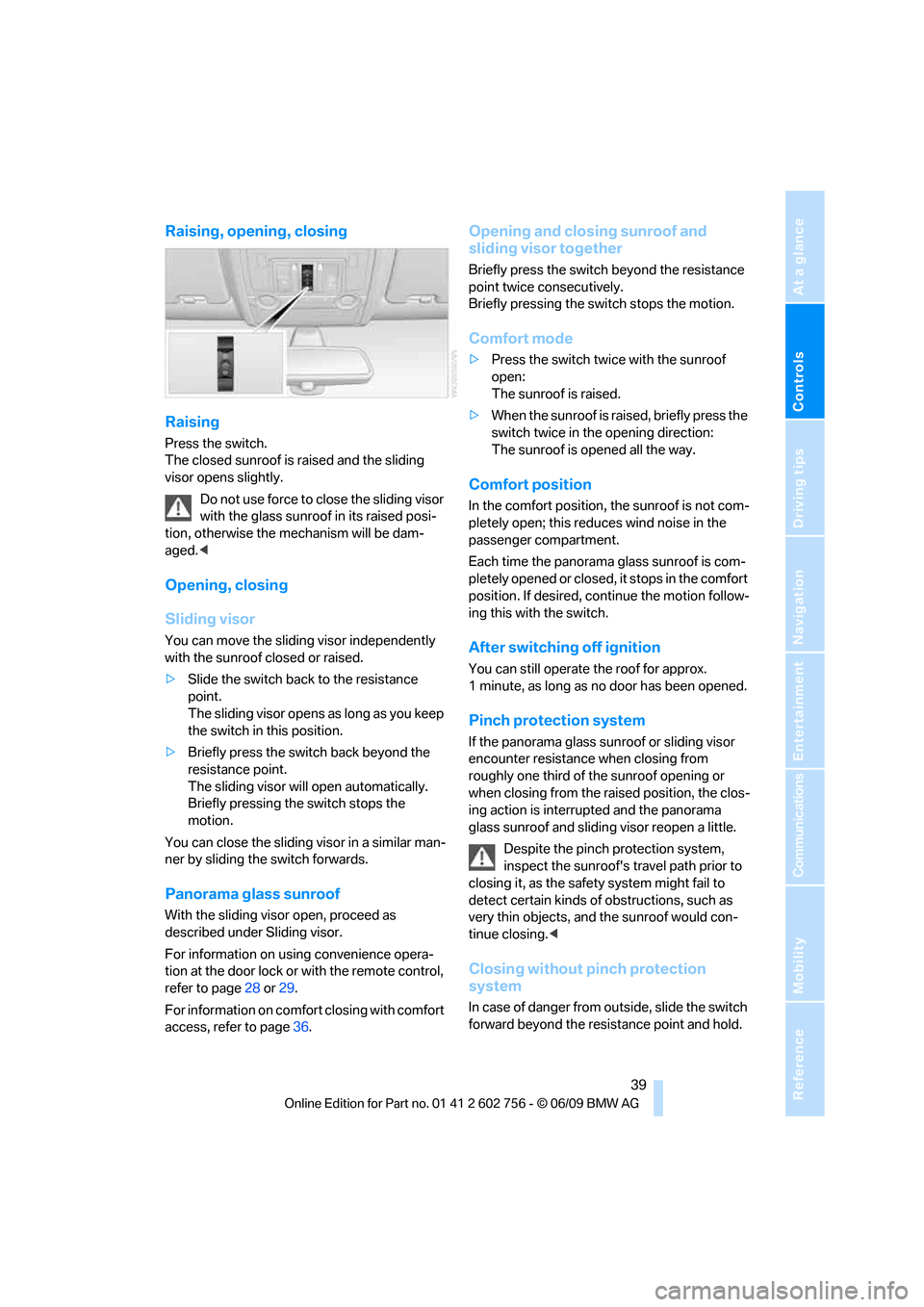
Press the switch.
The closed sunroof is raised and the sliding
visor opens slightly.
Do not use force to close the sliding visor
with the glass sunroof in its raised posi-
tion, otherwise the mechanism will be dam-
aged.<
Opening, closing
Sliding visor
You can move the sliding visor independently
with the sunroof closed or raised.
>Slide the switch back to the resistance
point.
The sliding visor opens as long as you keep
the switch in this position.
>Briefly press the switch back beyond the
resistance point.
The sliding visor will open automatically.
Briefly pressing the switch stops the
motion.
You can close the sliding visor in a similar man-
ner by sliding the switch forwards.
Panorama glass sunroof
With the sliding visor open, proceed as
described under Sliding visor.
For information on using convenience opera-
tion at the door lock or with the remote control,
refer to page28 or29.
For information on comfort closing with comfort
access, refer to page36.
Opening and closing sunroof and
sliding visor together
Briefly press the switch beyond the resistance
point twice consecutively.
Briefly pressing the switch stops the motion.
Comfort mode
>Press the switch twice with the sunroof
open:
The sunroof is raised.
>When the sunroof is raised, briefly press the
switch twice in the opening direction:
The sunroof is opened all the way.
Comfort position
In the comfort position, the sunroof is not com-
pletely open; this reduces wind noise in the
passenger compartment.
Each time the panorama glass sunroof is com-
pletely opened or closed, it stops in the comfort
position. If desired, continue the motion follow-
ing this with the switch.
After switching off ignition
You can still operate the roof for approx.
1 minute, as long as no door has been opened.
Pinch protection system
If the panorama glass sunroof or sliding visor
encounter resistance when closing from
roughly one third of the sunroof opening or
when closing from the raised position, the clos-
ing action is interrupted and the panorama
glass sunroof and sliding visor reopen a little.
Despite the pinch protection system,
inspect the sunroof's travel path prior to
closing it, as the safety system might fail to
detect certain kinds of obstructions, such as
very thin objects, and the sunroof would con-
tinue closing.<
Closing without pinch protection
system
In case of danger from outside, slide the switch
forward beyond the resistance point and hold.
ba8_e70ag.book Seite 39 Freitag, 5. Juni 2009 11:42 11
Page 42 of 300
Opening and closing
40 The roof closes without the pinch protection
system.
Following interruptions in electrical
power supply
After a power loss, the sunroof may only
respond to the raise command. Then have the
system initialized. BMW recommends having
this work carried out by your BMW Sports
Activity Vehicle Center.
Moving manually*
In the event of an electrical malfunction, you can
move the sunroof manually:
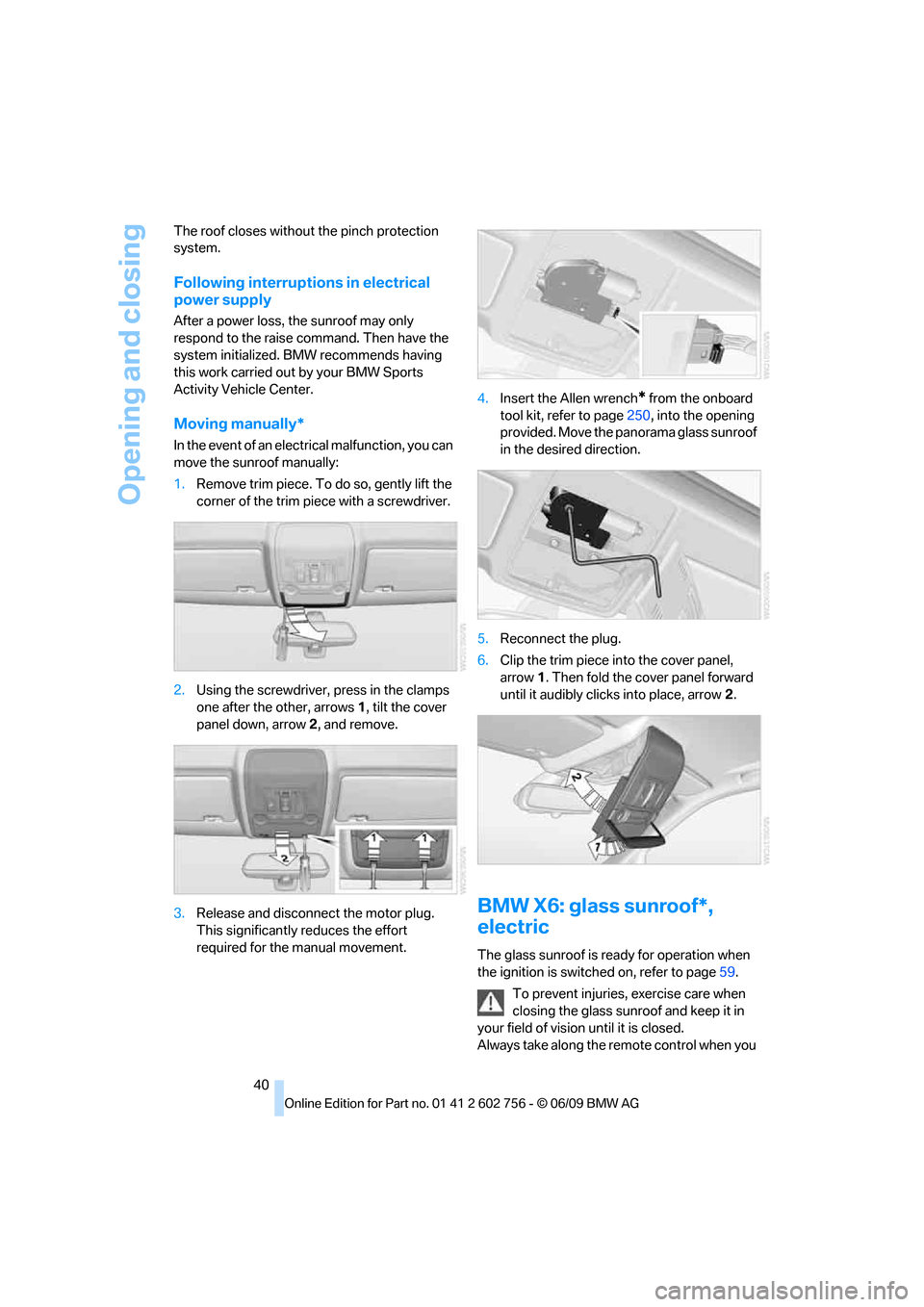
1.Remove trim piece. To do so, gently lift the
corner of the trim piece with a screwdriver.
2.Using the screwdriver, press in the clamps
one after the other, arrows 1, tilt the cover
panel down, arrow 2, and remove.
3.Release and disconnect the motor plug.
This significantly reduces the effort
required for the manual movement.4.Insert the Allen wrench
* from the onboard
tool kit, refer to page250, into the opening
provided. Move the panorama glass sunroof
in the desired direction.
5.Reconnect the plug.
6.Clip the trim piece into the cover panel,
arrow1. Then fold the cover panel forward
until it audibly clicks into place, arrow2.
BMW X6: glass sunroof*,
electric
The glass sunroof is ready for operation when
the ignition is switched on, refer to page59.
To prevent injuries, exercise care when
closing the glass sunroof and keep it in
your field of vision until it is closed.
Always take along the remote control when you
ba8_e70ag.book Seite 40 Freitag, 5. Juni 2009 11:42 11
Page 44 of 300
Opening and closing
42 2.Within about 4 seconds, slide the switch
forward again beyond the resistance point
and hold it there. The roof closes without
the pinch protection system.
Following interruptions in electrical
power supply
After a power loss, the sunroof may only
respond to the raise command. Then have the
system initialized. BMW recommends having
this work carried out by your BMW Sports
Activity Vehicle Center.
Moving manually*
In the event of an electrical malfunction, you can
move the sunroof manually:
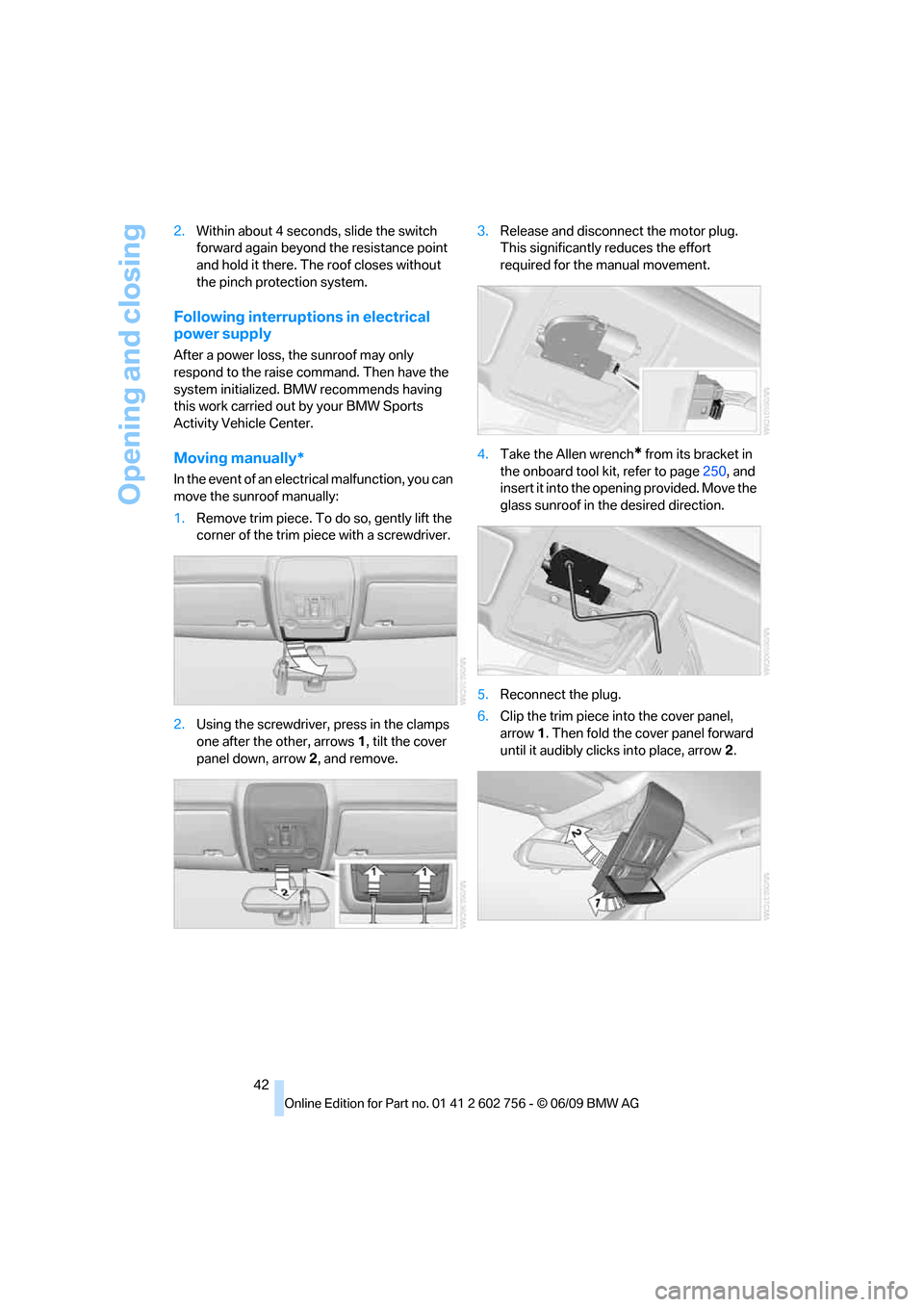
1.Remove trim piece. To do so, gently lift the
corner of the trim piece with a screwdriver.
2.Using the screwdriver, press in the clamps
one after the other, arrows 1, tilt the cover
panel down, arrow 2, and remove.3.Release and disconnect the motor plug.
This significantly reduces the effort
required for the manual movement.
4.Take the Allen wrench
* from its bracket in
the onboard tool kit, refer to page250, and
insert it into the opening provided. Move the
glass sunroof in the desired direction.
5.Reconnect the plug.
6.Clip the trim piece into the cover panel,
arrow1. Then fold the cover panel forward
until it audibly clicks into place, arrow2.
ba8_e70ag.book Seite 42 Freitag, 5. Juni 2009 11:42 11
Page 118 of 300
Practical interior accessories
116 The corresponding memory button1 is now
programmed with the signal of the original
hand-held transmitter.
You can operate the device when the engine is
running or when the ignition is switched on.
If the device cannot be used after
repeated programming, check whether
the original hand-held transmitter uses an alter-
nating-code system. To do so, either read the
instructions for the original hand-held transmit-
ter or hold down the programmed memory but-
ton 1 of the integrated universal remote control.
If the LED2 on the integrated universal remote
control flashes rapidly for a short time and then
remains lit for approx. 2 seconds, this indicates
that the original hand-held transmitter uses an
alternating-code system. In the case of an alter-
nating-code system, program the memory but-
tons 1 as described at Alternating-code hand-
held transmitters.<
Alternating-code hand-held
transmitters
To program the integrated universal remote
control, consult the operating instructions for
the equipment to be set. You will find informa-
tion there on the possibilities for synchroniza-
tion.
When programming hand-held transmitters
that employ an alternating code, observe the
following supplementary instructions:
Programming will be easier with the aid of
a second person.<
1.Park your vehicle within the range of the
remote-controlled device.
2.Program the integrated universal remote
control as described above in the section
Fixed-code hand-held transmitters.
3.Locate the button on the receiver of the
device to be set, e.g. on the drive unit.
4.Press the button on the receiver of the
device to be set. After step 4, you have
approx. 30 seconds for step 5.
5.Press the programmed memory button1
of the integrated universal remote control
three times.The corresponding memory button1 is now
programmed with the signal of the original
hand-held transmitter.
Should you have questions, please con-
tact your BMW Sports Activity Vehicle
Center.<
Deleting all stored programs
Press the left and right-hand memory button1
for approx. 20 seconds until the LED2 flashes
quickly:
All stored programs are deleted.
Reassigning individual programs
1.Hold the original hand-held transmitter at
a distance of approx. 4 in/10 cm to 12 in/
30 cm from the memory buttons1.
The required distance between the
hand-held transmitter and the mem-
ory buttons1 depends on the relevant sys-
tem of the original hand-held transmitter
used.<
2.Press the desired memory button1 of the
integrated universal remote control.
3.When the LED2 flashes slowly after approx.
20 seconds, press the transmit button of
the original hand-held transmitter. Release
both buttons as soon as the LED2 flashes
rapidly. If the LED2 does not flash rapidly
after approx. 15 seconds, alter the distance
and repeat the step.
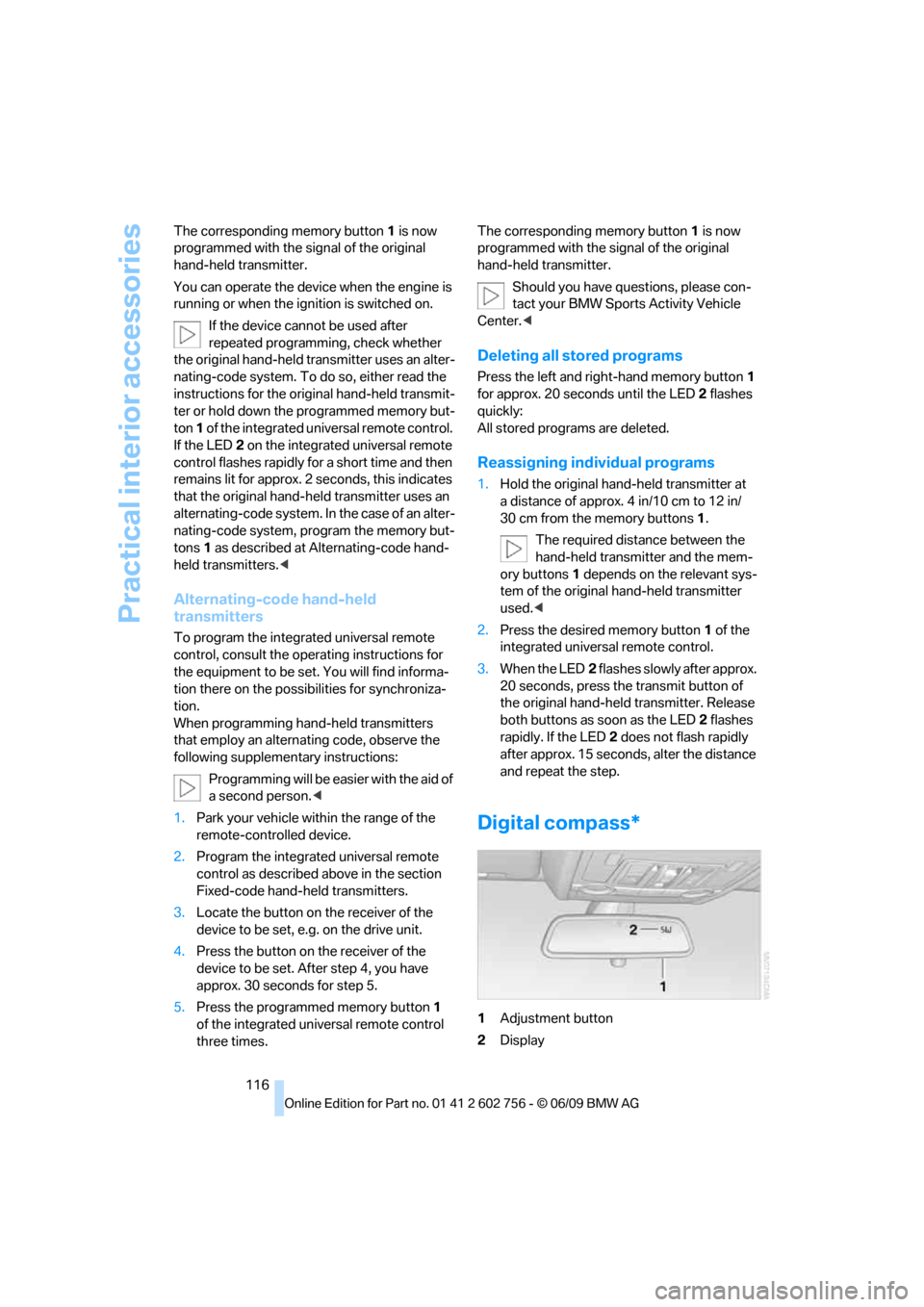
Digital compass*
1Adjustment button
2Display
ba8_e70ag.book Seite 116 Freitag, 5. Juni 2009 11:42 11
Page 127 of 300
Controls
125Reference
At a glance
Driving tips
Communications
Navigation
Entertainment
Mobility
Before using the adaptive fixing system,
fold up and lock the rear seat backrest;
otherwise, the cargo could be thrown into the
vehicle interior in an accident.<
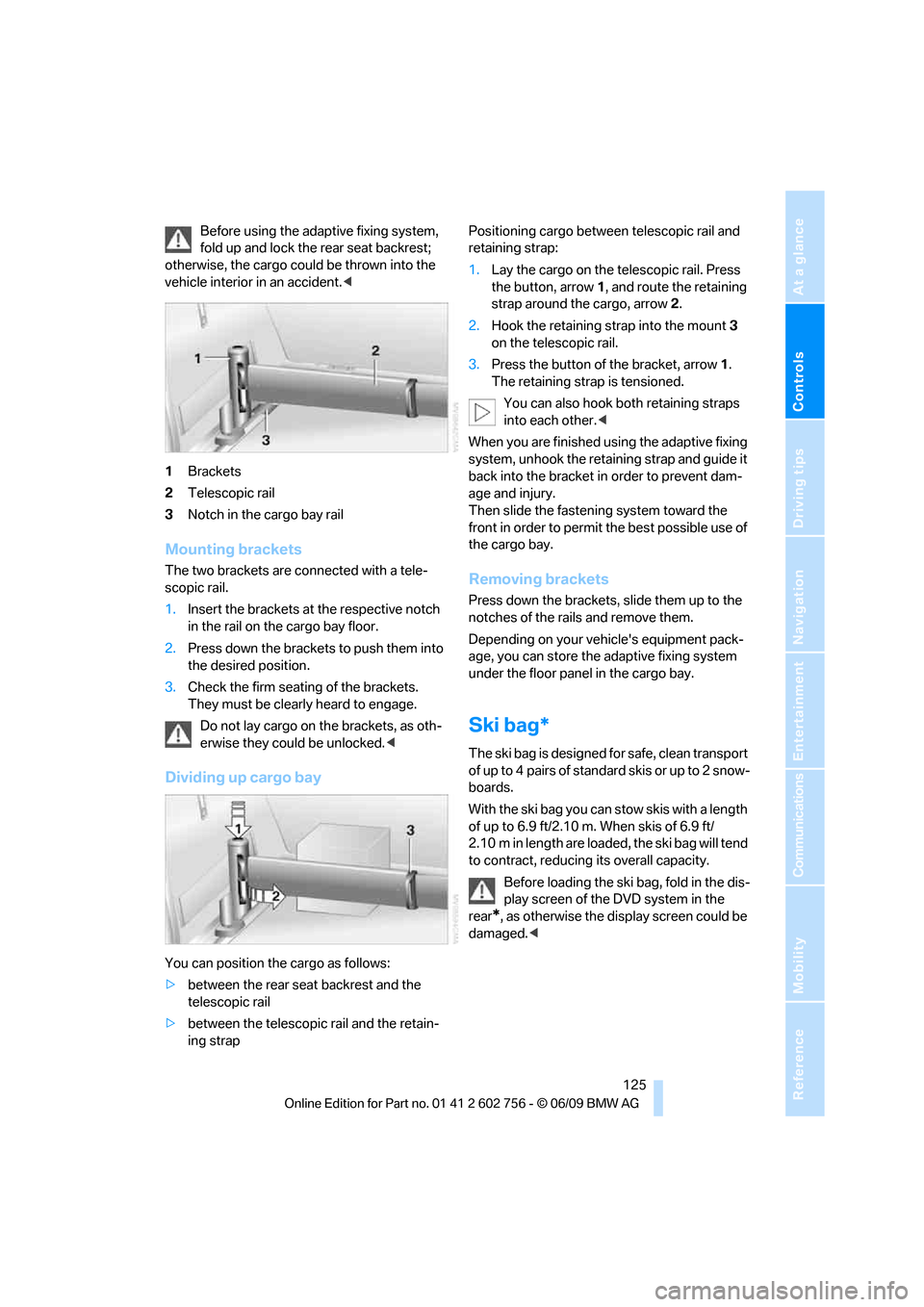
1Brackets
2Telescopic rail
3Notch in the cargo bay rail
Mounting brackets
The two brackets are connected with a tele-
scopic rail.
1.Insert the brackets at the respective notch
in the rail on the cargo bay floor.
2.Press down the brackets to push them into
the desired position.
3.Check the firm seating of the brackets.
They must be clearly heard to engage.
Do not lay cargo on the brackets, as oth-
erwise they could be unlocked.<
Dividing up cargo bay
You can position the cargo as follows:
>between the rear seat backrest and the
telescopic rail
>between the telescopic rail and the retain-
ing strapPositioning cargo between telescopic rail and
retaining strap:
1.Lay the cargo on the telescopic rail. Press
the button, arrow1, and route the retaining
strap around the cargo, arrow2.
2.Hook the retaining strap into the mount3
on the telescopic rail.
3.Press the button of the bracket, arrow1.
The retaining strap is tensioned.
You can also hook both retaining straps
into each other.<
When you are finished using the adaptive fixing
system, unhook the retaining strap and guide it
back into the bracket in order to prevent dam-
age and injury.
Then slide the fastening system toward the
front in order to permit the best possible use of
the cargo bay.
Removing brackets
Press down the brackets, slide them up to the
notches of the rails and remove them.
Depending on your vehicle's equipment pack-
age, you can store the adaptive fixing system
under the floor panel in the cargo bay.
Ski bag*
The ski bag is designed for safe, clean transport
of up to 4 pairs of standard skis or up to 2 snow-
boards.
With the ski bag you can stow skis with a length
of up to 6.9 ft/2.10 m. When skis of 6.9 ft/
2.10 m in length are loaded, the ski bag will tend
to contract, reducing its overall capacity.
Before loading the ski bag, fold in the dis-
play screen of the DVD system in the
rear
*, as otherwise the display screen could be
damaged.<
ba8_e70ag.book Seite 125 Freitag, 5. Juni 2009 11:42 11
Page 136 of 300
Things to remember when driving
134
Stowing cargo
BMW X5
BMW X6
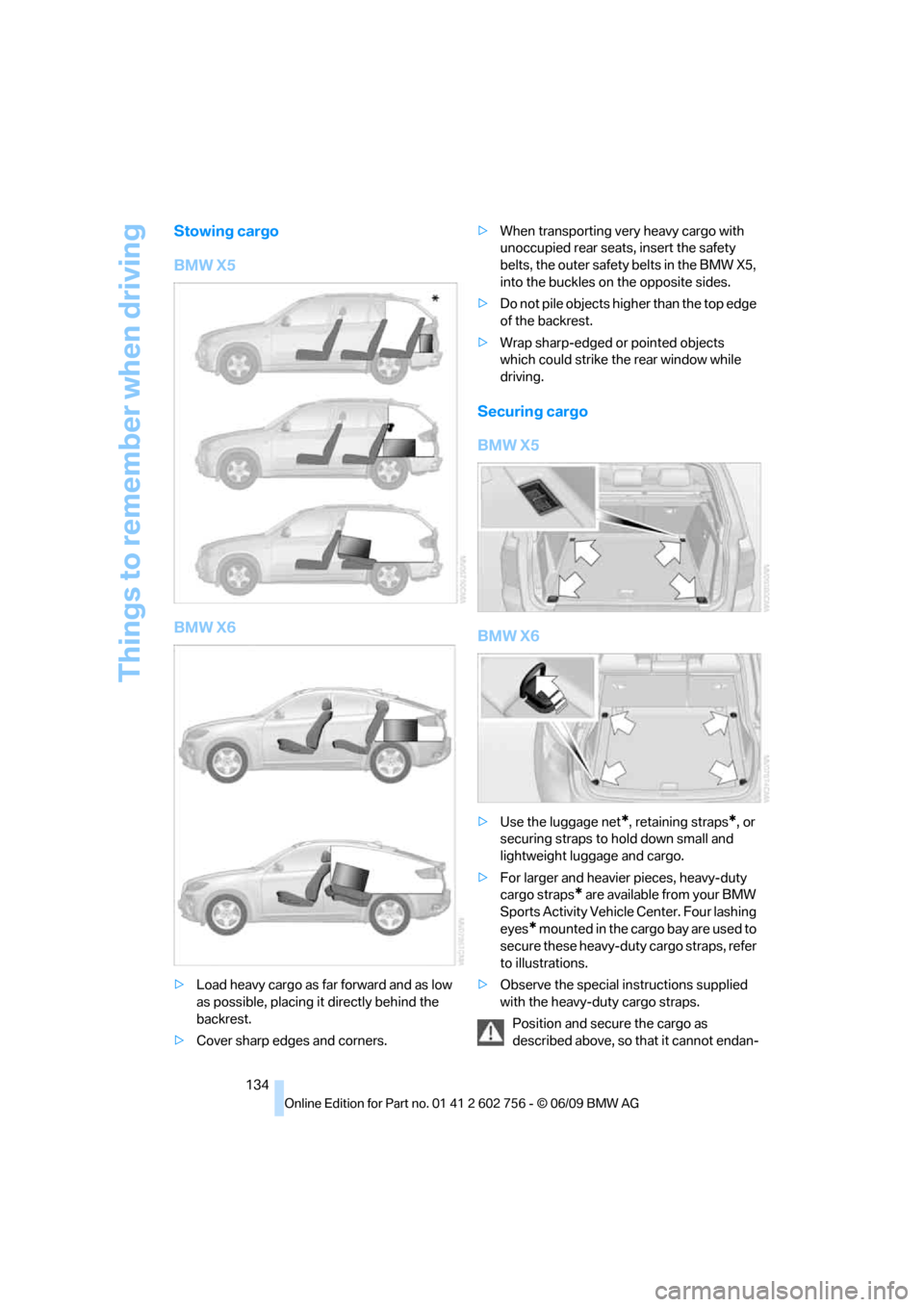
>Load heavy cargo as far forward and as low
as possible, placing it directly behind the
backrest.
>Cover sharp edges and corners.>When transporting very heavy cargo with
unoccupied rear seats, insert the safety
belts, the outer safety belts in the BMW X5,
into the buckles on the opposite sides.
>Do not pile objects higher than the top edge
of the backrest.
>Wrap sharp-edged or pointed objects
which could strike the rear window while
driving.
Securing cargo
BMW X5
BMW X6
>Use the luggage net*, retaining straps*, or
securing straps to hold down small and
lightweight luggage and cargo.
>For larger and heavier pieces, heavy-duty
cargo straps
* are available from your BMW
Sports Activity Vehicle Center. Four lashing
eyes
* mounted in the cargo bay are used to
secure these heavy-duty cargo straps, refer
to illustrations.
>Observe the special instructions supplied
with the heavy-duty cargo straps.
Position and secure the cargo as
described above, so that it cannot endan-
ba8_e70ag.book Seite 134 Freitag, 5. Juni 2009 11:42 11
Page 141 of 300
Navigation
This chapter describes how you can
enter destinations and specify your route
so that your navigation system guides you
reliably to your destination.
Navigation
ba8_e70ag.book Seite 139 Freitag, 5. Juni 2009 11:42 11
Page 155 of 300
Navigation
Driving tips
153Reference
At a glance
Controls
Communications
Entertainment
Mobility
Viewing the map
1.Select the symbol.
2.Select a setting:
>"View facing north"
>"View in dir. of travel"
>"Perspective view"
>"Arrow display"
3.Press the controller.
Changing map scale
Select interactive map.
>Moving map: move the controller in the cor-
responding direction.
>Shifting map diagonally: move the control-
ler in the corresponding direction and turn
the controller.
Changing scale
1.Select the symbol.
2.Turn the controller to change the scale.
Automatic scaling of the map
In the map display facing north, turn the control-
ler in any direction until AUTO is displayed as
the map scale.
The map shows the entire range from your loca-
tion to the destination.
Settings for the map display
The map appears on the Control Display.
1.Open "Options".
2."Settings"
3.Set the optimum map view.
>"Day/night mode"
Select according to lighting conditions
and make adjustments. This setting is
disregarded when the traffic info map is
activated.
>"Satellite images"
Satellite images
* are displayed,
depending on availability and resolution.
>"Perspective view in 3D"
Shows a three-dimensional depiction. Prominent landmarks contained in the
navigation data are displayed on the map
in 3D.
>"Traffic Info map"
Split screen settings
The map settings for the split screen can be
created separately from the main screen.
1.Open "Options".
2."Split screen"
3.Select the settings:
>"Arrow display"
>"View facing north"
>"View in dir. of travel"
>"Perspective view"
>"Exit ramp view"
Changing scale
1.Move the controller to the right until the
split screen is selected.
2.Turn the controller.
Traffic information*
You can display the traffic bulletins from radio
stations that broadcast the TMC (Traffic Mes-
sage Channel) of a traffic information service.
This information from the traffic information
service is continuously updated on the basis of
measurement data from traffic control centers
and information on traffic congestion.
During destination guidance, traffic bulletins
that are relevant to areas along the route are
automatically displayed and taken into account
in the route planning. You can open all traffic
bulletins manually using iDrive.
The traffic bulletins are shown in the map dis-
play.
Real Time Traffic Information End-User
Provisions
Certain BMW models equipped with navigation
have the capability to display real-time traffic
information. If your system has this capability
ba8_e70ag.book Seite 153 Freitag, 5. Juni 2009 11:42 11
Page 161 of 300
Entertainment
Operation of the radio and CD as well as their
tone settings are described in this chapter.
Entertainment
ba8_e70ag.book Seite 159 Freitag, 5. Juni 2009 11:42 11
Page 168 of 300
Satellite radio
166
Satellite radio
General information
The channels are offered in fixed packages.
Packages must be activated by telephone.
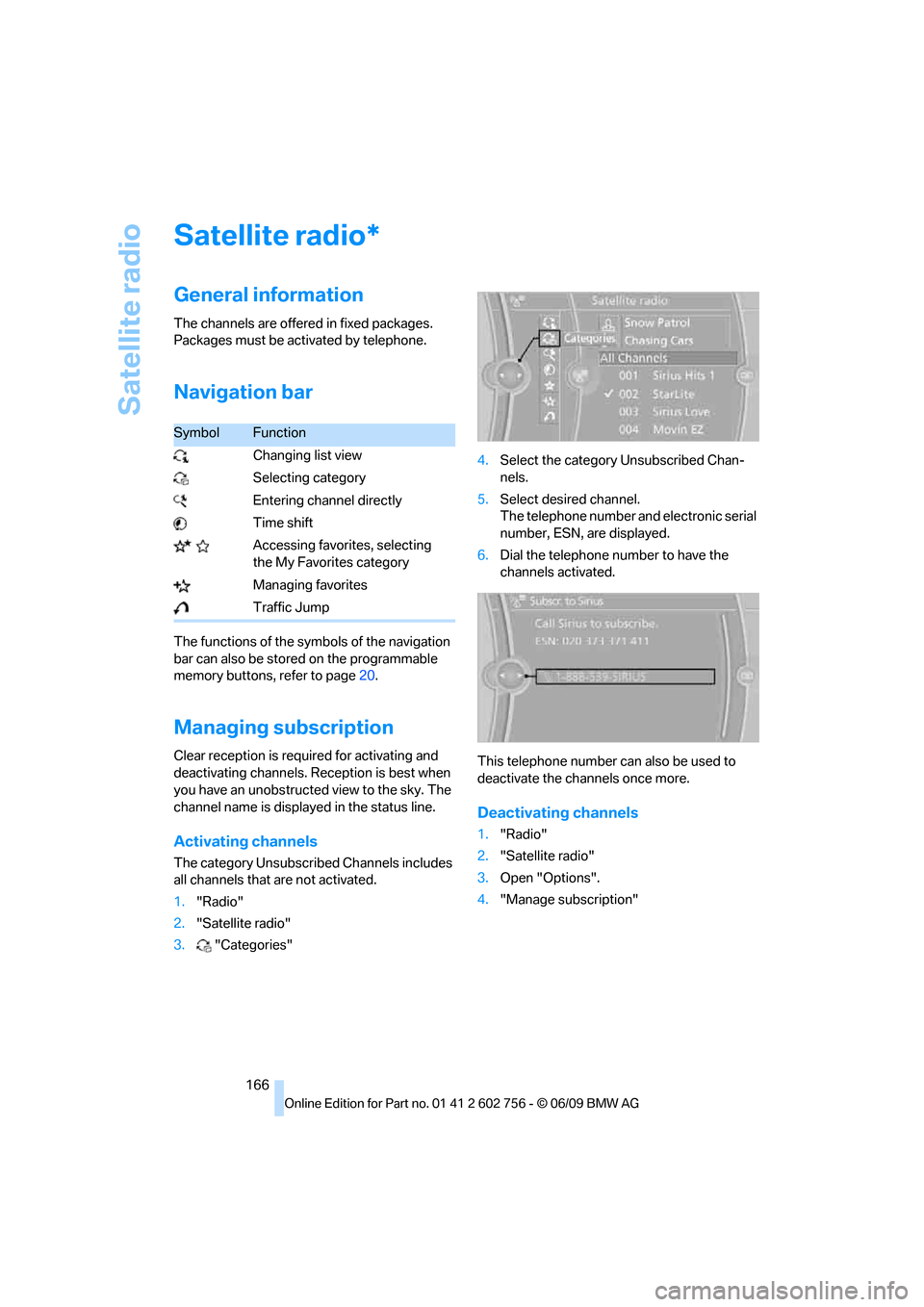
Navigation bar
The functions of the symbols of the navigation
bar can also be stored on the programmable
memory buttons, refer to page20.
Managing subscription
Clear reception is required for activating and
deactivating channels. Reception is best when
you have an unobstructed view to the sky. The
channel name is displayed in the status line.
Activating channels
The category Unsubscribed Channels includes
all channels that are not activated.
1."Radio"
2."Satellite radio"
3."Categories"4.Select the category Unsubscribed Chan-
nels.
5.Select desired channel.
The telephone number and electronic serial
number, ESN, are displayed.
6.Dial the telephone number to have the
channels activated.
This telephone number can also be used to
deactivate the channels once more.
Deactivating channels
1."Radio"
2."Satellite radio"
3.Open "Options".
4."Manage subscription"
*
SymbolFunction
Changing list view
Selecting category
Entering channel directly
Time shift
Accessing favorites, selecting
the My Favorites category
Managing favorites
Traffic Jump
ba8_e70ag.book Seite 166 Freitag, 5. Juni 2009 11:42 11