Repeat BMW X5 XDRIVE 35D 2009 E70 User Guide
[x] Cancel search | Manufacturer: BMW, Model Year: 2009, Model line: X5 XDRIVE 35D, Model: BMW X5 XDRIVE 35D 2009 E70Pages: 317, PDF Size: 9.56 MB
Page 119 of 317
Controls
117Reference
At a glance
Driving tips
Communications
Navigation
Entertainment
Mobility
>Individual program
Selecting program
Press the button repeatedly until
the desired program is shown on
the Control Display.
Adjusting air distribution individually –
individual program
The settings are stored in this program.
iDrive, for operating principle refer to page 16.
1. Press the button.
This opens the start menu.
2. Move the controller to the left to open "Cli-
mate".
3. Select "Vent settings" and press the con-
troller.
The driver's and front passenger side can
be adjusted separately with the fields on the
right or left side.
4. Select the driver's or front passenger side
if necessary.
Move the controller to the right or left
repeatedly until the driver's or front passen-
ger side is selected.
5. Select the desired field by moving the con-
troller.
6. Turn the controller to ad just the air distribu-
tion.
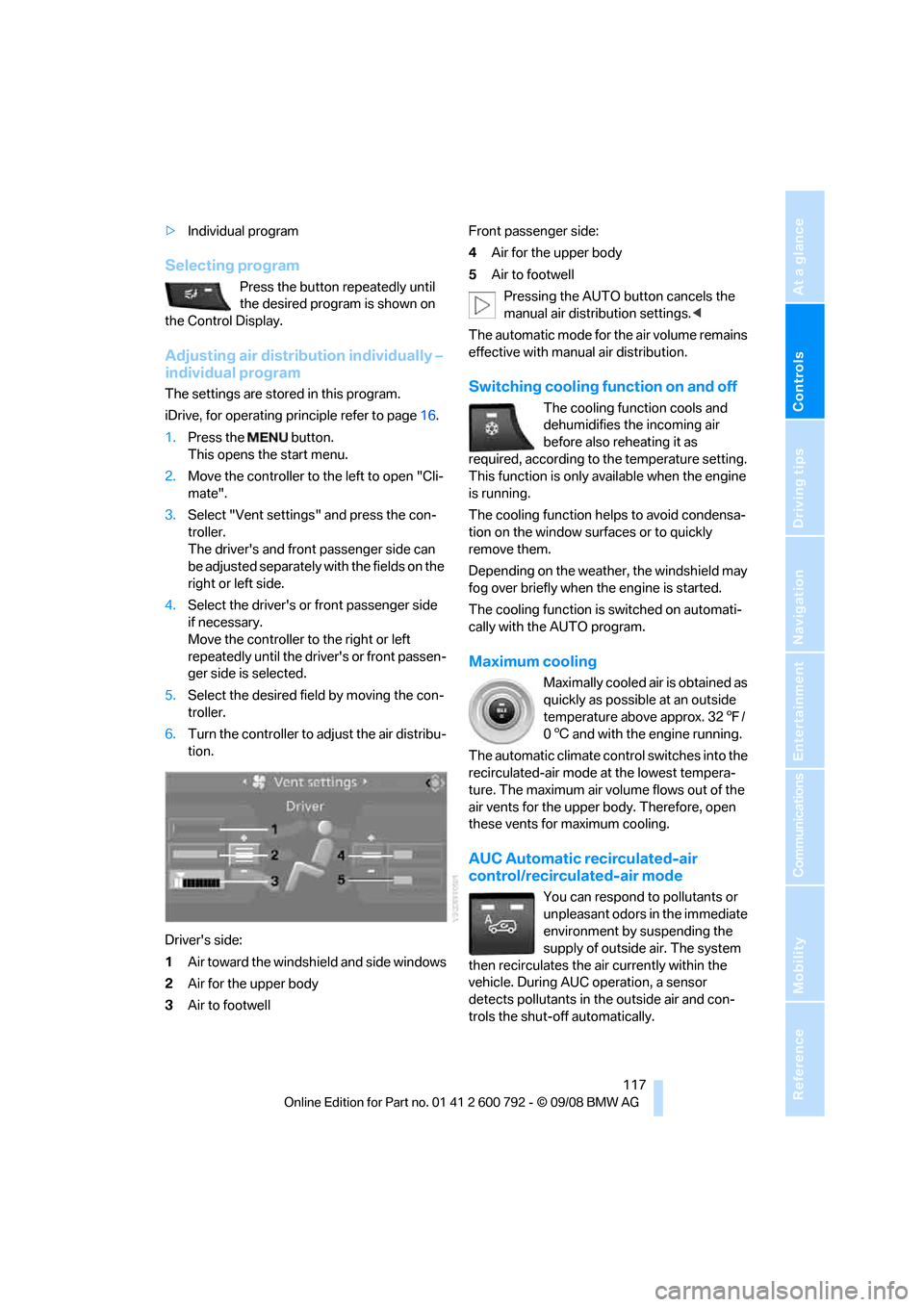
Driver's side:
1 Air toward the windshield and side windows
2 Air for the upper body
3 Air to footwell Front passenger side:
4
Air for the upper body
5 Air to footwell
Pressing the AUTO button cancels the
manual air distribution settings. <
The automatic mode for the air volume remains
effective with manual air distribution.Switching cooling function on and off
The cooling function cools and
dehumidifies the incoming air
before also reheating it as
required, according to the temperature setting.
This function is only available when the engine
is running.
The cooling function helps to avoid condensa-
tion on the window surfaces or to quickly
remove them.
Depending on the weathe r, the windshield may
fog over briefly when the engine is started.
The cooling function is switched on automati-
cally with the AUTO program.
Maximum cooling
Maximally cooled air is obtained as
quickly as possible at an outside
temperature above approx. 32 7/
0 6 and with the engine running.
The automatic climate cont rol switches into the
recirculated-air mode at the lowest tempera-
ture. The maximum air volume flows out of the
air vents for the upper body. Therefore, open
these vents for maximum cooling.
AUC Automatic re circulated-air
control/recirculated-air mode
You can respond to pollutants or
unpleasant odors in the immediate
environment by suspending the
supply of outside air. The system
then recirculates the air currently within the
vehicle. During AUC operation, a sensor
detects pollutants in the outside air and con-
trols the shut-off automatically.
Page 120 of 317
Climate
118
By pressing the button repeatedly, you can
request three operating modes:
>
LED off: outside air flows in continuously.
> Left LED on, AUC mode: the system
detects pollutants in the outside air and
shuts off the supply as needed.
> Right LED on, recirculated-air mode: the
supply of outside air is permanently shut off.
Should the windows fog up in the recircu-
lated-air mode, press the AUTO button or
switch off the recirc ulated-air mode and
increase the air volume if necessary.
The recirculated-air mode should not be used
without interruption over an extended period of
time, as the air quality inside the vehicle deteri-
orates continuously. <
Residual heat
The heat stored in the engine is used to heat the
passenger compartment, e.g. while stopped at
a school to pick up a child.
Switching on
Pressing the right side switches on
the residual heat utilization when
the following conditions are met:
> up to 15 minutes after switching off the
engine
> with the engine at operating temperature
> with sufficient battery voltage
> at an outside temperature below 77 7/
25 6
REST appears on the display of the automatic
climate control when the residual heat utiliza-
tion is switched on.
From radio readiness the interior temperature,
the air volume and the air distribution can be
set.
Switching off
You can select the lowe st blower speed by
pressing and holding th e left side. Pressing
again switches off the re sidual heat utilization.
REST disappears from the display of the auto-
matic climate control.
Switching automatic climate control on
and off
You can select the lowest blower
speed by pressing and holding the
left side. Pressing again switches
off the automatic climate control.
Y o u s w i t c h o n t h e s y s t e m a g a i n b y p r e s s i n g a n y
button of the automatic climate control.
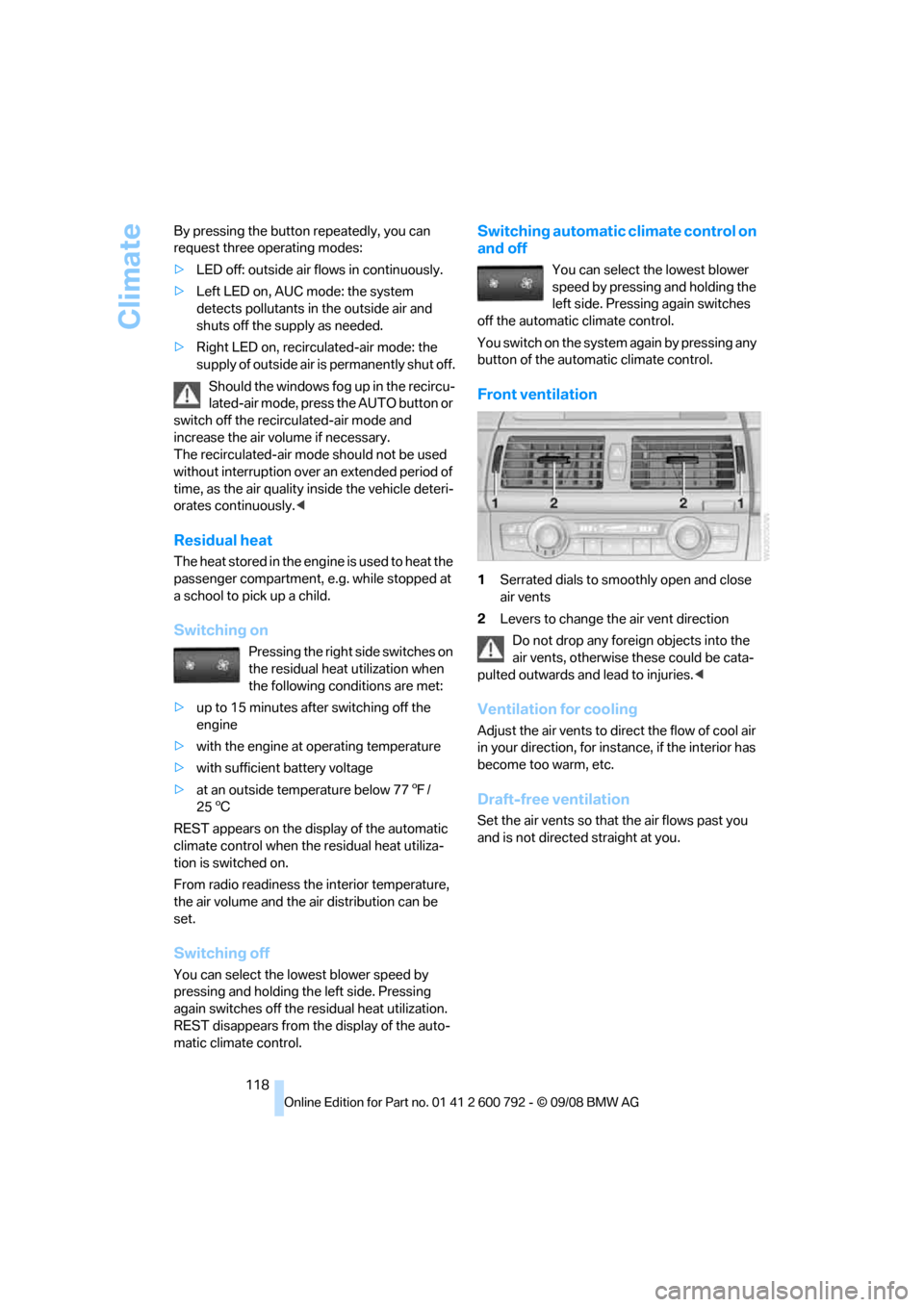
Front ventilation
1 Serrated dials to smoothly open and close
air vents
2 Levers to change th e air vent direction
Do not drop any foreign objects into the
air vents, otherwise these could be cata-
pulted outwards and lead to injuries. <
Ventilation for cooling
Adjust the air vents to direct the flow of cool air
in your direction, for instance, if the interior has
become too warm, etc.
Draft-free ventilation
Set the air vents so that the air flows past you
and is not directed straight at you.
Page 125 of 317
Controls
123Reference
At a glance
Driving tips
Communications
Navigation
Entertainment
Mobility
Practical interior accessories
Integrated universal remote
control*
The concept
The integrated universal remote control can
replace as many as three hand-held transmit-
ters for various remote -controlled accessories,
such as garage and gate or lighting systems.
The integrated universal remote control regis-
ters and stores signals from the original hand-
held transmitters.
The signal of an original hand-held transmitter
can be programmed on one of the three mem-
ory buttons 1. Then with the ignition switched
on, this programme d memory button1 can be
used to operate the respective feature. The
LED 2 flashes to confirm transmission of the
signal.
Should you sell your vehicl e one day, be sure to
delete the stored progra ms beforehand for your
safety, refer to page 124.
To prevent possible damage or injury,
before programming or using the inte-
grated universal remote control, always inspect
the immediate area to make certain that no peo-
ple, animals or objects are within the travel
range of the device. Also, comply with the
safety precautions of the original hand-held
transmitter. <
Checking compatibility
If you see this symbol on the packaging
or in the manual supplied with the orig-
inal hand-held transmitter, it is safe to
assume that it is compat ible with the integrated
universal remote control.
Should you have additional questions,
please contact your BMW Sports Activity
Vehicle Center or call: 1-800-355-3515.
Information is also provided on the Internet at:
www.bmwusa.com or
www.homelink.com. HomeLink is a registered trademark of Johnson
Controls, Inc.
<
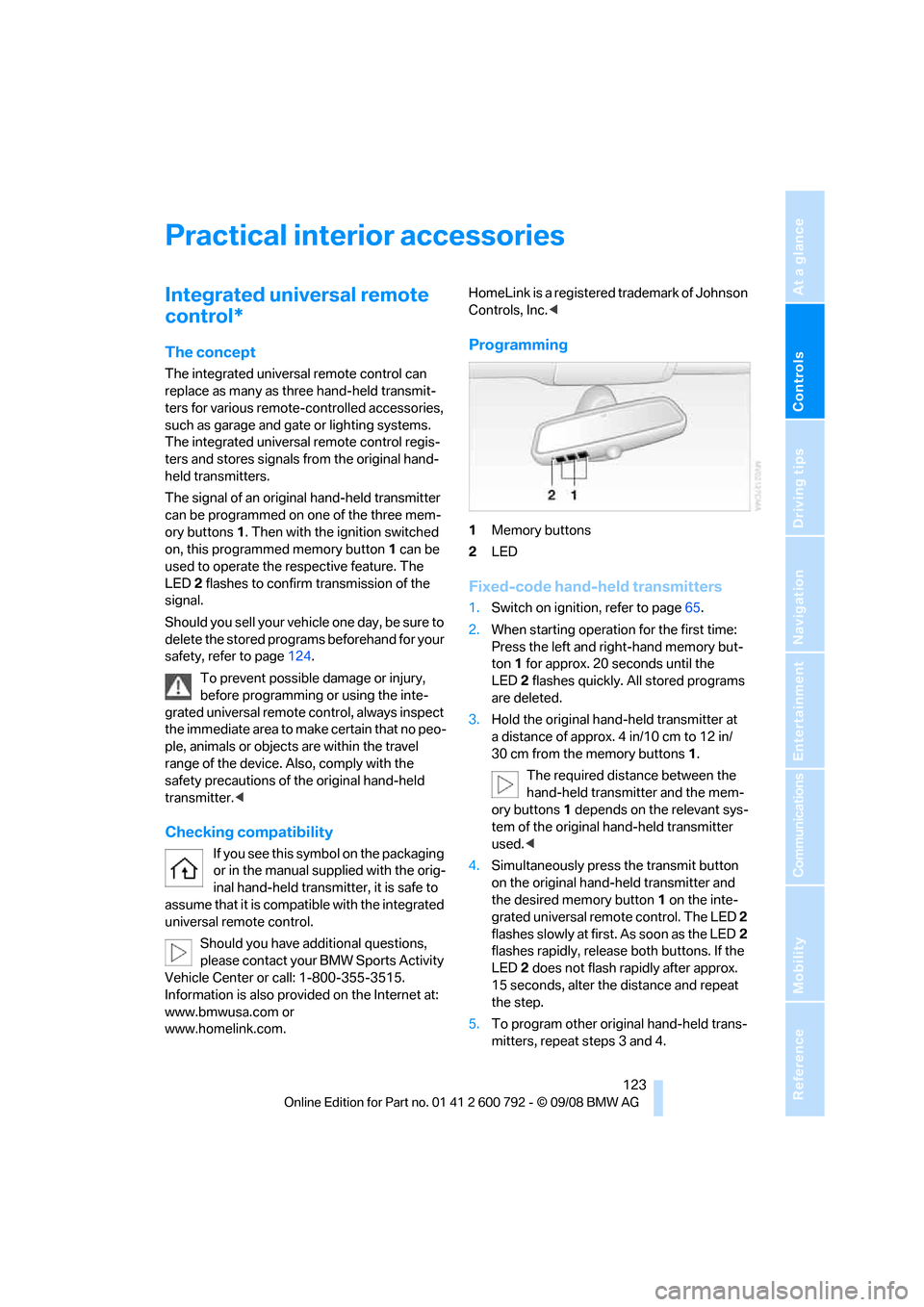
Programming
1Memory buttons
2 LED
Fixed-code hand-held transmitters
1.Switch on ignition, refer to page 65.
2. When starting operation for the first time:
Press the left and ri ght-hand memory but-
ton 1 for approx. 20 seconds until the
LED 2 flashes quickly. All stored programs
are deleted.
3. Hold the original hand-held transmitter at
a distance of approx. 4 in/10 cm to 12 in/
30 cm from the memory buttons 1.
The required distance between the
hand-held transmitter and the mem-
ory buttons 1 depends on the relevant sys-
tem of the original hand-held transmitter
used. <
4. Simultaneously press the transmit button
on the original hand-held transmitter and
the desired memory button 1 on the inte-
grated universal remote control. The LED 2
flashes slowly at first. As soon as the LED 2
flashes rapidly, releas e both buttons. If the
LED 2 does not flash rapidly after approx.
15 seconds, alter the distance and repeat
the step.
5. To program other original hand-held trans-
mitters, repeat steps 3 and 4.
Page 126 of 317
Practical interior accessories
124
The corresponding memory button
1 is now
programmed with the signal of the original
hand-held transmitter.
You can operate the device when the engine is
running or when the igni tion is switched on.
If the device cannot be used after
repeated programming, check whether
the original hand-held transmitter uses an alter-
nating-code system. To do so, either read the
instructions for the original hand-held transmit-
ter or hold down the programmed memory but-
ton 1 of the integrated universal remote control.
If the LED 2 on the integrated universal remote
control flashes rapidly for a short time and then
remains lit for approx. 2 seconds, this indicates
that the original hand-h eld transmitter uses an
alternating-code system. In the case of an alter-
nating-code system, program the memory but-
tons 1 as described at Alternating-code hand-
held transmitters. <
Alternating-code hand-held
transmitters
To program the integrated universal remote
control, consult the operating instructions for
the equipment to be set. You will find informa-
tion there on the possibilities for synchroniza-
tion.
When programming hand-held transmitters
that employ an alternating code, observe the
following supplementary instructions:
Programming will be easi er with the aid of
a second person. <
1. Park your vehicle within the range of the
remote-controlled device.
2. Program the integrated universal remote
control as described above in the section
Fixed-code hand-held transmitters.
3. Locate the button on the receiver of the
device to be set, e.g. on the drive unit.
4. Press the button on the receiver of the
device to be set. Af ter step 4, you have
approx. 30 seconds for step 5.
5. Press the programmed memory button 1
of the integrated universal remote control
three times. The corresponding memory button
1 is now
programmed with the signal of the original
hand-held transmitter.
Should you have questions, please con-
tact your BMW Sports Activity Vehicle
Center. <
Deleting all stored programs
Press the left and right-hand memory button 1
for approx. 20 seconds until the LED 2 flashes
quickly:
All stored programs are deleted.
Reassigning individual programs
1. Hold the original hand-held transmitter at
a distance of approx. 4 in/10 cm to 12 in/
30 cm from the memory buttons 1.
The required distance between the
hand-held transmitter and the mem-
ory buttons 1 depends on the relevant sys-
tem of the original hand-held transmitter
used. <
2. Press the desired memory button 1 of the
integrated universal remote control.
3. When the LED 2 flashes slowly after approx.
20 seconds, press the transmit button of
the original hand-held transmitter. Release
both buttons as soon as the LED 2 flashes
rapidly. If the LED 2 does not flash rapidly
after approx. 15 seconds, alter the distance
and repeat the step.
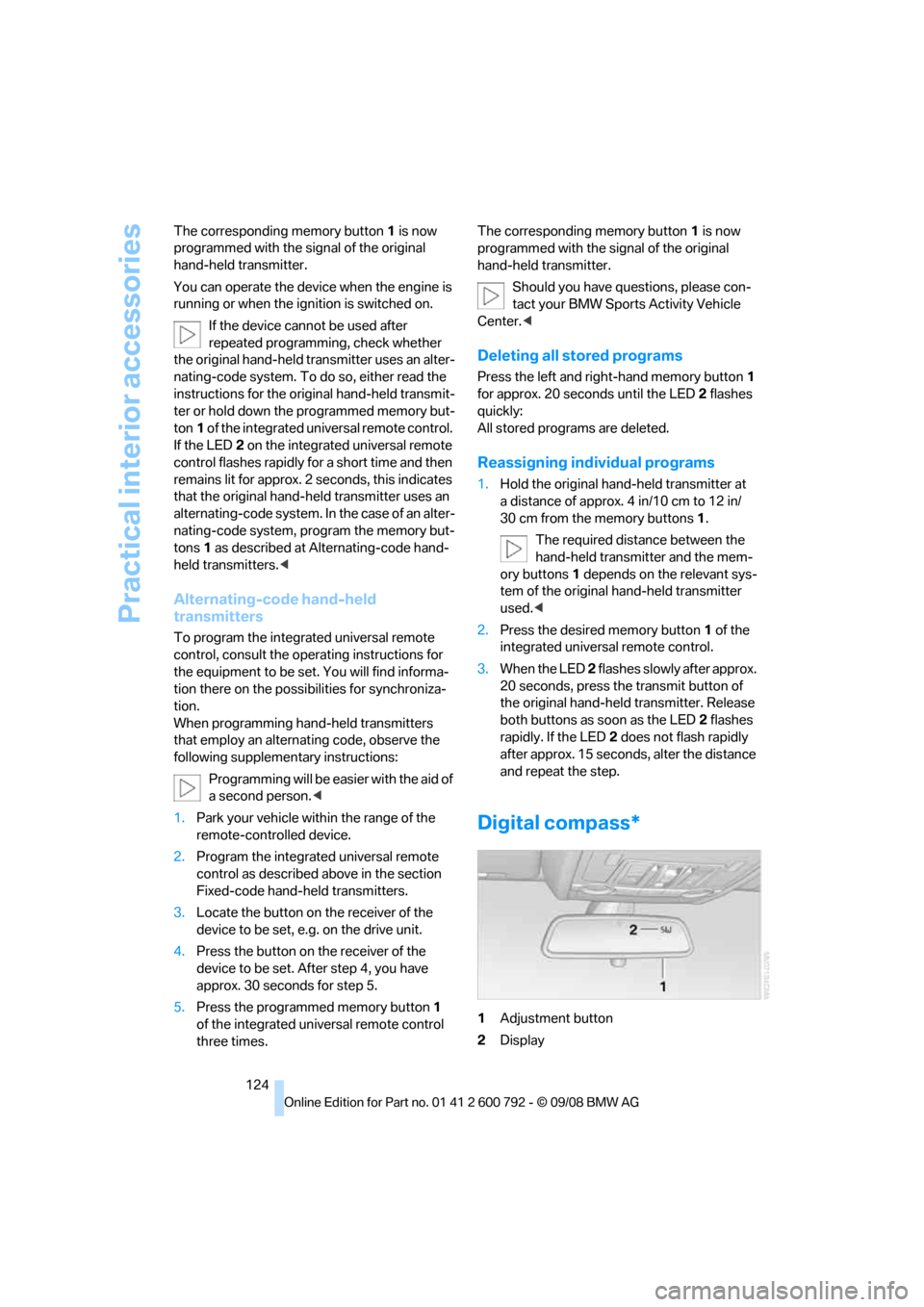
Digital compass*
1 Adjustment button
2 Display
Page 127 of 317
Controls
125Reference
At a glance
Driving tips
Communications
Navigation
Entertainment
Mobility
The display indicates the cardinal or intercardi-
nal direction in which you are currently driving.
Operating principle
You can run various functions by pressing the
adjustment button with a pointed object, e.g. a
ball-point pen etc. The following setting options
are displayed consecutively, depending on how
long the adjustment button is pressed:
> Press briefly: switch display on/off
> 3 to 6 seconds: set compass zone
> 6 to 9 seconds: calibrate compass
> 9 to 12 seconds: set left/right-hand drive
vehicle
> 12 to 15 seconds: set language
Setting compass zones
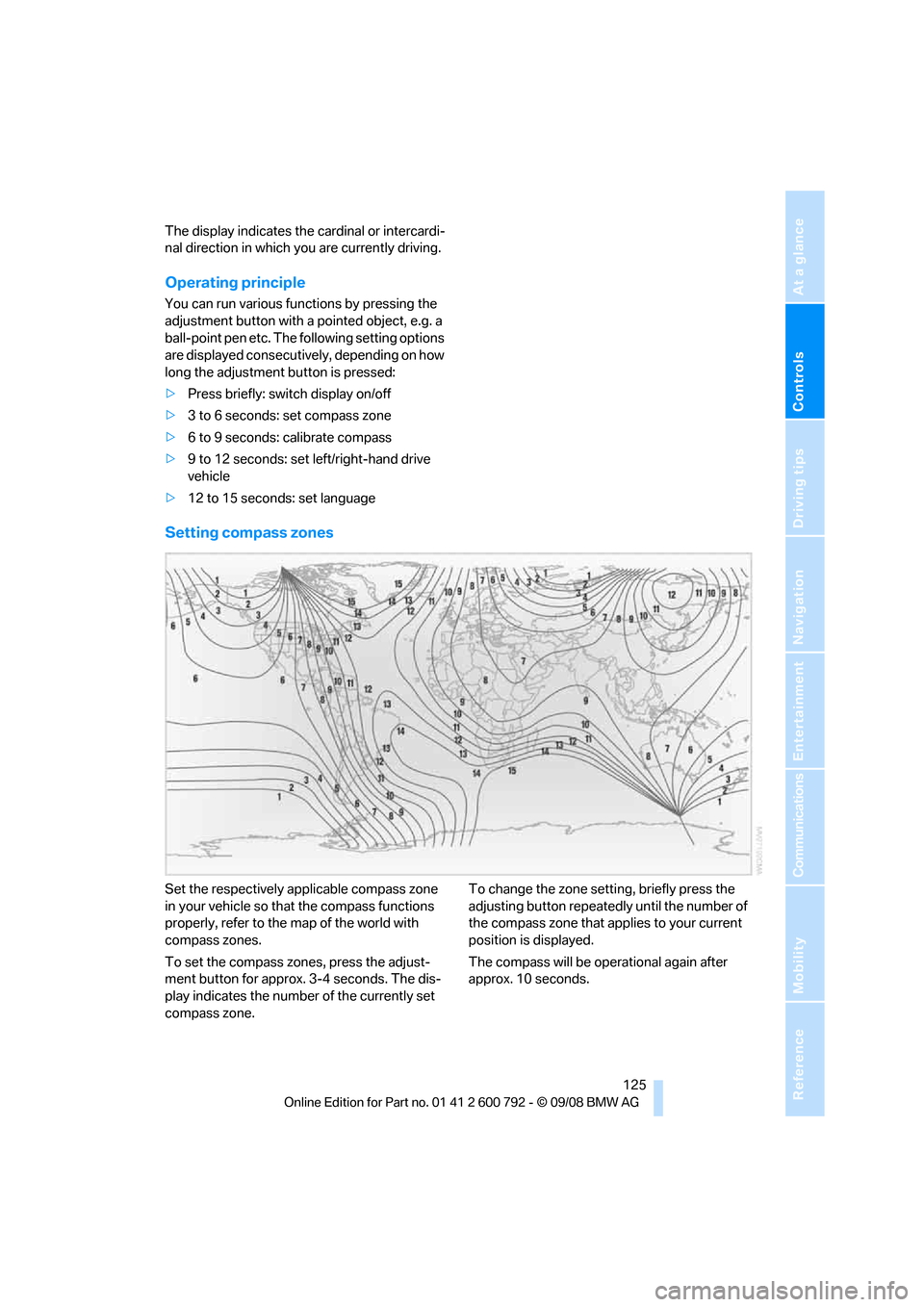
Set the respectively a pplicable compass zone
in your vehicle so that the compass functions
properly, refer to the map of the world with
compass zones.
To set the compass zones, press the adjust-
ment button for approx. 3-4 seconds. The dis-
play indicates the number of the currently set
compass zone. To change the zone setting, briefly press the
adjusting button repeatedly
until the number of
the compass zone that a pplies to your current
position is displayed.
The compass will be operational again after
approx. 10 seconds.
Page 156 of 317
Destination entry
154
Selecting country
1.Wait for the system to ask for the country of
destination.
Say the name of the coun try of destination in
the language of the vo ice activation system.
Entering destination
The destination can be sp elled or entered as an
entire word.
Spelling destination
To enter the destination, spell it using the
orthography of the coun try of destination.
Pronounce the letters smoothly and at normal
volume, avoiding excessive emphasis and
pauses.
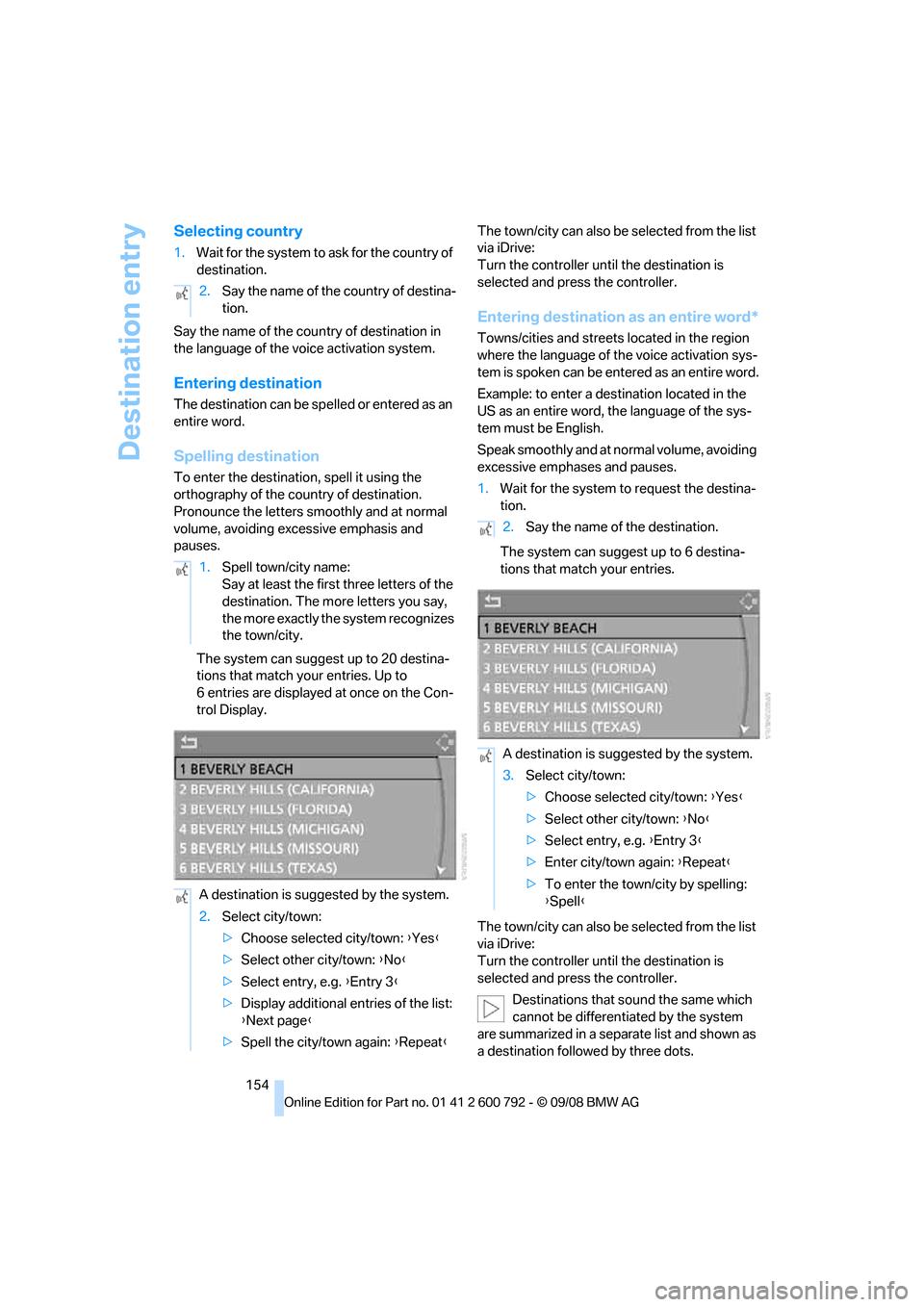
The system can suggest up to 20 destina-
tions that match your entries. Up to
6 entries are displayed at once on the Con-
trol Display. The town/city can also be
selected from the list
via iDrive:
Turn the controller until the destination is
selected and press the controller.
Entering destination as an entire word*
Towns/cities and streets located in the region
where the language of the voice activation sys-
tem is spoken can be entered as an entire word.
Example: to enter a destination located in the
US as an entire word, the language of the sys-
tem must be English.
Speak smoothly and at normal volume, avoiding
excessive emphases and pauses.
1. Wait for the system to request the destina-
tion.
The system can suggest up to 6 destina-
tions that match your entries.
The town/city can also be selected from the list
via iDrive:
Turn the controller until the destination is
selected and press the controller.
Destinations that sound the same which
cannot be differentia ted by the system
are summarized in a sepa rate list and shown as
a destination followe d by three dots.
2.
Say the name of the country of destina-
tion.
1. Spell town/city name:
Say at least the first three letters of the
destination. The more letters you say,
the more exactly the system recognizes
the town/city.
A destination is suggested by the system.
2. Select city/town:
>Choose selected city/town: { Yes}
> Select other city/town: {No }
> Select entry, e.g. {Entry 3 }
> Display additional entries of the list:
{Next page }
> Spell the city/town again: {Repeat }
2.Say the name of the destination.
A destination is suggested by the system.
3. Select city/town:
>Choose selected city/town: { Yes}
> Select other city/town: {No }
> Select entry, e.g. {Entry 3 }
> Enter city/town again: {Repeat }
> To enter the town/city by spelling:
{Spell }
Page 167 of 317
Navigation
Driving tips
165Reference
At a glance
Controls
Communications
Entertainment
Mobility
To exit from the menu: Select the arrow and press the controller.
Destination guidance via
voice instructions
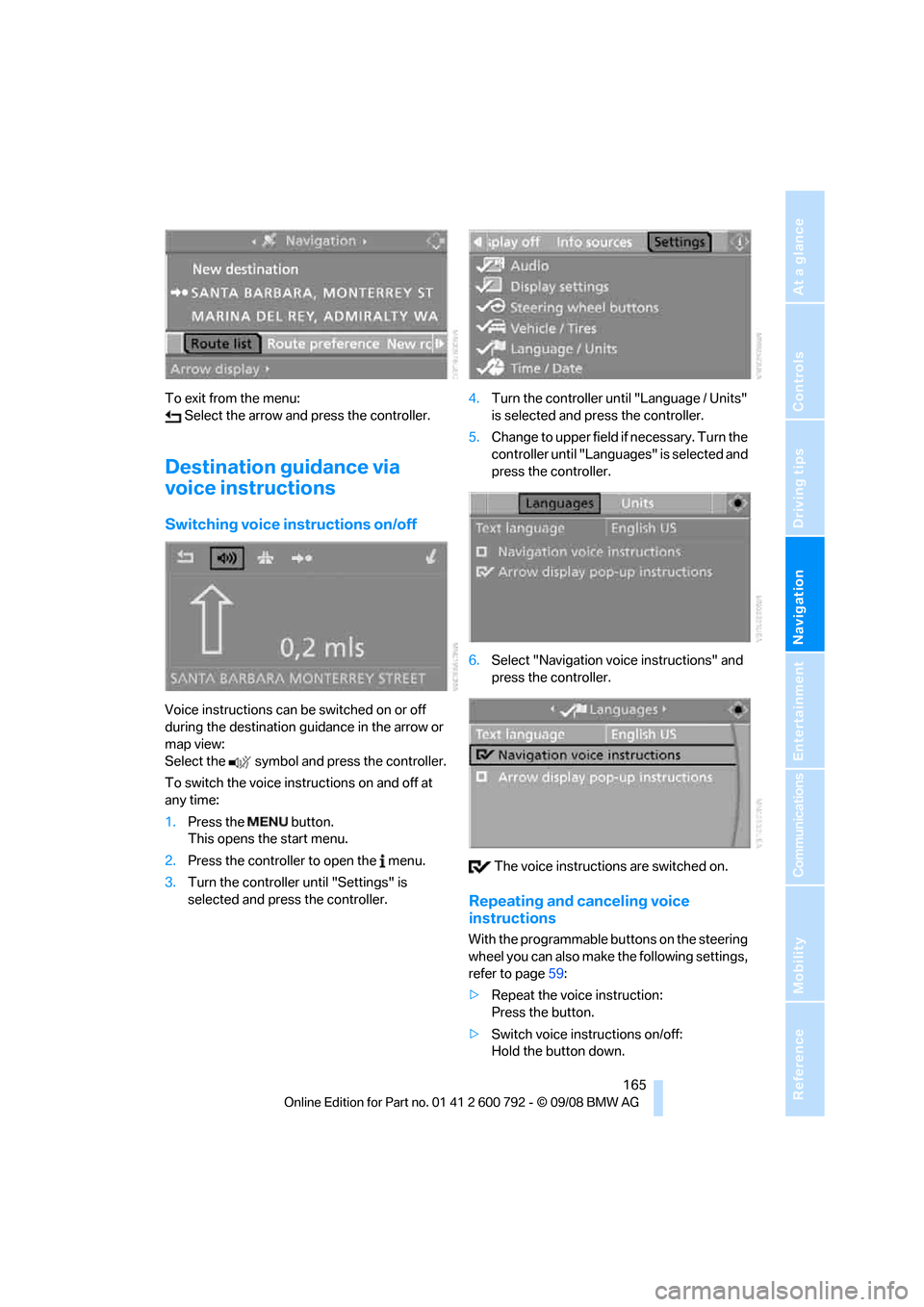
Switching voice in structions on/off
Voice instructions can be switched on or off
during the destination guidance in the arrow or
map view:
Select the symbol and press the controller.
To switch the voice instructions on and off at
any time:
1.Press the button.
This opens the start menu.
2. Press the controller to open the menu.
3. Turn the controller until "Settings" is
selected and press the controller. 4.
Turn the controller until "Language / Units"
is selected and pr ess the controller.
5. Change to upper field if necessary. Turn the
controller until "Languages" is selected and
press the controller.
6. Select "Navigation voice instructions" and
press the controller.
The voice instructio ns are switched on.
Repeating and canceling voice
instructions
With the programmable buttons on the steering
wheel you can also make the following settings,
refer to page59:
> Repeat the voice instruction:
Press the button.
> Switch voice instructions on/off:
Hold the button down.
Page 168 of 317
Destination guidance
166
Setting volume of voice instructions
The volume can only be adjusted while a voice
instruction is being output.
1.Repeat the last voice instruction, if neces-
sary.
2. Turn the knob during the voice instruction
to select the desired volume.
This volume is independen t of the volume of the
audio sources.
The setting is stored fo r the remote control cur-
rently in use.
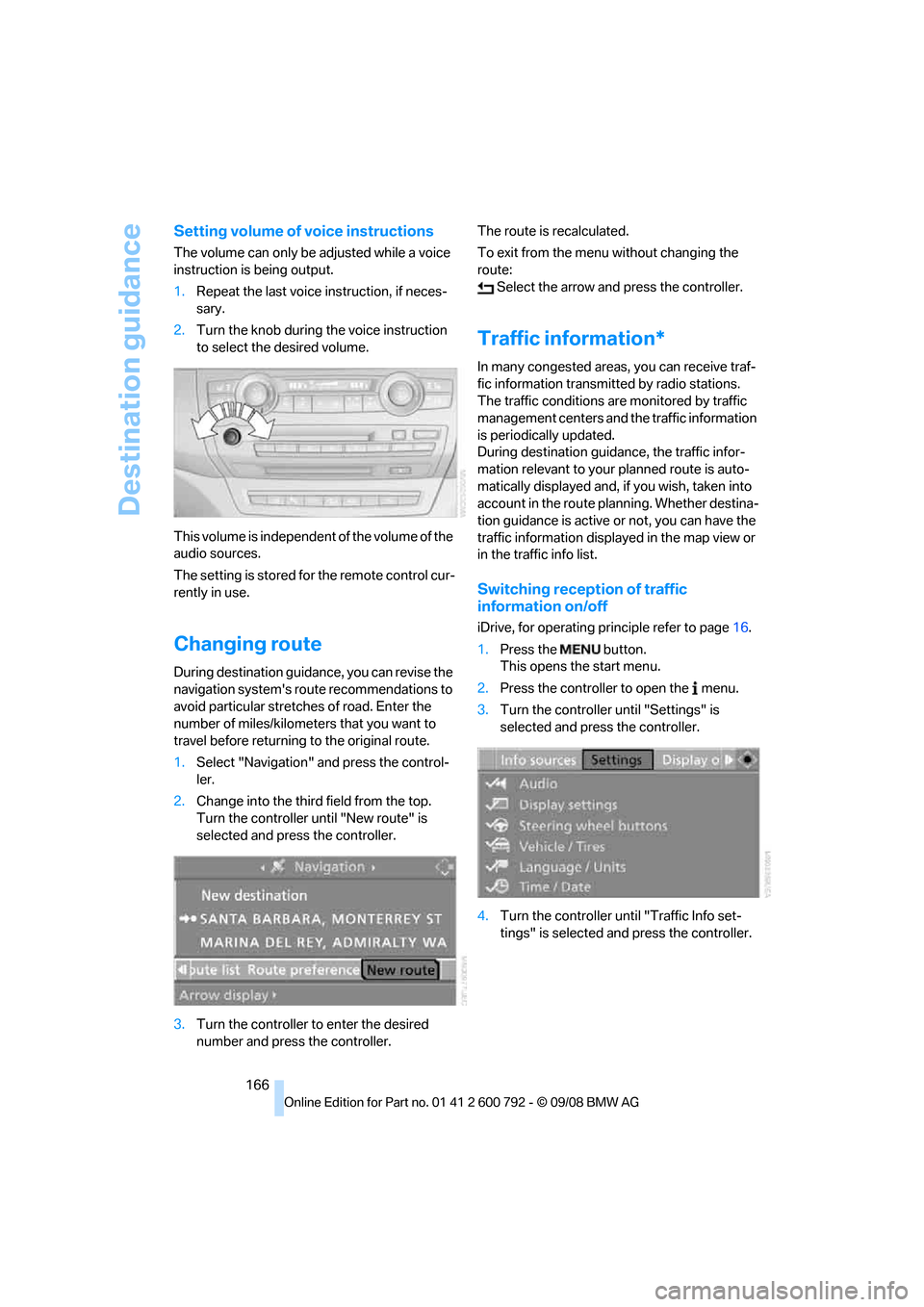
Changing route
During destination guidan ce, you can revise the
navigation system's route recommendations to
avoid particular stretches of road. Enter the
number of miles/kilomete rs that you want to
travel before returning to the original route.
1. Select "Navigation" and press the control-
ler.
2. Change into the third field from the top.
Turn the controller until "New route" is
selected and press the controller.
3. Turn the controller to enter the desired
number and press the controller. The route is recalculated.
To exit from the menu without changing the
route:
Select the arrow and press the controller.
Traffic information*
In many congested areas, you can receive traf-
fic information transmitted by radio stations.
The traffic conditions ar e monitored by traffic
management centers and the traffic information
is periodically updated.
During destination guid ance, the traffic infor-
mation relevant to your planned route is auto-
matically displayed and, if you wish, taken into
account in the route planning. Whether destina-
tion guidance is active or not, you can have the
traffic information displayed in the map view or
in the traffic info list.
Switching reception of traffic
information on/off
iDrive, for operating pr inciple refer to page16.
1. Press the button.
This opens the start menu.
2. Press the controller to open the menu.
3. Turn the controller until "Settings" is
selected and press the controller.
4. Turn the controller until "Traffic Info set-
tings" is selected and press the controller.
Page 185 of 317
Navigation
Entertainment
Driving tips
183Reference
At a glance
Controls
Communications
Mobility
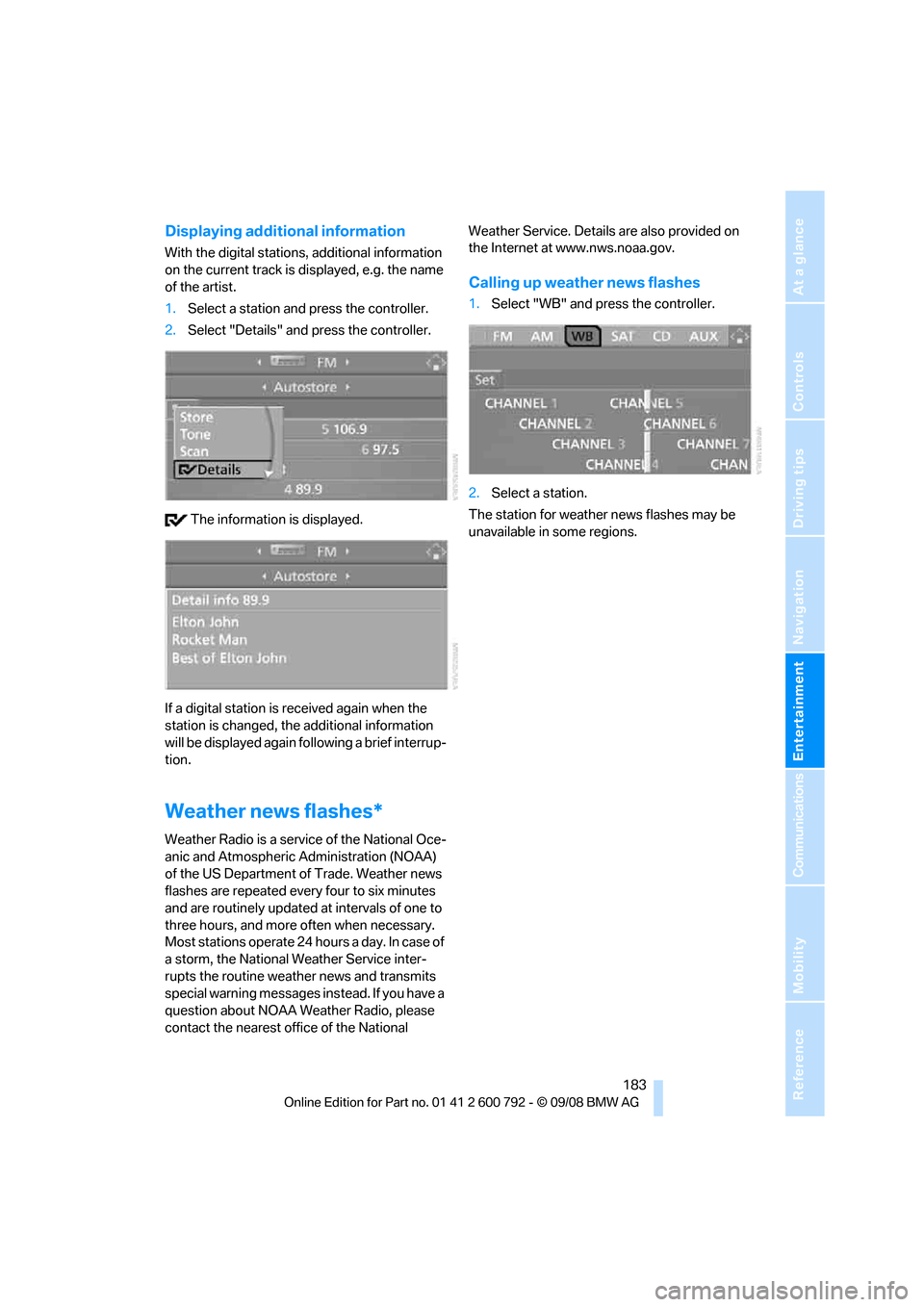
Displaying additional information
With the digital stations, additional information
on the current track is displayed, e.g. the name
of the artist.
1. Select a station and press the controller.
2. Select "Details" and press the controller.
The information is displayed.
If a digital station is received again when the
station is changed, the additional information
will be displayed again following a brief interrup-
tion.
Weather news flashes*
Weather Radio is a service of the National Oce-
anic and Atmospheric Administration (NOAA)
of the US Department of Trade. Weather news
flashes are repeated every four to six minutes
and are routinely updated at intervals of one to
three hours, and more often when necessary.
Most stations operate 24 ho urs a day. In case of
a storm, the National Weather Service inter-
rupts the routine weather news and transmits
special warning messages in stead. If you have a
question about NOAA Weather Radio, please
contact the nearest offi ce of the National Weather Service. Details are also provided on
the Internet at www.nws.noaa.gov.
Calling up weather news flashes
1.
Select "WB" and press the controller.
2. Select a station.
The station for weather news flashes may be
unavailable in some regions.
Page 190 of 317
CD player and CD changer
188
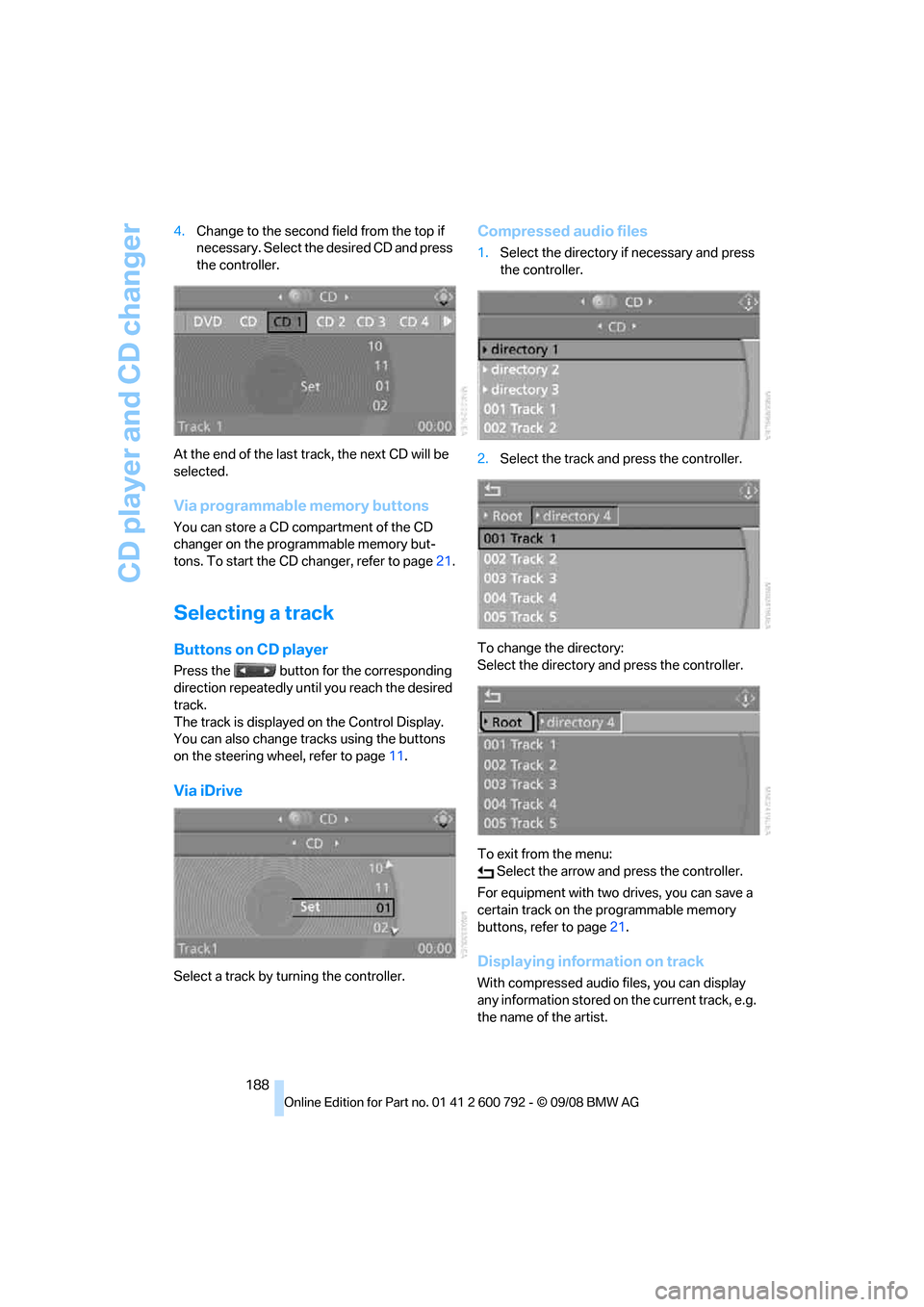
4.
Change to the second field from the top if
necessary. Select the desired CD and press
the controller.
At the end of the last tr ack, the next CD will be
selected.
Via programmable memory buttons
You can store a CD compartment of the CD
changer on the programmable memory but-
tons. To start the CD changer, refer to page 21.
Selecting a track
Buttons on CD player
Press the button for the corresponding
direction repeatedly until you reach the desired
track.
The track is displayed on the Control Display.
You can also change tracks using the buttons
on the steering wheel, refer to page 11.
Via iDrive
Select a track by turning the controller.
Compressed audio files
1.Select the directory if necessary and press
the controller.
2. Select the track and press the controller.
To change the directory:
Select the directory and press the controller.
To exit from the menu: Select the arrow and press the controller.
For equipment with two drives, you can save a
certain track on the programmable memory
buttons, refer to page 21.
Displaying information on track
With compressed audio files, you can display
any information stored on the current track, e.g.
the name of the artist.