check BMW X5M 2012 Owners Manual
[x] Cancel search | Manufacturer: BMW, Model Year: 2012, Model line: X5M, Model: BMW X5M 2012Pages: 317, PDF Size: 8.83 MB
Page 14 of 317
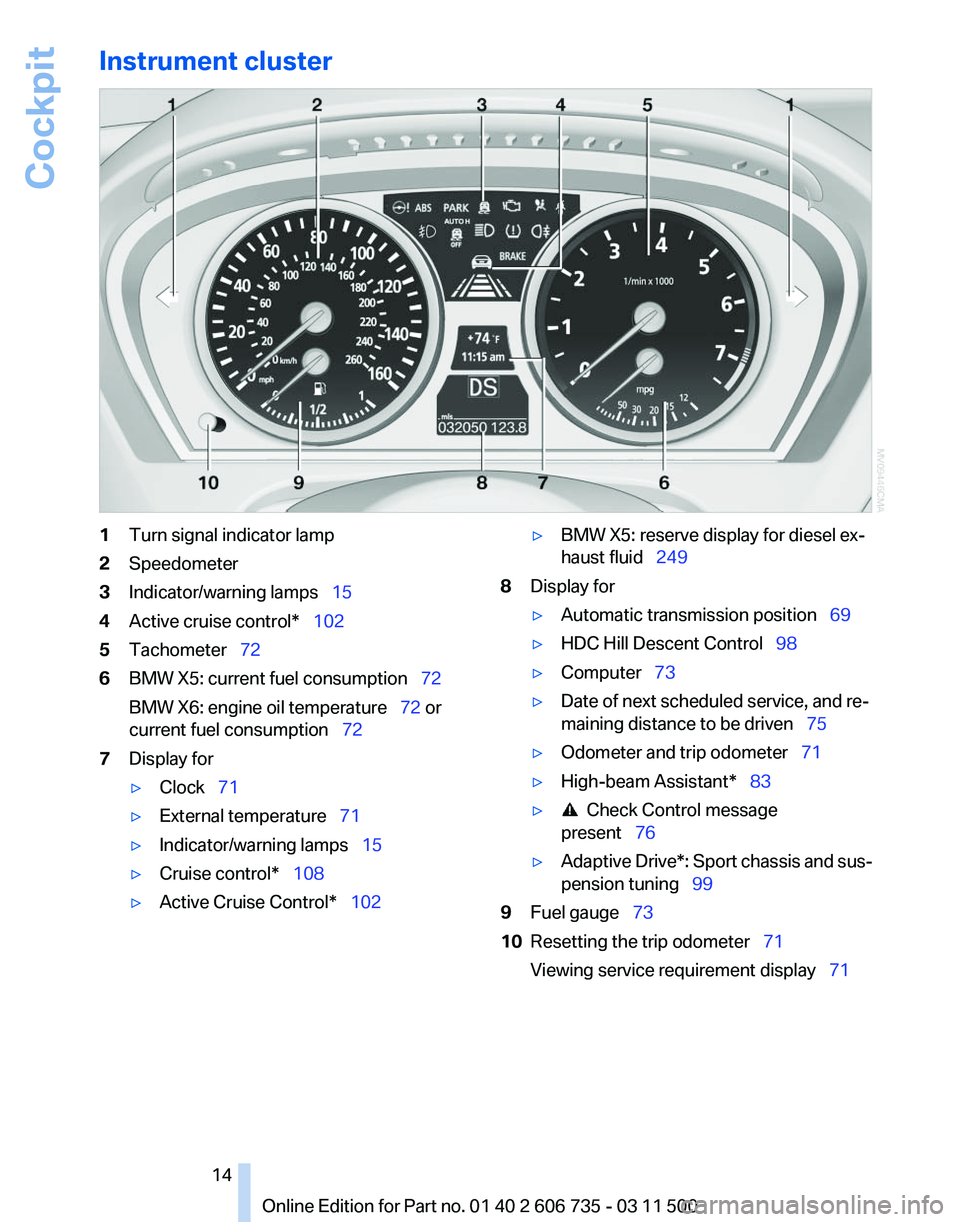
Instrument cluster
1
Turn signal indicator lamp
2 Speedometer
3 Indicator/warning lamps 15
4 Active cruise control* 102
5 Tachometer 72
6 BMW X5: current fuel consumption 72
BMW X6: engine oil temperature
72 or
current fuel consumption 72
7 Display for
▷Clock 71
▷ External temperature 71
▷ Indicator/warning lamps 15
▷ Cruise control* 108
▷ Active Cruise Control* 102 ▷
BMW X5: reserve display for diesel ex‐
haust fluid 249
8 Display for
▷Automatic transmission position 69
▷ HDC Hill Descent Control 98
▷ Computer 73
▷ Date of next scheduled service, and re‐
maining distance to be driven
75
▷ Odometer and trip odometer 71
▷ High-beam Assistant* 83
▷ Check Control message
present 76
▷ Adaptive Drive*:
Sport chassis and sus‐
pension tuning 99
9 Fuel gauge 73
10 Resetting the trip odometer 71
Viewing service requirement display 71
Seite 14
14 Online Edition for Part no. 01 40 2 606 735 - 03 11 500
Cockpit
Page 15 of 317
Indicator/warning lamps
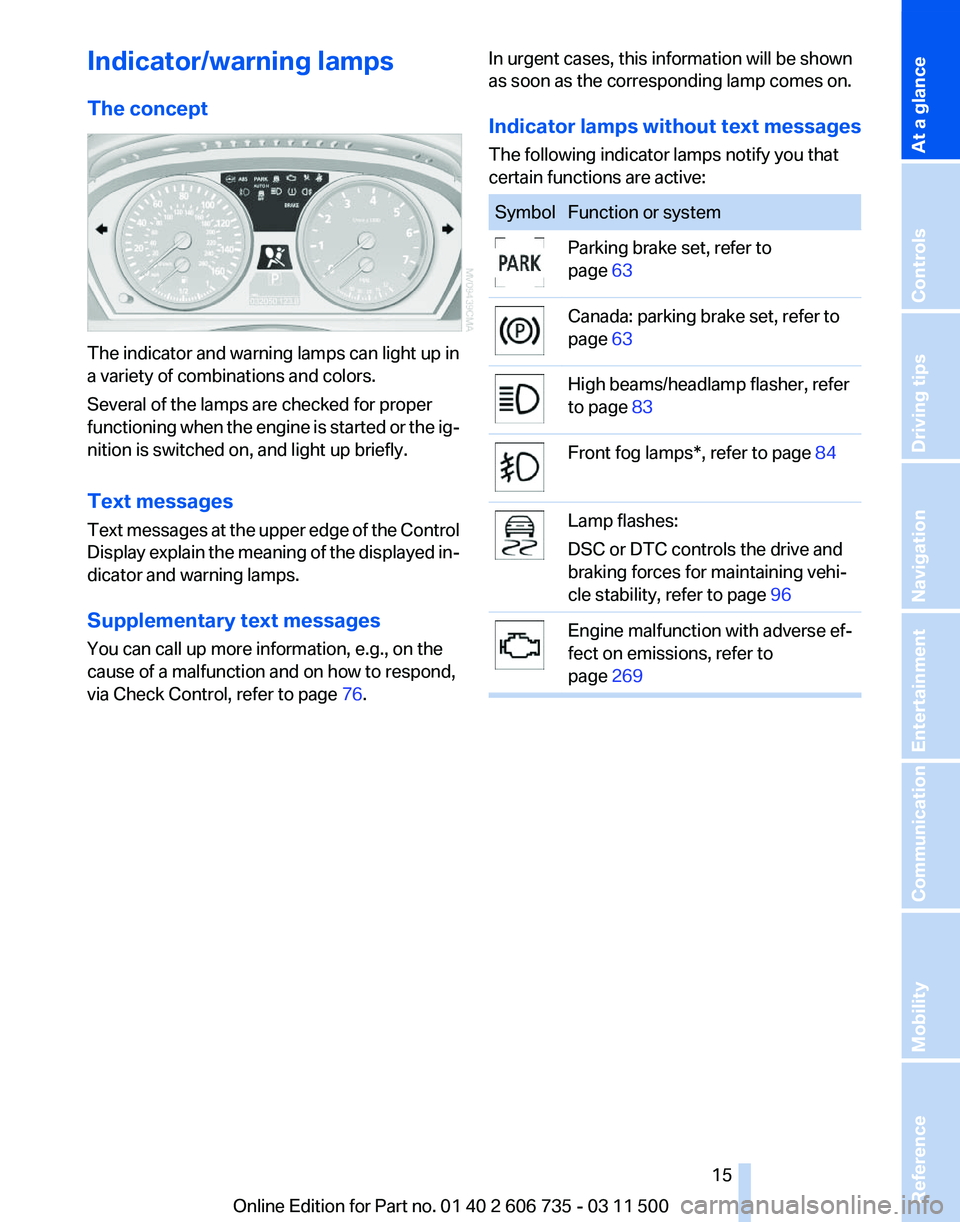
The concept
The indicator and warning lamps can light up in
a variety of combinations and colors.
Several of the lamps are checked for proper
functioning
when the engine is started or the ig‐
nition is switched on, and light up briefly.
Text messages
Text messages at the upper edge of the Control
Display explain the meaning of the displayed in‐
dicator and warning lamps.
Supplementary text messages
You can call up more information, e.g., on the
cause of a malfunction and on how to respond,
via Check Control, refer to page 76.In urgent cases, this information will be shown
as soon as the corresponding lamp comes on.
Indicator lamps without text messages
The following indicator lamps notify you that
certain functions are active: Symbol Function or system
Parking brake set, refer to
page
63 Canada: parking brake set, refer to
page
63 High beams/headlamp flasher, refer
to page
83 Front fog lamps*, refer to page
84 Lamp flashes:
DSC or DTC controls the drive and
braking forces for maintaining vehi‐
cle stability, refer to page
96 Engine malfunction with adverse ef‐
fect on emissions, refer to
page
269 Seite 15
15Online Edition for Part no. 01 40 2 606 735 - 03 11 500
Reference Mobility Communication Entertainment Navigation Driving tips Controls
At a glance
Page 20 of 317
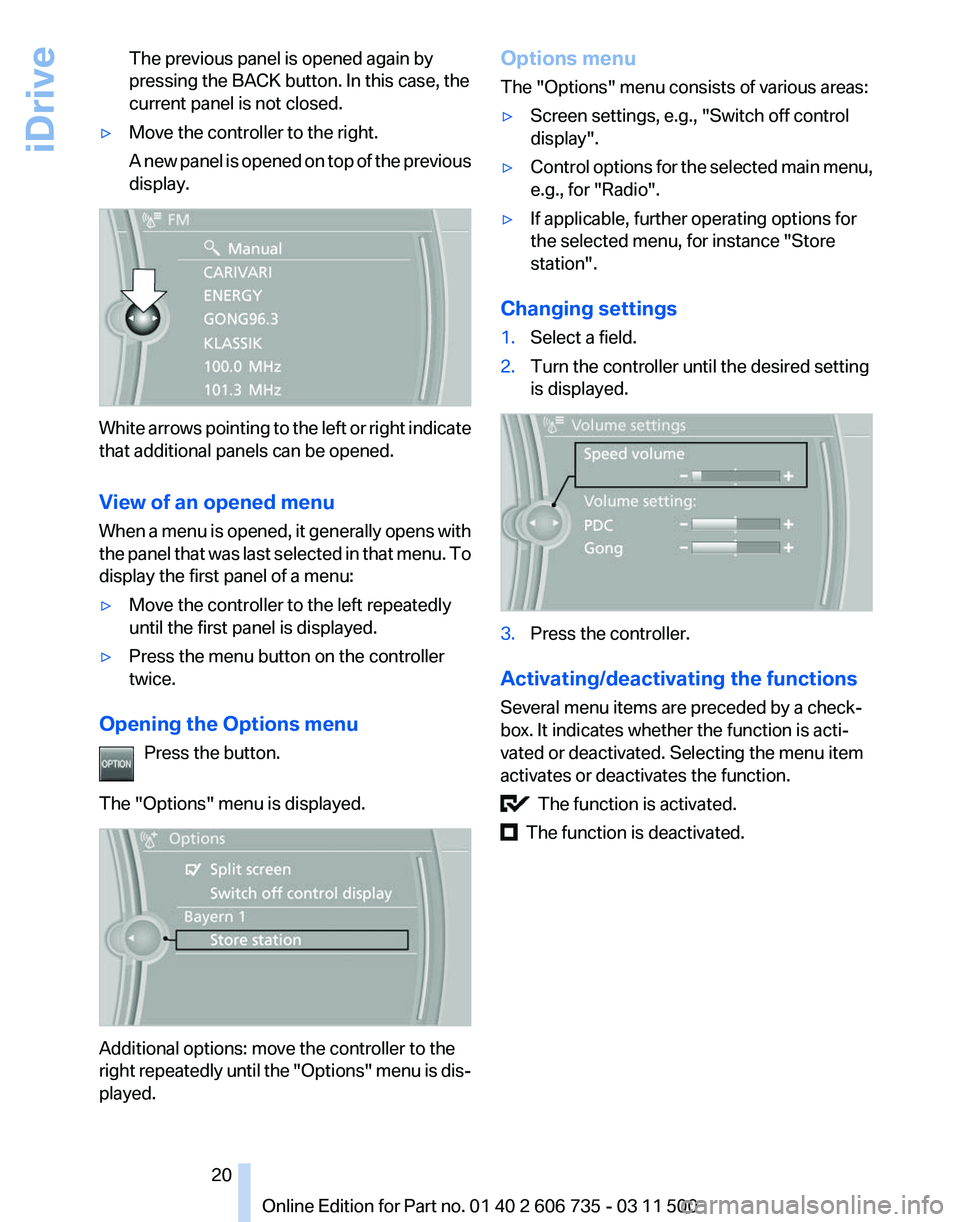
The previous panel is opened again by
pressing the BACK button. In this case, the
current panel is not closed.
▷ Move the controller to the right.
A
new panel is opened on top of the previous
display. White arrows pointing to the left or right indicate
that additional panels can be opened.
View of an opened menu
When
a menu is opened, it generally opens with
the panel that was last selected in that menu. To
display the first panel of a menu:
▷ Move the controller to the left repeatedly
until the first panel is displayed.
▷ Press the menu button on the controller
twice.
Opening the Options menu Press the button.
The "Options" menu is displayed. Additional options: move the controller to the
right
repeatedly until the "Options" menu is dis‐
played. Options menu
The "Options" menu consists of various areas:
▷
Screen settings, e.g., "Switch off control
display".
▷ Control options for the selected main menu,
e.g., for "Radio".
▷ If applicable, further operating options for
the selected menu, for instance "Store
station".
Changing settings
1. Select a field.
2. Turn the controller until the desired setting
is displayed. 3.
Press the controller.
Activating/deactivating the functions
Several menu items are preceded by a check‐
box. It indicates whether the function is acti‐
vated or deactivated. Selecting the menu item
activates or deactivates the function. The function is activated.
The function is deactivated.
Seite 20
20 Online Edition for Part no. 01 40 2 606 735 - 03 11 500
iDrive
Page 21 of 317
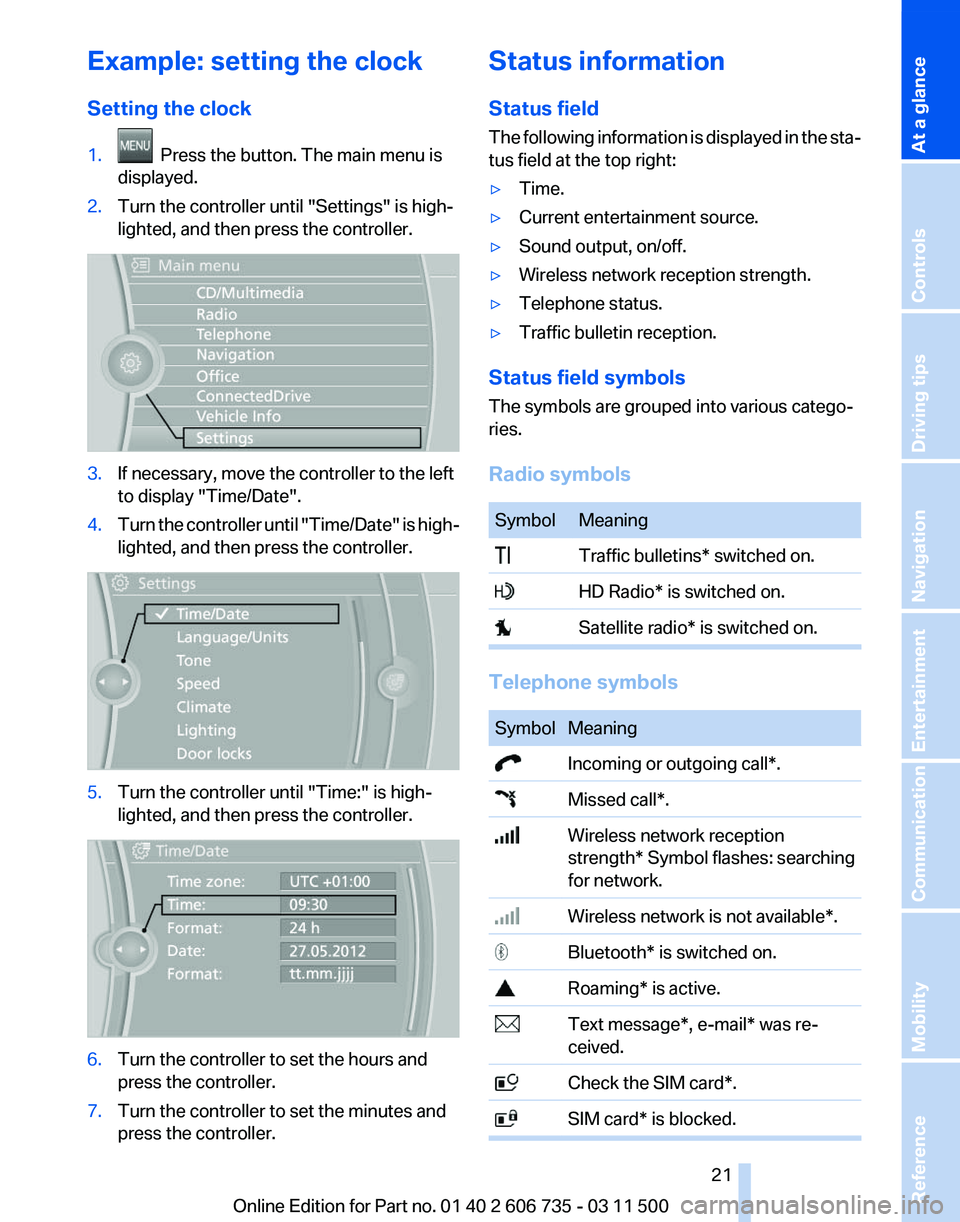
Example: setting the clock
Setting the clock
1.
Press the button. The main menu is
displayed.
2. Turn the controller until "Settings" is high‐
lighted, and then press the controller. 3.
If necessary, move the controller to the left
to display "Time/Date"
.
4. Turn the controller until "Time/Date"
is high‐
lighted, and then press the controller. 5.
Turn the controller until "Time:" is high‐
lighted, and then press the controller. 6.
Turn the controller to set the hours and
press the controller.
7. Turn the controller to set the minutes and
press the controller. Status information
Status field
The
following information is displayed in the sta‐
tus field at the top right:
▷ Time.
▷ Current entertainment source.
▷ Sound output, on/off.
▷ Wireless network reception strength.
▷ Telephone status.
▷ Traffic bulletin reception.
Status field symbols
The symbols are grouped into various catego‐
ries.
Radio symbols Symbol Meaning
Traffic bulletins* switched on.
HD Radio* is switched on.
Satellite radio* is switched on.
Telephone symbols
Symbol Meaning
Incoming or outgoing call*.
Missed call*.
Wireless network reception
strength*
Symbol flashes: searching
for network. Wireless network is not available*.
Bluetooth* is switched on.
Roaming* is active.
Text message*, e-mail* was re‐
ceived. Check the SIM card*.
SIM card* is blocked. Seite 21
21Online Edition for Part no. 01 40 2 606 735 - 03 11 500
Reference Mobility Communication Entertainment Navigation Driving tips Controls
At a glance
Page 31 of 317
Press the button on the remote control for at
least 3 seconds.
To switch off the alarm: press any button.
Unlocking tailgate Press the button on the remote control for
approx. 1 second and release.
The tailgate will open slightly, regardless of
whether it was previously locked or unlocked.
With automatic tailgate operation
*: the tailgate
opens automatically.
The tailgate pivots back and up when it opens.
Ensure that adequate clearance is available be‐
fore opening.
To avoid locking yourself out of the vehicle, do
not place the remote control into the cargo area.
The tailgate is locked again as soon as it is
pushed closed.
Before and after each trip, check that the tailgate
has not been inadvertently unlocked.
Provide edge protection
Sharp or angular objects can hit the rear
window while driving and damage the heating
wires of the rear window. Provide edge protec‐
tion.◀
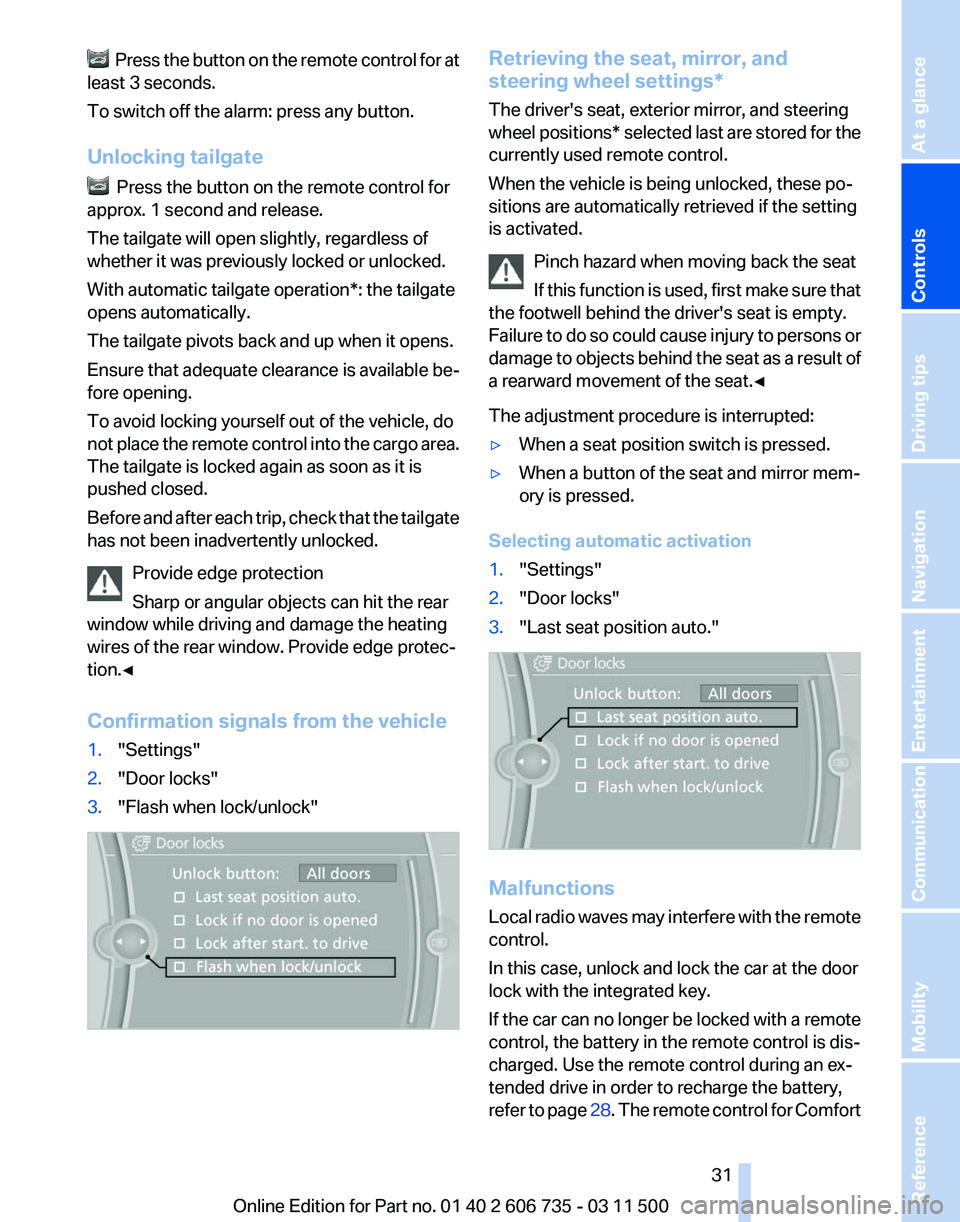
Confirmation signals from the vehicle
1. "Settings"
2. "Door locks"
3. "Flash when lock/unlock" Retrieving the seat, mirror, and
steering wheel settings
*
The driver's seat, exterior mirror, and steering
wheel positions* selected last are stored for the
currently used remote control.
When the vehicle is being unlocked, these po‐
sitions are automatically retrieved if the setting
is activated.
Pinch hazard when moving back the seat
If this function is used, first make sure that
the footwell behind the driver's seat is empty.
Failure to do so could cause injury to persons or
damage to objects behind the seat as a result of
a rearward movement of the seat.◀
The adjustment procedure is interrupted:
▷ When a seat position switch is pressed.
▷ When a button of the seat and mirror mem‐
ory is pressed.
Selecting automatic activation
1. "Settings"
2. "Door locks"
3. "Last seat position auto." Malfunctions
Local
radio waves may interfere with the remote
control.
In this case, unlock and lock the car at the door
lock with the integrated key.
If the car can no longer be locked with a remote
control, the battery in the remote control is dis‐
charged. Use the remote control during an ex‐
tended drive in order to recharge the battery,
refer to page 28. The remote control for Comfort Seite 31
31Online Edition for Part no. 01 40 2 606 735 - 03 11 500
Reference Mobility Communication Entertainment Navigation Driving tips
Controls At a glance
Page 37 of 317
Closing
Danger of pinching
Make
sure that the closing path of the tail‐
gate is clear; otherwise, injuries may result.◀ The tailgate closes automatically when the but‐
ton on the inside of the tailgate is pressed.
To stop the closing process:
▷
Press the button on the inside of the tailgate.
▷ Press the button on the exterior of the tail‐
gate.
Closing is not canceled when you put the vehicle
into motion.
Automatic closing
The tailgate closes automatically without
button
operation if it is weighed down by an ad‐
ditional weight of approx. 11 lbs/5 kg, such as
snow or ice.◀
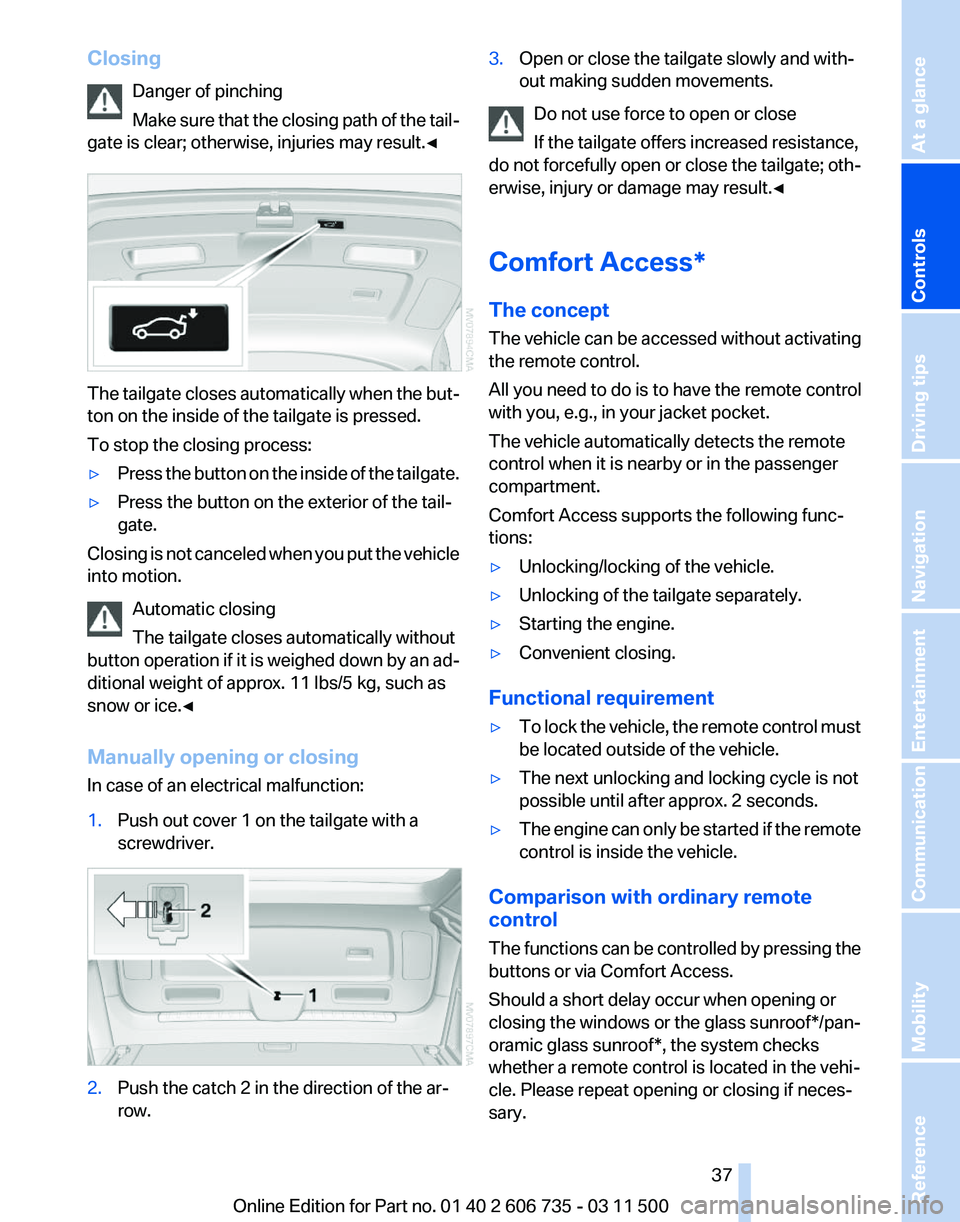
Manually opening or closing
In case of an electrical malfunction:
1. Push out cover 1 on the tailgate with a
screwdriver. 2.
Push the catch 2 in the direction of the ar‐
row. 3.
Open or close the tailgate slowly and with‐
out making sudden movements.
Do not use force to open or close
If the tailgate offers increased resistance,
do
not forcefully open or close the tailgate; oth‐
erwise, injury or damage may result.◀
Comfort Access*
The concept
The vehicle can be accessed without activating
the remote control.
All you need to do is to have the remote control
with you, e.g., in your jacket pocket.
The vehicle automatically detects the remote
control when it is nearby or in the passenger
compartment.
Comfort Access supports the following func‐
tions:
▷ Unlocking/locking of the vehicle.
▷ Unlocking of the tailgate separately.
▷ Starting the engine.
▷ Convenient closing.
Functional requirement
▷ To lock the vehicle, the remote control must
be located outside of the vehicle.
▷ The next unlocking and locking cycle is not
possible until after approx. 2 seconds.
▷ The engine can only be started if the remote
control is inside the vehicle.
Comparison with ordinary remote
control
The
functions can be controlled by pressing the
buttons or via Comfort Access.
Should a short delay occur when opening or
closing the windows or the glass sunroof*/pan‐
oramic glass sunroof*, the system checks
whether a remote control is located in the vehi‐
cle. Please repeat opening or closing if neces‐
sary. Seite 37
37Online Edition for Part no. 01 40 2 606 735 - 03 11 500
Reference Mobility Communication Entertainment Navigation Driving tips
Controls At a glance
Page 39 of 317
Warning lamps
The warning lamp in the instrument
cluster lights up when you attempt to
start
the engine: the engine cannot be
started.
The remote control is not in the vehicle or has a
malfunction. Take the remote control with you
inside the vehicle or have it checked. If neces‐
sary, insert another remote control into the ig‐
nition switch.
The warning lamp in the instrument
cluster lights up while the engine is
running: the remote control is no lon‐
ger inside the vehicle.
After switching off the engine, the engine can
only be started again within approx. 10 seconds
if no door has been opened.
The indicator lamp in the instrument
cluster comes on and a message ap‐
pears on the Control Display: replace
the remote control battery.
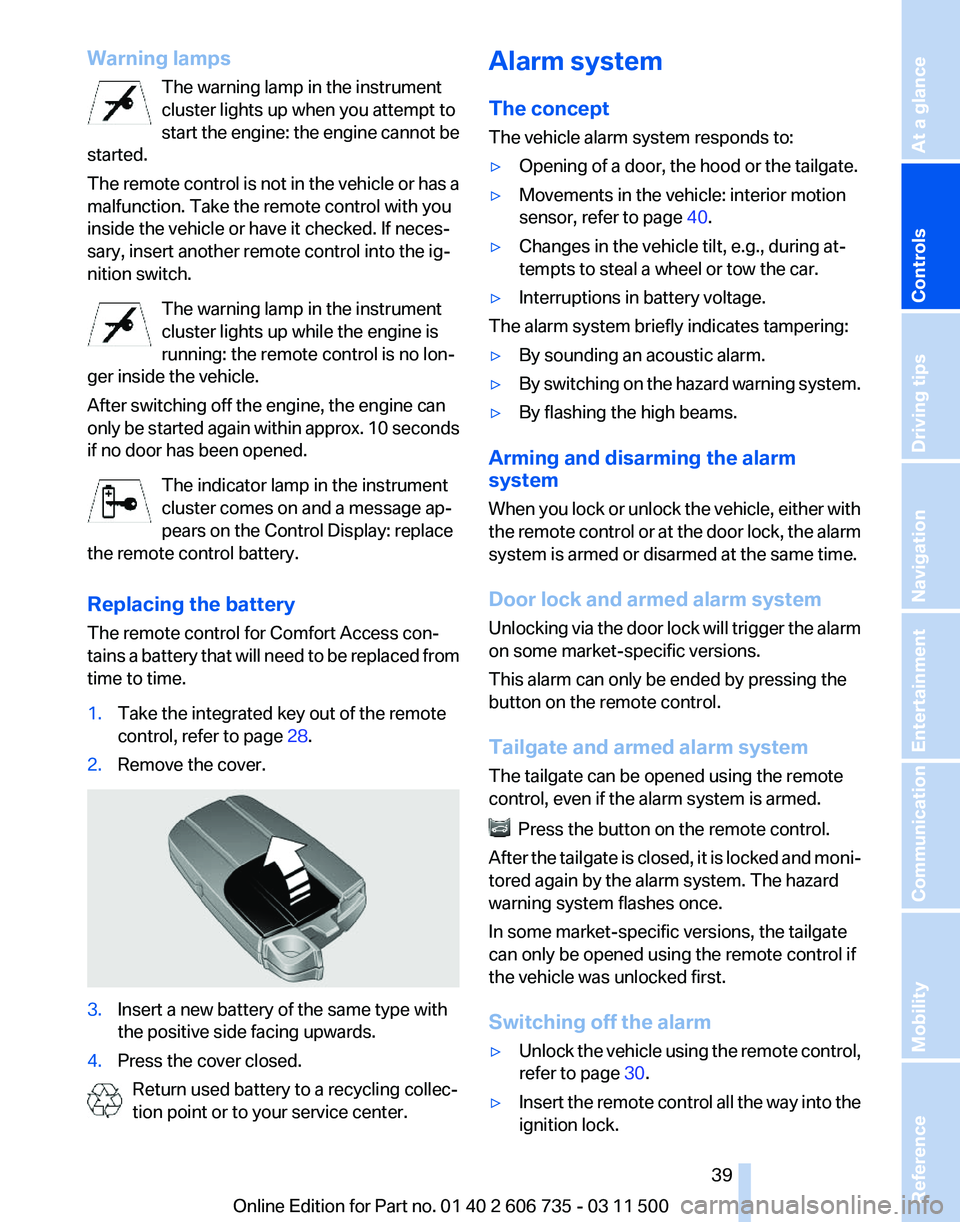
Replacing the battery
The remote control for Comfort Access con‐
tains a battery that will need to be replaced from
time to time.
1. Take the integrated key out of the remote
control, refer to page 28.
2. Remove the cover. 3.
Insert a new battery of the same type with
the positive side facing upwards.
4. Press the cover closed.
Return used battery to a recycling collec‐
tion point or to your service center. Alarm system
The concept
The vehicle alarm system responds to:
▷
Opening of a door, the hood or the tailgate.
▷ Movements in the vehicle: interior motion
sensor, refer to page 40.
▷ Changes in the vehicle tilt, e.g., during at‐
tempts to steal a wheel or tow the car.
▷ Interruptions in battery voltage.
The alarm system briefly indicates tampering:
▷ By sounding an acoustic alarm.
▷ By switching on the hazard warning system.
▷ By flashing the high beams.
Arming and disarming the alarm
system
When
you lock or unlock the vehicle, either with
the remote control or at the door lock, the alarm
system is armed or disarmed at the same time.
Door lock and armed alarm system
Unlocking via the door lock will trigger the alarm
on some market-specific versions.
This alarm can only be ended by pressing the
button on the remote control.
Tailgate and armed alarm system
The tailgate can be opened using the remote
control, even if the alarm system is armed. Press the button on the remote control.
After
the tailgate is closed, it is locked and moni‐
tored again by the alarm system. The hazard
warning system flashes once.
In some market-specific versions, the tailgate
can only be opened using the remote control if
the vehicle was unlocked first.
Switching off the alarm
▷ Unlock the vehicle using the remote control,
refer to page 30.
▷ Insert the remote control all the way into the
ignition lock.
Seite 39
39Online Edition for Part no. 01 40 2 606 735 - 03 11 500
Reference Mobility Communication Entertainment Navigation Driving tips
Controls At a glance
Page 41 of 317
▷ Press the switch beyond the resist‐
ance point.
The window opens automatically.
Pressing again stops the motion.
Closing
Danger of pinching
Monitor the closing process and make
sure
that the closing path of the window is clear;
otherwise, injuries may result.◀
▷ Pull
the switch to the resistance point.
The window closes while the switch is held.
▷ Pull the switch beyond the resistance
point.
The window closes automatically.
Pressing the switch stops the motion.
Convenient operation, refer to page 30, via the
remote control or the door lock.
Convenient
closing, refer to page 38, with Com‐
fort Access*.
After the ignition is switched off
When the remote control is removed or the ig‐
nition is switched off, the windows can continue
to be operated for approx. 1 minute as long as
no door is opened.
Pinch protection system
If the closing force exceeds a specific value as a
window closes, the closing action is interrupted.
The window reopens slightly.
Danger of pinching even with pinch pro‐
tection
Even with the pinch protection system, check
that the window's closing path is clear; other‐
wise, the closing action may not stop in certain
situations, e.g., if thin objects are present.◀ Do not use window accessories
Do
not install any accessories in the range
of movement of the windows; otherwise, the
pinch protection system will be impaired.◀
Closing without the pinch protection
system
For example, if there is an external danger or if
ice on the windows prevents a window from
closing normally, proceed as follows:
1. Pull the switch past the resistance point and
hold it there.
Pinch protection is limited and the window
reopens
slightly if the closing force exceeds
a certain value.
2. Pull the switch past the resistance point
again within approx. 4 seconds and hold it
there.
The window closes without pinch protec‐
tion.
Safety switch
With the safety switch, the rear windows are
prevented from being opened or closed via the
switches in the rear passenger area, such as by
children. Press the button.
The LED lights up if the safety function is
switched on.
Safety switch for rear operation
Press
the safety switch when transporting
children in the rear; otherwise, injury may result
if the windows are closed without supervision.◀
Roller sunblinds for the rear
side windows*
Pull the loop of the roller sun blind and hook onto
bracket. Seite 41
41Online Edition for Part no. 01 40 2 606 735 - 03 11 500
Reference Mobility Communication Entertainment Navigation Driving tips
Controls At a glance
Page 43 of 317
Each time the glass sunroof is opened or closed
all the way, it stops in the comfort position. If
desired,
continue the motion following this with
the switch.
After the ignition is switched off
The roof can still be operated for approx. 1 mi‐
nute, as long as no door has been opened.
Pinch protection system
If the closing force when closing the glass sun‐
roof exceeds a certain value, the closing move‐
ment is stopped, beginning at approximately
one-third of the opening in the roof, or from the
tilted position during closing.
The roof and the sliding visor open a short dis‐
tance.
Danger of pinching even with pinch pro‐
tection
Despite the pinch protection system, check that
the roof's closing path is clear; otherwise, the
closing action may not be interrupted in certain
extreme situations, such as when thin objects
are present.◀
Closing without the pinch protection
system
For example, if there is an external danger, pro‐
ceed as follows:
Press the switch forward beyond the resistance
point and hold. The roof closes without the pinch
protection system.
Initialization after a power failure
After a power failure, it is only possible to raise
the roof, if necessary.
Have the system initialized by your service cen‐
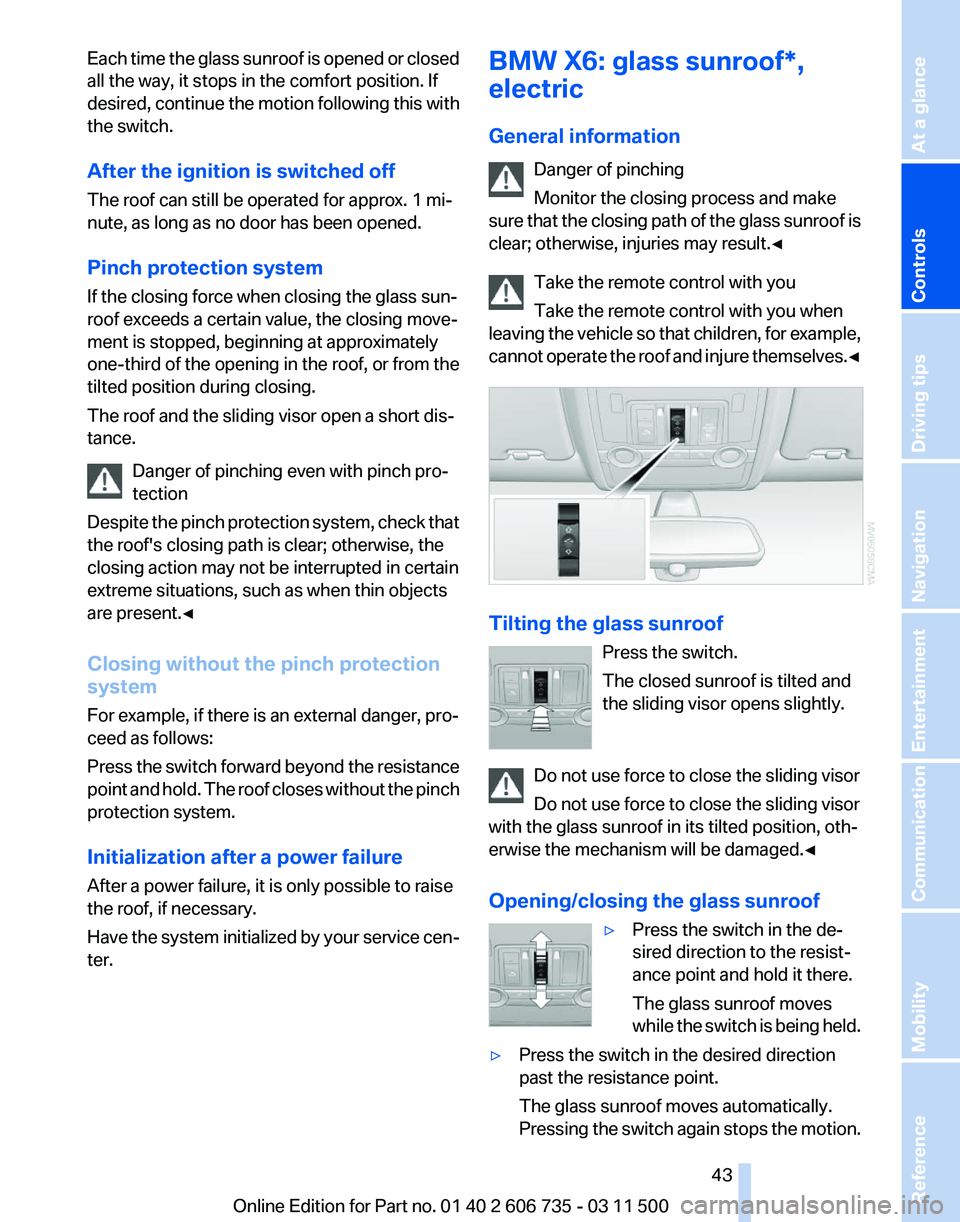
ter. BMW X6: glass sunroof*,
electric
General information
Danger of pinching
Monitor the closing process and make
sure
that the closing path of the glass sunroof is
clear; otherwise, injuries may result.◀
Take the remote control with you
Take the remote control with you when
leaving the vehicle so that children, for example,
cannot operate the roof and injure themselves.◀ Tilting the glass sunroof
Press the switch.
The closed sunroof is tilted and
the sliding visor opens slightly.
Do not use force to close the sliding visor
Do not use force to close the sliding visor
with the glass sunroof in its tilted position, oth‐
erwise the mechanism will be damaged.
◀
Opening/closing the glass sunroof ▷Press the switch in the de‐
sired direction to the resist‐
ance point and hold it there.
The glass sunroof moves
while
the switch is being held.
▷ Press the switch in the desired direction
past the resistance point.
The glass sunroof moves automatically.
Pressing
the switch again stops the motion. Seite 43
43Online Edition for Part no. 01 40 2 606 735 - 03 11 500
Reference Mobility Communication Entertainment Navigation Driving tips
Controls At a glance
Page 44 of 317
The glass sunroof and sliding visor can be
opened together. Close the sliding visor man‐
ually.
Convenient operation, refer to page
30, via the
remote control or the door lock.
Convenient
closing, refer to page 38, with Com‐
fort Access*.
Opening/closing the glass sunroof
automatically
Press the switch beyond the resistance point.
The following movements are also automatic:
▷ Pressing the switch with the sunroof open:
the sunroof is tilted fully.
▷ Pressing the switch in the Open direction
with
the sunroof tilted: the sunroof is opened
fully.
Pressing the switch again stops the motion.
Comfort position
In
the comfort position, the roof is not fully open.
This reduces wind noise in the passenger com‐
partment.
Each time the glass sunroof is opened or closed
all the way, it stops in the comfort position. If
desired, continue the motion following this with
the switch.
After the ignition is switched off
The roof can still be operated for approx. 1 mi‐
nute, as long as no door has been opened.
Pinch protection system
If the closing force when closing the glass sun‐
roof exceeds a certain value, the closing move‐
ment is stopped, beginning at approximately the
middle of the opening in the roof, or from the
tilted position during closing.
The glass sunroof opens again fully.
Danger of pinching even with pinch pro‐
tection
Despite the pinch protection system, check that
the roof's closing path is clear; otherwise, the
closing action may not be interrupted in certain extreme situations, such as when thin objects
are present.◀
Closing without the pinch protection
system
For example, if there is an external danger, pro‐
ceed as follows:
1.
Press the switch forward beyond the resist‐
ance point and hold. The pinch protection
system is limited and the sunroof opens
slightly
if the closing force exceeds a certain
value.
2. Within about 4 seconds, slide the switch for‐
ward
again beyond the resistance point and
hold it there. The roof closes without the
pinch protection system.
Initialization after a power failure
After a power failure, it is only possible to raise
the roof, if necessary.
Have
the system initialized by your service cen‐
ter.
Seite 44
44 Online Edition for Part no. 01 40 2 606 735 - 03 11 500
Opening and closing