park BMW X6 M 2012 Owners Manual
[x] Cancel search | Manufacturer: BMW, Model Year: 2012, Model line: X6 M, Model: BMW X6 M 2012Pages: 317, PDF Size: 8.83 MB
Page 12 of 317
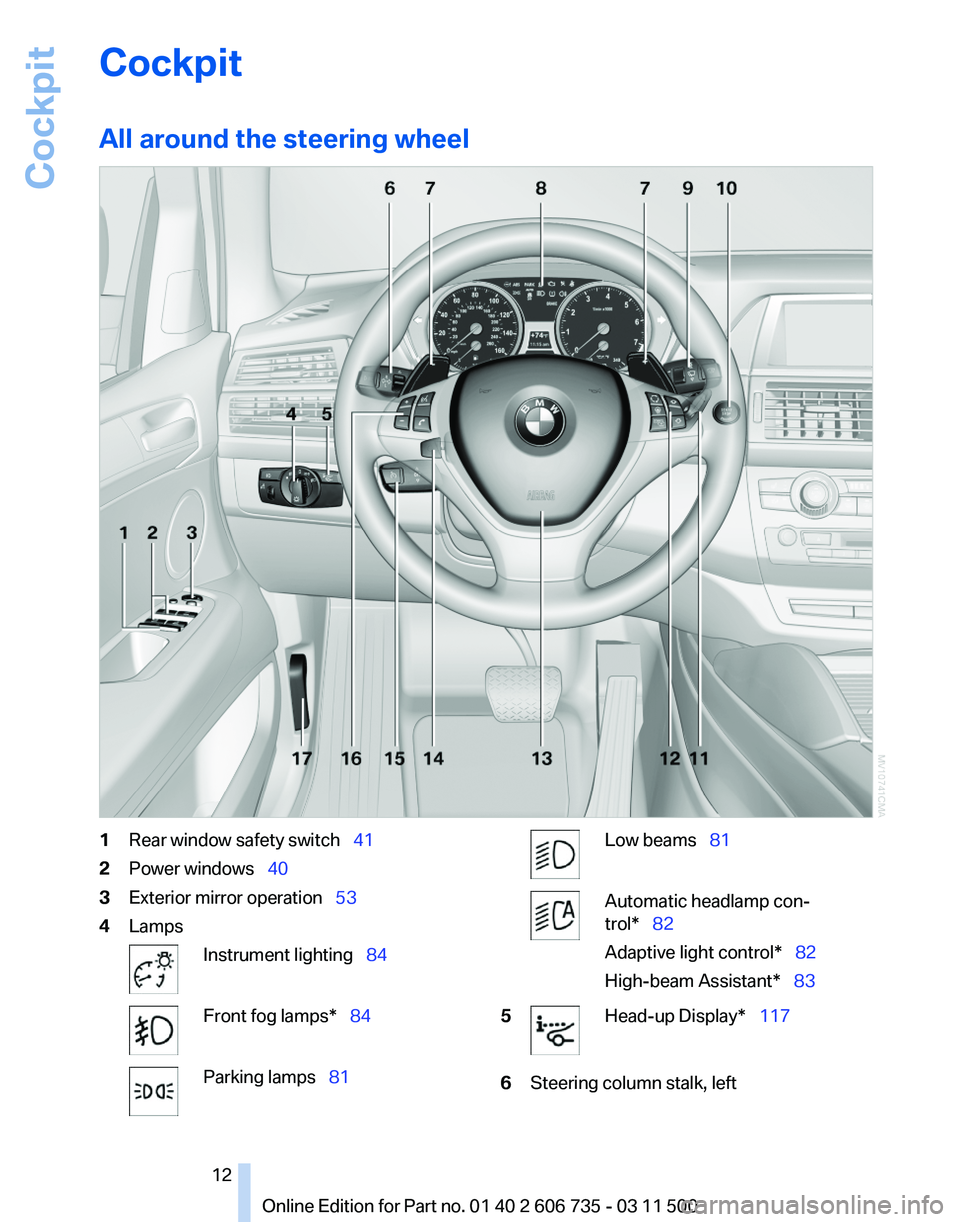
Cockpit
All around the steering wheel
1
Rear window safety switch 41
2 Power windows 40
3 Exterior mirror operation 53
4 Lamps Instrument lighting 84
Front fog lamps* 84
Parking lamps
81 Low beams 81
Automatic headlamp con‐
trol* 82
Adaptive light control
* 82
High-beam Assistant* 83
5 Head-up Display*
117
6 Steering column stalk, left
Seite 12
12 Online Edition for Part no. 01 40 2 606 735 - 03 11 500
Cockpit
Page 13 of 317
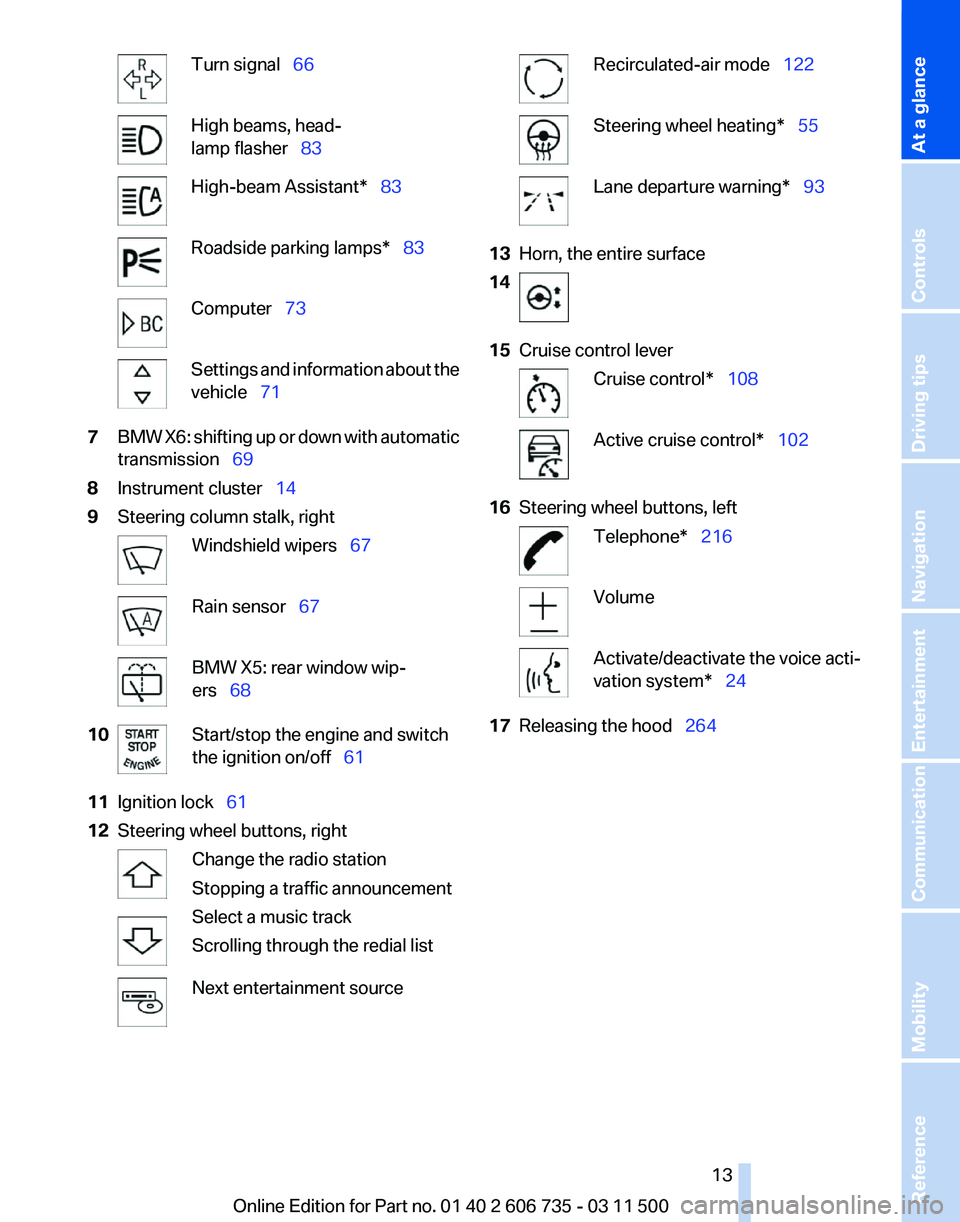
Turn signal 66
High beams, head‐
lamp flasher 83
High-beam Assistant* 83
Roadside parking lamps* 83
Computer 73
Settings and information about the
vehicle 71
7 BMW X6: shifting up or down with automatic
transmission 69
8 Instrument cluster 14
9 Steering column stalk, right Windshield wipers 67
Rain sensor
67 BMW X5: rear window wip‐
ers 68
10 Start/stop the engine and switch
the ignition on/off 61
11 Ignition lock 61
12 Steering wheel buttons, right Change the radio station
Stopping a traffic announcement
Select a music track
Scrolling through the redial list
Next entertainment source Recirculated-air mode 122
Steering wheel heating* 55
Lane departure warning* 93
13 Horn, the entire surface
14 15
Cruise control lever Cruise control*
108 Active cruise control*
102
16 Steering wheel buttons, left Telephone* 216
Volume
Activate/deactivate the voice acti‐
vation system* 24
17 Releasing the hood 264
Seite 13
13Online Edition for Part no. 01 40 2 606 735 - 03 11 500
Reference Mobility Communication Entertainment Navigation Driving tips Controls
At a glance
Page 15 of 317
Indicator/warning lamps
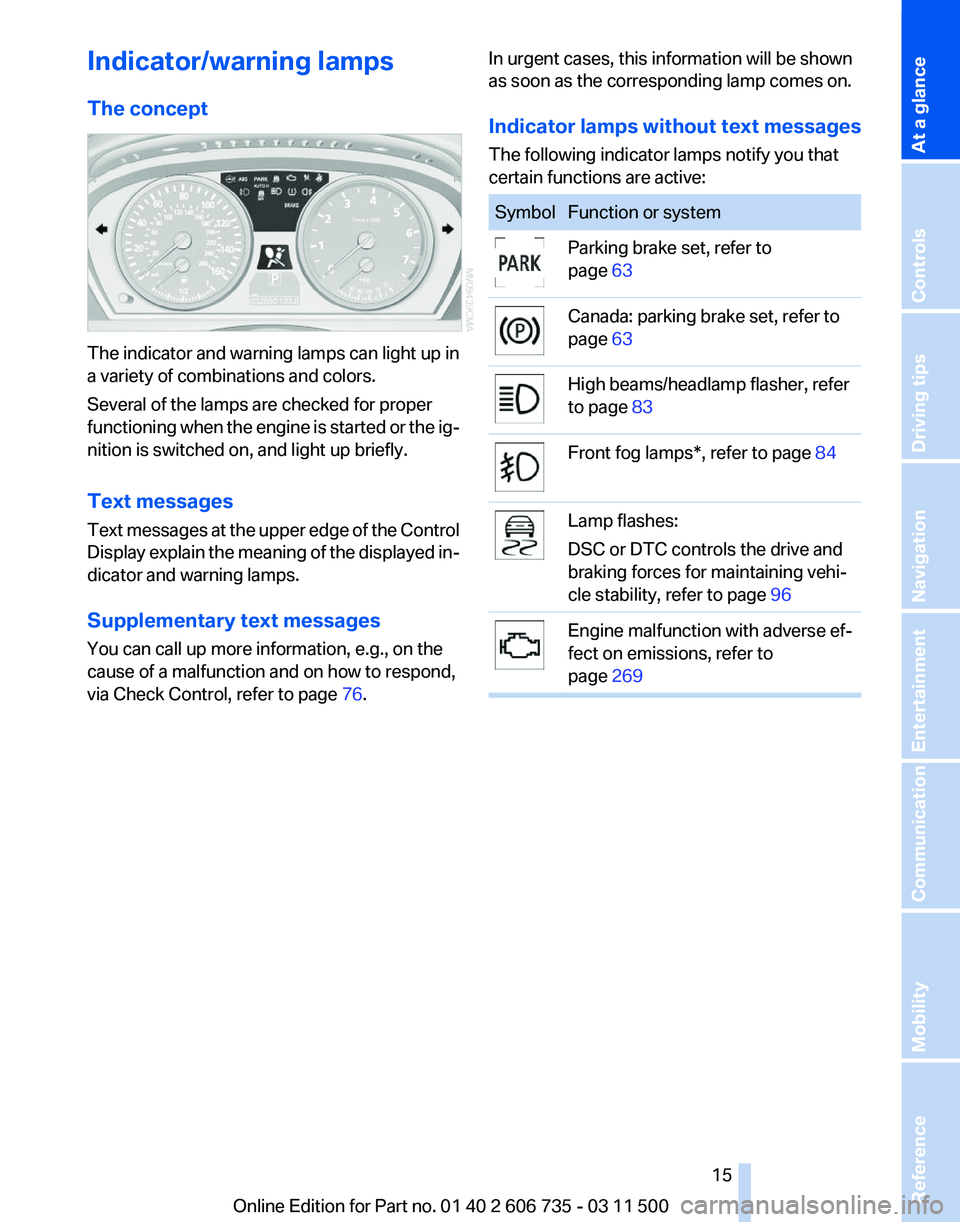
The concept
The indicator and warning lamps can light up in
a variety of combinations and colors.
Several of the lamps are checked for proper
functioning
when the engine is started or the ig‐
nition is switched on, and light up briefly.
Text messages
Text messages at the upper edge of the Control
Display explain the meaning of the displayed in‐
dicator and warning lamps.
Supplementary text messages
You can call up more information, e.g., on the
cause of a malfunction and on how to respond,
via Check Control, refer to page 76.In urgent cases, this information will be shown
as soon as the corresponding lamp comes on.
Indicator lamps without text messages
The following indicator lamps notify you that
certain functions are active: Symbol Function or system
Parking brake set, refer to
page
63 Canada: parking brake set, refer to
page
63 High beams/headlamp flasher, refer
to page
83 Front fog lamps*, refer to page
84 Lamp flashes:
DSC or DTC controls the drive and
braking forces for maintaining vehi‐
cle stability, refer to page
96 Engine malfunction with adverse ef‐
fect on emissions, refer to
page
269 Seite 15
15Online Edition for Part no. 01 40 2 606 735 - 03 11 500
Reference Mobility Communication Entertainment Navigation Driving tips Controls
At a glance
Page 16 of 317
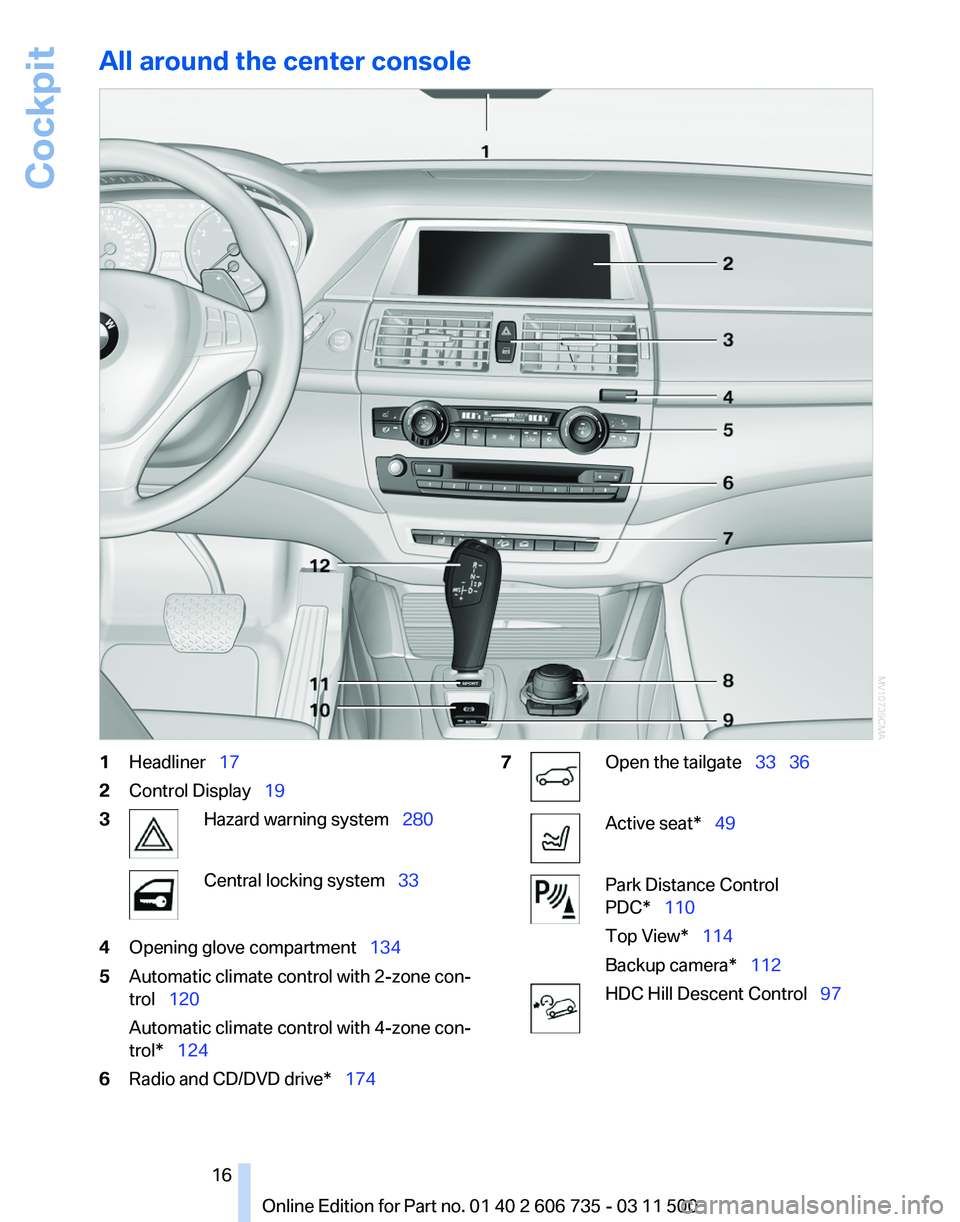
All around the center console
1
Headliner 17
2 Control Display 19
3 Hazard warning system 280
Central locking system 33
4 Opening glove compartment 134
5 Automatic climate control with 2-zone con‐
trol 120
Automatic climate control with 4-zone con‐
trol* 124
6 Radio and CD/DVD drive* 174 7 Open the tailgate
33 36 Active seat* 49
Park Distance Control
PDC* 110
Top View* 114
Backup camera* 112
HDC Hill Descent Control
97
Seite 16
16 Online Edition for Part no. 01 40 2 606 735 - 03 11 500Cockpit
Page 17 of 317
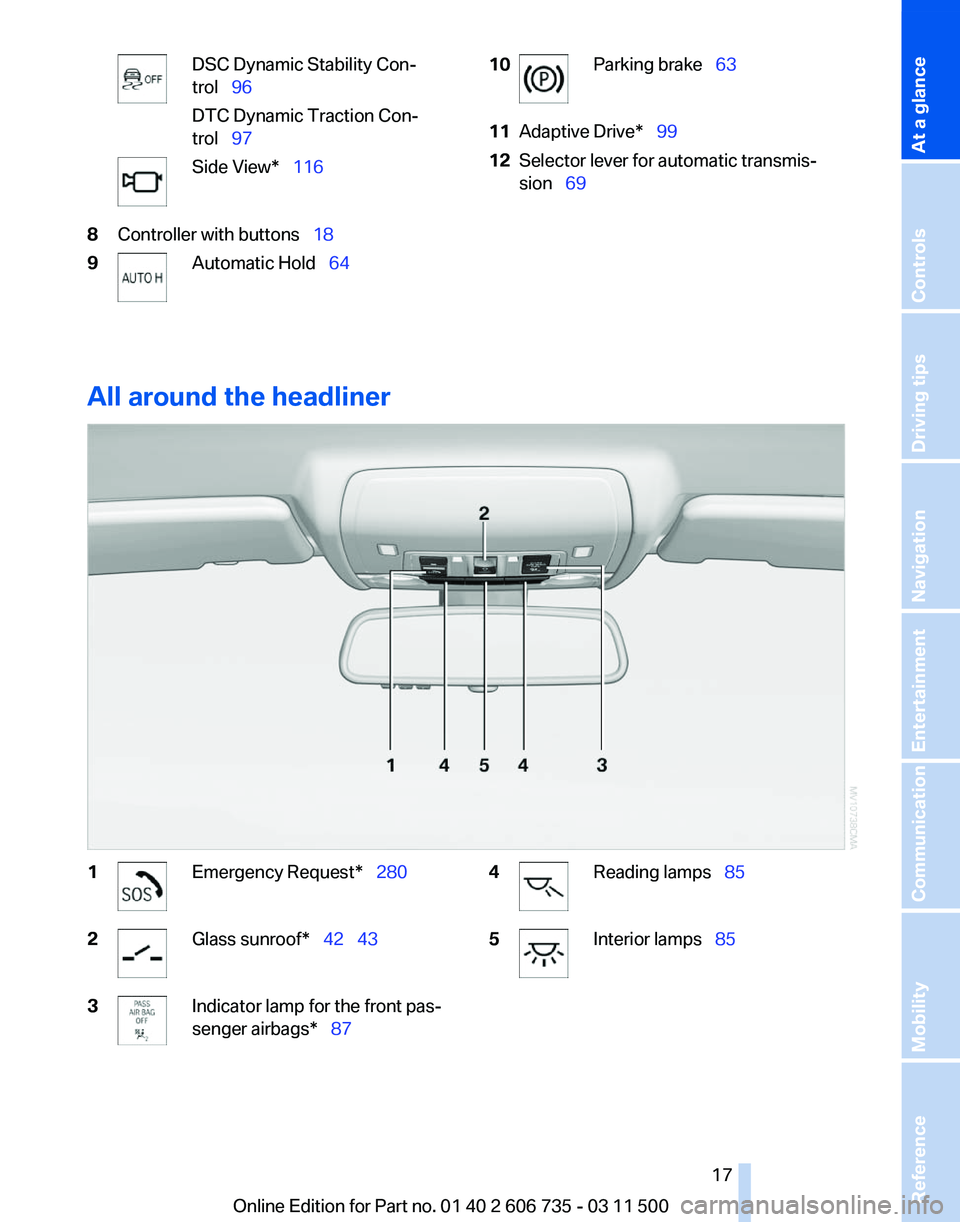
DSC Dynamic Stability Con‐
trol 96
DTC Dynamic Traction Con‐
trol 97
Side View* 116
8 Controller with buttons 18
9 Automatic Hold
64 10 Parking brake
63
11 Adaptive Drive* 99
12 Selector lever for automatic transmis‐
sion 69
All around the headliner 1 Emergency Request* 280
2 Glass sunroof*
42 43
3 Indicator lamp for the front pas‐
senger airbags* 87
4 Reading lamps
85
5 Interior lamps 85
Seite 17
17Online Edition for Part no. 01 40 2 606 735 - 03 11 500
Reference Mobility Communication Entertainment Navigation Driving tips Controls
At a glance
Page 29 of 317
The individual settings are stored for a maximum
of
four remote controls. They are stored for two
remote controls if Comfort Access* is in use.
Personal Profile settings
The following functions and settings can be
stored in a profile.
More information on the settings can be found
under:
▷ Assigning the programmable memory but‐
tons, refer to page 22.
▷ Response of the central locking system
when the car is being unlocked, refer to
page 30.
▷ Automatic locking of the vehicle, refer to
page 33.
▷ Driver's seat, exterior mirror and steering
wheel positions*, refer to page 53.
▷ Settings for the display on the Control Dis‐
play and in the instrument cluster:
▷12h/24h clock format, refer to
page 79.
▷ Date format, refer to page 79.
▷ Brightness of the Control Display, refer
to page 80.
▷ Language on the Control Display, refer
to page 80.
▷ Units of measure for fuel consumption,
distance covered/remaining distances,
and temperature, refer to page 80.
▷ Show visual warning for the Park Distance
Control PDC*, refer to page 111.
▷ Show visual warning for Top View*, refer to
page 114.
▷ Show Side View*, refer to page 116.
▷ Backup camera*:
▷Function selection, refer to page 113.
▷ Type of display, refer to page 114.
▷ Lane departure warning*: last setting, on/
off, refer to page 93.
▷ Head-up Display*: selection, brightness and
position of the display, refer to page 117.▷
Adaptive Drive*: selected chassis and sus‐
pension tuning, refer to page 99.
▷ Light settings:
▷Triple turn signal activation, refer to
page 66.
▷ Welcome lamps, refer to page 81.
▷ Headlamp courtesy delay feature, refer
to page 81.
▷ Daytime running lights, refer to
page 82.
▷ High-beam Assistant*, refer to
page 83.
▷ Automatic climate control with 2-zone con‐
trol: settings, refer to page 120.
▷ Navigation:
▷Voice activation, refer to page 163.
▷ Route criteria, refer to page 161.
▷ Map view settings, refer to page 164.
▷ Entertainment:
▷Tone control, refer to page 172.
▷ Radio, stored stations, refer to
page 180.
▷ CD/multimedia, audio source listened to
last, refer to page 181.
▷ Telephone: volume, refer to page 220.
Central locking system
The concept
The central locking system becomes active
when the driver's door is closed.
The system simultaneously engages and re‐
leases the locks on the following:
▷ Doors.
▷ Tailgate.
▷ Fuel filler flap.
Operating from the outside
▷ Via the remote control.
▷ Via the door lock*.
Seite 29
29Online Edition for Part no. 01 40 2 606 735 - 03 11 500
Reference Mobility Communication Entertainment Navigation Driving tips
Controls At a glance
Page 30 of 317
▷
In cars with Comfort Access*, via the door
handles.
The following takes place simultaneously when
locking/unlocking the vehicle via the remote
control:
▷ The welcome lamps, interior lamps and
courtesy lamps* are switched on and off.
▷ The alarm system* is armed or disarmed,
refer to page 39.
Operating from the inside
Via the button for the central locking system, re‐
fer to page 33.
If the vehicle is locked from the inside, the fuel
filler flap remains unlocked.
If an accident of a certain severity occurs, the
central locking system unlocks automatically.
The hazard warning system and interior lamps
come on.
Opening and closing: from the
outside
Using the remote control
General information
Take the remote control with you
People or animals left unattended in a
parked vehicle can lock the doors from the in‐
side. Always take the remote control with you
when leaving the vehicle so that the vehicle can
then be opened from the outside.◀
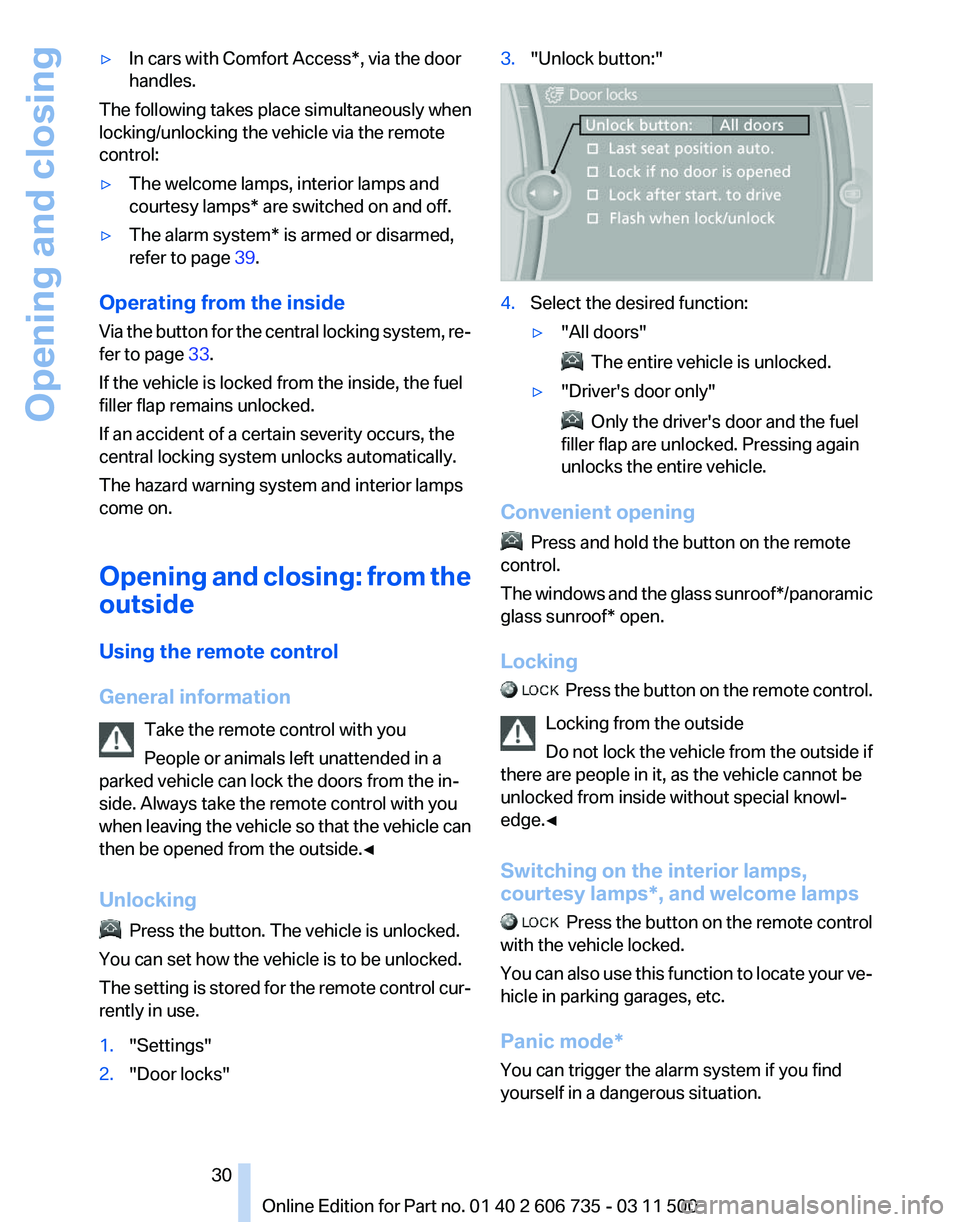
Unlocking Press the button. The vehicle is unlocked.
You can set how the vehicle is to be unlocked.
The
setting is stored for the remote control cur‐
rently in use.
1. "Settings"
2. "Door locks" 3.
"Unlock button:" 4.
Select the desired function:
▷"All doors" The entire vehicle is unlocked.
▷ "Driver's door only" Only the driver's door and the fuel
filler flap are unlocked. Pressing again
unlocks the entire vehicle.
Convenient opening Press and hold the button on the remote
control.
The
windows and the glass sunroof*/panoramic
glass sunroof* open.
Locking Press the button on the remote control.
Locking from the outside
Do
not lock the vehicle from the outside if
there are people in it, as the vehicle cannot be
unlocked from inside without special knowl‐
edge.◀
Switching on the interior lamps,
courtesy lamps*, and welcome lamps Press
the button on the remote control
with the vehicle locked.
You can also use this function to locate your ve‐
hicle in parking garages, etc.
Panic mode*
You can trigger the alarm system if you find
yourself in a dangerous situation. Seite 30
30 Online Edition for Part no. 01 40 2 606 735 - 03 11 500
Opening and closing
Page 33 of 317
Opening and closing: from the
inside
Locking and unlocking
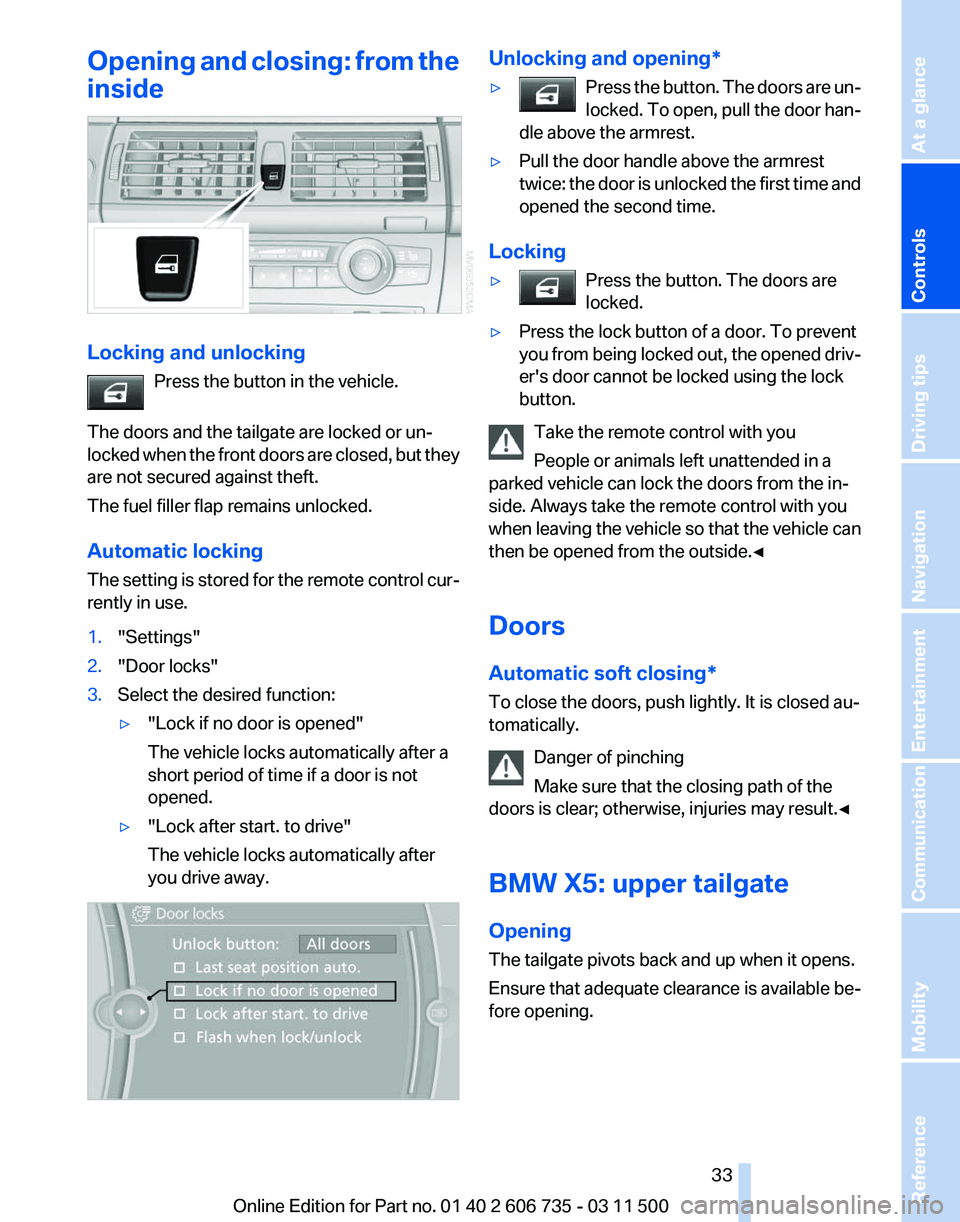
Press the button in the vehicle.
The doors and the tailgate are locked or un‐
locked
when the front doors are closed, but they
are not secured against theft.
The fuel filler flap remains unlocked.
Automatic locking
The setting is stored for the remote control cur‐
rently in use.
1. "Settings"
2. "Door locks"
3. Select the desired function:
▷"Lock if no door is opened"
The vehicle locks automatically after a
short period of time if a door is not
opened.
▷ "Lock after start. to drive"
The vehicle locks automatically after
you drive away. Unlocking and opening*
▷
Press the button. The doors are un‐
locked.
To open, pull the door han‐
dle above the armrest. ▷
Pull the door handle above the armrest
twice:
the door is unlocked the first time and
opened the second time.
Locking
▷ Press the button. The doors are
locked. ▷
Press the lock button of a door. To prevent
you
from being locked out, the opened driv‐
er's door cannot be locked using the lock
button.
Take the remote control with you
People or animals left unattended in a
parked vehicle can lock the doors from the in‐
side. Always take the remote control with you
when
leaving the vehicle so that the vehicle can
then be opened from the outside.◀
Doors
Automatic soft closing*
To close the doors, push lightly. It is closed au‐
tomatically.
Danger of pinching
Make sure that the closing path of the
doors is clear; otherwise, injuries may result.◀
BMW X5: upper tailgate
Opening
The tailgate pivots back and up when it opens.
Ensure that adequate clearance is available be‐
fore opening. Seite 33
33Online Edition for Part no. 01 40 2 606 735 - 03 11 500
Reference Mobility Communication Entertainment Navigation Driving tips
Controls At a glance
Page 54 of 317
At a glance
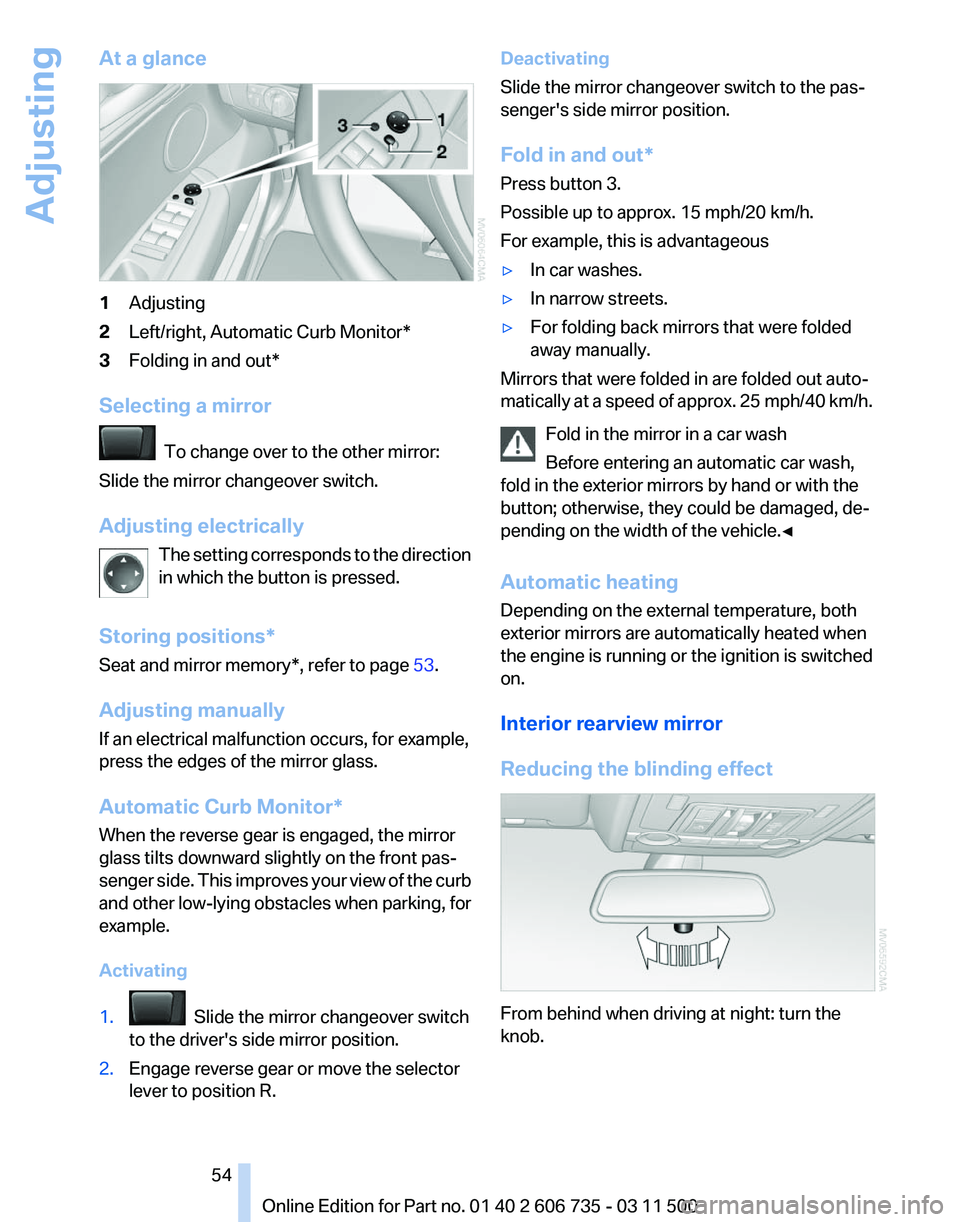
1
Adjusting
2 Left/right, Automatic Curb Monitor*
3 Folding in and out*
Selecting a mirror To change over to the other mirror:
Slide the mirror changeover switch.
Adjusting electrically The
setting corresponds to the direction
in which the button is pressed.
Storing positions*
Seat and mirror memory*, refer to page 53.
Adjusting manually
If an electrical malfunction occurs, for example,
press the edges of the mirror glass.
Automatic Curb Monitor*
When the reverse gear is engaged, the mirror
glass tilts downward slightly on the front pas‐
senger side. This improves your view of the curb
and other low-lying obstacles when parking, for
example.
Activating
1. Slide the mirror changeover switch
to the driver's side mirror position.
2. Engage reverse gear or move the selector
lever to position R. Deactivating
Slide the mirror changeover switch to the pas‐
senger's side mirror position.
Fold in and out*
Press button 3.
Possible up to approx. 15 mph/20 km/h.
For example, this is advantageous
▷
In car washes.
▷ In narrow streets.
▷ For folding back mirrors that were folded
away manually.
Mirrors that were folded in are folded out auto‐
matically
at a speed of approx. 25 mph/40 km/h.
Fold in the mirror in a car wash
Before entering an automatic car wash,
fold in the exterior mirrors by hand or with the
button; otherwise, they could be damaged, de‐
pending on the width of the vehicle.◀
Automatic heating
Depending on the external temperature, both
exterior mirrors are automatically heated when
the engine is running or the ignition is switched
on.
Interior rearview mirror
Reducing the blinding effect From behind when driving at night: turn the
knob. Seite 54
54 Online Edition for Part no. 01 40 2 606 735 - 03 11 500
Adjusting
Page 62 of 317
car wash, for example, ensure that the ignition is
not switched off accidentally.◀
For example, the ignition is not switched off in
the following situations:
▷
The brake is applied.
▷ The low beams are switched on
Starting the engine
General information Enclosed areas
Do not let the engine run in enclosed
areas; otherwise, breathing of exhaust fumes
may lead to loss of consciousness and death.
The
exhaust gases contain carbon monoxide, an
odorless and colorless but highly toxic gas.◀
Unattended vehicle
Do not leave the car unattended with the
engine running; otherwise, it presents a poten‐
tial source of danger.
Before leaving the car with the engine running,
set the parking brake and place the transmission
in position P or neutral to prevent the car from
moving.◀
Frequent starting in quick succession
Avoid repeated futile attempts at starting
the car and avoid starting the car frequently in
quick succession. Otherwise, the fuel is not
burned or is inadequately burned, and there is
the danger of overheating and damaging the
catalytic converter.◀
Do not wait for the engine to warm up while the
vehicle remains stationary. Start driving right
away, but at moderate engine speeds. Starting the engine
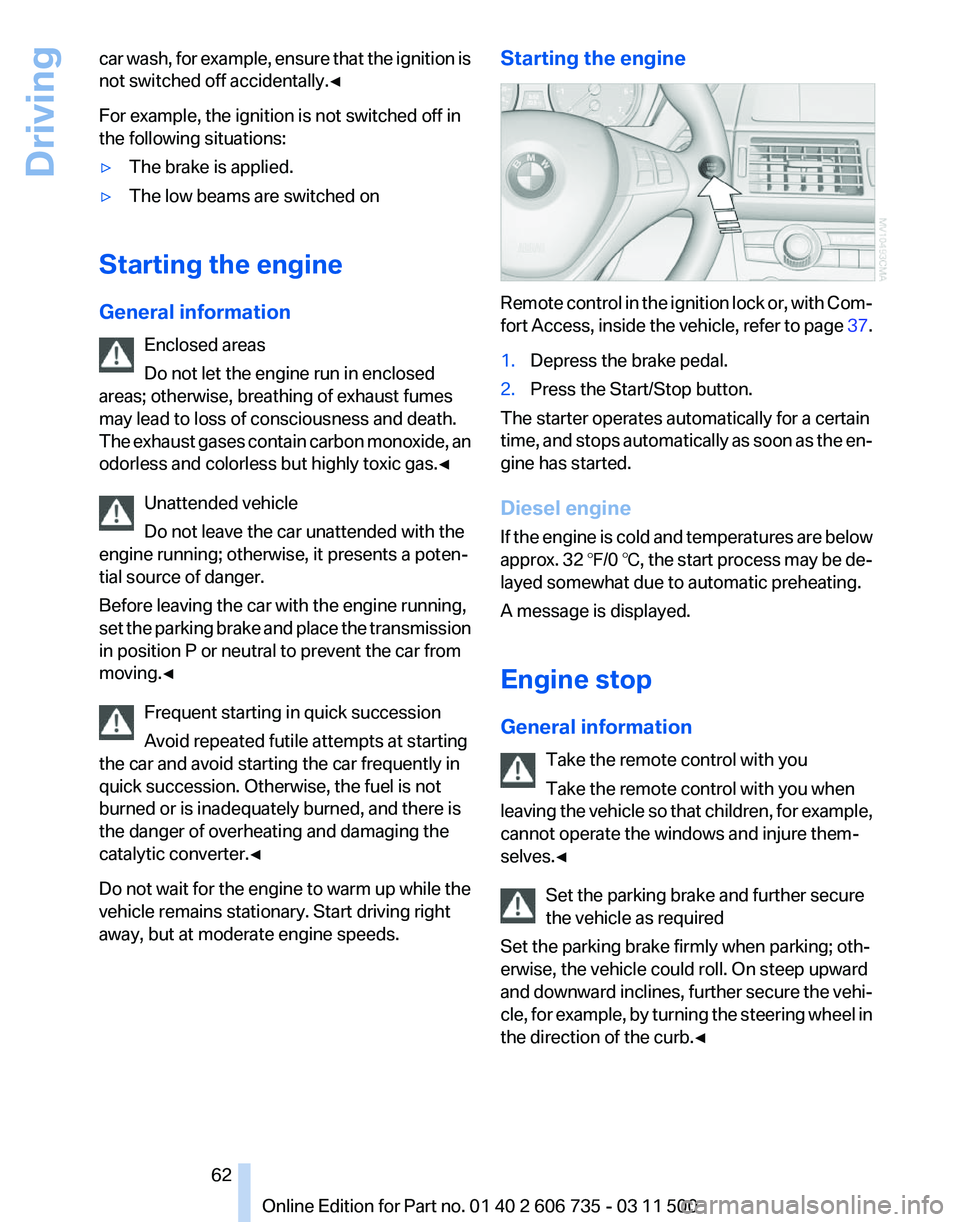
Remote control in the ignition lock or, with Com‐
fort
Access, inside the vehicle, refer to page 37.
1. Depress the brake pedal.
2. Press the Start/Stop button.
The starter operates automatically for a certain
time,
and stops automatically as soon as the en‐
gine has started.
Diesel engine
If the engine is cold and temperatures are below
approx. 32 ℉/0 ℃, the start process may be de‐
layed somewhat due to automatic preheating.
A message is displayed.
Engine stop
General information
Take the remote control with you
Take the remote control with you when
leaving the vehicle so that children, for example,
cannot operate the windows and injure them‐
selves.◀
Set the parking brake and further secure
the vehicle as required
Set the parking brake firmly when parking; oth‐
erwise, the vehicle could roll. On steep upward
and downward inclines, further secure the vehi‐
cle, for example, by turning the steering wheel in
the direction of the curb.◀ Seite 62
62 Online Edition for Part no. 01 40 2 606 735 - 03 11 500
Driving