ignition BUICK ENVISION 2016 User Guide
[x] Cancel search | Manufacturer: BUICK, Model Year: 2016, Model line: ENVISION, Model: BUICK ENVISION 2016Pages: 432, PDF Size: 5.68 MB
Page 47 of 432

Buick Envision Owner Manual (GMNA-Localizing-U.S./Canada/Mexico-
8534310) - 2016 - crc - 2/29/16
46 Keys, Doors, and Windows
holding the switch. Press the
window switch fully and release it to
activate the express-down feature.
The express mode can be canceled
at any time by briefly pressing or
pulling the switch.
Express-Up Window
If equipped, the driver window
express-up feature allows the
window to be raised without holding
the switch. Pull the window switch
up fully and release it to activate the
express-up feature. The express-up
feature can be canceled at any time
by briefly pressing or pulling the
switch.
Programming the Power
Windows
If the battery on the vehicle has
been recharged or disconnected,
or is not working, the driver power
window may need to be
reprogrammed for the express-up
feature to work.
To reprogram the power windows:1. Close all doors. 2. Place the ignition in ACC/
ACCESSORY or ON/RUN.
3. From any open position, pull the power window switch up
until the window is fully closed.
4. Hold the switch up for approximately two seconds
after the window is fully closed.
The window is now reprogrammed.
Express Window Anti-Pinch
Feature
If any object is in the path of the
window when express-up is active,
the window stops at the obstacle
and auto-reverses to a preset
factory position. Weather conditions
such as severe icing also cause the
window to auto-reverse. The
window returns to normal operation
once the obstacle or condition is
removed.
Express Window Anti-Pinch
Override
{Warning
If express override is activated,
the window will not reverse
automatically. You or others could
be injured and the window could
be damaged. Before you use
express override, make sure that
all people and obstructions are
clear of the window path.
The anti-pinch feature can be
overridden in a supervised mode.
Hold the window switch in the
partially or fully pulled up position.
The window goes up for as long as
the switch is held. Once the switch
is released, the express mode is
reactivated.
In this mode, the window can still
close on an object in its path. Use
care when using the override mode.
Page 48 of 432

Buick Envision Owner Manual (GMNA-Localizing-U.S./Canada/Mexico-
8534310) - 2016 - crc - 2/29/16
Keys, Doors, and Windows 47
Window Lockout
This feature prevents the rear
passenger windows from operating,
except from the driver position.
.PressZ{to activate the rear
window locks. An indicator light
will illuminate when the feature
is on.
. Press
Z{again to deactivate
the rear window locks.
The safety locks are also enabled.
See Safety Locks 035.
Sun Visors
Pull the sun visor down to block
glare. Detach the sun visor from the
center mount to pivot to the side
window or, if equipped, extend
along the rod.
Roof
Sunroof
1. Sunroof Switch
2. Sunshade Switch
If equipped, the sunroof only
operates when the ignition is in
ACC/ACCESSORY or ON/RUN,
or when Retained Accessory Power
(RAP) is active. See Retained
Accessory Power (RAP) 0264.
Vent : From the closed position,
press the rear of the switch (1) to
vent the sunroof.
Page 55 of 432

Buick Envision Owner Manual (GMNA-Localizing-U.S./Canada/Mexico-
8534310) - 2016 - crc - 2/29/16
54 Seats and Restraints
Storing Memory Positions
To store positions to the 1 and 2
buttons:1. Place the ignition in ON/RUN or ACC/ACCESSORY.
2. Adjust the driver seat, outside mirrors, and the power tilt and
telescoping steering column.
3. Press and release SET. A beep will sound.
4. Immediately press and hold 1 until two beeps sound.
5. Repeat Steps 1–4 for a second driver using 2.
To store positions to the
B(Exit)
button and easy exit features,
repeat steps 1–4 using
Bto store
your positions for getting out of the
vehicle.
Manually Recalling Memory
Positions
Press and hold 1, 2, or
B(Exit) to
manually recall the previously
stored memory positions. Releasing 1, 2, or
Bbefore the stored
positions are reached stops the
recall.
Automatically Recalling Memory
Positions (Auto Memory Recall)
When the Auto (Automatic) Memory
Recall feature is enabled in the
vehicle personalization menu, the
current driver ’s previously stored 1
or 2 positions are recalled by
placing the ignition in ON/RUN or
ACC/ACCESSORY.
See “Auto Memory Recall” under
"Comfort and Convenience" in
Vehicle Personalization 0146.
To stop recall movement, press one
of the memory, power mirror,
or power seat controls.
RKE transmitters are not labeled
with a number. If your memory seat
position is saved to 1 or 2 but this
position is not automatically
recalling, then store your positions
to the other button or switch RKE
transmitters with the other driver. Easy Exit Recall
When the Easy Exit Recall feature
is enabled in the vehicle
personalization menu, the positions
previously stored to the
B(Exit)
button are automatically recalled
when getting out of the vehicle.
See Vehicle Personalization 0146.
Obstructions
If something has blocked the driver
seat and/or power tilt and
telescoping steering column while
recalling a memory position, the
recall may stop. Remove the
obstruction. Then do one of the
following:
. If manually or automatically
recalling the memory position,
press and hold the appropriate
manual control for the memory
item that is not recalling for
two seconds. Try recalling again
by pressing the appropriate
memory button.
. If recalling the exit position,
press and hold the appropriate
manual control for the exit
Page 59 of 432
Buick Envision Owner Manual (GMNA-Localizing-U.S./Canada/Mexico-
8534310) - 2016 - crc - 2/29/16
58 Seats and Restraints
If equipped, the rear seat has an
armrest in the center of the
seatback. Lower the armrest to
access the cupholders.
To fold, lift the armrest up and push
it rearward until it is flush with the
seatback.
Heated Rear Seats
{WARNING
If you cannot feel temperature
change or pain to the skin, the
seat heater may cause burns.
See the Warning underHeated
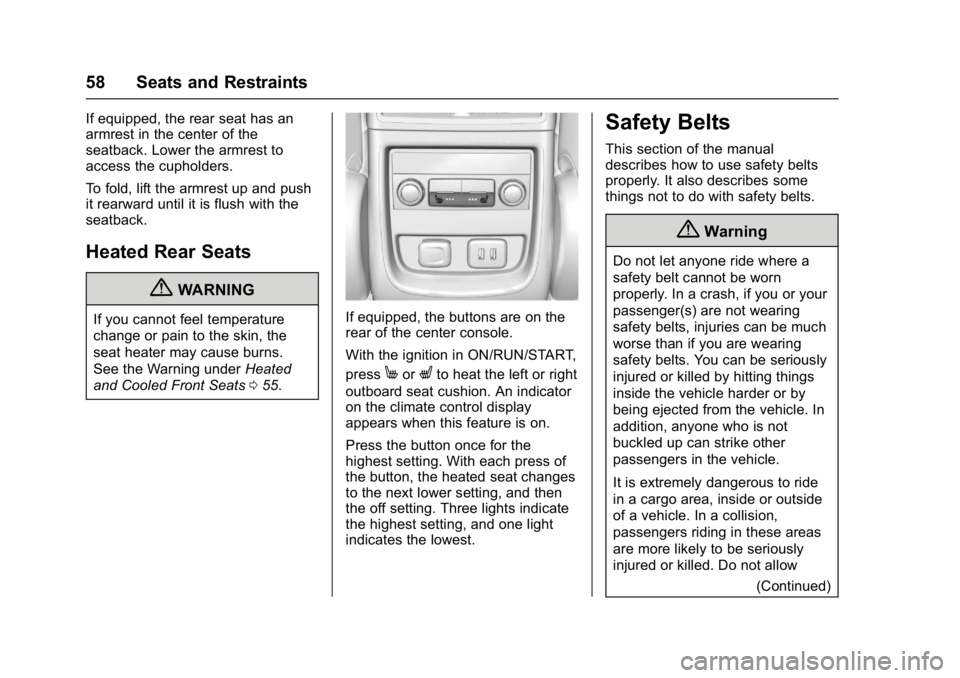
and Cooled Front Seats 055.If equipped, the buttons are on the
rear of the center console.
With the ignition in ON/RUN/START,
press
MorLto heat the left or right
outboard seat cushion. An indicator
on the climate control display
appears when this feature is on.
Press the button once for the
highest setting. With each press of
the button, the heated seat changes
to the next lower setting, and then
the off setting. Three lights indicate
the highest setting, and one light
indicates the lowest.
Safety Belts
This section of the manual
describes how to use safety belts
properly. It also describes some
things not to do with safety belts.
{Warning
Do not let anyone ride where a
safety belt cannot be worn
properly. In a crash, if you or your
passenger(s) are not wearing
safety belts, injuries can be much
worse than if you are wearing
safety belts. You can be seriously
injured or killed by hitting things
inside the vehicle harder or by
being ejected from the vehicle. In
addition, anyone who is not
buckled up can strike other
passengers in the vehicle.
It is extremely dangerous to ride
in a cargo area, inside or outside
of a vehicle. In a collision,
passengers riding in these areas
are more likely to be seriously
injured or killed. Do not allow
(Continued)
Page 105 of 432
Buick Envision Owner Manual (GMNA-Localizing-U.S./Canada/Mexico-
8534310) - 2016 - crc - 2/29/16
104 Instruments and Controls
SorT(Previous or Next) :Press
to go to the previous or next area in
the display or to the previous or
next menu.
yorz(Next or Previous) :
Press to go up or down in a list.
Press to go up or down a page.
@(Select) : Press to select a
highlighted menu item.
CorB(Next or Previous
Favorite) : Press to go to the next
or previous favorite when listening
to the radio. Press to go to the next
or previous track when listening to a
media source.
q+ orq− (Volume) : Press to
increase or decrease the volume.
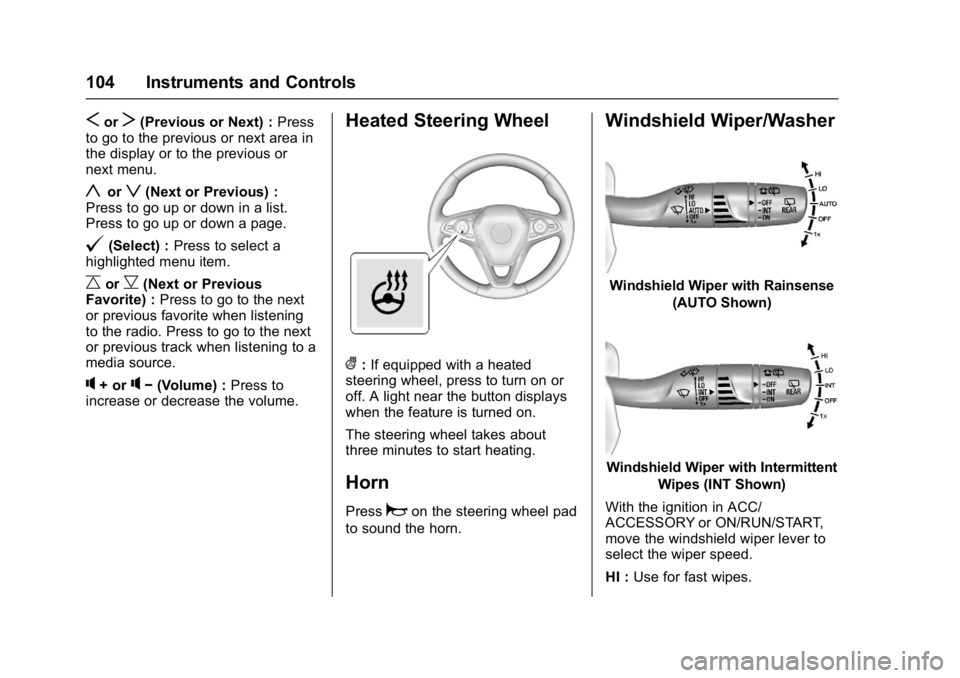
Heated Steering Wheel
(: If equipped with a heated
steering wheel, press to turn on or
off. A light near the button displays
when the feature is turned on.
The steering wheel takes about
three minutes to start heating.
Horn
Pressaon the steering wheel pad
to sound the horn.
Windshield Wiper/Washer
Windshield Wiper with Rainsense
(AUTO Shown)
Windshield Wiper with IntermittentWipes (INT Shown)
With the ignition in ACC/
ACCESSORY or ON/RUN/START,
move the windshield wiper lever to
select the wiper speed.
HI : Use for fast wipes.
Page 106 of 432

Buick Envision Owner Manual (GMNA-Localizing-U.S./Canada/Mexico-
8534310) - 2016 - crc - 2/29/16
Instruments and Controls 105
LO :Use for slow wipes.
INT : Use for intermittent wipes or
Rainsense™, if equipped and
enabled. To adjust wipe frequency,
turn the band up for more frequent
wipes or down for less frequent
wipes. If Rainsense™ is enabled,
see “Rainsense” later in this section.
OFF : Use to turn the wipers off.
1x : For a single wipe, briefly move
the wiper lever down. For several
wipes, hold the wiper lever down.
Clear snow and ice from the wiper
blades before using them. If frozen
to the windshield, carefully loosen or
thaw them. Damaged blades should
be replaced. See Wiper Blade
Replacement 0329. Heavy snow or ice can overload the
wiper motor.
Wipe Parking
If the ignition is changed to LOCK/
OFF while the wipers are on LO, HI,
or INT, they will immediately stop.
If the windshield wiper lever is then
moved to OFF before the driver
door is opened or within 10 minutes,
the wipers will restart and move to
the base of the windshield.
If the ignition is changed to LOCK/
OFF while the wipers are performing
wipes due to windshield washing or
Rainsense, the wipers continue to
run until they reach the base of the
windshield.
Rainsense™
If equipped with Rainsense, a
sensor located near the top center
of the windshield detects the
amount of water on the windshield
and automatically controls the
frequency of the windshield wiper.
When Rainsense is enabled, the
normal intermittent control operates
as a sensitivity control. Keep this area of the windshield
clear of debris to allow for best
system performance.
AUTO :
Move the windshield wiper
lever to AUTO. Turn the band on the
wiper lever to adjust the sensitivity.
. Turn the band up for more
sensitivity to moisture.
. Turn the band down for less
sensitivity to moisture.
. Move the windshield wiper lever
out of the AUTO position to
deactivate Rainsense.
To enable or disable this feature,
see “Rainsense Wipers” under
Vehicle Personalization 0146.
Page 107 of 432
Buick Envision Owner Manual (GMNA-Localizing-U.S./Canada/Mexico-
8534310) - 2016 - crc - 2/29/16
106 Instruments and Controls
Wiper Arm Assembly Protection
When using an automatic car wash,
move the windshield wiper lever to
OFF. This disables the automatic
Rainsense windshield wipers and/or
manual windshield wipers.
With Rainsense, if the transmission
is in N (Neutral) and the vehicle
speed is very slow, the wipers will
automatically stop at the base of the
windshield.
The wiper operations return to
normal when the transmission is no
longer in N (Neutral) or the vehicle
speed has increased.
Windshield Washer
Pull the windshield wiper lever
toward you to spray windshield
washer fluid and activate the wipers.
The wipers will continue until the
lever is released or the maximum
wash time is reached. When the
windshield wiper lever is released,
additional wipes may occur
depending on how long the
windshield washer had beenactivated. See
Washer Fluid0324
for information on filling the
windshield washer fluid reservoir.
{Warning
In freezing weather, do not use
the washer until the windshield is
warmed. Otherwise the washer
fluid can form ice on the
windshield, blocking your vision.
Rear Window Wiper/
Washer
The ignition must be in the ACC/
ACCESSORY or ON/RUN position
to operate the rear window wiper/
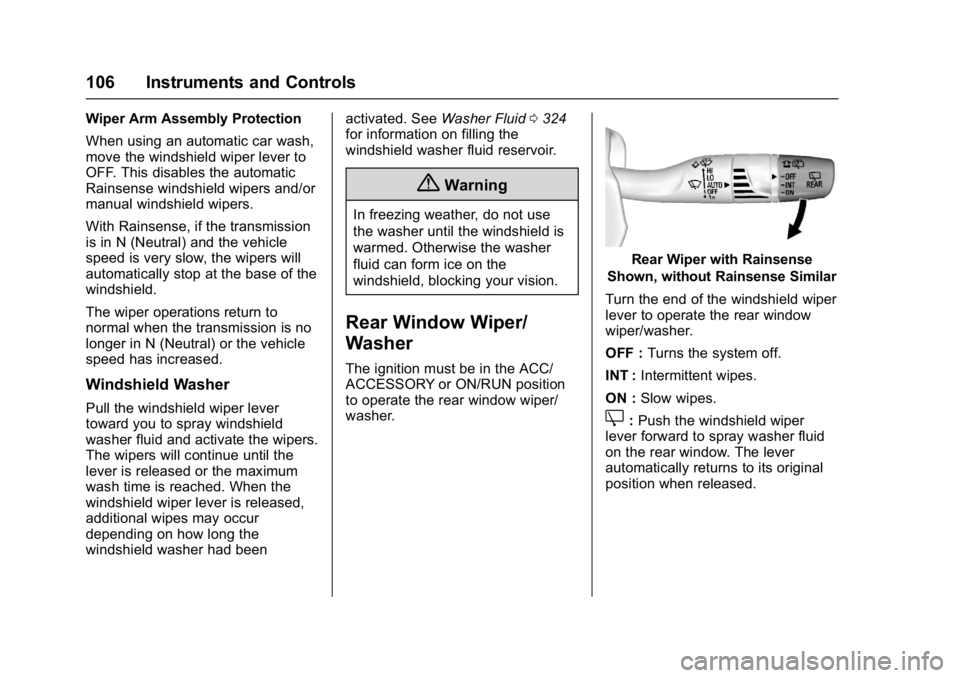
washer.
Rear Wiper with Rainsense
Shown, without Rainsense Similar
Turn the end of the windshield wiper
lever to operate the rear window
wiper/washer.
OFF : Turns the system off.
INT : Intermittent wipes.
ON : Slow wipes.
Z:Push the windshield wiper
lever forward to spray washer fluid
on the rear window. The lever
automatically returns to its original
position when released.
Page 110 of 432

Buick Envision Owner Manual (GMNA-Localizing-U.S./Canada/Mexico-
8534310) - 2016 - crc - 2/29/16
Instruments and Controls 109
Caution
Hanging heavy equipment from
the power outlet can cause
damage not covered by the
vehicle warranty. The power
outlets are designed for
accessory power plugs only, such
as cell phone charge cords.
Power Outlet 110/120 Volt
Alternating Current
If equipped, this power outlet can be
used to plug in electrical equipment
that uses a maximum limit of 400
watts.
The power outlet is on the rear of
the center console.
An indicator light on the outlet turns
on to show it is in use. The light
comes on when the ignition is in
ON/RUN and equipment requiring
less than 400 watts is plugged into
the outlet, and no system fault is
detected.
The indicator light does not come on
when the ignition is in LOCK/OFF or
if the equipment is not fully seated
into the outlet.
If equipment is connected using
more than 400 watts or a system
fault is detected, a protection circuit
shuts off the power supply and theindicator light turns off. To reset the
circuit, unplug the item and plug it
back in or turn the Retained
Accessory Power (RAP) off and
then back on. See
Retained
Accessory Power (RAP) 0264. The
power restarts when equipment
using 400 watts or less is plugged
into the outlet and a system fault is
not detected.
The power outlet is not designed for
the following and may not work
properly if they are plugged in:
. Equipment with high initial peak
wattage, such as
compressor-driven refrigerators
and electric power tools.
. Other equipment requiring an
extremely stable power supply,
such as
microcomputer-controlled
electric blankets and touch
sensor lamps.
. Medical equipment.
Page 115 of 432

Buick Envision Owner Manual (GMNA-Localizing-U.S./Canada/Mexico-
8534310) - 2016 - crc - 2/29/16
114 Instruments and Controls
Info Pages :PressTwhile Info
Pages is displayed to enter the Info
Pages menu and select the items to
be displayed in the Info App. See
Driver Information Center (DIC)
(Base Level) 0128 orDriver
Information Center (DIC)
(Uplevel) 0131.
Speed Warning : The Speed
Warning display allows the driver to
set a speed that they do not want to
exceed. To set the Speed Warning,
press
Twhen Speed Warning is
displayed. Press
yorzto adjust
the value. Press
Vto set the speed.
Once the speed is set, this feature
can be turned off by pressing
V
while viewing this page. If the
selected speed limit is exceeded, a
pop-up warning is displayed with a
chime.
Software Information (Uplevel
Cluster) : Displays the open source
software information.
Speedometer
The speedometer shows the
vehicle's speed in either kilometers
per hour (km/h) or miles per
hour (mph).
Odometer
The odometer shows how far the
vehicle has been driven, in either
kilometers or miles.
Trip Odometer
The trip odometer shows how far
the vehicle has been driven since
the trip odometer was last reset.
The trip odometer is accessed and
reset through the Driver Information
Center (DIC). See Driver
Information Center (DIC) (Base
Level) 0128 orDriver Information
Center (DIC) (Uplevel) 0131.
Tachometer
The tachometer displays the engine
speed in revolutions per
minute (rpm). For vehicles with the Stop/Start
system, when the ignition is in ON/
RUN, the tachometer indicates the
vehicle status. When pointing to
AUTO STOP, the engine is off but
the vehicle is on and can move. The
engine could auto start at any time.
When the indicator points to OFF,
the vehicle is off.
When the engine is on, the
tachometer will indicate the engine’s
revolutions per minute (rpm). The
tachometer may vary by several
hundred rpm’s, during Auto Stop
mode, when the engine is shutting
off and restarting.
A slight bump may be felt when the
transmission is determining the
most fuel efficient operating range.
Caution
If the engine is operated with the
rpm’s in the warning area at the
high end of the tachometer, the
vehicle could be damaged, and
the damage would not be covered
(Continued)
Page 116 of 432

Buick Envision Owner Manual (GMNA-Localizing-U.S./Canada/Mexico-
8534310) - 2016 - crc - 2/29/16
Instruments and Controls 115
Caution (Continued)
by the vehicle warranty. Do not
operate the engine with the rpm’s
in the warning area.
Fuel Gauge
Base Level Metric
Base Level English
Uplevel Metric
Uplevel English
When the ignition is on, the fuel
gauge shows about how much fuel
is left in the tank.
An arrow on the fuel gauge
indicates the side of the vehicle the
fuel door is on.
When the vehicle's fuel level
becomes low, a message appears
in the Driver Information Center
(DIC) and a single chime sounds.
See Fuel System Messages 0140.