lock BUICK LACROSSE 2009 Workshop Manual
[x] Cancel search | Manufacturer: BUICK, Model Year: 2009, Model line: LACROSSE, Model: BUICK LACROSSE 2009Pages: 428
Page 158 of 428
When the ignition is on, the brake system warning
light will also come on when you set your parking brake.
The light will stay on if your parking brake does not
release fully. If it stays on after your parking brake is
fully released, it means you have a brake problem.
If the light comes on while you are driving, a chime will
sound and you should pull off the road and stop carefully.
You may notice that the pedal is harder to push. Or, the
pedal may go closer to the oor. It may take longer to
stop. If the light is still on, have the vehicle towed for
service. SeeTowing Your Vehicle on page 4-26.
{CAUTION:
The brake system might not be working properly if
the brake system warning light is on. Driving with
the brake system warning light on can lead to a
crash. If the light is still on after the vehicle has
been pulled off the road and carefully stopped,
have the vehicle towed for service.
Antilock Brake System (ABS)
Warning Light
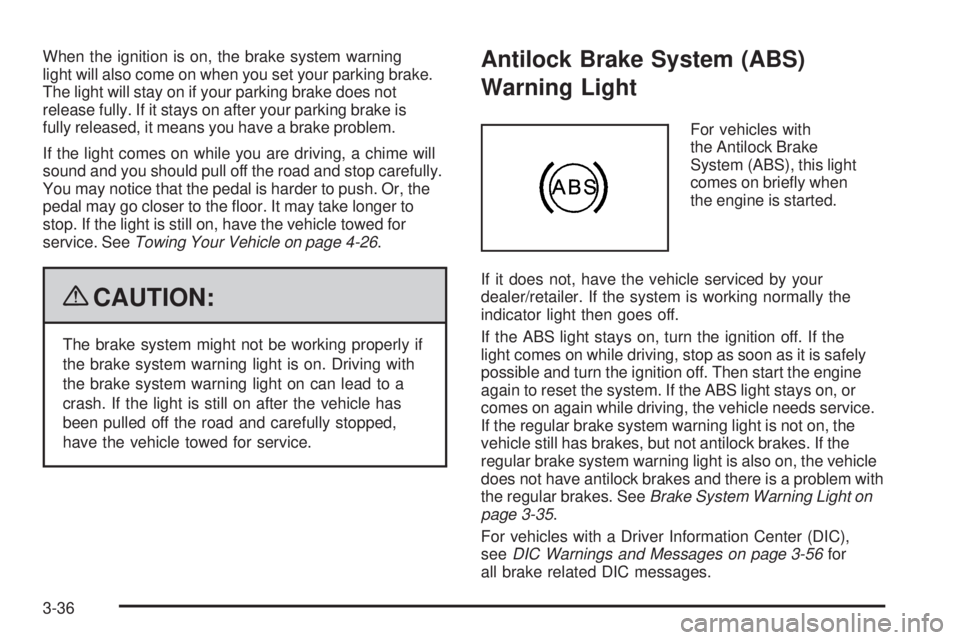
For vehicles with
the Antilock Brake
System (ABS), this light
comes on briey when
the engine is started.
If it does not, have the vehicle serviced by your
dealer/retailer. If the system is working normally the
indicator light then goes off.
If the ABS light stays on, turn the ignition off. If the
light comes on while driving, stop as soon as it is safely
possible and turn the ignition off. Then start the engine
again to reset the system. If the ABS light stays on, or
comes on again while driving, the vehicle needs service.
If the regular brake system warning light is not on, the
vehicle still has brakes, but not antilock brakes. If the
regular brake system warning light is also on, the vehicle
does not have antilock brakes and there is a problem with
the regular brakes. SeeBrake System Warning Light on
page 3-35.
For vehicles with a Driver Information Center (DIC),
seeDIC Warnings and Messages on page 3-56for
all brake related DIC messages.
3-36
Page 172 of 428
There is also a retroactive trip odometer function that
performs the following for each trip odometer:
If the vehicle’s speed has exceeded 3 mph (5 km/h)
during the current ignition cycle, this function will
set the trip odometer to the distance driven
during the current ignition cycle.
If the vehicle’s speed has not exceeded 3 mph
(5 km/h), this function will set the trip odometer
to the distance driven during the previous ignition
cycle plus the distance driven during the current
ignition cycle.
Press and hold the set/reset button on vehicles with
the uplevel DIC or the trip/odometer button on vehicles
with the base level DIC for three seconds, then release
the button. The retroactive trip odometer value will be set
into the currently displayed trip odometer.
Time Elapsed (Uplevel Only)
Press the trip/odometer button until TIME ELAPSED :00
displays. This mode is like a stopwatch, in that you can
clock the time it takes to get from one point to another.
Each of the elds for the hours, minutes, and seconds
are two numeric digits.Once TIME ELAPSED :00 is displayed, press the
set/reset button on vehicles with the uplevel DIC to start
the timing feature. Press the set/reset button again to
stop it. If you will be starting and stopping your vehicle,
during a trip for instance, the TIME ELAPSED feature will
automatically start timing where it left off when you last
stopped. To reset it, press and hold the set/reset button
for about 1.5 seconds. The display will return to zero.
Press the trip/odometer button to exit from the TIME
ELAPSED display.
Average Speed (Uplevel Only)
Press the trip/odometer button until AVERAGE SPEED
displays. This mode shows the average speed of the
vehicle in miles per hour (mph) or kilometers per hour
(km/h). This average is calculated based on the various
vehicle speed recorded since the last reset of this value.
To reset the value, press the trip/odometer button to
display AVERAGE SPEED, then press and hold the
set/reset button on vehicles with the uplevel DIC.
The display will return to zero.
3-50
Page 181 of 428
DELAYED LOCKING
This message displays to inform the driver that even
though a door lock switch or the lock button on the
Remote Keyless Entry (RKE) transmitter has been
pressed, that actual locking of the doors is being delayed
because the delayed locking feature has been activated
in the DIC. See “DELAYED LOCKING” underDIC Vehicle
Personalization on page 3-74for more information.
This message appears and a chime sounds when the
ignition is off.
This message cannot be acknowledged.
DRIVER’S DOOR AJAR
This message displays when the driver door is not
closed properly. Make sure that the door is closed
completely.
This message displays while the ignition is in ON/RUN.
A chime sounds when the gear position is shifted out of
P (Park). Press any of the DIC buttons to acknowledge
this message and to clear it from the screen.This message continues to display for two seconds
if it has not been acknowledged when the engine
is turned off. It also re-displays for two seconds if the
message has been acknowledged, but the condition
still exists when the engine is turned off.
If the condition still exists, the message re-appears
when the engine is turned on.
DRIVER’S REAR DOOR AJAR
This message displays when the driver side rear door is
not closed properly. Make sure that the door is closed
completely.
This message displays while the ignition is in ON/RUN.
A chime sounds when the gear position is shifted out of
P (Park). Press any of the DIC buttons to acknowledge
this message and to clear it from the screen.
This message continues to display for two seconds
if it has not been acknowledged when the engine
is turned off. It also re-displays for two seconds if the
message has been acknowledged, but the condition
still exists when the engine is turned off.
If the condition still exists, the message re-appears
when the engine is turned on.
3-59
Page 184 of 428
KEY IN IGNITION
This message displays and a chime sounds continuously
when the drivers door is open and the key is in
ACC/ACCESSORY or LOCK/OFF.
This message cannot be acknowledged.
This message disappears and the chiming stops when
the key is removed from the ignition.
LEFT FRONT TURN LAMP OUT
This message displays when the left front turn signal
bulb needs to be replaced.
This message displays while the ignition is in ON/RUN.
Press any of the DIC buttons to acknowledge this
message and to clear it from the screen.
This message continues to display for two seconds
if it has not been acknowledged when the engine
is turned off. It also re-displays for two seconds if the
message has been acknowledged, but the condition
still exists when the engine is turned off.
If the condition still exists, the message re-appears
when the engine is turned on.
LEFT REAR TURN LAMP OUT
This message displays when the left rear turn signal
bulb needs to be replaced. SeeTaillamps, Turn Signal,
Sidemarker, Stoplamps and Back-up Lamps on
page 5-50.
This message displays while the ignition is in ON/RUN.
Press any of the DIC buttons to acknowledge this
message and to clear it from the screen.
This message continues to display for two seconds
if it has not been acknowledged when the engine
is turned off. It also re-displays for two seconds if the
message has been acknowledged, but the condition
still exists when the engine is turned off.
If the condition still exists, the message re-appears
when the engine is turned on.
LOW BRAKE FLUID
This message displays when the brake uid level is low.
Have the brake system serviced by your dealer/retailer
as soon as possible. SeeBrakes on page 5-37for
proper uid level.
The brake system warning light also appears on the
instrument panel cluster when this message appears
on the DIC. SeeBrake System Warning Light on
page 3-35.
3-62
Page 190 of 428
This message continues to display for two seconds
if it has not been acknowledged when the engine
is turned off. It also re-displays for two seconds if the
message has been acknowledged, but the condition
still exists when the engine is turned off.
If the condition still exists, the message re-appears
when the engine is turned on.
SERVICE ABS SYSTEM
This message displays when the Antilock Brake System
(ABS) is not functioning properly. Have the brake system
serviced by your dealer/retailer as soon as possible.
The antilock brake system warning light also appears on
the instrument panel cluster when this message appears
on the DIC. SeeAntilock Brake System (ABS) Warning
Light on page 3-36.
This message only displays while the ignition is in
ON/RUN. Press any of the DIC buttons to acknowledge
this message and to clear it from the screen.
This message continues to display for two seconds
if it has not been acknowledged when the engine
is turned off. It also re-displays for two seconds if the
message has been acknowledged, but the condition
still exists when the engine is turned off.
If the condition still exists, the message re-appears
when the engine is turned on.
SERVICE BRAKE SYSTEM
This message displays when a problem with the
brake system has been detected. Have your vehicle
serviced by your dealer/retailer as soon as possible.
The brake system warning light also appears on the
instrument panel cluster when this message appears on
the DIC. SeeBrake System Warning Light on page 3-35.
This message only displays while the ignition is in
ON/RUN. Press any of the DIC buttons to acknowledge
this message and to clear it from the screen.
This message continues to display for two seconds
if it has not been acknowledged when the engine
is turned off. It also re-displays for two seconds if the
message has been acknowledged, but the condition
still exists when the engine is turned off.
If the condition still exists, the message re-appears
when the engine is turned on.
3-68
Page 191 of 428
SERVICE PARK LAMPS
This message displays when there is a problem with the
park lamps. Check to see if the park lamp fuse is blown
and replace the fuse if necessary. SeeFuses and Circuit
Breakers on page 5-99andInstrument Panel Fuse Block
on page 5-100for more information. If changing the fuse
does not correct the problem, see your dealer/retailer.
This message only displays while the ignition is in
ON/RUN. Press any of the DIC buttons to acknowledge
this message and to clear it from the screen.
This message continues to display for two seconds
if it has not been acknowledged when the engine
is turned off. It also re-displays for two seconds if the
message has been acknowledged, but the condition
still exists when the engine is turned off.
If the condition still exists, the message re-appears
when the engine is turned on.
SERVICE STABILITY SYSTEM
If your vehicle has StabiliTrak, this message displays if
there has been a problem detected with StabiliTrak.
A warning light also appears on the instrument panel
cluster. SeeTraction Control System (TCS) Warning
Light on page 3-37. SeeStabiliTrak
®System on
page 4-6for more information.
If this message turns on while you are driving, pull off
the road as soon as possible and stop carefully. Try
resetting the system by turning the ignition off and then
back on. If this message still stays on or turns back on
again while you are driving, your vehicle needs service.
Have the StabiliTrak System inspected by your dealer/
retailer as soon as possible.
This message displays only while the ignition is in
ON/RUN. Press any of the DIC buttons to acknowledge
this message and to clear it from the screen.
This message continues to display for two seconds
if it has not been acknowledged when the engine
is turned off. It also re-displays for two seconds if the
message has been acknowledged, but the condition
still exists when the engine is turned off.
If the condition still exists, the message re-appears
when the engine is turned on.
3-69
Page 196 of 428
TURN SIGNAL ON
This message displays as a reminder to turn off the
turn signal if you drive your vehicle for more than about
0.75 mile (1.2 km) with a turn signal on. SeeTurn
Signal/Multifunction Lever on page 3-7.
This message displays and a chime sounds only when
the ignition is in ON/RUN. This message clears from
the DIC if the turn signal is manually turned off, a turn
is completed, or the message is acknowledged.
DIC Vehicle Personalization
Your vehicle may have customization capabilities that
allow you to program certain features to one preferred
setting. Customization features can only be programmed
to one setting on the vehicle and cannot be programmed
to a preferred setting for two different drivers. The
customization features include the following:
Exterior lighting delay
Interior lighting delay
Delayed locking
Content theft
Remote keyless entry feedback
Remote startYour vehicle may also have personalization capabilities
that allow you to program certain features to a preferred
setting for up to two drivers. The rst personalized key
corresponds to driver 1 and the second personalized key
corresponds to driver 2. The personalization features
include the following:
Radio station presets
Auto door unlock preferences
Remote keyless entry unlock preferences
All of the customization and personalization options
may not be available on your vehicle. Only the options
available will be displayed on the DIC.
The default settings for the customization and
personalization features were set when your vehicle
left the factory, but may have been changed from their
default state since then.
The customization preferences are automatically
recalled.
The driver’s personalization preferences are recalled by
using the key programmed for driver 1 or 2.
3-74
Page 198 of 428
ALL KEYS WILL BE RESET
This screen will only display if YES was selected on the
FACTORY DEFAULTS screen.
Press the set/reset button to scroll through the following
settings:
CANCEL (default):The features will not be set to their
factory default settings and the DIC will return to the
PERSONAL PROGRAM menu.
OK:The features will be set to their factory default
settings, the DIC will exit the personal program menu,
and PERSONAL OPTIONS SAVED will display.
EXT (Exterior) LIGHT DELAY
This feature allows you to set the amount of time the
exterior lamps remain on after the key is removed from
the ignition or the vehicle is unlocked using the Remote
Keyless Entry (RKE) transmitter.
Press the option button until EXT LIGHT DELAY
appears on the DIC display. Press the set/reset button
to scroll through the following settings:
OFF:The exterior lamps will not turn on.
15 seconds:The exterior lamps will stay on for
15 seconds.
30 seconds (default):The exterior lamps will stay on
for 30 seconds.60 seconds:The exterior lamps will stay on for
60 seconds.
90 seconds:The exterior lamps will stay on for
90 seconds.
To select a setting and move on to the next feature,
press the option button while the desired setting
is displayed on the DIC.
INT (Interior) LIGHTS KEYS REMOVED
This feature enables the interior lamps in the vehicle to
turn on for about 25 seconds after the key is removed
from the ignition.
Press the option button until INT LIGHTS KEYS
REMOVED appears on the DIC display. Press the
set/reset button to scroll through the following settings:
OFF:Removing the key from the ignition will not
cause the interior lamps to turn on.
ON (default):Removing the key from the ignition will
cause the interior lamps to be turned on for about
25 seconds.
To select a setting and move on to the next feature,
press the option button while the desired setting
is displayed on the DIC.
3-76
Page 199 of 428
DELAYED LOCKING
This feature allows the locking of the vehicle to be
delayed until all of the doors have been closed for
about ve seconds.
When the delayed locking feature is enabled, it may be
activated when the key is out of the ignition by doing
one of the following:
Pressing the driver door power lock switch one time
while the driver door is open.
Pressing the passenger door power lock switch one
time while the passenger door is open.
Pressing the lock button on the Remote Keyless
Entry (RKE) transmitter one time while any door
is open.
Two chimes will sound to signal that delayed locking is
active.
The doors may be locked immediately by repeating one
of the above actions more than one time.If a door remains open, without any other door being
opened or closed, the vehicle will lock after about
45 seconds.
If a key is in the ignition, this feature will not lock the
doors. SeeDelayed Locking on page 2-10for more
information.
Press the option button until DELAYED LOCKING
appears on the DIC display. Press the set/reset button
to scroll through the following settings:
OFF:There will be no delayed locking of the vehicle’s
doors.
ON (default):The locking of the vehicle’s doors will be
delayed by ve seconds while a door is open after a
power door lock switch is pressed, or the lock button on
the RKE transmitter is pressed while a door is open.
To select a setting and move on to the next feature,
press the option button while the desired setting
is displayed on the DIC.
3-77
Page 200 of 428
CONTENT THEFT
If your vehicle has the content theft-deterrent system,
once this feature is turned on, the system will activate
if someone tries to enter the vehicle without using
the Remote Keyless Entry (RKE) transmitter or the
correct key.
Press the option button until CONTENT THEFT appears
on the DIC display. Press the set/reset button to scroll
through the following settings:
OFF:The content theft-deterrent system will be
turned off.
ON (default):The content theft-deterrent system will be
turned on.
When ON is selected, the content theft-deterrent system
will be armed when the vehicle is locked by pressing
the lock button on the RKE transmitter or by pressing the
power door lock switch. SeeContent Theft-Deterrent
on page 2-17andPower Door Locks on page 2-9
for more information.
To select a setting and move on to the next feature,
press the option button while the desired setting
is displayed on the DIC.
FOB LOCK FEEDBACK
This feature allows you to select the type of feedback
you will receive when locking the vehicle with the
Remote Keyless Entry (RKE) transmitter.
Press the option button until FOB LOCK FEEDBACK
appears on the DIC display. Press the set/reset button
to scroll through the following settings:
OFF:There will be no feedback when locking the
vehicle.
LIGHTS:The exterior lamps will ash when you press
the lock button on the RKE transmitter.
LIGHTS and HORN (default):The exterior lamps
will ash when you press the lock button on the RKE
transmitter, and the horn will sound when the lock button
is pressed again within ve seconds of the previous
command.
To select a setting and move on to the next feature,
press the option button while the desired setting
is displayed on the DIC.
3-78