lock BUICK LACROSSE 2009 Repair Manual
[x] Cancel search | Manufacturer: BUICK, Model Year: 2009, Model line: LACROSSE, Model: BUICK LACROSSE 2009Pages: 428
Page 202 of 428
REPLACE KEY
This screen displays only if YES was selected for the
PERSONALIZE KEY feature, keys 1 and 2 have already
been personalized, and the current key being used is
not key 1 or 2. This feature allows you to program a key
to be recognized as key 1 or 2 in the event that the
previously programmed key needs to be replaced.
1:The key will be programmed to be recognized as
key 1.
2:The key will be programmed to be recognized as
key 2.
CANCEL (default):The key will not be programmed.
RADIO STATIONS PERSONALIZED
This screen displays only if YES was selected for the
PERSONALIZE KEY feature. This feature allows you
to set the radio station presets to be recognized for the
key, 1 or 2, that is being used. You may notice a change
to the radio after this message displays. After this
message displays, any change to the presets will be
recognized for key 1 or 2 and will be maintained by
the radio.
AUTO DOOR UNLOCK
This feature allows automatic door unlocking to be
turned off, used for the driver door only, or for all of
the doors.
Press the option button until AUTO DOOR UNLOCK
appears on the DIC display. Press the set/reset button to
scroll through the following settings:
OFF:None of the doors will unlock when the vehicle is
shifted into P (Park) or the key is taken out of the ignition.
DRIVER:Only the driver door will unlock when the
vehicle is shifted into P (Park) or the key is taken out
of the ignition.
ALL (default):All of the doors will unlock when the
vehicle is shifted into P (Park) or the key is taken out
of the ignition.
To select a setting and move on to the next feature,
press the option button while the desired setting
is displayed on the DIC.
3-80
Page 203 of 428
AUTO UNLOCK ON
This feature displays only if DRIVER or ALL was
selected for the AUTO DOOR UNLOCK feature.
This feature allows the selection of when the vehicle’s
doors will unlock.
Press the option button until AUTO UNLOCK ON
appears on the DIC display. Press the set/reset button
to scroll through the following settings:
KEY-OUT:The door(s) will unlock when the key is
taken out of the ignition.
PARK (default):The door(s) will unlock when the
vehicle is shifted into P (Park).
To select a setting and move on to the next feature,
press the option button while the desired setting
is displayed on the DIC.
FOB UNLOCK ON 1ST PRESS
This feature allows the selection of which doors will
unlock on the rst press of the unlock button on the
Remote Keyless Entry (RKE) transmitter. SeeRemote
Keyless Entry (RKE) System Operation on page 2-4for
more information.Press the option button until FOB UNLOCK ON 1ST
PRESS appears on the DIC display. Press the set/reset
button to scroll through the following settings:
DRIVER (default):The driver door will unlock on the
rst press of the unlock button on the RKE transmitter.
ALL:All of the doors will unlock on the rst press
of the unlock button on the RKE transmitter.
To select a setting, press the option button while the
desired setting is displayed on the DIC. The DIC
will then display PRESS UNLOCK SWITCH ON KEY
FOB. Press the unlock button on the RKE transmitter
and the setting will be saved for that RKE transmitter.
After programming the last option, the message
PERSONAL OPTIONS SAVED appears on the DIC
display for a few seconds, then the display returns to
the PERSONAL PROGRAM main screen.
Exiting the Personal Program Menu
The personal program menu will be exited when any of
the following occurs:
The vehicle is shifted out of P (Park).
The vehicle is no longer in ON/RUN.
The end of the personal program menu is reached.
3-81
Page 204 of 428
Audio System(s)
Determine which radio the vehicle has and read the
following pages to become familiar with its features.
{CAUTION:
Taking your eyes off the road for extended periods
could cause a crash resulting in injury or death to
you or others. Do not give extended attention to
entertainment tasks while driving.
This system provides access to many audio and non
audio listings.
To minimize taking your eyes off the road while driving,
do the following while the vehicle is parked:
Become familiar with the operation and controls of
the audio system.
Set up the tone, speaker adjustments, and preset
radio stations.
For more information, seeDefensive Driving on
page 4-2.Notice:Contact your dealer/retailer before adding
any equipment.
Adding audio or communication equipment could
interfere with the operation of the vehicle’s engine,
radio, or other systems, and could damage them.
Follow federal rules covering mobile radio and
telephone equipment.
Notice:The chime signals related to safety belts,
parking brake, and other functions of your vehicle
operate through the radio/entertainment system.
If that equipment is replaced or additional equipment
is added to your vehicle, the chimes may not
work. Make sure that replacement or additional
equipment is compatible with your vehicle before
installing it. SeeAccessories and Modifications
on page 5-3.
The vehicle has Retained Accessory Power (RAP).
With RAP, the audio system can be played even after
the ignition is turned off. SeeRetained Accessory
Power (RAP) on page 2-22for more information.Setting the Clock
Press and hold H until the correct hour and AM or PM
displays. Press and hold M until the correct minute
displays. The clock can be set with the ignition on or off.
3-82
Page 210 of 428
Scanning Categories (CAT)
(XM Satellite Radio Service Only)
To scan a desired category:
1. Press the CAT button to enter the category select
mode. The current category displays.
2. Turn the
eknob to select a category.
3. Press either SEEK arrow for two seconds once the
desired category is displayed, to scan the stations
in that category.
4. Press either SEEK arrow again to stop scanning.
If the radio cannot nd the desired category, NOT
FOUND displays and the radio returns to the last
station that was being listened to.
Radio Messages
CALIBRATE:The audio system has been calibrated
for the vehicle from the factory. If CALIBRATE displays, it
means that the radio has not been congured properly for
the vehicle and it must be returned to your dealer/retailer
for service.LOCKED:If LOCKED displays, it means the
THEFTLOCK
®system has locked up. Take the
vehicle to your dealer/retailer for service.
If any error occurs repeatedly or if an error cannot be
corrected, contact your dealer/retailer.
XM Satellite Radio Service
XM is a satellite radio service that is based in the
48 contiguous United States and 10 Canadian provinces.
XM Satellite Radio has a wide variety of programming
and commercial-free music, coast-to-coast, and in
digital-quality sound. During your trial or when you
subscribe, you will get unlimited access to XM Radio
Online for when you are not in the vehicle. A service
fee is required to receive the XM service. For more
information, contact XM at xmradio.com or call
1-800-929-2100 in the U.S. and xmradio.ca or
call 1-877-438-9677 in Canada.
Radio Messages for XM Only
SeeXM Radio Messages on page 3-98later in this
section for further detail.
3-88
Page 220 of 428
DISP (Display):Press to change between track mode,
folder/playlist mode, and ID3 tag. The display shows
only eight characters, but there can be up to four pages
of text. If there are more than eight characters in the
song, folder, or playlist name, pressing this knob within
two seconds goes to the next page of text. If there
are no other pages to be shown, pressing this button
within two seconds goes to the next display mode.
Song name and time of day mode displays
the current song name and time of day.
Folder/playlist mode displays the current folder or
playlist number the track number and the elapsed
time of the track.
Song name and track number mode displays the
current song name and track number.
ID3 Tag and folder mode displays the ID3 tag
information and the folder number.
Song and folder mode displays the number of
songs in the folder and the folder number.
INFO (Information):INFO displays when a current
track has ID3 tag information. Press this button to
display the artist name and album contained in the tag.
BAND:Press to listen to the radio when a CD is
playing. The inactive CD remains inside the radio
for future listening.
XM Radio Messages
XL (Explicit Language Channels):These
channels, or any others, can be blocked by
calling 1-800-852-XMXM (9696).
Updating:The encryption code in the receiver is being
updated, and no action is required. This process should
take no longer than 30 seconds.
No Signal:The system is functioning correctly, but the
vehicle is in a location that is blocking the XM signal.
When the vehicle is moved into an open area, the signal
should return.
Loading XM:The audio system is acquiring and
processing audio and text data. No action is needed.
This message should disappear shortly.
CH Off Air:This channel is not currently in service.
Tune in to another channel.
CH Unauth:This channel is blocked or cannot be
received with your XM Subscription package.
CH Unavail:This previously assigned channel is no
longer assigned. Tune to another station. If this station
was one of the presets, choose another station for
that preset button.
3-98
Page 221 of 428
No Info:No artist, song title, category, or text
information is available at this time on this channel.
The system is working properly.
Not Found:There are no channels available for the
selected category. The system is working properly.
XM Locked:The XM receiver in the vehicle may
have previously been in another vehicle. For security
purposes, XM receivers cannot be swapped between
vehicles. If this message is received after having
the vehicle serviced, check with your dealer/retailer.
Radio ID:If tuned to channel 0, this message will
alternate with the XM Radio 8 digit radio ID label.
This label is needed to activate the service.
Unknown:If this message is received when tuned
to channel 0, there may be a receiver fault. Consult
with your dealer/retailer.
Chk XMRcvr:If this message does not clear within a
short period of time, the receiver may have a fault.
Consult with your dealer/retailer.Bluetooth®
Vehicles with a Bluetooth system can use a Bluetooth
capable cell phone with a Hands Free Prole to make and
receive phone calls. The system can be used while the
key is in ON/RUN or ACC/ACCESSORY position. The
range of the Bluetooth system can be up to 30 ft. (9.1 m).
Not all phones support all functions, and not all phones
are guaranteed to work with the in-vehicle Bluetooth
system. See gm.com/bluetooth for more information
on compatible phones.
Voice Recognition
The Bluetooth system uses voice recognition to interpret
voice commands to dial phone numbers and name tags.
Noise:Keep interior noise levels to a minimum. The
system may not recognize voice commands if there is
too much background noise.
When to Speak:A short tone sounds after the system
responds indicating when it is waiting for a voice
command. Wait until the tone and then speak.
How to Speak:Speak clearly in a calm and
natural voice.
3-99
Page 232 of 428
Other Information
The Bluetooth®word mark and logos are owned by
the Bluetooth®SIG, Inc. and any use of such marks by
General Motors is under license. Other trademarks and
trade names are those of their respective owners.
This device complies with Part 15 of the FCC Rules.
Operation is subject to the following two conditions:
1. This device may not cause harmful interference.
2. This device must accept any interference received,
including interference that may cause undesired
operation.
This device complies with RSS-210 of Industry Canada.
Operation is subject to the following two conditions:
1. This device may not cause interference.
2. This device must accept any interference received,
including interference that may cause undesired
operation of the device.
Changes or modications to this system by other than
an authorized service facility could void authorization to
use this equipment.
Theft-Deterrent Feature
THEFTLOCK®is designed to discourage theft of the
vehicle’s radio by learning a portion of the Vehicle
Identication Number (VIN). The radio does not operate
if it is stolen or moved to a different vehicle.
Audio Steering Wheel Controls
Vehicles with audio
steering wheel controls
could differ depending
on the vehicle’s options.
Some audio controls can
be adjusted at the steering
wheel.
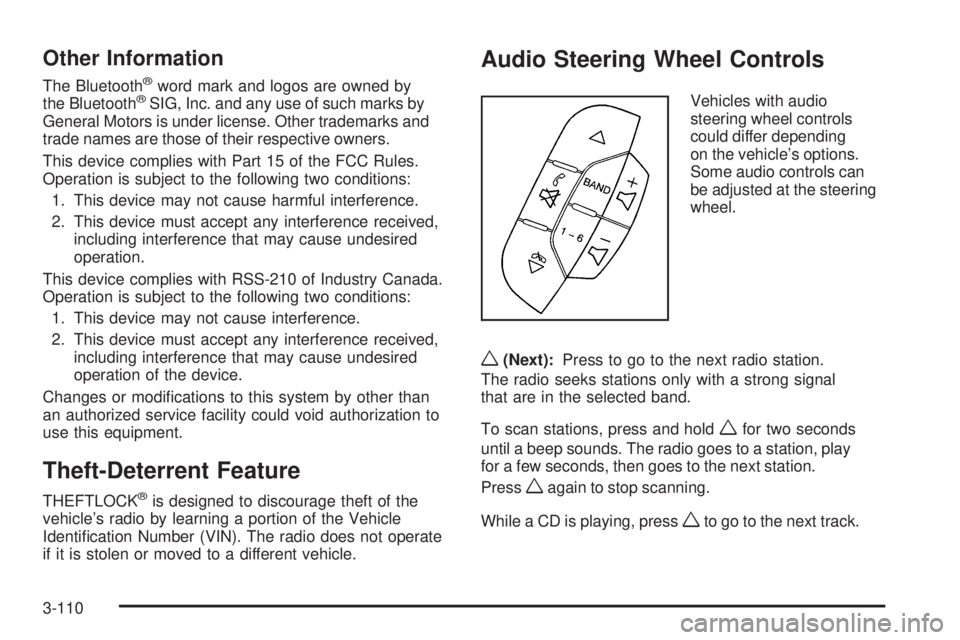
w(Next):Press to go to the next radio station.
The radio seeks stations only with a strong signal
that are in the selected band.
To scan stations, press and hold
wfor two seconds
until a beep sounds. The radio goes to a station, play
for a few seconds, then goes to the next station.
Press
wagain to stop scanning.
While a CD is playing, press
wto go to the next track.
3-110
Page 237 of 428
Your Driving, the Road, and the Vehicle............4-2
Driving for Better Fuel Economy.......................4-2
Defensive Driving...........................................4-2
Drunk Driving.................................................4-3
Control of a Vehicle........................................4-3
Braking.........................................................4-4
Antilock Brake System (ABS)...........................4-5
Braking in Emergencies...................................4-5
StabiliTrak
®System........................................4-6
Traction Control System (TCS).........................4-7
Enhanced Traction System (ETS).....................4-8
Steering......................................................4-10
Off-Road Recovery.......................................4-11
Passing.......................................................4-12
Loss of Control.............................................4-12Driving at Night............................................4-13
Driving in Rain and on Wet Roads..................4-14
Before Leaving on a Long Trip.......................4-15
Highway Hypnosis........................................4-15
Hill and Mountain Roads................................4-16
Winter Driving..............................................4-17
If Your Vehicle is Stuck in Sand, Mud,
Ice, or Snow.............................................4-19
Rocking Your Vehicle to Get It Out.................4-20
Loading the Vehicle......................................4-20
Towing..........................................................4-26
Towing Your Vehicle.....................................4-26
Recreational Vehicle Towing...........................4-26
Towing a Trailer...........................................4-28
Section 4 Driving Your Vehicle
4-1
Page 241 of 428
Antilock Brake System (ABS)
This vehicle has the Antilock Brake System (ABS), an
advanced electronic braking system that will help
prevent a braking skid.
When the engine is started and the vehicle begins to
drive away, ABS checks itself. A momentary motor
or clicking noise might be heard while this test is going
on, and it might even be noticed that the brake pedal
moves a little. This is normal.
If there is a problem with
ABS, this warning light
stays on. SeeAntilock
Brake System (ABS)
Warning Light on
page 3-36.
Let us say the road is wet and you are driving safely.
Suddenly, an animal jumps out in front of you. You slam
on the brakes and continue braking. Here is what
happens with ABS:
A computer senses that the wheels are slowing down. If
one of the wheels is about to stop rolling, the computer
will separately work the brakes at each wheel.ABS can change the brake pressure to each wheel, as
required, faster than any driver could. This can help
the driver steer around the obstacle while braking hard.
As the brakes are applied, the computer keeps receiving
updates on wheel speed and controls braking pressure
accordingly.
Remember: ABS does not change the time needed to get
a foot up to the brake pedal or always decrease stopping
distance. If you get too close to the vehicle in front of you,
there will not be enough time to apply the brakes if that
vehicle suddenly slows or stops. Always leave enough
room up ahead to stop, even with ABS.
Using ABS
Do not pump the brakes. Just hold the brake pedal
down rmly and let antilock work. The antilock pump or
motor might be heard operating and the brake pedal
might be felt to pulsate, but this is normal.
Braking in Emergencies
ABS allows the driver to steer and brake at the same
time. In many emergencies, steering can help more than
even the very best braking.
4-5
Page 247 of 428
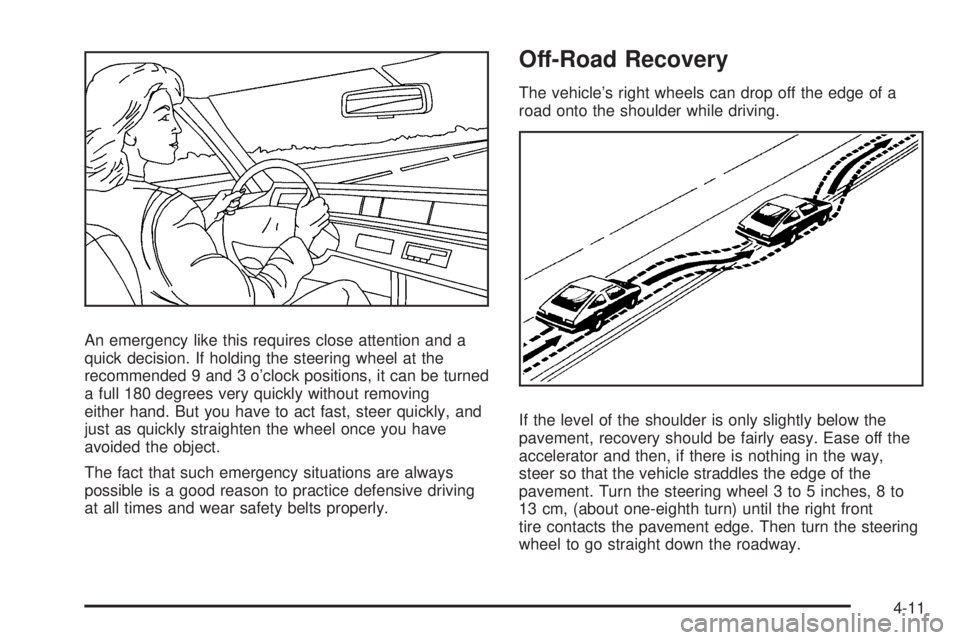
An emergency like this requires close attention and a
quick decision. If holding the steering wheel at the
recommended 9 and 3 o’clock positions, it can be turned
a full 180 degrees very quickly without removing
either hand. But you have to act fast, steer quickly, and
just as quickly straighten the wheel once you have
avoided the object.
The fact that such emergency situations are always
possible is a good reason to practice defensive driving
at all times and wear safety belts properly.
Off-Road Recovery
The vehicle’s right wheels can drop off the edge of a
road onto the shoulder while driving.
If the level of the shoulder is only slightly below the
pavement, recovery should be fairly easy. Ease off the
accelerator and then, if there is nothing in the way,
steer so that the vehicle straddles the edge of the
pavement. Turn the steering wheel 3 to 5 inches, 8 to
13 cm, (about one-eighth turn) until the right front
tire contacts the pavement edge. Then turn the steering
wheel to go straight down the roadway.
4-11