adjust light BUICK LACROSSE 2011 Owner's Manual
[x] Cancel search | Manufacturer: BUICK, Model Year: 2011, Model line: LACROSSE, Model: BUICK LACROSSE 2011Pages: 462, PDF Size: 5.73 MB
Page 7 of 462
Black plate (1,1)Buick LaCrosse Owner Manual - 2011
In Brief 1-1
In Brief
Instrument Panel
Instrument Panel . . . . . . . . . . . . . . 1-2
Initial Drive Information
Initial Drive Information . . . . . . . . 1-4
Remote Keyless Entry (RKE)System . . . . . . . . . . . . . . . . . . . . . . 1-4
Remote Vehicle Start . . . . . . . . . 1-4
Door Locks . . . . . . . . . . . . . . . . . . . 1-5
Trunk Release . . . . . . . . . . . . . . . . 1-5
Windows . . . . . . . . . . . . . . . . . . . . . . 1-5
Seat Adjustment . . . . . . . . . . . . . . 1-6
Memory Features . . . . . . . . . . . . . 1-7
Heated and Ventilated Seats . . . . . . . . . . . . . . . . . . . . . . . . 1-9
Head Restraint Adjustment . . . . 1-9
Safety Belts . . . . . . . . . . . . . . . . . . 1-10
Sensing System for Passenger Airbag . . . . . . . . . . 1-10 Mirror Adjustment . . . . . . . . . . . . 1-10
Steering Wheel
Adjustment . . . . . . . . . . . . . . . . . 1-11
Interior Lighting . . . . . . . . . . . . . . 1-12
Exterior Lighting . . . . . . . . . . . . . 1-12
Windshield Wiper/Washer . . . . 1-13
Climate Controls . . . . . . . . . . . . . 1-14
Transmission . . . . . . . . . . . . . . . . 1-15
Vehicle Features
Radio(s) . . . . . . . . . . . . . . . . . . . . . 1-16
Satellite Radio . . . . . . . . . . . . . . . 1-17
Portable Audio Devices . . . . . . 1-17
Bluetooth
®. . . . . . . . . . . . . . . . . . . 1-17
Steering Wheel Controls . . . . . 1-18
Cruise Control . . . . . . . . . . . . . . . 1-18
Navigation System . . . . . . . . . . . 1-19
Driver Information Center (DIC) . . . . . . . . . . . . . . . 1-19
Vehicle Personalization . . . . . . 1-20
Power Outlets . . . . . . . . . . . . . . . 1-20
Universal Remote System . . . 1-20
Sunroof . . . . . . . . . . . . . . . . . . . . . . 1-21
Performance and Maintenance
Traction Control System (TCS) . . . . . . . . . . . . . . 1-22
Electronic Stability Control (ESC) . . . . . . . . . . . . . . 1-22
Tire Pressure Monitor . . . . . . . . 1-22
Tire Sealant and
Compressor Kit . . . . . . . . . . . . . 1-23
Engine Oil Life System . . . . . . 1-23
Driving for Better Fuel Economy . . . . . . . . . . . . . . . . . . . 1-23
Roadside Assistance Program . . . . . . . . . . . . . . . . . . . . 1-24
OnStar
®. . . . . . . . . . . . . . . . . . . . . 1-24
Page 15 of 462
Black plate (9,1)Buick LaCrosse Owner Manual - 2011
In Brief 1-9
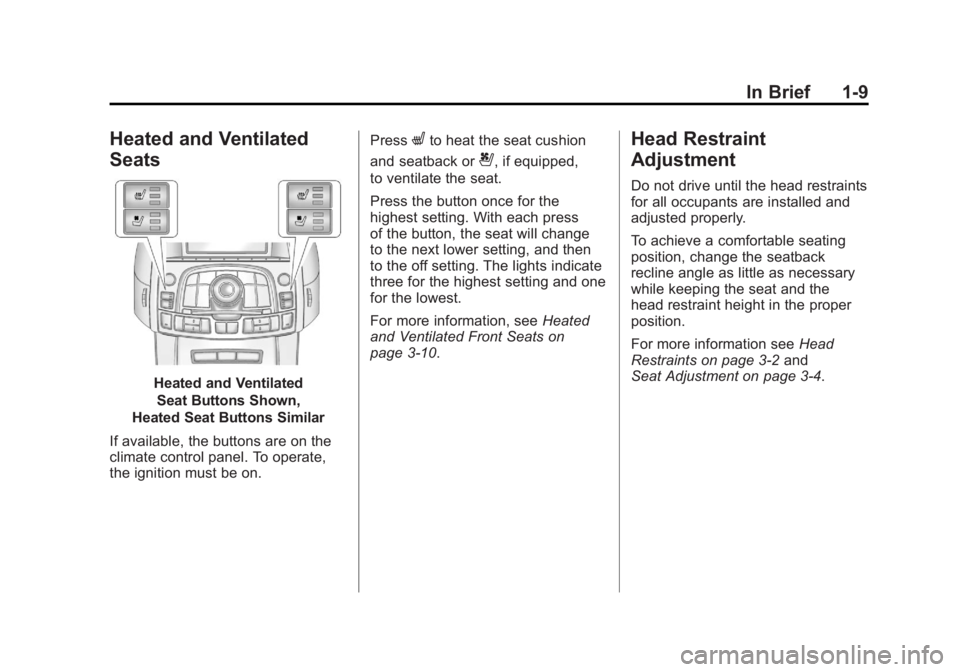
Heated and Ventilated
Seats
Heated and VentilatedSeat Buttons Shown,
Heated Seat Buttons Similar
If available, the buttons are on the
climate control panel. To operate,
the ignition must be on. Press
Lto heat the seat cushion
and seatback or
{, if equipped,
to ventilate the seat.
Press the button once for the
highest setting. With each press
of the button, the seat will change
to the next lower setting, and then
to the off setting. The lights indicate
three for the highest setting and one
for the lowest.
For more information, see Heated
and Ventilated Front Seats on
page 3‑10.
Head Restraint
Adjustment
Do not drive until the head restraints
for all occupants are installed and
adjusted properly.
To achieve a comfortable seating
position, change the seatback
recline angle as little as necessary
while keeping the seat and the
head restraint height in the proper
position.
For more information see Head
Restraints on page 3‑2 and
Seat Adjustment on page 3‑4.
Page 22 of 462
Black plate (16,1)Buick LaCrosse Owner Manual - 2011
1-16 In Brief
Vehicle Features
Radio(s)
VOL/O:Press to turn the system
on and off. Turn to increase or
decrease the volume.
RADIO/BAND: Press to choose
between FM, AM, or XM™,
if equipped.
TUNE: Turn to select radio
stations.
g: Press to seek the previous
station or track.
l: Press to seek the next station
or track.
Buttons 1‐6: Press to save and
select favorite stations
INFO: Press to show available
information about the current station
or track.
For more information about
these and other radio features,
see Operation on page 7‑7.
Storing a Favorite Station
Stations from all bands can be
stored in the favorite lists in any
order. Up to six stations can be
stored in each favorite page and
the number of available favorite
pages can be set.
To store the station to a position
in the list, press the corresponding
numeric button 1-6 until the station
can be heard again.
For more information, see “Storing
and Retrieving Favorites” inAM-FM
Radio on page 7‑12.
Setting the Clock
Adjusting the Time
1. Press the CONFIG button and select Time Settings,
or press
H.
2. Select Set Time. 3. Turn the Menu knob to adjust
the highlighted number.
4. Press the SELECT button to select the next number.
5. To save the time and return to the Time Settings menu, press
the BACK button at any time or
press the SELECT button after
adjusting the minutes.
Setting the 12/24 Hour Format
1. Press the CONFIG button and select Time Settings,
or press
H.
2. Highlight 12/24 Hour Format.
3. Press the SELECT button to select the 12 hour or 24 hour
display format.
For detailed instructions on setting
the clock, see Clock (Without Date
Display) on page 5‑5 orClock (With
Date Display) on page 5‑6.
Page 24 of 462
Black plate (18,1)Buick LaCrosse Owner Manual - 2011
1-18 In Brief
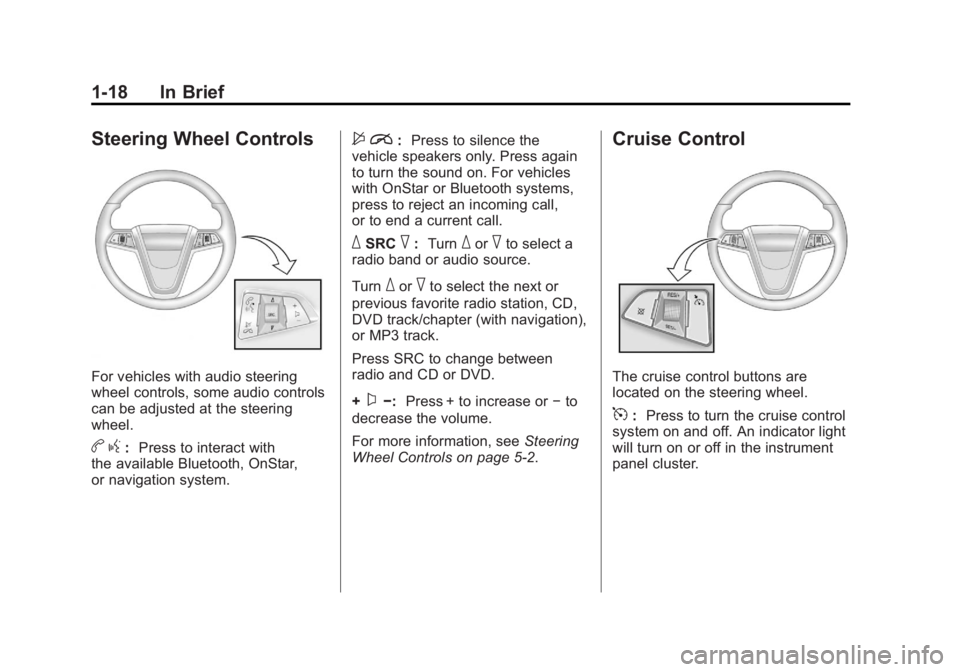
Steering Wheel Controls
For vehicles with audio steering
wheel controls, some audio controls
can be adjusted at the steering
wheel.
bg: Press to interact with
the available Bluetooth, OnStar,
or navigation system.
$ i: Press to silence the
vehicle speakers only. Press again
to turn the sound on. For vehicles
with OnStar or Bluetooth systems,
press to reject an incoming call,
or to end a current call.
_SRC^: Turn_or^to select a
radio band or audio source.
Turn
_or^to select the next or
previous favorite radio station, CD,
DVD track/chapter (with navigation),
or MP3 track.
Press SRC to change between
radio and CD or DVD.
+
x−: Press + to increase or −to
decrease the volume.
For more information, see Steering
Wheel Controls on page 5‑2.
Cruise Control
The cruise control buttons are
located on the steering wheel.
5: Press to turn the cruise control
system on and off. An indicator light
will turn on or off in the instrument
panel cluster.
Page 48 of 462
Black plate (16,1)Buick LaCrosse Owner Manual - 2011
2-16 Keys, Doors and Windows
The system has one or more
transmitters that are matched to
an immobilizer control unit in your
vehicle. Only a correctly matched
transmitter will start the vehicle.
If the transmitter is ever damaged,
you may not be able to start your
vehicle.
When trying to start the vehicle, the
security light comes on briefly when
the ignition is turned on.
If the engine does not start and the
security light stays on, there is a
problem with the system. Turn the
ignition off and try again.If the RKE appears to be
undamaged, try another
transmitter. Or, you may try
placing the transmitter in the
transmitter pocket located in the
center console. See
“No Remote
Detected” underKey and Lock
Messages on page 5‑36.
If the engine does not start with
the other transmitter or when the
transmitter is on the pocket in the
center console, your vehicle needs
service. See your dealer who can
service the theft-deterrent system
and have a new transmitter
programmed to the vehicle.
Do not leave the key or device
that disarms or deactivates the
theft-deterrent system in the vehicle.Exterior Mirrors
Power Mirrors
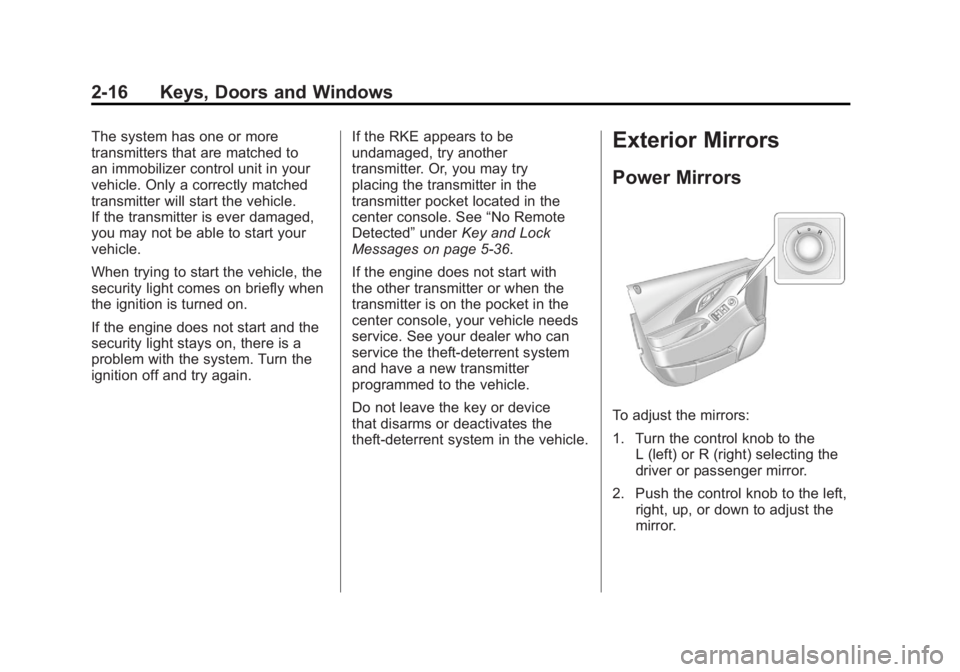
To adjust the mirrors:
1. Turn the control knob to the L (left) or R (right) selecting the
driver or passenger mirror.
2. Push the control knob to the left, right, up, or down to adjust the
mirror.
Page 76 of 462
Black plate (22,1)Buick LaCrosse Owner Manual - 2011
3-22 Seats and Restraints
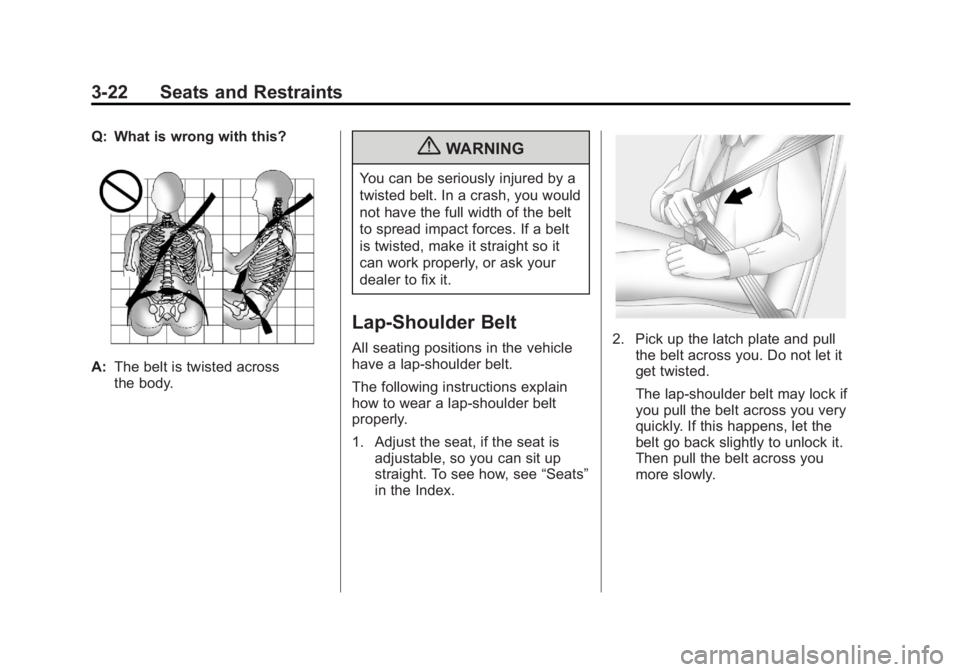
Q: What is wrong with this?
A:The belt is twisted across
the body.
{WARNING
You can be seriously injured by a
twisted belt. In a crash, you would
not have the full width of the belt
to spread impact forces. If a belt
is twisted, make it straight so it
can work properly, or ask your
dealer to fix it.
Lap-Shoulder Belt
All seating positions in the vehicle
have a lap-shoulder belt.
The following instructions explain
how to wear a lap-shoulder belt
properly.
1. Adjust the seat, if the seat is
adjustable, so you can sit up
straight. To see how, see “Seats”
in the Index.2. Pick up the latch plate and pull the belt across you. Do not let it
get twisted.
The lap-shoulder belt may lock if
you pull the belt across you very
quickly. If this happens, let the
belt go back slightly to unlock it.
Then pull the belt across you
more slowly.
Page 94 of 462
Black plate (40,1)Buick LaCrosse Owner Manual - 2011
3-40 Seats and Restraints
5. If, after reinstalling the childrestraint and restarting the
vehicle, the on indicator is
still lit, turn the vehicle off.
Then slightly recline the vehicle
seatback and adjust the seat
cushion, if adjustable, to make
sure that the vehicle seatback
is not pushing the child restraint
into the seat cushion.
Also make sure the child
restraint is not trapped under
the vehicle head restraint.
If this happens, adjust the
head restraint. See Head
Restraints on page 3‑2.
6. Restart the vehicle.
If the on indicator is still lit,
secure the child in the child
restraint in a rear seat position
in the vehicle, and check with
your dealer.If the Off Indicator is Lit for an
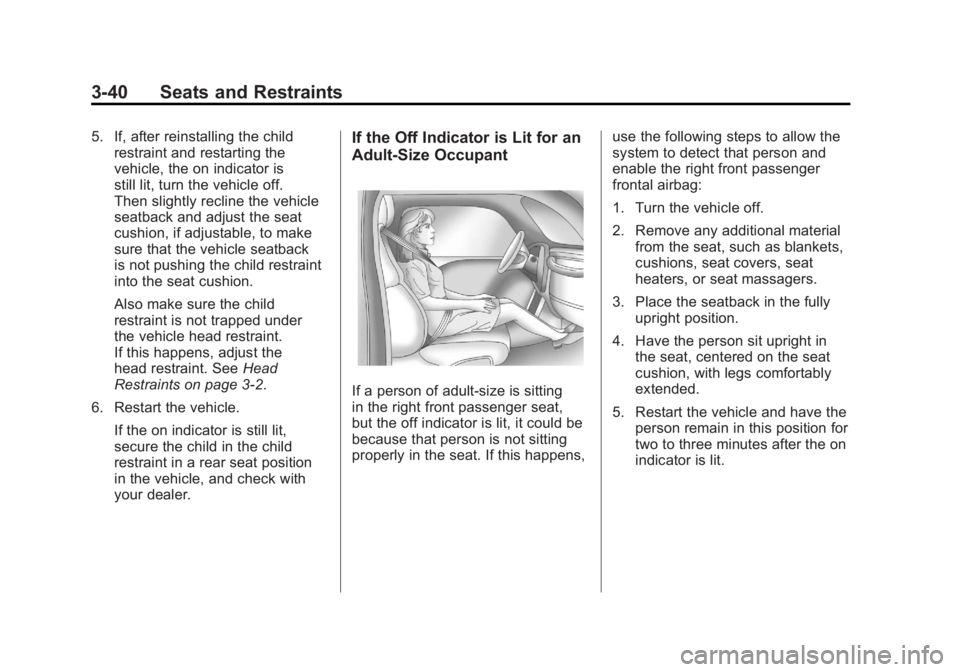
Adult-Size Occupant
If a person of adult-size is sitting
in the right front passenger seat,
but the off indicator is lit, it could be
because that person is not sitting
properly in the seat. If this happens, use the following steps to allow the
system to detect that person and
enable the right front passenger
frontal airbag:
1. Turn the vehicle off.
2. Remove any additional material
from the seat, such as blankets,
cushions, seat covers, seat
heaters, or seat massagers.
3. Place the seatback in the fully upright position.
4. Have the person sit upright in the seat, centered on the seat
cushion, with legs comfortably
extended.
5. Restart the vehicle and have the person remain in this position for
two to three minutes after the on
indicator is lit.
Page 123 of 462
Black plate (1,1)Buick LaCrosse Owner Manual - 2011
Instruments and Controls 5-1
Instruments and
Controls
Controls
Steering Wheel Adjustment . . . 5-2
Steering Wheel Controls . . . . . . 5-2
Heated Steering Wheel . . . . . . . 5-3
Horn . . . . . . . . . . . . . . . . . . . . . . . . . . 5-3
Windshield Wiper/Washer . . . . . 5-3
Compass . . . . . . . . . . . . . . . . . . . . . 5-5
Clock (Without DateDisplay) . . . . . . . . . . . . . . . . . . . . . 5-5
Clock (With Date Display) . . . . . 5-6
Power Outlets . . . . . . . . . . . . . . . . . 5-7
Warning Lights, Gauges, and
Indicators
Warning Lights, Gauges, and Indicators . . . . . . . . . . . . . . . . . . . . 5-9
Instrument Cluster . . . . . . . . . . . 5-10
Speedometer . . . . . . . . . . . . . . . . 5-11
Odometer . . . . . . . . . . . . . . . . . . . . 5-11 Tachometer . . . . . . . . . . . . . . . . . . 5-11
Fuel Gauge . . . . . . . . . . . . . . . . . . 5-11
Engine Coolant Temperature
Gauge . . . . . . . . . . . . . . . . . . . . . . 5-13
Safety Belt Reminders . . . . . . . 5-14
Airbag Readiness Light . . . . . . 5-14
Passenger Airbag Status
Indicator . . . . . . . . . . . . . . . . . . . . 5-15
Charging System Light . . . . . . 5-16
Malfunction Indicator Lamp . . . . . . . . . . . . . 5-17
Brake System Warning Light . . . . . . . . . . . . . . . . . . . . . . . 5-19
Electric Parking Brake Light . . . . . . . . . . . . . . . . . . . . . . . 5-20
Antilock Brake System (ABS) Warning Light . . . . . . . . . . . . . . 5-21
Traction Off Light . . . . . . . . . . . . 5-21
Electronic Stability Control (ESC) Indicator Light . . . . . . . 5-22
Electronic Stability Control (ESC)/Traction Control
System (TCS) Indicator/
Warning Light . . . . . . . . . . . . . . 5-22 Tire Pressure Light . . . . . . . . . . 5-23
Engine Oil Pressure Light . . . . 5-23
Low Fuel Warning Light . . . . . . 5-24
Security Light . . . . . . . . . . . . . . . . 5-24
High-Beam On Light . . . . . . . . . 5-24
Front Fog Lamp Light . . . . . . . . 5-25
Taillamp Indicator Light . . . . . . 5-25
Cruise Control Light . . . . . . . . . 5-25
Information Displays
Driver Information
Center (DIC) . . . . . . . . . . . . . . . 5-25
Head-Up Display (HUD) . . . . . 5-29
Vehicle Messages
Vehicle Messages . . . . . . . . . . . 5-33
Battery Voltage and Charging Messages . . . . . . . . . . . . . . . . . . 5-33
Brake System Messages . . . . 5-33
Compass Messages . . . . . . . . . 5-34
Cruise Control Messages . . . . 5-34
Door Ajar Messages . . . . . . . . . 5-34
Engine Cooling System Messages . . . . . . . . . . . . . . . . . . 5-35
Page 128 of 462
Black plate (6,1)Buick LaCrosse Owner Manual - 2011
5-6 Instruments and Controls
3. Turn the Menu knob to adjustthe highlighted value.
4. Press the SELECT button to select the next value.
5. To save the time and return to the Time Settings menu, press
the
0BACK button at any time
or press the SELECT button
after adjusting the minutes.
Setting the 12/24 Hour Format
1. Press the CONFIG button and select Time Settings,
or press
H.
2. Highlight 12/24 Hour Format.
3. Press the SELECT button to select the 12 hour or 24 hour
display format.
Clock (With Date Display)
The infotainment system controls
are used to access the time and
date settings through the menu
system. See Operation on page 7‑7
for information about how to use
the menu system.
Setting the Time and Date
1. Press the CONFIG button and select Time and Date Settings,
or press
H.
2. Select Set Time or Set Date.
3. Turn the Menu knob to adjust the highlighted value. 4. Press the SELECT button to
select the next value.
5. To save the time or date and return to the Time and
Date Settings menu, press
the
0BACK button at any time
or press the SELECT button
after adjusting the minutes
or year.
Setting the 12/24 Hour Format
1. Press the CONFIG button and select Time and Date Settings,
or press
H.
2. Highlight Set Time Format.
3. Press the SELECT button to select the 12 hour or 24 hour
display format.
Page 129 of 462
Black plate (7,1)Buick LaCrosse Owner Manual - 2011
Instruments and Controls 5-7
Setting the Month & Day
Format
1. Press the CONFIG button andselect Time and Date Settings,
or press
H.
2. Highlight Set Date Format.
3. Press the SELECT button to select MM/DD/YY
(month/day/year) or DD/MM/YY
(day/month/year).
Setting the Auto Time Adjust
1. Press the CONFIG button andselect Time and Date Settings,
or press
H.
2. Highlight Auto Time Adjust.
3. Press the SELECT button to turn Auto Time Adjust on or off.
4. Press the SELECT button to select Time Zone, and then
select the Time Zone.
5. Press the SELECT button to turn Daylight Savings on or off.
Power Outlets
The accessory power outlets can be
used to plug in electrical equipment,
such as a cell phone or MP3 player.
There are two accessory power
outlets. One is located under the
armrest inside the center console
storage and the other is on the rear
of the center floor console.
These outlets are powered
when the ignition is in ON/RUN
or ACC/ACCESSORY, or until
the driver door is opened within
10 minutes of turning off the vehicle.
See Retained Accessory Power
(RAP) on page 9‑24.