ignition BUICK LUCERNE 2010 Workshop Manual
[x] Cancel search | Manufacturer: BUICK, Model Year: 2010, Model line: LUCERNE, Model: BUICK LUCERNE 2010Pages: 474
Page 235 of 474

Setting the Clock
Single CD (MP3) Player
To set the time and date:1. Turn the ignition key to ACC/ACCESSORY or ON/RUN. Press
Oto turn the radio on.
2. Press
Hand the HR, MIN, MM, DD, YYYY
(hour, minute, month, day, and year) displays.
3. Press the softkey located below any one of the tabs that you want to change.
4. To increase the time or date, do one of the following:
.Press the softkey located below the
selected tab.
.Press¨SEEK, or\FWD.
.Turnfclockwise.
5. To decrease the time or date, do one of the following:
.Press©SEEK orsREV.
.Turnfcounterclockwise. The date does not automatically display. To see the
date press
Hwhile the radio is on. The date with
display times out after a few seconds and goes back to
the normal radio and time display.
To change the time default setting from 12 hour to
24 hour or to change the date default setting from
month/day/year to day/month/year:
1. Press
Hand then the softkey located below the
forward arrow label. Once the time 12H and 24H,
and the date MM/DD/YYYY (month, day, and year)
and DD/MM/YYYY (day, month, and year) displays.
2. Press the softkey located below the desired option.
3. Press
Hagain to apply the selected default, or let
the screen time out.
4-75
Page 236 of 474

Six-Disc CD (MP3) Player
To set the time and date:1. Turn the ignition key to ACC/ACCESSORY or ON/ RUN. Press
Oto turn the radio on.
2. Press MENU.
3. Press the softkey below the
Htab. The HR, MIN,
MM, DD, YYYY displays.
4. Press the softkey below any one of the tabs you want to change.
5. To increase the time or date, do one of the following:
.Press the softkey located below the
selected tab.
.Press¨SEEK, or\FWD.
.Turnfclockwise.
6. To decrease the time or date, do one of the following:
.Press©SEEK orsREV.
.Turnfcounterclockwise. The date does not automatically display. To see the
date press MENU and then softkey below the
Htab
while the radio is on. The date with display times out
after a few seconds and goes back to the normal radio
and time display.
To change the time default setting from 12 hour to
24 hour or to change the date default setting from
month/day/year to day/month/year:
1. Press MENU, and then the softkey below the
Htab. The HR, MIN, MM, DD, YYYY
displays.
2. Press the softkey below the forward arrow tab. The time 12H and 24H, and the date MM/DD/YYYY
(month, day, and year) and DD/MM/YYYY (day,
month, and year) displays.
3. Press the softkey located below the desired option.
4. Press MENU again to apply the selected default, or let the screen time out.
4-76
Page 242 of 474

Radio Messages
Calibration Error:The audio system has been
calibrated for the vehicle from the factory. If Calibration
Error displays, it means that the radio has not been
configured properly for the vehicle and it must be
returned to your dealer for service.
Loc or Locked: If Loc or Locked displays, it means the
THEFTLOCK
®system has locked up. Take the vehicle
to your dealer for service.
If any error occurs repeatedly or if an error cannot be
corrected, contact your dealer.
XM™ Satellite Radio Service
XM is a satellite radio service that is based in the
48 contiguous United States and 10 Canadian
provinces. XM Satellite Radio has a wide variety
of programming and commercial-free music,
coast-to-coast, and in digital-quality sound. A service
fee is required to receive the XM service. For more
information, contact XM at www.xmradio.com or call
1-800-929-2100 in the U.S. and www.xmradio.ca or
call 1-877-438-9677 in Canada.
Radio Messages for XM™ Only
SeeXM Radio Messageson page 4‑92later in this
section for further detail.
Playing a CD
Insert a CD partway into the slot, label side up. The
player pulls it in and the CD should begin playing.
If the ignition or radio is turned off while a CD in the
player it stays in the player. When the ignition or radio is
turned on, the CD starts to play where it stopped, if it
was the last selected audio source.
When the CD is inserted, the CD symbol displays. As
each new track starts to play, the track number displays.
The CD player can play the smaller 3 inch (8 cm) single
CDs with an adapter ring. Full-size CDs and the smaller
CDs are loaded in the same manner.
4-82
Page 243 of 474
For vehicles that have a Radio with a Six-Disc CD
player:
LOAD
^:Press to load CDs into the CD player. This
CD player holds up to six CDs.
To insert one CD, do the following:
1. Press and release the load button.
2. Wait for the message to insert the disc.
3. Load a CD. Insert the CD partway into the slot, label side up. The player pulls the CD in.
To insert multiple CDs: 1. Press and hold the load button for two seconds. A beep sounds and Load All Discs displays.
2. Follow the displayed instruction on when to insert the discs. The CD player takes up to six CDs.
3. Press this button again to cancel loading more CDs.
If the ignition or radio is turned off, while a CD is in the
player, it stays in the player. When the ignition or radio
is turned on, the CD starts playing where it stopped, if it
was the last selected audio source.
ZEJECT: For the Radio with a Single CD player,
press to eject the CD. If the CD is not removed, after
several seconds, the CD automatically pulls back into
the player.
For the Radio with a Six-Disc CD player, press and
release to eject the CD that is currently playing. The
radio beeps once and Ejecting Disc displays. Once the
disc is ejected, Remove Disc displays. The CD can be
removed. If the CD is not removed, after several
seconds, the CD automatically pulls back into the player
and begins playing. Press and hold for two seconds to
eject all discs.
f(Tune): Turn to select tracks on the CD currently
playing.
©SEEK¨: Press the left arrow to go to the start of
the current track, if more than ten seconds have played.
Press the right arrow to go to the next track. If either
arrow is held, or pressed multiple times, the player
continues moving backward or forward through the
tracks on the CD.
4-83
Page 283 of 474
{WARNING:
Coasting downhill in N (Neutral) or with the
ignition off is dangerous. The brakes will have to
do all the work of slowing down and they could
get so hot that they would not work well. You
would then have poor braking or even none going
down a hill. You could crash. Always have the
engine running and the vehicle in gear when
going downhill.
.Stay in your own lane. Do not swing wide or cut
across the center of the road. Drive at speeds that
let you stay in your own lane.
.Top of hills: Be alert—something could be in your
lane (stalled car, accident).
.Pay attention to special road signs (falling rocks
area, winding roads, long grades, passing or
no-passing zones) and take appropriate action.
Winter Driving
Driving on Snow or Ice
Drive carefully when there is snow or ice between the
tires and the road, creating less traction or grip. Wet ice
can occur at about 0°C (32°F) when freezing rain
begins to fall, resulting in even less traction. Avoid
driving on wet ice or in freezing rain until roads can be
treated with salt or sand.
Drive with caution, whatever the condition. Accelerate
gently so traction is not lost. Accelerating too quickly
causes the wheels to spin and makes the surface under
the tires slick, so there is even less traction.
Try not to break the fragile traction. If you accelerate too
fast, the drive wheels will spin and polish the surface
under the tires even more.
5-15
Page 294 of 474
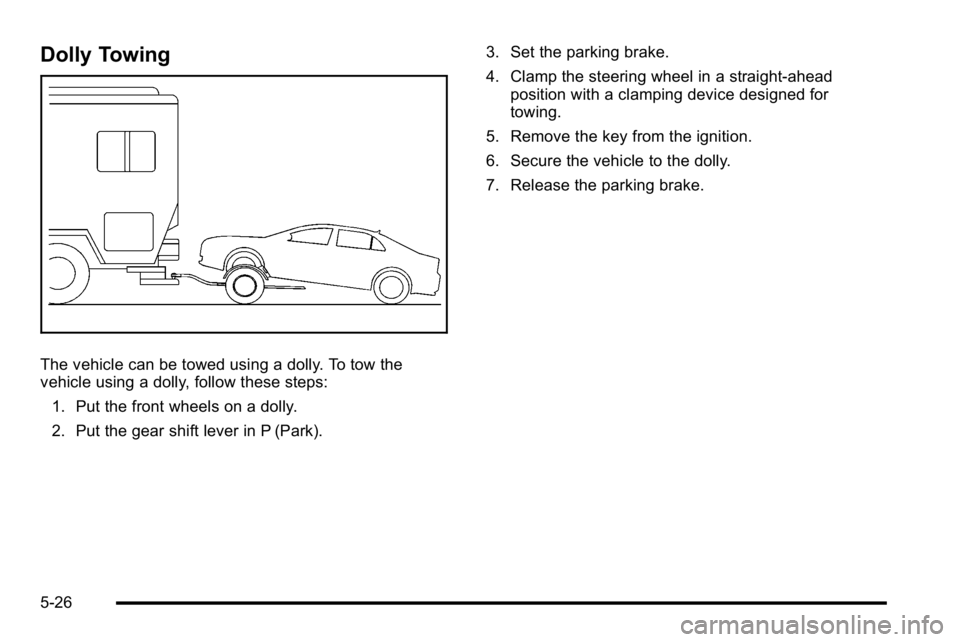
Dolly Towing
The vehicle can be towed using a dolly. To tow the
vehicle using a dolly, follow these steps:1. Put the front wheels on a dolly.
2. Put the gear shift lever in P (Park). 3. Set the parking brake.
4. Clamp the steering wheel in a straight-ahead
position with a clamping device designed for
towing.
5. Remove the key from the ignition.
6. Secure the vehicle to the dolly.
7. Release the parking brake.
5-26
Page 347 of 474
Notice:Ignoring these steps could result in costly
damage to the vehicle that would not be covered by
the warranty.
Trying to start the vehicle by pushing or pulling it
will not work, and it could damage the vehicle.
1. Check the other vehicle. It must have a 12-volt battery with a negative ground system.
Notice: If the other vehicle's system is not a 12-volt
system with a negative ground, both vehicles can
be damaged. Only use vehicles with 12-volt systems
with negative grounds to jump start your vehicle.
2. Get the vehicles close enough so the jumper cables can reach, but be sure the vehicles are
not touching each other. If they are, it could cause
a ground connection you do not want. You would
not be able to start your vehicle, and the bad
grounding could damage the electrical systems.
To avoid the possibility of the vehicles rolling, set
the parking brake firmly on both vehicles involved
in the jump start procedure. Put an automatic
transmission in P (Park) or a manual transmission
in Neutral before setting the parking brake. Notice:
If you leave the radio or other accessories
on during the jump starting procedure, they could
be damaged. The repairs would not be covered by
the warranty. Always turn off the radio and other
accessories when jump starting the vehicle.
3. Turn off the ignition on both vehicles. Unplug unnecessary accessories plugged into the
cigarette lighter or the accessory power outlet(s).
Turn off the radio and all lamps that are not
needed. This will avoid sparks and help save
both batteries. And it could save the radio!
4. Open the hood on the other vehicle and locate the positive (+) and negative (−) terminal locations on
that vehicle.
You will not see the battery of your vehicle under
the hood. It is located under the rear passenger's
seat. You will not need to access the battery for
jump starting. The remote positive (+) terminal is
for that purpose. See Engine Compartment
Overview
on page 6‑14for location.
6-45
Page 357 of 474
License Plate Lamp
To replace one of these bulbs:1. Remove the license plate.
2. Reach up through the opening above the license plate to access the two license plate lamps.
3. Turn the socket counterclockwise to remove.
4. Grasp the bulb in the socket and pull straight out.
5. Push the bulb straight into the socket until it clicks to secure it.
6. Push the socket in and turn it clockwise to secure it.
7. Reinstall the license plate in its original location.
Replacement Bulbs
Exterior Lamps Bulb Number
Back-up Lamp 921
Sidemarker, License Plate Lamp,
and Auxiliary Taillamp 194
Stoplamp, Taillamp, and Turn
Signal Lamp 3057K
For replacement bulbs not listed here, contact your
dealer.
Windshield Wiper Blade
Replacement
Windshield wiper blades should be inspected for wear
or cracking. See
Scheduled Maintenance on page 7‑3.
It is a good idea to clean or replace the wiper blade
assembly on a regular basis or when worn. For
proper windshield wiper blade length and type, see
Maintenance Replacement Parts on page 7‑11.
To replace the wiper blade assembly: 1. Turn the ignition to ACC/ACCESSORY with the engine off.
2. Pull the windshield wiper assembly away from the windshield.
6-55
Page 370 of 474

If the warning light comes on, stop as soon as possible
and inflate the tires to the recommended pressure
shown on the tire loading information label. See
Loading the Vehicle on page 5‑19.
At the same time a message to check the pressure in a
specific tire appears on the Driver Information Center
(DIC) display. The low tire pressure warning light and
the DIC warning message come on at each ignition
cycle until the tires are inflated to the correct inflation
pressure. Using the DIC, tire pressure levels can be
viewed by the driver. For additional information and
details about the DIC operation and displays seeDIC
Operation and Displays
on page 4‑47and DIC
Warnings and Messages on page 4‑55.
The low tire pressure warning light may come on in cool
weather when the vehicle is first started, and then turn
off as you start to drive. This could be an early indicator
that the air pressure in the tire(s) are getting low and
need to be inflated to the proper pressure. A Tire and Loading Information label, attached to your
vehicle, shows the size of your vehicle's original
equipment tires and the correct inflation pressure for
your vehicle's tires when they are cold. See
Loading the
Vehicle
on page 5‑19, for an example of the Tire and
Loading Information label and its location on your
vehicle. Also see Inflation - Tire Pressure on page 6‑65.
Your vehicle's TPMS can warn you about a low tire
pressure condition but it does not replace normal tire
maintenance. See Tire Inspection and Rotation
on
page 6‑71and Tires on page 6‑57.
Notice: Using non‐approved tire sealants could
damage the Tire Pressure Monitor System (TPMS)
sensors. TPMS sensor damage caused by using an
incorrect tire sealant is not covered by the vehicle
warranty. Always use the GM approved tire sealant
available through your dealer.
Factory-installed Tire Inflator Kits use a GM approved
liquid tire sealant. Using non-approved tire sealants
could damage the TPMS sensors. See Tire Sealant and
Compressor Kit
on page 6‑82for information regarding
the inflator kit materials and instructions.
6-68
Page 371 of 474

TPMS Malfunction Light and Message
The TPMS will not function properly if one or more of
the TPMS sensors are missing or inoperable. When the
system detects a malfunction, the low tire warning light
flashes for about one minute and then stays on for the
remainder of the ignition cycle. A DIC warning message
is also displayed. The low tire warning light and DIC
warning message come on at each ignition cycle until
the problem is corrected. Some of the conditions that
can cause the malfunction light and DIC message to
come on are:
.One of the road tires has been replaced with the
spare tire. The spare tire does not have a TPMS
sensor. The TPMS malfunction light and DIC
message should go off once you re‐install the road
tire containing the TPMS sensor.
.The TPMS sensor matching process was started
but not completed or not completed successfully
after rotating the vehicle's tires. The DIC message
and TPMS malfunction light should go off once the
TPMS sensor matching process is performed
successfully. See“TPMS Sensor Matching
Process” later in this section.
.One or more TPMS sensors are missing or
damaged. The DIC message and the TPMS
malfunction light should go off when the TPMS
sensors are installed and the sensor matching
process is performed successfully. See your
dealer/retailer for service.
.Replacement tires or wheels do not match your
vehicle's original equipment tires or wheels. Tires
and wheels other than those recommended for
your vehicle could prevent the TPMS from
functioning properly. See Buying New Tires
on
page 6‑74.
.Operating electronic devices or being near facilities
using radio wave frequencies similar to the TPMS
could cause the TPMS sensors to malfunction.
If the TPMS is not functioning it cannot detect or signal
a low tire condition. See your dealer/retailer for service
if the TPMS malfunction light and DIC message comes
on and stays on.
6-69