Key lock BUICK LUCERNE 2010 Owner's Manual
[x] Cancel search | Manufacturer: BUICK, Model Year: 2010, Model line: LUCERNE, Model: BUICK LUCERNE 2010Pages: 474
Page 1 of 474
2010 Buick Lucerne Owner ManualM
In Brief. . . . . . . . . . . . . . . . . . . . . . . . . . . . . . . . . . . . . . . . . . . . 1-1
Instrument Panel . . . . . . . . . . . . . . . . . . . . . . . . . . . . . . . . . 1-2
Initial Drive Information . . . . . . . . . . . . . . . . . . . . . . . . . . . 1-4
Vehicle Features . . . . . . . . . . . . . . . . . . . . . . . . . . . . . . . . 1-14
Performance and Maintenance . . . . . . . . . . . . . . . . . . 1-21
Seats and Restraint System . . . . . . . . . . . . . . . . . . . . . . 2-1
Head Restraints . . . . . . . . . . . . . . . . . . . . . . . . . . . . . . . . . . 2-2
Front Seats . . . . . . . . . . . . . . . . . . . . . . . . . . . . . . . . . . . . . . . 2-3
Rear Seats . . . . . . . . . . . . . . . . . . . . . . . . . . . . . . . . . . . . . . 2-12
Safety Belts . . . . . . . . . . . . . . . . . . . . . . . . . . . . . . . . . . . . . 2-12
Child Restraints . . . . . . . . . . . . . . . . . . . . . . . . . . . . . . . . . 2-33
Airbag System . . . . . . . . . . . . . . . . . . . . . . . . . . . . . . . . . . 2-56
Restraint System Check . . . . . . . . . . . . . . . . . . . . . . . . . 2-74
Features and Controls . . . . . . . . . . . . . . . . . . . . . . . . . . . . 3-1
Keys . . . . . . . . . . . . . . . . . . . . . . . . . . . . . . . . . . . . . . . . . . . . . 3-3
Doors and Locks . . . . . . . . . . . . . . . . . . . . . . . . . . . . . . . . . 3-9
Windows . . . . . . . . . . . . . . . . . . . . . . . . . . . . . . . . . . . . . . . . 3-14
Theft-Deterrent Systems . . . . . . . . . . . . . . . . . . . . . . . . 3-16
Starting and Operating Your Vehicle . . . . . . . . . . . . . 3-19
Mirrors . . . . . . . . . . . . . . . . . . . . . . . . . . . . . . . . . . . . . . . . . . 3-33 Object Detection Systems . . . . . . . . . . . . . . . . . . . . . . . 3-37
Universal Home Remote System . . . . . . . . . . . . . . . . 3-44
Storage Areas . . . . . . . . . . . . . . . . . . . . . . . . . . . . . . . . . . . 3-51
Sunroof . . . . . . . . . . . . . . . . . . . . . . . . . . . . . . . . . . . . . . . . . 3-52
Instrument Panel . . . . . . . . . . . . . . . . . . . . . . . . . . . . . . . . . 4-1
Instrument Panel Overview . . . . . . . . . . . . . . . . . . . . . . . 4-3
Climate Controls . . . . . . . . . . . . . . . . . . . . . . . . . . . . . . . . 4-18
Warning Lights, Gauges, and Indicators . . . . . . . . . 4-30
Driver Information Center (DIC) . . . . . . . . . . . . . . . . . 4-47
Audio System(s) . . . . . . . . . . . . . . . . . . . . . . . . . . . . . . . . 4-74
Driving Your Vehicle . . . . . . . . . . . . . . . . . . . . . . . . . . . . . . 5-1
Your Driving, the Road, and the Vehicle . . . . . . . . . . 5-2
Towing . . . . . . . . . . . . . . . . . . . . . . . . . . . . . . . . . . . . . . . . . . 5-24
Service and Appearance Care . . . . . . . . . . . . . . . . . . . 6-1
Service . . . . . . . . . . . . . . . . . . . . . . . . . . . . . . . . . . . . . . . . . . . 6-3
Fuel . . . . . . . . . . . . . . . . . . . . . . . . . . . . . . . . . . . . . . . . . . . . . . 6-5
Checking Things Under the Hood . . . . . . . . . . . . . . . 6-12
Headlamp Aiming . . . . . . . . . . . . . . . . . . . . . . . . . . . . . . . 6-49
Bulb Replacement . . . . . . . . . . . . . . . . . . . . . . . . . . . . . . 6-52
Page 7 of 474
Section 1 In Brief
Instrument Panel. . . . . . . . . . . . . . . . . . . . . . . . . . . . . . . . . . . 1-2
Initial Drive Information . . . . . . . . . . . . . . . . . . . . . . . . . . . 1-4
Remote Keyless Entry (RKE) System . . . . . . . . . . . 1-4
Remote Vehicle Start . . . . . . . . . . . . . . . . . . . . . . . . . . . 1-4
Door Locks . . . . . . . . . . . . . . . . . . . . . . . . . . . . . . . . . . . . . 1-5
Trunk Release . . . . . . . . . . . . . . . . . . . . . . . . . . . . . . . . . . 1-5
Windows . . . . . . . . . . . . . . . . . . . . . . . . . . . . . . . . . . . . . . . . 1-6
Seat Adjustment . . . . . . . . . . . . . . . . . . . . . . . . . . . . . . . . 1-6
Heated Seats . . . . . . . . . . . . . . . . . . . . . . . . . . . . . . . . . . . 1-8
Heated and Ventilated Seats . . . . . . . . . . . . . . . . . . . . 1-8
Head Restraint Adjustment . . . . . . . . . . . . . . . . . . . . . . 1-8
Safety Belt . . . . . . . . . . . . . . . . . . . . . . . . . . . . . . . . . . . . . . 1-8
Sensing System for Passenger Airbag . . . . . . . . . . 1-9
Mirror Adjustment . . . . . . . . . . . . . . . . . . . . . . . . . . . . . . . 1-9
Steering Wheel Adjustment . . . . . . . . . . . . . . . . . . . . 1-10
Interior Lighting . . . . . . . . . . . . . . . . . . . . . . . . . . . . . . . . 1-11
Exterior Lighting . . . . . . . . . . . . . . . . . . . . . . . . . . . . . . . 1-12
Windshield Wiper/Washer . . . . . . . . . . . . . . . . . . . . . . 1-13
Climate Controls . . . . . . . . . . . . . . . . . . . . . . . . . . . . . . . 1-13 Vehicle Features
. . . . . . . . . . . . . . . . . . . . . . . . . . . . . . . . . . 1-14
Radio(s) . . . . . . . . . . . . . . . . . . . . . . . . . . . . . . . . . . . . . . . 1-14
Satellite Radio . . . . . . . . . . . . . . . . . . . . . . . . . . . . . . . . . 1-16
Portable Audio Devices . . . . . . . . . . . . . . . . . . . . . . . . 1-16
Steering Wheel Controls . . . . . . . . . . . . . . . . . . . . . . . 1-16
Bluetooth
®. . . . . . . . . . . . . . . . . . . . . . . . . . . . . . . . . . . . . 1-17
Navigation System . . . . . . . . . . . . . . . . . . . . . . . . . . . . . 1-17
Driver Information Center (DIC) . . . . . . . . . . . . . . . . 1-18
Cruise Control . . . . . . . . . . . . . . . . . . . . . . . . . . . . . . . . . 1-19
Lane Departure Warning (LDW) . . . . . . . . . . . . . . . 1-19
Side Blind Zone Alert (SBZA) . . . . . . . . . . . . . . . . . . 1-20
Ultrasonic Parking Assist . . . . . . . . . . . . . . . . . . . . . . 1-20
Power Outlets . . . . . . . . . . . . . . . . . . . . . . . . . . . . . . . . . 1-20
Universal Remote System . . . . . . . . . . . . . . . . . . . . . 1-21
Performance and Maintenance . . . . . . . . . . . . . . . . . .1-21
Traction Control System (TCS) . . . . . . . . . . . . . . . . 1-21
StabiliTrak
®. . . . . . . . . . . . . . . . . . . . . . . . . . . . . . . . . . . . 1-22
Tire Pressure Monitor . . . . . . . . . . . . . . . . . . . . . . . . . . 1-22
Tire Sealant and Compressor Kit . . . . . . . . . . . . . . 1-23
Engine Oil Life System . . . . . . . . . . . . . . . . . . . . . . . . 1-23
Fuel E85 (85% Ethanol) . . . . . . . . . . . . . . . . . . . . . . . 1-23
Driving for Better Fuel Economy . . . . . . . . . . . . . . . 1-23
Roadside Assistance Program . . . . . . . . . . . . . . . . . 1-24
OnStar
®. . . . . . . . . . . . . . . . . . . . . . . . . . . . . . . . . . . . . . . 1-24
1-1
Page 10 of 474
Initial Drive Information
This section provides a brief overview about some of
the important features that may or may not be on your
specific vehicle.
For more detailed information, refer to each of the
features which can be found later in this owner manual.
Remote Keyless Entry (RKE) System
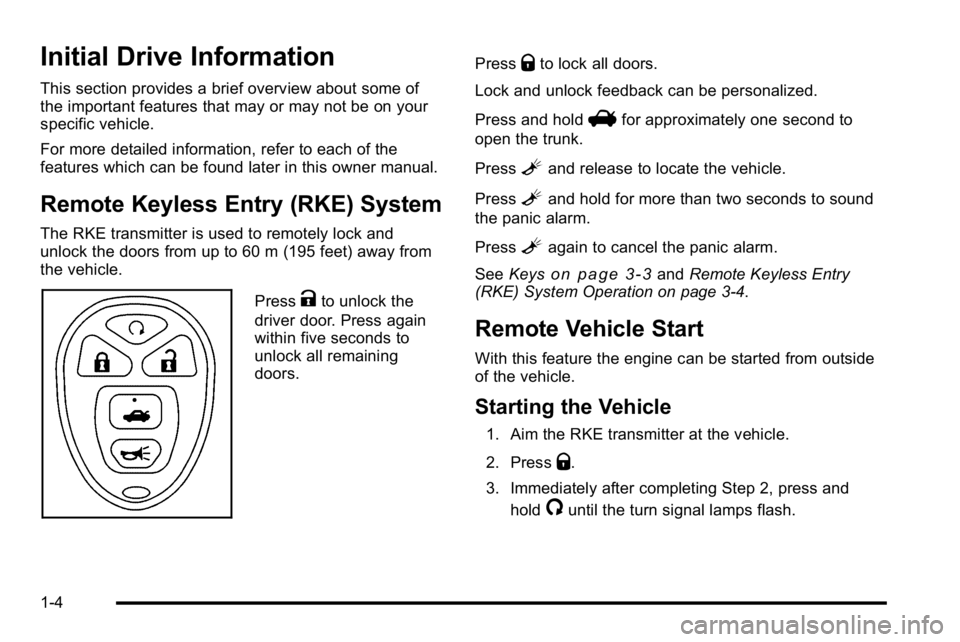
The RKE transmitter is used to remotely lock and
unlock the doors from up to 60 m (195 feet) away from
the vehicle.
PressKto unlock the
driver door. Press again
within five seconds to
unlock all remaining
doors. Press
Qto lock all doors.
Lock and unlock feedback can be personalized.
Press and hold
Vfor approximately one second to
open the trunk.
Press
Land release to locate the vehicle.
Press
Land hold for more than two seconds to sound
the panic alarm.
Press
Lagain to cancel the panic alarm.
See Keys
on page 3‑3andRemote Keyless Entry
(RKE) System Operation on page 3‑4.
Remote Vehicle Start
With this feature the engine can be started from outside
of the vehicle.
Starting the Vehicle
1. Aim the RKE transmitter at the vehicle.
2. Press
Q.
3. Immediately after completing Step 2, press and hold
/until the turn signal lamps flash.
1-4
Page 11 of 474
When the vehicle starts, the parking lamps will turn on
and remain on as long as the engine is running. The
doors will be locked and the climate control system may
come on.
The engine will continue to run for 10 minutes. Repeat
the steps for a 10-minute time extension. Remote start
can be extended only once.
Canceling a Remote Start
To cancel a remote start:
.Aim the RKE transmitter at the vehicle and press
and hold
/until the parking lamps turn off.
.Turn on the hazard warning flashers.
.Turn the ignition on and then back off.
See Remote Vehicle Start on page 3‑7.
Door Locks
From the outside, unlock the door using either the key
or the RKE transmitter.
From the inside, use the power door lock switches or
manual lock knobs located at the top of the door panel
near the window.
Power Door Locks
On vehicles with power door locks, the switches are
located on the front doors.
"(Unlock): Press to unlock the doors.
Q(Lock):Remove the key from the ignition and press
to lock the doors.
For more information, see:
.Door Locks on page 3‑9.
.Power Door Locks on page 3‑10.
.Remote Keyless Entry (RKE) System Operationon page 3‑4.
Trunk Release
In addition to the trunk release button on the RKE
transmitter, there is a remote release
Vbutton
located to the left of the steering wheel, next to the
instrument panel brightness control. Press to open the
trunk.
See Trunk on page 3‑12.
1-5
Page 21 of 474
4(XM™Satellite Radio Service, MP3, and RDS
Features): Press this button to display additional text
information related to the current FM-RDS or XM
station, or MP3 song. When information is not available,
No Info displays.
For more information about these and other radio
features, see Audio System(s) on page 4‑74.
Storing a Favorite Station
For vehicles with an XM radio, a maximum of
36 stations can be stored as favorites using the six
softkeys located below the radio station frequency tabs
and by using the radio FAV button. Press FAV to go
through up to six pages of favorites, each having six
favorite stations available per page. Each page of
favorites can contain any combination of AM, FM, or
XM stations.
SeeRadio(s) on page 4‑77.
Setting the Clock
To set the time and date for the radio with CD (MP3):
1. Turn the ignition key to ACC/ACCESSORY or ON/RUN.
2. Press
Oto turn the radio on.
3. Press
Hand the HR, MIN, MM, DD, YYYY
(hour, minute, month, day, and year) displays.
4. Press the softkey located below any one of the tabs that you want to change.
5. Increase or decrease the time or date by turning
f
clockwise or counterclockwise.
For detailed instructions on setting the clock for your
specific audio system, see Setting the Clock
on
page 4‑75.
1-15
Page 39 of 474
Memory Seat and Mirrors
On vehicles with the memory feature the buttons are
located on the driver's door.
1:Saves the seating position for driver 1.
2: Saves the seating position for driver 2.
B:Recalls the easy exit position.
For more programming information, see DIC Vehicle
Customization on page 4‑65.
To save your positions in memory:
1. Adjust the driver's seat, including the seatback recliner and lumbar, and both outside mirrors to
your preferred position.
2. Press and hold button 1 until two beeps sound to let you know that the position has been stored.
3. Repeat the procedure for a second driver using button 2.
The vehicle must be in P (Park) to recall your memory
positions.
Press and release either button to recall the stored
setting. Each time a memory button is pressed, a single
beep sounds. If you use the remote keyless entry transmitter to enter
your vehicle and the remote recall memory feature is
on, automatic seat and mirror movement occurs.
To stop recall movement of the memory feature, press
one of the power seat controls, memory buttons,
or power mirror buttons.
If something has blocked the driver's seat while
recalling a memory position, the driver's seat recall may
stop working. If this happens, press the control for the
area that is not recalling for two seconds, after the
obstruction is removed. Try recalling the memory
position again by pressing the appropriate memory
button. If the memory position is still not recalling, see
your dealer for service.
Easy Exit Seat
B
:
With the vehicle in P (Park), press to recall the exit
position.
You will hear a single beep and the driver's seat
moves back.
2-7
Page 109 of 474
Section 3 Features and Controls
Keys. . . . . . . . . . . . . . . . . . . . . . . . . . . . . . . . . . . . . . . . . . . . . . . . 3-3
Remote Keyless Entry (RKE) System . . . . . . . . . . . 3-4
Remote Keyless Entry (RKE) System Operation . . . . . . . . . . . . . . . . . . . . . . . . . . . . . . . . . . . . . 3-4
Remote Vehicle Start . . . . . . . . . . . . . . . . . . . . . . . . . . . 3-7
Doors and Locks . . . . . . . . . . . . . . . . . . . . . . . . . . . . . . . . . . 3-9
Door Locks . . . . . . . . . . . . . . . . . . . . . . . . . . . . . . . . . . . . . 3-9
Power Door Locks . . . . . . . . . . . . . . . . . . . . . . . . . . . . . 3-10
Delayed Locking . . . . . . . . . . . . . . . . . . . . . . . . . . . . . . . 3-10
Programmable Automatic Door Locks . . . . . . . . . . 3-10
Rear Door Security Locks . . . . . . . . . . . . . . . . . . . . . . 3-11
Lockout Protection . . . . . . . . . . . . . . . . . . . . . . . . . . . . . 3-12
Trunk . . . . . . . . . . . . . . . . . . . . . . . . . . . . . . . . . . . . . . . . . . 3-12
Windows . . . . . . . . . . . . . . . . . . . . . . . . . . . . . . . . . . . . . . . . . . 3-14
Power Windows . . . . . . . . . . . . . . . . . . . . . . . . . . . . . . . 3-15
Sun Visors . . . . . . . . . . . . . . . . . . . . . . . . . . . . . . . . . . . . . 3-16
Theft-Deterrent Systems . . . . . . . . . . . . . . . . . . . . . . . . .3-16
Content Theft-Deterrent . . . . . . . . . . . . . . . . . . . . . . . . 3-16
PASS-Key
®III+ Electronic Immobilizer . . . . . . . . . 3-17
PASS-Key®III+ Electronic Immobilizer
Operation . . . . . . . . . . . . . . . . . . . . . . . . . . . . . . . . . . . . 3-17 Starting and Operating Your Vehicle
. . . . . . . . . . . .3-19
New Vehicle Break-In . . . . . . . . . . . . . . . . . . . . . . . . . . 3-19
Ignition Positions . . . . . . . . . . . . . . . . . . . . . . . . . . . . . . 3-20
Retained Accessory Power (RAP) . . . . . . . . . . . . . 3-21
Starting the Engine . . . . . . . . . . . . . . . . . . . . . . . . . . . . 3-21
Engine Coolant Heater . . . . . . . . . . . . . . . . . . . . . . . . . 3-23
Automatic Transmission Operation . . . . . . . . . . . . . 3-24
Parking Brake . . . . . . . . . . . . . . . . . . . . . . . . . . . . . . . . . 3-26
Shifting Into Park . . . . . . . . . . . . . . . . . . . . . . . . . . . . . . 3-27
Shifting Out of Park . . . . . . . . . . . . . . . . . . . . . . . . . . . . 3-30
Parking Over Things That Burn . . . . . . . . . . . . . . . . 3-30
Engine Exhaust . . . . . . . . . . . . . . . . . . . . . . . . . . . . . . . . 3-31
Running the Vehicle While Parked . . . . . . . . . . . . . 3-32
Mirrors . . . . . . . . . . . . . . . . . . . . . . . . . . . . . . . . . . . . . . . . . . . . 3-33
Automatic Dimming Rearview Mirror . . . . . . . . . . . 3-33
Compass . . . . . . . . . . . . . . . . . . . . . . . . . . . . . . . . . . . . . . 3-33
Outside Power Mirrors . . . . . . . . . . . . . . . . . . . . . . . . . 3-35
Outside Automatic Dimming Mirror . . . . . . . . . . . . . 3-35
Park Tilt Mirrors . . . . . . . . . . . . . . . . . . . . . . . . . . . . . . . . 3-36
Outside Convex Mirror . . . . . . . . . . . . . . . . . . . . . . . . . 3-36
Outside Heated Mirrors . . . . . . . . . . . . . . . . . . . . . . . . 3-36
3-1
Page 111 of 474
Keys
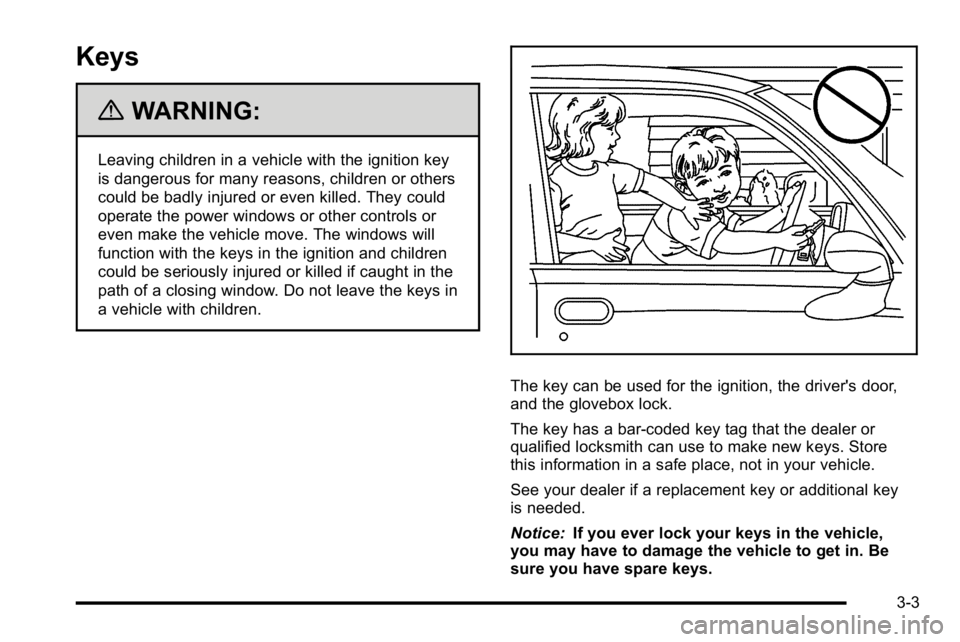
{WARNING:
Leaving children in a vehicle with the ignition key
is dangerous for many reasons, children or others
could be badly injured or even killed. They could
operate the power windows or other controls or
even make the vehicle move. The windows will
function with the keys in the ignition and children
could be seriously injured or killed if caught in the
path of a closing window. Do not leave the keys in
a vehicle with children.
The key can be used for the ignition, the driver's door,
and the glovebox lock.
The key has a bar-coded key tag that the dealer or
qualified locksmith can use to make new keys. Store
this information in a safe place, not in your vehicle.
See your dealer if a replacement key or additional key
is needed.
Notice:If you ever lock your keys in the vehicle,
you may have to damage the vehicle to get in. Be
sure you have spare keys.
3-3
Page 112 of 474
If you are locked out of your vehicle, contact Roadside
Assistance. SeeRoadside Assistance Programon
page 8‑8for more information.
Remote Keyless Entry (RKE) System
See Radio Frequency Statementon page 8‑20for
information regarding Part 15 of the Federal
Communications Commission (FCC) Rules and
RSS-210/211 of Industry Canada.
Changes or modifications to this system by other than
an authorized service facility could void authorization to
use this equipment.
If there is a decrease in the RKE operating range,
try this:
.Check the distance. The transmitter may be too far
from the vehicle. Stand closer during rainy or
snowy weather.
.Check the location. Other vehicles or objects may
be blocking the signal. Take a few steps to the left
or right, hold the transmitter higher, and try again.
.Check the transmitter's battery. See “Battery
Replacement” later in this section.
.If the transmitter is still not working correctly, see
your dealer or a qualified technician for service.
Remote Keyless Entry (RKE) System
Operation
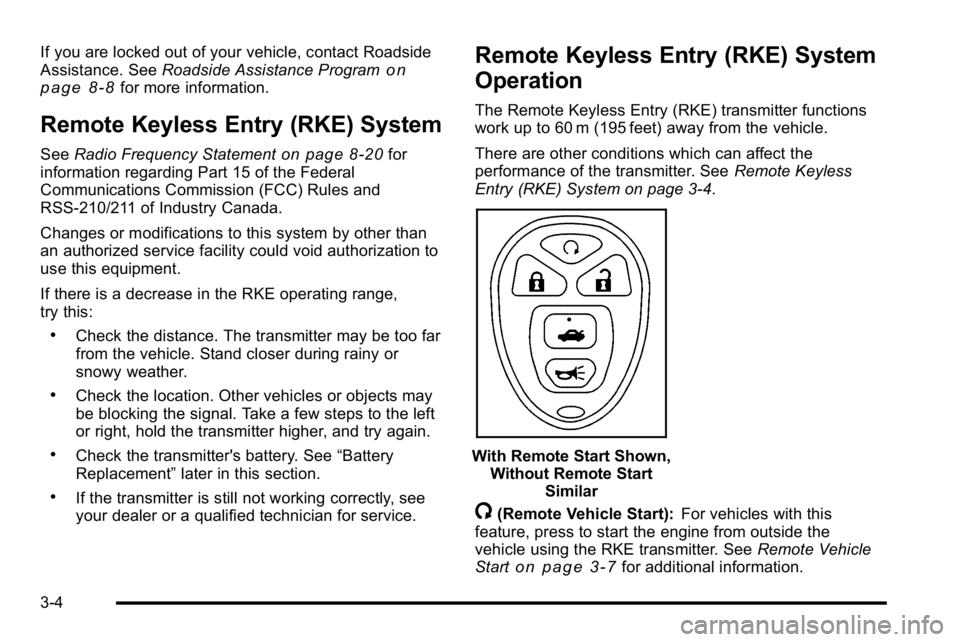
The Remote Keyless Entry (RKE) transmitter functions
work up to 60 m (195 feet) away from the vehicle.
There are other conditions which can affect the
performance of the transmitter. See Remote Keyless
Entry (RKE) System on page 3‑4.
With Remote Start Shown, Without Remote Start Similar
/(Remote Vehicle Start): For vehicles with this
feature, press to start the engine from outside the
vehicle using the RKE transmitter. See Remote Vehicle
Start
on page 3‑7for additional information.
3-4
Page 115 of 474
Remote Vehicle Start
Your vehicle may have a remote starting feature. This
feature allows you to start the engine from outside the
vehicle. It may also start the vehicle's heating or air
conditioning systems, rear window defogger, and
heated seats. SeeHeated Seats
on page 2‑4and
Heated and Ventilated Seatson page 2‑6for
additional information. When the remote start system is
active, the climate control system will heat or cool the
inside of the vehicle at the setting the vehicle was set to
when the vehicle was last turned off. The rear window
defogger will be turned on by the climate control system
when it is cold outside. If the vehicle has heated seats,
they may also turn on when it is cold outside. Cooled
seats are not activated during a remote start. Normal
operation of the system will return after the key is
turned to the ON/RUN position.
Laws in some communities may restrict the use of
remote starters. For example, some laws may require a
person using the remote start to have the vehicle in
view when doing so. Check local regulations for any
requirements on remote starting of vehicles.
Do not use the remote start feature if your vehicle is low
on fuel. Your vehicle may run out of fuel.
If your vehicle has the remote start feature, the RKE
transmitter functions will have an increased range of
operation. However, the range may be less while the
vehicle is running. There are other conditions which can affect the
performance of the transmitter, see
Remote Keyless
Entry (RKE) System
on page 3‑4for additional
information.
/ (Remote Start): This button will be on the RKE
transmitter if you have remote start.
To start the vehicle using the remote start feature:
1. Aim the transmitter at the vehicle.
2. Press and release the transmitter's lock button, then immediately press and hold the transmitter's
remote start button until the turn signal lights
flash or if the vehicle's lights are not visible, press
and hold the remote start button for at least
four seconds.
When the vehicle starts, the parking lamps will turn
on and remain on while the vehicle is running. The
vehicle's doors will be locked.
3. If it is the first remote start since the vehicle has been driven, repeat these steps, while the engine
is still running, to extend the engine running time
by 10 minutes. Remote start can be extended
one time.
After entering the vehicle during a remote start, insert
and turn the key to ON/RUN to drive the vehicle.
If the vehicle is left running it will automatically shut
off after 10 minutes unless a time extension has
been done.
3-7