ECU BUICK PARK AVENUE 2003 Service Manual
[x] Cancel search | Manufacturer: BUICK, Model Year: 2003, Model line: PARK AVENUE, Model: BUICK PARK AVENUE 2003Pages: 372, PDF Size: 2.8 MB
Page 214 of 372
If you put things inside your vehicle ± like suitcases,
tools, packages, or anything else ± they will go as fast
as the vehicle goes. If you have to stop or turn
quickly, or if there is a crash, they'll keep going.
{CAUTION:
Things you put inside your vehicle can strike
and injure people in a sudden stop or turn, or
in a crash.
·Put things in the trunk of your vehicle. In a
trunk, put them as far forward as you can.
Try to spread the weight evenly.
·Never stack heavier things, like suitcases,
inside the vehicle so that some of them
are above the tops of the seats.
·Don't leave an unsecured child restraint in
your vehicle.
·When you carry something inside the
vehicle, secure it whenever you can.
Automatic Level Control
This feature keeps the rear of your vehicle level as the
load changes. It's automatic ± you don't need to
adjust anything.
Towing a Trailer
{CAUTION:
If you do not use the correct equipment and
drive properly, you can lose control when you
pull a trailer. For example, if the trailer is too
heavy, the brakes may not work well Ð or even
at all. You and your passengers could be
seriously injured. You may also damage your
vehicle; the resulting repairs would not be
covered by your warranty. Pull a trailer only if
you have followed all the steps in this section.
Ask your dealer for advice and information
about towing a trailer with your vehicle.
Your vehicle can tow a trailer if it is equipped with the
proper trailer towing equipment. To identify what
the vehicle trailering capacity is for your vehicle, you
should read the information in ªWeight of the Trailerº that
appears later in this section. But trailering is different
than just driving your vehicle by itself. Trailering means
changes in handling, durability and fuel economy.
Successful, safe trailering takes correct equipment, and
it has to be used properly.
4-32
Page 218 of 372
Before you start, check the trailer hitch and platform
(and attachments), safety chains, electrical connector,
lamps, tires and mirror adjustment. If the trailer has
electric brakes, start your vehicle and trailer moving and
then apply the trailer brake controller by hand to be
sure the brakes are working. This lets you check your
electrical connection at the same time.
During your trip, check occasionally to be sure that the
load is secure, and that the lamps and any trailer
brakes are still working.
Following Distance
Stay at least twice as far behind the vehicle ahead as
you would when driving your vehicle without a trailer.
This can help you avoid situations that require
heavy braking and sudden turns.
Passing
You'll need more passing distance up ahead when
you're towing a trailer. And, because you're a good deal
longer, you'll need to go much farther beyond the
passed vehicle before you can return to your lane.
Backing Up
Hold the bottom of the steering wheel with one hand.
Then, to move the trailer to the left, just move that hand
to the left. To move the trailer to the right, move your
hand to the right. Always back up slowly and, if possible,
have someone guide you.
Making Turns
Notice:Making very sharp turns while trailering
could cause the trailer to come in contact with the
vehicle. Your vehicle could be damaged. Avoid
making very sharp turns while trailering.
When you're turning with a trailer, make wider turns
than normal. Do this so your trailer won't strike
soft shoulders, curbs, road signs, trees or other objects.
Avoid jerky or sudden maneuvers. Signal well in
advance.
Turn Signals When Towing a Trailer
When you tow a trailer, your vehicle may need a
different turn signal ¯asher and/or extra wiring. Check
with your dealer. The arrows on your instrument
panel will ¯ash whenever you signal a turn or lane
change. Properly hooked up, the trailer lamps will also
¯ash, telling other drivers you're about to turn,
change lanes or stop.
When towing a trailer, the arrows on your instrument
panel will ¯ash for turns even if the bulbs on the trailer
are burned out. Thus, you may think drivers behind
you are seeing your signal when they are not. It's
important to check occasionally to be sure the trailer
bulbs are still working.
4-36
Page 276 of 372
9. Replace it with a new bulb.
10. Reverse Steps 1 through 8 to reinstall the taillamp
assembly.
Rear Quarter Panel Turn Signal and
Stoplamps
1. Open the trunk.
2. On either side of the rear of the trunk is a plastic
retainer that holds the cargo net and taillamp
assembly in place. Unhook the cargo net from the
cargo net retainer and remove the retainer by
turning it counterclockwise.
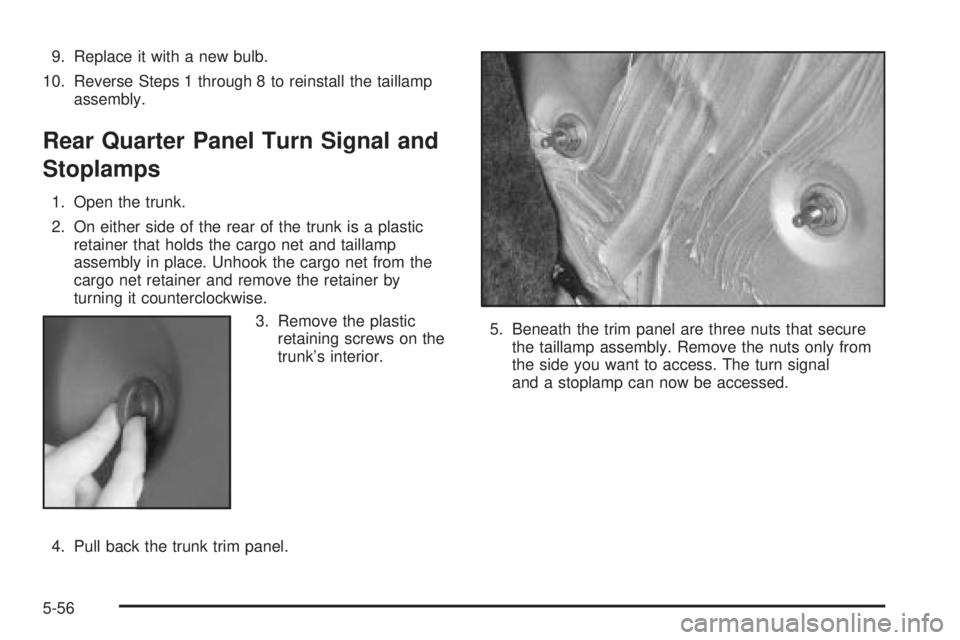
3. Remove the plastic
retaining screws on the
trunk's interior.
4. Pull back the trunk trim panel.5. Beneath the trim panel are three nuts that secure
the taillamp assembly. Remove the nuts only from
the side you want to access. The turn signal
and a stoplamp can now be accessed.
5-56
Page 288 of 372
Tire Chains
{CAUTION:
If your vehicle has P235/55R17 size tires, don't
use tire chains, there's not enough clearance.
Tire chains used on a vehicle without the
proper amount of clearance can cause damage
to the brakes, suspension or other vehicle
parts. The area damaged by the tire chains
could cause you to lose control of your vehicle
and you or others may be injured in a crash.
Use another type of traction device only if its
manufacturer recommends it for use on your
vehicle and tire size combination and road
conditions. Follow that manufacturer's
instructions. To help avoid damage to your
vehicle, drive slowly, readjust or remove the
device if it's contacting your vehicle, and don't
spin your wheels.
If you do ®nd traction devices that will ®t,
install them on the front tires.
Notice:If your vehicle has a tire size other than
P235/55R17 size tires, use tire chains only where
legal and only when you must. Use only SAE Class
ªSº type chains that are the proper size for your
tires. Install them on the front tires and tighten them
as tightly as possible with the ends securely
fastened. Drive slowly and follow the chain
manufacturer's instructions. If you can hear the
chains contacting your vehicle, stop and retighten
them. If the contact continues, slow down until
it stops. Driving too fast or spinning the wheels with
chains on will damage your vehicle.
If a Tire Goes Flat
It's unusual for a tire to ªblowoutº while you're driving,
especially if you maintain your tires properly. If air goes
out of a tire, it's much more likely to leak out slowly.
But if you should ever have a ªblowout,º here are a few
tips about what to expect and what to do:
If a front tire fails, the ¯at tire will create a drag that
pulls the vehicle toward that side. Take your foot off the
accelerator pedal and grip the steering wheel ®rmly.
Steer to maintain lane position, and then gently brake to
a stop well out of the traffic lane.
5-68
Page 296 of 372
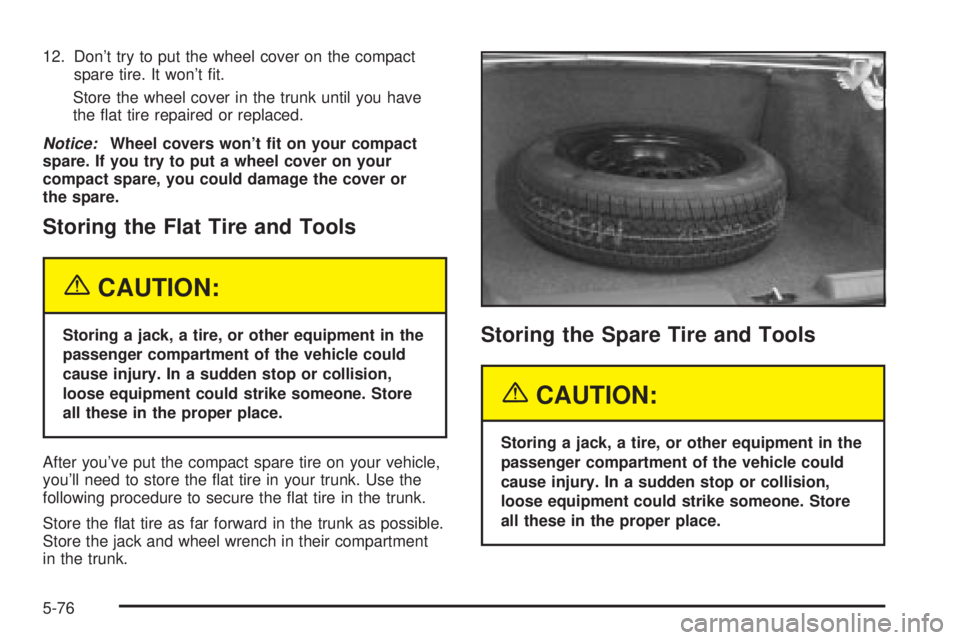
12. Don't try to put the wheel cover on the compact
spare tire. It won't ®t.
Store the wheel cover in the trunk until you have
the ¯at tire repaired or replaced.
Notice:Wheel covers won't ®t on your compact
spare. If you try to put a wheel cover on your
compact spare, you could damage the cover or
the spare.
Storing the Flat Tire and Tools
{CAUTION:
Storing a jack, a tire, or other equipment in the
passenger compartment of the vehicle could
cause injury. In a sudden stop or collision,
loose equipment could strike someone. Store
all these in the proper place.
After you've put the compact spare tire on your vehicle,
you'll need to store the ¯at tire in your trunk. Use the
following procedure to secure the ¯at tire in the trunk.
Store the ¯at tire as far forward in the trunk as possible.
Store the jack and wheel wrench in their compartment
in the trunk.Storing the Spare Tire and Tools
{CAUTION:
Storing a jack, a tire, or other equipment in the
passenger compartment of the vehicle could
cause injury. In a sudden stop or collision,
loose equipment could strike someone. Store
all these in the proper place.
5-76
Page 313 of 372
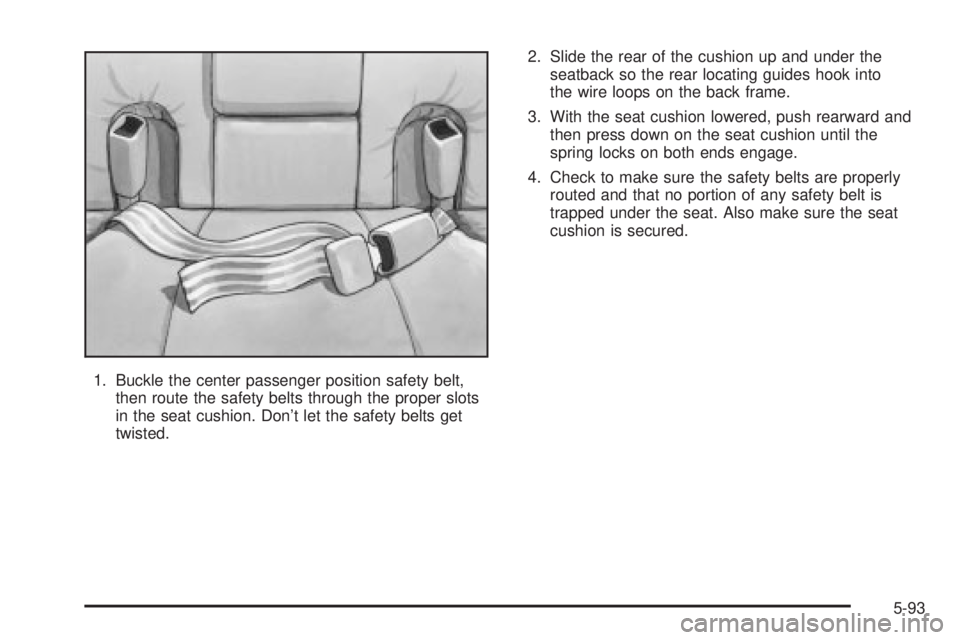
1. Buckle the center passenger position safety belt,
then route the safety belts through the proper slots
in the seat cushion. Don't let the safety belts get
twisted.2. Slide the rear of the cushion up and under the
seatback so the rear locating guides hook into
the wire loops on the back frame.
3. With the seat cushion lowered, push rearward and
then press down on the seat cushion until the
spring locks on both ends engage.
4. Check to make sure the safety belts are properly
routed and that no portion of any safety belt is
trapped under the seat. Also make sure the seat
cushion is secured.
5-93
Page 351 of 372
Mexico, Central America and Caribbean
Islands/Countries (Except Puerto
Rico and U.S. Virgin Islands) ±
Customer Assistance
General Motors de Mexico, S. de R.L. de C.V.
Customer Assistance Center
Paseo de la Reforma # 2740
Col. Lomas de Bezares
C.P. 11910, Mexico, D.F.
01-800-508-0000
Long Distance: 011-52-53 29 0 800
GM Mobility Program for Persons
with Disabilities
This program, available to
quali®ed applicants, can
reimburse you up to
$1,000 toward aftermarket
driver or passenger
adaptive equipment you
may require for your
vehicle (hand controls,
wheelchair/scooter
lifts, etc.).This program can also provide you with free resource
information, such as area driver assessment centers and
mobility equipment installers. The program is available
for a limited period of time from the date of vehicle
purchase/lease. See your dealer for more details or call
the GM Mobility Assistance Center at 1-800-323-9935.
Text telephone (TTY) users, call 1-800-833-9935.
GM of Canada also has a Mobility Program. Call
1-800-GM-DRIVE (463-7483) for details. All TTY users
call 1-800-263-3830.
Roadside Assistance Program
Buick Motor Division is proud to offer Buick Premium
Roadside Assistance to customers for vehicles covered
under the 3 year/36,000 mile (60 000 km) new car
warranty (whichever occurs ®rst).
Our commitment to Buick owners has always included
superior service through our network of Buick dealers.
Buick Premium Roadside Assistance provides an
extra measure of convenience and security.
Buick's Roadside Assistance toll-free number is staffed
by a team of technically trained advisors, who are
available 24 hours a day, 365 days a year.
We take anxiety out of uncertain situations by providing
minor repair information over the phone or making
arrangements to tow your vehicle to the nearest Buick
dealer.
7-5
Page 352 of 372
We will provide the following services for
3 years/36,000 miles (60 000 km), at no expense to you:
·Fuel delivery
·Lock-out service (identi®cation required)
·Tow to nearest dealership for warranty service
·Change a ¯at tire
·Jump starts
We have quick, easy access to telephone numbers of
the following additional services depending on your
needs:
·Hotels
·Glass replacement
·Tire repair facilities
·Rental vehicle or taxis
·Airports or train stations
·Police, ®re department or hospitals
In many instances, mechanical failures are covered
under Buick's comprehensive warranty. However, when
other services are utilized, our advisors will explain
any payment obligations you might incur.For prompt and efficient assistance when calling, please
provide the following information to give the advisor:
·Location of vehicle
·Telephone number of your location
·Vehicle model, year and color
·Mileage of vehicle
·Vehicle Identi®cation Number (VIN)
·Vehicle license plate number
Buick reserves the right to limit services or
reimbursement to an owner or driver when, in Buick's
judgement, the claims become excessive in frequency or
type of occurrence.
While we hope you never have the occasion to use our
service, it is added security while traveling for you
and your family. Remember, we're only a phone call
away. Buick Roadside Assistance: 1-800-252-1112, text
telephone (TTY) users, call 1-888-889-2438.
Canadian Roadside Assistance
Vehicles purchased in Canada have an extensive
Roadside Assistance program accessible from anywhere
in Canada or the United States. Please refer to the
Warranty and Owner Assistance Information book.
7-6
Page 359 of 372
Chains, Tires..................................................5-68
Checking Coolant............................................5-26
Checking Engine Oil........................................5-14
Checking Things Under the Hood......................5-10
Checking Your Restraint Systems......................1-56
Check...........................................................3-37
Engine Light...............................................3-37
Tire Pressure System...................................5-60
Chemical Paint Spotting...................................5-84
Child Restraints..............................................1-33
Child Restraint Systems...............................1-33
Infants and Young Children...........................1-29
Lower Anchorages and Top Tethers for
Children (LATCH System)..........................1-39
Older Children.............................................1-27
Securing a Child Restraint Designed for
the LATCH System...................................1-41
Securing a Child Restraint in a Center
Rear Seat Position...................................1-44
Securing a Child Restraint in a Rear
Outside Seat Position...............................1-42
Securing a Child Restraint in the Right
Front Seat Position...................................1-46
Top Strap Anchor Location............................1-39
Top Strap...................................................1-37
Where to Put the Restraint...........................1-36Cigarette Lighter.............................................3-22
Cleaning Aluminum or Chrome-Plated Wheels.....5-83
Cleaning Exterior Lamps/Lenses.......................5-82
Cleaning Fabric/Carpet....................................5-79
Cleaning Glass Surfaces..................................5-81
Cleaning Interior Plastic Components.................5-80
Cleaning Leather............................................5-80
Cleaning the Speaker Covers...........................5-81
Cleaning the Top of the
Instrument Panel.........................................5-80
Cleaning Tires................................................5-83
Cleaning Vinyl................................................5-80
Cleaning Windshield and Wiper Blades..............5-83
Cleaning........................................................5-79
Inside of Your Vehicle..................................5-79
Outside of Your Vehicle................................5-82
Underbody Maintenance...............................5-84
Weatherstrips..............................................5-81
Climate Control System...................................3-27
Air Filter, Passenger Compartment.................3-27
Climate Controls Personalization....................3-28
Dual Automatic............................................3-22
Outlet Adjustment........................................3-26
Steering Wheel Controls...............................3-28
Compact Disc Changer Errors..........................3-65
Compact Disc Messages..................................3-62
3
Page 360 of 372
Compact Spare Tire........................................5-77
Compass Calibration.......................................2-34
Compass Operation.........................................2-34
Compass Variance..........................................2-35
Content Theft-Deferrent....................................2-17
Control of a Vehicle.......................................... 4-5
Convenience Net............................................2-45
Coolant.........................................................3-37
Engine Temperature Gage............................3-37
Heater, Engine............................................2-23
Cooling System..............................................5-30
Cornering Lamps............................................3-13
Courtesy Lamps.............................................3-14
Cruise Control Light........................................3-41
Cruise Control.................................................. 3-9
Current and Past Model Order Forms................7-10
Customer Assistance Information........................ 7-7
Courtesy Transportation.................................. 7-7
Customer Assistance for Text Telephone
(TTY) Users.............................................. 7-4
Customer Assistance Offices........................... 7-4
Customer Satisfaction Procedure..................... 7-2
GM Mobility Program for Persons with
Disabilities................................................ 7-5
Reporting Safety Defects to General Motors...... 7-9
Reporting Safety Defects to the Canadian
Government.............................................. 7-9Customer Assistance Information (cont.)
Reporting Safety Defects to the United
States Government.................................... 7-8
Roadside Assistance Program......................... 7-5
Service Publications Ordering Information......... 7-9
Customizing Your Automatic Door
Locks Feature.............................................2-11
D
Daytime Running Lamps..................................3-13
Defensive Driving............................................. 4-2
Defogging and Defrosting.................................3-25
Delayed Entry Lighting.....................................3-15
Delayed Exit Lighting.......................................3-15
Delayed Locking.....................................2-10, 3-49
Dinghy Towing................................................4-29
Disabling the Theft-Deterrent Feature.................3-67
Doing Your Own Service Work........................... 5-3
Dolly Towing..................................................4-30
Door............................................................... 2-9
Central Door Unlocking System....................... 2-9
Delayed Locking..........................................2-10
Door Ajar Reminder.....................................2-10
Locks.......................................................... 2-9
Power Door Locks.......................................2-10
Programmable Automatic Door Locks.............2-11
Rear Door Security Locks.............................2-12
4