service BUICK TERRAZA 2005 Owner's Guide
[x] Cancel search | Manufacturer: BUICK, Model Year: 2005, Model line: TERRAZA, Model: BUICK TERRAZA 2005Pages: 428, PDF Size: 2.6 MB
Page 196 of 428
SERVICE VEHICLE SOON
This message will display when a non-emissions related
malfunction occurs. Have the vehicle serviced by your
GM dealer as soon as possible.
This message will display only while the ignition is in
RUN. Press any of the DIC buttons to acknowledge this
message and to clear it from the screen.
This message will continue to display for two seconds
if it has not been acknowledged when the engine is
turned off. It will also re-display for two seconds if the
message has been acknowledged, but the condition still
exists when the engine is turned off.
If the condition still exists, the message will re-appear
when the engine is turned on.
STABILITY CONTROL ACTIVE
If your vehicle has StabiliTrak®, this message will
display when StabiliTrak®is actively assisting you with
directional control of the vehicle. Slippery road
conditions may exist when this message is displayed,
so adjust your driving accordingly. SeeStabiliTrak
®
System on page 4-10.This message will display only while the ignition is in
RUN. This message stays on until road conditions
change and StabiliTrak
®is not active.
This message cannot be acknowledged and cleared
from the screen.
STABILITY CONTROL OFF
If your vehicle has StabiliTrak®, this message will
display any time the system turns off. When this
message has been displayed, StabiliTrak
®is no longer
available to assist you with directional control of the
vehicle. Adjust your driving accordingly. SeeStabiliTrak
®
System on page 4-10.
This message will display only while the ignition is
in RUN.
Any of the following conditions may cause the
StabiliTrak
®system to turn off:
The battery is low.
There is a StabiliTrak®system failure. See your
GM dealer for service.
3-66
Page 197 of 428
STARTING DISABLED
This message will display if the starting of the engine is
disabled due to the electronic throttle control system
or vehicle theft-deterrent system. Have your vehicle
serviced by your GM dealer immediately.
This message will only appear while the ignition is in
RUN, and will not disappear until the problem is
resolved.
This message cannot be acknowledged.
TRACTION CONTROL ACTIVE
If your vehicle has the traction control system, this
message will display when the system is on. Slippery
road conditions may exist if this message is displayed,
so adjust your driving accordingly. SeeTraction
Control System (TCS) on page 4-9for more information.
This message only displays while the ignition is in
RUN and will not disappear until driving conditions
change and the traction control is no longer active.
This message cannot be acknowledged or cleared from
the screen.
TRACTION CONTROL OFF
If your vehicle has the traction control system, this
message will display when the traction control system
turns off. SeeTraction Control System (TCS) on
page 4-9for more information.
This message will only display while the ignition is in
RUN and will disappear after two seconds.
Any of the following conditions may cause the traction
control system to turn off:
The traction control system is turned off by pressing
the traction control button located on the center of
the instrument panel. SeeTraction Control
System (TCS) on page 4-9.
The battery is low.
There is a traction control system failure. See your
GM dealer for service.
TRANSMISSION FLUID HOT
This message will display when the transaxle uid in
your vehicle is too hot. Stop the vehicle and allow
it to idle until it cools down. If the warning message
continues to display, have the vehicle serviced by your
GM dealer as soon as possible.
3-67
Page 208 of 428
With RDS, the radio can do the following:
Seek to stations broadcasting the selected type
of programming
Receive announcements concerning local and
national emergencies
Display messages from radio stations
Seek to stations with traffic announcements
This system relies upon receiving specic information
from these stations and will only work when the
information is available. In rare cases, a radio station
may broadcast incorrect information that will cause
the radio features to work improperly. If this happens,
contact the radio station.
While the radio is tuned to an RDS station, the station
name or call letters will appear on the display. RDS
stations may also provide the time of day, a program
type (PTY) for current programming, and the name
of the program being broadcast.
XM™ Satellite Radio Service
If your vehicle has XM™, XM™ is a satellite radio
service that is based in the 48 contiguous United States.
XM™ offers 100 coast-to-coast channels including
music, news, sports, talk, and children’s programming.XM™ provides digital quality audio and text information
that includes song title and artist name. A service
fee is required in order to receive the XM™ service. For
more information, contact XM™ at www.xmradio.com
or call 1-800-852-XMXM (9696).
Playing the Radio
Top Knob (Power/Volume):Press this knob to turn
the system on and off. Turn this knob to increase or to
decrease the volume.
4(Information):For RDS, press this button to change
what appears on the display while using RDS. The
display options are station name, RDS station frequency,
PTY, and the name of the program (if available).
For XM™ (if equipped), press the information button
while in XM™ mode to retrieve four different categories
of information related to the current song or channel:
Artist, Song Title, Category or PTY, Channel
Number/Channel Name.
To change the default on the display, press the
information button until you see the display you want,
then hold the button for two seconds. The radio will
produce one beep and the selected display will now be
the default.
3-78
Page 212 of 428
SCAN:Scan the stations within a category by
performing the following:
1. Press the CAT button. The last selected category
will appear on the display.
2. Turn the tune knob to select the category.
3. Once the desired category is displayed, press and
hold either SCAN arrow until you hear a beep and
SCAN CATEGORY appears on the display.
The radio will begin scanning the stations in the
category.
4. Press either SCAN arrow to stop scanning.
If both category and TRAF are on, the radio will scan
for stations with the selected category and traffic
announcements.
BAND (Alternate Frequency):Alternate frequency
allows the radio to switch to a stronger station with the
same category. To turn alternate frequency on,
press and hold BAND for two seconds. AF ON will
appear on the display. The radio may switch to stations
with a stronger frequency.To turn alternate frequency off, press and hold BAND
again for two seconds. AF OFF will appear on the
display. The radio will not switch to other stations.
This function does not apply for XM™ Satellite Radio
Service.
RDS Messages
ALERT!:Alert warns of local or national emergencies.
When an alert announcement comes on the current
radio station, ALERT! will appear on the display. You will
hear the announcement, even if the volume is low or
a CD is playing. If a CD is playing, play will stop during
the announcement. Alert announcements cannot be
turned off.
ALERT! will not be affected by tests of the emergency
broadcast system. This feature is not supported by
all RDS stations.
3-82
Page 213 of 428
4(Information):If the current station has a message,
INFO will appear on the display. Press this button to
see the message. The message may display the artist,
song title, call in phone numbers, etc.
If the entire message is not displayed, parts of the
message will appear every three seconds. To scroll
through the message, press and release this button.
A new group of words will appear on the display
after every press of the button. Once the complete
message has been displayed, INFO will disappear
from the display until another new message is received.
The last message can be displayed by pressing this
button. You can view the last message until a new
message is received or a different station is tuned to.
When a message is not available from a station,
NO INFO will appear on the display.
TRAF (Traffic):If TA appears on the display, the tuned
station broadcasts traffic announcements and when a
traffic announcement comes on the tuned radio
station you will hear it.If the station does not broadcast traffic announcements,
press the TRAF button and the radio will seek to a
station that does. When a station that broadcasts traffic
announcements is found, the radio will stop seeking
and TA will appear on the display. If no station is found
that broadcasts traffic announcements, NO TRAFFIC
will appear on the display.
If TA is on the display, press the TRAF button to turn off
the traffic announcements.
The radio will play the traffic announcement even if the
volume is low. The radio will interrupt the play of a
CD if the last tuned station broadcasts traffic
announcements.
This function does not apply to XM™ Satellite Radio
Service.
3-83
Page 214 of 428
Radio Messages
CAL ERR (Calibration Error):The audio system has
been calibrated for your vehicle from the factory. If
CAL ERR appears on the display, it means that the radio
has not been congured properly for your vehicle and
must be returned to your GM dealer for service.LOCKED:This message is displayed when the
THEFTLOCK
®system has locked up. Take the vehicle
to your GM dealer for service.
If any error occurs repeatedly or if an error cannot be
corrected, contact your GM dealer. If the radio displays
an error message, write it down and provide it to
your GM dealer when reporting the problem.
XM™ Radio Messages
Radio Display
MessageCondition Action Required
XL (Explicit Language
Channels)XL on the radio display,
after the channel name,
indicates content with
explicit language.These channels, or any others, can be blocked at a
customer’s request, by calling 1-800-852-XMXM (9696).
Updating Updating
encryption codeThe encryption code in the receiver is being updated, and
no action is required. This process should take no longer
than 30 seconds.
No Signal Loss of signal The system is functioning correctly, but the vehicle is in a
location that is blocking the XM™ signal. When you move
into an open area, the signal should return.
Loading XM Acquiring channel audio
(after 4 second delay)The audio system is acquiring and processing audio and
text data. No action is needed. This message should
disappear shortly.
3-84
Page 215 of 428
XM™ Radio Messages (cont’d)
Radio Display
MessageCondition Action Required
CH Off Air Channel not in service This channel is not currently in service. Tune to another
channel.
CH Unavail Channel no longer
availableThis previously assigned channel is no longer assigned.
Tune to another station. If this station was one of the
presets, choose another station for that preset button.
No Info Artist Name/Feature
not availableNo artist information is available at this time on this channel.
The system is working properly.
No Info Song/Program Title
not availableNo song title information is available at this time on this
channel. The system is working properly.
No Info Category Name
not availableNo category information is available at this time on this
channel. The system is working properly.
No Info No Text/Informational
message availableNo text or informational messages are available at this time
on this channel. The system is working properly.
Not Found No channel available for
the chosen categoryThere are no channels available for the selected category.
The system is working properly.
XM Locked Theft lock active The XM™ receiver in the vehicle may have previously been
in another vehicle. For security purposes, XM™ receivers
cannot be swapped between vehicles. If this message is
received after having your vehicle serviced, check with your
GM dealer.
3-85
Page 216 of 428
XM™ Radio Messages (cont’d)
Radio Display
MessageCondition Action Required
Radio ID Radio ID label
(channel 0)If tuned to channel 0, this message will alternate with the
XM™ Radio eight digit radio ID label. This label is needed
to activate the service.
Unknown Radio ID not known
(should only be if
hardware failure)If this message is received when tuned to channel 0, there
may be a receiver fault. Consult with your GM dealer.
Chk XMRcvr Hardware failure If this message does not clear within a short period of
time, your receiver may have a fault. Consult with your
GM dealer.
Playing a CD (Single CD Player)
Insert a CD partway into the slot, label side up. The
player will pull it in and the CD should begin playing.
If the ignition or radio is turned off with a CD in the
player, it will stay in the player. When the ignition or
radio is turned on, the CD will start playing where
it stopped, if it was the last selected audio source.
When a CD is inserted, CD and the CD symbol
will appear on the display. As each new track starts to
play the track number will appear on the display.The CD player can play the smaller 3 inch (8 cm) single
CDs with an adapter ring. Full-size CDs and the
smaller CDs are loaded in the same manner.
If playing a CD-R the sound quality may be reduced
due to CD-R quality, the method of recording, the quality
of the music that has been recorded, and the way the
CD-R has been handled. There may be an increase
in skipping, difficulty in nding tracks, and/or difficulty in
loading and ejecting. If these problems occur try a
known good CD.
3-86
Page 226 of 428
If any error occurs repeatedly or if an error cannot be
corrected, contact your GM dealer. If the radio displays
an error message, write it down and provide it to
your GM dealer when reporting the problem.
Navigation/Radio System
Your vehicle may have a navigation radio system that
includes Radio Data System (RDS) with Program
Type (PTY) selections that will seek out the kind of
music you want to listen to and XM™ Satellite Radio
Service capabilities (if equipped). The radio can
also communicate with the navigation system to
broadcast announcements on traffic, weather, and
emergency alert communications. For information on
how to use this system, see the “Navigation System”
manual.
Rear Seat Entertainment System
Your vehicle may have a DVD Rear Seat Entertainment
(RSE) system. The RSE system includes a DVD
player, a video display screen, auxiliary inputs, two sets
of wireless headphones, and a remote control.
Parental Control
rj
(Parental Control):This button is located behind
the video screen, below the auxiliary jacks. Press this
button while using RSA, or when a DVD or CD is playing
to blank the video screen and to mute the audio. The
power indicator lights on the DVD player will ash.
Turning on the parental control will also disable all other
button operations from the remote control and the
DVD player, except for the eject button. Press this
button again to restore operation of the RSA, DVD
player, and remote control.
This button may also be used to turn the DVD player
power on and automatically resume play if the vehicle is
on and a disc is in the player. If no disc is in the
player, the system will power up in auxiliary mode.
Before You Drive
The RSE is designed for rear seat passengers only.
The driver cannot safely view the video screen
while driving and should not try to do so. The RSE
system will play DVD, CD, and MP3 discs. You can also
connect an auxiliary device to the RSE system to play
games, watch videos, look at pictures, etc.
Normal operation may be limited under extremely low
or high temperatures, in order to protect the system from
damage. Operate the RSE system under normal or
comfortable cabin temperature ranges.
3-96
Page 240 of 428
Rear Seat Audio (RSA)
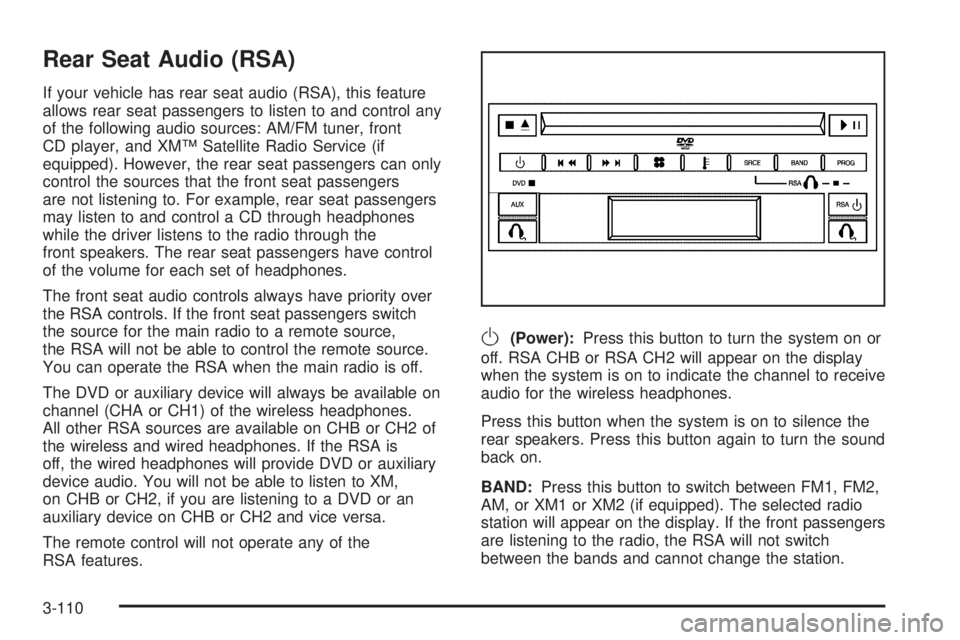
If your vehicle has rear seat audio (RSA), this feature
allows rear seat passengers to listen to and control any
of the following audio sources: AM/FM tuner, front
CD player, and XM™ Satellite Radio Service (if
equipped). However, the rear seat passengers can only
control the sources that the front seat passengers
are not listening to. For example, rear seat passengers
may listen to and control a CD through headphones
while the driver listens to the radio through the
front speakers. The rear seat passengers have control
of the volume for each set of headphones.
The front seat audio controls always have priority over
the RSA controls. If the front seat passengers switch
the source for the main radio to a remote source,
the RSA will not be able to control the remote source.
You can operate the RSA when the main radio is off.
The DVD or auxiliary device will always be available on
channel (CHA or CH1) of the wireless headphones.
All other RSA sources are available on CHB or CH2 of
the wireless and wired headphones. If the RSA is
off, the wired headphones will provide DVD or auxiliary
device audio. You will not be able to listen to XM,
on CHB or CH2, if you are listening to a DVD or an
auxiliary device on CHB or CH2 and vice versa.
The remote control will not operate any of the
RSA features.
O(Power):Press this button to turn the system on or
off. RSA CHB or RSA CH2 will appear on the display
when the system is on to indicate the channel to receive
audio for the wireless headphones.
Press this button when the system is on to silence the
rear speakers. Press this button again to turn the sound
back on.
BAND:Press this button to switch between FM1, FM2,
AM, or XM1 or XM2 (if equipped). The selected radio
station will appear on the display. If the front passengers
are listening to the radio, the RSA will not switch
between the bands and cannot change the station.
3-110