instrument panel CADILLAC ATS 2019 Owner's Guide
[x] Cancel search | Manufacturer: CADILLAC, Model Year: 2019, Model line: ATS, Model: CADILLAC ATS 2019Pages: 384, PDF Size: 6.11 MB
Page 145 of 384
Cadillac ATS/ATS-V Owner Manual (GMNA-Localizing-U.S./Canada/Mexico-
12460272) - 2019 - crc - 5/8/18
144 LIGHTING
Lighting
Exterior Lighting
Exterior Lamp Controls . . . . . . . . . . 144
Exterior Lamps Off Reminder . . . 146
Headlamp High/Low-BeamChanger . . . . . . . . . . . . . . . . . . . . . . . . . . 146
Flash-to-Pass . . . . . . . . . . . . . . . . . . . . . 146
Daytime Running Lamps (DRL) . . . . . . . . . . . . . . . . . . . . 146
Automatic Headlamp System . . . 147
Adaptive Forward Lighting (AFL) . . . . . . . . . . . . . . . . . . 148
Hazard Warning Flashers . . . . . . . . 148
Turn and Lane-Change Signals . . . . . . . . . . . . . . . . . . . . . . . . . . . 148
Interior Lighting
Instrument Panel IlluminationControl . . . . . . . . . . . . . . . . . . . . . . . . . . 149
Courtesy Lamps . . . . . . . . . . . . . . . . . . 149
Dome Lamps . . . . . . . . . . . . . . . . . . . . . 149
Reading Lamps . . . . . . . . . . . . . . . . . . . 150
Lighting Features
Entry Lighting . . . . . . . . . . . . . . . . . . . . 150
Exit Lighting . . . . . . . . . . . . . . . . . . . . . . 151
Battery Power Protection . . . . . . . . 151
Exterior Lighting Battery Saver . . . . . . . . . . . . . . . . . . . . . . . . . . . . . 151Exterior Lighting
Exterior Lamp Controls
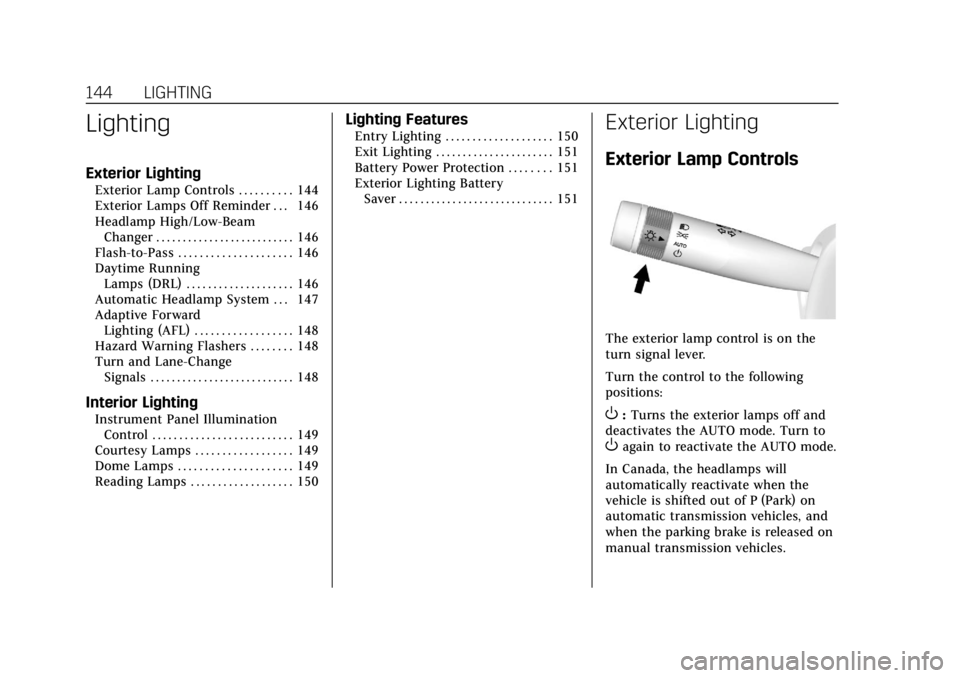
The exterior lamp control is on the
turn signal lever.
Turn the control to the following
positions:
O:Turns the exterior lamps off and
deactivates the AUTO mode. Turn to
Oagain to reactivate the AUTO mode.
In Canada, the headlamps will
automatically reactivate when the
vehicle is shifted out of P (Park) on
automatic transmission vehicles, and
when the parking brake is released on
manual transmission vehicles.
Page 146 of 384
Cadillac ATS/ATS-V Owner Manual (GMNA-Localizing-U.S./Canada/Mexico-
12460272) - 2019 - crc - 5/8/18
LIGHTING 145
AUTO :Automatically turns the
exterior lamps on and off, depending
on outside lighting.
;: Turns on the parking lamps
including all lamps, except the
headlamps.
2: Turns on the headlamps together
with the parking lamps and
instrument panel lights.
IntelliBeam System
If equipped, this system turns the
vehicle's high-beam headlamps on and
off according to surrounding traffic
conditions.
The system turns the high-beam
headlamps on when it is dark enough
and there is no other traffic present.
An indicator light
b(Cluster with
Auto Stop) or
2(V-Series Cluster)
comes on in the instrument cluster
when the IntelliBeam system is
enabled.
Turning On and Enabling IntelliBeam
To enable the automatic high-beam
system, with the turn signal lever in
the neutral position, turn the exterior lamp control to AUTO. The blue
high-beam on light appears on the
instrument cluster when the high
beams are on.
Driving with IntelliBeam
The system only activates the high
beams when driving over 40 km/h
(25 mph).
There is a sensor near the top center
of the windshield, which automatically
controls the system. Keep this area of
the windshield clear of debris to allow
for best system performance.
The high-beam headlamps remain on,
under the automatic control, until one
of the following situations occurs:
.
The system detects an
approaching vehicle's headlamps.
. The system detects a preceding
vehicle's taillamps.
. The outside light is bright enough
that high-beam headlamps are not
required.
. The vehicle's speed drops below
20 km/h (12 mph). .
The Intellibeam system is disabled
by the high/low-beam changer or
the flash-to-pass feature. If this
happens, the high/low-beam
changer must be activated two
times within two seconds to
reactivate the Intellibeam system.
The instrument cluster light will
come on to indicate the
Intellibeam system is reactivated.
See Headlamp High/Low-Beam
Changer 0146 and Flash-to-Pass
0 146.
The high beams may not turn off
automatically if the system cannot
detect other vehicle's lamps because
of any of the following:
. The other vehicle's lamp(s) are
missing, damaged, obstructed from
view, or otherwise undetected.
. The other vehicle's lamp(s) are
covered with dirt, snow, and/or
road spray.
. The other vehicle's lamp(s) cannot
be detected due to dense exhaust,
smoke, fog, snow, road spray, mist,
or other airborne obstructions.
Page 148 of 384
Cadillac ATS/ATS-V Owner Manual (GMNA-Localizing-U.S./Canada/Mexico-
12460272) - 2019 - crc - 5/8/18
LIGHTING 147
.The light sensor determines it is
daytime.
. The parking brake is released or
the vehicle is not in P (Park).
The taillamps, sidemarker lamps,
instrument panel lights, and other
lamps will not be on.
The DRL turn off when the headlamps
are turned to
Oor the ignition is off.
For vehicles first sold in Canada, the
DRL can only be turned off when the
transmission is in P (Park).
Automatic Headlamp
System
When the exterior lamp control is set
to AUTO and it is dark enough
outside, the headlamps come on
automatically.
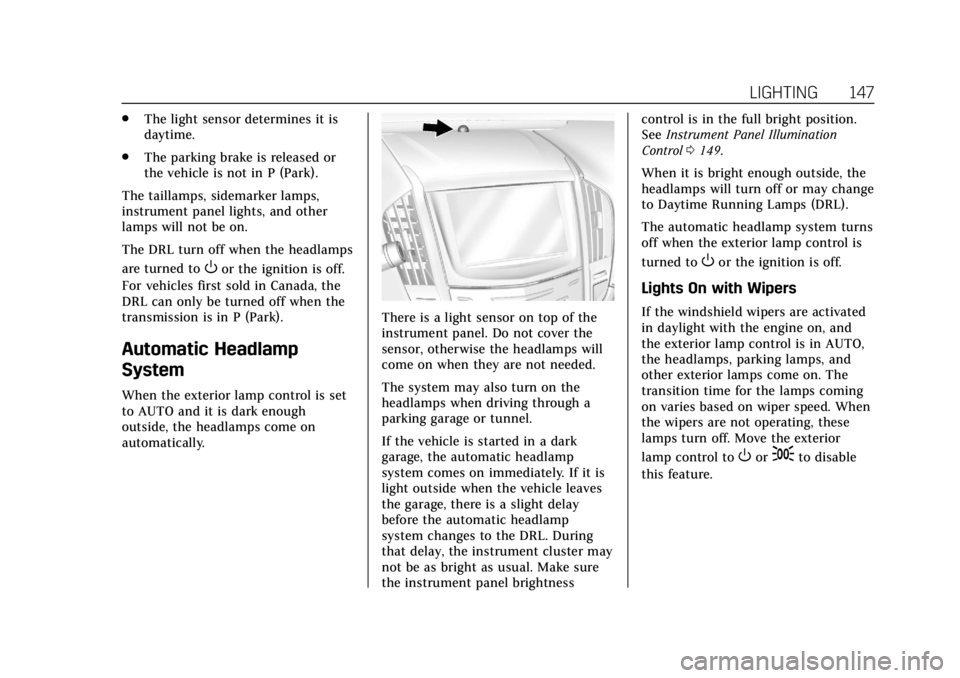
There is a light sensor on top of the
instrument panel. Do not cover the
sensor, otherwise the headlamps will
come on when they are not needed.
The system may also turn on the
headlamps when driving through a
parking garage or tunnel.
If the vehicle is started in a dark
garage, the automatic headlamp
system comes on immediately. If it is
light outside when the vehicle leaves
the garage, there is a slight delay
before the automatic headlamp
system changes to the DRL. During
that delay, the instrument cluster may
not be as bright as usual. Make sure
the instrument panel brightness control is in the full bright position.
See
Instrument Panel Illumination
Control 0149.
When it is bright enough outside, the
headlamps will turn off or may change
to Daytime Running Lamps (DRL).
The automatic headlamp system turns
off when the exterior lamp control is
turned to
Oor the ignition is off.
Lights On with Wipers
If the windshield wipers are activated
in daylight with the engine on, and
the exterior lamp control is in AUTO,
the headlamps, parking lamps, and
other exterior lamps come on. The
transition time for the lamps coming
on varies based on wiper speed. When
the wipers are not operating, these
lamps turn off. Move the exterior
lamp control to
Oor;to disable
this feature.
Page 150 of 384
Cadillac ATS/ATS-V Owner Manual (GMNA-Localizing-U.S./Canada/Mexico-
12460272) - 2019 - crc - 5/8/18
LIGHTING 149
If after signaling a turn or lane
change, the arrow flashes rapidly or
does not come on, a signal bulb might
be burned out.
Replace any burned out bulbs. If a
bulb is not burned out, check the fuse.
SeeFuses and Circuit Breakers 0274.Interior Lighting
Instrument Panel
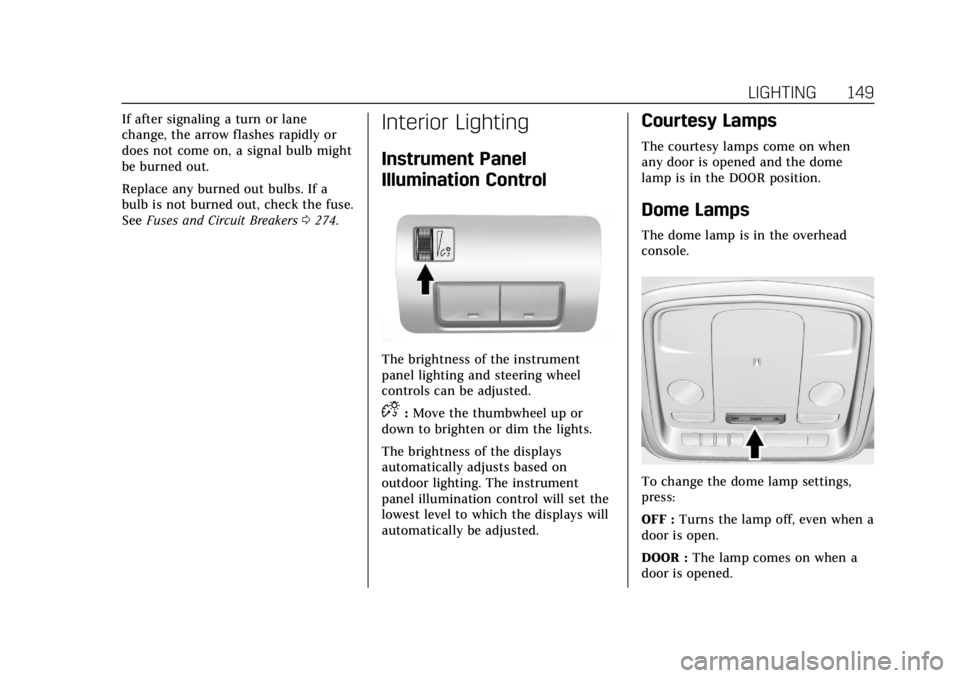
Illumination Control
The brightness of the instrument
panel lighting and steering wheel
controls can be adjusted.
D:Move the thumbwheel up or
down to brighten or dim the lights.
The brightness of the displays
automatically adjusts based on
outdoor lighting. The instrument
panel illumination control will set the
lowest level to which the displays will
automatically be adjusted.
Courtesy Lamps
The courtesy lamps come on when
any door is opened and the dome
lamp is in the DOOR position.
Dome Lamps
The dome lamp is in the overhead
console.
To change the dome lamp settings,
press:
OFF : Turns the lamp off, even when a
door is open.
DOOR : The lamp comes on when a
door is opened.
Page 161 of 384
Cadillac ATS/ATS-V Owner Manual (GMNA-Localizing-U.S./Canada/Mexico-
12460272) - 2019 - crc - 5/8/18
160 CLIMATE CONTROLS
zNy:Press the air delivery mode
buttons to change the direction of the
airf low. Selecting any of the air
delivery modes cancels automatic air
delivery control and the direction of
the airf low can be controlled
manually. Press AUTO to return to
automatic operation.
To change the current mode, select
one of the following:
Y: Air is directed to the instrument
panel outlets.
\: Air is divided between the
instrument panel outlets and the floor
outlets.
[: Air is directed to the floor
outlets, with some air to the
windshield and side windows.
-: Clears the windows of fog or
moisture. Air is directed to the
windshield, side windows, and floor
outlets. Some air may go to the rear
floor outlets.
0: Press to turn defrost on or off.
This clears the windshield of fog or
frost more quickly. Air is directed to
the windshield and side windows. A/C :
Press to turn the air
conditioning on or off. If the fan is
turned off, the air conditioner will not
run. Outside temperatures below
freezing may also prevent the air
conditioner from running.
Press AUTO to return to automatic
operation and the air conditioner runs
as needed. When the indicator light is
on, the air conditioner runs
automatically to cool the air inside
the vehicle or to dry the air needed to
defog the windshield faster.
Automatic Air Recirculation : When
the AUTO indicator light is on, the air
is automatically recirculated as
needed to help quickly cool the inside
of the vehicle.
@: Press to alternate between
recirculating air inside the vehicle or
pulling in outside air. The indicator
light on the button is lit when
recirculation mode is active. This
helps to quickly cool the air inside the
vehicle or reduce the outside air and
odors that may enter. Pressing this button cancels automatic
recirculation. Press AUTO to return to
automatic operation; recirculation
runs automatically as needed.
Manual recirculation mode is not
available when in Defrost or Defog
modes.
Auto Defog :
The climate control
system may have a sensor to
automatically detect high humidity
inside the vehicle. When high
humidity is detected, the climate
control system may adjust to outside
air supply and turn on the air
conditioner. If the climate control
system does not detect possible
window fogging, it returns to normal
operation. To turn Auto Defog off or
on, see “Climate and Air Quality”
under Vehicle Personalization 0135.
Rear Window Defogger
K:Press to turn the rear window
defogger on or off. An indicator light
on the button comes on to show that
the rear window defogger is on. The
rear window defogger only works
when the engine is running.
Page 165 of 384

Cadillac ATS/ATS-V Owner Manual (GMNA-Localizing-U.S./Canada/Mexico-
12460272) - 2019 - crc - 5/8/18
164 CLIMATE CONTROLS
OFF :Press to turn the fan on or off.
When off is selected, the system will
stop air from flowing into the cabin.
If on is selected, or any other button
press occurs, the climate control
system will turn on and operate to the
current setting. The temperature
control and air delivery mode can still
be adjusted.
worx: The temperature can be
adjusted separately for the driver and
the passenger. Press to increase or
decrease the temperature. Press and
hold to rapidly increase or decrease
the temperature. The driver and
passenger temperatures can also be
adjusted by touching the controls on
the climate control display.
SYNC : Touch SYNC on the climate
control display to link all climate zone
settings to the driver settings. Adjust
the driver side temperature control to
change the linked temperature. The
SYNC button is illuminated when the
driver and passenger settings are
linked. Manual Operation
z 9or9 y:
Press or touch the
fan controls on the center stack or the
climate control display to increase or
decrease the fan speed. Press and hold
the controls to adjust speed more
quickly. The fan speed setting
displays. Pressing either button
cancels automatic fan control and the
fan can be controlled manually. Press
AUTO to return to automatic
operation.
Air Delivery Mode Control : Touch
the air delivery mode on the climate
control display to change the direction
of the airflow. The selected air
delivery mode control is lit. Pressing
any of the air delivery controls cancels
automatic air delivery control and the
direction of the airflow can be
controlled manually. Press AUTO to
return to automatic operation.
To change the current mode, select
one of the following:
Y: Air is directed to the instrument
panel outlets.
\: Air is divided between the
instrument panel outlets and the floor
outlets.
[: Air is directed to the floor
outlets, with some air to the
windshield and side windows.
-: Clears the windows of fog or
moisture. Air is directed to the
windshield, side windows, and floor
outlets. Some air may go to the rear
floor outlets.
0: Press0to turn defrost on or
off. This clears the windshield of fog
or frost more quickly. Air is directed to
the windshield and side windows.
A/C Mode : Touch A/C Mode on the
climate control display to turn the
automatic air conditioning on or off.
If the fan is turned off, the air
conditioner will not run. Outside
temperatures below freezing may also
prevent the air conditioner from
running.
Press AUTO to return to automatic
operation and the air conditioner runs
as needed.
Page 167 of 384
Cadillac ATS/ATS-V Owner Manual (GMNA-Localizing-U.S./Canada/Mexico-
12460272) - 2019 - crc - 5/8/18
166 CLIMATE CONTROLS
The vehicle also has auto heated seats
that turn on when the vehicle is on.
The seats will activate at the level
required by the vehicle’s interior
temperature. Use the manual heated
seat buttons to turn auto heated seats
off. The auto heated seats feature can
be turned on or off.
SeeVehicle Personalization 0135 and
Heated Front Seats 061.
Remote Start Climate Control
Operation : If equipped with the
remote vehicle start feature, the
climate control system may run when
the vehicle is started remotely. The
system uses the driver's previous
settings to heat or cool the inside of
the vehicle. See Remote Vehicle Start
0 35.
The rear window defogger turns on if
it is cold outside.
If equipped, the heated seats will turn
on if it is cold outside. The heated
seat indicator lights may not come on
during a remote start. If equipped, the
heated steering wheel will come on in
a remote start if it is cold outside. The
heated steering wheel indicator light
may not come on.Sensor
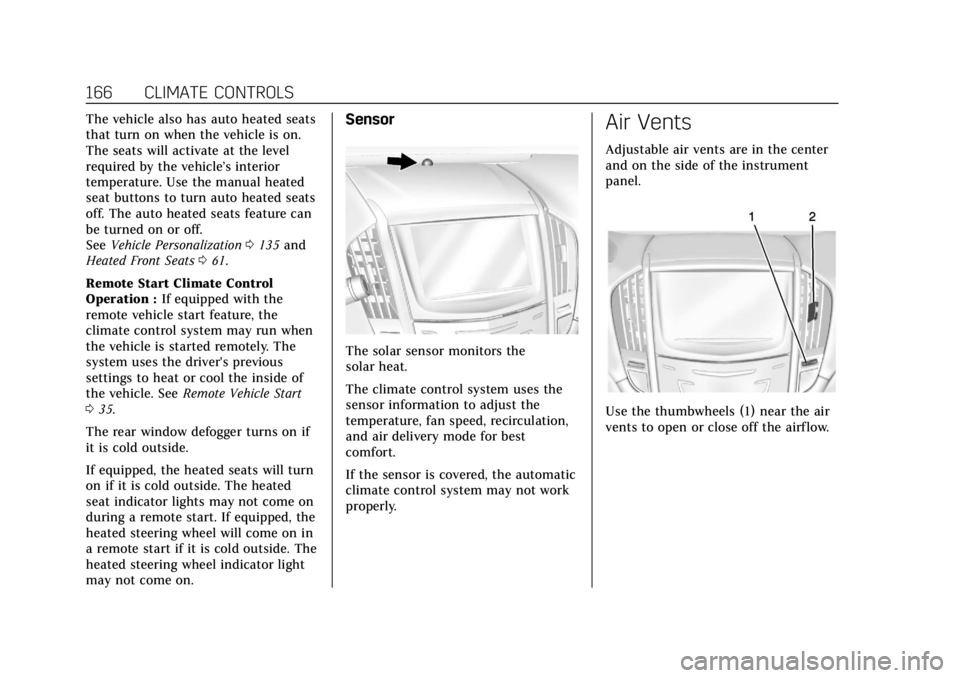
The solar sensor monitors the
solar heat.
The climate control system uses the
sensor information to adjust the
temperature, fan speed, recirculation,
and air delivery mode for best
comfort.
If the sensor is covered, the automatic
climate control system may not work
properly.
Air Vents
Adjustable air vents are in the center
and on the side of the instrument
panel.
Use the thumbwheels (1) near the air
vents to open or close off the airflow.
Page 181 of 384
Cadillac ATS/ATS-V Owner Manual (GMNA-Localizing-U.S./Canada/Mexico-
12460272) - 2019 - crc - 5/8/18
180 DRIVING AND OPERATING
be applied sooner than when on
dry pavement. SeeAntilock Brake
System (ABS) 0200.
. Allow greater following distance
and watch for slippery spots. Icy
patches can occur on otherwise
clear roads in shaded areas. The
surface of a curve or an overpass
can remain icy when the
surrounding roads are clear. Avoid
sudden steering maneuvers and
braking while on ice.
. Turn off cruise control.
Blizzard Conditions
Stay with the vehicle unless there is
help nearby. If possible, use Roadside
Assistance. See Roadside Service 0350.
To get help and keep everyone in the
vehicle safe:
. Turn on the hazard warning
flashers.
. Tie a red cloth to an outside
mirror.
{Warning
Snow can trap engine exhaust
under the vehicle. This may cause
exhaust gases to get inside. Engine
exhaust contains carbon monoxide
(CO), which cannot be seen or
smelled. It can cause
unconsciousness and even death.
If the vehicle is stuck in snow:
. Clear snow from the base of
the vehicle, especially any
blocking the exhaust pipe.
. Open a window about 5 cm
(2 in) on the vehicle side that
is away from the wind, to
bring in fresh air.
. Fully open the air outlets on
or under the instrument
panel.
. Adjust the climate control
system to circulate the air
inside the vehicle and set the
(Continued)
Warning (Continued)
fan speed to the highest
setting. See“Climate Control
Systems.”
For more information about CO, see
Engine Exhaust 0193.
To save fuel, run the engine for short
periods to warm the vehicle and then
shut the engine off and partially close
the window. Moving about to keep
warm also helps.
If it takes time for help to arrive,
when running the engine, push the
accelerator pedal slightly so the
engine runs faster than the idle speed.
This keeps the battery charged to
restart the vehicle and to signal for
help with the headlamps. Do this as
little as possible, to save fuel.
Page 202 of 384

Cadillac ATS/ATS-V Owner Manual (GMNA-Localizing-U.S./Canada/Mexico-
12460272) - 2019 - crc - 5/8/18
DRIVING AND OPERATING 201
If driving safely on a wet road and it
becomes necessary to slam on the
brakes and continue braking to avoid
a sudden obstacle, a computer senses
the wheels are slowing down. If one of
the wheels is about to stop rolling, the
computer will separately work the
brakes at each wheel.
ABS can change the brake pressure to
each wheel, as required, faster than
any driver could. This can help you
steer around the obstacle while
braking hard.
As the brakes are applied, the
computer keeps receiving updates on
wheel speed and controls braking
pressure accordingly.
Remember: ABS does not change the
time needed to get a foot up to the
brake pedal or always decrease
stopping distance. If you get too close
to the vehicle in front of you, there
will not be enough time to apply the
brakes if that vehicle suddenly slows
or stops. Always leave enough room
up ahead to stop, even with ABS.Using ABS
Do not pump the brakes. Just hold the
brake pedal down firmly and let ABS
work. You may hear the ABS pump or
motor operating and feel the brake
pedal pulsate. This is normal.
Braking in Emergencies
ABS allows you to steer and brake at
the same time. In many emergencies,
steering can help more than even the
very best braking.
Parking Brake (Electric)
Automatic Transmission
Manual Transmission
If equipped with an Electric Parking
Brake (EPB), the switch is on the
center console for manual
transmission vehicles, or on the left
side of the instrument panel for
automatic transmission vehicles. The
EPB can always be activated, even if
the ignition is off. To prevent draining
the battery, avoid repeated cycles of
the EPB when the engine is not
running.
Page 243 of 384
Cadillac ATS/ATS-V Owner Manual (GMNA-Localizing-U.S./Canada/Mexico-
12460272) - 2019 - crc - 5/8/18
242 VEHICLE CARE
Vehicle Care
General Information
General Information . . . . . . . . . . . . . 243
California Proposition65 Warning . . . . . . . . . . . . . . . . . . . . . 243
California Perchlorate Materials Requirements . . . . . . . . . . . . . . . . . . . 244
Accessories and Modifications . . . . . . . . . . . . . . . . . . . 244
Vehicle Checks
Doing Your OwnService Work . . . . . . . . . . . . . . . . . . . . 244
Hood . . . . . . . . . . . . . . . . . . . . . . . . . . . . . . 245
Engine Compartment Overview . . . . . . . . . . . . . . . . . . . . . . . . . 246
Engine Oil . . . . . . . . . . . . . . . . . . . . . . . . . 251
Engine Oil Life System . . . . . . . . . . . 253
Automatic Transmission Fluid . . . . . . . . . . . . . . . . . . . . . . . . . . . . . 255
Manual Transmission Fluid . . . . . 255
Hydraulic Clutch . . . . . . . . . . . . . . . . . 255
Engine Air Cleaner/Filter . . . . . . . . . 256
Cooling System (Engine) . . . . . . . . . 257
Cooling System (Intercooler) . . . . 262
Engine Overheating . . . . . . . . . . . . . . 262
Washer Fluid . . . . . . . . . . . . . . . . . . . . . 263
Brakes . . . . . . . . . . . . . . . . . . . . . . . . . . . . . 264 Brake Fluid . . . . . . . . . . . . . . . . . . . . . . . 265
Battery - North America . . . . . . . . . 266
All-Wheel Drive . . . . . . . . . . . . . . . . . . 267
Starter Switch Check . . . . . . . . . . . . . 268
Automatic Transmission Shift
Lock Control Function
Check . . . . . . . . . . . . . . . . . . . . . . . . . . . . 268
Park Brake and P (Park) Mechanism Check . . . . . . . . . . . . . . 269
Wiper Blade Replacement . . . . . . . 269
Windshield Replacement . . . . . . . . 270
Gas Strut(s) . . . . . . . . . . . . . . . . . . . . . . . 270Headlamp Aiming
Headlamp Aiming . . . . . . . . . . . . . . . . 271
Bulb Replacement
Bulb Replacement . . . . . . . . . . . . . . . . 271
Halogen Bulbs . . . . . . . . . . . . . . . . . . . . 271
High Intensity Discharge (HID) Lighting . . . . . . . . . . . . . . . . . . . . . . . . . 272
LED Lighting . . . . . . . . . . . . . . . . . . . . . 272
Back-Up Lamps . . . . . . . . . . . . . . . . . . . 272
License Plate Lamp . . . . . . . . . . . . . . 273
Electrical System
Electrical System Overload . . . . . . 273
Fuses and Circuit Breakers . . . . . . 274
Engine Compartment Fuse Block . . . . . . . . . . . . . . . . . . . . . . . . . . . . 274
Instrument Panel Fuse Block . . . . 277 Rear Compartment Fuse
Block . . . . . . . . . . . . . . . . . . . . . . . . . . . . 280
Wheels and Tires
Tires . . . . . . . . . . . . . . . . . . . . . . . . . . . . . . . 282
All-Season Tires . . . . . . . . . . . . . . . . . . 283
Winter Tires . . . . . . . . . . . . . . . . . . . . . . 283
Run-Flat Tires . . . . . . . . . . . . . . . . . . . . 284
Summer Tires . . . . . . . . . . . . . . . . . . . . 285
Tire Sidewall Labeling . . . . . . . . . . . 285
Tire Designations . . . . . . . . . . . . . . . . . 286
Tire Terminology andDefinitions . . . . . . . . . . . . . . . . . . . . . . 287
Tire Pressure . . . . . . . . . . . . . . . . . . . . . . 289
Tire Pressure for High-Speed Operation . . . . . . . . . . . . . . . . . . . . . . . . 291
Tire Pressure Monitor System . . . 291
Tire Pressure Monitor
Operation . . . . . . . . . . . . . . . . . . . . . . . . 292
Tire Inspection . . . . . . . . . . . . . . . . . . . 295
Tire Rotation . . . . . . . . . . . . . . . . . . . . . 295
When It Is Time for New Tires . . . . . . . . . . . . . . . . . . . . . . . . . . . . . 297
Buying New Tires . . . . . . . . . . . . . . . . 297
Different Size Tires and Wheels . . . . . . . . . . . . . . . . . . . . . . . . . . 299
Uniform Tire Quality Grading . . . 299
Wheel Alignment and Tire Balance . . . . . . . . . . . . . . . . . . . . . . . . . . 301
Wheel Replacement . . . . . . . . . . . . . . 301
Tire Chains . . . . . . . . . . . . . . . . . . . . . . . 302