check CADILLAC ATS V 2017 1.G Owners Manual
[x] Cancel search | Manufacturer: CADILLAC, Model Year: 2017, Model line: ATS V, Model: CADILLAC ATS V 2017 1.GPages: 335, PDF Size: 3.73 MB
Page 8 of 335

Cadillac ATS/ATS-V Owner Manual (GMNA-Localizing-MidEast-10287885) -
2017 - crc - 6/16/16
IN BRIEF 7
1.Air Vents 0168.
2. Exterior Lamp Controls 0145.
Turn Signal Lever. See Turn and
Lane-Change Signals 0149.
3. Tap Shift Controls (If Equipped). See Manual Mode 0193.
4. Cruise Control 0204.
Adaptive Cruise Control 0207 (If
Equipped).
Forward Collision Alert (FCA)
System 0218 (If Equipped).
Heated Steering Wheel 0100 (If
Equipped).
Traction Control/Electronic
Stability Control 0198 (ATS-V).
Steering Wheel Controls 0100.
5. Instrument Cluster 0107.
Driver Information Center (DIC)
Display. See Driver Information
Center (DIC) 0122.
6. Steering Wheel Controls 0100 (If
Equipped).
7. Windshield Wiper/Washer 0101.
8. Infotainment 0153. 9. Light Sensor. See
Automatic
Headlamp System 0147.
10. Dual Automatic Climate Control
System 0160 orDual Automatic
Climate Control System 0163.
11. Hazard Warning Flashers 0148.
12. Heated and Ventilated Front Seats
058 (If Equipped).
13. Instrument Panel Storage 096 (If
Equipped).
Wireless Charging Pad (If
Equipped) (Out of View). See
Wireless Charging 0104.
14. Traction Control/Electronic
Stability Control 0198 (ATS).
Stop/Start Disable Switch (If
Equipped). See Starting the
Engine 0186.
MODE Button (ATS) or
«/ª
Button (ATS-V). See Driver Mode
Control 0199.
15. Shift Lever. See Automatic
Transmission 0191.
16. Storage Bin. See Instrument Panel
Storage 096. 17. ENGINE START/STOP Button.
SeeIgnition Positions 0185.
18. Horn 0100.
19. Steering Wheel Adjustment 0100.
20. Head-Up Display (HUD) 0124 (If
Equipped).
21. Parking Assist Button. See Driver
Assistance Systems 0214.
Lane Keep Assist (LKA) 0224 (If
Equipped).
22. Electric Parking Brake (If Equipped). See Parking Brake
(Manual) 0195 orParking Brake
(Electric) 0196.
23. Data Link Connector (DLC) (Out of View). See Malfunction
Indicator Lamp (Check Engine
Light) 0114.
24. Hood Release (Out of View). See Hood 0233.
25. Instrument Panel Illumination
Control 0149.
Page 29 of 335
Cadillac ATS/ATS-V Owner Manual (GMNA-Localizing-MidEast-10287885) -
2017 - crc - 6/16/16
28 KEYS, DOORS, AND WINDOWS
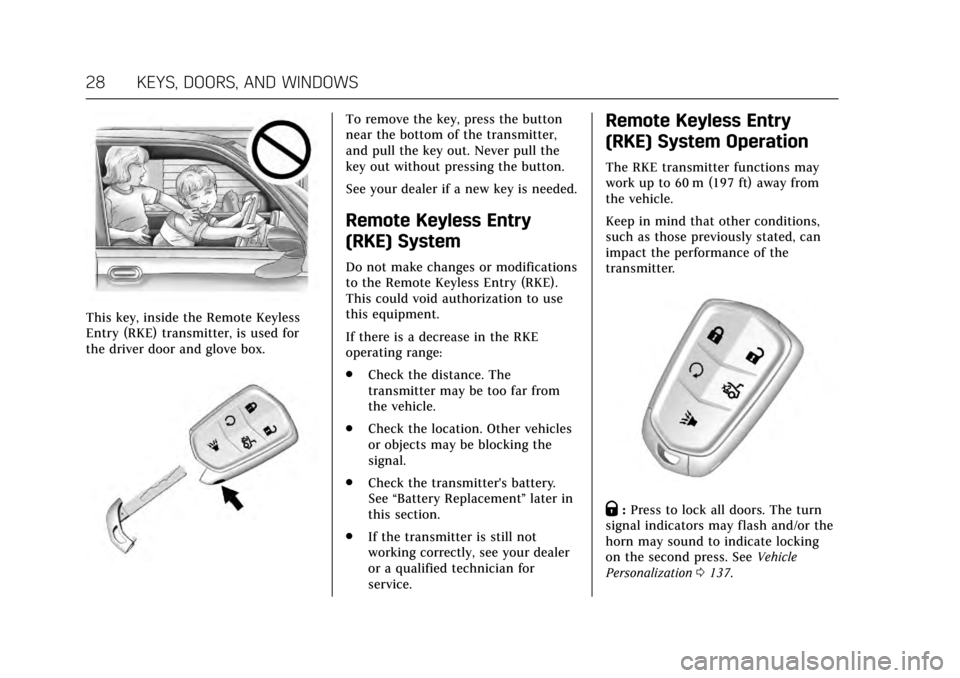
This key, inside the Remote Keyless
Entry (RKE) transmitter, is used for
the driver door and glove box.
To remove the key, press the button
near the bottom of the transmitter,
and pull the key out. Never pull the
key out without pressing the button.
See your dealer if a new key is needed.
Remote Keyless Entry
(RKE) System
Do not make changes or modifications
to the Remote Keyless Entry (RKE).
This could void authorization to use
this equipment.
If there is a decrease in the RKE
operating range:
.Check the distance. The
transmitter may be too far from
the vehicle.
. Check the location. Other vehicles
or objects may be blocking the
signal.
. Check the transmitter's battery.
See “Battery Replacement ”later in
this section.
. If the transmitter is still not
working correctly, see your dealer
or a qualified technician for
service.
Remote Keyless Entry
(RKE) System Operation
The RKE transmitter functions may
work up to 60 m (197 ft) away from
the vehicle.
Keep in mind that other conditions,
such as those previously stated, can
impact the performance of the
transmitter.
Q:Press to lock all doors. The turn
signal indicators may flash and/or the
horn may sound to indicate locking
on the second press. See Vehicle
Personalization 0137.
Page 32 of 335
Cadillac ATS/ATS-V Owner Manual (GMNA-Localizing-MidEast-10287885) -
2017 - crc - 6/16/16
KEYS, DOORS, AND WINDOWS 31
To customize the doors to
automatically lock when exiting the
vehicle, seeVehicle
Personalization 0137.
Temporary Disable of Passive
Locking Feature
Temporarily disable the passive
locking by pressing and holding
Kon
the interior door switch with a door
open for at least four seconds, or until
three chimes are heard. Passive
locking will then remain disabled until
Qon the interior door is pressed,
or until the vehicle is turned on.
Keyless Trunk Opening
Press the touch pad on the trunk to
open the trunk if the RKE transmitter
is within 1 m (3 ft).
Key Access
To access a vehicle with a weak
transmitter battery see Door
Locks 034. Remote Left In Vehicle Alert
When the vehicle is turned off and a
remote is left in the vehicle, the horn
will chirp three times after all doors
are closed. To turn on or off see
Vehicle Personalization
0137.
Remote No Longer In Vehicle Alert
If the vehicle is on, with a door open,
and then all doors are closed, the
vehicle will check for RKE
transmitter(s) inside. If an RKE
transmitter is not detected, the DIC
will display NO REMOTE DETECTED
and the horn will chirp three times.
This occurs only once each time the
vehicle is driven.
See Vehicle Personalization 0137.
Programming Transmitters to
the Vehicle
Only RKE transmitters programmed to
the vehicle will work. If a transmitter
is lost or stolen, a replacement can be
purchased and programmed through
your dealer. When the replacement
transmitter is programmed to this
vehicle, all remaining transmitters
must also be reprogrammed. Any lost or stolen transmitters will no longer
work once the new transmitter is
programmed. Each vehicle can have
up to eight transmitters programmed
to it. See your dealer to program
transmitters to this vehicle.
Starting the Vehicle with a Low
Transmitter Battery
When the vehicle is started, if the
transmitter battery is weak or if there
is interference with the signal, the DIC
may display NO REMOTE DETECTED
or NO REMOTE KEY WAS DETECTED,
PLACE KEY IN TRANSMITTER
POCKET, THEN START YOUR
VEHICLE. See
Key and Lock
Messages 0131.
To start the vehicle: 1. Open the center console storage area and the storage tray.
Page 34 of 335
Cadillac ATS/ATS-V Owner Manual (GMNA-Localizing-MidEast-10287885) -
2017 - crc - 6/16/16
KEYS, DOORS, AND WINDOWS 33
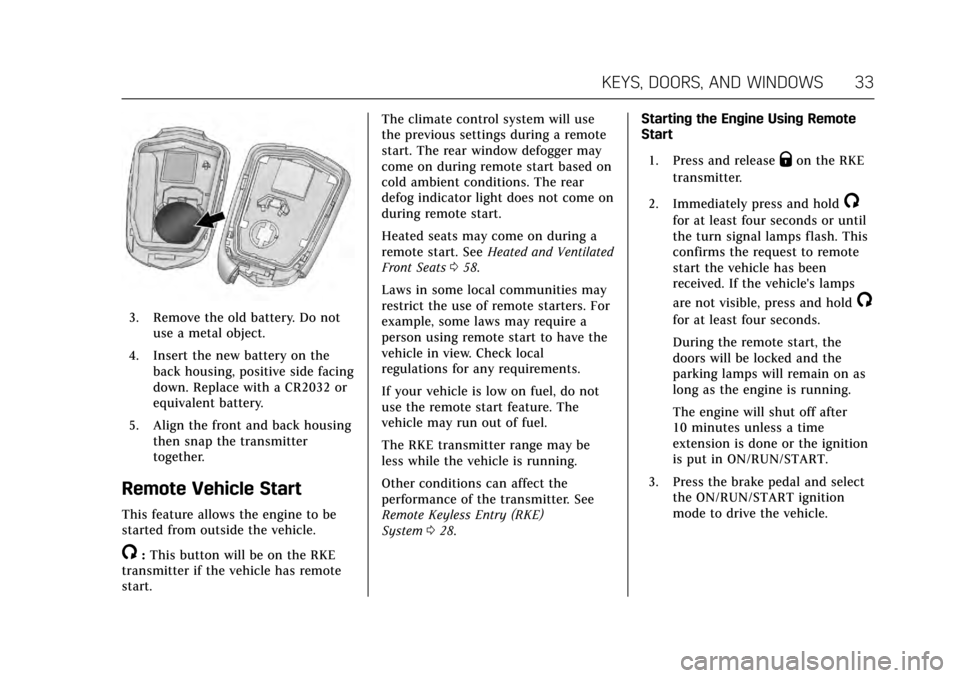
3. Remove the old battery. Do notuse a metal object.
4. Insert the new battery on the back housing, positive side facing
down. Replace with a CR2032 or
equivalent battery.
5. Align the front and back housing then snap the transmitter
together.
Remote Vehicle Start
This feature allows the engine to be
started from outside the vehicle.
/:This button will be on the RKE
transmitter if the vehicle has remote
start. The climate control system will use
the previous settings during a remote
start. The rear window defogger may
come on during remote start based on
cold ambient conditions. The rear
defog indicator light does not come on
during remote start.
Heated seats may come on during a
remote start. See
Heated and Ventilated
Front Seats 058.
Laws in some local communities may
restrict the use of remote starters. For
example, some laws may require a
person using remote start to have the
vehicle in view. Check local
regulations for any requirements.
If your vehicle is low on fuel, do not
use the remote start feature. The
vehicle may run out of fuel.
The RKE transmitter range may be
less while the vehicle is running.
Other conditions can affect the
performance of the transmitter. See
Remote Keyless Entry (RKE)
System 028. Starting the Engine Using Remote
Start
1. Press and release
Qon the RKE
transmitter.
2. Immediately press and hold
/
for at least four seconds or until
the turn signal lamps flash. This
confirms the request to remote
start the vehicle has been
received. If the vehicle's lamps
are not visible, press and hold
/
for at least four seconds.
During the remote start, the
doors will be locked and the
parking lamps will remain on as
long as the engine is running.
The engine will shut off after
10 minutes unless a time
extension is done or the ignition
is put in ON/RUN/START.
3. Press the brake pedal and select the ON/RUN/START ignition
mode to drive the vehicle.
Page 38 of 335
Cadillac ATS/ATS-V Owner Manual (GMNA-Localizing-MidEast-10287885) -
2017 - crc - 6/16/16
KEYS, DOORS, AND WINDOWS 37
To unlock the doors:
.Press
Kon the power door lock
switch.
. Shift the transmission into
P (Park).
Automatic door locking can be
programmed. Automatic door
unlocking will follow automatic door
locking settings. See Vehicle
Personalization 0137.
Lockout Protection
If the vehicle is in ACC/ACCESSORY or
ON/RUN/START and the power door
lock switch is pressed with the driver
door open, all the doors will lock and
only the driver door will unlock.
If the vehicle is off and is locked while
a door is open, when all doors are
closed the vehicle will check for RKE
transmitter(s) inside. If RKE
transmitter(s) are detected and none
were removed, the driver door will
unlock and the horn will chirp three
times. This feature can be manually
overridden with the driver door open
by pressing and holding
Qon the
power door lock switch.
Unlocked Door Anti Lock Out
When this feature is on and door
locking is requested with the driver
door open, all doors will lock and only
the driver door will unlock. The driver
door must be closed before locking is
requested for all doors to remain
locked. When this feature is off, the
Delayed Door Lock menu will be
available.
This feature can also be programmed.
See Vehicle Personalization 0137.
Safety Locks (Sedan Only)
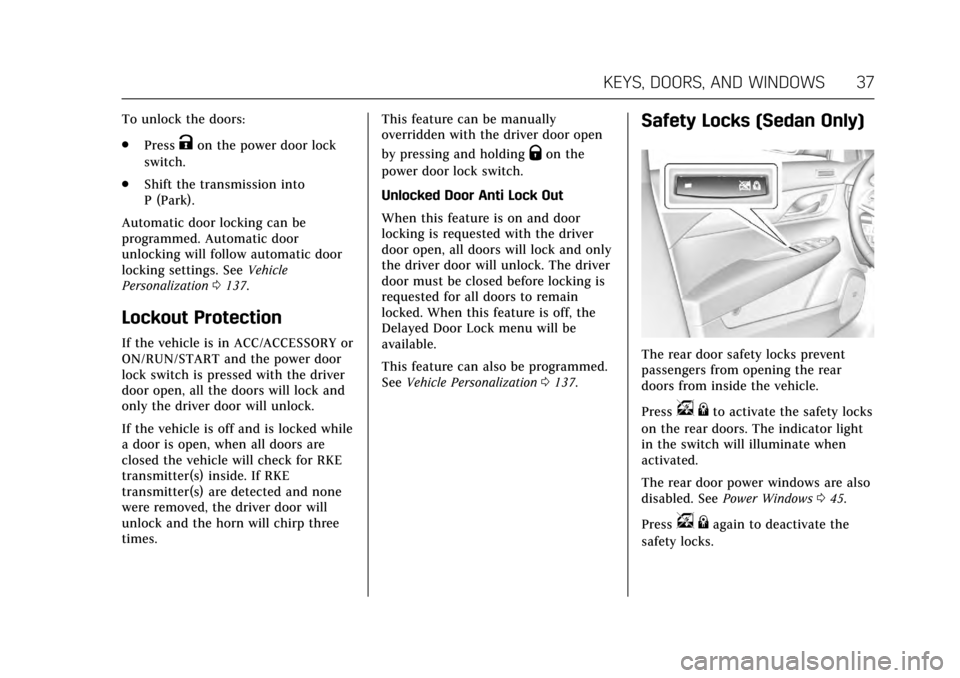
The rear door safety locks prevent
passengers from opening the rear
doors from inside the vehicle.
Press
v {to activate the safety locks
on the rear doors. The indicator light
in the switch will illuminate when
activated.
The rear door power windows are also
disabled. See Power Windows 045.
Press
v {again to deactivate the
safety locks.
Page 43 of 335
Cadillac ATS/ATS-V Owner Manual (GMNA-Localizing-MidEast-10287885) -
2017 - crc - 6/16/16
42 KEYS, DOORS, AND WINDOWS
When trying to start the vehicle, the
security light comes on briefly when
the ignition is turned on.
If the engine does not start and the
security light stays on, there is a
problem with the system. Turn the
vehicle off and try again.
If the vehicle will not change ignition
modes (ACC/ACCESSORY, ON/RUN/
START, OFF), and the RKE transmitter
appears to be undamaged, try another
transmitter. Or, you may try placing
the transmitter in the transmitter
pocket located in the center console.
SeeKey and Lock Messages 0131.
If the ignition modes will not change
with the other transmitter, your
vehicle needs service. If the ignition
does change modes, the first
transmitter may be faulty. See your
dealer.
It is possible for the immobilizer
system to learn new or replacement
RKE transmitters. Up to eight
transmitters can be programmed for
the vehicle. To program additional
transmitters, see “Programming Transmitters to the Vehicle
”under
Remote Keyless Entry (RKE) System
Operation 028.
Do not leave the key or device that
disarms or deactivates the
theft-deterrent system in the vehicle.Exterior Mirrors
Convex Mirrors
{Warning
A convex mirror can make things,
like other vehicles, look farther
away than they really are. If you cut
too sharply into the right lane, you
could hit a vehicle on the right.
Check the inside mirror or glance
over your shoulder before changing
lanes.
The passenger side mirror is convex
shaped. A convex mirror's surface is
curved so more can be seen from the
driver seat.
Page 50 of 335
Cadillac ATS/ATS-V Owner Manual (GMNA-Localizing-MidEast-10287885) -
2017 - crc - 6/16/16
SEATS AND RESTRAINTS 49
Seats and Restraints
Head Restraints
Head Restraints . . . . . . . . . . . . . . . . . . . . 50
Front Seats
Easy Entry Seat . . . . . . . . . . . . . . . . . . . . 51
Power Seat Adjustment . . . . . . . . . . . 52
Lumbar Adjustment . . . . . . . . . . . . . . . 54
Thigh Support Adjustment . . . . . . . . 55
Reclining Seatbacks . . . . . . . . . . . . . . . 55
Memory Seats . . . . . . . . . . . . . . . . . . . . . . 56
Heated and Ventilated FrontSeats . . . . . . . . . . . . . . . . . . . . . . . . . . . . . . 58
Rear Seats
Rear Seats . . . . . . . . . . . . . . . . . . . . . . . . . . 59
Rear Seat Pass-Through Door . . . . . 61
Safety Belts
Safety Belts . . . . . . . . . . . . . . . . . . . . . . . . . 61
How to Wear Safety BeltsProperly . . . . . . . . . . . . . . . . . . . . . . . . . . . 62
Lap-Shoulder Belt . . . . . . . . . . . . . . . . . . 63
Safety Belt Use During Pregnancy . . . . . . . . . . . . . . . . . . . . . . . . . 66
Safety System Check . . . . . . . . . . . . . . 66
Safety Belt Care . . . . . . . . . . . . . . . . . . . . 66
Replacing Safety Belt System Parts after a Crash . . . . . . . . . . . . . . . . . . . . . . 67
Airbag System
Airbag System . . . . . . . . . . . . . . . . . . . . . 67
Where Are the Airbags? . . . . . . . . . . . 69
When Should an AirbagInflate? . . . . . . . . . . . . . . . . . . . . . . . . . . . 70
What Makes an Airbag Inflate? . . . 71
How Does an Airbag Restrain? . . . 72
What Will You See after an Airbag
Inflates? . . . . . . . . . . . . . . . . . . . . . . . . . . 72
Passenger Sensing System . . . . . . . . 73
Servicing the Airbag-Equipped Vehicle . . . . . . . . . . . . . . . . . . . . . . . . . . . . 77
Adding Equipment to the Airbag-Equipped Vehicle . . . . . . . . 77
Airbag System Check . . . . . . . . . . . . . . 78
Replacing Airbag System Parts after a Crash . . . . . . . . . . . . . . . . . . . . . . 78
Child Restraints
Older Children . . . . . . . . . . . . . . . . . . . . . 79
Infants and Young Children . . . . . . 81
Child Restraint Systems . . . . . . . . . . . 83
Where to Put the Restraint . . . . . . . 84
Lower Anchors and Tethers forChildren (LATCH System) . . . . . . . 85
Replacing LATCH System Parts After a Crash . . . . . . . . . . . . . . . . . . . . . 91 Securing Child Restraints (With
the Safety Belt in the
Rear Seat) . . . . . . . . . . . . . . . . . . . . . . . . 91
Securing Child Restraints (With the Safety Belt in the
Front Seat) . . . . . . . . . . . . . . . . . . . . . . . 93
Page 61 of 335
Cadillac ATS/ATS-V Owner Manual (GMNA-Localizing-MidEast-10287885) -
2017 - crc - 6/16/16
60 SEATS AND RESTRAINTS
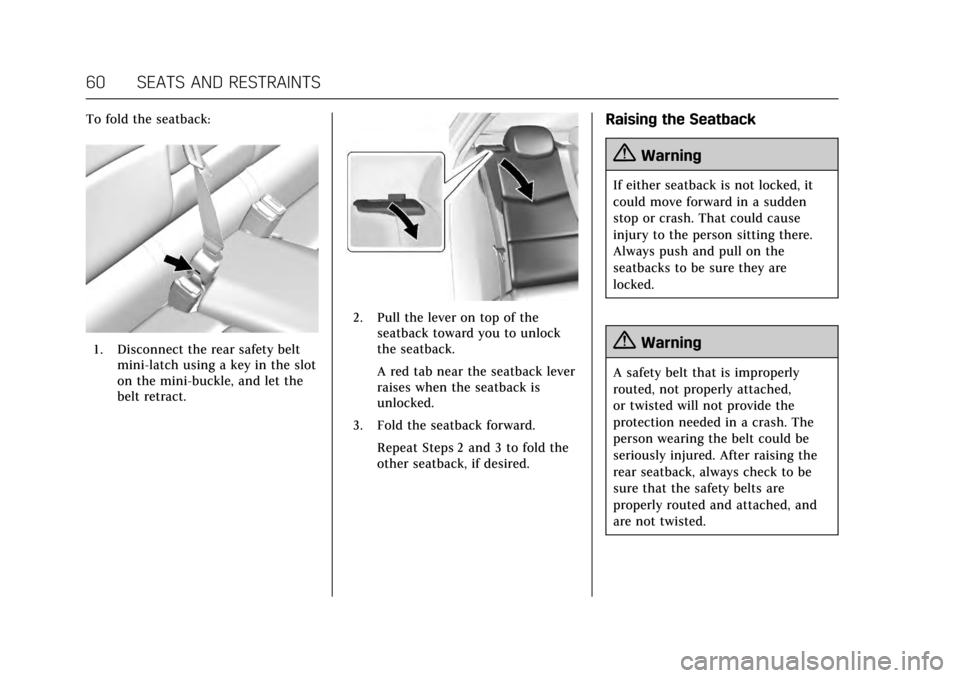
To fold the seatback:
1. Disconnect the rear safety beltmini-latch using a key in the slot
on the mini-buckle, and let the
belt retract.
2. Pull the lever on top of theseatback toward you to unlock
the seatback.
A red tab near the seatback lever
raises when the seatback is
unlocked.
3. Fold the seatback forward. Repeat Steps 2 and 3 to fold the
other seatback, if desired.
Raising the Seatback
{Warning
If either seatback is not locked, it
could move forward in a sudden
stop or crash. That could cause
injury to the person sitting there.
Always push and pull on the
seatbacks to be sure they are
locked.
{Warning
A safety belt that is improperly
routed, not properly attached,
or twisted will not provide the
protection needed in a crash. The
person wearing the belt could be
seriously injured. After raising the
rear seatback, always check to be
sure that the safety belts are
properly routed and attached, and
are not twisted.
Page 63 of 335
Cadillac ATS/ATS-V Owner Manual (GMNA-Localizing-MidEast-10287885) -
2017 - crc - 6/16/16
62 SEATS AND RESTRAINTS
Warning (Continued)
area of the vehicle that is not
equipped with seats and safety
belts.
Always wear a safety belt, and
check that all passenger(s) are
restrained properly too.
This vehicle has indicators as a
reminder to buckle the safety belts.
See Safety Belt Reminders 0112.
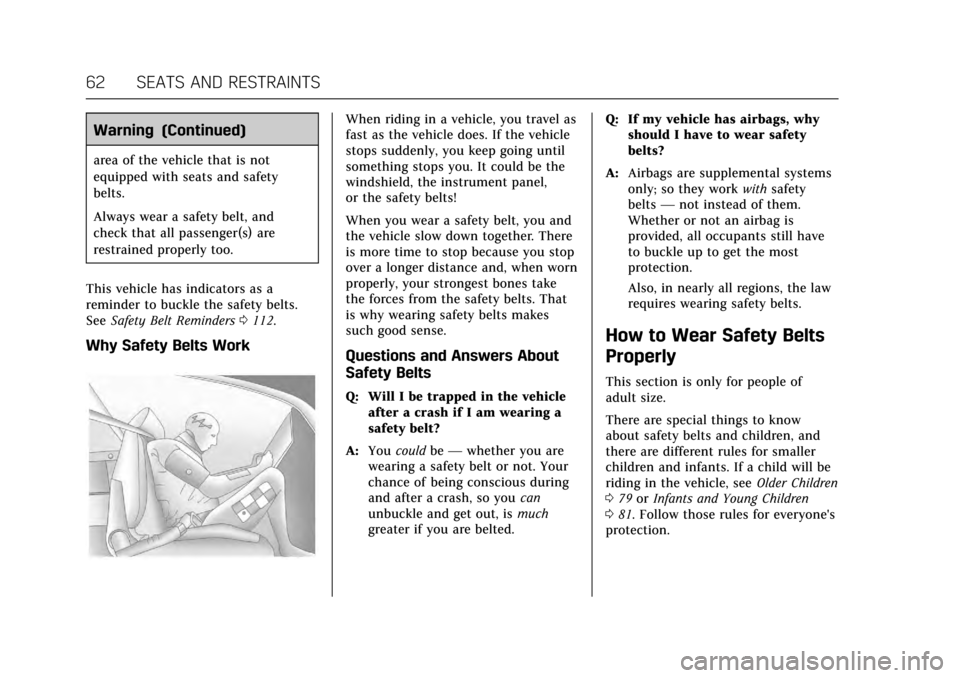
Why Safety Belts Work
When riding in a vehicle, you travel as
fast as the vehicle does. If the vehicle
stops suddenly, you keep going until
something stops you. It could be the
windshield, the instrument panel,
or the safety belts!
When you wear a safety belt, you and
the vehicle slow down together. There
is more time to stop because you stop
over a longer distance and, when worn
properly, your strongest bones take
the forces from the safety belts. That
is why wearing safety belts makes
such good sense.
Questions and Answers About
Safety Belts
Q: Will I be trapped in the vehicle
after a crash if I am wearing a
safety belt?
A: You could be— whether you are
wearing a safety belt or not. Your
chance of being conscious during
and after a crash, so you can
unbuckle and get out, is much
greater if you are belted. Q: If my vehicle has airbags, why
should I have to wear safety
belts?
A: Airbags are supplemental systems
only; so they work withsafety
belts —not instead of them.
Whether or not an airbag is
provided, all occupants still have
to buckle up to get the most
protection.
Also, in nearly all regions, the law
requires wearing safety belts.
How to Wear Safety Belts
Properly
This section is only for people of
adult size.
There are special things to know
about safety belts and children, and
there are different rules for smaller
children and infants. If a child will be
riding in the vehicle, see Older Children
0 79 orInfants and Young Children
0 81. Follow those rules for everyone's
protection.
Page 67 of 335
Cadillac ATS/ATS-V Owner Manual (GMNA-Localizing-MidEast-10287885) -
2017 - crc - 6/16/16
66 SEATS AND RESTRAINTS
Do not sit on the outboard safety belt
while entering or exiting the vehicle or
at any time while sitting in the seat.
Sitting on the safety belt can damage
the webbing and hardware.
Rear Safety Belt Comfort Guides
Rear safety belt comfort guides may
provide added safety belt comfort for
older children who have outgrown
booster seats and for some adults.
When installed on a shoulder belt, the
comfort guide positions the belt away
from the neck and head.
Comfort guides may be available
through your dealer for the rear
outboard seating positions.
If available, instructions are included
with the guide.
Safety Belt Use During
Pregnancy
Safety belts work for everyone,
including pregnant women. Like all
occupants, they are more likely to be
seriously injured if they do not wear
safety belts.
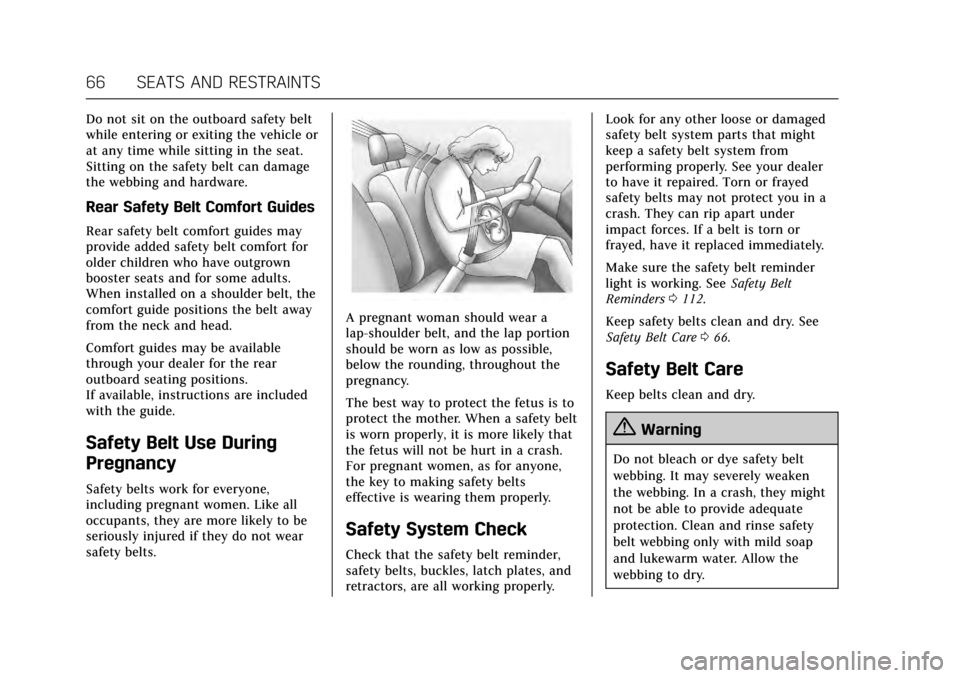
A pregnant woman should wear a
lap-shoulder belt, and the lap portion
should be worn as low as possible,
below the rounding, throughout the
pregnancy.
The best way to protect the fetus is to
protect the mother. When a safety belt
is worn properly, it is more likely that
the fetus will not be hurt in a crash.
For pregnant women, as for anyone,
the key to making safety belts
effective is wearing them properly.
Safety System Check
Check that the safety belt reminder,
safety belts, buckles, latch plates, and
retractors, are all working properly.Look for any other loose or damaged
safety belt system parts that might
keep a safety belt system from
performing properly. See your dealer
to have it repaired. Torn or frayed
safety belts may not protect you in a
crash. They can rip apart under
impact forces. If a belt is torn or
frayed, have it replaced immediately.
Make sure the safety belt reminder
light is working. See
Safety Belt
Reminders 0112.
Keep safety belts clean and dry. See
Safety Belt Care 066.
Safety Belt Care
Keep belts clean and dry.
{Warning
Do not bleach or dye safety belt
webbing. It may severely weaken
the webbing. In a crash, they might
not be able to provide adequate
protection. Clean and rinse safety
belt webbing only with mild soap
and lukewarm water. Allow the
webbing to dry.