124 CADILLAC CT5 2020 User Guide
[x] Cancel search | Manufacturer: CADILLAC, Model Year: 2020, Model line: CT5, Model: CADILLAC CT5 2020Pages: 359, PDF Size: 6.04 MB
Page 47 of 359
Cadillac CT5 Owner Manual (GMNA-Localizing-U.S./Canada-13060105) -
2020 - CRC - 2/14/20
46 SEATS AND RESTRAINTS
positions saved to the same memory
button number 1 or 2 are
automatically recalled when the
vehicle is turned on.
To turn Seat Entry Memory on or off,
see“Vehicle Personalization Settings”
previously in this section and Vehicle
Personalization 0124.
The vehicle must be in P (Park) to
start Seat Entry Memory. Seat Entry
Memory recall will complete if the
vehicle is shifted out of P (Park) prior
to reaching the saved memory
position.
To stop Seat Entry Memory recall
movement, turn the vehicle off or
press any of the following controls:
. Power seat
. Memory SET, 1, 2, or
B
.
Power mirror, with the driver or
passenger side mirror selected
. Power steering wheel, if equipped
If the saved memory seat position
does not automatically recall or recalls
to the wrong positions, the driver’s
remote key number (1 or 2) may not
match the memory button number that positions were saved to. Try
storing the position to the other
memory button or try the other
remote key.
Seat Exit Memory
Seat Exit Memory is not linked to a
remote key. The position saved to
B
is used for all drivers. To turn Seat
Exit Memory on or off, see "Vehicle
Personalization Settings" previously in
this section and
Vehicle Personalization
0 124.
If turned on, the position saved to
B
is automatically recalled when one of
the following occurs:
. The vehicle is turned off and the
driver door is opened within a
short time.
. The vehicle is turned off with the
driver door open.
To stop Seat Exit Memory movement,
press any of the following memory
controls:
. Power seat
. Memory SET, 1, 2, or
B
.Power mirror, with the driver or
passenger side mirror selected
. Power steering wheel, if equipped
Obstructions
If something has blocked the driver
seat while recalling a memory
position, the recall may stop. Remove
the obstruction and try the recall
again. If the memory position still
does not recall, see your dealer.
Heated and Ventilated
Front Seats
{Warning
If temperature change or pain to
the skin cannot be felt, the seat
heater may cause burns. To reduce
the risk of burns, use care when
using the seat heater, especially for
long periods of time. Do not place
anything on the seat that insulates
against heat, such as a blanket,
cushion, cover, or similar item. This
may cause the seat heater to (Continued)
Page 49 of 359
Cadillac CT5 Owner Manual (GMNA-Localizing-U.S./Canada-13060105) -
2020 - CRC - 2/14/20
48 SEATS AND RESTRAINTS
remote start if it is cold outside. The
heated and ventilated seat indicators
and heated steering wheel indicator
will come on during this operation.
The heated and ventilated seats and
heated steering wheel may cancel
when the vehicle is started. These
features can be manually selected
after the ignition is turned on.
The temperature performance of an
unoccupied seat may be reduced. This
is normal.
The remote start heated or ventilated
seats can be enabled or disabled in
the vehicle personalization menu. See
Remote Vehicle Start015 and
Vehicle Personalization 0124.Massage
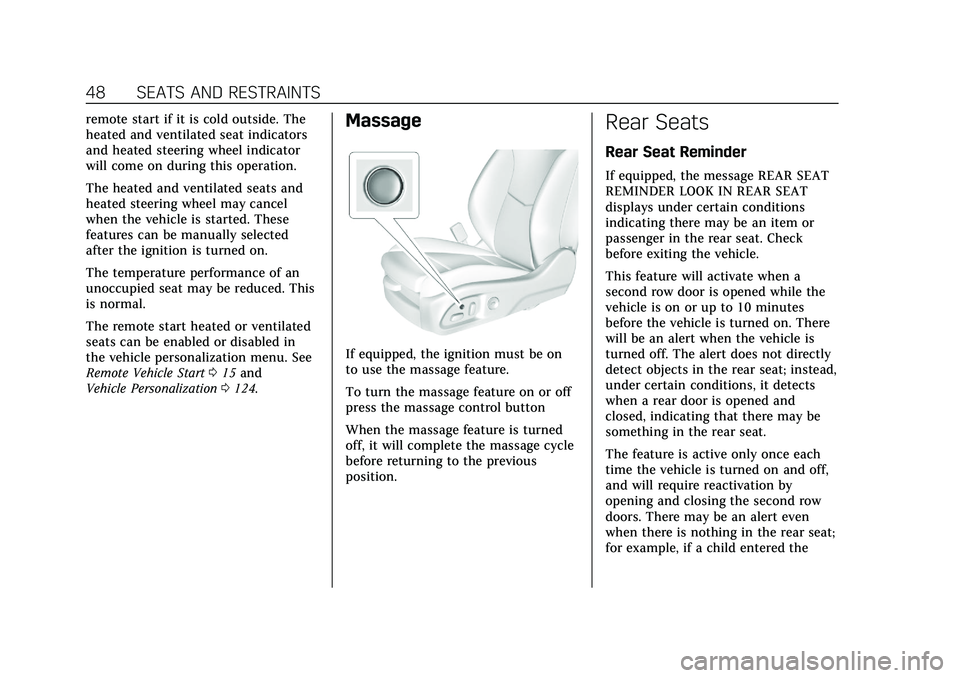
If equipped, the ignition must be on
to use the massage feature.
To turn the massage feature on or off
press the massage control button
When the massage feature is turned
off, it will complete the massage cycle
before returning to the previous
position.
Rear Seats
Rear Seat Reminder
If equipped, the message REAR SEAT
REMINDER LOOK IN REAR SEAT
displays under certain conditions
indicating there may be an item or
passenger in the rear seat. Check
before exiting the vehicle.
This feature will activate when a
second row door is opened while the
vehicle is on or up to 10 minutes
before the vehicle is turned on. There
will be an alert when the vehicle is
turned off. The alert does not directly
detect objects in the rear seat; instead,
under certain conditions, it detects
when a rear door is opened and
closed, indicating that there may be
something in the rear seat.
The feature is active only once each
time the vehicle is turned on and off,
and will require reactivation by
opening and closing the second row
doors. There may be an alert even
when there is nothing in the rear seat;
for example, if a child entered the
Page 50 of 359

Cadillac CT5 Owner Manual (GMNA-Localizing-U.S./Canada-13060105) -
2020 - CRC - 2/14/20
SEATS AND RESTRAINTS 49
vehicle through the rear door and left
the vehicle without the vehicle being
shut off.
The feature can be turned on or off.
SeeVehicle Personalization 0124.
Folding the Seatback
Either side of the seatback can be
folded for more cargo space. Fold a
seatback only when the vehicle is not
moving.
Caution
Folding a rear seat with the seat
belts still fastened may cause
damage to the seat or the seat
belts. Always unbuckle the seat
belts and return them to their
normal stowed position before
folding a rear seat. To fold the seatback:1. Disconnect the rear seat belt
mini-latch using a key in the slot
on the mini-buckle, and let the
belt retract.
2. Pull the lever on top of theseatback toward you to unlock
the seatback.
A red tab near the seatback lever
raises when the seatback is
unlocked.
3. Fold the seatback forward. Repeat Steps 2 and 3 to fold the
other seatback, if desired.
Page 94 of 359
Cadillac CT5 Owner Manual (GMNA-Localizing-U.S./Canada-13060105) -
2020 - CRC - 2/14/20
INSTRUMENTS AND CONTROLS 93
Instruments and
Controls
Controls
Steering Wheel Adjustment . . . . . . . 94
Steering Wheel Controls . . . . . . . . . . 94
Heated Steering Wheel . . . . . . . . . . . . 94
Horn . . . . . . . . . . . . . . . . . . . . . . . . . . . . . . . . 95
Windshield Wiper/Washer . . . . . . . . 95
Compass . . . . . . . . . . . . . . . . . . . . . . . . . . . . 97
Clock . . . . . . . . . . . . . . . . . . . . . . . . . . . . . . . 97
Power Outlets . . . . . . . . . . . . . . . . . . . . . . 97
Wireless Charging . . . . . . . . . . . . . . . . . 98
Warning Lights, Gauges, and
Indicators
Warning Lights, Gauges, andIndicators . . . . . . . . . . . . . . . . . . . . . . . 100
Instrument Cluster . . . . . . . . . . . . . . . 101
Speedometer . . . . . . . . . . . . . . . . . . . . . . 104
Odometer . . . . . . . . . . . . . . . . . . . . . . . . . 104
Trip Odometer . . . . . . . . . . . . . . . . . . . . 104
Tachometer . . . . . . . . . . . . . . . . . . . . . . . 104
Fuel Gauge . . . . . . . . . . . . . . . . . . . . . . . . 104
Engine Coolant Temperature Gauge . . . . . . . . . . . . . . . . . . . . . . . . . . . . 105
Seat Belt Reminders . . . . . . . . . . . . . . 105
Airbag Readiness Light . . . . . . . . . . 106 Passenger Airbag Status
Indicator . . . . . . . . . . . . . . . . . . . . . . . . . 107
Charging System Light . . . . . . . . . . . 107
Malfunction Indicator Lamp (Check Engine Light) . . . . . . . . . . . 108
Brake System Warning Light . . . . 110
Electric Parking Brake Light . . . . . 110
Service Electric Parking Brake Light . . . . . . . . . . . . . . . . . . . . . . . . . . . . . 110
Antilock Brake System (ABS) Warning Light . . . . . . . . . . . . . . . . . . 111
Performance Shifting Light . . . . . . 111
Automatic Vehicle Hold (AVH) Light . . . . . . . . . . . . . . . . . . . . . . . . . . . . . 111
Lane Keep Assist (LKA) Light . . . 111
Vehicle Ahead Indicator . . . . . . . . . 112
Pedestrian Ahead Indicator . . . . . . 112
Traction Off Light . . . . . . . . . . . . . . . . 112
StabiliTrak OFF Light . . . . . . . . . . . . 113
Traction Control System (TCS)/ StabiliTrak Light . . . . . . . . . . . . . . . . 113
Engine Coolant Temperature Warning Light . . . . . . . . . . . . . . . . . . 113
Driver Mode Control Light . . . . . . . 114
Tire Pressure Light . . . . . . . . . . . . . . . 114
Engine Oil Pressure Light . . . . . . . . 115
Low Fuel Warning Light . . . . . . . . . 115
Security Light . . . . . . . . . . . . . . . . . . . . . 115
High-Beam On Light . . . . . . . . . . . . . 116
Lamps On Reminder . . . . . . . . . . . . . 116 Cruise Control Light . . . . . . . . . . . . . . 116
Door Ajar Light . . . . . . . . . . . . . . . . . . . 117
Information Displays
Driver Information
Center (DIC) . . . . . . . . . . . . . . . . . . . . . 117
Head-Up Display (HUD) . . . . . . . . . 119
Vehicle Messages
Vehicle Messages . . . . . . . . . . . . . . . . . 123
Engine Power Messages . . . . . . . . . . 123
Vehicle Speed Messages . . . . . . . . . 124
Vehicle Personalization
Vehicle Personalization . . . . . . . . . . 124
Universal Remote System
Universal Remote System . . . . . . . . 130
Universal Remote System Programming . . . . . . . . . . . . . . . . . . . 130
Universal Remote System Operation . . . . . . . . . . . . . . . . . . . . . . . . 132
Page 97 of 359

Cadillac CT5 Owner Manual (GMNA-Localizing-U.S./Canada-13060105) -
2020 - CRC - 2/14/20
96 INSTRUMENTS AND CONTROLS
Warning (Continued)
vehicle, including all lamps and
windows. Reduced visibility from
snow and ice buildup could lead to
a crash.
Clear snow and ice from the wiper
blades and windshield before using
them. If frozen to the windshield,
carefully loosen or thaw them.
Damaged blades should be replaced.
See Wiper Blade Replacement 0261.
Wiper Parking
If the ignition is turned off while the
wipers are on LO, HI, or INT, they will
immediately stop.
If the windshield wiper lever is then
moved to OFF before the driver door is
opened or within 10 minutes, the
wipers will restart and move to the
base of the windshield.
If the ignition is turned off while the
wipers are performing wipes due to
windshield washing or Rainsense wipes, the wipers continue to run
until they reach the base of the
windshield.
Rainsense
There is a sensor near the top center
of the windshield detects the amount
of water on the windshield and
controls the frequency of the
windshield wiper. To turn this feature
on or off, see
“Rain Sense Wipers ”
under Vehicle Personalization 0124.
Keep this area of the windshield clear
of debris to allow for best system
performance.
AUTO : When enabled, move the
windshield wiper lever to AUTO. Turn
the
xAUTO band on the wiper
lever to adjust the sensitivity.
. Turn the band up for more
sensitivity to moisture. .
Turn the band down for less
sensitivity to moisture.
. Move the windshield wiper lever
out of the AUTO position to
deactivate Rainsense.
Wiper Arm Assembly Protection
If equipped with wiper arm assembly
protection, when using an automatic
car wash, move the windshield wiper
lever to OFF. This disables the
automatic Rainsense windshield
wipers.
With Rainsense, if the transmission is
in N (Neutral) and the vehicle speed is
very slow, the wipers will
automatically stop at the base of the
windshield.
The wiper operations return to normal
when the transmission is no longer in
N (Neutral) or the vehicle speed has
increased.
Wiper-Activated Headlamps
This feature activates the headlamps
and parking lamps after the
windshield wipers have been in use
for a while. The transition time for the
lamps coming on varies based on the
Page 125 of 359
Cadillac CT5 Owner Manual (GMNA-Localizing-U.S./Canada-13060105) -
2020 - CRC - 2/14/20
124 INSTRUMENTS AND CONTROLS
the performance may be reduced the
next time the vehicle is driven. The
vehicle may be driven while this
message is on, but maximum
acceleration and speed may be
reduced. Anytime this message stays
on, or displays repeatedly, the vehicle
should be taken to your dealer for
service as soon as possible.
Under certain operating conditions,
propulsion will be disabled. Try
restarting after the ignition has been
off for two minutes.
Vehicle Speed Messages
SPEED LIMITED TO XXX
KM/H (MPH)
This message shows that the vehicle
speed has been limited to the speed
displayed. The limited speed is a
protection for various propulsion and
vehicle systems, such as lubrication,
thermal, brakes, suspension, Teen
Driver if equipped, or tires.
Vehicle Personalization
The following are all possible vehicle
personalization features. Depending
on the vehicle, some may not be
available.
For System, Apps, and Personal
features and functions, see“Settings”
in the infotainment manual.
To access the vehicle
personalization menu:
1. Touch the Settings icon on the Home Page of the infotainment
display.
2. Touch Vehicle to display a list of available options.
3. Touch to select the desired feature setting.
4. Touch
9orRto turn a feature
off or on.
5. Touch
zto go to the top level of
the Settings menu.
The menu may contain the following:
Rear Seat Reminder
This allows for a chime and a message
when the rear door has been opened
before or during operation of the
vehicle.
Touch Off or On.
My Mode
Touch and the following may display:
. Engine Sound
. Steering
. Suspension
. Brake Response
Engine Sound
This setting adjusts the sound of the
engine exhaust from a quiet to a loud
exhaust volume.
Touch Tour, Sport, or Track.
Steering
This setting adjusts how the steering
feels from a lighter to a reduced assist
for more steering feel.
Touch Tour, Sport, or Track.
Page 140 of 359
Cadillac CT5 Owner Manual (GMNA-Localizing-U.S./Canada-13060105) -
2020 - CRC - 2/14/20
LIGHTING 139
Lighting Features
Entry Lighting
Some exterior lamps and most of the
interior lights turn on briefly at night,
or in areas of limited lighting when
K
is pressed on the remote key. After
about 30 seconds the exterior lamps
turn off. When any door is opened,
the remote unlock is pressed or the
vehicle power mode is transitioned to
OFF all interior lights turn on. The
dome and remaining interior lamps
dim to off after 20 seconds. Entry
lighting can be disabled manually by
turning the ignition on or to ACC/
ACCESSORY, or by pressing
Qon the
remote key.
The entry lighting feature for exterior
lighting can be changed. See “Vehicle
Locator Lights” underVehicle
Personalization 0124. Entry Lighting with Approach
Detection
If equipped with approach detection,
the entry lighting feature will
automatically turn on when the
remote key is detected within
approximately 2 m (6 ft) of the vehicle.
If the vehicle has remained parked for
an extended period of time with no
remote key use or Keyless Access
operation, approach detection will be
disabled. To reactivate, press any
button on the remote key or open and
close all vehicle doors to re-enable the
entry lighting feature on approach.
Approach detection will not work if:
.
The vehicle battery is low.
. The ignition is on or in ACC/
ACCESSORY.
. Entry lighting is set to Off. See
“Vehicle Locator Lights” under
Vehicle Personalization 0124.
Approach detection will not work with
a single remote key if:
. The remote key is left within a 5 m
(16 ft) range of the vehicle for
several minutes .
The remote key is left inside the
vehicle and all the doors are
closed
To help maximize remote key battery
life, do not store the remote key
within 5 m (16 ft) of the vehicle.
Exit Lighting
Some exterior lamps come on at night,
or in areas with limited lighting, when
the driver door is opened after the
ignition is turned off. The dome lamp
comes on after the ignition is turned
off. The exterior lamps and dome
lamp remain on after the door is
closed for a set amount of time, then
automatically turn off.
The exterior lamps turn off
immediately by turning the exterior
lamp control off.
This feature can be changed. See
Vehicle Personalization 0124.
Battery Load Management
The vehicle has Electric Power
Management (EPM), which estimates
the battery's temperature and state of
Page 191 of 359
Cadillac CT5 Owner Manual (GMNA-Localizing-U.S./Canada-13060105) -
2020 - CRC - 2/14/20
190 DRIVING AND OPERATING
hold lower gears when not using
paddles. The shifts are also firmer to
increase the quickness of shifting.
Engine Sound
Adjust the volume of engine noise.
Changes when the variable exhaust
valves open.
Steering (Assist Effort)
Adjusts from a lighter steering feel in
Tour Mode to reduced assist in Sport
and Track Mode for more
steering feel.
Magnetic Ride Control (If Equipped)
Adjusts the shock dampening
firmness from a comfort tune in Tour
Mode to an optimized responsiveness
tune in Sport and Track.
Stability Control
.Competitive Mode allows less
computer control to permit some
slide and drift and is selected with
the button –only available in
Sport Mode. .
StabiliTrak/Electronic Stability
Control (ESC) can be turned off by
pressing and holding the button
for five seconds.
Brake Response
Adjusts brake pedal sensitivity by
selecting how quick or slow the brakes
reply to input.
Driver Mode Customization
The vehicle is equipped to modify
following vehicle settings based on
vehicle content. Through the
center-stack, see “Driving Mode”under
Vehicle Personalization 0124 to
customize and personalize My Mode
and/or V-Mode.
Engine Sound
Engine sound adjusts the volume of
engine noise. Setting ranges from
quietest to loudest volume as you
move from stealth through Track.
–Stealth, Tour, Sport, Track Steering
This setting adjusts the effort required
to turn the steering wheel. The
steering wheel offers better feedback
but requires more effort as you move
from Tour to Track.
–Tour, Sport, Track
Suspension
This setting adjusts the firmness of
the suspension in the vehicle.
Suspension adjust stiffness of the
shocks and / or springs. The ride is
more comfortable at lower settings
and is stiffer at higher settings for
better control.
–Tour, Sport, Track
Powertrain
This setting adjusts the throttle
response, gear shifting and engine
performance. An increased throttle
response enhances the acceleration
feel as you move towards track, but
with a comfort trade-off due to more
aggressive gear shifting.
–Tour, Sport, Track, Snow/Ice
Page 201 of 359
Cadillac CT5 Owner Manual (GMNA-Localizing-U.S./Canada-13060105) -
2020 - CRC - 2/14/20
200 DRIVING AND OPERATING
Changing the gap setting
automatically changes the alert timing
sensitivity (Far, Medium, or Near) for
the Forward Collision Alert (FCA)
feature. SeeForward Collision Alert
(FCA) System 0214.
Alerting the Driver
If ACC is engaged, driver action may
be required when ACC cannot apply
sufficient braking because of
approaching a vehicle too rapidly.
When this condition occurs, the
collision alert symbol on the HUD will
flash on the windshield. Either eight
beeps will sound from the front,
or both sides of the Safety Alert Seat
will pulse five times. See “Collision/
Detection Systems” underVehicle
Personalization 0124.
See Defensive Driving 0150. Approaching and Following a
Vehicle
The vehicle ahead indicator is in the
instrument cluster and HUD display,
if equipped.
The vehicle ahead indicator only
displays when a vehicle is detected in
your vehicle’s path moving in the
same direction.
If this symbol is not displaying, ACC
will not respond to or brake to
vehicles ahead.
ACC automatically slows the vehicle
down and adjusts vehicle speed to
follow a detected vehicle ahead at the
selected follow gap. The vehicle speed
increases or decreases to follow a
detected vehicle in front of your
vehicle when that vehicle is traveling
slower than your vehicle set speed.
It may apply limited braking,
if necessary. When braking is active, the brake lamps will come on. The
automatic braking may feel or sound
different than if the brakes were
applied manually. This is normal.
Stationary or Very Slow-Moving
Objects{Warning
ACC may not detect and react to
stopped or slow-moving vehicles
ahead of you. For example, the
system may not brake for a vehicle
it has never detected moving. This
can occur in stop-and-go traffic or
when a vehicle suddenly appears
due to a vehicle ahead changing
lanes. Your vehicle may not stop
and could cause a crash. Use
caution when using ACC. Your
complete attention is always
required while driving and you
should be ready to take action and
apply the brakes.
Page 202 of 359
Cadillac CT5 Owner Manual (GMNA-Localizing-U.S./Canada-13060105) -
2020 - CRC - 2/14/20
DRIVING AND OPERATING 201
ACC Automatically Disengages
ACC may automatically disengage and
you will need to manually apply the
brakes to slow the vehicle when:
.The sensors are blocked.
. The Traction Control System (TCS)
or StabiliTrak/ESC system has
activated or been disabled.
. There is a fault in the system.
. The radar falsely reports blockage
when driving in a desert or remote
area with no other vehicles or
roadside objects. A DIC message
may display to indicate that ACC
is temporarily unavailable.
The ACC indicator will turn white
when ACC is no longer active.
In some cases, when ACC will not
activate, regular Cruise Control may
be used. See “Switching Between ACC
and Regular Cruise Control ”previously
in this section. Always consider
driving conditions before using either
cruise control system. Notification to Resume ACC
ACC will maintain a follow gap behind
a detected vehicle and slow your
vehicle to a stop behind that vehicle.
If the stopped vehicle ahead has
driven away and ACC has not
resumed, the vehicle ahead indicator
will flash as a reminder to check
traffic ahead before proceeding. In
addition, the left and right sides of the
Safety Alert Seat will pulse three
times, or three beeps will sound. See
“Alert Type
”and “Adaptive Cruise Go
Notifier” in“Collision/Detection
Systems” underVehicle Personalization
0 124.
When the vehicle ahead drives away,
press RES+ or the accelerator pedal to
resume ACC. If stopped for more than
two minutes or if the driver door is
opened and the driver seat belt is
unbuckled, ACC automatically applies
the Electric Parking Brake (EPB) to
hold the vehicle. The Electric Parking
Brake light will turn on. See Electric
Parking Brake 0180.
A DIC warning message may display
indicating to shift to P (Park) before
exiting the vehicle.
{Warning
If ACC has stopped the vehicle, and
if ACC is disengaged, turned off,
or canceled, the vehicle will no
longer be held at a stop. The vehicle
can move. When ACC is holding the
vehicle at a stop, always be
prepared to manually apply the
brakes.
{Warning
Leaving the vehicle without placing
it in P (Park) can be dangerous. Do
not leave the vehicle while it is
being held at a stop by ACC. Always
place the vehicle in P (Park) and
turn off the ignition before leaving
the vehicle.
ACC Override
If using the accelerator pedal while
ACC is active, the ACC indicator turns
blue on the instrument cluster and in
the HUD (if equipped) to indicate that