124 CADILLAC CT5 2020 Owner's Manual
[x] Cancel search | Manufacturer: CADILLAC, Model Year: 2020, Model line: CT5, Model: CADILLAC CT5 2020Pages: 359, PDF Size: 6.04 MB
Page 10 of 359
Cadillac CT5 Owner Manual (GMNA-Localizing-U.S./Canada-13060105) -
2020 - CRC - 2/14/20
KEYS, DOORS, AND WINDOWS 9
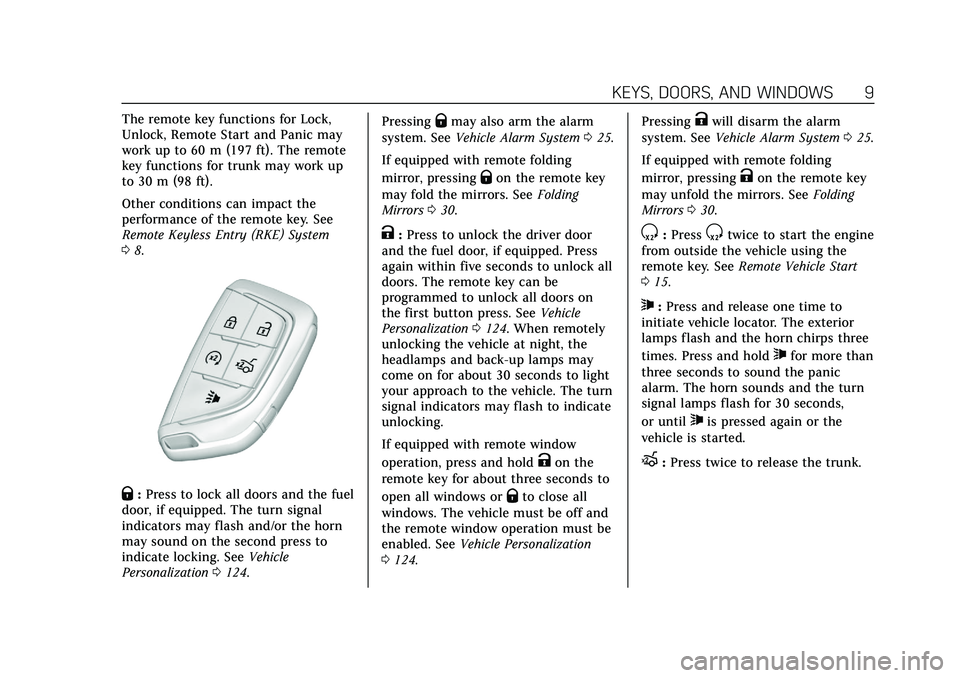
The remote key functions for Lock,
Unlock, Remote Start and Panic may
work up to 60 m (197 ft). The remote
key functions for trunk may work up
to 30 m (98 ft).
Other conditions can impact the
performance of the remote key. See
Remote Keyless Entry (RKE) System
08.
Q:Press to lock all doors and the fuel
door, if equipped. The turn signal
indicators may flash and/or the horn
may sound on the second press to
indicate locking. See Vehicle
Personalization 0124. Pressing
Qmay also arm the alarm
system. See Vehicle Alarm System 025.
If equipped with remote folding
mirror, pressing
Qon the remote key
may fold the mirrors. See Folding
Mirrors 030.
K:Press to unlock the driver door
and the fuel door, if equipped. Press
again within five seconds to unlock all
doors. The remote key can be
programmed to unlock all doors on
the first button press. See Vehicle
Personalization 0124. When remotely
unlocking the vehicle at night, the
headlamps and back-up lamps may
come on for about 30 seconds to light
your approach to the vehicle. The turn
signal indicators may flash to indicate
unlocking.
If equipped with remote window
operation, press and hold
Kon the
remote key for about three seconds to
open all windows or
Qto close all
windows. The vehicle must be off and
the remote window operation must be
enabled. See Vehicle Personalization
0 124. Pressing
Kwill disarm the alarm
system. See Vehicle Alarm System 025.
If equipped with remote folding
mirror, pressing
Kon the remote key
may unfold the mirrors. See Folding
Mirrors 030.
S:PressStwice to start the engine
from outside the vehicle using the
remote key. See Remote Vehicle Start
0 15.
7:Press and release one time to
initiate vehicle locator. The exterior
lamps flash and the horn chirps three
times. Press and hold
7for more than
three seconds to sound the panic
alarm. The horn sounds and the turn
signal lamps flash for 30 seconds,
or until
7is pressed again or the
vehicle is started.
X: Press twice to release the trunk.
Page 11 of 359
Cadillac CT5 Owner Manual (GMNA-Localizing-U.S./Canada-13060105) -
2020 - CRC - 2/14/20
10 KEYS, DOORS, AND WINDOWS
Keyless Access Operation
The Keyless Access system lets you
lock and unlock the doors and access
the trunk without removing the
remote key from your pocket, purse,
briefcase, etc. The remote key must be
within 1 m (3 ft) of the trunk or door
being opened. If equipped, there will
be a sensor on the outside door
handles.
The Keyless Access system can be
programmed to unlock all doors on
the first door handle press from the
driver door button. Keyless unlocking
can also be turned off. SeeVehicle
Personalization 0124.
If equipped with memory seats,
remote keys 1 and 2 are linked to
seating positions of memory 1 or 2.
See Memory Seats 044. Keyless Unlocking/Locking from the
Driver Door
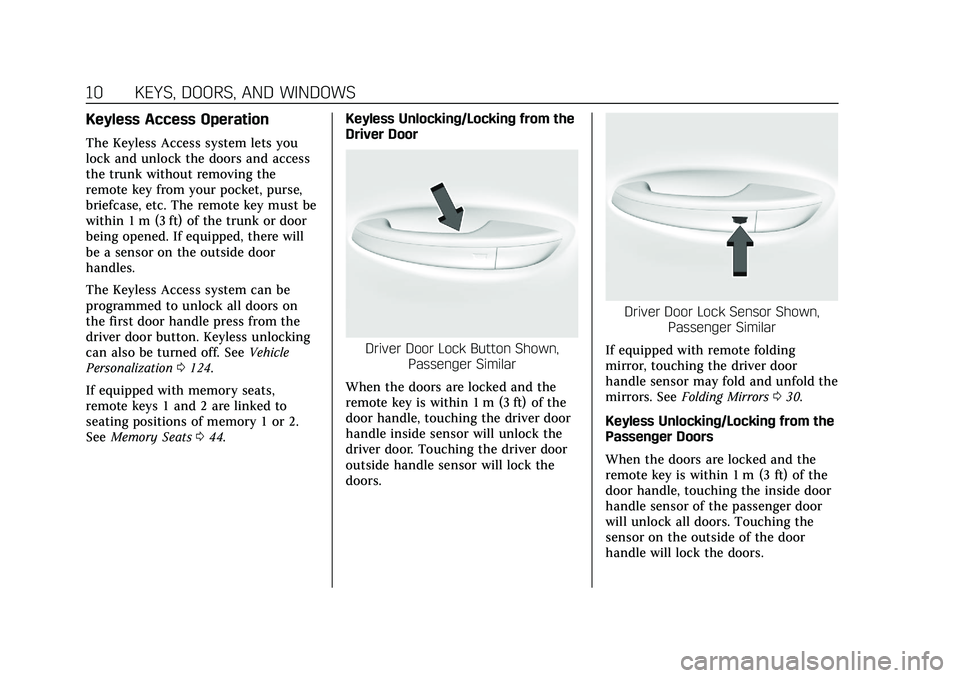
Driver Door Lock Button Shown,
Passenger Similar
When the doors are locked and the
remote key is within 1 m (3 ft) of the
door handle, touching the driver door
handle inside sensor will unlock the
driver door. Touching the driver door
outside handle sensor will lock the
doors.
Driver Door Lock Sensor Shown, Passenger Similar
If equipped with remote folding
mirror, touching the driver door
handle sensor may fold and unfold the
mirrors. See Folding Mirrors 030.
Keyless Unlocking/Locking from the
Passenger Doors
When the doors are locked and the
remote key is within 1 m (3 ft) of the
door handle, touching the inside door
handle sensor of the passenger door
will unlock all doors. Touching the
sensor on the outside of the door
handle will lock the doors.
Page 12 of 359
Cadillac CT5 Owner Manual (GMNA-Localizing-U.S./Canada-13060105) -
2020 - CRC - 2/14/20
KEYS, DOORS, AND WINDOWS 11
Disable/Enable Keyless Unlocking of
Exterior Door Handles and Trunk
If equipped, keyless unlocking of the
exterior door handles and trunk can
be disabled and enabled.
Disabling Keyless Unlocking:
With the vehicle off, press and hold
Q
andKon the remote key at the same
time for approximately four seconds.
The turn signal lamps will flash four
times quickly to indicate access is
disabled. Using any exterior handle to
unlock the doors or open the trunk
will cause the turn signal lamps to
flash four times quickly, indicating
access is disabled. If disabled, disarm
the alarm system before starting the
vehicle.
Disabling Keyless Unlocking may also
be configured under Vehicle
Personalization. See Vehicle
Personalization 0124. Enabling Keyless Unlocking:
With the vehicle off, press and hold
Q
andKon the remote key at the same
time for approximately four seconds.
The turn signal lamps will flash twice
quickly to indicate access is enabled.
Enabling Keyless Unlocking may also
be configured under Vehicle
Personalization. See Vehicle
Personalization 0124.
Passive (Walkaway) Locking
The Keyless Access system will lock
the vehicle several seconds after all
doors are closed if the vehicle is off
and at least one remote key has been
removed or none remain in the
vehicle.
If equipped, the fuel door will
also lock.
If other electronic devices interfere
with the remote key signal, the vehicle
may not detect the remote key inside
the vehicle. If passive (walkaway)
locking is enabled, the doors may lock
with the remote key inside the vehicle.
Do not leave the remote key in an
unattended vehicle. To customize the doors to
automatically lock when exiting the
vehicle, see
Vehicle Personalization
0 124.
If equipped with remote folding
mirror, passive (walkaway) locking
may fold and unfold the mirrors. See
Folding Mirrors 030.
Temporary Disable of Passive
(Walkaway) Locking
Temporarily disable passive locking by
pressing and holding
Kon the
interior door switch with a door open
for at least four seconds, or until three
chimes are heard. Passive (walkaway)
locking will then remain disabled until
Qon the interior door is pressed,
or until the vehicle is turned on.
Remote Key Left In Vehicle Alert
When the vehicle is turned off and a
remote key is left in the vehicle, the
horn will chirp three times after all
doors are closed. To turn on or off see
Vehicle Personalization 0124.
Page 13 of 359
Cadillac CT5 Owner Manual (GMNA-Localizing-U.S./Canada-13060105) -
2020 - CRC - 2/14/20
12 KEYS, DOORS, AND WINDOWS
Remote Key No Longer In Vehicle
Alert
If the vehicle is on, with a door open,
and then all doors are closed, the
vehicle will check for a remote key
inside. If a remote key is not detected,
the Driver Information Center (DIC)
will display NO KEY FOUND and the
horn will chirp three times.
This occurs only once each time the
vehicle is driven. SeeVehicle
Personalization 0124.
Keyless Trunk Opening
Press the touch pad on the rear of the
trunk above the license plate if the
remote key is within 1 m (3 ft).
Mechanical Key Access
To access a vehicle with a weak
remote key battery, see Door Locks
0 16.
Programming Remote Keys to
the Vehicle
Only remote keys programmed to the
vehicle will work. If a remote key is
lost or stolen, a replacement can be
purchased and programmed through your dealer. The vehicle can be
reprogrammed so that lost or stolen
remote keys no longer work. Each
vehicle can have up to eight remote
keys matched to it.
Programming with Recognized
Remote Keys
A new key can be programmed to the
vehicle when there are two
recognized keys.
To program, the vehicle must be in
RUN and all remote keys, both
currently recognized and new, must
be with you.
1. Place the two recognized remote keys on the passenger seat.
2. Scroll to the DIC menu to "Remote Key Learn" menu and
select.
The DIC displays READY FOR
REMOTE #3, 4, 5, ETC.
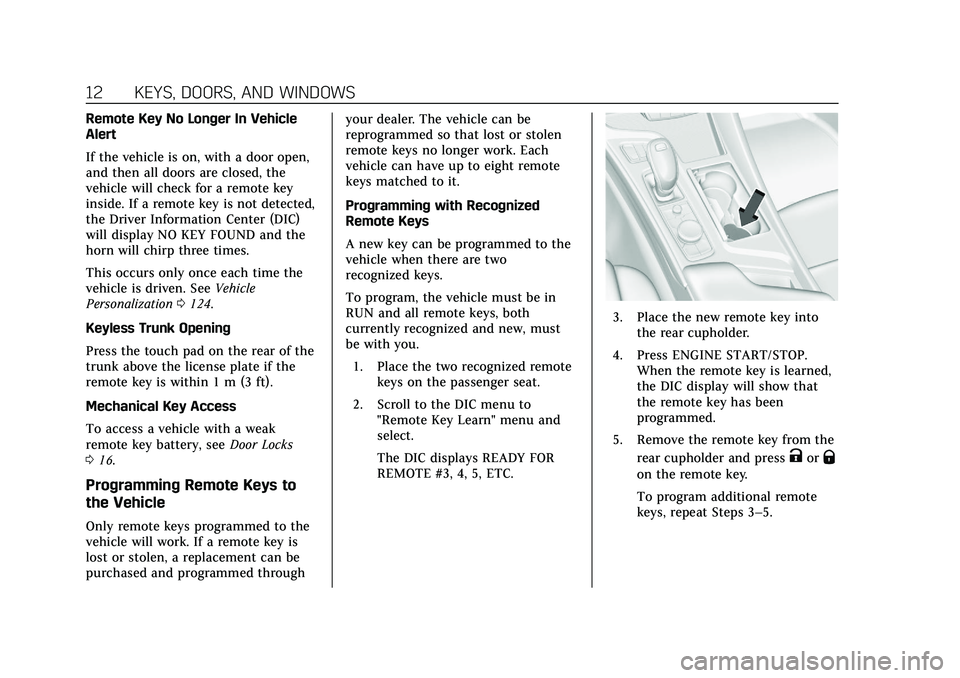
3. Place the new remote key intothe rear cupholder.
4. Press ENGINE START/STOP. When the remote key is learned,
the DIC display will show that
the remote key has been
programmed.
5. Remove the remote key from the rear cupholder and press
KorQ
on the remote key.
To program additional remote
keys, repeat Steps 3–5.
Page 20 of 359

Cadillac CT5 Owner Manual (GMNA-Localizing-U.S./Canada-13060105) -
2020 - CRC - 2/14/20
KEYS, DOORS, AND WINDOWS 19
Q:Press to lock the doors. The
indicator light in the switch will
illuminate when locked.
K: Press to unlock the doors.
The fuel door is also locked or
unlocked using these features.
Delayed Locking
This feature delays the actual locking
of the doors until five seconds after all
doors are closed.
When
Qis pressed on the power door
lock switch with the door open, a
chime will sound three times
indicating that delayed locking is
active.
The doors will then lock automatically
five seconds after all doors are closed.
If a door is reopened before
five seconds have elapsed, the
five-second timer will reset once all
the doors are closed again.
Press
Qon the door lock switch again,
or press
Qon the key, to override this
feature and lock the doors
immediately. Delayed locking can be programmed
through the Driver Information Center
(DIC). See
Vehicle Personalization
0 124.
Automatic Door Locks
The doors will lock automatically
when all doors are closed, the ignition
is on, and the vehicle is shifted out of
P (Park).
If a vehicle door is unlocked, and then
opened and closed, the doors will lock
either when your foot is removed from
the brake or the vehicle speed
becomes faster than 13 km/h (8 mph).
To unlock the doors:
.
Press
Kon the power door lock
switch.
. Shift the transmission into
P (Park).
Automatic door locking cannot be
disabled. Automatic door unlocking
can be programmed. See Vehicle
Personalization 0124.
Lockout Protection
If the vehicle is on or in ACC/
ACCESSORY and the power door lock
switch is pressed with the driver door
open, all the doors will lock and only
the driver door will unlock.
If the vehicle is off and locking is
requested while a door is open, when
all doors are closed the vehicle will
check for keys inside. If any remote
key programmed to the vehicle is
detected and the number of keys
inside has not reduced, the driver door
will unlock and the horn will chirp
three times.
Lockout Protection can be manually
overridden with the driver door open
by pressing and holding
Qon the
power door lock switch.
Page 23 of 359
Cadillac CT5 Owner Manual (GMNA-Localizing-U.S./Canada-13060105) -
2020 - CRC - 2/14/20
22 KEYS, DOORS, AND WINDOWS
Hands-Free Trunk
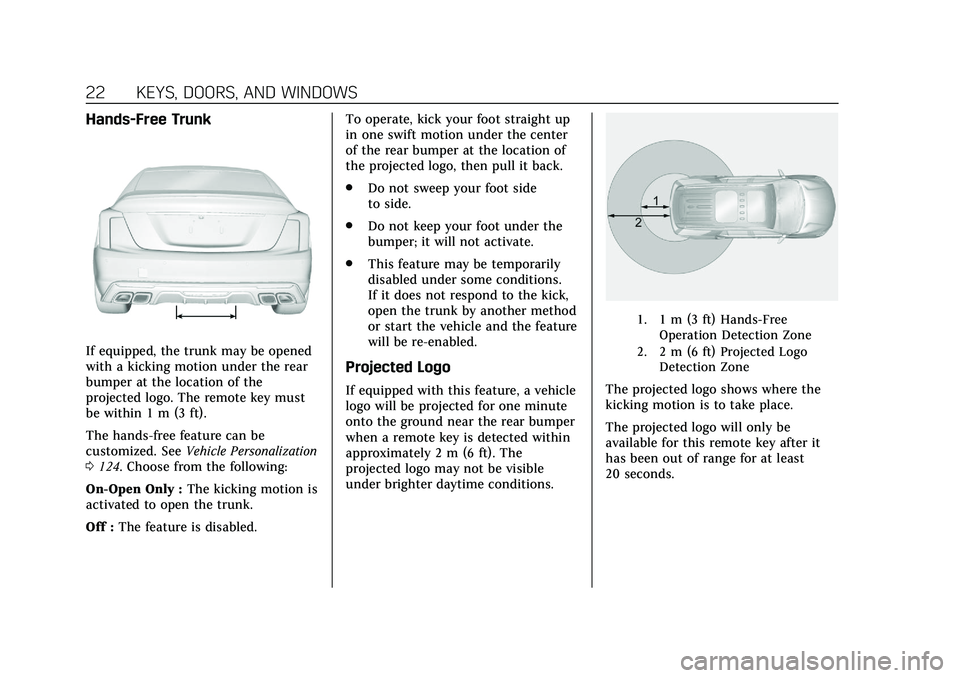
If equipped, the trunk may be opened
with a kicking motion under the rear
bumper at the location of the
projected logo. The remote key must
be within 1 m (3 ft).
The hands-free feature can be
customized. SeeVehicle Personalization
0 124. Choose from the following:
On-Open Only : The kicking motion is
activated to open the trunk.
Off : The feature is disabled. To operate, kick your foot straight up
in one swift motion under the center
of the rear bumper at the location of
the projected logo, then pull it back.
.
Do not sweep your foot side
to side.
. Do not keep your foot under the
bumper; it will not activate.
. This feature may be temporarily
disabled under some conditions.
If it does not respond to the kick,
open the trunk by another method
or start the vehicle and the feature
will be re-enabled.
Projected Logo
If equipped with this feature, a vehicle
logo will be projected for one minute
onto the ground near the rear bumper
when a remote key is detected within
approximately 2 m (6 ft). The
projected logo may not be visible
under brighter daytime conditions.
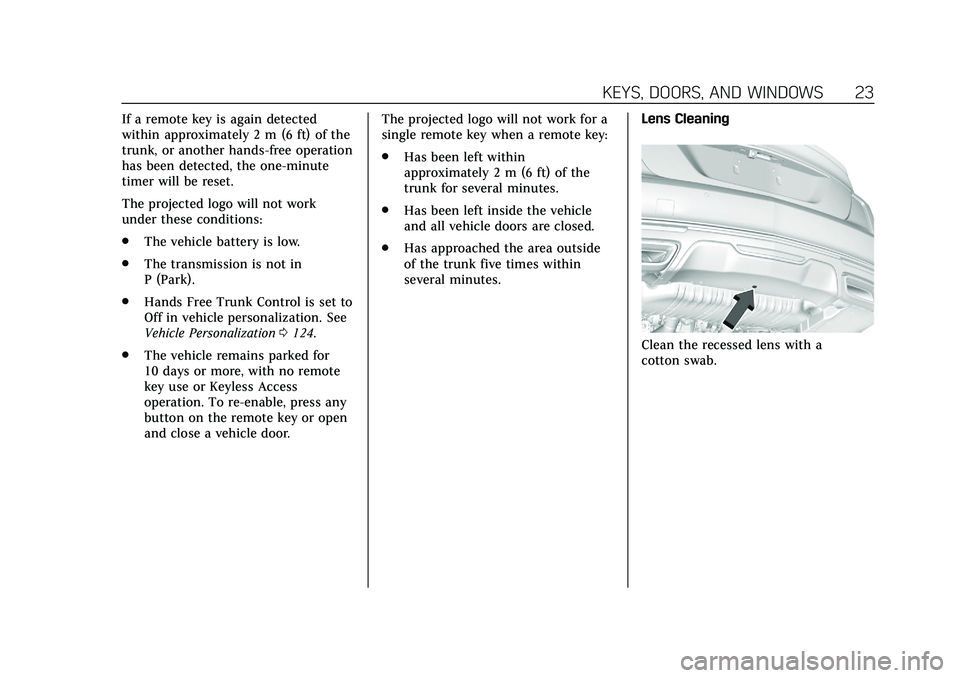
1. 1 m (3 ft) Hands-Free
Operation Detection Zone
2. 2 m (6 ft) Projected Logo Detection Zone
The projected logo shows where the
kicking motion is to take place.
The projected logo will only be
available for this remote key after it
has been out of range for at least
20 seconds.
Page 24 of 359
Cadillac CT5 Owner Manual (GMNA-Localizing-U.S./Canada-13060105) -
2020 - CRC - 2/14/20
KEYS, DOORS, AND WINDOWS 23
If a remote key is again detected
within approximately 2 m (6 ft) of the
trunk, or another hands-free operation
has been detected, the one-minute
timer will be reset.
The projected logo will not work
under these conditions:
.The vehicle battery is low.
. The transmission is not in
P (Park).
. Hands Free Trunk Control is set to
Off in vehicle personalization. See
Vehicle Personalization 0124.
. The vehicle remains parked for
10 days or more, with no remote
key use or Keyless Access
operation. To re-enable, press any
button on the remote key or open
and close a vehicle door. The projected logo will not work for a
single remote key when a remote key:
.
Has been left within
approximately 2 m (6 ft) of the
trunk for several minutes.
. Has been left inside the vehicle
and all vehicle doors are closed.
. Has approached the area outside
of the trunk five times within
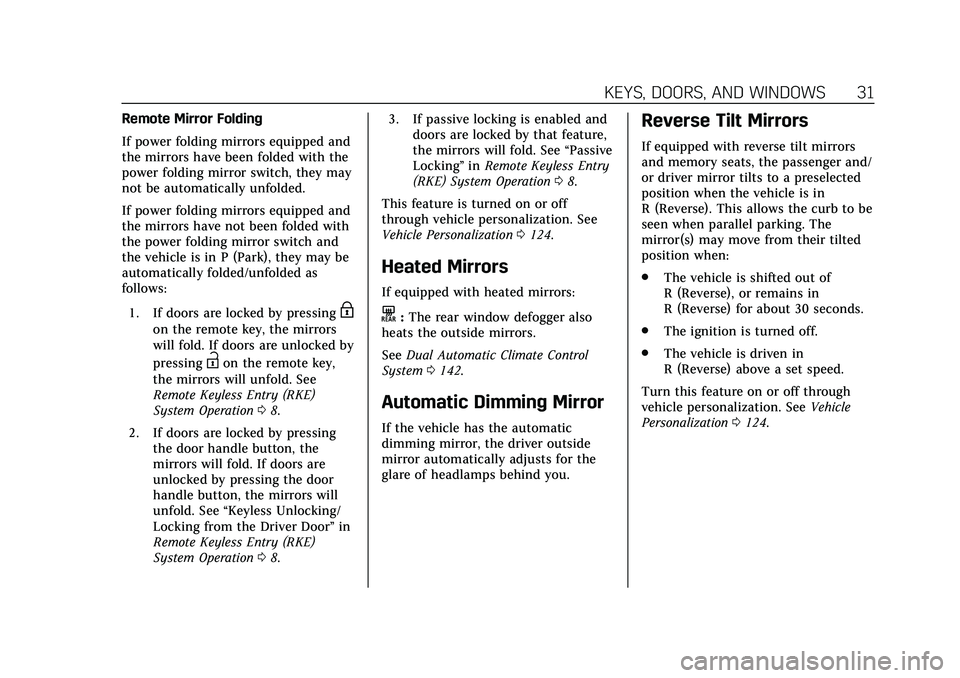
several minutes. Lens Cleaning
Clean the recessed lens with a
cotton swab.
Page 32 of 359
Cadillac CT5 Owner Manual (GMNA-Localizing-U.S./Canada-13060105) -
2020 - CRC - 2/14/20
KEYS, DOORS, AND WINDOWS 31
Remote Mirror Folding
If power folding mirrors equipped and
the mirrors have been folded with the
power folding mirror switch, they may
not be automatically unfolded.
If power folding mirrors equipped and
the mirrors have not been folded with
the power folding mirror switch and
the vehicle is in P (Park), they may be
automatically folded/unfolded as
follows:1. If doors are locked by pressing
H
on the remote key, the mirrors
will fold. If doors are unlocked by
pressing
Ion the remote key,
the mirrors will unfold. See
Remote Keyless Entry (RKE)
System Operation 08.
2. If doors are locked by pressing the door handle button, the
mirrors will fold. If doors are
unlocked by pressing the door
handle button, the mirrors will
unfold. See “Keyless Unlocking/
Locking from the Driver Door” in
Remote Keyless Entry (RKE)
System Operation 08. 3. If passive locking is enabled and
doors are locked by that feature,
the mirrors will fold. See “Passive
Locking” inRemote Keyless Entry
(RKE) System Operation 08.
This feature is turned on or off
through vehicle personalization. See
Vehicle Personalization 0124.
Heated Mirrors
If equipped with heated mirrors:
K:The rear window defogger also
heats the outside mirrors.
See Dual Automatic Climate Control
System 0142.
Automatic Dimming Mirror
If the vehicle has the automatic
dimming mirror, the driver outside
mirror automatically adjusts for the
glare of headlamps behind you.
Reverse Tilt Mirrors
If equipped with reverse tilt mirrors
and memory seats, the passenger and/
or driver mirror tilts to a preselected
position when the vehicle is in
R (Reverse). This allows the curb to be
seen when parallel parking. The
mirror(s) may move from their tilted
position when:
.
The vehicle is shifted out of
R (Reverse), or remains in
R (Reverse) for about 30 seconds.
. The ignition is turned off.
. The vehicle is driven in
R (Reverse) above a set speed.
Turn this feature on or off through
vehicle personalization. See Vehicle
Personalization 0124.
Page 37 of 359

Cadillac CT5 Owner Manual (GMNA-Localizing-U.S./Canada-13060105) -
2020 - CRC - 2/14/20
36 KEYS, DOORS, AND WINDOWS
If equipped, pull the window switch
up fully and quickly release to express
close the window. Briefly press or pull
the window switch in the same
direction to stop that window’s
express movement.
Window Automatic Reversal
System
The express-close feature will reverse
window movement if it comes in
contact with an object. Extreme cold
or ice could cause the window to
auto-reverse. The window will operate
normally after the object or condition
is removed.
Automatic Reversal System
Override
{Warning
If automatic reversal system
override is active, the window will
not reverse automatically. You or
others could be injured and the
window could be damaged. Before
using automatic reversal system(Continued)
Warning (Continued)
override, make sure that all people
and obstructions are clear of the
window path.
When the engine is on, override the
automatic reversal system by pulling
and holding the window switch if
conditions prevent it from closing.
Programming the Power
Windows
Programming may be necessary if the
vehicle battery has been disconnected
or discharged. If the window is unable
to express-up, program each
express-close window: 1. Close all doors.
2. Turn the ignition on or to ACC/ ACCESSORY.
3. Partially open the window to be programmed. Then close it and
continue to pull the switch
briefly after the window has fully
closed. 4. Open the window and continue
to press the switch briefly after
the window has fully opened.
Remote Window Operation
If equipped, this feature allows all the
windows to be opened remotely.
If enabled in vehicle personalization,
press and hold
Kon the remote key.
See Vehicle Personalization 0124.
Sun Visors
Pull the sun visor down to block glare.
Detach the sun visor from the center
mount to pivot to the side window
and, if equipped, extend along the rod.
Page 45 of 359
Cadillac CT5 Owner Manual (GMNA-Localizing-U.S./Canada-13060105) -
2020 - CRC - 2/14/20
44 SEATS AND RESTRAINTS
.Tilt the top of the control
rearward to recline.
. Tilt the top of the control forward
to raise.
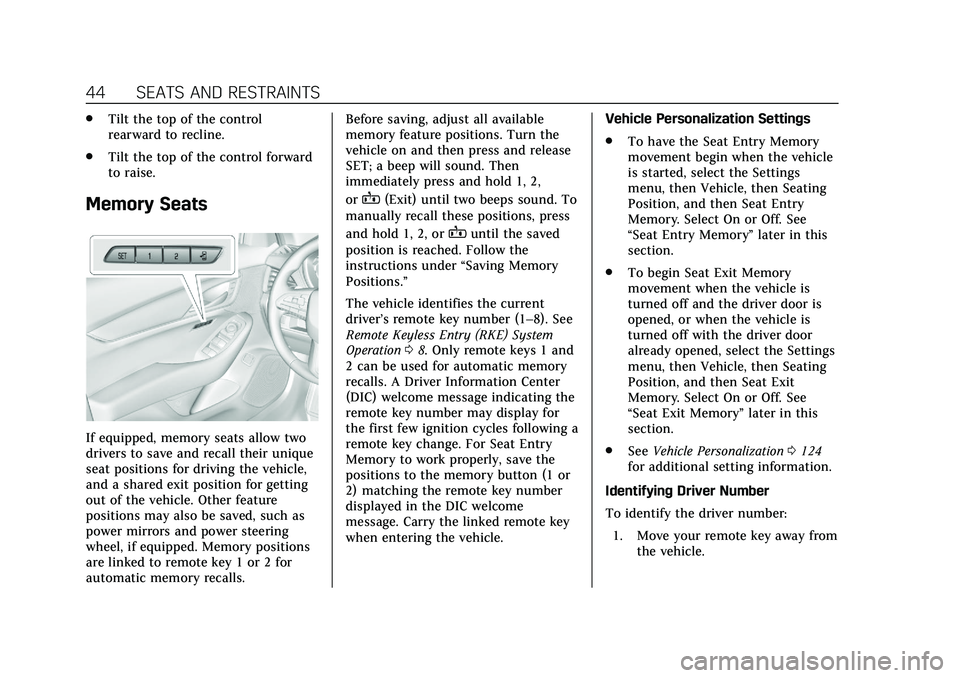
Memory Seats
If equipped, memory seats allow two
drivers to save and recall their unique
seat positions for driving the vehicle,
and a shared exit position for getting
out of the vehicle. Other feature
positions may also be saved, such as
power mirrors and power steering
wheel, if equipped. Memory positions
are linked to remote key 1 or 2 for
automatic memory recalls. Before saving, adjust all available
memory feature positions. Turn the
vehicle on and then press and release
SET; a beep will sound. Then
immediately press and hold 1, 2,
or
B(Exit) until two beeps sound. To
manually recall these positions, press
and hold 1, 2, or
Buntil the saved
position is reached. Follow the
instructions under “Saving Memory
Positions.”
The vehicle identifies the current
driver’s remote key number (1–8). See
Remote Keyless Entry (RKE) System
Operation 08. Only remote keys 1 and
2 can be used for automatic memory
recalls. A Driver Information Center
(DIC) welcome message indicating the
remote key number may display for
the first few ignition cycles following a
remote key change. For Seat Entry
Memory to work properly, save the
positions to the memory button (1 or
2) matching the remote key number
displayed in the DIC welcome
message. Carry the linked remote key
when entering the vehicle. Vehicle Personalization Settings
.
To have the Seat Entry Memory
movement begin when the vehicle
is started, select the Settings
menu, then Vehicle, then Seating
Position, and then Seat Entry
Memory. Select On or Off. See
“Seat Entry Memory” later in this
section.
. To begin Seat Exit Memory
movement when the vehicle is
turned off and the driver door is
opened, or when the vehicle is
turned off with the driver door
already opened, select the Settings
menu, then Vehicle, then Seating
Position, and then Seat Exit
Memory. Select On or Off. See
“Seat Exit Memory” later in this
section.
. See Vehicle Personalization 0124
for additional setting information.
Identifying Driver Number
To identify the driver number: 1. Move your remote key away from the vehicle.