ad blue CADILLAC CT5 2023 User Guide
[x] Cancel search | Manufacturer: CADILLAC, Model Year: 2023, Model line: CT5, Model: CADILLAC CT5 2023Pages: 526, PDF Size: 6.85 MB
Page 179 of 526
Cadillac CT5 Owner Manual (GMNA-Localizing-U.S./Canada-16500419) -
2023 - CRC - 5/6/22
178 Infotainment System
of the display or by touching
the More option and then
touching the Bluetooth device.
To play music via Bluetooth:1. Power on the device, and pair to connect the device.
2. Once paired, touch Audio from the Home Page, then
touch Bluetooth from the
recent sources list on the
left of the display.
Bluetooth Sound Menu
See “Infotainment System
Sound Menu” under AM-FM
Radio 0169.
Manage Bluetooth Devices
From the Home Page: 1. Touch Audio.
2. Touch Devices to add or delete devices.
When touching Bluetooth, the
radio may not be able to
launch the audio player on the
connected device to start
playing. When the vehicle is
not moving, use the mobile
device to begin playback. All devices launch audio
differently. When selecting
Bluetooth as a source, the
radio may show as paused on
the display. Press play on the
device or touch
pon the
vehicle display to begin
playback.
Browse functionality will be
provided where supported by
the Bluetooth device. This
media content will not be part
of the MyMedia source mode.
Some smartphones support
sending Bluetooth music
information to display on the
radio. When the radio receives
this information, it will check to
see if any is available and
display it. For more
information about supported
Bluetooth features, visit your
brand website. See Online
Account 0488 for details.
See Radio Frequency
Statement 0496.
Navigation
Using the Navigation
System
If equipped, launch the Nav
application by touching the
Nav icon on the Home Page or
on the shortcut tray near the
bottom of the infotainment
display.
When the Nav application is
launched for the first time, a
product walkthrough is
available. Use of the feature
requires the Terms and
Conditions and the Privacy
statement to be confirmed.
If available and signed into a
profile, it is also suggested to
enable and confirm Predictive
Navigation.
Page 201 of 526
Cadillac CT5 Owner Manual (GMNA-Localizing-U.S./Canada-16500419) -
2023 - CRC - 5/6/22
200 Infotainment System
Voice Recognition for the
Phone
“Call
Initiate a call to a stored
contact. The command may
include location if the contact
has location numbers stored.
“Call
“At Work,” “On Mobile,” or
“On Other” :Initiate a call to a
stored contact and location at
home, at work, on mobile
device, or on another phone.
“Call
Initiate a call to a cell phone
number of seven digits, 10
digits, or three digit
emergency numbers.
“Pair Phone” :Begin the
Bluetooth pairing process.
Follow the instructions on the
infotainment display.
“Redial” :Initiate a call to the
last dialed number.
“Switch Phone” :Select a
different connected cell phone
for outgoing calls. “Voice Keypad”
:Begin a
dialog to enter special
numbers like international
numbers. The numbers can be
entered in groups of digits
with each group of digits being
repeated back by the system.
If the group of digits is not
correct, the command “Delete”
will remove the last group of
digits and allow them to be
re-entered. Once the entire
number has been entered, the
command “Call”will start
dialing the number.
Phone Assistant Voice
Recognition
Press and holdgon the
steering wheel controls to
pass through and launch
Google phone assistant or Siri.
For the low radio, whether
connected by Bluetooth or
phone projection, the only
available voice recognition is
either Siri (iPhone) or the
Google Assistant (Android).
Performance Data
Recorder (PDR)
If equipped, the PDR icon
displays on the Home Page.
Important Information
Use of the PDR may be
prohibited or legally restricted
in certain countries and
situations. Ensure compliance
with applicable laws and
regulations, including, but not
limited to: privacy laws, laws
related to camera surveillance
and recordings, road traffic
and security laws, and laws on
the protection of publicity and
personality rights.
.Do not use the PDR if it
causes distraction.
.Do not rely on camera
footage to steer the vehicle.
.Comply with any notice and
consent requirements
before capturing and/or
recording the voices or
Page 207 of 526
Cadillac CT5 Owner Manual (GMNA-Localizing-U.S./Canada-16500419) -
2023 - CRC - 5/6/22
206 Infotainment System
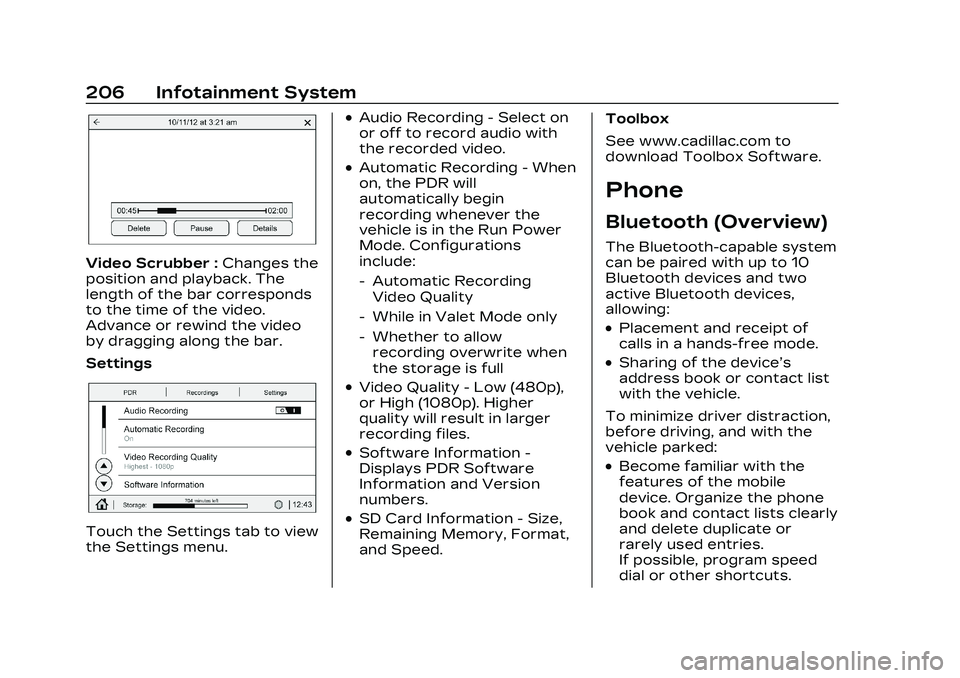
Video Scrubber :Changes the
position and playback. The
length of the bar corresponds
to the time of the video.
Advance or rewind the video
by dragging along the bar.
Settings
Touch the Settings tab to view
the Settings menu.
.Audio Recording - Select on
or off to record audio with
the recorded video.
.Automatic Recording - When
on, the PDR will
automatically begin
recording whenever the
vehicle is in the Run Power
Mode. Configurations
include:
‐ Automatic Recording
Video Quality
‐ While in Valet Mode only
‐ Whether to allow
recording overwrite when
the storage is full
.Video Quality - Low (480p),
or High (1080p). Higher
quality will result in larger
recording files.
.Software Information -
Displays PDR Software
Information and Version
numbers.
.SD Card Information - Size,
Remaining Memory, Format,
and Speed. Toolbox
See www.cadillac.com to
download Toolbox Software.
Phone
Bluetooth (Overview)
The Bluetooth-capable system
can be paired with up to 10
Bluetooth devices and two
active Bluetooth devices,
allowing:
.Placement and receipt of
calls in a hands-free mode.
.Sharing of the device’s
address book or contact list
with the vehicle.
To minimize driver distraction,
before driving, and with the
vehicle parked:
.Become familiar with the
features of the mobile
device. Organize the phone
book and contact lists clearly
and delete duplicate or
rarely used entries.
If possible, program speed
dial or other shortcuts.
Page 208 of 526
Cadillac CT5 Owner Manual (GMNA-Localizing-U.S./Canada-16500419) -
2023 - CRC - 5/6/22
Infotainment System 207
.Review the controls and
operation of the
infotainment system.
.Pair mobile device(s) to the
vehicle. The system may not
work with all mobile devices.
See“Pairing” later in this
section.
Vehicles with a Bluetooth
system can use a
Bluetooth-capable mobile
device with a Hands-Free
Profile to make and receive
phone calls. The infotainment
system and voice recognition
are used to control the
system. The system can be
used while the ignition is on or
in accessory mode. The range
of the Bluetooth system can
be up to 9.1 m (30 ft). Not all
mobile devices support all
functions and not all mobile
devices work with the
Bluetooth system. Visit your
brand website for more
information about compatible
mobile devices. See Online
Account 0488.
Controls
Use the controls on the center
stack and the steering wheel
to operate the Bluetooth
system.
Steering Wheel Controls
g:Press to answer incoming
calls and start voice
recognition on your connected
Bluetooth mobile device.
i: Press to end a call, decline
a call, or cancel an operation.
Press to mute or unmute the
infotainment system when not
on a call.
Infotainment System
Controls
For information about how to
navigate the menu system
using the infotainment
controls, see Overview 0162.
Audio System
When using the Bluetooth
mobile device system, sound
comes through the vehicle's
front audio system speakers and overrides the audio
system. The volume level while
on a mobile device call can be
adjusted by pressing the
steering wheel controls or the
volume control on the center
stack. The adjusted volume
level remains in memory for
later calls. The volume cannot
be lowered beyond a certain
level.
Bluetooth (Pairing
and Using a Phone)
Pairing
A Bluetooth-enabled mobile
device must be paired to the
Bluetooth system and then
connected to the vehicle
before it can be used. See the
mobile device manufacturer's
user guide for Bluetooth
functions before pairing the
device.
Pairing Information
.If no mobile device has been
connected, the Phone main
page on the infotainment
Page 209 of 526
Cadillac CT5 Owner Manual (GMNA-Localizing-U.S./Canada-16500419) -
2023 - CRC - 5/6/22
208 Infotainment System
display will show the
Connect Phone option.
Touch this option to
connect. Another way to
connect is to touch the
Phones tab at the top right
of the display and then
touch Add Phone.
.A Bluetooth smartphone
with music capability can be
paired to the vehicle as a
smartphone and a music
player at the same time.
.Up to 10 devices can be
paired to the Bluetooth
system.
.The pairing process is
disabled when the vehicle is
moving.
.Pairing only needs to be
completed once, unless the
pairing information on the
cell phone changes or the
cell phone is deleted from
the system.
.If multiple paired cell phones
are within range of the
system, the system
connects to the paired cellphone that is set to First to
Connect. If there is no cell
phone set to First to
Connect, it will link to the cell
phone which was used last.
To link to a different paired
cell phone, see
“Linking to a
Different Phone” later in this
section.
Pairing a Phone 1. Make sure Bluetooth has been enabled on the cell
phone before the pairing
process is started.
2. Touch the Phone icon on the Home Page or the
phone icon on the shortcut
tray near the bottom of
the display.
3. Touch Phones at the top of the infotainment display.
There is also a Connect
Phones option in the
middle of the Phone
display which will shortcut
to the Phone List menu.
4. Touch Add Phone. 5. Select the vehicle name
shown on the infotainment
display from your cell
phone’s Bluetooth
Settings list.
6. Follow the instructions on the cell phone to confirm
the six-digit code showing
on the infotainment display
and touch Pair. The code
on the cell phone and
infotainment display will
need to be acknowledged
for a successful pair.
7. Start the pairing process on the cell phone to be
paired to the vehicle. See
the cell phone
manufacturer's user guide
for information on this
process. Once the cell
phone is paired, it will show
under Connected.
Page 210 of 526
Cadillac CT5 Owner Manual (GMNA-Localizing-U.S./Canada-16500419) -
2023 - CRC - 5/6/22
Infotainment System 209
8. If the vehicle name doesnot appear on your cell
phone, there are a few
ways to start the pairing
process over:
.Turn the cell phone off
and then back on.
.Go back to the beginning
of the Phone menus on
the infotainment display
and restart the pairing
process.
.Reset the cell phone, but
this step should be done
as a last effort.
9. If the cell phone prompts to accept connection or
allow phone book
download, touch Always
Accept and Allow. The
phone book may not be
available if not accepted.
10. Repeat Steps 1−8 to pair additional cell phones. First to Connect Paired
Phones
If multiple paired cell phones
are within range of the
system, the system connects
to the paired cell phone that is
set as First to Connect. To
enable a paired cell phone as
the First to Connect phone:
1. Make sure the cell phone is turned on.
2. Touch Settings, then touch System.
3. Touch Phones to access all paired and all connected
cell phones and mobile
devices.
4. Touch the information icon or pencil icon to the right
of the cell phone to open
the cell phone’s
settings menu.
5. Touch the First to Connect option, to enable the
setting for that device.
Cell phones and mobile
devices can be added,
removed, connected, and disconnected. A sub-menu will
display whenever a request is
made to add or manage cell
phones and mobile devices.
Secondary Phone
A cell phone can be enabled as
a Secondary Phone by
touching the information icon
to the right of the paired cell
phone name to open the
phone settings menu. If a cell
phone is enabled as a
Secondary Phone, it can
connect simultaneously
alongside another Bluetooth
mobile device. In doing so, the
Secondary Phone will be
labeled as Incoming Calls. This
means the mobile device can
only receive calls. The Address
Book of a Secondary Phone
will not be available and
hands-free outgoing calls
cannot be placed using this
cell phone.
If needed, touch the
Secondary Phone while in the
Phones list to swap it into the
Outgoing and Incoming role.
Page 211 of 526
Cadillac CT5 Owner Manual (GMNA-Localizing-U.S./Canada-16500419) -
2023 - CRC - 5/6/22
210 Infotainment System
This role makes it possible to
place outgoing calls from the
Contacts and Recents list.
Listing All Paired and
Connected Phones1. Touch the Phone icon on the Home Page or the
phone icon on the shortcut
tray near the bottom of
the display.
2. Touch Phones.
Disconnecting a Connected
Phone 1. Touch the Phone icon on the Home Page.
2. Touch Phones.
3. Touch the information icon or the pencil icon next to
the connected cell phone
or mobile device to show
the cell phone’s or mobile
device’s information
display.
4. Touch Disconnect. Deleting a Paired Phone
1. Touch the Phone icon on the Home Page or the
phone icon on the shortcut
tray near the bottom of
the display.
2. Touch Phones.
3. Touch the information icon or the pencil icon next to
the connected cell phone
to display the cell phone’s
or mobile device’s
information display.
4. Touch Forget Device.
Linking to a Different Phone
To link to a different cell
phone, the new cell phone
must be in the vehicle and
paired to the Bluetooth
system. 1. Touch the Phone icon on the Home Page or the
phone icon on the shortcut
tray near the bottom of
the display.
2. Touch Phones. 3. Touch the new cell phone
to link to from the not
connected phone list. See
“First to Connect Paired
Phones” and“Secondary
Phone” previously in this
section.
Switching to Handset or
Handsfree Mode
To switch between handset or
handsfree mode:
.While the active call is
hands-free, touch the
Handset option to switch to
the handset mode.
The mute icon will not be
available or functional while
Handset mode is active.
.While the active call is on the
handset, touch the Handset
option to switch to the
hands-free mode.
Page 212 of 526
Cadillac CT5 Owner Manual (GMNA-Localizing-U.S./Canada-16500419) -
2023 - CRC - 5/6/22
Infotainment System 211
Making a Call Using
Contacts and Recent Calls
Calls can be made through the
Bluetooth system using
personal cell phone contact
information for all cell phones
that support the Phone Book
feature. Become familiar with
the cell phone settings and
operation. Verify the cell
phone supports this feature.
The Contacts menu accesses
the phone book stored in the
cell phone.
The Recents menu accesses
the recents call list from your
cell phone.
To make a call using the
Contacts menu:1. Touch the Phone icon on the Home Page.
2. Touch Contacts.
3. The Contacts list can be searched by using the first
character. Touch A-Z on the infotainment display to
scroll through the list of
names.
Touch the name to call.
4. Touch the desired contact number to call.
To make a call using the
Recents menu: 1. Touch Phone on the Home Page.
2. Touch Recents.
3. Touch the name or number to call.
Making a Call Using the
Keypad
To make a call by dialing the
numbers:
1. Touch the Phone icon on the Home Page.
2. Touch Keypad and enter a phone number.
3. Touch
#on the
infotainment display to
start dialing the number.
Searching Contacts Using
the Keypad
To search for contacts using
the keypad:
1. Touch the Phone icon on the Home Page.
2. Touch Keypad and enter partial phone numbers or
contact names using the
digits on the keypad to
search.
Results will show on the
right side of the display.
Touch one to place a call.
Accepting or Declining
a Call
When an incoming call is
received, the infotainment
system mutes and a ring tone
is heard in the vehicle.
Accepting a Call
There are two ways to accept
a call:
.Pressgon the steering
wheel controls.
Page 213 of 526
Cadillac CT5 Owner Manual (GMNA-Localizing-U.S./Canada-16500419) -
2023 - CRC - 5/6/22
212 Infotainment System
.Touch Answer on the
infotainment display.
Declining a Call
There are two ways to decline
a call:
.Pression the steering
wheel controls.
.Touch Ignore on the
infotainment display.
Call Waiting
Call waiting must be
supported on the Bluetooth
cell phone and enabled by the
wireless service carrier
to work.
Accepting a Call
Press
gto answer, then touch
Switch on the infotainment
display.
Declining a Call
Press
ito decline, then
touch Ignore on the
infotainment display Switching Between Calls (Call
Waiting Calls Only)
To switch between calls, touch
Phone on the Home Page to
display Call View. While in Call
View, touch the call
information of the call on hold
to change calls.
Three-Way Calling
Three-way calling must be
supported on the Bluetooth
cell phone and enabled by the
wireless service carrier
to work.
To start a three-way call while
in a current call:
1. In the Call View, touch Add Call to add another call.
2. Initiate the second call by selecting from Recents,
Contacts, or Keypad.
3. When the second call is active, touch the merge
icon to conference the
three-way call together.
Ending a Call
.Pression the steering
wheel controls.
.Touch#on the infotainment
display, next to a call, to end
only that call.
Dual Tone
Multi-Frequency (DTMF)
Tones
The in-vehicle Bluetooth
system can send numbers
during a call. This is used when
calling a menu-driven phone
system. Use the Keypad to
enter the number.
Apple CarPlay and
Android Auto
If equipped, Android Auto
and/or Apple CarPlay
capability may be available
through a compatible
smartphone. If available, the
Android Auto and Apple
CarPlay icons will change from
Page 215 of 526
Cadillac CT5 Owner Manual (GMNA-Localizing-U.S./Canada-16500419) -
2023 - CRC - 5/6/22
214 Infotainment System
.Connecting the phone
over Bluetooth. See
Bluetooth (Overview)
0206 or
Bluetooth (Pairing and
Using a Phone) 0207.
3. Make sure wireless is turned on the phone for
wireless projection
to work.
4. When the phone is first connected to activate
Apple CarPlay or Android
Auto, agree to the terms
and conditions on both the
infotainment system and
the phone.
5. Follow the instructions on the phone.
The Android Auto and Apple
CarPlay icons on the Home
Page will illuminate depending
on the smartphone. Android
Auto and/or Apple CarPlay
may automatically launch upon
wireless connection. If not,
touch the Android Auto or
Apple CarPlay icon on the
Home Page to launch. Wireless Carplay and/or
Wireless Android Auto may
experience occasional service
disruption due to outside Wi-Fi
interference.
To disconnect the phones
wireless projection:
1. Select Settings from the Home Page.
2. Select Phones
3. Touch
4or the pencil icon
next to the phone to be
disconnected.
4. Turn off Apple CarPlay or Android Auto.
Press
{on the center stack to
return to the Home Page.
Features are subject to
change. For further
information on how to set up
Android Auto and Apple
CarPlay in the vehicle, visit
your brand website. See
Online Account 0488 for
details. Android Auto is provided by
Google and is subject to
Google’s terms and privacy
policy. Apple CarPlay is
provided by Apple and is
subject to Apple’s terms and
privacy policy. Data plan rates
apply. For Android Auto
support and to see if your
phone is compatible, see
https://support.google.com/
androidauto. For Apple
CarPlay support and to see if
your phone is compatible, see
www.apple.com/ios/carplay/.
Apple or Google may change
or suspend availability at any
time. Android Auto, Android,
Google, Google Play, and other
marks are trademarks of
Google Inc.; Apple CarPlay is a
trademark of Apple Inc.
Press
{on the center stack to
exit Android Auto or Apple
CarPlay. To enter back into
Android Auto or Apple
CarPlay, press and hold
{on
the center stack.