brake CADILLAC CT5 2023 Manual Online
[x] Cancel search | Manufacturer: CADILLAC, Model Year: 2023, Model line: CT5, Model: CADILLAC CT5 2023Pages: 526, PDF Size: 6.85 MB
Page 322 of 526
 -
2023 - CRC - 5/10/22
Driving and Operating 321
To engage:
.PressJto turn on ACC.
Make sure the white
\
indicator displays in the
inst")
Cadillac CT5 Owner Manual (GMNA-Localizing-U.S./Canada-16500419) -
2023 - CRC - 5/10/22
Driving and Operating 321
To engage:
.PressJto turn on ACC.
Make sure the white
\
indicator displays in the
instrument cluster. See
Adaptive Cruise Control
(Advanced) 0305. When
Super Cruise is available, the
white
^will display in the
instrument cluster.
.Press].
ACC will set the speed to
the current vehicle speed or
resume to the higher
previously stored ACC set
speed. When engaged and not
steering the vehicle, the
steering wheel light bar
flashes blue, and
^will be
blue. The driver is in control of
steering and Super Cruise is
not steering the vehicle.
When the vehicle is positioned
in the center of the lane, the
steering wheel light bar and
^
display will turn green,
indicating Super Cruise is
steering the vehicle.
When Super Cruise controls
the steering, traffic and other
conditions and laws permit,
and it is safe to do so, your
hands can be taken off the
steering wheel.
Always pay attention to the
road and the operation of the
vehicle. Always monitor and be
attentive of surrounding
traffic, including vehicles that
may cross the road in front of
your vehicle. Super Cruise steering can be
overridden with manual
steering at any time. When
Super Cruise is engaged,
always be prepared to take
immediate action
—including
steering, accelerating, and
braking quickly, if necessary.
When Super Cruise is
engaged, the Forward
Collision System will alert and
brake.
Steering Manually and
Changing Lanes
The vehicle can always be
manually steered, even with
Super Cruise engaged; for
example, when manually
changing lanes.
When the steering wheel is
moved manually, the steering
wheel light bar flashes blue
and
^on the instrument
cluster turns blue to indicate
Super Cruise is not steering
the vehicle.
Page 326 of 526

Cadillac CT5 Owner Manual (GMNA-Localizing-U.S./Canada-16500419) -
2023 - CRC - 5/10/22
Driving and Operating 325
Warning (Continued)
Super Cruise also cannot
determine whether you are
awake, asleep, impaired,
or properly focused on safe
driving. The vehicle could
crash into other vehicles,
drive out of the lane, or drive
off the road. Complete
attention is always required
while driving, even while
using Super Cruise. Be
prepared to take over
steering or apply the brakes
at any time.
{Warning
To prevent serious injury or
death, be alert and pay
special attention when
passing highway exits,
entrances, and crossings
with Super Cruise, and be
ready to take control of the
vehicle when necessary.
Changes in lane markings
around exits and entrances
can momentarily cause
Super Cruise to not detect
the correct lane. If this
occurs, Super Cruise may
attempt steering inputs to
bring the vehicle back into
the correct lane and, in rare
circumstances, could
over-correct and cause the
vehicle to momentarily cross
into a lane next to your
vehicle unless you manually
steer to maintain your lane
position.The Driver Attention System
(DAS) on the steering column
continually monitors driver
head and eye position to
estimate driver attention to
the road. The camera does not
record or share pictures,
audio, or video.
Sunglasses, hats, or other
types of clothing that change
the shape of the head may
interfere with camera
performance. To improve
camera performance, raise or
lower the steering wheel,
or change the seat position.
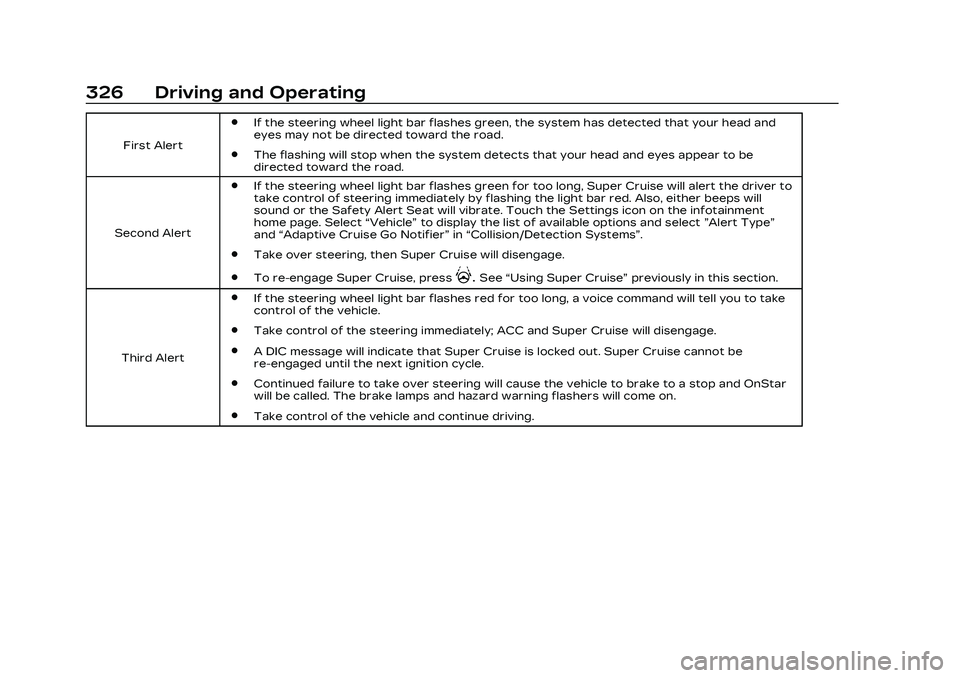
Pay close attention to the
road ahead to avoid these
three increasing alerts:
Page 327 of 526
Cadillac CT5 Owner Manual (GMNA-Localizing-U.S./Canada-16500419) -
2023 - CRC - 5/10/22
326 Driving and Operating
First Alert
.If the steering wheel light bar flashes green, the system has detected that your head and
eyes may not be directed toward the road.
.The flashing will stop when the system detects that your head and eyes appear to be
directed toward the road.
Second Alert
.If the steering wheel light bar flashes green for too long, Super Cruise will alert the driver to
take control of steering immediately by flashing the light bar red. Also, either beeps will
sound or the Safety Alert Seat will vibrate. Touch the Settings icon on the infotainment
home page. Select “Vehicle”to display the list of available options and select ”Alert Type”
and “Adaptive Cruise Go Notifier” in“Collision/Detection Systems”.
.Take over steering, then Super Cruise will disengage.
.To re-engage Super Cruise, press].See “Using Super Cruise” previously in this section.
Third Alert
.If the steering wheel light bar flashes red for too long, a voice command will tell you to take
control of the vehicle.
.Take control of the steering immediately; ACC and Super Cruise will disengage.
.A DIC message will indicate that Super Cruise is locked out. Super Cruise cannot be
re-engaged until the next ignition cycle.
.Continued failure to take over steering will cause the vehicle to brake to a stop and OnStar
will be called. The brake lamps and hazard warning flashers will come on.
.Take control of the vehicle and continue driving.
Page 328 of 526

Cadillac CT5 Owner Manual (GMNA-Localizing-U.S./Canada-16500419) -
2023 - CRC - 5/10/22
Driving and Operating 327
Stationary or Very
Slow-Moving Objects;
Cross-Traffic
{Warning
Super Cruise is not a crash
avoidance system and will
not steer or brake to avoid a
crash. Super Cruise does
not steer to prevent a crash
with stopped or slow-moving
vehicles. You must supervise
the driving task and may
need to steer and brake to
prevent a crash, especially in
stop-and-go traffic or when
a vehicle suddenly enters
your lane. Always pay
attention when using Super
Cruise. Failure to do so
could result in a crash
involving serious injury or
death.Curves in the Road
{Warning
The vehicle could drift out of
your lane of travel. To
prevent crashes, always be
ready to manually steer.
Super Cruise may not detect
your lane on curves in the
road. Super Cruise may not
detect the markings that
show your lane. You may not
have time to react to a
vehicle in the lane next to
your vehicle while on curves
in the road.
Super Cruise may operate
differently in sharp curves.
The vehicle may drift out of
your lane of travel if the curve
is too sharp.
When entering a curve, Super
Cruise may not detect the lane
markings and may not adjust
the steering enough to stay in
your lane of travel. When this
happens, you will need to
steer the vehicle.
Super Cruise may detect
other lane markings that are
not in your lane and may or
may not steer appropriately to
maintain your lane.
Page 329 of 526

Cadillac CT5 Owner Manual (GMNA-Localizing-U.S./Canada-16500419) -
2023 - CRC - 5/10/22
328 Driving and Operating
Super Cruise may occasionally
provide an alert and/or
steering that is considered
unnecessary. It could respond
to lane markings in different
lanes, signs, guardrails, and
other stationary objects when
entering or exiting a curve.
This is normal operation. The
vehicle does not need service.Other Vehicles Entering
Your Lane
Super Cruise may not detect a
vehicle that enters your lane,
or may not brake fast enough
to avoid a crash. You must
manually brake and steer the
vehicle.
Intersections; Vehicles
Crossing the Road Ahead
Super Cruise will not brake the
vehicle when approaching an
intersection that is controlled
by a traffic light or stop sign.
Super Cruise will not detect
vehicles crossing the road
ahead, including at
intersections, and will not
automatically steer or brake to
prevent a collision. You must
manually brake and steer the
vehicle.
Towing a Trailer
Do not use Super Cruise when
towing a trailer. For towing
capability, see General Towing
Information
0364.
Super Cruise on Hills
Do not use Super Cruise while
driving on steep hills.
Page 331 of 526
Cadillac CT5 Owner Manual (GMNA-Localizing-U.S./Canada-16500419) -
2023 - CRC - 5/10/22
330 Driving and Operating
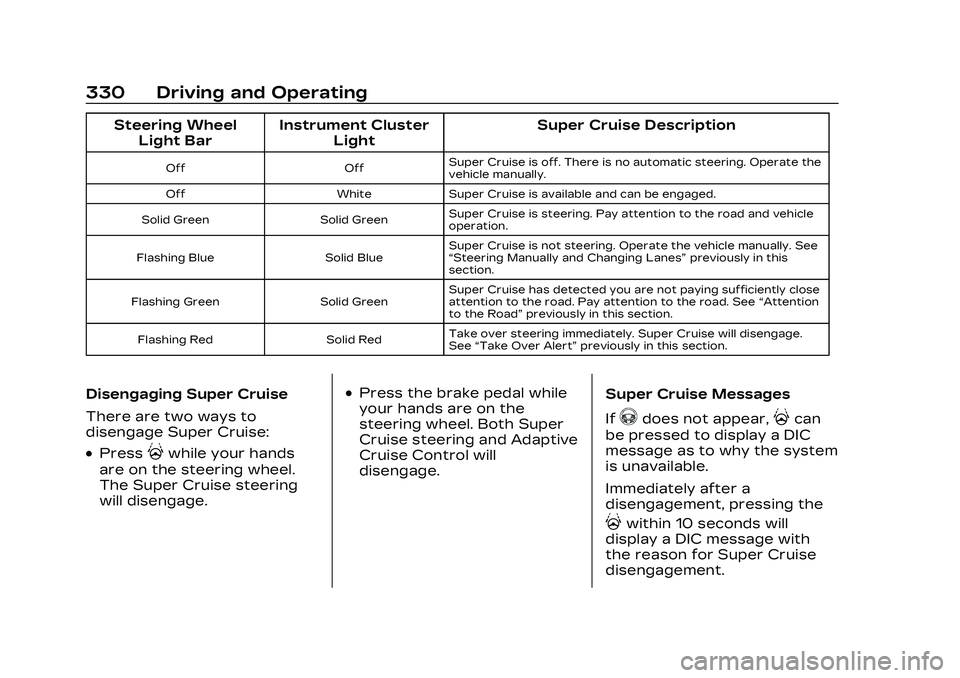
Steering WheelLight Bar Instrument Cluster
Light Super Cruise Description
Off
OffSuper Cruise is off. There is no automatic steering. Operate the
vehicle manually.
Off WhiteSuper Cruise is available and can be engaged.
Solid Green Solid GreenSuper Cruise is steering. Pay attention to the road and vehicle
operation.
Flashing Blue Solid BlueSuper Cruise is not steering. Operate the vehicle manually. See
“Steering Manually and Changing Lanes”
previously in this
section.
Flashing Green Solid GreenSuper Cruise has detected you are not paying sufficiently close
attention to the road. Pay attention to the road. See
“Attention
to the Road” previously in this section.
Flashing Red Solid RedTake over steering immediately. Super Cruise will disengage.
See
“Take Over Alert” previously in this section.
Disengaging Super Cruise
There are two ways to
disengage Super Cruise:
.Press]while your hands
are on the steering wheel.
The Super Cruise steering
will disengage.
.Press the brake pedal while
your hands are on the
steering wheel. Both Super
Cruise steering and Adaptive
Cruise Control will
disengage. Super Cruise Messages
If
^does not appear,]can
be pressed to display a DIC
message as to why the system
is unavailable.
Immediately after a
disengagement, pressing the
]within 10 seconds will
display a DIC message with
the reason for Super Cruise
disengagement.
Page 334 of 526

Cadillac CT5 Owner Manual (GMNA-Localizing-U.S./Canada-16500419) -
2023 - CRC - 5/10/22
Driving and Operating 333
Super Cruise Message Summary (cont'd)
Unavailable You Have Taken Vehicle Control.The brake pedal is being pressed.
.The Adaptive Cruise Control has been canceled or
turned off.
Unavailable Sensor Blocked Clear snow, ice, dirt, or other contaminants from the front and rear areas of the vehicle.
Unavailable Sharp Curve Some curves are too sharp to be navigated by the Super Cruise system. Super Cruise will be available after the curve is
traveled.
Super Cruise Unavailable Super Cruise is unavailable for reasons not described in other messages.
Super Cruise Locked Out See Owner’s Manual The driver did not take control of the vehicle when prompted by the Super Cruise system. The Super Cruise system will be
disabled until the ignition is turned off and back on.
Map Updates
Super Cruise map information
must be periodically updated
at least once every seven
months to determine whether
Super Cruise is available on
certain roads.
See the following website for
Super Cruise map open source
compliance documentation,
including the license
information:https://oss.veoneer.com/
Data Download
If the vehicle is equipped with
OnStar and has an active
service plan, additional data
may be collected through the
OnStar system. This includes
information about: the
vehicle’s operation; a crash
involving the vehicle; the use
of the vehicle and its features;
and, in certain situations, the
location and approximate GPSspeed of the vehicle. Refer to
the OnStar Terms and
Conditions and Privacy
Statement on the OnStar
website.
Location Services
This setting enables or
disables sharing of vehicle
location outside the vehicle for
certain purposes. Even if the
Location Services setting is
disabled, vehicle location
information will continue to be
Page 336 of 526
Cadillac CT5 Owner Manual (GMNA-Localizing-U.S./Canada-16500419) -
2023 - CRC - 5/10/22
Driving and Operating 335
Warning (Continued)
.Work if the detection
sensor is not cleaned or is
covered by ice, snow, mud,
or dirt.
.Work if the detection
sensor is covered up, such
as with a sticker, magnet,
or metal plate.
.Work if the area
surrounding the detection
sensor is damaged or not
properly repaired.
Complete attention is
always required while
driving, and you should be
ready to take action and
apply the brakes and/or
steer the vehicle to avoid
crashes.
Audible or Safety Alert Seat
Some driver assistance
features alert the driver of
obstacles by beeping. To view
available settings for this
feature, touch the Settings icon on the infotainment home
page. Select
“Vehicle”to
display the list of available
options and select “Comfort
and Convenience”.
If equipped with the Safety
Alert Seat, the driver seat
cushion may provide a
vibrating pulse alert instead of
beeping. To view available
settings for this feature, touch
the Settings icon on the
infotainment home page.
Select “Vehicle” to display the
list of available options and
select “Collision/Detection
Systems”.
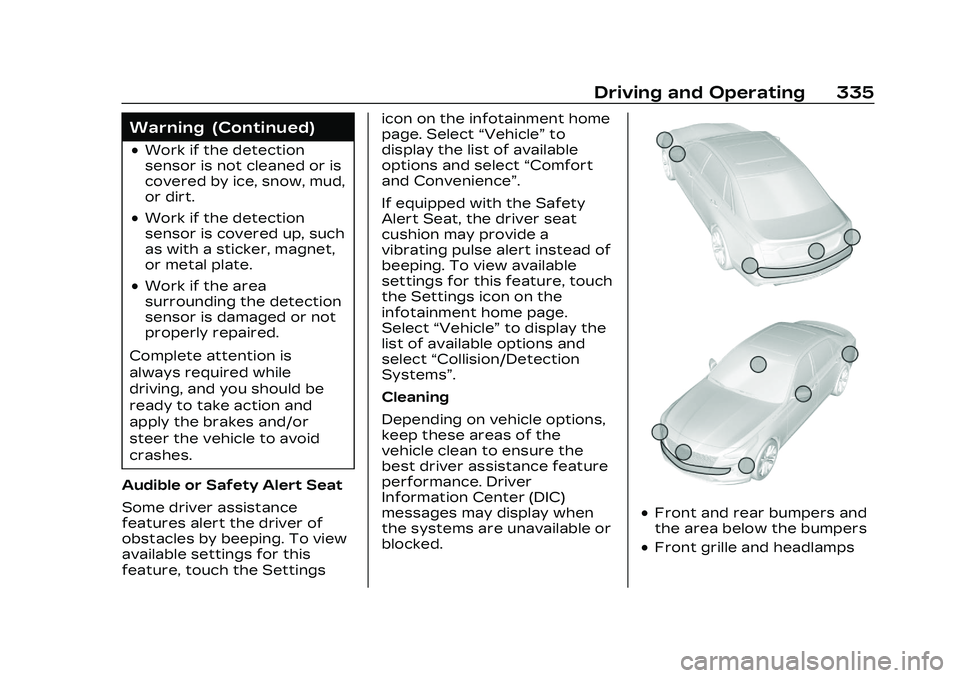
Cleaning
Depending on vehicle options,
keep these areas of the
vehicle clean to ensure the
best driver assistance feature
performance. Driver
Information Center (DIC)
messages may display when
the systems are unavailable or
blocked.
.Front and rear bumpers and
the area below the bumpers
.Front grille and headlamps
Page 341 of 526
Cadillac CT5 Owner Manual (GMNA-Localizing-U.S./Canada-16500419) -
2023 - CRC - 5/10/22
340 Driving and Operating
front are higher pitched than
beeps for the rear. If equipped
with Safety Alert seat, both
sides of the seat will pulse
alongside the beeps.
When the System Does Not
Seem to Work Properly
The following messages may
be displayed on the DIC:
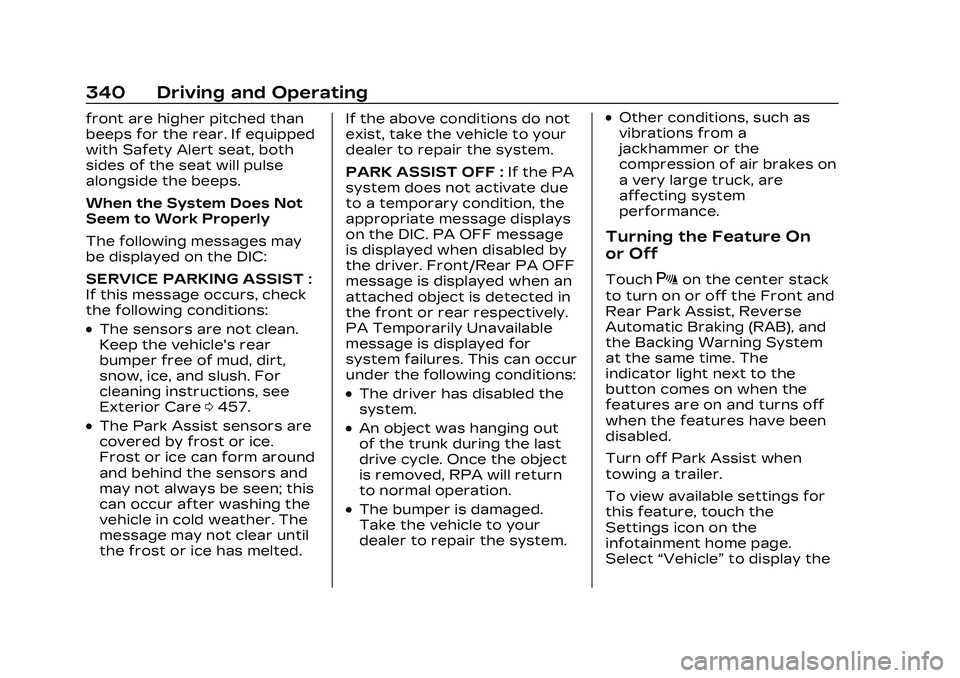
SERVICE PARKING ASSIST :
If this message occurs, check
the following conditions:
.The sensors are not clean.
Keep the vehicle's rear
bumper free of mud, dirt,
snow, ice, and slush. For
cleaning instructions, see
Exterior Care0457.
.The Park Assist sensors are
covered by frost or ice.
Frost or ice can form around
and behind the sensors and
may not always be seen; this
can occur after washing the
vehicle in cold weather. The
message may not clear until
the frost or ice has melted. If the above conditions do not
exist, take the vehicle to your
dealer to repair the system.
PARK ASSIST OFF :
If the PA
system does not activate due
to a temporary condition, the
appropriate message displays
on the DIC. PA OFF message
is displayed when disabled by
the driver. Front/Rear PA OFF
message is displayed when an
attached object is detected in
the front or rear respectively.
PA Temporarily Unavailable
message is displayed for
system failures. This can occur
under the following conditions:
.The driver has disabled the
system.
.An object was hanging out
of the trunk during the last
drive cycle. Once the object
is removed, RPA will return
to normal operation.
.The bumper is damaged.
Take the vehicle to your
dealer to repair the system.
.Other conditions, such as
vibrations from a
jackhammer or the
compression of air brakes on
a very large truck, are
affecting system
performance.
Turning the Feature On
or Off
TouchXon the center stack
to turn on or off the Front and
Rear Park Assist, Reverse
Automatic Braking (RAB), and
the Backing Warning System
at the same time. The
indicator light next to the
button comes on when the
features are on and turns off
when the features have been
disabled.
Turn off Park Assist when
towing a trailer.
To view available settings for
this feature, touch the
Settings icon on the
infotainment home page.
Select “Vehicle” to display the
Page 342 of 526

Cadillac CT5 Owner Manual (GMNA-Localizing-U.S./Canada-16500419) -
2023 - CRC - 5/10/22
Driving and Operating 341
list of available options and
select“Collision/Detection
Systems”.
Automatic Parking
Assist (APA)
If equipped, APA searches for
and steers the vehicle into
parallel and perpendicular
parking spots. When using
APA, you must still shift gears
while the system applies the
brakes and accelerator.
A display and audible beeps
help to guide parking
maneuvers.
Do not use APA when towing
a trailer.
{Warning
APA may not detect objects
in the parking space, objects
that are soft or narrow,
objects high off the ground
such as flatbed trucks,
objects below ground level
such as large potholes,
(Continued)
Warning (Continued)
or moving objects (e.g.
pedestrians). Always verify
that the parking space is
appropriate for parking a
vehicle. APA does not
respond to changes in the
parking space, such as
movement of an adjacent
vehicle, or a person or
object entering the parking
space. APA does not detect
or avoid traffic that is
behind or alongside of the
vehicle. Always be prepared
to stop the vehicle during
the parking maneuver.
Touch
Oon the center stack
to enable the system to
search for a parking space
that is large enough and within
1.5 m (5 ft) of the vehicle. The
vehicle speed must be below
30 km/h (18 mph). The system
cannot:
.Detect whether it is a legal
parking space.
.Park exactly lined up with
the vehicle next to it if the
spot is approached at an
angle or if the parking space
is angled.
.Park exactly centered in a
spot that is marked too
large.
.Always detect short curbs.
When enabled, APA searches
for parallel parking spaces to
the right of the vehicle. To
search for a parking space to
the left, turn on the left turn
signal or, if available, change
the side selection in the
infotainment display. To switch
the parking mode between
parallel and perpendicular,
change the parking mode in
the infotainment display.