light CADILLAC CT6 2016 Owners Manual
[x] Cancel search | Manufacturer: CADILLAC, Model Year: 2016, Model line: CT6, Model: CADILLAC CT6 2016Pages: 397, PDF Size: 7.09 MB
Page 234 of 397

Cadillac CT6 Owner Manual (GMNA-Localizing-U.S./Canada-9235592) -
2016 - crc - 11/6/15
Driving and Operating 233shifting from R (Reverse) to a
forward gear, or by pressing
CAMERA in the center stack, and
when the vehicle is moving forward
slower than 8 km/h (5 mph).
If equipped, the front view camera
also displays when the Front
Parking Assist system detects an
object within 30 cm (12 in).
{ WarningThe camera(s) do not display
children, pedestrians, bicyclists,
crossing traffic, animals, or any
other object outside of the
cameras ’ field of view, below the
bumper, or under the vehicle.
Shown distances may be different
from actual distances. Do not
drive or park the vehicle using
only these camera(s). Always
check behind and around the
vehicle before driving. Failure to
use proper care may result in
injury, death, or vehicle damage. Parking Assist
With RPA, and if equipped with FPA,
as the vehicle moves at speeds of
less than 8 km/h (5 mph) the
sensors on the bumpers may detect
objects up to 2.5 m (8 ft) behind and
1.2 m (4 ft) in front of the vehicle
within a zone 25 cm (10 in) high off
the ground and below bumper level.
These detection distances may be
shorter during warmer or humid
weather. Blocked sensors will not
detect objects and can also cause
false detections. Keep the sensors
clean of mud, dirt, snow, ice, and
slush; and clean sensors after a car
wash in freezing temperatures.
{ Warning
The Parking Assist system does
not detect children, pedestrians,
bicyclists, animals, or objects
located below the bumper or that
are too close or too far from the
vehicle. It is not available at
speeds greater than 8 km/h
(5 mph). To prevent injury, death,
(Continued) Warning (Continued) or vehicle damage, even with
parking assist, always check the
area around the vehicle and
check all mirrors before moving
forward or backing.
The instrument cluster may have a
parking assist display with bars that
show “ distance to object ” and object
location information for the Parking
Assist system. As the object gets
closer, more bars light up and the
bars change color from yellow to
amber to red.
When an object is first detected in
the rear, one beep will be heard
from the rear, or both sides of the
Page 236 of 397
Cadillac CT6 Owner Manual (GMNA-Localizing-U.S./Canada-9235592) -
2016 - crc - 11/6/15
Driving and Operating 235Pressing the brake pedal after the
vehicle comes to a stop will release
RAB. If the brake pedal is not
pressed soon after the stop, the
Electric Parking Brake (EPB) may
be set. When it is safe, press the
accelerator pedal firmly at any time
to override RAB.
{ WarningThere may be instances where
unexpected or undesired
automatic braking occurs. If this
happens, either press the brake
pedal or firmly press the
accelerator pedal to release the
brakes from the Rear Automatic
Braking system. Before releasing
the brakes, check the RVC
screen and check the area
around the vehicle to make sure it
is safe to proceed.
Rear Cross Traffic Alert (RCTA)
If equipped, RCTA displays a red
warning triangle with a left or right
pointing arrow on the RVC screen to
warn of traffic coming from the left or right. This system detects objects
coming from up to 20 m (65 ft) from
the left or right side of the vehicle.
When an object is detected, either
three beeps sound from the left or
right or three Safety Alert Seat
pulses occur on the left or right side,
depending on the direction of the
detected vehicle.
Use caution while backing up when
towing a trailer, as the RCTA
detection zones that extend out
from the back of the vehicle do not
move further back when a trailer is
towed.
See Radio Frequency
Statement 0 371 .
Turning the Features On or Off
Touch
X on the center stack to
turn on or off the Front and Rear
Parking Assist, Rear Automatic
Braking (RAB), Rear Cross Traffic
Alert (RCTA), and the Backing
Warning System at the same time.
The indicator light next to the button
comes on when the features are on
and turns off when the features
have been disabled. Turn off parking assist, RCTA, and
RAB when towing a trailer.
To turn the RPA symbols or
guidance lines (on some models) on
or off, see “ Rear Camera ” under
Vehicle Personalization 0 157 .
RCTA can also be turned on or off
through vehicle personalization. See
“ Collision/Detection Systems ” under
Vehicle Personalization 0 157 .
Automatic Parking
Assist (APA) If equipped, APA searches for and
steers the vehicle into parallel and
perpendicular parking spots. When
using APA, you must still shift gears,
and control the brakes and
accelerator. The Driver information
Center (DIC) and audible beeps
help to guide parking maneuvers.
Do not use APA when towing a
trailer.
Page 238 of 397
Cadillac CT6 Owner Manual (GMNA-Localizing-U.S./Canada-9235592) -
2016 - crc - 11/6/15
Driving and Operating 237APA will instruct the vehicle to stop
once a large enough space is found.
Follow the instructions in the DIC.
When instructed to drive in reverse,
shift to R (Reverse) to engage
automatic steering. The steering
wheel will vibrate briefly as a
reminder to remove hands from the
steering wheel. Check surroundings
and continue braking or accelerating
as needed, and be prepared to stop
to avoid vehicles, pedestrians,
or objects. If the vehicle exceeds
10 km/h (6 mph), APA is
automatically disengaged. A DIC
progress arrow displays the status
of the parking maneuver. Depending
on the space size, additional
maneuvers may be required, and
there will be additional instructions.
When changing gears, allow the
automatic steering to complete
before continuing the parking
maneuver. APA will beep and
display a PARKING COMPLETE
message. Place the vehicle in
P (Park).
APA may automatically disengage if:
.
The steering wheel is used by
the driver. .
The maximum allowed speed is
exceeded.
.
There is a failure with the APA
system.
.
Electronic stability control or
antilock brakes are activated.
.
A high priority vehicle message
is displayed in the DIC.
To cancel APA, touch
O again.
When the System Does Not Seem
to Work Properly
The APA system may require a
short period of driving along curves
to calibrate.
Assistance Systems for
Driving If equipped, when driving the
vehicle in a forward gear, Forward
Collision Alert (FCA), Lane
Departure Warning (LDW), Lane
Keep Assist (LKA), Side Blind Zone
Alert (SBZA), Lane Change Alert
(LCA), the Front Automatic Braking
(FAB) system, the Front Pedestrian
Braking (FPB) system and/or the Night Vision system can help to
avoid a crash or reduce crash
damage.
Forward Collision Alert
(FCA) System If equipped, the FCA system may
help to avoid or reduce the harm
caused by front-end crashes. When
approaching a vehicle ahead too
quickly, FCA provides a red flashing
alert on the windshield and rapidly
beeps or pulses the driver seat.
FCA also lights an amber visual
alert if following another vehicle
much too closely.
FCA detects vehicles within a
distance of approximately 60 m
(197 ft) and operates at speeds
above 8 km/h (5 mph). If the vehicle
has Adaptive Cruise Control (ACC),
it can detect vehicles to distances of
approximately 110 m (360 ft) and
operates at all speeds. See
Adaptive Cruise Control 0 223 .
Page 245 of 397

Cadillac CT6 Owner Manual (GMNA-Localizing-U.S./Canada-9235592) -
2016 - crc - 11/6/15
244 Driving and Operating animal. When the system detects
that the vehicle is approaching a
pedestrian ahead much too quickly,
the box changes to red.
With the Front Pedestrian Braking
system turned on, Night Vision
provides a red Head-Up Display
(HUD) alert when the system
detects that the vehicle is
approaching a pedestrian ahead
much too quickly. In addition, an
alert beeps or the Safety Alert Seat
pulses, if equipped. See Front
Pedestrian Braking (FPB)
System 0 241 . { WarningThe system does not detect all
objects or the vehicle distance
from objects. The system may not
provide a warning with enough
time to help avoid a crash.
1. Low-Beam Headlamps
2. High-Beam Headlamps
3. Night Vision System By selecting a view on the
instrument cluster, the Night Vision
image can be displayed. See
Instrument Cluster (Uplevel) 0 121
or Instrument Cluster (Base Level)
0 118 . The Night Vision system can
operate only if:
.
The ignition is on.
.
The vehicle is in P (Park) or a
forward gear.
.
It is dark enough outside.
.
The headlamps are on.
Adjust the instrument panel
brightness to make the image no
brighter than necessary. Turn the
image off by selecting another view
on the instrument cluster.
Warm objects, such as pedestrians,
animals, and other moving vehicles,
should appear whiter on the Night
Vision display. Cold objects, such as
the sky, signs, and parked vehicles,
should appear darker. Night Vision
only shows objects that are warmer
or colder than the surroundings.
It does not detect brake lamps, turn
signals, emergency flashers, traffic
lights, or sign information.
Page 247 of 397

Cadillac CT6 Owner Manual (GMNA-Localizing-U.S./Canada-9235592) -
2016 - crc - 11/6/15
246 Driving and Operating Pedestrian detection may not be
available in high outside
temperatures. An amber icon,
* ,
displays. The system does not need
service.
In rain, snow, or fog the image may
not be clear and the direction of the
road ahead may not be seen. In
more severe weather conditions, the
image may be unclear and
unusable. The system does not
need service.
Keep the system sensor clean by
activating the windshield washer up
to five times when it is dark enough
for the system to operate. If the
Night Vision image still looks blurry,
use a soft wet cloth to gently clean
the sensor camera lens and dry
thoroughly. The sensor is behind the
front grille to the inside of the driver
side headlamp.
The camera must also be aligned to
work correctly. If the camera needs
adjustment, see your dealer. Do not
attempt to adjust the camera
yourself. Side Blind Zone
Alert (SBZA) If equipped, the SBZA system is a
lane-changing aid that assists
drivers with avoiding crashes that
occur with moving vehicles in the
side blind zone (or spot) areas.
When the vehicle is in a forward
gear, the left or right side mirror
display will light up if a moving
vehicle is detected in that blind
zone. If the turn signal is activated
and a vehicle is also detected on
the same side, the display will flash
as an extra warning not to change
lanes. Since this system is part of
the Lane Change Alert (LCA)
system, read the entire LCA section
before using this feature.
Lane Change Alert (LCA) If equipped, the LCA system is a
lane-changing aid that assists
drivers with avoiding lane change
crashes that occur with moving
vehicles in the side blind zone (or
spot) areas or with vehicles rapidly
approaching these areas from
behind. The LCA warning display will light up in the corresponding
outside side mirror and will flash if
the turn signal is on.
{ WarningLCA does not alert the driver to
vehicles outside of the system
detection zones, pedestrians,
bicyclists, or animals. It may not
provide alerts when changing
lanes under all driving conditions.
Failure to use proper care when
changing lanes may result in
injury, death, or vehicle damage.
Before making a lane change,
always check mirrors, glance over
your shoulder, and use the turn
signals.
Page 248 of 397

Cadillac CT6 Owner Manual (GMNA-Localizing-U.S./Canada-9235592) -
2016 - crc - 11/6/15
Driving and Operating 247LCA Detection Zones
1. SBZA Detection Zone
2. LCA Detection Zone
The LCA sensor covers a zone of
approximately one lane over from
both sides of the vehicle, or 3.5 m
(11 ft). The height of the zone is
approximately between 0.5 m (1.5 ft)
and 2 m (6 ft) off the ground. The
Side Blind Zone Alert (SBZA)
warning area starts at approximately
the middle of the vehicle and goes
back 5 m (16 ft). Drivers are also
warned of vehicles rapidly
approaching from up to 70 m (230 ft)
behind the vehicle. How the System Works The LCA symbol lights up in the
side mirrors when the system
detects a moving vehicle in the next
lane over that is in the side blind
zone or rapidly approaching that
zone from behind. A lit LCA symbol
indicates it may be unsafe to
change lanes. Before making a lane
change, check the LCA display,
check mirrors, glance over your
shoulder, and use the turn signals.
Left Side Mirror
Display Right Side Mirror
Display
When the vehicle is started, both
outside mirror LCA displays will
briefly come on to indicate the
system is operating. When the
vehicle is in a forward gear, the left
or right side mirror display will light
up if a moving vehicle is detected in
the next lane over in that blind zone
or rapidly approaching that zone. If the turn signal is activated in the
same direction as a detected
vehicle, this display will flash as an
extra warning not to change lanes.
LCA can be disabled through
vehicle personalization using the
Side Blind Zone Alert option. See
“ Collision/Detection Systems ” under
Vehicle Personalization 0 157 .
If LCA is disabled by the driver, the
LCA mirror displays will not light up.
When the System Does Not
Seem to Work Properly The LCA system requires some
driving for the system to calibrate to
maximum performance. This
calibration may occur more quickly if
the vehicle is driving on a straight
highway road with traffic and
roadside objects (e.g., guardrails,
barriers).
LCA displays may not come on
when passing a vehicle quickly, for
a stopped vehicle, or when towing a
trailer. The LCA detection zones
that extend back from the side of
the vehicle do not move further back
when a trailer is towed. Use caution
while changing lanes when towing a
Page 249 of 397

Cadillac CT6 Owner Manual (GMNA-Localizing-U.S./Canada-9235592) -
2016 - crc - 11/6/15
248 Driving and Operating trailer. LCA may alert to objects
attached to the vehicle, such as a
trailer, bicycle, or object extending
out to either side of the vehicle.
Attached objects may also interfere
with the detection of vehicles. This
is normal system operation; the
vehicle does not need service.
LCA may not always alert the driver
to vehicles in the next lane over,
especially in wet conditions or when
driving on sharp curves. The system
does not need to be serviced. The
system may light up due to
guardrails, signs, trees, shrubs, and
other non-moving objects. This is
normal system operation; the
vehicle does not need service.
LCA may not operate when the LCA
sensors in the left or right corners of
the rear bumper are covered with
mud, dirt, snow, ice, or slush, or in
heavy rainstorms. For cleaning
instructions, see "Washing the
Vehicle" under Exterior Care 0 333 .
If the DIC still displays the system
unavailable message after cleaning
both sides of the vehicle toward the
rear corners of the vehicle, see your
dealer. If the LCA displays do not light up
when moving vehicles are in the
side blind zone or are rapidly
approaching this zone and the
system is clean, the system may
need service. Take the vehicle to
your dealer.
When LCA is disabled for any
reason other than the driver turning
it off, the Side Blind Zone Alert On
option will not be available on the
personalization menu.
Radio Frequency Information See Radio Frequency
Statement 0 371 .
Lane Departure
Warning (LDW) If equipped, LDW may help avoid
crashes due to unintentional lane
departures. It may provide a
warning if the vehicle is crossing a
detected lane marking without using
a turn signal in the lane departure
direction. Since this system is part
of the Lane Keep Assist (LKA)
system, read the entire LKA section
before using this feature. Lane Keep Assist (LKA) If equipped, LKA may help avoid
crashes due to unintentional lane
departures. It may assist by gently
turning the steering wheel if the
vehicle approaches a detected lane
marking without using a turn signal
in that direction. It may also provide
a Lane Departure Warning (LDW)
system alert as the lane marking is
crossed. The LKA system will not
assist or provide an LDW alert if it
detects that you are actively
steering. Override LKA by turning
the steering wheel. LKA uses a
camera to detect lane markings
between 60 km/h (37 mph) and
180 km/h (112 mph).
{ Warning
The LKA system does not
continuously steer the vehicle.
It may not keep the vehicle in the
lane or give a Lane Departure
Warning (LDW) alert, even if a
lane marking is detected.
(Continued)
Page 251 of 397
Cadillac CT6 Owner Manual (GMNA-Localizing-U.S./Canada-9235592) -
2016 - crc - 11/6/15
250 Driving and Operating .
Sudden lighting changes, such
as when driving through tunnels.
.
Banked roads.
.
Roads with poor lane markings,
such as two-lane roads.
If the LKA system is not functioning
properly when lane markings are
clearly visible, cleaning the
windshield may help.
LKA assistance and/or LDW alerts
may occur due to tar marks,
shadows, cracks in the road,
temporary or construction lane
markings, or other road
imperfections. This is normal system
operation; the vehicle does not need
service. Turn LKA off if these
conditions continue.
Surround Vision
Recorder If equipped, this system records the
360° camera views to an SD card.
Only images are recorded, no
sound. An SD card will be needed
for this system. The recommended SD card is an 8-32GB SDHC card
with FAT32 file system, Class
4 and over.
Insert the SD card into the card
reader located in the trunk. Opening
the trunk will disable recording to
safely remove the SD card.
Other files should not be stored on
the same SD card as the surround
vision recorder files. Storing other
files on the same card may increase
recording start up and playback time
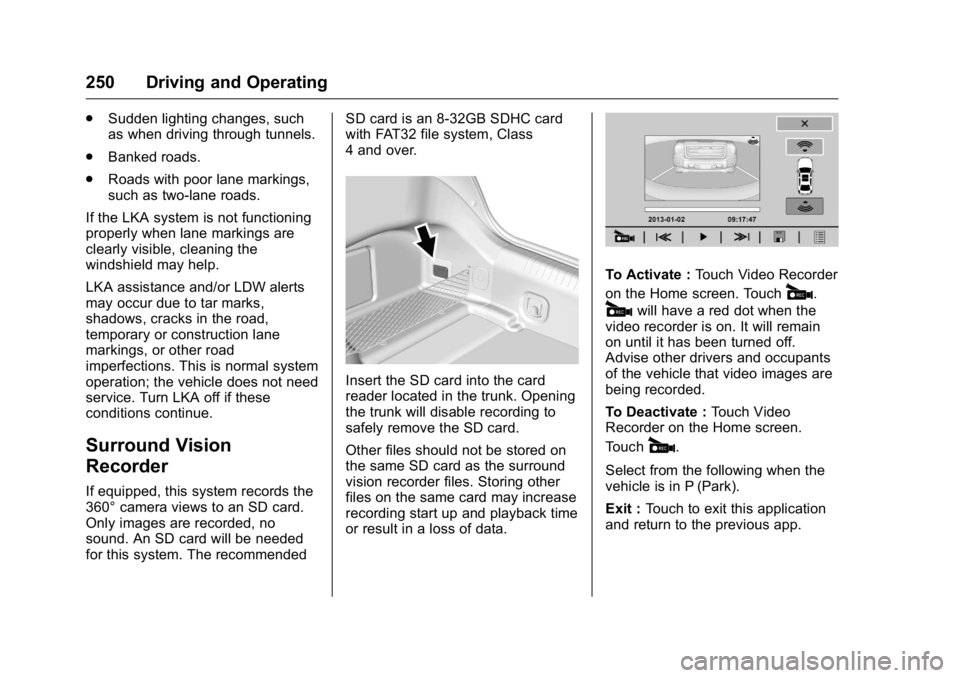
or result in a loss of data. To Activate : Touch Video Recorder
on the Home screen. Touch
# .
# will have a red dot when the
video recorder is on. It will remain
on until it has been turned off.
Advise other drivers and occupants
of the vehicle that video images are
being recorded.
To Deactivate : Touch Video
Recorder on the Home screen.
Touch
# .
Select from the following when the
vehicle is in P (Park).
Exit : Touch to exit this application
and return to the previous app.
Page 252 of 397

Cadillac CT6 Owner Manual (GMNA-Localizing-U.S./Canada-9235592) -
2016 - crc - 11/6/15
Driving and Operating 251Video List : Touch to display a list
of the most recent and saved
videos. Touch the delete button next
to the name to delete a saved video.
Rewind : Touch to rewind the video.
Touch again to stop rewinding.
Play/Pause : Touch to play or
pause a recorded video.
Fast Forward : Touch to fast
forward the video. Touch again to
stop fast forward.
Save : Touch to save a video. This
protects the video from being
erased. Once the SD card is full,
files will be overwritten unless they
have been saved.
Front/Rear Camera View : Select
to switch between the front and rear
camera views in playback.
Touching
S Back returns to the
player view with video that was
previously loaded still showing.
The latest recorded video file can be
played. In addition: .
There are approximately
12 hours of video storage based
on an 8GB SD card. This could
vary based on exterior lighting
conditions.
.
The recorded video is stored in
five-minute-long files.
.
All files can be viewed on the
playback app or when the SD
card is read by a PC.
.
Once the SD card is full, the
oldest files will be overwritten.
To Delete Data : Remove the SD
card from the vehicle and insert into
a personal computer to manually
delete the file.
Error messages can occur if:
.
No SD card is present.
.
There is a system error.
.
The SD card is full. Fuel Use of the recommended fuel is an
important part of the proper
maintenance of this vehicle. When
driving in the U.S. and Canada, to
help keep the engine clean and
maintain optimum vehicle
performance, we recommend using
TOP TIER Detergent Gasolines.
See www.toptiergas.com for a list of
TOP TIER Detergent Gasolines.
If the vehicle has the 2.0L L4 turbo
engine, use premium unleaded
gasoline meeting ASTM
specification D4814 with a posted
octane rating of 91 or higher.
Page 254 of 397

Cadillac CT6 Owner Manual (GMNA-Localizing-U.S./Canada-9235592) -
2016 - crc - 11/6/15
Driving and Operating 253
California Fuel
Requirements If the vehicle is certified to meet
California Emissions Standards, it is
designed to operate on fuels that
meet California specifications. See
the underhood emission control
label. If this fuel is not available in
states adopting California Emissions
Standards, the vehicle will operate
satisfactorily on fuels meeting
federal specifications, but emission
control system performance might
be affected. The malfunction
indicator lamp could turn on and the
vehicle may not pass a smog-check
test. See Malfunction Indicator
Lamp (Check Engine Light) 0 132 .
If this occurs, return to your
authorized dealer for diagnosis. If it
is determined that the condition is
caused by the type of fuel used,
repairs may not be covered by the
vehicle warranty. Fuels in Foreign
Countries If planning to drive in countries
outside the U.S. or Canada, the
proper fuel might be hard to find.
Check regional auto club or fuel
retail brand websites for availability
in the country where driving. Never
use leaded gasoline, fuel containing
methanol, manganese, or any other
fuel not recommended. Costly
repairs caused by use of improper
fuel would not be covered by the
vehicle warranty.
Fuel Additives To keep fuel systems clean, TOP
TIER Detergent Gasoline is
recommended. See Fuel 0 251 .
If TOP TIER Detergent Gasoline is
not available, one bottle of Fuel
System Treatment PLUS added to
the fuel tank at every engine oil
change, can help. Fuel System
Treatment PLUS is the only
gasoline additive recommended by
General Motors. It is available at
your dealer. Filling the Tank
{ WarningFuel vapors and fuel fires burn
violently and can cause injury or
death.
.
To help avoid injuries to you
and others, read and follow
all the instructions on the
fuel pump island.
.
Turn off the engine when
refueling.
.
Keep sparks, flames, and
smoking materials away
from fuel.
.
Do not leave the fuel pump
unattended.
.
Do not use a cell phone
while refueling.
.
Do not reenter the vehicle
while pumping fuel.
.
Keep children away from
the fuel pump and never let
children pump fuel.
(Continued)