infotainment CADILLAC CT6 2016 Owners Manual
[x] Cancel search | Manufacturer: CADILLAC, Model Year: 2016, Model line: CT6, Model: CADILLAC CT6 2016Pages: 397, PDF Size: 7.09 MB
Page 2 of 397

Cadillac CT6 Owner Manual (GMNA-Localizing-U.S./Canada-9235592) -
2016 - crc - 11/6/15
Contents Introduction . . . . . . . . . . . . . . . . . . . . . . 2
In Brief . . . . . . . . . . . . . . . . . . . . . . . . . . . 5
Keys, Doors, and Windows . . . . . 28
Seats and Restraints . . . . . . . . . . . 57
Storage . . . . . . . . . . . . . . . . . . . . . . . 106
Instruments and Controls . . . . . . 109
Lighting . . . . . . . . . . . . . . . . . . . . . . . 170
Infotainment System . . . . . . . . . . 177
Climate Controls . . . . . . . . . . . . . . 178
Driving and Operating . . . . . . . . . 191
Vehicle Care . . . . . . . . . . . . . . . . . . 261
Service and Maintenance . . . . . 342
Technical Data . . . . . . . . . . . . . . . . 357
Customer Information . . . . . . . . . 361
Reporting Safety Defects . . . . . . 371
OnStar . . . . . . . . . . . . . . . . . . . . . . . . 375
Index . . . . . . . . . . . . . . . . . . . . 385
Page 6 of 397
Cadillac CT6 Owner Manual (GMNA-Localizing-U.S./Canada-9235592) -
2016 - crc - 11/6/15
In Brief 5
In Brief Instrument Panel Instrument Panel Overview . . . . . . 6
Initial Drive Information Initial Drive Information . . . . . . . . . . 8
Stop/Start System . . . . . . . . . . . . . . . 8
Remote Keyless Entry (RKE)
System . . . . . . . . . . . . . . . . . . . . . . . . 8
Remote Vehicle Start . . . . . . . . . . . 9
Door Locks . . . . . . . . . . . . . . . . . . . . . 9
Trunk . . . . . . . . . . . . . . . . . . . . . . . . . . 10
Windows . . . . . . . . . . . . . . . . . . . . . . . 10
Seat Adjustment . . . . . . . . . . . . . . . 10
Memory Features . . . . . . . . . . . . . . 12
Second Row Seats . . . . . . . . . . . . 13
Heated and Ventilated Seats . . . 14
Head Restraint Adjustment . . . . 14
Safety Belts . . . . . . . . . . . . . . . . . . . . 15
Passenger Sensing System . . . 15
Mirror Adjustment . . . . . . . . . . . . . . 15
Steering Wheel Adjustment . . . . 16
Interior Lighting . . . . . . . . . . . . . . . . 16
Exterior Lighting . . . . . . . . . . . . . . . 17
Windshield Wiper/Washer . . . . . . 18
Climate Controls . . . . . . . . . . . . . . . 19
Transmission . . . . . . . . . . . . . . . . . . 20 Vehicle Features Infotainment System . . . . . . . . . . . 20
Steering Wheel Controls . . . . . . . 20
Cruise Control . . . . . . . . . . . . . . . . . 20
Driver Information
Center (DIC) . . . . . . . . . . . . . . . . . 21
Forward Collision Alert (FCA)
System . . . . . . . . . . . . . . . . . . . . . . . 21
Night Vision System . . . . . . . . . . . 21
Front Automatic Braking (FAB)
System . . . . . . . . . . . . . . . . . . . . . . . 22
Front Pedestrian Braking (FPB)
System . . . . . . . . . . . . . . . . . . . . . . . 22
Lane Keep Assist (LKA) . . . . . . . 22
Lane Change Alert (LCA) . . . . . . 22
Surround Vision . . . . . . . . . . . . . . . 22
Rear Vision Camera (RVC) . . . . 23
Rear Cross Traffic Alert (RCTA)
System . . . . . . . . . . . . . . . . . . . . . . . 23
Parking Assist . . . . . . . . . . . . . . . . . 23
Automatic Parking
Assist (APA) . . . . . . . . . . . . . . . . . . 23
Rear Automatic Braking (RAB)
System . . . . . . . . . . . . . . . . . . . . . . . 23
Surround Vision Recorder . . . . . 24
Power Outlets . . . . . . . . . . . . . . . . . 24
Universal Remote System . . . . . 24
Sunroof . . . . . . . . . . . . . . . . . . . . . . . . 24 Performance and Maintenance Traction Control/Electronic
Stability Control . . . . . . . . . . . . . . 25
Tire Pressure Monitor . . . . . . . . . . 26
Engine Oil Life System . . . . . . . . 26
Driving for Better Fuel
Economy . . . . . . . . . . . . . . . . . . . . . 27
Roadside Service . . . . . . . . . . . . . . 27
Page 8 of 397

Cadillac CT6 Owner Manual (GMNA-Localizing-U.S./Canada-9235592) -
2016 - crc - 11/6/15
In Brief 71. Air Vents 0 189 .
2. Exterior Lamp Controls 0 170 .
Turn Signal Lever. See Turn
and Lane-Change
Signals 0 173 .
3. Instrument Cluster (Uplevel)
0 121 or Instrument Cluster
(Base Level) 0 118 .
Driver Information Center (DIC)
Display. See Driver Information
Center (DIC) 0 140 .
4. Windshield Wiper/
Washer 0 111 .
5. ENGINE START/STOP Button.
See Ignition Positions 0 202 .
6. Parking Assist Button. See
Assistance Systems for
Parking or Backing 0 231 .
Automatic Parking Assist (APA)
Button. See Assistance
Systems for Parking or
Backing 0 231 .
Automatic Engine Start/Stop
Disable Switch. See Starting
the Engine 0 204 . 7. Light Sensor. See Automatic
Headlamp System 0 172 .
8. Hazard Warning
Flashers 0 173 .
Glove Box Button. See Glove
Box 0 106 .
9. Infotainment 0 177 .
10. Heated and Ventilated Front
Seats 0 64 (If Equipped).
11. Infotainment Touch Pad. See
the infotainment manual.
12. Automatic Climate Control
System (Quad Zone) 0 178 or
Automatic Climate Control
System (Dual Zone) 0 185 .
13. Automatic Vehicle Hold
(AVH) 0 217 .
MODE Button. See Driver
Mode Control 0 219 .
Traction Control/Electronic
Stability Control 0 217 .
14. Shift Lever. See Automatic
Transmission 0 210 .
15. Driver Information Center (DIC)
Controls. See Driver
Information Center (DIC) 0 140 . 16. Steering Wheel Controls. See
the infotainment manual.
17. Horn 0 111 .
18. Steering Wheel Adjustment
0 110 (Out of View).
19. Forward Collision Alert (FCA)
System 0 237 (If Equipped).
Lane Keep Assist (LKA) 0 248
(If Equipped).
Heated Steering Wheel 0 111
(If Equipped).
20. Cruise Control 0 220 .
Adaptive Cruise Control 0 223
(If Equipped).
Phone Button. See “ Steering
Wheel Controls ” in the
infotainment manual.
21. Data Link Connector (DLC)
(Out of View). See Malfunction
Indicator Lamp (Check Engine
Light) 0 132 .
22. Instrument Panel
Storage 0 106 .
Instrument Panel Fuse
Block 0 293 .
Page 21 of 397

Cadillac CT6 Owner Manual (GMNA-Localizing-U.S./Canada-9235592) -
2016 - crc - 11/6/15
20 In Brief 9. Ionizer Status Indicator (If
Equipped)
See Automatic Climate Control
System (Quad Zone) 0 178 or
Automatic Climate Control System
(Dual Zone) 0 185 .
Transmission Tap Shift
Vehicles equipped with Tap Shift
allow shifting an automatic
transmission similar to a manual
transmission. Tap Shift can be
enabled through the shift lever or
the Tap Shift controls on the back of
the steering wheel. See Manual
Mode 0 212 . Vehicle Features Infotainment System See the infotainment manual for
information on the radio, audio
players, rear seat infotainment,
phone, navigation system, and
voice or speech recognition. It also
includes information on settings.
Steering Wheel Controls The infotainment system can be
operated by using the steering
wheel controls. See "Steering
Wheel Controls" in the infotainment
manual. Cruise Control
J : Press to turn the system on
and off. A white indicator appears in
the instrument cluster when
turned on.
RES+ : If there is a set speed in
memory, press briefly to resume to
that speed or press and hold to
accelerate. If the cruise control is
already active, use to increase
vehicle speed. To increase speed by
1 km/h (1 mph), press RES+ to the
first detent. To increase speed to the
Page 108 of 397
Cadillac CT6 Owner Manual (GMNA-Localizing-U.S./Canada-9235592) -
2016 - crc - 11/6/15
Storage 107
Armrest Storage
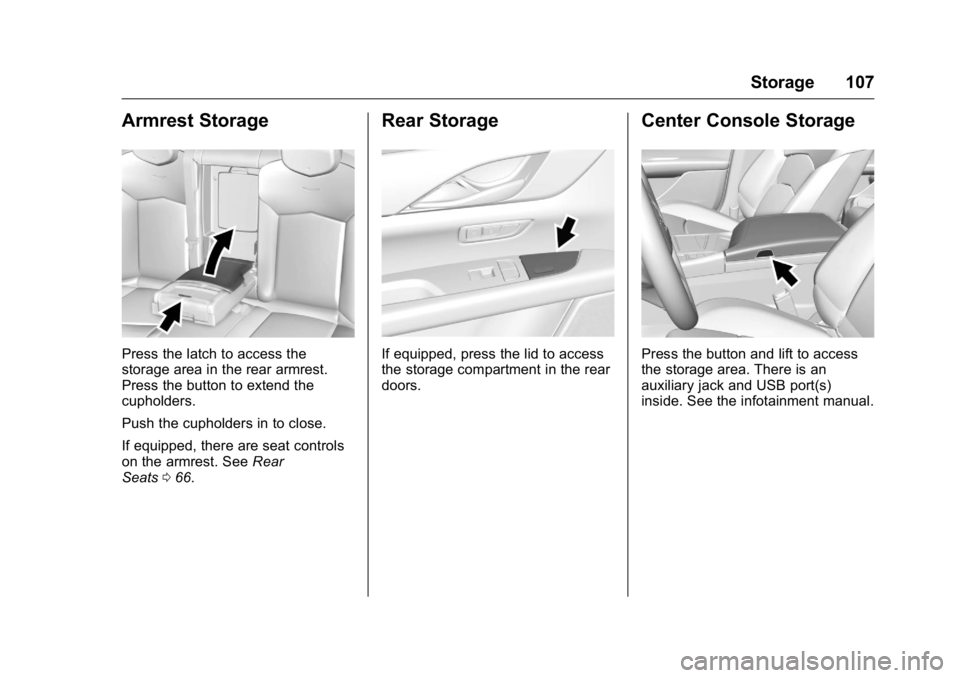
Press the latch to access the
storage area in the rear armrest.
Press the button to extend the
cupholders.
Push the cupholders in to close.
If equipped, there are seat controls
on the armrest. See Rear
Seats 0 66 . Rear Storage
If equipped, press the lid to access
the storage compartment in the rear
doors. Center Console Storage
Press the button and lift to access
the storage area. There is an
auxiliary jack and USB port(s)
inside. See the infotainment manual.
Page 112 of 397

Cadillac CT6 Owner Manual (GMNA-Localizing-U.S./Canada-9235592) -
2016 - crc - 11/6/15
Instruments and Controls 111
Steering Wheel Controls The infotainment system can be
operated by using the steering
wheel controls. See "Steering
Wheel Controls" in the infotainment
manual.
Heated Steering Wheel
( : If equipped with a heated
steering wheel, press to turn on or
off. An indicator next to the button is
lit when the feature is turned on.
The steering wheel takes about
three minutes to start heating. Horn Press
a on the steering wheel pad
to sound the horn.
Windshield Wiper/Washer
With the ignition in ACC/
ACCESSORY or ON/RUN, move
the windshield wiper lever to select
the wiper speed.
HI : Use for fast wipes.
LO : Use for slow wipes. AUTO : Use this setting for
intermittent wipes or Rainsense ™ ,
when enabled. For intermittent
wipes, move the lever up to AUTO,
then turn the band on the wiper
lever up for more frequent wipes or
down for less frequent wipes.
If Rainsense is enabled, see
“ Rainsense ™ ” later in this section.
If the windshield wipers are in use
while driving, the exterior lamps
come on automatically if the exterior
lamp control is in AUTO. The
transition time for the lamps coming
on varies based on wiper speed.
See “ Lights On with Wipers ” under
Automatic Headlamp System 0 172 .
OFF : Use to turn the wipers off.
Page 114 of 397

Cadillac CT6 Owner Manual (GMNA-Localizing-U.S./Canada-9235592) -
2016 - crc - 11/6/15
Instruments and Controls 113depending on how long the
windshield washer had been
activated. See Washer Fluid 0 281
for information on filling the
windshield washer fluid reservoir.
{ WarningIn freezing weather, do not use
the washer until the windshield is
warmed. Otherwise the washer
fluid can form ice on the
windshield, blocking your vision.
Compass The vehicle may have a compass
display on the Driver Information
Center (DIC). The compass receives
its heading and other information
from the Global Positioning
System (GPS) antenna,
StabiliTrak ®
, and vehicle speed
information.
The compass system is designed to
operate for a certain number of
miles or degrees of turn before
needing a signal from the GPS
satellites. When the compass
display shows CAL, drive the vehicle for a short distance in an
open area where it can receive a
GPS signal. The compass system
will automatically determine when a
GPS signal is restored and provide
a heading again. See Compass
Messages 0 148 for the messages
that may be displayed for the
compass.
Clock The infotainment system controls
are used to access the time and
date settings through the menu
system. See “ Home Page ” in the
infotainment manual for information
about how to use the menu system.
Setting the Clock Time
To set the time:
1. From the Home Page, touch
the SETTINGS screen button,
then touch Time and Date.
2. Touch Set Time, then touch +
or − to increase or decrease
hours or minutes, and change
AM or PM. 3. Touch 12-24 Hr for a 12 or
24 hour clock.
4. Touch
0 to go back to the
previous menu.
Date
To set the date:
1. Touch the SETTINGS screen
button, then touch Time
and Date.
2. Touch Set Date, then touch +
or − to increase or decrease
month, day, or year.
3. Touch
0 to go back to the
previous menu.
Auto Set
When on, the time and date will
automatically update.
To set auto set:
1. Touch the SETTINGS screen
button, then touch Time
and Date.
2. Touch Set Time or Set Date.
Page 115 of 397

Cadillac CT6 Owner Manual (GMNA-Localizing-U.S./Canada-9235592) -
2016 - crc - 11/6/15
114 Instruments and Controls 3. Touch Auto Set, then select
On-Cell Network or Off-Manual
to manually set the time
and date.
4. Touch
0 to go back to the
previous menu.
If auto set is on, the time displayed
on the clock may not update
immediately when driving into a new
time zone.
Clock Display
When on, the digital clock will
display on the infotainment screen.
To set the clock display:
1. Touch the SETTINGS screen
button, then touch Time
and Date.
2. Touch Clock Display, then
select Off or On.
3. Touch
0 to go back to the
previous menu. Power Outlets
1. Power Outlet 110V/120V
Alternating Current
2. Power Outlet 12 Volt Direct
Current
Power Outlet 12 Volt Direct
Current
The 12-volt accessory power outlet
can be used to plug in electrical
equipment, such as a cell phone or
MP3 player.
The vehicle has an accessory
power outlet on the rear seat trim
panel. Lift the cover to access the
accessory power outlet.
Certain accessory power plugs may
not be compatible with the
accessory power outlet and could
overload vehicle or adapter fuses.
If a problem is experienced, see
your dealer.
When adding electrical equipment,
be sure to follow the proper
installation instructions included with
the equipment. See Add-On
Electrical Equipment 0 260 .
CautionHanging heavy equipment from
the power outlet can cause
damage not covered by the
vehicle warranty. The power
outlets are designed for
accessory power plugs only, such
as cell phone charge cords.
Always unplug electrical equipment
when not in use and do not plug in
equipment that exceeds the
maximum 20 amp rating.
Page 117 of 397
Cadillac CT6 Owner Manual (GMNA-Localizing-U.S./Canada-9235592) -
2016 - crc - 11/6/15
116 Instruments and Controls The operating temperature is − 20 °C
( − 4 °F) to 60 °C (140 °F) for the
charging system and 0 °C (32 °F) to
35 °C (95 °F) for the phone.
{ WarningRemove all metal objects from the
charging pad before charging
your mobile device. Metal objects,
such as coins, keys, rings,
or paper clips, between the phone
and charging pad will become
very hot. On the rare occasion
that the charging system does not
detect a metal object, and the
object gets wedged between the
phone and charger, remove the
phone and allow the metallic
object to cool before removing it
from the charging pad, to prevent
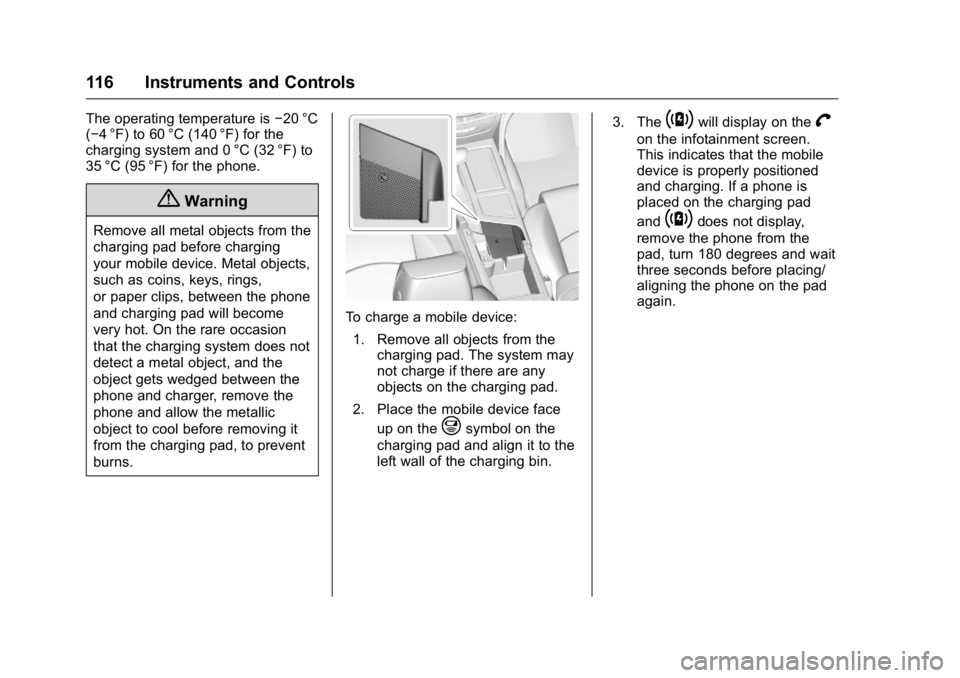
burns. To charge a mobile device:
1. Remove all objects from the
charging pad. The system may
not charge if there are any
objects on the charging pad.
2. Place the mobile device face
up on the
@ symbol on the
charging pad and align it to the
left wall of the charging bin. 3. The
~ will display on the
V on the infotainment screen.
This indicates that the mobile
device is properly positioned
and charging. If a phone is
placed on the charging pad
and
~ does not display,
remove the phone from the
pad, turn 180 degrees and wait
three seconds before placing/
aligning the phone on the pad
again.
Page 158 of 397

Cadillac CT6 Owner Manual (GMNA-Localizing-U.S./Canada-9235592) -
2016 - crc - 11/6/15
Instruments and Controls 157TRANSMISSION HOT — IDLE
ENGINE This message displays and a chime
sounds if the transmission fluid in
the vehicle gets hot. Driving with the
transmission fluid temperature high
can cause damage to the vehicle.
Stop the vehicle and let it idle to
allow the transmission to cool. This
message clears when the fluid
temperature reaches a safe level.
Vehicle Reminder
Messages ICE POSSIBLE DRIVE
WITH CARE This message displays when ice
conditions are possible.
Vehicle Speed Messages SPEED LIMIT EXCEEDED
This message is displayed when the
vehicle speed is greater than the set
speed. See "Speed Warning" under
Driver Information Center
(DIC) 0 140 . Washer Fluid Messages WASHER FLUID LOW ADD
FLUID This message may display when the
washer fluid level is low. Fill the
windshield washer reservoir as soon
as possible. See Engine
Compartment Overview 0 265 for
the location of the windshield
washer reservoir. Also, see Washer
Fluid 0 281 .
Window Messages OPEN, THEN CLOSE DRIVER/
PASSENGER WINDOW This message is displayed when the
window needs to be reprogrammed.
If the vehicle's battery has been
recharged or disconnected, you will
need to program each front window
for the express-up feature to work.
See Power Windows 0 52 .Vehicle
Personalization Use the audio system controls to
access the personalization menus
for customizing vehicle features.
The following are all possible
personalization features. Depending
on the vehicle, some may not be
available.
Infotainment System Audio
System Controls
To access the
personalization menu:
1. Touch SETTINGS on the Home
Page of the infotainment
system display.
2. Touch the desired feature to
display a list of available
options.
3. Touch to select the desired
feature setting.
4. Touch
S Back to exit or move
backward in a menu.