climate control CADILLAC CT6 2018 1.G User Guide
[x] Cancel search | Manufacturer: CADILLAC, Model Year: 2018, Model line: CT6, Model: CADILLAC CT6 2018 1.GPages: 445, PDF Size: 7.7 MB
Page 78 of 445
Cadillac CT6 Owner Manual (GMNA-Localizing-U.S./Canada-11292458) -
2018 - crc - 2/15/17
SEATS AND RESTRAINTS 77
Heated and Ventilated
Rear Seats
{Warning
If you cannot feel temperature
change or pain to the skin, the seat
heater may cause burns. See the
Warning underHeated and
Ventilated Front Seats 072.
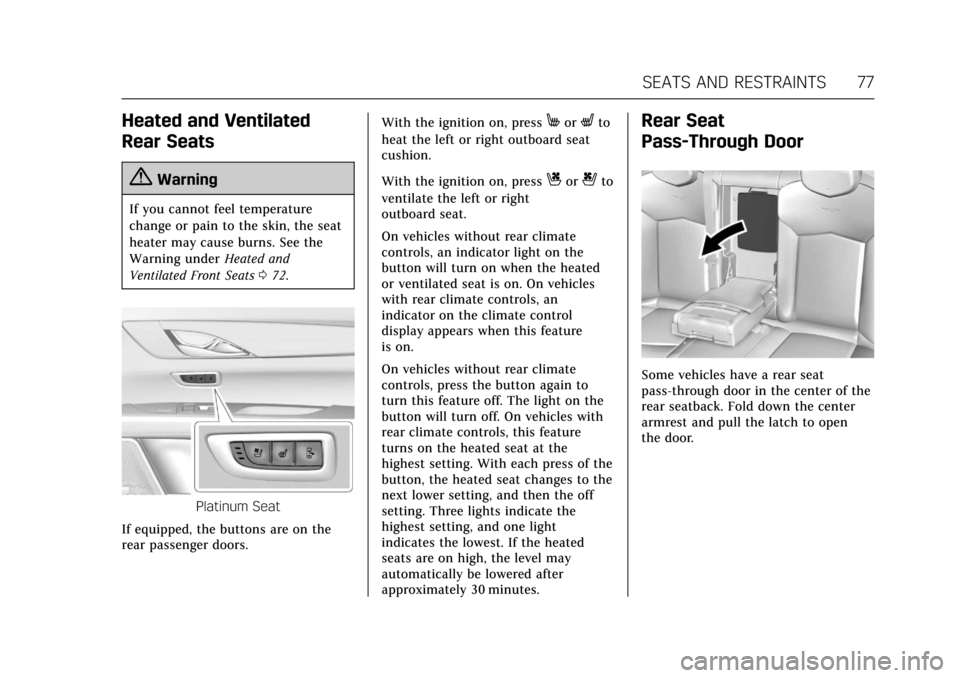
Platinum Seat
If equipped, the buttons are on the
rear passenger doors. With the ignition on, press
MorLto
heat the left or right outboard seat
cushion.
With the ignition on, press
Cor{to
ventilate the left or right
outboard seat.
On vehicles without rear climate
controls, an indicator light on the
button will turn on when the heated
or ventilated seat is on. On vehicles
with rear climate controls, an
indicator on the climate control
display appears when this feature
is on.
On vehicles without rear climate
controls, press the button again to
turn this feature off. The light on the
button will turn off. On vehicles with
rear climate controls, this feature
turns on the heated seat at the
highest setting. With each press of the
button, the heated seat changes to the
next lower setting, and then the off
setting. Three lights indicate the
highest setting, and one light
indicates the lowest. If the heated
seats are on high, the level may
automatically be lowered after
approximately 30 minutes.
Rear Seat
Pass-Through Door
Some vehicles have a rear seat
pass-through door in the center of the
rear seatback. Fold down the center
armrest and pull the latch to open
the door.
Page 163 of 445
Cadillac CT6 Owner Manual (GMNA-Localizing-U.S./Canada-11292458) -
2018 - crc - 2/14/17
162 INSTRUMENTS AND CONTROLS
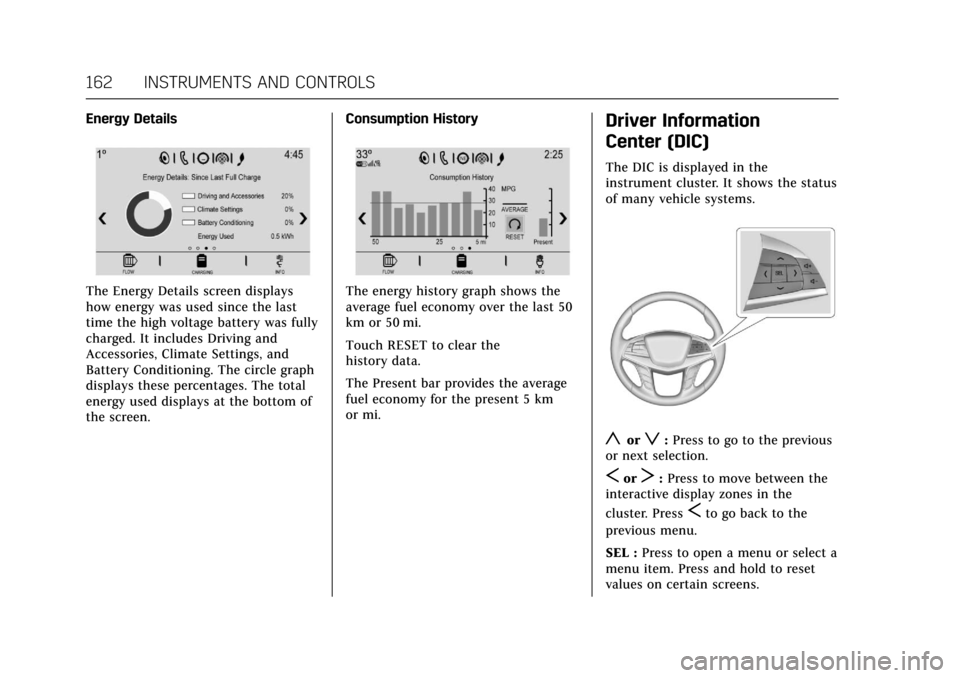
Energy Details
The Energy Details screen displays
how energy was used since the last
time the high voltage battery was fully
charged. It includes Driving and
Accessories, Climate Settings, and
Battery Conditioning. The circle graph
displays these percentages. The total
energy used displays at the bottom of
the screen.Consumption HistoryThe energy history graph shows the
average fuel economy over the last 50
km or 50 mi.
Touch RESET to clear the
history data.
The Present bar provides the average
fuel economy for the present 5 km
or mi.
Driver Information
Center (DIC)
The DIC is displayed in the
instrument cluster. It shows the status
of many vehicle systems.
yorz:
Press to go to the previous
or next selection.
SorT: Press to move between the
interactive display zones in the
cluster. Press
Sto go back to the
previous menu.
SEL : Press to open a menu or select a
menu item. Press and hold to reset
values on certain screens.
Page 172 of 445
Cadillac CT6 Owner Manual (GMNA-Localizing-U.S./Canada-11292458) -
2018 - crc - 2/14/17
INSTRUMENTS AND CONTROLS 171
To enable valet mode:1. Enter a four-digit code on the keypad.
2. Select Enter to go to the confirmation screen.
3. Re-enter the four-digit code.
Touch LOCK or UNLOCK to lock or
unlock the system. Touch Back to go
back to the previous menu.
The four-digit code can be texted to a
paired phone if forgotten by pressing
Option on the Valet Mode lock screen.
Teen Driver
See “Teen Driver” under“Settings ”in
the infotainment manual.
Radio
Select and the following may display:
. Manage Favorites
. Number of Favorites Shown
. Audible Touch Feedback
. Bose Audio Pilot
. Maximum Start Up Volume Manage Favorites
This allows favorites to be edited. See
“Manage Favorites
”in “Settings” under
“Radio ”in the infotainment manual.
Number of Favorites Shown
Touch to set the number of favorites
to display.
Select the desired number or select
Auto and the infotainment system will
automatically adjust the number of
favorites shown.
Audible Touch Feedback
This allows Audible Touch Feedback
to be turned on or off.
Select Off or On.
Bose Audio Pilot
This feature adjusts the volume based
on the noise in the vehicle. See “Bose
AudioPilot Noise Compensation
Technology” under“Infotainment
System Settings” in the infotainment
manual.
Select Off or On. Maximum Start Up Volume
This feature sets the maximum
startup volume. If the vehicle is
started and the volume is greater than
this level, the volume is adjusted to
this level.
To set the maximum startup volume,
touch + or
−to increase or decrease.
Vehicle
Select and the following may display:
.
Climate and Air Quality
. Collision/Detection Systems
. Comfort and Convenience
. Energy
. Lighting
. Power Door Locks
. Remote Lock, Unlock, Start
Climate and Air Quality
Select and the following may display:
.
Auto Fan Speed
. Air Quality Sensor
. Auto Cooled Seats
. Auto Heated Seats
Page 173 of 445

Cadillac CT6 Owner Manual (GMNA-Localizing-U.S./Canada-11292458) -
2018 - crc - 2/14/17
172 INSTRUMENTS AND CONTROLS
.Auto Defog
. Auto Rear Defog
. Ionizer
. Engine Assist Heat
. Engine Assist Heat Plugged In
Auto Fan Speed
This feature will set the auto fan
speed.
Select Low, Medium, or High.
Air Quality Sensor
This allows for selection of air quality
sensor operation at high or low
sensitivity.
Select Off, Low Sensitivity, or High
Sensitivity.
Auto Cooled Seats
When enabled, this feature will
automatically activate the cooled seats
at the level required by the interior
temperature. See Heated and Ventilated
Front Seats 072.
Select Off or On. Auto Heated Seats
When enabled, this feature will
automatically activate heated seats at
the level required by the interior
temperature. See
Heated and Ventilated
Front Seats 072.
If equipped with Auto Heated Steering
Wheel, this feature will turn on when
the Auto Heated Seats turn on.
Select Off or On.
Auto Defog
When set to On, the front defog will
automatically react to temperature
and humidity conditions that may
cause fogging.
Select Off or On.
Auto Rear Defog
If equipped, this allows the Auto Rear
Defog to be turned on or off. This
feature will automatically turn on the
rear window defogger when it is cold
outside.
Select Off or On. Ionizer
If equipped and on, this feature
purifies the air in the interior of the
vehicle.
See
Automatic Climate Control System
(Quad Zone - Gasoline Only) 0197 or
Automatic Climate Control System (Dual
Zone - Gasoline and PLUG-IN) 0191.
Select Off or On.
Engine Assist Heat
If equipped, this feature selects the
outside temperature level at which the
engine may run to assist heating in
Electric Mode. A change in selection
will not take effect until after the
vehicle is first powered down.
Select On for temperatures below
approximately 2 °C (35 °F), or select
Deferred for temperatures below
approximately −10 °C (15 °F).
Engine Assist Heat Plugged In
During remote start, this feature turns
on or off the ability for the engine to
run to help heat the vehicle when it is
plugged in. A change in setting will
not take effect until after the vehicle
is first powered down.
Page 192 of 445

Cadillac CT6 Owner Manual (GMNA-Localizing-U.S./Canada-11292458) -
2018 - crc - 2/14/17
CLIMATE CONTROLS 191
Climate Controls
Climate Control Systems
Automatic Climate ControlSystem (Dual Zone - Gasoline
and PLUG-IN) . . . . . . . . . . . . . . . . . . . 191
Automatic Climate Control System (Quad Zone -
Gasoline Only) . . . . . . . . . . . . . . . . . . 197
Air Vents
Air Vents . . . . . . . . . . . . . . . . . . . . . . . . . . 203
Maintenance
Passenger Compartment AirFilter . . . . . . . . . . . . . . . . . . . . . . . . . . . . . 204
Service . . . . . . . . . . . . . . . . . . . . . . . . . . . . 204
Climate Control Systems
Automatic Climate Control System (Dual Zone - Gasoline
and PLUG-IN)
The climate control buttons on the center stack and on the climate control
display are used to adjust the heating, cooling, and ventilation.
Center Stack Climate Controls
1. Driver and Passenger Temperature Controls
2. Fan Control
3. Driver and Passenger Heated and Ventilated Seats (If Equipped)
4. Rear Window Defogger 5. Defrost
6. OFF (Fan)
7. Recirculation
8. AUTO (Automatic Operation)
Page 193 of 445
Cadillac CT6 Owner Manual (GMNA-Localizing-U.S./Canada-11292458) -
2018 - crc - 2/14/17
192 CLIMATE CONTROLS
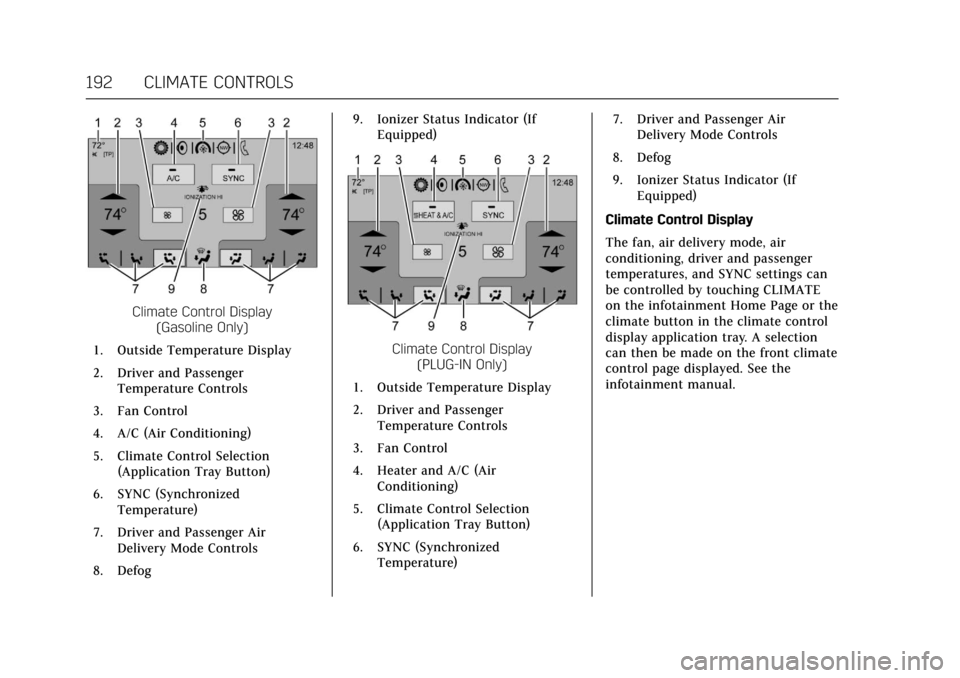
Climate Control Display(Gasoline Only)
1. Outside Temperature Display
2. Driver and Passenger Temperature Controls
3. Fan Control
4. A/C (Air Conditioning)
5. Climate Control Selection (Application Tray Button)
6. SYNC (Synchronized Temperature)
7. Driver and Passenger Air Delivery Mode Controls
8. Defog 9. Ionizer Status Indicator (If
Equipped)
Climate Control Display (PLUG-IN Only)
1. Outside Temperature Display
2. Driver and Passenger Temperature Controls
3. Fan Control
4. Heater and A/C (Air Conditioning)
5. Climate Control Selection (Application Tray Button)
6. SYNC (Synchronized Temperature) 7. Driver and Passenger Air
Delivery Mode Controls
8. Defog
9. Ionizer Status Indicator (If Equipped)
Climate Control Display
The fan, air delivery mode, air
conditioning, driver and passenger
temperatures, and SYNC settings can
be controlled by touching CLIMATE
on the infotainment Home Page or the
climate button in the climate control
display application tray. A selection
can then be made on the front climate
control page displayed. See the
infotainment manual.
Page 194 of 445
Cadillac CT6 Owner Manual (GMNA-Localizing-U.S./Canada-11292458) -
2018 - crc - 2/14/17
CLIMATE CONTROLS 193
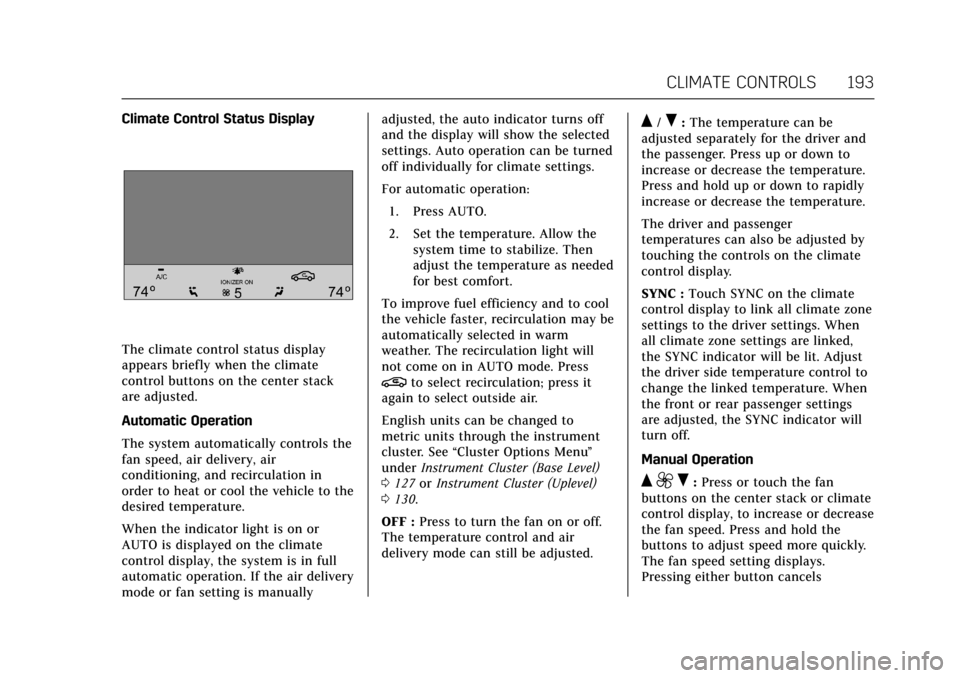
Climate Control Status Display
The climate control status display
appears briefly when the climate
control buttons on the center stack
are adjusted.
Automatic Operation
The system automatically controls the
fan speed, air delivery, air
conditioning, and recirculation in
order to heat or cool the vehicle to the
desired temperature.
When the indicator light is on or
AUTO is displayed on the climate
control display, the system is in full
automatic operation. If the air delivery
mode or fan setting is manuallyadjusted, the auto indicator turns off
and the display will show the selected
settings. Auto operation can be turned
off individually for climate settings.
For automatic operation:
1. Press AUTO.
2. Set the temperature. Allow the system time to stabilize. Then
adjust the temperature as needed
for best comfort.
To improve fuel efficiency and to cool
the vehicle faster, recirculation may be
automatically selected in warm
weather. The recirculation light will
not come on in AUTO mode. Press
@to select recirculation; press it
again to select outside air.
English units can be changed to
metric units through the instrument
cluster. See “Cluster Options Menu ”
under Instrument Cluster (Base Level)
0 127 orInstrument Cluster (Uplevel)
0 130.
OFF : Press to turn the fan on or off.
The temperature control and air
delivery mode can still be adjusted.
Q/R: The temperature can be
adjusted separately for the driver and
the passenger. Press up or down to
increase or decrease the temperature.
Press and hold up or down to rapidly
increase or decrease the temperature.
The driver and passenger
temperatures can also be adjusted by
touching the controls on the climate
control display.
SYNC : Touch SYNC on the climate
control display to link all climate zone
settings to the driver settings. When
all climate zone settings are linked,
the SYNC indicator will be lit. Adjust
the driver side temperature control to
change the linked temperature. When
the front or rear passenger settings
are adjusted, the SYNC indicator will
turn off.
Manual Operation
Q 9 R:Press or touch the fan
buttons on the center stack or climate
control display, to increase or decrease
the fan speed. Press and hold the
buttons to adjust speed more quickly.
The fan speed setting displays.
Pressing either button cancels
Page 195 of 445
Cadillac CT6 Owner Manual (GMNA-Localizing-U.S./Canada-11292458) -
2018 - crc - 2/14/17
194 CLIMATE CONTROLS
automatic fan control and the fan can
be controlled manually. Press AUTO to
return to automatic operation.
Driver and Passenger Air Delivery
Mode Controls :When the climate
information is displayed, touch the
desired air delivery mode on the
climate control display to change the
direction of the airflow. The selected
air delivery mode button is lit.
Touching any of the air delivery
buttons cancels automatic air delivery
control and the direction of the
airf low can be controlled manually.
Press AUTO to return to automatic
operation.
To change the current mode, select
one of the following:
Y: Air is directed to the instrument
panel outlets.
\: Air is divided between the
instrument panel outlets and the floor
outlets.
[: Air is directed to the floor
outlets.
-: Clears the windows of fog or
moisture. Air is directed to the
windshield and floor outlets.
0: Clears the windshield of fog or
frost more quickly. Air is directed to
the windshield. Press
0to turn on or
off. Changing the air delivery mode
also turns the defrost off.
A/C : Touch A/C on the climate
control display to turn the automatic
air conditioning on or off. If the fan is
turned off or the outside temperature
falls below freezing, the air
conditioner will not run.
Press AUTO to return to automatic
operation and the air conditioner runs
as needed.
Heater & A/C (PLUG-IN Only) :
Touch Heater & A/C on the climate
control display to turn electric heater
and air conditioning on or off.
Press AUTO to return to automatic
operation and the electric heater and
air conditioner run as needed.
Automatic Air Recirculation : When
the AUTO indicator light is on, the air
is automatically recirculated as
needed to help quickly cool the inside
of the vehicle. The climate control system may have
a sensor to detect air pollution. When
using automatic air recirculation, the
air quality control system may
operate. To adjust the sensitivity of
the air quality sensor, see
“Climate
and Air Quality” underVehicle
Personalization 0170.
@:Press to alternate between
recirculating air inside the vehicle or
pulling in outside air. The indicator
light on the button is lit when
recirculation mode is active. This
helps to quickly cool the air inside the
vehicle or reduce the outside air and
odors that might enter.
Pressing this button cancels automatic
recirculation. Press AUTO to return to
automatic operation; recirculation
runs automatically as needed.
Manual recirculation mode is not
available when in Defrost or Defog
modes.
Auto Defog : The climate control
system may have a sensor to
automatically detect high humidity
inside the vehicle. When high
humidity is detected, the climate
control system may adjust to outside
Page 196 of 445
Cadillac CT6 Owner Manual (GMNA-Localizing-U.S./Canada-11292458) -
2018 - crc - 2/14/17
CLIMATE CONTROLS 195
air supply and turn on the air
conditioner. If the climate control
system does not detect possible
window fogging, it returns to normal
operation. To turn Auto Defog off or
on, see“Climate and Air Quality”
under Vehicle Personalization 0170.
Ionizer : If equipped with an ionizer,
this feature helps to clean the air
inside the vehicle and remove
contaminants; such as pollen, odors,
and dust. If the climate control
system is on and the ionizer is
enabled, the ionizer status indicator
will be lit on the climate control
display. To turn the ionizer on or off,
see “Climate and Air Quality” under
Vehicle Personalization 0170.
Rear Window Defogger
K:Press to turn the rear window
defogger on or off. The rear window
defogger only works when the engine
is running.
The rear window defogger can be set
to automatic operation. See “Climate
and Air Quality” underVehicle
Personalization 0170. When Auto Rear
Defog is selected, the rear window
defogger turns on automatically when the interior temperature is cold and
the outside temperature is about 4 °C
(40 °F) and below.
The upper grid lines on the rear
window are antenna lines and are not
intended to heat when the defogger is
activated.
The heated outside mirrors turn on
when the rear window defogger
button is on and help to clear fog or
frost from the surface of the mirrors.
Caution
Do not try to clear frost or other
material from the inside of the
front windshield and rear window
with a razor blade or anything else
that is sharp. This may damage the
rear window defogger grid and
affect the radio's ability to pick up
stations clearly. The repairs would
not be covered by the vehicle
warranty.
Driver and Passenger Heated and
Ventilated Seats (If Equipped) :
Press
Ior+to heat the driver or
passenger seatback only.
Press
Jorzto heat the driver or
passenger seat cushion and seatback.
Press
Cor{to ventilate the driver
or passenger seat. See Heated and
Ventilated Front Seats 072.
Remote Start Climate Control
Operation : If equipped with the
remote start feature, the climate
control system may run when the
vehicle is started remotely. The system
uses the driver’s previous settings to
heat or cool the inside of the vehicle.
The rear defog may come on during
remote start based on cold ambient
conditions. The rear defog indicator
light does not come on during a
remote start.
Page 197 of 445

Cadillac CT6 Owner Manual (GMNA-Localizing-U.S./Canada-11292458) -
2018 - crc - 2/14/17
196 CLIMATE CONTROLS
If equipped, the heated seats will turn
on if it is cold outside or the
ventilated seats will turn on if it is hot
outside. The heated and ventilated
seat indicator lights may not come on
during a remote start. If equipped, the
heated steering wheel will come on in
a remote start if it is cold outside. The
heated steering wheel indicator light
may not come on.
SeeRemote Vehicle Start 042 and
Heated and Ventilated Front Seats 072.
Sensor
The solar sensor, on top of the
instrument panel near the windshield,
monitors the solar heat. The climate control system uses the
sensor information to adjust the
temperature, fan speed, recirculation,
and air delivery mode for best
comfort.
If the sensor is covered, the automatic
climate control system may not work
properly.