climate control CADILLAC CT6 2018 1.G Owners Manual
[x] Cancel search | Manufacturer: CADILLAC, Model Year: 2018, Model line: CT6, Model: CADILLAC CT6 2018 1.GPages: 445, PDF Size: 7.7 MB
Page 2 of 445

Cadillac CT6 Owner Manual (GMNA-Localizing-U.S./Canada-11292458) -
2018 - crc - 2/14/17
ContentsIntroduction . . . . . . . . . . . . . . . . . . . . . . . . . . 2
In Brief . . . . . . . . . . . . . . . . . . . . . . . . . . . . . . . 5
Keys, Doors, and Windows . . . . . . . . . 34
Seats and Restraints . . . . . . . . . . . . . . . 64
Storage . . . . . . . . . . . . . . . . . . . . . . . . . . . . . 115
Instruments and Controls . . . . . . . . 118
Lighting . . . . . . . . . . . . . . . . . . . . . . . . . . . . 183
Infotainment System . . . . . . . . . . . . . 190
Climate Controls . . . . . . . . . . . . . . . . . . 191
Driving and Operating . . . . . . . . . . . . 205
Vehicle Care . . . . . . . . . . . . . . . . . . . . . . . 296
Service and Maintenance . . . . . . . . . 388
Technical Data . . . . . . . . . . . . . . . . . . . . 403
Customer Information . . . . . . . . . . . . 408
Reporting Safety Defects . . . . . . . . . 418
OnStar . . . . . . . . . . . . . . . . . . . . . . . . . . . . . . 421
Index . . . . . . . . . . . . . . . . . . . . . . . . 432
Page 6 of 445
Cadillac CT6 Owner Manual (GMNA-Localizing-U.S./Canada-11292458) -
2018 - crc - 2/14/17
IN BRIEF 5
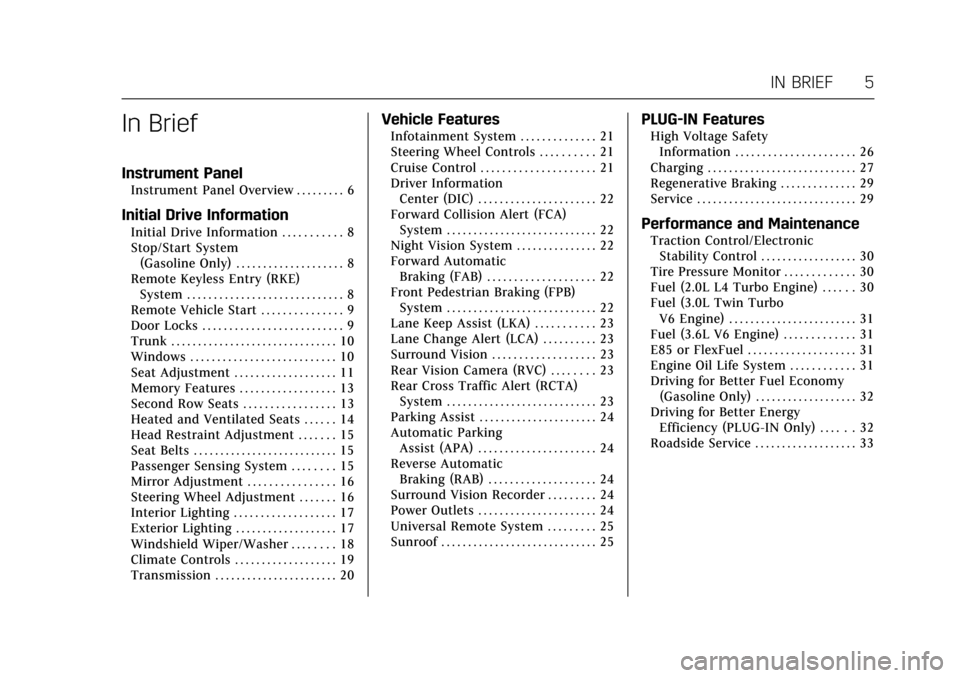
In Brief
Instrument Panel
Instrument Panel Overview . . . . . . . . . 6
Initial Drive Information
Initial Drive Information . . . . . . . . . . . 8
Stop/Start System(Gasoline Only) . . . . . . . . . . . . . . . . . . . . 8
Remote Keyless Entry (RKE) System . . . . . . . . . . . . . . . . . . . . . . . . . . . . . 8
Remote Vehicle Start . . . . . . . . . . . . . . . 9
Door Locks . . . . . . . . . . . . . . . . . . . . . . . . . . 9
Trunk . . . . . . . . . . . . . . . . . . . . . . . . . . . . . . . 10
Windows . . . . . . . . . . . . . . . . . . . . . . . . . . . 10
Seat Adjustment . . . . . . . . . . . . . . . . . . . 11
Memory Features . . . . . . . . . . . . . . . . . . 13
Second Row Seats . . . . . . . . . . . . . . . . . 13
Heated and Ventilated Seats . . . . . . 14
Head Restraint Adjustment . . . . . . . 15
Seat Belts . . . . . . . . . . . . . . . . . . . . . . . . . . . 15
Passenger Sensing System . . . . . . . . 15
Mirror Adjustment . . . . . . . . . . . . . . . . 16
Steering Wheel Adjustment . . . . . . . 16
Interior Lighting . . . . . . . . . . . . . . . . . . . 17
Exterior Lighting . . . . . . . . . . . . . . . . . . . 17
Windshield Wiper/Washer . . . . . . . . 18
Climate Controls . . . . . . . . . . . . . . . . . . . 19
Transmission . . . . . . . . . . . . . . . . . . . . . . . 20
Vehicle Features
Infotainment System . . . . . . . . . . . . . . 21
Steering Wheel Controls . . . . . . . . . . 21
Cruise Control . . . . . . . . . . . . . . . . . . . . . 21
Driver Information Center (DIC) . . . . . . . . . . . . . . . . . . . . . . 22
Forward Collision Alert (FCA) System . . . . . . . . . . . . . . . . . . . . . . . . . . . . 22
Night Vision System . . . . . . . . . . . . . . . 22
Forward Automatic Braking (FAB) . . . . . . . . . . . . . . . . . . . . 22
Front Pedestrian Braking (FPB) System . . . . . . . . . . . . . . . . . . . . . . . . . . . . 22
Lane Keep Assist (LKA) . . . . . . . . . . . 23
Lane Change Alert (LCA) . . . . . . . . . . 23
Surround Vision . . . . . . . . . . . . . . . . . . . 23
Rear Vision Camera (RVC) . . . . . . . . 23
Rear Cross Traffic Alert (RCTA) System . . . . . . . . . . . . . . . . . . . . . . . . . . . . 23
Parking Assist . . . . . . . . . . . . . . . . . . . . . . 24
Automatic Parking Assist (APA) . . . . . . . . . . . . . . . . . . . . . . 24
Reverse Automatic Braking (RAB) . . . . . . . . . . . . . . . . . . . . 24
Surround Vision Recorder . . . . . . . . . 24
Power Outlets . . . . . . . . . . . . . . . . . . . . . . 24
Universal Remote System . . . . . . . . . 25
Sunroof . . . . . . . . . . . . . . . . . . . . . . . . . . . . . 25
PLUG-IN Features
High Voltage Safety Information . . . . . . . . . . . . . . . . . . . . . . 26
Charging . . . . . . . . . . . . . . . . . . . . . . . . . . . . 27
Regenerative Braking . . . . . . . . . . . . . . 29
Service . . . . . . . . . . . . . . . . . . . . . . . . . . . . . . 29
Performance and Maintenance
Traction Control/Electronic Stability Control . . . . . . . . . . . . . . . . . . 30
Tire Pressure Monitor . . . . . . . . . . . . . 30
Fuel (2.0L L4 Turbo Engine) . . . . . . 30
Fuel (3.0L Twin Turbo V6 Engine) . . . . . . . . . . . . . . . . . . . . . . . . 31
Fuel (3.6L V6 Engine) . . . . . . . . . . . . . 31
E85 or FlexFuel . . . . . . . . . . . . . . . . . . . . 31
Engine Oil Life System . . . . . . . . . . . . 31
Driving for Better Fuel Economy (Gasoline Only) . . . . . . . . . . . . . . . . . . . 32
Driving for Better Energy Efficiency (PLUG-IN Only) . . . . . . 32
Roadside Service . . . . . . . . . . . . . . . . . . . 33
Page 8 of 445

Cadillac CT6 Owner Manual (GMNA-Localizing-U.S./Canada-11292458) -
2018 - crc - 2/14/17
IN BRIEF 7
1.Air Vents 0203.
2. Exterior Lamp Controls 0183.
Turn Signal Lever. See Turn and
Lane-Change Signals 0186.
3. Tap Shift Paddles (If Equipped). See Manual Mode (Gasoline Only)
0 233.
Regen On Demand (If Equipped).
See Regenerative Braking
(PLUG-IN Only) 0237.
4. Instrument Cluster (Base Level)
0127 orInstrument Cluster
(Uplevel) 0130.
Driver Information Center (DIC)
Display. See Driver Information
Center (DIC) 0162.
5. Windshield Wiper/Washer 0120.
6. ENGINE START/STOP Button. See Ignition Positions 0217.
7. Parking Assist Button. See Assistance Systems for Parking or
Backing 0254.
Automatic Parking Assist (APA)
Button (If Equipped). See
Assistance Systems for Parking or
Backing 0254. Automatic Engine Stop/Start
Disable Switch (If Equipped).
See
Starting the Engine (PLUG-IN
Only) 0218 orStarting the Engine
(Gasoline Only) 0221.
8. Light Sensor. See Automatic
Headlamp System 0185.
9. Hazard Warning Flashers 0186.
Glove Box Button. See Glove Box
0 115.
10. Infotainment 0190.
11. Heated and Ventilated Front Seats
072 (If Equipped).
12. Infotainment Touch Pad. See the infotainment manual.
13. Automatic Climate Control System
(Quad Zone - Gasoline Only) 0197
or Automatic Climate Control
System (Dual Zone - Gasoline and
PLUG-IN) 0191.
14. Automatic Vehicle Hold (AVH)
0237 (If Equipped).
MODE Button. See Driver Mode
Control (Gasoline Only) 0241.
Traction Control/Electronic
Stability Control 0239. 15. Shift Lever. See
Automatic
Transmission 0231.
16. Driver Information Center (DIC) Controls. See Driver Information
Center (DIC) 0162.
17. Steering Wheel Controls. See the infotainment manual.
18. Horn 0120.
19. Steering Wheel Adjustment 0119
(Out of View).
20. Forward Collision Alert (FCA)
System 0260 (If Equipped).
Lane Keep Assist (LKA) 0271 (If
Equipped).
Heated Steering Wheel 0119 (If
Equipped).
21. Cruise Control 0242.
Adaptive Cruise Control 0245 (If
Equipped).
Phone Button. See “Steering
Wheel Controls ”in the
infotainment manual.
22. Data Link Connector (DLC) (Out of View). See Malfunction
Indicator Lamp (Check Engine
Light) 0143.
Page 15 of 445
Cadillac CT6 Owner Manual (GMNA-Localizing-U.S./Canada-11292458) -
2018 - crc - 2/14/17
14 IN BRIEF
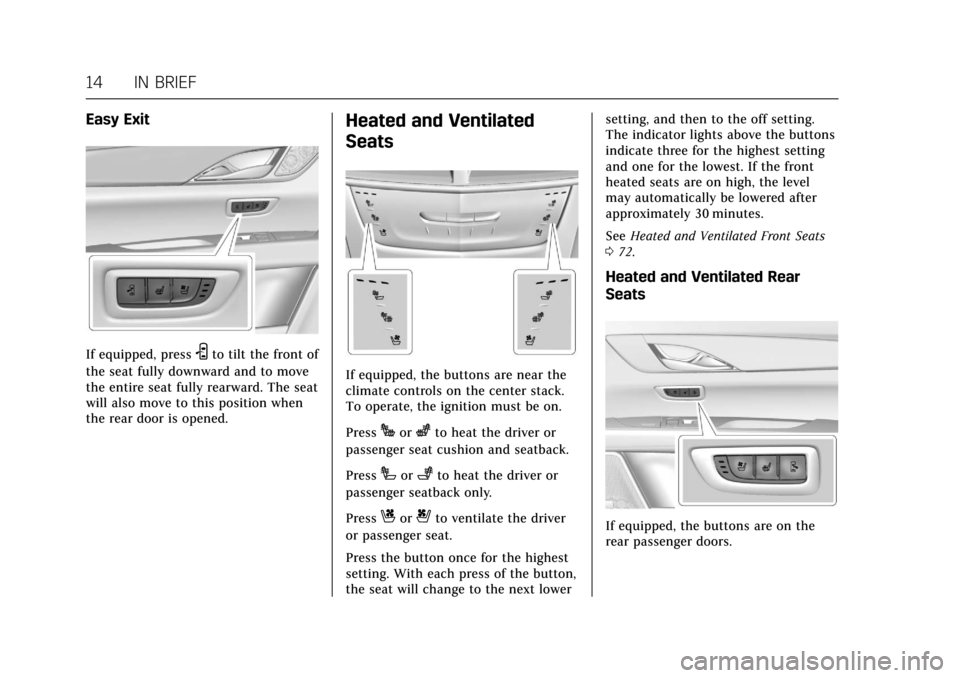
Easy Exit
If equipped, pressSto tilt the front of
the seat fully downward and to move
the entire seat fully rearward. The seat
will also move to this position when
the rear door is opened.
Heated and Ventilated
Seats
If equipped, the buttons are near the
climate controls on the center stack.
To operate, the ignition must be on.
Press
Jorzto heat the driver or
passenger seat cushion and seatback.
Press
Ior+to heat the driver or
passenger seatback only.
Press
Cor{to ventilate the driver
or passenger seat.
Press the button once for the highest
setting. With each press of the button,
the seat will change to the next lower setting, and then to the off setting.
The indicator lights above the buttons
indicate three for the highest setting
and one for the lowest. If the front
heated seats are on high, the level
may automatically be lowered after
approximately 30 minutes.
See
Heated and Ventilated Front Seats
0 72.
Heated and Ventilated Rear
Seats
If equipped, the buttons are on the
rear passenger doors.
Page 20 of 445
Cadillac CT6 Owner Manual (GMNA-Localizing-U.S./Canada-11292458) -
2018 - crc - 2/14/17
IN BRIEF 19
To enable or disable this feature, see
“Rainsense Wipers”underVehicle
Personalization 0170.
OFF : Use to turn the wipers off.
1X : For a single wipe, briefly move
the lever down. For several wipes, hold
the lever down.
f: Pull the lever toward you to
spray windshield washer fluid and
activate the wipers.
See Windshield Wiper/Washer 0120.
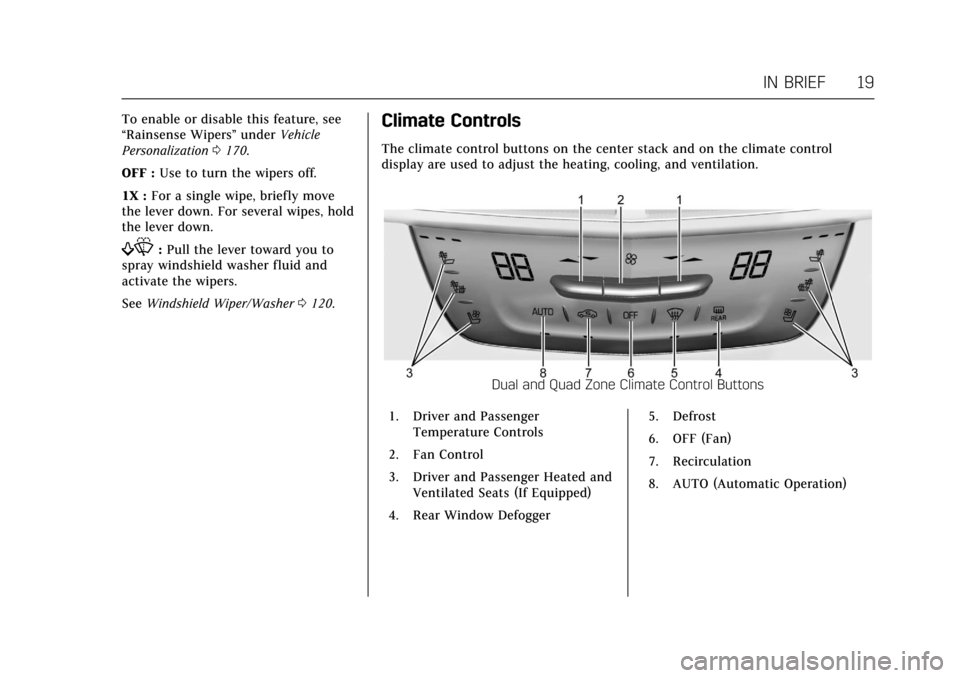
Climate Controls
The climate control buttons on the center stack and on the climate control
display are used to adjust the heating, cooling, and ventilation.
Dual and Quad Zone Climate Control Buttons
1. Driver and Passenger Temperature Controls
2. Fan Control
3. Driver and Passenger Heated and Ventilated Seats (If Equipped)
4. Rear Window Defogger 5. Defrost
6. OFF (Fan)
7. Recirculation
8. AUTO (Automatic Operation)
Page 21 of 445
Cadillac CT6 Owner Manual (GMNA-Localizing-U.S./Canada-11292458) -
2018 - crc - 2/14/17
20 IN BRIEF
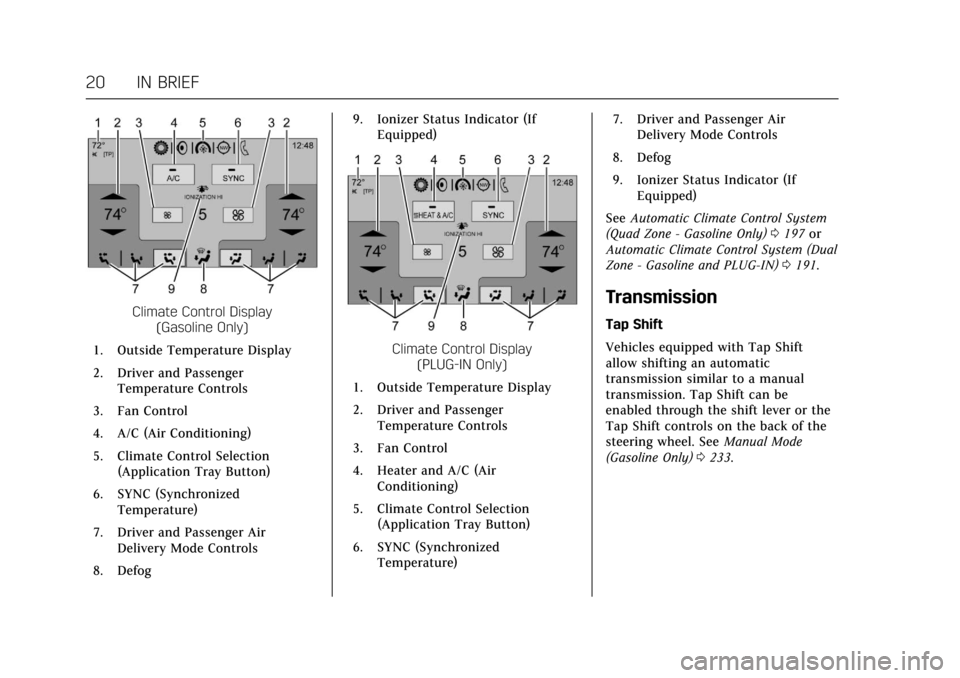
Climate Control Display(Gasoline Only)
1. Outside Temperature Display
2. Driver and Passenger Temperature Controls
3. Fan Control
4. A/C (Air Conditioning)
5. Climate Control Selection (Application Tray Button)
6. SYNC (Synchronized Temperature)
7. Driver and Passenger Air Delivery Mode Controls
8. Defog 9. Ionizer Status Indicator (If
Equipped)
Climate Control Display (PLUG-IN Only)
1. Outside Temperature Display
2. Driver and Passenger Temperature Controls
3. Fan Control
4. Heater and A/C (Air Conditioning)
5. Climate Control Selection (Application Tray Button)
6. SYNC (Synchronized Temperature) 7. Driver and Passenger Air
Delivery Mode Controls
8. Defog
9. Ionizer Status Indicator (If Equipped)
See Automatic Climate Control System
(Quad Zone - Gasoline Only) 0197 or
Automatic Climate Control System (Dual
Zone - Gasoline and PLUG-IN) 0191.
Transmission
Tap Shift
Vehicles equipped with Tap Shift
allow shifting an automatic
transmission similar to a manual
transmission. Tap Shift can be
enabled through the shift lever or the
Tap Shift controls on the back of the
steering wheel. See Manual Mode
(Gasoline Only) 0233.
Page 43 of 445
Cadillac CT6 Owner Manual (GMNA-Localizing-U.S./Canada-11292458) -
2018 - crc - 2/14/17
42 KEYS, DOORS, AND WINDOWS
Remote Vehicle Start
If equipped, this feature allows the
engine to be started from outside the
vehicle.
For the PLUG-IN vehicle, the engine
will only start if needed for warming
functions or high voltage battery
charging.
/:This button will be on the RKE
transmitter if the vehicle has remote
start.
The climate control system will use
the previous settings during a remote
start. The rear window defogger may
come on during remote start based on
cold ambient conditions. The rear
defog indicator light does not come on
during remote start.
If equipped, the heated seats and
heated steering wheel or ventilated
seats may come on when enabled in
vehicle personalization. See Vehicle
Personalization 0170.
If equipped, the heated and ventilated
front seats may also come on when
the vehicle personalization setting is
enabled. See Heated and Ventilated
Front Seats 072. Laws in some local communities may
restrict the use of remote starters. For
example, some laws may require a
person using remote start to have the
vehicle in view. Check local
regulations for any requirements.
If your vehicle is low on fuel, do not
use the remote start feature. The
vehicle may run out of fuel.
The RKE transmitter range may be
shorter while the vehicle is running.
Other conditions can affect the
performance of the transmitter. See
Remote Keyless Entry (RKE) System
0
35.
Starting the Engine Using Remote
Start
1. Press and release
Qon the RKE
transmitter.
2. Immediately press and hold
/
for at least four seconds or until
the turn signal lamps flash. This
confirms the request to remote
start the vehicle has been
received. During the remote start, the
doors will be locked and the
parking lamps will remain on as
long as the engine is running.
The engine will shut off after
10 minutes unless a time
extension is done or the vehicle
is started.
3. Press the brake pedal and start the vehicle to drive.
Extending Engine Run Time
The engine run time can also be
extended by another 10 minutes,
if during the first 10 minutes
Steps 1 and 2 are repeated while the
engine is still running. An extension
can be requested 30 seconds after
starting. This provides a total of
20 minutes.
The remote start can only be
extended once.
When the remote start is extended,
the second 10 minute period is added
on to the first 10 minutes for a total
of 20 minutes.
Page 48 of 445
Cadillac CT6 Owner Manual (GMNA-Localizing-U.S./Canada-11292458) -
2018 - crc - 2/14/17
KEYS, DOORS, AND WINDOWS 47
Doors
Trunk
{Warning
Exhaust gases can enter the vehicle
if it is driven with the liftgate or
trunk/hatch open, or with any
objects that pass through the seal
between the body and the trunk/
hatch or liftgate. Engine exhaust
contains carbon monoxide (CO)
which cannot be seen or smelled.
It can cause unconsciousness and
even death.
If the vehicle must be driven with
the liftgate or trunk/hatch open:. Close all of the windows.
. Fully open the air outlets on
or under the instrument
panel.
. Adjust the climate control
system to a setting that
brings in only outside air and
(Continued)
Warning (Continued)
set the fan speed to the
highest setting. See “Climate
Control Systems” in the Index.
See Engine Exhaust 0230.
To open the trunk, the vehicle must
be off or the shift lever must be in
P (Park).
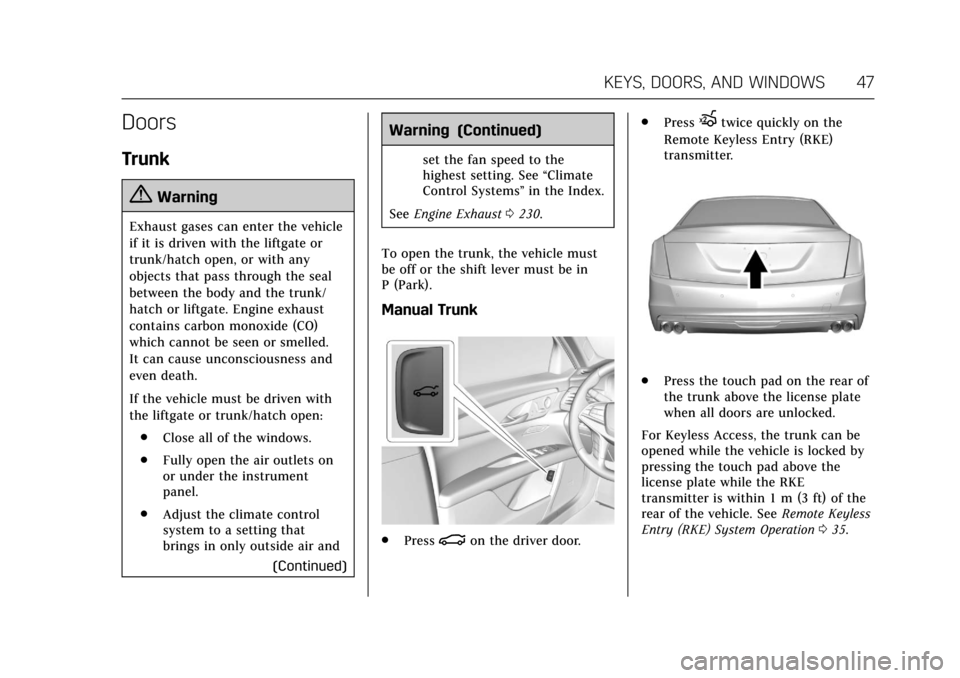
Manual Trunk
. Press|on the driver door. .
Press
Xtwice quickly on the
Remote Keyless Entry (RKE)
transmitter.
. Press the touch pad on the rear of
the trunk above the license plate
when all doors are unlocked.
For Keyless Access, the trunk can be
opened while the vehicle is locked by
pressing the touch pad above the
license plate while the RKE
transmitter is within 1 m (3 ft) of the
rear of the vehicle. See Remote Keyless
Entry (RKE) System Operation 035.
Page 56 of 445
Cadillac CT6 Owner Manual (GMNA-Localizing-U.S./Canada-11292458) -
2018 - crc - 2/14/17
KEYS, DOORS, AND WINDOWS 55
Power Mirrors
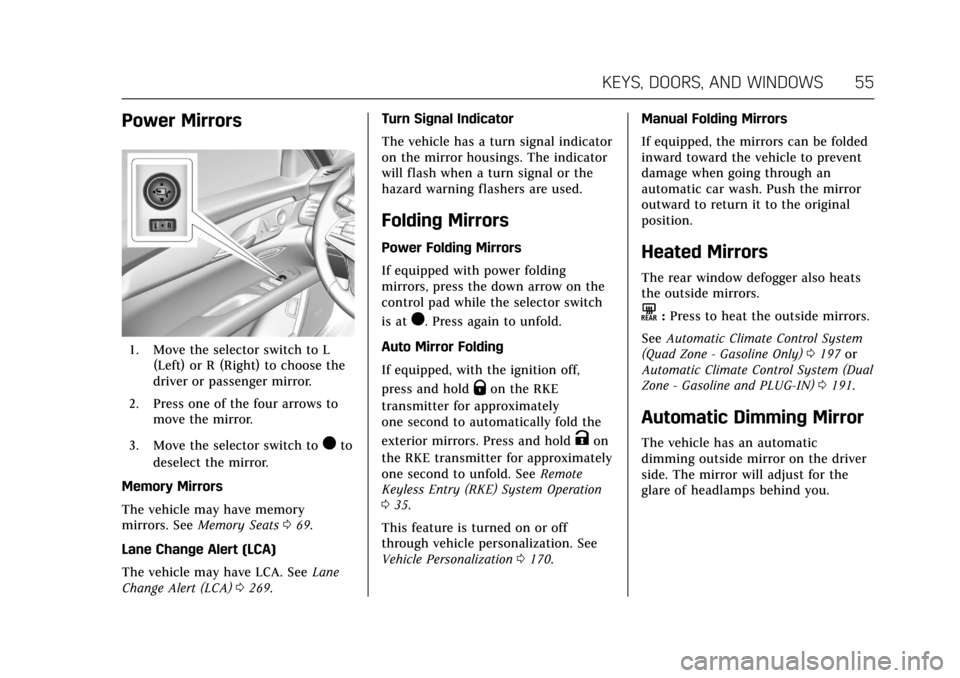
1. Move the selector switch to L(Left) or R (Right) to choose the
driver or passenger mirror.
2. Press one of the four arrows to move the mirror.
3. Move the selector switch to
)to
deselect the mirror.
Memory Mirrors
The vehicle may have memory
mirrors. See Memory Seats 069.
Lane Change Alert (LCA)
The vehicle may have LCA. See Lane
Change Alert (LCA) 0269. Turn Signal Indicator
The vehicle has a turn signal indicator
on the mirror housings. The indicator
will flash when a turn signal or the
hazard warning flashers are used.
Folding Mirrors
Power Folding Mirrors
If equipped with power folding
mirrors, press the down arrow on the
control pad while the selector switch
is at
). Press again to unfold.
Auto Mirror Folding
If equipped, with the ignition off,
press and hold
Qon the RKE
transmitter for approximately
one second to automatically fold the
exterior mirrors. Press and hold
Kon
the RKE transmitter for approximately
one second to unfold. See Remote
Keyless Entry (RKE) System Operation
0 35.
This feature is turned on or off
through vehicle personalization. See
Vehicle Personalization 0170. Manual Folding Mirrors
If equipped, the mirrors can be folded
inward toward the vehicle to prevent
damage when going through an
automatic car wash. Push the mirror
outward to return it to the original
position.
Heated Mirrors
The rear window defogger also heats
the outside mirrors.
K:
Press to heat the outside mirrors.
See Automatic Climate Control System
(Quad Zone - Gasoline Only) 0197 or
Automatic Climate Control System (Dual
Zone - Gasoline and PLUG-IN) 0191.
Automatic Dimming Mirror
The vehicle has an automatic
dimming outside mirror on the driver
side. The mirror will adjust for the
glare of headlamps behind you.
Page 73 of 445
Cadillac CT6 Owner Manual (GMNA-Localizing-U.S./Canada-11292458) -
2018 - crc - 2/15/17
72 SEATS AND RESTRAINTS
number that positions were saved to.
Try storing the position to the other
memory button or try the other RKE
transmitter.
Easy Exit Recall
Easy Exit Recall is not linked to an
RKE transmitter. The position stored
to
Bis used for all drivers. To turn
Easy Exit Recall on or off, see "Vehicle
Personalization Settings" previously in
this section and Vehicle Personalization
0 170.
If turned on, the positions saved to
Bare automatically recalled when
one of the following occurs:
. The vehicle is turned off and the
driver door is opened within a
short time.
. The vehicle is turned off with the
driver door open.
To stop Easy Exit Recall movement,
press any of the following memory
controls:
. Power seat
. Memory SET, 1, 2, or
B
.Power mirror, with the driver or
passenger side mirror selected
. Power steering wheel
Obstructions
If something has blocked the driver
seat and/or power steering wheel
while recalling a memory position, the
recall may stop. Remove the
obstruction and try the recall again.
If the memory position still does not
recall, see your dealer for service.
Heated and Ventilated
Front Seats
{Warning
If temperature change or pain to
the skin cannot be felt, the seat
heater may cause burns. To reduce
the risk of burns, use care when
using the seat heater, especially for
long periods of time. Do not place
anything on the seat that insulates
against heat, such as a blanket,
cushion, cover, or similar item. This (Continued)
Warning (Continued)
may cause the seat heater to
overheat. An overheated seat heater
may cause a burn or may damage
the seat.
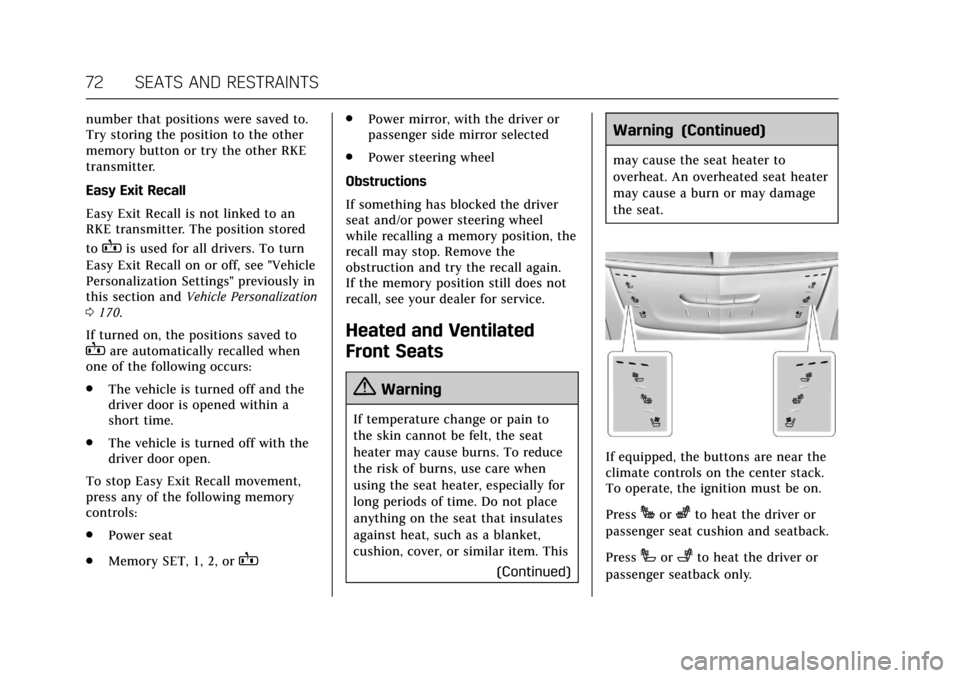
If equipped, the buttons are near the
climate controls on the center stack.
To operate, the ignition must be on.
Press
Jorzto heat the driver or
passenger seat cushion and seatback.
Press
Ior+to heat the driver or
passenger seatback only.