phone CADILLAC CT6 2018 1.G User Guide
[x] Cancel search | Manufacturer: CADILLAC, Model Year: 2018, Model line: CT6, Model: CADILLAC CT6 2018 1.GPages: 445, PDF Size: 7.7 MB
Page 172 of 445
Cadillac CT6 Owner Manual (GMNA-Localizing-U.S./Canada-11292458) -
2018 - crc - 2/14/17
INSTRUMENTS AND CONTROLS 171
To enable valet mode:1. Enter a four-digit code on the keypad.
2. Select Enter to go to the confirmation screen.
3. Re-enter the four-digit code.
Touch LOCK or UNLOCK to lock or
unlock the system. Touch Back to go
back to the previous menu.
The four-digit code can be texted to a
paired phone if forgotten by pressing
Option on the Valet Mode lock screen.
Teen Driver
See “Teen Driver” under“Settings ”in
the infotainment manual.
Radio
Select and the following may display:
. Manage Favorites
. Number of Favorites Shown
. Audible Touch Feedback
. Bose Audio Pilot
. Maximum Start Up Volume Manage Favorites
This allows favorites to be edited. See
“Manage Favorites
”in “Settings” under
“Radio ”in the infotainment manual.
Number of Favorites Shown
Touch to set the number of favorites
to display.
Select the desired number or select
Auto and the infotainment system will
automatically adjust the number of
favorites shown.
Audible Touch Feedback
This allows Audible Touch Feedback
to be turned on or off.
Select Off or On.
Bose Audio Pilot
This feature adjusts the volume based
on the noise in the vehicle. See “Bose
AudioPilot Noise Compensation
Technology” under“Infotainment
System Settings” in the infotainment
manual.
Select Off or On. Maximum Start Up Volume
This feature sets the maximum
startup volume. If the vehicle is
started and the volume is greater than
this level, the volume is adjusted to
this level.
To set the maximum startup volume,
touch + or
−to increase or decrease.
Vehicle
Select and the following may display:
.
Climate and Air Quality
. Collision/Detection Systems
. Comfort and Convenience
. Energy
. Lighting
. Power Door Locks
. Remote Lock, Unlock, Start
Climate and Air Quality
Select and the following may display:
.
Auto Fan Speed
. Air Quality Sensor
. Auto Cooled Seats
. Auto Heated Seats
Page 177 of 445
Cadillac CT6 Owner Manual (GMNA-Localizing-U.S./Canada-11292458) -
2018 - crc - 2/14/17
176 INSTRUMENTS AND CONTROLS
Remote Start Auto Cool Seats
If equipped and turned on, this
feature will turn the ventilated seats
on when using remote start on
warm days.
Select Off or On.
Remote Start Auto Heat Seats
If equipped and turned on, this
feature will turn the heated seats on
when using remote start on cold days.
If equipped with Remote Start Heated
Steering Wheel, this feature will turn
on when the Remote Start Auto
Heated Seats turn on.
Select Off or On.
Remote Window Operation
This allows the windows to be opened
when pressing
Kon the RKE
transmitter. See Remote Keyless Entry
(RKE) System Operation 035.
Select Off or On. Passive Door Unlock
This allows the selection of what
doors will unlock when using the
button on the driver door to unlock
the vehicle.
Select All Doors or Driver Door.
Passive Door Lock
This allows passive locking to be
turned on or off and selects feedback.
See
Remote Keyless Entry (RKE) System
Operation 035.
Select On, On with Horn Chirp, or Off.
Remote Left in Vehicle Alert
This feature sounds an alert when the
RKE transmitter is left in the vehicle.
This menu also enables Remote No
Longer in Vehicle Alert.
Select Off or On.
Bluetooth
Select and the following may display:
. Pair New Device
. Device Management
. Ringtones
. Voice Mail Numbers .
Text Message Alerts
Pair New Device
Select to pair a new device. See
“Pairing” in“Infotainment Controls ”
under “Bluetooth ”in the infotainment
manual.
Device Management
Select to connect to a different phone
source, disconnect a phone, or delete
a phone.
Ringtones
Touch to change the ring tone for the
specific phone. The phone does not
need to be connected to change the
ring tone.
Voice Mail Numbers
This feature displays the voice mail
number for all connected phones. To
change the voice mail number, select
EDIT. Type a new number, then
select SAVE.
Text Message Alerts
This feature allows text messages to
be received. See “Text Messaging”
under “Phone ”in the infotainment
manual.
Page 191 of 445
Cadillac CT6 Owner Manual (GMNA-Localizing-U.S./Canada-11292458) -
2018 - crc - 2/14/17
190 INFOTAINMENT SYSTEM
Infotainment System
Introduction
Infotainment . . . . . . . . . . . . . . . . . . . . . 190
Introduction
Infotainment
See the infotainment manual for
information on the radio, audio
players, rear seat infotainment, phone,
navigation system, and voice or
speech recognition. It also includes
information on settings.
Page 207 of 445
Cadillac CT6 Owner Manual (GMNA-Localizing-U.S./Canada-11292458) -
2018 - crc - 2/14/17
206 DRIVING AND OPERATING
Lane DepartureWarning (LDW) . . . . . . . . . . . . . . . . . 270
Lane Keep Assist (LKA) . . . . . . . . . . 271
Surround Vision Recorder . . . . . . . 272
Charging
Plug-In Charging (PLUG-IN Only) . . . . . . . . . . . . . . . . . 274
Delayed Charging Override (PLUG-IN Only) . . . . . . . . . . . . . . . . . 275
Charging Status Feedback (PLUG-IN Only) . . . . . . . . . . . . . . . . . 275
Charge Cord (PLUG-IN Only) . . . . 279
Utility Interruption of Charging (PLUG-IN Only) . . . . . . . . . . . . . . . . . 284
Electrical Requirements for Battery Charging
(PLUG-IN Only) . . . . . . . . . . . . . . . . . 285
Fuel
Fuel . . . . . . . . . . . . . . . . . . . . . . . . . . . . . . . 286
California Fuel Requirements . . . . 287
Fuels in Foreign Countries . . . . . . . 287
Fuel Additives . . . . . . . . . . . . . . . . . . . . 287
Filling the Tank . . . . . . . . . . . . . . . . . . 288
Filling a Portable Fuel
Container . . . . . . . . . . . . . . . . . . . . . . . . 290
Trailer Towing
General Towing Information . . . . 290
Driving Characteristics andTowing Tips . . . . . . . . . . . . . . . . . . . . . 290 Trailer Towing
(PLUG-IN Only) . . . . . . . . . . . . . . . . . 293
Trailer Towing (Gasoline Only) . . . . . . . . . . . . . . . . . 293
Towing Equipment . . . . . . . . . . . . . . . 294
Conversions and Add-Ons
Add-On Electrical Equipment . . . 295
Driving Information
Distracted Driving
Distraction comes in many forms and
can take your focus from the task of
driving. Exercise good judgment and
do not let other activities divert your
attention away from the road. Many
local governments have enacted laws
regarding driver distraction. Become
familiar with the local laws in
your area.
To avoid distracted driving, keep your
eyes on the road, keep your hands on
the steering wheel, and focus your
attention on driving.
. Do not use a phone in demanding
driving situations. Use a
hands-free method to place or
receive necessary phone calls.
. Watch the road. Do not read, take
notes, or look up information on
phones or other electronic devices.
. Designate a front seat passenger
to handle potential distractions.
Page 208 of 445
Cadillac CT6 Owner Manual (GMNA-Localizing-U.S./Canada-11292458) -
2018 - crc - 2/14/17
DRIVING AND OPERATING 207
.Become familiar with vehicle
features before driving, such as
programming favorite radio
stations and adjusting climate
control and seat settings. Program
all trip information into any
navigation device prior to driving.
. Wait until the vehicle is parked to
retrieve items that have fallen to
the floor.
. Stop or park the vehicle to tend to
children.
. Keep pets in an appropriate carrier
or restraint.
. Avoid stressful conversations
while driving, whether with a
passenger or on a cell phone.
{Warning
Taking your eyes off the road too
long or too often could cause a
crash resulting in injury or death.
Focus your attention on driving. Refer to the infotainment section for
more information on using that
system and the navigation system,
if equipped, including pairing and
using a cell phone.
Defensive Driving
Defensive driving means
“always
expect the unexpected.” The first step
in driving defensively is to wear the
seat belt. See Seat Belts078.
. Assume that other road users
(pedestrians, bicyclists, and other
drivers) are going to be careless
and make mistakes. Anticipate
what they might do and be ready.
. Allow enough following distance
between you and the driver in
front of you.
. Focus on the task of driving.
Drunk Driving
Death and injury associated with
drinking and driving is a global
tragedy.
{Warning
Drinking and then driving is very
dangerous. Your reflexes,
perceptions, attentiveness, and
judgment can be affected by even a
small amount of alcohol. You can
have a serious —or even fatal —
collision if you drive after drinking.
Do not drink and drive or ride with
a driver who has been drinking.
Ride home in a cab; or if you are
with a group, designate a driver
who will not drink.
Control of a Vehicle
Braking, steering, and accelerating are
important factors in helping to control
a vehicle while driving.
Braking (Gasoline Only)
Braking action involves perception
time and reaction time. Deciding to
push the brake pedal is perception
time. Actually doing it is
reaction time.
Page 289 of 445
Cadillac CT6 Owner Manual (GMNA-Localizing-U.S./Canada-11292458) -
2018 - crc - 2/14/17
288 DRIVING AND OPERATING
Filling the Tank
{Warning
Fuel vapors and fuel fires burn
violently and can cause injury or
death.. To help avoid injuries to you
and others, read and follow
all the instructions on the
fuel pump island.
. Turn off the engine when
refueling.
. Keep sparks, flames, and
smoking materials away
from fuel.
. Do not leave the fuel pump
unattended.
. Do not use a cell phone while
refueling.
. Do not reenter the vehicle
while pumping fuel.
. Keep children away from the
fuel pump and never let
children pump fuel.
(Continued)
Warning (Continued)
.Fuel can spray out if the
refueling nozzle is inserted
too quickly. This spray can
happen if the tank is nearly
full, and is more likely in hot
weather. Insert the refueling
nozzle slowly and wait for any
hiss noise to stop prior to
beginning to flow fuel.
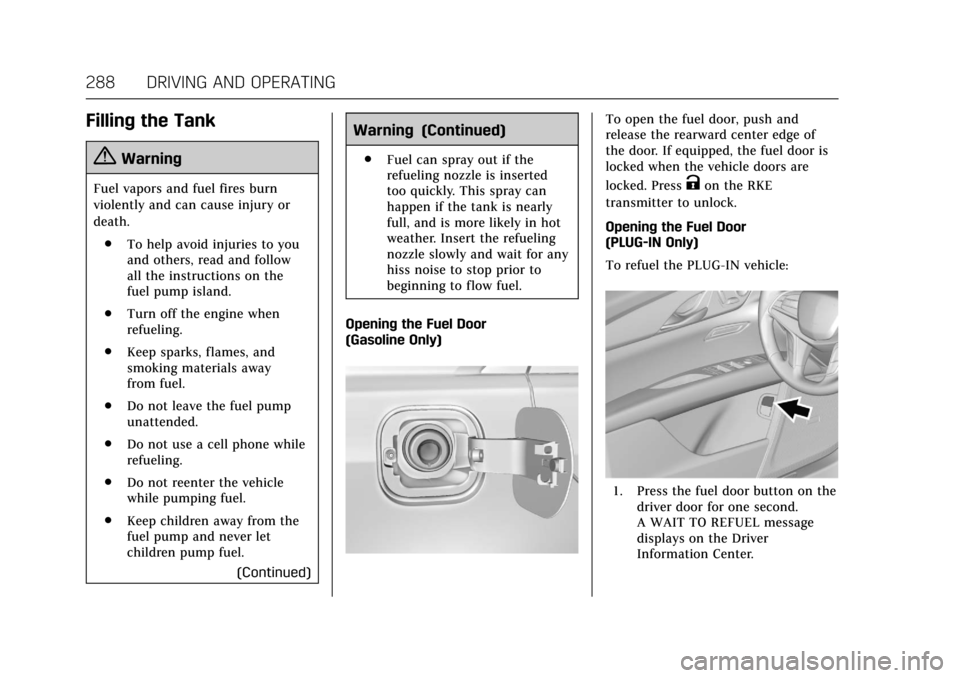
Opening the Fuel Door
(Gasoline Only)
To open the fuel door, push and
release the rearward center edge of
the door. If equipped, the fuel door is
locked when the vehicle doors are
locked. Press
Kon the RKE
transmitter to unlock.
Opening the Fuel Door
(PLUG-IN Only)
To refuel the PLUG-IN vehicle:
1. Press the fuel door button on the driver door for one second.
A WAIT TO REFUEL message
displays on the Driver
Information Center.
Page 291 of 445

Cadillac CT6 Owner Manual (GMNA-Localizing-U.S./Canada-11292458) -
2018 - crc - 2/14/17
290 DRIVING AND OPERATING
3. Remove and clean the funneladapter and return it to the
storage location.
Filling a Portable Fuel
Container
{Warning
Filling a portable fuel container
while it is in the vehicle can cause
fuel vapors that can ignite either by
static electricity or other means.
You or others could be badly
burned and the vehicle could be
damaged. Always:
. Use approved fuel containers.
. Remove the container from
the vehicle, trunk, or pickup
bed before filling.
. Place the container on the
ground.
. Place the nozzle inside the fill
opening of the container
before dispensing fuel, and
(Continued)
Warning (Continued)
keep it in contact with the fill
opening until filling is
complete.
. Fill the container no more
than 95% full to allow for
expansion.
. Do not smoke, light matches,
or use lighters while
pumping fuel.
. Avoid using cell phones or
other electronic devices.
Trailer Towing
General Towing
Information
Only use towing equipment that has
been designed for the vehicle. Contact
your dealer or trailering dealer for
assistance with preparing the vehicle
for towing a trailer. Read the entire
section before towing a trailer.
For towing a disabled vehicle, see
Towing the Vehicle 0376. For towing
the vehicle behind another vehicle
such as a motor home, see
Recreational Vehicle Towing 0378.
Driving Characteristics and
Towing Tips
Driving with a Trailer
When towing a trailer:
.
Become familiar with the local
laws that apply to trailer towing.
. Do not tow a trailer during the
first 2 414 km (1,500 mi) to
prevent damage to the engine,
axle, or other parts.
Page 409 of 445
Cadillac CT6 Owner Manual (GMNA-Localizing-U.S./Canada-11292458) -
2018 - crc - 2/14/17
408 CUSTOMER INFORMATION
Customer
Information
Customer Information
Customer SatisfactionProcedure . . . . . . . . . . . . . . . . . . . . . . . 408
Customer Assistance Offices . . . . 410
Customer Assistance for Text Telephone (TTY) Users . . . . . . . . . 410
Online Owner Center . . . . . . . . . . . . . 411
Roadside Service . . . . . . . . . . . . . . . . . 411
Scheduling Service Appointments . . . . . . . . . . . . . . . . . . . 413
Courtesy Transportation Program . . . . . . . . . . . . . . . . . . . . . . . . . 413
Collision Damage Repair . . . . . . . . . 414
Service Publications Ordering Information . . . . . . . . . . . . . . . . . . . . . 416
Radio Frequency Statement . . . . . 417
Reporting Safety Defects
Reporting Safety Defects to the United States Government . . . . . 418
Reporting Safety Defects to the Canadian Government . . . . . . . . . 418
Reporting Safety Defects to General Motors . . . . . . . . . . . . . . . . . 418
Vehicle Data Recording and
Privacy
Vehicle Data Recording andPrivacy . . . . . . . . . . . . . . . . . . . . . . . . . . . 419
Event Data Recorders . . . . . . . . . . . . 419
OnStar . . . . . . . . . . . . . . . . . . . . . . . . . . . . . 420
Infotainment System . . . . . . . . . . . . . 420
Customer Information
Customer Satisfaction
Procedure
Your satisfaction and goodwill are
important to your dealer and to
Cadillac. Normally, any concerns with
the sales transaction or the operation
of the vehicle will be resolved by your
dealer's sales or service departments.
Sometimes, however, despite the best
intentions of all concerned,
misunderstandings can occur. If your
concern has not been resolved to your
satisfaction, the following steps
should be taken:
STEP ONE : Discuss your concern
with a member of dealership
management. Normally, concerns can
be quickly resolved at that level. If the
matter has already been reviewed with
the sales, service or parts manager,
contact the owner of your dealership
or the general manager.
STEP TWO : If after contacting a
member of dealership management, it
appears your concern cannot be
resolved by your dealership without
Page 410 of 445
Cadillac CT6 Owner Manual (GMNA-Localizing-U.S./Canada-11292458) -
2018 - crc - 2/14/17
CUSTOMER INFORMATION 409
further help, in the U.S., call the
Cadillac Customer Assistance Center
at 1-800–458–8006. In Canada, call
the Canadian Cadillac Customer Care
Centre at 1-888-446-2000.
We encourage you to call the toll-free
number in order to give your inquiry
prompt attention. Have the following
information available to give the
Customer Assistance representative:
.Vehicle Identification
Number (VIN). This is available
from the vehicle registration or
title, or the plate at the top left of
the instrument panel and visible
through the windshield.
. Dealership name and location.
. Vehicle delivery date and present
mileage.
When contacting Cadillac, remember
that your concern will likely be
resolved at a dealer's facility. That is
why we suggest following Step One
first.
STEP THREE —U.S. Owners : Both
General Motors and your dealer are
committed to making sure you are
completely satisfied with the new vehicle. However, if you continue to
remain unsatisfied after following the
procedure outlined in Steps One and
Two, you can file with the Better
Business Bureau (BBB) Auto Line
®
Program to enforce your rights.
The BBB Auto Line Program is an
out-of-court program administered by
the Council of Better Business Bureaus
to settle automotive disputes
regarding vehicle repairs or the
interpretation of the New Vehicle
Limited Warranty. Although you may
be required to resort to this informal
dispute resolution program prior to
filing a court action, use of the
program is free of charge and your
case will generally be heard within
40 days. If you do not agree with the
decision given in your case, you may
reject it and proceed with any other
venue for relief available to you.
You may contact the BBB Auto Line
Program using the toll-free telephone
number or write them at the following
address:
BBB Auto Line Program
Council of Better Business Bureaus,
Inc.
3033 Wilson Boulevard
Suite 600
Arlington, VA 22201
Telephone: 1-800-955-5100
http://www.bbb.org/council/
programs-services/
dispute-handling-and-resolution/
bbb-auto-line
This program is available in all
50 states and the District of Columbia.
Eligibility is limited by vehicle age,
mileage, and other factors. General
Motors reserves the right to change
eligibility limitations and/or
discontinue its participation in this
program.
STEP THREE
—Canadian Owners :
In the event that you do not feel your
concerns have been addressed after
following the procedure outlined in
Steps One and Two, General Motors of
Canada Company wants you to be
aware of its participation in a
no-charge mediation/arbitration
program. General Motors of Canada
Company has committed to binding
Page 411 of 445
Cadillac CT6 Owner Manual (GMNA-Localizing-U.S./Canada-11292458) -
2018 - crc - 2/14/17
410 CUSTOMER INFORMATION
arbitration of owner disputes involving
factory-related vehicle service claims.
The program provides for the review
of the facts involved by an impartial
third party arbiter, and may include
an informal hearing before the arbiter.
The program is designed so that the
entire dispute settlement process,
from the time you file your complaint
to the final decision, should be
completed in about 70 days. We
believe our impartial program offers
advantages over courts in most
jurisdictions because it is informal,
quick, and free of charge.
For further information concerning
eligibility in the Canadian Motor
Vehicle Arbitration Plan (CAMVAP),
call toll-free 1-800-207-0685, or call
the Cadillac Customer Care Centre,
1-888-446-2000, or write to:
General Motors Cadillac Customer
Care Centre
General Motors of Canada Company
Mail Code: CA1-163-005
1908 Colonel Sam Drive
Oshawa, Ontario L1H 8P7The inquiry should be accompanied
by the Vehicle Identification
Number (VIN).
Customer Assistance
Offices
Cadillac encourages customers to call
the toll-free number for assistance.
However, if a customer wishes to
write or e-mail Cadillac, the letter
should be addressed to:
United States and Puerto Rico
Cadillac Customer Assistance Center
Cadillac Motor Car Division
P.O. Box 33169
Detroit, MI 48232-5169
www.Cadillac.com
1-800-458-8006
1-800-833-2622 (For Text Telephone
devices (TTYs))
Roadside Service: 1-800-224-1400
From U.S. Virgin Islands:
1-800-496-9994
Canada
General Motors of Canada Company
Cadillac Customer Care Centre, Mail
Code: CA1-163-005
1908 Colonel Sam Drive
Oshawa, Ontario L1H 8P7
www.gm.ca
1-888-446-2000 (English/French)
Cadillac Roadside Service:
1-800-882-1112
Overseas
Contact the local General Motors
Business Unit.
Customer Assistance for
Text Telephone (TTY)
Users
To assist customers who are deaf,
hard of hearing, or speech-impaired
and who use Text Telephones (TTYs),
Cadillac has TTY equipment available
at its Customer Assistance Center. Any
TTY user can communicate with
Cadillac by dialing: 1-800-833-2622.
TTY users in Canada can dial
1-800-263-3830.