steering CADILLAC CT6 2018 1.G Owner's Guide
[x] Cancel search | Manufacturer: CADILLAC, Model Year: 2018, Model line: CT6, Model: CADILLAC CT6 2018 1.GPages: 445, PDF Size: 7.7 MB
Page 167 of 445
Cadillac CT6 Owner Manual (GMNA-Localizing-U.S./Canada-11292458) -
2018 - crc - 2/14/17
166 INSTRUMENTS AND CONTROLS
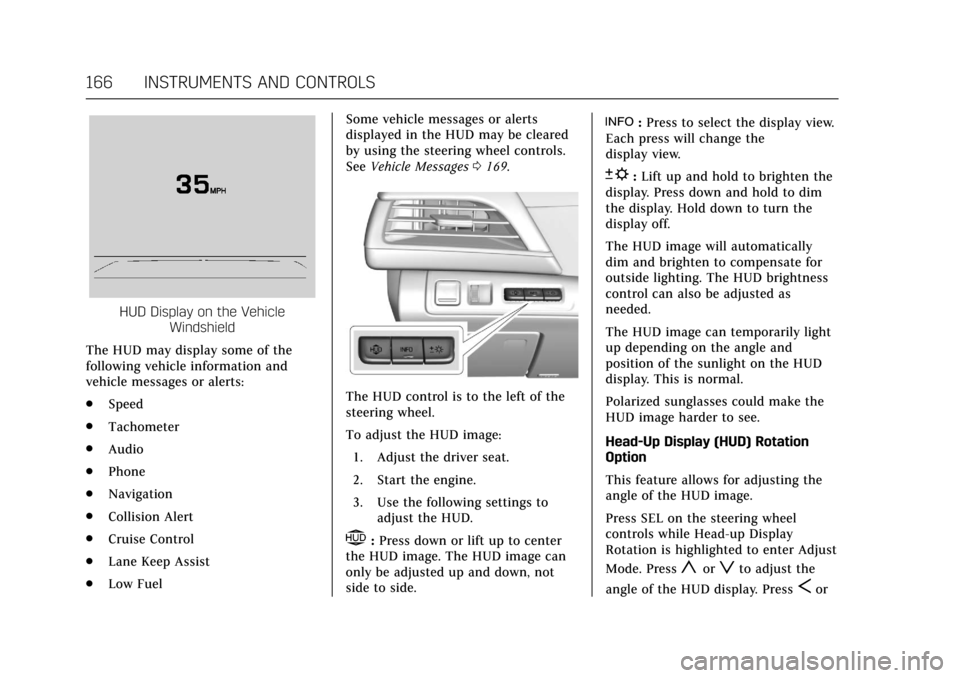
HUD Display on the VehicleWindshield
The HUD may display some of the
following vehicle information and
vehicle messages or alerts:
. Speed
. Tachometer
. Audio
. Phone
. Navigation
. Collision Alert
. Cruise Control
. Lane Keep Assist
. Low Fuel Some vehicle messages or alerts
displayed in the HUD may be cleared
by using the steering wheel controls.
See
Vehicle Messages 0169.
The HUD control is to the left of the
steering wheel.
To adjust the HUD image:
1. Adjust the driver seat.
2. Start the engine.
3. Use the following settings to adjust the HUD.
$:Press down or lift up to center
the HUD image. The HUD image can
only be adjusted up and down, not
side to side.
!: Press to select the display view.
Each press will change the
display view.
D: Lift up and hold to brighten the
display. Press down and hold to dim
the display. Hold down to turn the
display off.
The HUD image will automatically
dim and brighten to compensate for
outside lighting. The HUD brightness
control can also be adjusted as
needed.
The HUD image can temporarily light
up depending on the angle and
position of the sunlight on the HUD
display. This is normal.
Polarized sunglasses could make the
HUD image harder to see.
Head-Up Display (HUD) Rotation
Option
This feature allows for adjusting the
angle of the HUD image.
Press SEL on the steering wheel
controls while Head-up Display
Rotation is highlighted to enter Adjust
Mode. Press
yorzto adjust the
angle of the HUD display. Press
Sor
Page 168 of 445
Cadillac CT6 Owner Manual (GMNA-Localizing-U.S./Canada-11292458) -
2018 - crc - 2/14/17
INSTRUMENTS AND CONTROLS 167
Tto highlight OK, then press SEL to
save the setting. CANCEL can also be
selected to cancel the setting. The
vehicle must be in P (Park).
See Instrument Cluster (Base Level)
0 127 orInstrument Cluster (Uplevel)
0 130.
HUD Views
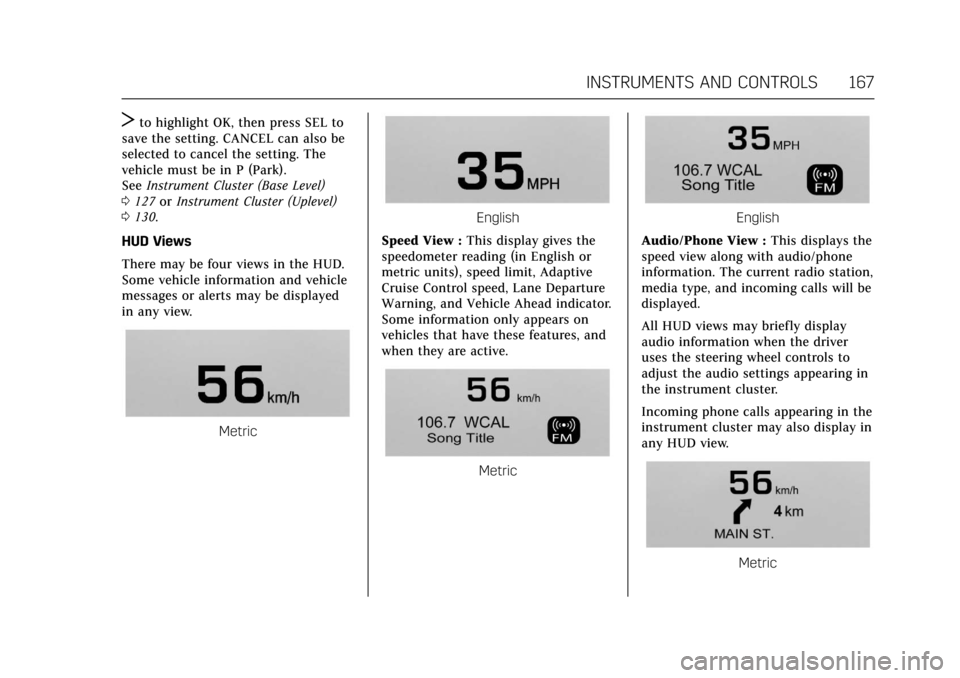
There may be four views in the HUD.
Some vehicle information and vehicle
messages or alerts may be displayed
in any view.
Metric
English
Speed View : This display gives the
speedometer reading (in English or
metric units), speed limit, Adaptive
Cruise Control speed, Lane Departure
Warning, and Vehicle Ahead indicator.
Some information only appears on
vehicles that have these features, and
when they are active.
Metric
English
Audio/Phone View : This displays the
speed view along with audio/phone
information. The current radio station,
media type, and incoming calls will be
displayed.
All HUD views may briefly display
audio information when the driver
uses the steering wheel controls to
adjust the audio settings appearing in
the instrument cluster.
Incoming phone calls appearing in the
instrument cluster may also display in
any HUD view.
Metric
Page 171 of 445
Cadillac CT6 Owner Manual (GMNA-Localizing-U.S./Canada-11292458) -
2018 - crc - 2/14/17
170 INSTRUMENTS AND CONTROLS
Vehicle Personalization
Use the audio system controls to
access the personalization menus for
customizing vehicle features.
The following are all possible
personalization features. Depending
on the vehicle, some may not be
available.
Infotainment System Audio System
Controls
To access the personalization menu:1. Touch SETTINGS on the Home Page of the infotainment display.
2. Touch the desired feature to display a list of available options.
3. Touch to select the desired feature setting.
4. Touch
0Back to exit or move
backward in a menu.
Personalization Menus
The following list of menu items may
be available:
. Time and Date
. Rear Seat Reminder .
Language
. Video Voice-Over
. Valet Mode
. Teen Driver
. Radio
. Vehicle
. Bluetooth
. Apple CarPlay
. Android Auto
. Voice
. TouchPad
. Display
. Rear Camera
. Return to Factory Settings
. Software Information
. Wi-Fi
Each menu is detailed in the following
information.
Time and Date
Manually set the time and date. See
Clock 0122.
Rear Seat Reminder
This allows for a chime and a message
when the rear door has been opened
before or during operation of the
vehicle.
Select Off or On.
Language
Select Language, then select from the
available language(s).
The selected language will display on
the system, and voice recognition will
reflect the selected language.
Video Voice-Over
When activated, the RSI will read
aloud menu titles, menu listings,
pop-ups, alerts, and file titles from
audio and video media.
Select Off or On.
Valet Mode
This will lock the infotainment system
and steering wheel controls. It may
also limit access to vehicle storage
locations, if equipped.
Page 173 of 445

Cadillac CT6 Owner Manual (GMNA-Localizing-U.S./Canada-11292458) -
2018 - crc - 2/14/17
172 INSTRUMENTS AND CONTROLS
.Auto Defog
. Auto Rear Defog
. Ionizer
. Engine Assist Heat
. Engine Assist Heat Plugged In
Auto Fan Speed
This feature will set the auto fan
speed.
Select Low, Medium, or High.
Air Quality Sensor
This allows for selection of air quality
sensor operation at high or low
sensitivity.
Select Off, Low Sensitivity, or High
Sensitivity.
Auto Cooled Seats
When enabled, this feature will
automatically activate the cooled seats
at the level required by the interior
temperature. See Heated and Ventilated
Front Seats 072.
Select Off or On. Auto Heated Seats
When enabled, this feature will
automatically activate heated seats at
the level required by the interior
temperature. See
Heated and Ventilated
Front Seats 072.
If equipped with Auto Heated Steering
Wheel, this feature will turn on when
the Auto Heated Seats turn on.
Select Off or On.
Auto Defog
When set to On, the front defog will
automatically react to temperature
and humidity conditions that may
cause fogging.
Select Off or On.
Auto Rear Defog
If equipped, this allows the Auto Rear
Defog to be turned on or off. This
feature will automatically turn on the
rear window defogger when it is cold
outside.
Select Off or On. Ionizer
If equipped and on, this feature
purifies the air in the interior of the
vehicle.
See
Automatic Climate Control System
(Quad Zone - Gasoline Only) 0197 or
Automatic Climate Control System (Dual
Zone - Gasoline and PLUG-IN) 0191.
Select Off or On.
Engine Assist Heat
If equipped, this feature selects the
outside temperature level at which the
engine may run to assist heating in
Electric Mode. A change in selection
will not take effect until after the
vehicle is first powered down.
Select On for temperatures below
approximately 2 °C (35 °F), or select
Deferred for temperatures below
approximately −10 °C (15 °F).
Engine Assist Heat Plugged In
During remote start, this feature turns
on or off the ability for the engine to
run to help heat the vehicle when it is
plugged in. A change in setting will
not take effect until after the vehicle
is first powered down.
Page 177 of 445

Cadillac CT6 Owner Manual (GMNA-Localizing-U.S./Canada-11292458) -
2018 - crc - 2/14/17
176 INSTRUMENTS AND CONTROLS
Remote Start Auto Cool Seats
If equipped and turned on, this
feature will turn the ventilated seats
on when using remote start on
warm days.
Select Off or On.
Remote Start Auto Heat Seats
If equipped and turned on, this
feature will turn the heated seats on
when using remote start on cold days.
If equipped with Remote Start Heated
Steering Wheel, this feature will turn
on when the Remote Start Auto
Heated Seats turn on.
Select Off or On.
Remote Window Operation
This allows the windows to be opened
when pressing
Kon the RKE
transmitter. See Remote Keyless Entry
(RKE) System Operation 035.
Select Off or On. Passive Door Unlock
This allows the selection of what
doors will unlock when using the
button on the driver door to unlock
the vehicle.
Select All Doors or Driver Door.
Passive Door Lock
This allows passive locking to be
turned on or off and selects feedback.
See
Remote Keyless Entry (RKE) System
Operation 035.
Select On, On with Horn Chirp, or Off.
Remote Left in Vehicle Alert
This feature sounds an alert when the
RKE transmitter is left in the vehicle.
This menu also enables Remote No
Longer in Vehicle Alert.
Select Off or On.
Bluetooth
Select and the following may display:
. Pair New Device
. Device Management
. Ringtones
. Voice Mail Numbers .
Text Message Alerts
Pair New Device
Select to pair a new device. See
“Pairing” in“Infotainment Controls ”
under “Bluetooth ”in the infotainment
manual.
Device Management
Select to connect to a different phone
source, disconnect a phone, or delete
a phone.
Ringtones
Touch to change the ring tone for the
specific phone. The phone does not
need to be connected to change the
ring tone.
Voice Mail Numbers
This feature displays the voice mail
number for all connected phones. To
change the voice mail number, select
EDIT. Type a new number, then
select SAVE.
Text Message Alerts
This feature allows text messages to
be received. See “Text Messaging”
under “Phone ”in the infotainment
manual.
Page 188 of 445
Cadillac CT6 Owner Manual (GMNA-Localizing-U.S./Canada-11292458) -
2018 - crc - 2/14/17
LIGHTING 187
If after signaling a turn or lane
change, the arrow flashes rapidly or
does not come on, a signal bulb may
be burned out.
Replace any burned out bulbs. If a
bulb is not burned out, check the fuse.
SeeFuses and Circuit Breakers 0331.Interior Lighting
Instrument Panel
Illumination Control
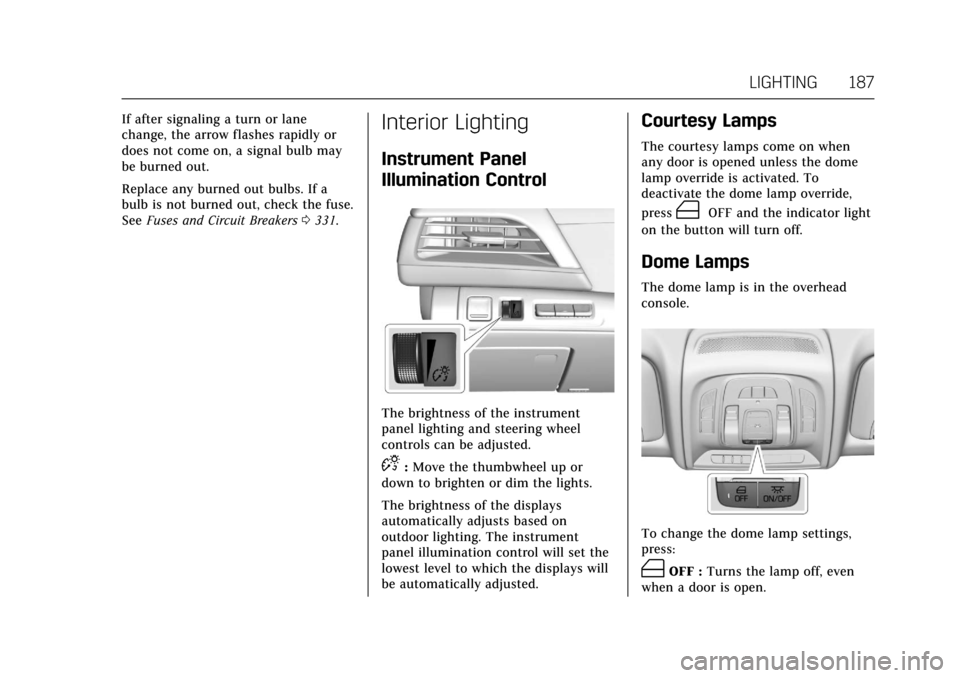
The brightness of the instrument
panel lighting and steering wheel
controls can be adjusted.
D:Move the thumbwheel up or
down to brighten or dim the lights.
The brightness of the displays
automatically adjusts based on
outdoor lighting. The instrument
panel illumination control will set the
lowest level to which the displays will
be automatically adjusted.
Courtesy Lamps
The courtesy lamps come on when
any door is opened unless the dome
lamp override is activated. To
deactivate the dome lamp override,
press
(OFF and the indicator light
on the button will turn off.
Dome Lamps
The dome lamp is in the overhead
console.
To change the dome lamp settings,
press:
(OFF : Turns the lamp off, even
when a door is open.
Page 197 of 445

Cadillac CT6 Owner Manual (GMNA-Localizing-U.S./Canada-11292458) -
2018 - crc - 2/14/17
196 CLIMATE CONTROLS
If equipped, the heated seats will turn
on if it is cold outside or the
ventilated seats will turn on if it is hot
outside. The heated and ventilated
seat indicator lights may not come on
during a remote start. If equipped, the
heated steering wheel will come on in
a remote start if it is cold outside. The
heated steering wheel indicator light
may not come on.
SeeRemote Vehicle Start 042 and
Heated and Ventilated Front Seats 072.
Sensor
The solar sensor, on top of the
instrument panel near the windshield,
monitors the solar heat. The climate control system uses the
sensor information to adjust the
temperature, fan speed, recirculation,
and air delivery mode for best
comfort.
If the sensor is covered, the automatic
climate control system may not work
properly.
Page 202 of 445
Cadillac CT6 Owner Manual (GMNA-Localizing-U.S./Canada-11292458) -
2018 - crc - 2/14/17
CLIMATE CONTROLS 201
uses the driver’s previous settings to
heat or cool the inside of the vehicle.
The rear window defogger may come
on during remote start based on cold
ambient conditions. The rear window
defogger indicator light does not come
on during a remote start.
If equipped, the heated seats will turn
on if it is cold outside or the
ventilated seats will turn on if it is hot
outside. The heated and ventilated
seat indicator lights may not come on
during a remote start. If equipped, the
heated steering wheel will come on in
a remote start if it is cold outside. The
heated steering wheel indicator light
may not come on.
SeeRemote Vehicle Start 042 and
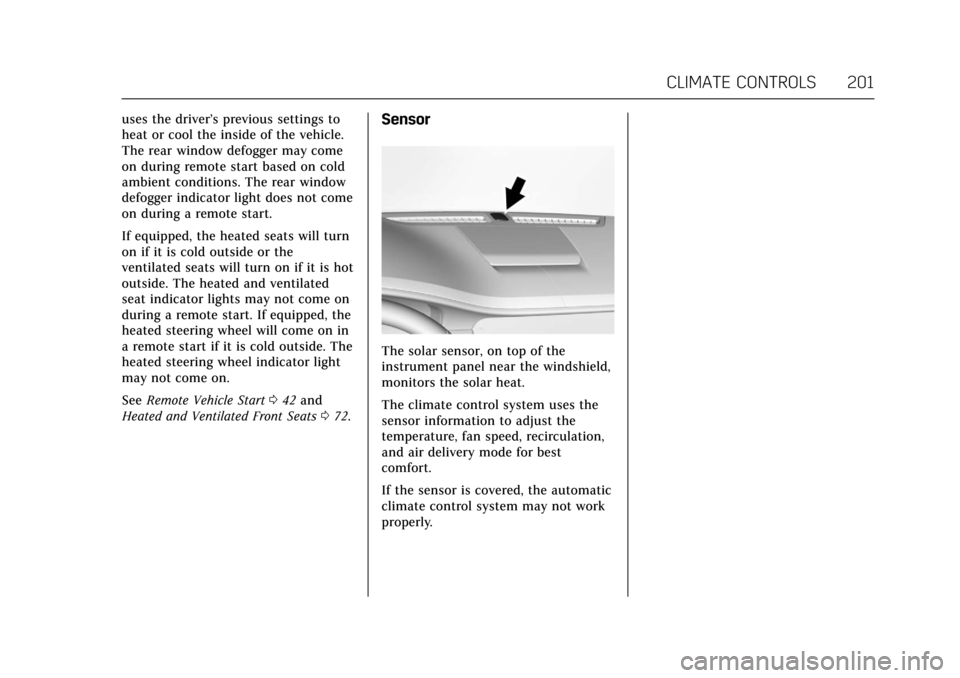
Heated and Ventilated Front Seats 072.Sensor
The solar sensor, on top of the
instrument panel near the windshield,
monitors the solar heat.
The climate control system uses the
sensor information to adjust the
temperature, fan speed, recirculation,
and air delivery mode for best
comfort.
If the sensor is covered, the automatic
climate control system may not work
properly.
Page 206 of 445
Cadillac CT6 Owner Manual (GMNA-Localizing-U.S./Canada-11292458) -
2018 - crc - 2/14/17
DRIVING AND OPERATING 205
Driving and
Operating
Driving Information
Distracted Driving . . . . . . . . . . . . . . . . 206
Defensive Driving . . . . . . . . . . . . . . . . 207
Drunk Driving . . . . . . . . . . . . . . . . . . . . 207
Control of a Vehicle . . . . . . . . . . . . . . 207
Braking (Gasoline Only) . . . . . . . . . . 207
Braking (PLUG-IN Only) . . . . . . . . . 208
Steering . . . . . . . . . . . . . . . . . . . . . . . . . . . 208
Off-Road Recovery . . . . . . . . . . . . . . . . 209
Loss of Control . . . . . . . . . . . . . . . . . . . 209
Driving on Wet Roads . . . . . . . . . . . 210
Hill and Mountain Roads . . . . . . . . 211
Winter Driving . . . . . . . . . . . . . . . . . . . . 211
If the Vehicle Is Stuck . . . . . . . . . . . 212
Vehicle Load Limits . . . . . . . . . . . . . . 213
Starting and Operating
New Vehicle Break-In (GasolineEngine Only) . . . . . . . . . . . . . . . . . . . . 216
Ignition Positions . . . . . . . . . . . . . . . . 217
Starting the Engine (PLUG-IN Only) . . . . . . . . . . . . . . . . . 218
Starting the Engine (Gasoline Only) . . . . . . . . . . . . . . . . . 221
Engine Heater . . . . . . . . . . . . . . . . . . . . 223 Retained Accessory
Power (RAP) . . . . . . . . . . . . . . . . . . . . 224
Shifting Into Park . . . . . . . . . . . . . . . . 224
Shifting out of Park . . . . . . . . . . . . . . 225
Parking over Things That Burn . . . . . . . . . . . . . . . . . . . . . . . 225
Extended Parking . . . . . . . . . . . . . . . . . 226
Electric Vehicle Operating
Modes
Driver Selected Operating Modes (PLUG-IN Only) . . . . . . . . . . . . . . . . . 226
Out of Fuel/Engine Unavailable . . . . . . . . . . . . . . . . . . . . . . 227
Maintenance Modes . . . . . . . . . . . . . . 228
Engine Exhaust
Engine Exhaust . . . . . . . . . . . . . . . . . . . 230
Running the Vehicle While Parked . . . . . . . . . . . . . . . . . . . . . . . . . . . 230
Automatic Transmission
Automatic Transmission . . . . . . . . . 231
Manual Mode (Gasoline Only) . . . 233
Drive Systems
All-Wheel Drive . . . . . . . . . . . . . . . . . . 234
Brakes
Antilock Brake System (ABS) . . . . 234
Electric Parking Brake . . . . . . . . . . . . 235
Brake Assist . . . . . . . . . . . . . . . . . . . . . . . 236 Hill Start Assist (HSA) . . . . . . . . . . . 237
Automatic Vehicle
Hold (AVH) . . . . . . . . . . . . . . . . . . . . . 237
Regenerative Braking (PLUG-IN Only) . . . . . . . . . . . . . . . . . 237
Ride Control Systems
Traction Control/Electronic
Stability Control . . . . . . . . . . . . . . . . 239
Driver Mode Control (Gasoline Only) . . . . . . . . . . . . . . . . . 241
Cruise Control
Cruise Control . . . . . . . . . . . . . . . . . . . . 242
Adaptive Cruise Control . . . . . . . . . 245
Driver Assistance Systems
Driver Assistance Systems . . . . . . . 253
Assistance Systems for Parkingor Backing . . . . . . . . . . . . . . . . . . . . . . . 254
Assistance Systems for Driving . . . . . . . . . . . . . . . . . . . . . . . . . . 260
Forward Collision Alert (FCA) System . . . . . . . . . . . . . . . . . . . . . . . . . . 260
Forward Automatic Braking (FAB) . . . . . . . . . . . . . . . . . . . 262
Front Pedestrian Braking (FPB) System . . . . . . . . . . . . . . . . . . . . . . . . . . 264
Night Vision System . . . . . . . . . . . . . 266
Side Blind Zone Alert (SBZA) . . . . 268
Lane Change Alert (LCA) . . . . . . . . 269
Page 207 of 445
Cadillac CT6 Owner Manual (GMNA-Localizing-U.S./Canada-11292458) -
2018 - crc - 2/14/17
206 DRIVING AND OPERATING
Lane DepartureWarning (LDW) . . . . . . . . . . . . . . . . . 270
Lane Keep Assist (LKA) . . . . . . . . . . 271
Surround Vision Recorder . . . . . . . 272
Charging
Plug-In Charging (PLUG-IN Only) . . . . . . . . . . . . . . . . . 274
Delayed Charging Override (PLUG-IN Only) . . . . . . . . . . . . . . . . . 275
Charging Status Feedback (PLUG-IN Only) . . . . . . . . . . . . . . . . . 275
Charge Cord (PLUG-IN Only) . . . . 279
Utility Interruption of Charging (PLUG-IN Only) . . . . . . . . . . . . . . . . . 284
Electrical Requirements for Battery Charging
(PLUG-IN Only) . . . . . . . . . . . . . . . . . 285
Fuel
Fuel . . . . . . . . . . . . . . . . . . . . . . . . . . . . . . . 286
California Fuel Requirements . . . . 287
Fuels in Foreign Countries . . . . . . . 287
Fuel Additives . . . . . . . . . . . . . . . . . . . . 287
Filling the Tank . . . . . . . . . . . . . . . . . . 288
Filling a Portable Fuel
Container . . . . . . . . . . . . . . . . . . . . . . . . 290
Trailer Towing
General Towing Information . . . . 290
Driving Characteristics andTowing Tips . . . . . . . . . . . . . . . . . . . . . 290 Trailer Towing
(PLUG-IN Only) . . . . . . . . . . . . . . . . . 293
Trailer Towing (Gasoline Only) . . . . . . . . . . . . . . . . . 293
Towing Equipment . . . . . . . . . . . . . . . 294
Conversions and Add-Ons
Add-On Electrical Equipment . . . 295
Driving Information
Distracted Driving
Distraction comes in many forms and
can take your focus from the task of
driving. Exercise good judgment and
do not let other activities divert your
attention away from the road. Many
local governments have enacted laws
regarding driver distraction. Become
familiar with the local laws in
your area.
To avoid distracted driving, keep your
eyes on the road, keep your hands on
the steering wheel, and focus your
attention on driving.
. Do not use a phone in demanding
driving situations. Use a
hands-free method to place or
receive necessary phone calls.
. Watch the road. Do not read, take
notes, or look up information on
phones or other electronic devices.
. Designate a front seat passenger
to handle potential distractions.