night vision CADILLAC CT6 2018 1.G Owners Manual
[x] Cancel search | Manufacturer: CADILLAC, Model Year: 2018, Model line: CT6, Model: CADILLAC CT6 2018 1.GPages: 445, PDF Size: 7.7 MB
Page 6 of 445
Cadillac CT6 Owner Manual (GMNA-Localizing-U.S./Canada-11292458) -
2018 - crc - 2/14/17
IN BRIEF 5
In Brief
Instrument Panel
Instrument Panel Overview . . . . . . . . . 6
Initial Drive Information
Initial Drive Information . . . . . . . . . . . 8
Stop/Start System(Gasoline Only) . . . . . . . . . . . . . . . . . . . . 8
Remote Keyless Entry (RKE) System . . . . . . . . . . . . . . . . . . . . . . . . . . . . . 8
Remote Vehicle Start . . . . . . . . . . . . . . . 9
Door Locks . . . . . . . . . . . . . . . . . . . . . . . . . . 9
Trunk . . . . . . . . . . . . . . . . . . . . . . . . . . . . . . . 10
Windows . . . . . . . . . . . . . . . . . . . . . . . . . . . 10
Seat Adjustment . . . . . . . . . . . . . . . . . . . 11
Memory Features . . . . . . . . . . . . . . . . . . 13
Second Row Seats . . . . . . . . . . . . . . . . . 13
Heated and Ventilated Seats . . . . . . 14
Head Restraint Adjustment . . . . . . . 15
Seat Belts . . . . . . . . . . . . . . . . . . . . . . . . . . . 15
Passenger Sensing System . . . . . . . . 15
Mirror Adjustment . . . . . . . . . . . . . . . . 16
Steering Wheel Adjustment . . . . . . . 16
Interior Lighting . . . . . . . . . . . . . . . . . . . 17
Exterior Lighting . . . . . . . . . . . . . . . . . . . 17
Windshield Wiper/Washer . . . . . . . . 18
Climate Controls . . . . . . . . . . . . . . . . . . . 19
Transmission . . . . . . . . . . . . . . . . . . . . . . . 20
Vehicle Features
Infotainment System . . . . . . . . . . . . . . 21
Steering Wheel Controls . . . . . . . . . . 21
Cruise Control . . . . . . . . . . . . . . . . . . . . . 21
Driver Information Center (DIC) . . . . . . . . . . . . . . . . . . . . . . 22
Forward Collision Alert (FCA) System . . . . . . . . . . . . . . . . . . . . . . . . . . . . 22
Night Vision System . . . . . . . . . . . . . . . 22
Forward Automatic Braking (FAB) . . . . . . . . . . . . . . . . . . . . 22
Front Pedestrian Braking (FPB) System . . . . . . . . . . . . . . . . . . . . . . . . . . . . 22
Lane Keep Assist (LKA) . . . . . . . . . . . 23
Lane Change Alert (LCA) . . . . . . . . . . 23
Surround Vision . . . . . . . . . . . . . . . . . . . 23
Rear Vision Camera (RVC) . . . . . . . . 23
Rear Cross Traffic Alert (RCTA) System . . . . . . . . . . . . . . . . . . . . . . . . . . . . 23
Parking Assist . . . . . . . . . . . . . . . . . . . . . . 24
Automatic Parking Assist (APA) . . . . . . . . . . . . . . . . . . . . . . 24
Reverse Automatic Braking (RAB) . . . . . . . . . . . . . . . . . . . . 24
Surround Vision Recorder . . . . . . . . . 24
Power Outlets . . . . . . . . . . . . . . . . . . . . . . 24
Universal Remote System . . . . . . . . . 25
Sunroof . . . . . . . . . . . . . . . . . . . . . . . . . . . . . 25
PLUG-IN Features
High Voltage Safety Information . . . . . . . . . . . . . . . . . . . . . . 26
Charging . . . . . . . . . . . . . . . . . . . . . . . . . . . . 27
Regenerative Braking . . . . . . . . . . . . . . 29
Service . . . . . . . . . . . . . . . . . . . . . . . . . . . . . . 29
Performance and Maintenance
Traction Control/Electronic Stability Control . . . . . . . . . . . . . . . . . . 30
Tire Pressure Monitor . . . . . . . . . . . . . 30
Fuel (2.0L L4 Turbo Engine) . . . . . . 30
Fuel (3.0L Twin Turbo V6 Engine) . . . . . . . . . . . . . . . . . . . . . . . . 31
Fuel (3.6L V6 Engine) . . . . . . . . . . . . . 31
E85 or FlexFuel . . . . . . . . . . . . . . . . . . . . 31
Engine Oil Life System . . . . . . . . . . . . 31
Driving for Better Fuel Economy (Gasoline Only) . . . . . . . . . . . . . . . . . . . 32
Driving for Better Energy Efficiency (PLUG-IN Only) . . . . . . 32
Roadside Service . . . . . . . . . . . . . . . . . . . 33
Page 23 of 445
Cadillac CT6 Owner Manual (GMNA-Localizing-U.S./Canada-11292458) -
2018 - crc - 2/14/17
22 IN BRIEF
Driver Information
Center (DIC)
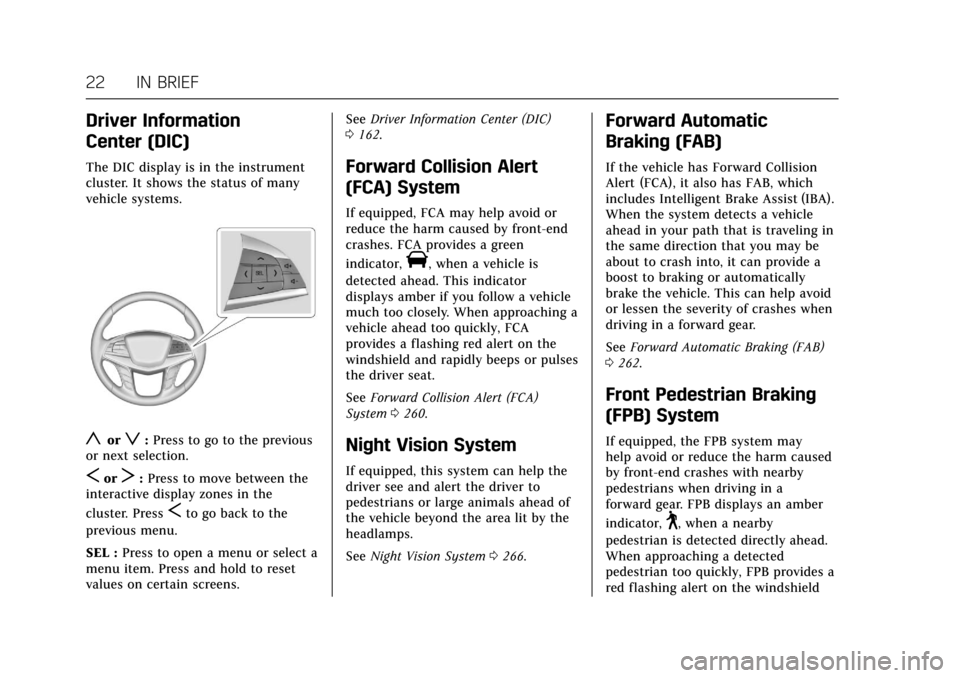
The DIC display is in the instrument
cluster. It shows the status of many
vehicle systems.
yorz:Press to go to the previous
or next selection.
SorT: Press to move between the
interactive display zones in the
cluster. Press
Sto go back to the
previous menu.
SEL : Press to open a menu or select a
menu item. Press and hold to reset
values on certain screens. See
Driver Information Center (DIC)
0 162.
Forward Collision Alert
(FCA) System
If equipped, FCA may help avoid or
reduce the harm caused by front-end
crashes. FCA provides a green
indicator,
V, when a vehicle is
detected ahead. This indicator
displays amber if you follow a vehicle
much too closely. When approaching a
vehicle ahead too quickly, FCA
provides a flashing red alert on the
windshield and rapidly beeps or pulses
the driver seat.
See Forward Collision Alert (FCA)
System 0260.
Night Vision System
If equipped, this system can help the
driver see and alert the driver to
pedestrians or large animals ahead of
the vehicle beyond the area lit by the
headlamps.
See Night Vision System 0266.
Forward Automatic
Braking (FAB)
If the vehicle has Forward Collision
Alert (FCA), it also has FAB, which
includes Intelligent Brake Assist (IBA).
When the system detects a vehicle
ahead in your path that is traveling in
the same direction that you may be
about to crash into, it can provide a
boost to braking or automatically
brake the vehicle. This can help avoid
or lessen the severity of crashes when
driving in a forward gear.
See Forward Automatic Braking (FAB)
0 262.
Front Pedestrian Braking
(FPB) System
If equipped, the FPB system may
help avoid or reduce the harm caused
by front-end crashes with nearby
pedestrians when driving in a
forward gear. FPB displays an amber
indicator,
~, when a nearby
pedestrian is detected directly ahead.
When approaching a detected
pedestrian too quickly, FPB provides a
red flashing alert on the windshield
Page 206 of 445
Cadillac CT6 Owner Manual (GMNA-Localizing-U.S./Canada-11292458) -
2018 - crc - 2/14/17
DRIVING AND OPERATING 205
Driving and
Operating
Driving Information
Distracted Driving . . . . . . . . . . . . . . . . 206
Defensive Driving . . . . . . . . . . . . . . . . 207
Drunk Driving . . . . . . . . . . . . . . . . . . . . 207
Control of a Vehicle . . . . . . . . . . . . . . 207
Braking (Gasoline Only) . . . . . . . . . . 207
Braking (PLUG-IN Only) . . . . . . . . . 208
Steering . . . . . . . . . . . . . . . . . . . . . . . . . . . 208
Off-Road Recovery . . . . . . . . . . . . . . . . 209
Loss of Control . . . . . . . . . . . . . . . . . . . 209
Driving on Wet Roads . . . . . . . . . . . 210
Hill and Mountain Roads . . . . . . . . 211
Winter Driving . . . . . . . . . . . . . . . . . . . . 211
If the Vehicle Is Stuck . . . . . . . . . . . 212
Vehicle Load Limits . . . . . . . . . . . . . . 213
Starting and Operating
New Vehicle Break-In (GasolineEngine Only) . . . . . . . . . . . . . . . . . . . . 216
Ignition Positions . . . . . . . . . . . . . . . . 217
Starting the Engine (PLUG-IN Only) . . . . . . . . . . . . . . . . . 218
Starting the Engine (Gasoline Only) . . . . . . . . . . . . . . . . . 221
Engine Heater . . . . . . . . . . . . . . . . . . . . 223 Retained Accessory
Power (RAP) . . . . . . . . . . . . . . . . . . . . 224
Shifting Into Park . . . . . . . . . . . . . . . . 224
Shifting out of Park . . . . . . . . . . . . . . 225
Parking over Things That Burn . . . . . . . . . . . . . . . . . . . . . . . 225
Extended Parking . . . . . . . . . . . . . . . . . 226
Electric Vehicle Operating
Modes
Driver Selected Operating Modes (PLUG-IN Only) . . . . . . . . . . . . . . . . . 226
Out of Fuel/Engine Unavailable . . . . . . . . . . . . . . . . . . . . . . 227
Maintenance Modes . . . . . . . . . . . . . . 228
Engine Exhaust
Engine Exhaust . . . . . . . . . . . . . . . . . . . 230
Running the Vehicle While Parked . . . . . . . . . . . . . . . . . . . . . . . . . . . 230
Automatic Transmission
Automatic Transmission . . . . . . . . . 231
Manual Mode (Gasoline Only) . . . 233
Drive Systems
All-Wheel Drive . . . . . . . . . . . . . . . . . . 234
Brakes
Antilock Brake System (ABS) . . . . 234
Electric Parking Brake . . . . . . . . . . . . 235
Brake Assist . . . . . . . . . . . . . . . . . . . . . . . 236 Hill Start Assist (HSA) . . . . . . . . . . . 237
Automatic Vehicle
Hold (AVH) . . . . . . . . . . . . . . . . . . . . . 237
Regenerative Braking (PLUG-IN Only) . . . . . . . . . . . . . . . . . 237
Ride Control Systems
Traction Control/Electronic
Stability Control . . . . . . . . . . . . . . . . 239
Driver Mode Control (Gasoline Only) . . . . . . . . . . . . . . . . . 241
Cruise Control
Cruise Control . . . . . . . . . . . . . . . . . . . . 242
Adaptive Cruise Control . . . . . . . . . 245
Driver Assistance Systems
Driver Assistance Systems . . . . . . . 253
Assistance Systems for Parkingor Backing . . . . . . . . . . . . . . . . . . . . . . . 254
Assistance Systems for Driving . . . . . . . . . . . . . . . . . . . . . . . . . . 260
Forward Collision Alert (FCA) System . . . . . . . . . . . . . . . . . . . . . . . . . . 260
Forward Automatic Braking (FAB) . . . . . . . . . . . . . . . . . . . 262
Front Pedestrian Braking (FPB) System . . . . . . . . . . . . . . . . . . . . . . . . . . 264
Night Vision System . . . . . . . . . . . . . 266
Side Blind Zone Alert (SBZA) . . . . 268
Lane Change Alert (LCA) . . . . . . . . 269
Page 261 of 445
Cadillac CT6 Owner Manual (GMNA-Localizing-U.S./Canada-11292458) -
2018 - crc - 2/14/17
260 DRIVING AND OPERATING
When the System Does Not Seem to
Work Properly
The APA system may require a short
period of driving along curves to
calibrate.
Assistance Systems for
Driving
If equipped, when driving the vehicle
in a forward gear, Forward Collision
Alert (FCA), Lane Departure Warning
(LDW), Lane Keep Assist (LKA), Side
Blind Zone Alert (SBZA), Lane Change
Alert (LCA), the Forward Automatic
Braking (FAB) system, the Front
Pedestrian Braking (FPB) system and/
or the Night Vision system can help to
avoid a crash or reduce crash damage.
Forward Collision Alert
(FCA) System
If equipped, the FCA system may help
to avoid or reduce the harm caused by
front-end crashes. When approaching
a vehicle ahead too quickly, FCA
provides a red flashing alert on the
windshield and rapidly beeps or pulsesthe driver seat. FCA also lights an
amber visual alert if following another
vehicle much too closely.
FCA detects vehicles within a distance
of approximately 60 m (197 ft) and
operates at speeds above 8 km/h
(5 mph). If the vehicle has Adaptive
Cruise Control (ACC), it can detect
vehicles to distances of approximately
110 m (360 ft) and operates at all
speeds. See
Adaptive Cruise Control
0 245.
{Warning
FCA is a warning system and does
not apply the brakes. When
approaching a slower-moving or
stopped vehicle ahead too rapidly,
or when following a vehicle too
closely, FCA may not provide a
warning with enough time to help
avoid a crash. It also may not
provide any warning at all. FCA
does not warn of pedestrians,
animals, signs, guardrails, bridges,
construction barrels, or other
(Continued)
Warning (Continued)
objects. Be ready to take action and
apply the brakes. SeeDefensive
Driving 0207.
FCA can be disabled with either the
FCA steering wheel control or,
if equipped, through vehicle
personalization. See “Collision/
Detection Systems” underVehicle
Personalization 0170.
Detecting the Vehicle Ahead
Page 265 of 445

Cadillac CT6 Owner Manual (GMNA-Localizing-U.S./Canada-11292458) -
2018 - crc - 2/14/17
264 DRIVING AND OPERATING
FAB and IBA can be disabled through
vehicle personalization. See“Collision/
Detection Systems” underVehicle
Personalization 0170.
{Warning
Using FAB or IBA while towing a
trailer could cause you to lose
control of the vehicle and crash.
Turn the system to Alert, or if the
vehicle has ACC to Off, when
towing a trailer.
A system unavailable message may
display if:
. The front of the vehicle or
windshield is not clean.
. Heavy rain or snow is interfering
with object detection.
. There is a problem with the
StabiliTrak system.
The FAB system does not need
service.
Front Pedestrian Braking
(FPB) System
If equipped, the FPB system may help
avoid or reduce the harm caused by
front-end crashes with nearby
pedestrians when driving in a
forward gear. FPB displays an amber
indicator,
~, when a nearby
pedestrian is detected directly ahead.
When approaching a detected
pedestrian too quickly, FPB provides a
red flashing alert on the windshield
and rapidly beeps or pulses the driver
seat. FPB can provide a boost to
braking or automatically brake the
vehicle. This system includes
Intelligent Brake Assist (IBA), and the
Forward Automatic Braking (FAB)
System may also respond to
pedestrians. See Forward Automatic
Braking (FAB) 0262.
The FPB system can detect and alert
to pedestrians in a forward gear at
speeds between 8 km/h (5 mph) and
80 km/h (50 mph). During daytime
driving, the system detects
pedestrians up to a distance of
approximately 40 m (131 ft). During
nighttime driving, system performance is very limited. If the vehicle is
equipped with the Night Vision
system, during nighttime driving, the
vehicle can detect and alert to
pedestrians whenever in a
forward gear.{Warning
FPB does not provide an alert or
automatically brake the vehicle,
unless it detects a pedestrian. FPB
may not detect pedestrians,
including children:
. When the pedestrian is not
directly ahead, fully visible,
or standing upright, or when
part of a group.
. Due to poor visibility,
including nighttime
conditions, fog, rain, or snow.
. If the FPB sensor is blocked
by dirt, snow, or ice.
. If the headlamps or
windshield are not cleaned or
in proper condition.
(Continued)
Page 266 of 445

Cadillac CT6 Owner Manual (GMNA-Localizing-U.S./Canada-11292458) -
2018 - crc - 2/14/17
DRIVING AND OPERATING 265
Warning (Continued)
Be ready to take action and apply
the brakes. For more information,
seeDefensive Driving 0207. Keep
the windshield, headlamps, and FPB
sensor clean and in good repair.
FPB can be set to Off, Alert, or Alert &
Brake through vehicle personalization.
See “Front Pedestrian Detection ”in
“Collision/Detection Systems” under
Vehicle Personalization 0170.
Detecting the Pedestrian Ahead
FPB alerts and automatic braking will
not occur unless the FPB system
detects a pedestrian. When a nearby
pedestrian is detected directly in front
of the vehicle, the pedestrian ahead
indicator will display amber.
Front Pedestrian Alert
With Head-Up Display
Without Head-Up Display
When the vehicle approaches a
pedestrian ahead too rapidly, the red
FPB alert display will flash on the
windshield. Eight rapid high-pitched
beeps will sound from the front,
or both sides of the Safety Alert Seat
will pulse five times. When this
Pedestrian Alert occurs, the brake
system may prepare for driver braking
to occur more rapidly which can cause
a brief, mild deceleration. Continue to
apply the brake pedal as needed. Cruise control may be disengaged
when the Front Pedestrian Alert
occurs.
Automatic Braking
If FPB detects it is about to crash into
a pedestrian directly ahead, and the
brakes have not been applied, FPB
may automatically brake moderately
or brake hard. This can help to avoid
some very low speed pedestrian
crashes or reduce pedestrian injury.
FPB can automatically brake to
detected pedestrians between 8 km/h
(5 mph) and 80 km/h (50 mph).
Automatic braking levels may be
reduced under certain conditions,
such as higher speeds. If also
equipped with the Night Vision
system, pedestrians detected by the
Night Vision system will not cause
automatic braking to occur.
If this happens, Automatic Braking
may engage the Electric Parking Brake
(EPB) to hold the vehicle at a stop.
Release the EPB. A firm press of the
accelerator pedal will also release
Automatic Braking and the EPB.
Page 267 of 445

Cadillac CT6 Owner Manual (GMNA-Localizing-U.S./Canada-11292458) -
2018 - crc - 2/14/17
266 DRIVING AND OPERATING
{Warning
FPB may alert or automatically
brake the vehicle suddenly in
situations where it is unexpected
and undesired. It could falsely alert
or brake for objects similar in shape
or size to pedestrians, including
shadows. This is normal operation
and the vehicle does not need
service. To override Automatic
Braking, firmly press the accelerator
pedal, if it is safe to do so.
Automatic Braking can be disabled
through vehicle personalization. See
“Front Pedestrian Detection ”in
“Collision/Detection Systems” under
Vehicle Personalization 0170.
{Warning
Using the Front Pedestrian Braking
system while towing a trailer could
cause you to lose control of the
vehicle and crash. Turn the system
to Alert or Off when towing a
trailer.
Cleaning the System
If FPB does not seem to operate
properly, cleaning the outside of the
windshield in front of the rearview
mirror may correct the issue.
Night Vision System
If equipped, this system can help the
driver see and alert the driver to
pedestrians or large animals ahead of
the vehicle beyond the area lit by the
headlamps. A thermal heat image of
the view ahead is displayed when it is
dark enough outside. If a pedestrian
or large animal is detected more than
25 m (82 ft) away, an amber
pedestrian or animal icon displays and
a box appears around the pedestrian
or animal. When the system detects
that the vehicle is approaching a
pedestrian ahead much too quickly,
the box changes to red.
With the Front Pedestrian Braking
system turned on, Night Vision
provides a red Head-Up Display (HUD)
alert when the system detects that the
vehicle is approaching a pedestrian
ahead much too quickly. In addition,
an alert beeps or the Safety Alert Seat
pulses, if equipped. See Front
Pedestrian Braking (FPB) System 0264.
{Warning
The system does not detect all
objects or the vehicle distance from
objects. The system may not
provide a warning with enough time
to help avoid a crash.
Page 268 of 445
Cadillac CT6 Owner Manual (GMNA-Localizing-U.S./Canada-11292458) -
2018 - crc - 2/14/17
DRIVING AND OPERATING 267
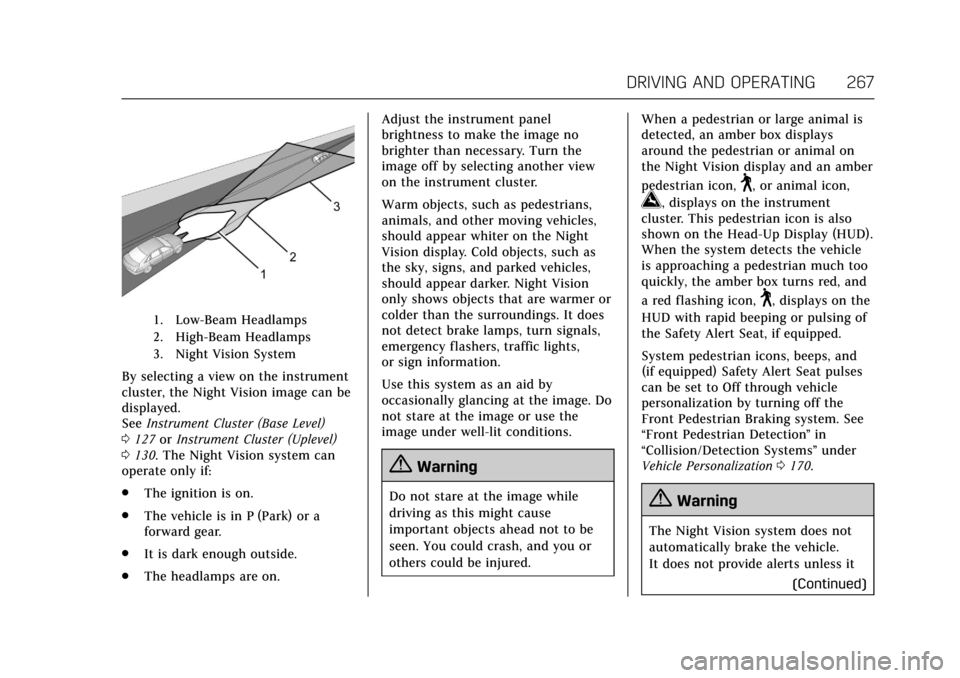
1. Low-Beam Headlamps
2. High-Beam Headlamps
3. Night Vision System
By selecting a view on the instrument
cluster, the Night Vision image can be
displayed.
SeeInstrument Cluster (Base Level)
0 127 orInstrument Cluster (Uplevel)
0 130. The Night Vision system can
operate only if:
. The ignition is on.
. The vehicle is in P (Park) or a
forward gear.
. It is dark enough outside.
. The headlamps are on. Adjust the instrument panel
brightness to make the image no
brighter than necessary. Turn the
image off by selecting another view
on the instrument cluster.
Warm objects, such as pedestrians,
animals, and other moving vehicles,
should appear whiter on the Night
Vision display. Cold objects, such as
the sky, signs, and parked vehicles,
should appear darker. Night Vision
only shows objects that are warmer or
colder than the surroundings. It does
not detect brake lamps, turn signals,
emergency flashers, traffic lights,
or sign information.
Use this system as an aid by
occasionally glancing at the image. Do
not stare at the image or use the
image under well-lit conditions.
{Warning
Do not stare at the image while
driving as this might cause
important objects ahead not to be
seen. You could crash, and you or
others could be injured.
When a pedestrian or large animal is
detected, an amber box displays
around the pedestrian or animal on
the Night Vision display and an amber
pedestrian icon,
~, or animal icon,
!, displays on the instrument
cluster. This pedestrian icon is also
shown on the Head-Up Display (HUD).
When the system detects the vehicle
is approaching a pedestrian much too
quickly, the amber box turns red, and
a red flashing icon,
~, displays on the
HUD with rapid beeping or pulsing of
the Safety Alert Seat, if equipped.
System pedestrian icons, beeps, and
(if equipped) Safety Alert Seat pulses
can be set to Off through vehicle
personalization by turning off the
Front Pedestrian Braking system. See
“Front Pedestrian Detection ”in
“Collision/Detection Systems” under
Vehicle Personalization 0170.
{Warning
The Night Vision system does not
automatically brake the vehicle.
It does not provide alerts unless it
(Continued)
Page 269 of 445
Cadillac CT6 Owner Manual (GMNA-Localizing-U.S./Canada-11292458) -
2018 - crc - 2/14/17
268 DRIVING AND OPERATING
Warning (Continued)
detects a pedestrian or large
animal. The system may not detect
pedestrians, including children,
or animals:. If they are less than 25 m
(82 ft) away.
. If they are not directly ahead
in the sensor coverage area,
fully visible, standing upright,
or part of a group.
. If the pedestrian or animal is
moving too quickly through
the field of view, such as a
bicyclist.
. If the pedestrian is wearing
certain types of clothing.
. If headlamps are off, except
when parked.
. If the outside temperature is
higher than 30 °C (86 °F).
. Due to poor visibility,
including in heavy fog, rain,
or snow.
(Continued)
Warning (Continued)
.If the sensor is blocked by
dirt, snow, rain, or ice.
Be ready to take action and apply
the brakes. For more information,
see Defensive Driving 0207. Keep
the Night Vision sensor clean and
in good repair.
Pedestrian detection may not be
available in high outside temperatures.
An amber icon,
*, displays. The
system does not need service.
In rain, snow, or fog the image may
not be clear and the direction of the
road ahead may not be seen. In more
severe weather conditions, the image
may be unclear and unusable. The
system does not need service.
Keep the system sensor clean by
activating the windshield washer up to
five times when it is dark enough for
the system to operate. If the Night
Vision image still looks blurry, use a
soft wet cloth to gently clean the
sensor camera lens and dry thoroughly. The sensor is behind the
front grille to the inside of the driver
side headlamp.
The camera must also be aligned to
work correctly. If the camera needs
adjustment, see your dealer. Do not
attempt to adjust the camera yourself.
Side Blind Zone
Alert (SBZA)
If equipped, the SBZA system is a
lane-changing aid that assists drivers
with avoiding crashes that occur with
moving vehicles in the side blind zone
(or spot) areas. When the vehicle is in
a forward gear, the left or right side
mirror display will light up if a moving
vehicle is detected in that blind zone.
If the turn signal is activated and a
vehicle is also detected on the same
side, the display will flash as an extra
warning not to change lanes. Since
this system is part of the Lane Change
Alert (LCA) system, read the entire
LCA section before using this feature.
Page 439 of 445

Cadillac CT6 Owner Manual (GMNA-Localizing-U.S./Canada-11292458) -
2018 - crc - 2/14/17
438 INDEX
Lights (cont'd)Low Fuel Warning . . . . . . . . . . . . . . . . 150
Seat Belt Reminders . . . . . . . . . . . . . . 140
Security . . . . . . . . . . . . . . . . . . . . . . . . . . . . 150
Service Electric Parking Brake . . . 146
Service Vehicle Soon . . . . . . . . . . . . . 145
Sport Mode . . . . . . . . . . . . . . . . . . . . . . . . 146
StabiliTrak OFF . . . . . . . . . . . . . . . . . . . 148
Tire Pressure . . . . . . . . . . . . . . . . . . . . . . 149
Traction Control System
(TCS)/StabiliTrak . . . . . . . . . . . . . . . . 148
Traction Off . . . . . . . . . . . . . . . . . . . . . . . 148
Vehicle Ready . . . . . . . . . . . . . . . . . . . . . 151
Winter Driving Mode . . . . . . . . . . . . . 146
Locks Automatic Door . . . . . . . . . . . . . . . . . . . . . 45
Delayed Locking . . . . . . . . . . . . . . . . . . . . 45
Door . . . . . . . . . . . . . . . . . . . . . . . . . . . . . . . . . 43
Lockout Protection . . . . . . . . . . . . . . . . . 46
Power Door . . . . . . . . . . . . . . . . . . . . . . . . . . 45
Safety . . . . . . . . . . . . . . . . . . . . . . . . . . . . . . . . 46
Loss of Control . . . . . . . . . . . . . . . . . . . . . . 209
Low Fuel Warning Light . . . . . . . . . . . 150
Low-Profile Tires . . . . . . . . . . . . . . . . . . . . 342
Lower Anchors and Tethers for Children (LATCH System) . . . . . . . . 103 Lumbar Adjustment . . . . . . . . . . . . . 67, 76
Front Seats . . . . . . . . . . . . . . . . . . . . . . . . . . 67
Rear Seats . . . . . . . . . . . . . . . . . . . . . . . . . . . 76
M
MaintenanceRecords . . . . . . . . . . . . . . . . . . . . . . . . . . . . 402
Maintenance and Care Additional . . . . . . . . . . . . . . . . . . . . . . . . . 396
Maintenance Modes . . . . . . . . . . . . . . . . 228
Maintenance Schedule . . . . . . . . . . . . . 390 Recommended Fluids and
Lubricants . . . . . . . . . . . . . . . . . . . . . . . 399
Malfunction Indicator Lamp . . . . . . . 143
Manual Mode . . . . . . . . . . . . . . . . . . . . . . . 233
Massage . . . . . . . . . . . . . . . . . . . . . . . . . . . . . . 74
Memory Features . . . . . . . . . . . . . . . . . . . . 13
Memory Seats . . . . . . . . . . . . . . . . . . . . . . . . 69
Messages Engine Power . . . . . . . . . . . . . . . . . . . . . 169
Vehicle . . . . . . . . . . . . . . . . . . . . . . . . . . . . . 169
Vehicle Speed . . . . . . . . . . . . . . . . . . . . . 169
Mirror Rear Camera . . . . . . . . . . . . . . . . . . . . . . . . 56
Mirrors Automatic Dimming . . . . . . . . . . . . . . . . 55
Automatic Dimming Rearview . . . . . 56 Mirrors (cont'd)
Convex . . . . . . . . . . . . . . . . . . . . . . . . . . . . . . . 54
Folding . . . . . . . . . . . . . . . . . . . . . . . . . . . . . . 55
Heated . . . . . . . . . . . . . . . . . . . . . . . . . . . . . . . 55
Power . . . . . . . . . . . . . . . . . . . . . . . . . . . . . . . . 55
Tilt in Reverse . . . . . . . . . . . . . . . . . . . . . . 56
Mirrors, Interior Rearview . . . . . . . . . . . 56
Mode . . . . . . . . . . . . . . . . . . . . . . . . . . . . . . . . 241 Driver Control . . . . . . . . . . . . . . . . . . . . . 241
Modes Driver Selected . . . . . . . . . . . . . . . . . . . . 226
Maintenance . . . . . . . . . . . . . . . . . . . . . . 228
Monitor System, Tire Pressure . . . . . 349
N
Navigation OnStar . . . . . . . . . . . . . . . . . . . . . . . . . . . . . 423
Net, Convenience . . . . . . . . . . . . . . . . . . . 117
New Vehicle Break-In . . . . . . . . . . . . . . . 216
Night Vision System . . . . . . . . . . . . . . . . 266
O
Odometer . . . . . . . . . . . . . . . . . . . . . . . . . . . . 134 Trip . . . . . . . . . . . . . . . . . . . . . . . . . . . . . . . . 134
Off-Road Recovery . . . . . . . . . . . . . . . . . . . . . . . . . . . 209
Oil Engine . . . . . . . . . . . . . . . . . . . . . . . . . . . . . 307
Engine Oil Life System . . . . . . . . . . . 309