lock CADILLAC CTS 2011 2.G Owners Manual
[x] Cancel search | Manufacturer: CADILLAC, Model Year: 2011, Model line: CTS, Model: CADILLAC CTS 2011 2.GPages: 496, PDF Size: 7.71 MB
Page 286 of 496
Black plate (26,1)Cadillac CTS/CTS-V Owner Manual - 2011
9-26 Driving and Operating
Automatic
Transmission
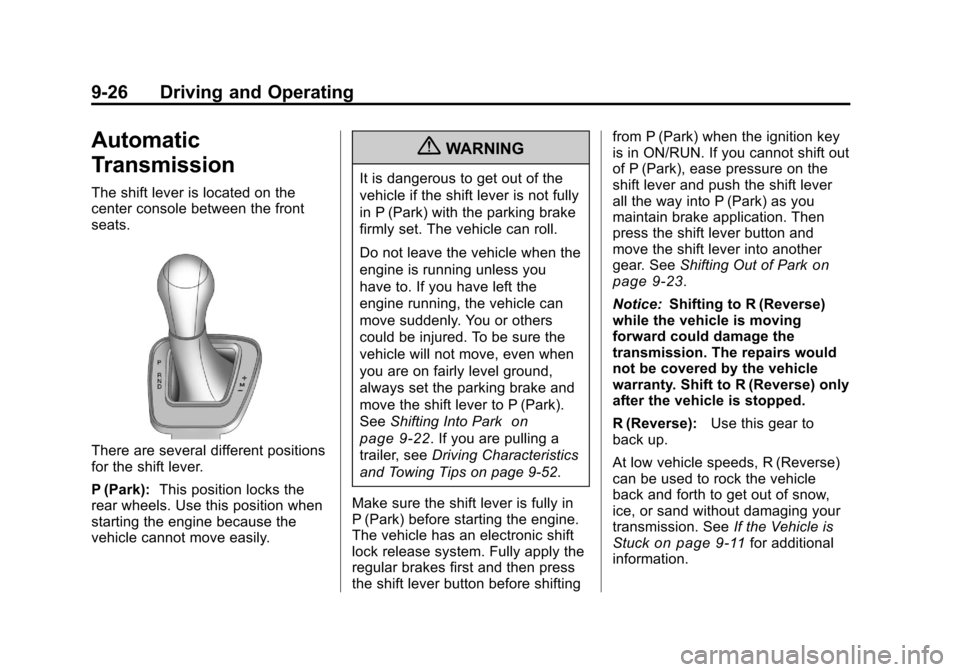
The shift lever is located on the
center console between the front
seats.
There are several different positions
for the shift lever.
P (Park):This position locks the
rear wheels. Use this position when
starting the engine because the
vehicle cannot move easily.
{WARNING
It is dangerous to get out of the
vehicle if the shift lever is not fully
in P (Park) with the parking brake
firmly set. The vehicle can roll.
Do not leave the vehicle when the
engine is running unless you
have to. If you have left the
engine running, the vehicle can
move suddenly. You or others
could be injured. To be sure the
vehicle will not move, even when
you are on fairly level ground,
always set the parking brake and
move the shift lever to P (Park).
See Shifting Into Park
on
page 9‑22
. If you are pulling a
trailer, see Driving Characteristics
and Towing Tips on page 9‑52.
Make sure the shift lever is fully in
P (Park) before starting the engine.
The vehicle has an electronic shift
lock release system. Fully apply the
regular brakes first and then press
the shift lever button before shifting from P (Park) when the ignition key
is in ON/RUN. If you cannot shift out
of P (Park), ease pressure on the
shift lever and push the shift lever
all the way into P (Park) as you
maintain brake application. Then
press the shift lever button and
move the shift lever into another
gear. See
Shifting Out of Park
on
page 9‑23.
Notice: Shifting to R (Reverse)
while the vehicle is moving
forward could damage the
transmission. The repairs would
not be covered by the vehicle
warranty. Shift to R (Reverse) only
after the vehicle is stopped.
R (Reverse): Use this gear to
back up.
At low vehicle speeds, R (Reverse)
can be used to rock the vehicle
back and forth to get out of snow,
ice, or sand without damaging your
transmission. See If the Vehicle is
Stuck
on page 9‑11for additional
information.
Page 291 of 496

Black plate (31,1)Cadillac CTS/CTS-V Owner Manual - 2011
Driving and Operating 9-31
The CTS-V transmission prevents
easily shifting into R (Reverse) using
normal shifting force while the
vehicle is moving at more than
5 km/h (3 mph), or when the ignition
is in LOCK/OFF.
Shift Speeds (Manual
Transmission)
{WARNING
If you skip a gear when you
downshift, you could lose control
of the vehicle. You could injure
yourself or others. Do not shift
down more than one gear at a
time when you downshift.
Notice: If you skip more than one
gear when you downshift, or if
you race the engine when you
release the clutch pedal while
downshifting, you could damage
the engine, clutch, driveshaft or
the transmission. Do not skip
gears or race the engine when
downshifting. If the vehicle speed drops below
32 km/h (20 mph), or if the engine is
not running smoothly, downshift to
the next lower gear. You may have
to downshift two or more gears to
keep the engine running smoothly
or for good performance.
Up-Shift Light
Vehicles with a manual transmission
have an up‐shift light on the
instrument panel. This light shows
when to shift to the next higher gear
for the best fuel economy.
When this light comes on, you can
shift to the next higher gear if
weather, road, and traffic conditions
allow. For the best fuel economy,
accelerate slowly and shift when the
light comes on.
While you accelerate, it is normal for
the light to go on and off if you
quickly change the position of the
accelerator. Ignore the light when
you downshift.
CTS-V vehicles use tracer lights
around the outside of the
tachometer as a performance
up‐shift light. These tracers flash to
indicate when to shift to the next
higher gear to avoid the engine
speed limit. See
Tachometer
on
page 5‑13for more information.
Skip Shift (CTS‐V)
Under light acceleration, the
transmission will only allow you to
shift from 1 (First) to 4 (Fourth).
Shifts from 1 (First) to 2 (Second) or
3 (Third) are not allowed. This helps
improve fuel mileage.
Under harder acceleration, Skip
Shift is disabled, and the driver has
all gears available.
Page 292 of 496
Black plate (32,1)Cadillac CTS/CTS-V Owner Manual - 2011
9-32 Driving and Operating
Drive Systems
All-Wheel Drive
Vehicles with this feature always
send engine power to all four
wheels. It is fully automatic, and
adjusts itself as needed for road
conditions.
When using a compact spare tire on
an AWD vehicle, the system
automatically detects the compact
spare and disables AWD. To restore
AWD operation and prevent
excessive wear on the system,
replace the compact spare with a
full-size tire as soon as possible.
SeeCompact Spare Tire
on
page 10‑111for more information.
Brakes
Antilock Brake
System (ABS)
This vehicle has the Antilock Brake
System (ABS), an advanced
electronic braking system that helps
prevent a braking skid.
When the engine is started and the
vehicle begins to drive away, ABS
checks itself. A momentary motor or
clicking noise might be heard while
this test is going on, and it might
even be noticed that the brake
pedal moves a little. This is normal.
If there is a problem with ABS, this
warning light stays on. See Antilock
Brake System (ABS) Warning Light
on page 5‑23. If driving safely on a wet road and it
becomes necessary to slam on the
brakes and continue braking to
avoid a sudden obstacle, a
computer senses that the wheels
are slowing down. If one of the
wheels is about to stop rolling, the
computer will separately work the
brakes at each wheel.
ABS can change the brake pressure
to each wheel, as required, faster
than any driver could. This can help
the driver steer around the obstacle
while braking hard.
As the brakes are applied, the
computer keeps receiving updates
on wheel speed and controls
braking pressure accordingly.
Page 295 of 496

Black plate (35,1)Cadillac CTS/CTS-V Owner Manual - 2011
Driving and Operating 9-35
EPB Apply
The EPB can be applied any time
the vehicle is stopped. The EPB is
applied by momentarily lifting up on
the EPB switch. Once fully applied,
the BRAKE light will be on, and the
DIC message PARK BRAKE SET
will be displayed. While the brake is
being applied, the status light will
flash until full apply is reached.
If the light does not come on,
or remains flashing, you need to
have the vehicle serviced. Do not
drive the vehicle if the BRAKE light
is flashing. See your dealer. See
Brake System Warning Light
on
page 5‑22for more information.
If the EPB is applied while the
vehicle is in motion, a chime will
sound, and the DIC message
RELEASE PARK BRAKE SWITCH
will be displayed. The vehicle will
decelerate as long as the switch is
held in the up position. Releasing
the EPB switch during the
deceleration will release the parking brake. If the switch is held in the up
position until the vehicle comes to a
stop, the EPB will remain applied.
If the BRAKE light is on, either the
EPB is applied, or there is a failure
in the hydraulic brake system.
If this light is flashing continuously,
the EPB is only partially applied or
released, or there is a problem with
the EPB. The DIC message
SERVICE PARK BRAKE will be
displayed. If this light is flashing
continuously, release the EPB, and
attempt to apply it again. If this light
continues to flash, do not drive the
vehicle. See your dealer.
If the yellow light is on, the EPB has
detected an error in another system
and is operating with reduced
functionality. To apply the EPB when
this light is on, lift up on the EPB
switch and hold it in the up position.
Full application of the parking brake
by the EPB system may take a
longer period of time than normal
when this light is on. Continue tohold the switch until the BRAKE
light remains on. If the yellow light is
on, see your dealer.
If the EPB fails to apply, the rear
wheels should be blocked to
prevent vehicle movement.
EPB Release
To release the EPB, turn the ignition
switch to the ON/RUN position,
apply and hold the brake pedal, and
push down momentarily on the EPB
switch. If you attempt to release the
EPB without the brake pedal
applied, a chime will sound, and the
DIC message STEP ON BRAKE TO
RELEASE PARK BRAKE will be
displayed. The EPB is released
when the BRAKE light is off and the
DIC message PARK BRAKE
RELEASED is displayed.
Page 310 of 496

Black plate (50,1)Cadillac CTS/CTS-V Owner Manual - 2011
9-50 Driving and Operating
Filling the Tank
{WARNING
Fuel vapor burns violently and a
fuel fire can cause bad injuries.
To help avoid injuries to you and
others, read and follow all the
instructions on the fuel pump
island. Turn off the engine when
refueling. Do not smoke near fuel
or when refueling the vehicle. Do
not use cellular phones. Keep
sparks, flames, and smoking
materials away from fuel. Do not
leave the fuel pump unattended
when refueling the vehicle. This is
against the law in some places.
Do not re-enter the vehicle while
pumping fuel. Keep children away
from the fuel pump; never let
children pump fuel.
The tethered fuel cap is located
behind a hinged fuel door on the
passenger side of the vehicle.
To open the fuel door, push the
rearward center edge in and release
and it will open.
To remove the fuel cap, turn it
slowly counterclockwise.
While refueling, hang the tethered
fuel cap from the hook on the
fuel door.When reinstalling the cap, turn it
clockwise until it clicks once,
otherwise the Malfunction Indicator
Lamp could turn on. See
Malfunction Indicator Lamp
on
page 5‑19.
{WARNING
Fuel can spray out on you if you
open the fuel cap too quickly.
If you spill fuel and then
something ignites it, you could be
badly burned. This spray can
happen if the tank is nearly full,
and is more likely in hot weather.
Open the fuel cap slowly and wait
for any hiss noise to stop. Then
unscrew the cap all the way.
Be careful not to spill fuel. Do not
top off or overfill the tank and wait a
few seconds after you have finished
pumping before removing the
nozzle. Clean fuel from painted
surfaces as soon as possible. See
Exterior Care on page 10‑120.
Page 311 of 496

Black plate (51,1)Cadillac CTS/CTS-V Owner Manual - 2011
Driving and Operating 9-51
When replacing the fuel cap, turn it
clockwise until it clicks once. Make
sure the cap is fully installed. The
diagnostic system can determine if
the fuel cap has been left off or
improperly installed. This would
allow fuel to evaporate into the
atmosphere. SeeMalfunction
Indicator Lamp on page 5‑19.
{WARNING
If a fire starts while you are
refueling, do not remove the
nozzle. Shut off the flow of fuel by
shutting off the pump or by
notifying the station attendant.
Leave the area immediately.
Notice: If a new fuel cap is
needed, be sure to get the right
type of cap from your dealer. The
wrong type fuel cap might not fit
properly, might cause the
malfunction indicator lamp to
light, and could damage the fuel tank and emissions system. See
Malfunction Indicator Lamp
on
page 5‑19.
Filling a Portable Fuel
Container
{WARNING
Never fill a portable fuel container
while it is in the vehicle. Static
electricity discharge from the
container can ignite the fuel
vapor. You can be badly burned
and the vehicle damaged if this
occurs. To help avoid injury to you
and others:
.Dispense fuel only into
approved containers.
.Do not fill a container while it
is inside a vehicle, in a
vehicle's trunk, pickup bed,
or on any surface other than
the ground.
(Continued)
WARNING (Continued)
.Bring the fill nozzle in contact
with the inside of the fill
opening before operating the
nozzle. Contact should be
maintained until the filling is
complete.
.Do not smoke while
pumping fuel.
.Do not use a cellular phone
while pumping fuel.
Page 318 of 496

Black plate (58,1)Cadillac CTS/CTS-V Owner Manual - 2011
9-58 Driving and Operating
Safety Chains
Always attach chains between the
vehicle and the trailer. Cross the
safety chains under the tongue of
the trailer to help prevent the tongue
from contacting the road if it
becomes separated from the hitch.
Leave enough slack so the rig can
turn. Never allow safety chains to
drag on the ground.
Trailer Brakes
Does the trailer have its own
brakes? Be sure to read and follow
the instructions for the trailer brakes
so they are installed, adjusted, and
maintained properly.
Because the vehicle has antilock
brakes, do not tap into the vehicle's
brake system. If this is done, both
brake systems will not work well,
or at all.
Conversions and
Add-Ons
Add-On Electrical
Equipment
Notice:Do not add anything
electrical to the vehicle unless
you check with your dealer first.
Some electrical equipment can
damage the vehicle and the
damage would not be covered by
the vehicle's warranty. Some
add-on electrical equipment can
keep other components from
working as they should.
Add-on equipment can drain the
vehicle 12‐volt battery, even if the
vehicle is not operating.
The vehicle has an airbag system.
Before attempting to add anything
electrical to the vehicle, see
Servicing the Airbag-Equipped
Vehicle
on page 3‑42and Adding
Equipment to the Airbag-Equipped
Vehicle on page 3‑42.
Page 319 of 496
Black plate (1,1)Cadillac CTS/CTS-V Owner Manual - 2011
Vehicle Care 10-1
Vehicle Care
General Information
General Information . . . . . . . . . . 10-3
California Proposition65 Warning . . . . . . . . . . . . . . . . . 10-3
California Perchlorate Materials Requirements . . . . 10-3
Accessories and Modifications . . . . . . . . . . . . . . . 10-4
Vehicle Checks
Doing Your OwnService Work . . . . . . . . . . . . . . . 10-4
Hood . . . . . . . . . . . . . . . . . . . . . . . . 10-5
Engine Compartment Overview . . . . . . . . . . . . . . . . . . . 10-6
Engine Cover . . . . . . . . . . . . . . . 10-10
Engine Oil . . . . . . . . . . . . . . . . . . 10-11
Engine Oil Life System . . . . . 10-14
Automatic Transmission Fluid . . . . . . . . . . . . . . . . . . . . . . 10-15
Manual Transmission Fluid . . . . . . . . . . . . . . . . . . . . . . 10-15 Hydraulic Clutch . . . . . . . . . . . . 10-15
Engine Air Cleaner/Filter . . . . 10-16
Cooling System . . . . . . . . . . . . 10-19
Engine Coolant . . . . . . . . . . . . . 10-19
Engine Overheating . . . . . . . . 10-24
Overheated Engine
Protection
Operating Mode . . . . . . . . . . . 10-25
Power Steering Fluid . . . . . . . 10-26
Washer Fluid . . . . . . . . . . . . . . . 10-26
Brakes . . . . . . . . . . . . . . . . . . . . . 10-27
Brake Fluid . . . . . . . . . . . . . . . . . 10-28
Battery . . . . . . . . . . . . . . . . . . . . . 10-30
All-Wheel Drive . . . . . . . . . . . . . 10-31
Rear Axle . . . . . . . . . . . . . . . . . . 10-31
Starter Switch Check . . . . . . . 10-32
Automatic Transmission Shift Lock Control Function
Check . . . . . . . . . . . . . . . . . . . . . 10-33
Ignition Transmission Lock Check . . . . . . . . . . . . . . . . . . . . . 10-33
Park Brake and P (Park) Mechanism Check . . . . . . . . 10-33
Wiper Blade Replacement . . . . . . . . . . . . . . 10-34
Headlamp Aiming
Headlamp Aiming . . . . . . . . . . 10-35
Bulb Replacement
Bulb Replacement . . . . . . . . . . 10-38
Halogen Bulbs . . . . . . . . . . . . . . 10-38
High Intensity Discharge(HID) Lighting . . . . . . . . . . . . . 10-38
Fog Lamps . . . . . . . . . . . . . . . . . 10-38
License Plate Lamp (Coupe
and Sedan) . . . . . . . . . . . . . . . 10-39
License Plate Lamp (Wagon) . . . . . . . . . . . . . . . . . . 10-39
Replacement Bulbs . . . . . . . . . 10-40
Electrical System
Electrical System Overload . . . . . . . . . . . . . . . . . . 10-40
Fuses and Circuit Breakers . . . . . . . . . . . . . . . . . . 10-42
Engine Compartment Fuse
Block (CTS Coupe and
Sedan) . . . . . . . . . . . . . . . . . . . . 10-42
Engine Compartment Fuse Block (CTS V Coupe and
Sedan) . . . . . . . . . . . . . . . . . . . . 10-46
Engine Compartment Fuse Block (CTS Wagon) . . . . . . . 10-50
Engine Compartment Fuse Block (CTS V Wagon) . . . . . 10-54
Page 320 of 496
Black plate (2,1)Cadillac CTS/CTS-V Owner Manual - 2011
10-2 Vehicle Care
Rear Compartment FuseBlock (CTS Coupe and
Sedan) . . . . . . . . . . . . . . . . . . . . 10-58
Rear Compartment Fuse Block (CTS-V Coupe and
Sedan) . . . . . . . . . . . . . . . . . . . . 10-60
Rear Compartment Fuse Block (CTS Wagon) . . . . . . . 10-62
Rear Compartment Fuse Block (CTS-V Wagon) . . . . . 10-64
Wheels and Tires
Tires . . . . . . . . . . . . . . . . . . . . . . . . 10-66
Winter Tires . . . . . . . . . . . . . . . . 10-67
Low-Profile Tires . . . . . . . . . . . 10-67
Tire Sidewall Labeling . . . . . . 10-68
Tire Designations . . . . . . . . . . . 10-70
Tire Terminology andDefinitions . . . . . . . . . . . . . . . . 10-71
Tire Pressure . . . . . . . . . . . . . . . 10-74
Tire Pressure for High-Speed Operation . . . . . . . . . . . . . . . . . 10-75
Tire Pressure Monitor System . . . . . . . . . . . . . . . . . . . 10-76
Tire Pressure Monitor Operation . . . . . . . . . . . . . . . . . 10-77
Tire Inspection . . . . . . . . . . . . . . 10-80
Tire Rotation . . . . . . . . . . . . . . . 10-81 When It Is Time for New
Tires . . . . . . . . . . . . . . . . . . . . . . 10-82
Buying New Tires . . . . . . . . . . . 10-83
Different Size Tires and Wheels . . . . . . . . . . . . . . . . . . . 10-85
Uniform Tire Quality Grading . . . . . . . . . . . . . . . . . . . 10-85
Wheel Alignment and Tire Balance . . . . . . . . . . . . . . . . . . . 10-87
Wheel Replacement . . . . . . . . 10-88
Tire Chains . . . . . . . . . . . . . . . . . 10-89
If a Tire Goes Flat . . . . . . . . . . 10-90
Tire Sealant and Compressor Kit . . . . . . . . . . . 10-92
Storing the Tire Sealant and Compressor Kit
(Wagon) . . . . . . . . . . . . . . . . . 10-101
Storing the Tire Sealant and Compressor Kit
(Coupe) . . . . . . . . . . . . . . . . . . 10-101
Storing the Tire Sealant and Compressor Kit
(Sedan) . . . . . . . . . . . . . . . . . . 10-102
Tire Changing . . . . . . . . . . . . . 10-102
Compact Spare Tire . . . . . . . 10-111
Jump Starting
Jump Starting . . . . . . . . . . . . . 10-112
Towing
Towing the Vehicle . . . . . . . . 10-117
Recreational Vehicle Towing . . . . . . . . . . . . . . . . . . . 10-117
Appearance Care
Exterior Care . . . . . . . . . . . . . . 10-120
Interior Care . . . . . . . . . . . . . . . 10-124
Floor Mats . . . . . . . . . . . . . . . . 10-127
Page 322 of 496
Black plate (4,1)Cadillac CTS/CTS-V Owner Manual - 2011
10-4 Vehicle Care
Accessories and
Modifications
Adding non‐dealer accessories to
the vehicle can affect vehicle
performance and safety, including
such things as airbags, braking,
stability, ride and handling,
emissions systems, aerodynamics,
durability, and electronic systems
like antilock brakes, traction control,
and stability control. Some of these
accessories could even cause
malfunction or damage not covered
by the vehicle warranty.
Damage to vehicle components
resulting from the installation or use
of non‐GM certified parts, including
control module modifications, is not
covered under the terms of the
vehicle warranty and may affect
remaining warranty coverage for
affected parts.GM Accessories are designed to
complement and function with other
systems on the vehicle. Your GM
dealer can accessorize the vehicle
using genuine GM Accessories.
When you go to your GM dealer and
ask for GM Accessories, you will
know that GM-trained and
supported service technicians will
perform the work using genuine GM
Accessories.
Also, see
Adding Equipment to the
Airbag-Equipped Vehicle
on
page 3‑42.
Vehicle Checks
Doing Your Own
Service Work
{WARNING
You can be injured and the
vehicle could be damaged if you
try to do service work on a vehicle
without knowing enough about it.
.Be sure you have sufficient
knowledge, experience,
the proper replacement
parts, and tools before
attempting any vehicle
maintenance task.
.Be sure to use the proper
nuts, bolts, and other
fasteners. English and metric
fasteners can be easily
confused. If the wrong
fasteners are used, parts can
later break or fall off. You
could be hurt.