lock CADILLAC CTS 2011 2.G Repair Manual
[x] Cancel search | Manufacturer: CADILLAC, Model Year: 2011, Model line: CTS, Model: CADILLAC CTS 2011 2.GPages: 496, PDF Size: 7.71 MB
Page 142 of 496
Black plate (2,1)Cadillac CTS/CTS-V Owner Manual - 2011
5-2 Instruments and Controls
Anti-Theft Alarm SystemMessages . . . . . . . . . . . . . . . . . . 5-42
Service Vehicle Messages . . . 5-43
Tire Messages . . . . . . . . . . . . . . . 5-43
Transmission Messages . . . . . 5-44
Vehicle Speed Messages . . . . 5-45
Washer Fluid Messages . . . . . 5-45
Vehicle Personalization
Vehicle Personalization . . . . . . 5-45
Universal Remote System
Universal Remote System . . . 5-53
Universal Remote System Programming . . . . . . . . . . . . . . . 5-53
Universal Remote System Operation . . . . . . . . . . . . . . . . . . 5-57
Controls
Steering Wheel
Adjustment
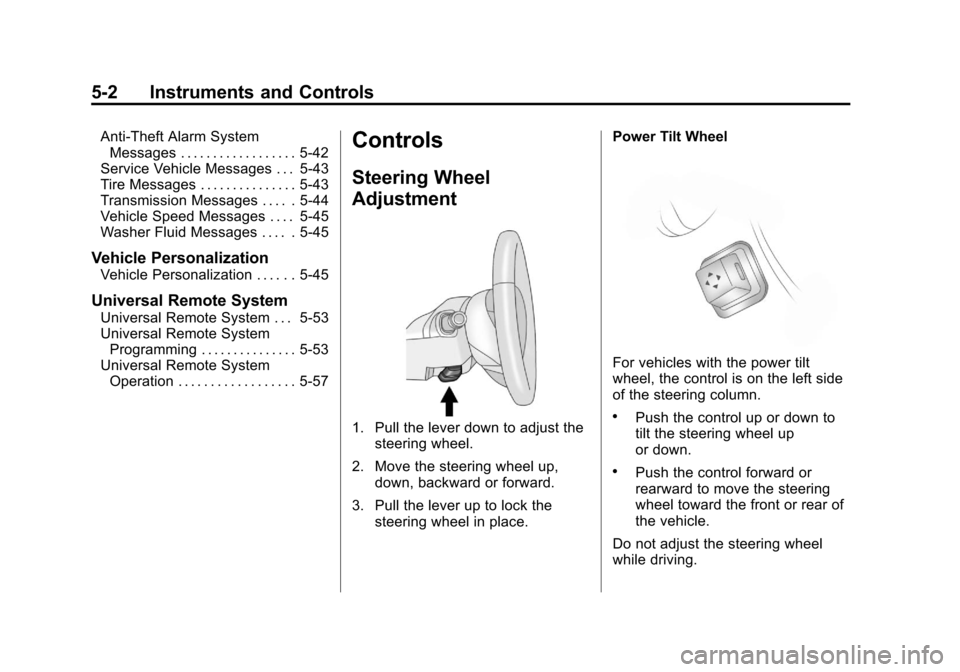
1. Pull the lever down to adjust the
steering wheel.
2. Move the steering wheel up, down, backward or forward.
3. Pull the lever up to lock the steering wheel in place. Power Tilt Wheel
For vehicles with the power tilt
wheel, the control is on the left side
of the steering column.
.Push the control up or down to
tilt the steering wheel up
or down.
.Push the control forward or
rearward to move the steering
wheel toward the front or rear of
the vehicle.
Do not adjust the steering wheel
while driving.
Page 145 of 496
Black plate (5,1)Cadillac CTS/CTS-V Owner Manual - 2011
Instruments and Controls 5-5
6(Adjustable Interval Wiper
Band): Turn the band up for more
frequent wipes or down for less
frequent wipes.
1 : Slow wipes.
2 : Fast wipes.
If the windshield wipers are in use
for about six seconds while you are
driving, the exterior lamps come on
automatically if the exterior lamp
control is in AUTO. See “Wiper
Activated Headlamps” for more
information.
Clear snow and ice from the wiper
blades before using them. If frozen
to the windshield, carefully loosen or
thaw them. Damaged wiper blades
should be replaced. For more
information, see Wiper Blade
Replacement on page 10‑34.
Heavy snow or ice can overload the
wiper motor. A circuit breaker will
stop the motor until it cools down. Wiper Arm Assembly Protection
When using an automatic car wash,
move the windshield wiper lever to
the OFF position. This disables the
windshield wipers and/or rear
wipers, if equipped.
Windshield Washer
{WARNING
In freezing weather, do not use
your washer until the windshield
is warmed. Otherwise the washer
fluid can form ice on the
windshield, blocking your vision.
Sedan/Coupe Model
K(Washer Fluid): Press the
button with this symbol, on the end
of the windshield washer lever, to
wash the windshield. The washer
fluid sprays onto the windshield and
the wipers run for a few cycles to
clear the windshield. Press and hold
Kfor more wash cycles. Wagon Model
Pull the lever to spray washer fluid
on the windshield. The spray
continues until the lever is released.
The wipers will run a few times.
Washer Fluid Low Add Fluid
displays on the Driver Information
Center (DIC) when the washer fluid
is low. See
Driver Information
Center (DIC) on page 5‑27.
See Washer Fluid
on page 10‑26for
information on filling the windshield
washer fluid reservoir.
If the headlamps are on while the
windshield is being washed, the
headlamp washers, if the vehicle
has them, will also turn on. See
“Headlamp Washer” following for
more information.
Page 146 of 496
Black plate (6,1)Cadillac CTS/CTS-V Owner Manual - 2011
5-6 Instruments and Controls
Wiper Activated Headlamps
This feature activates the
headlamps and parking lamps after
the windshield wipers have been in
use for about six seconds. For this
feature to work, the exterior lamp
control must be in AUTO.
The wiper-activated headlamps
immediately turn off when the
ignition is turned to LOCK/OFF,
or the windshield wiper control is
turned off.
Rear Window Wiper/
Washer
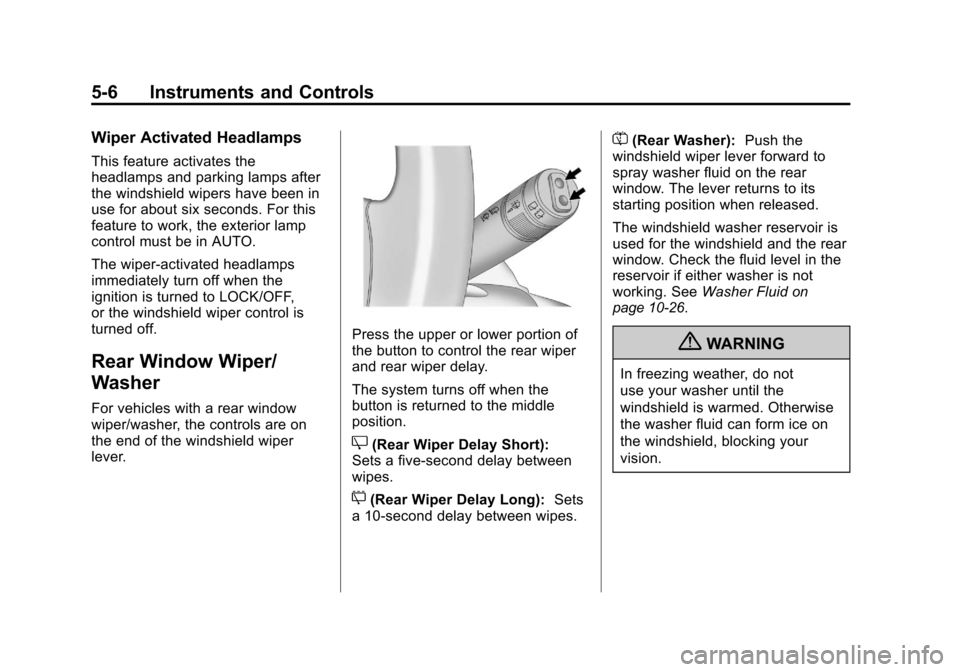
For vehicles with a rear window
wiper/washer, the controls are on
the end of the windshield wiper
lever.
Press the upper or lower portion of
the button to control the rear wiper
and rear wiper delay.
The system turns off when the
button is returned to the middle
position.
Z(Rear Wiper Delay Short):
Sets a five‐second delay between
wipes.
5(Rear Wiper Delay Long): Sets
a 10‐second delay between wipes.
=(Rear Washer): Push the
windshield wiper lever forward to
spray washer fluid on the rear
window. The lever returns to its
starting position when released.
The windshield washer reservoir is
used for the windshield and the rear
window. Check the fluid level in the
reservoir if either washer is not
working. See Washer Fluid
on
page 10‑26.
{WARNING
In freezing weather, do not
use your washer until the
windshield is warmed. Otherwise
the washer fluid can form ice on
the windshield, blocking your
vision.
Page 148 of 496
Black plate (8,1)Cadillac CTS/CTS-V Owner Manual - 2011
5-8 Instruments and Controls
3. PressVto scroll through and
select the appropriate
variance zone.
4. Press
3until the vehicle
heading, for example, N for
North, is displayed in the DIC.
5. Calibrate the compass. See “Compass Calibration
Procedure” following.
Compass Calibration
The compass can be manually
calibrated. Only calibrate the
compass in a magnetically clean
and safe location, such as an open
parking lot, where driving the
vehicle in circles is not a danger.
Also, away from tall buildings, utility
wires, manhole covers, or other
industrial structures, if possible.
If the DIC display does not show a
heading, for example, N for North,
or the heading does not change
after making turns, there may be a
strong magnetic field interfering with
the compass. Interference may be
caused by a magnetic antenna mount, magnetic note pad holder,
or any other magnetic item. Turn off
the vehicle, move the magnetic
item, then turn on the vehicle and
calibrate the compass.
Compass Calibration Procedure
1. Before calibrating the compass,
check that the compass is set to
the correct variance zone. See
“Compass Variance (Zone)
Procedure” earlier in this
section.
Do not operate any switches
such as window, sunroof,
climate controls, seats, etc.
during the calibration procedure.
2. Press
Tuntil PressVTo
Calibrate Compass displays.
3. Press
Vto start the compass
calibration.
4. The DIC will display Calibrating Drive In Circles. Drive the
vehicle in tight circles at less
than 8 km/h (5 mph) to complete
the calibration. The DIC will display Calibration Complete for
a few seconds then returns to
the Press
VTo Calibrate
Compass display.
Clock
The analog clock is located on the
instrument panel above the radio.
The clock is not connected with any
other vehicle system and runs by
itself. To adjust the clock:
1. Locate the adjustment buttons directly below the clock.
2. Push and release the right adjustment button to move the
clock hands forward or the left
adjustment button to make the
clock hands go backward.
Holding either button down will
cause the clock to advance
faster. Release the button before
the desired time is reached.
3. Push and release either button to adjust the time by one minute
increments.
Page 163 of 496
Black plate (23,1)Cadillac CTS/CTS-V Owner Manual - 2011
Instruments and Controls 5-23
{CAUTION
The brake system might not be
working properly if the brake
system warning light is on.
Driving with the brake system
warning light on can lead to a
crash. If the light is still on after
the vehicle has been pulled off
the road and carefully stopped,
have the vehicle towed for
service.
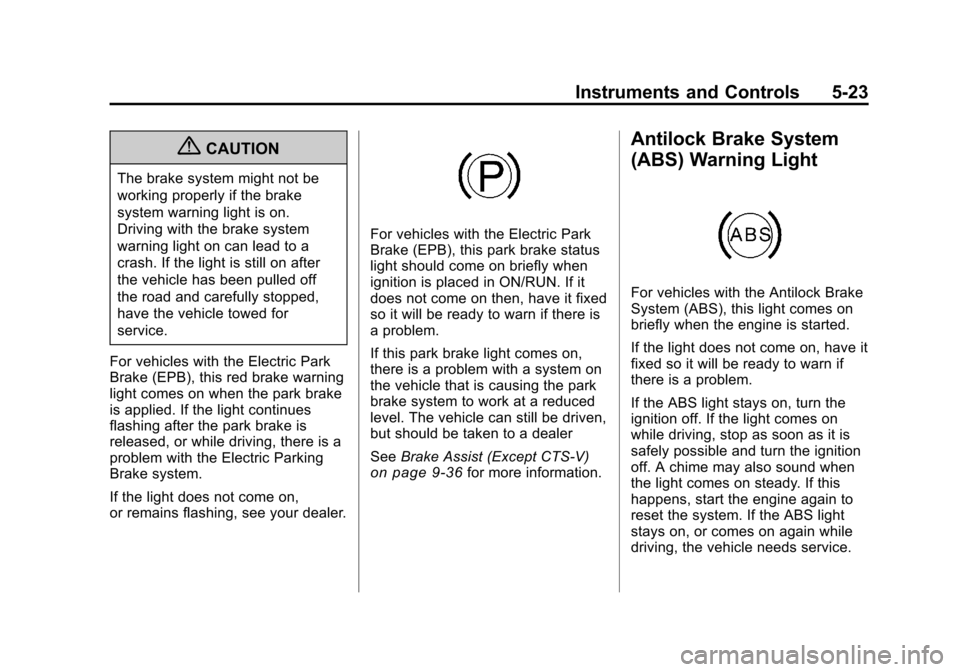
For vehicles with the Electric Park
Brake (EPB), this red brake warning
light comes on when the park brake
is applied. If the light continues
flashing after the park brake is
released, or while driving, there is a
problem with the Electric Parking
Brake system.
If the light does not come on,
or remains flashing, see your dealer.
For vehicles with the Electric Park
Brake (EPB), this park brake status
light should come on briefly when
ignition is placed in ON/RUN. If it
does not come on then, have it fixed
so it will be ready to warn if there is
a problem.
If this park brake light comes on,
there is a problem with a system on
the vehicle that is causing the park
brake system to work at a reduced
level. The vehicle can still be driven,
but should be taken to a dealer
See Brake Assist (Except CTS-V)
on page 9‑36for more information.
Antilock Brake System
(ABS) Warning Light
For vehicles with the Antilock Brake
System (ABS), this light comes on
briefly when the engine is started.
If the light does not come on, have it
fixed so it will be ready to warn if
there is a problem.
If the ABS light stays on, turn the
ignition off. If the light comes on
while driving, stop as soon as it is
safely possible and turn the ignition
off. A chime may also sound when
the light comes on steady. If this
happens, start the engine again to
reset the system. If the ABS light
stays on, or comes on again while
driving, the vehicle needs service.
Page 164 of 496

Black plate (24,1)Cadillac CTS/CTS-V Owner Manual - 2011
5-24 Instruments and Controls
If the regular brake system warning
light is not on, the vehicle still has
brakes, but not antilock brakes.
If the regular brake system warning
light is also on, the vehicle does not
have antilock brakes and there is a
problem with the regular brakes.
SeeBrake System Warning Light
on page 5‑22.
For vehicles with a Driver
Information Center (DIC), see Driver
Information Center (DIC)
on
page 5‑27for all brake related DIC
messages.
Up-Shift Light
The vehicle may have an up-shift
light. It indicates when to shift to the
next higher gear for best fuel
economy. See
Manual Transmission
on
page 9‑30for more information.
For the CTS-V, the tracer lights
function as a performance up-shift
light.
The tracers flash to indicate
when to shift to the next higher gear
to avoid the engine speed limit.
See Automatic Transmission
on
page 9‑26or Manual Transmissionon page 9‑30for more information.
Traction Control System
(TCS)/StabiliTrak®Light
The Traction Control System (TCS)/
StabiliTrak warning light should
come on briefly when the engine is
started. If it does not, have the vehicle
serviced by your dealer. If the
system is working normally, the
indicator light then goes off.
If the light comes on or stays on
while driving, there may be a
problem with the TCS/StabiliTrak
and the vehicle may need service.
When this warning light is on, the
system does not limit wheel spin.
Adjust driving accordingly.
See
Traction Control System (TCS)
on page 9‑37andStabiliTrak
Systemon page 9‑38for more
information.
Page 173 of 496
Black plate (33,1)Cadillac CTS/CTS-V Owner Manual - 2011
Instruments and Controls 5-33
Press Brake To Start Engine
(Automatic Transmission Only)
If the vehicle has the keyless
access system, this message
displays if you try to start the engine
without having the brake pressed.
The brake needs to be pressed
when starting the engine. See
Ignition Positions (Key Access)
on
page 9‑16or Ignition Positions
(Keyless Access)on page 9‑18for
more information.
Release Park Brake Switch
For vehicles with the Electric
Parking Brake, this message
displays if the Park Brake switch is
pulled while the vehicle is moving.
See the Electric Parking Brake
information under Parking Brake
(Manual)
on page 9‑33or Parking
Brake (Electric)on page 9‑34for
more information.
Service Brake Assist
This message displays if there is a
problem with the brake system. The
brake system warning light and the
antilock brake system (ABS)
warning light may also display on
the instrument panel cluster. See
Brake System Warning Light
on
page 5‑22and Antilock Brake
System (ABS) Warning Lighton
page 5‑23for more information.
Stop as soon as possible and turn
off the vehicle. Restart the vehicle
and check for the message on the
DIC display. If the message displays
immediately or again after you begin
driving, the brake system needs
service. See your dealer as soon as
possible. See Antilock Brake
System (ABS)
on page 9‑32for
more information.
Service Brake System
This message displays, while the
ignition is on, when the brake fluid
level is low. The brake system
warning light on the instrument
panel cluster also comes on. See Brake System Warning Light
on
page 5‑22for more information.
This message may also be
displayed for other brake system
problems. Have the brake system
serviced by your dealer as soon as
possible.
Service Park Brake
For vehicles with the Electric
Parking Brake, this message
displays if a problem is detected
with the electric parking brake
system. See your dealer for service.
Step On Brake To Release
Park Brake
For vehicles with the Electric
Parking Brake, this message
displays if you try to release the
park brake system without first
pressing the brake pedal. See the
Electric Parking Brake information
under Parking Brake (Manual)
on
page 9‑33or Parking Brake
(Electric)on page 9‑34for more
information.
Page 176 of 496

Black plate (36,1)Cadillac CTS/CTS-V Owner Manual - 2011
5-36 Instruments and Controls
This message clears itself after
10 seconds, until the next ignition
cycle. SeeEngine Oil
on page 10‑11for additional information.
Oil Pressure Low Stop Engine
Notice:If you drive your vehicle
while the engine oil pressure is
low, severe engine damage may
occur. If a low oil pressure
warning appears on the
instrument panel cluster and/or
DIC, stop the vehicle as soon as
possible. Do not drive the vehicle
until the cause of the low oil
pressure is corrected. See Engine
Oil
on page 10‑11for more
information.
This message displays when the
vehicle's engine oil pressure is low.
The oil pressure light may also
appear on the instrument panel
cluster. See Engine Oil Pressure
Light
on page 5‑26. See Engine Oilon page 10‑11for more information.
Stop the vehicle immediately, as
engine damage can result from
driving a vehicle with low oil pressure. Have the vehicle serviced
by your dealer as soon as possible
when this message is displayed.
Engine Power Messages
Engine Power Is Reduced
This message displays when the
engine power is being reduced to
protect the engine from damage.
There could be several malfunctions
that might cause this message.
Reduced engine power can affect
the vehicle's ability to accelerate.
If this message is on, but there is no
reduction in performance, proceed
to your destination. The
performance may be reduced the
next time the vehicle is driven. The
vehicle may be driven at a reduced
speed while this message is on, but
acceleration and speed may be
reduced. Anytime this message
stays on, the vehicle should be
taken to your dealer for service as
soon as possible.
Fuel System Messages
Fuel Level Low
This message displays when the
vehicle is low on fuel. Refill the fuel
tank as soon as possible. A chime
may sound when this message
displays. See
Filling the Tank
on
page 9‑50.
Tighten Gas Cap
This message displays when the
fuel cap has not been fully
tightened. Recheck the fuel cap to
ensure that it is on and tightened
properly.
Key and Lock Messages
Accessory Mode Active
If the vehicle has the keyless
access system, this message
displays when the accessory mode
is active. See Ignition Positions (Key
Access)
on page 9‑16or Ignition
Positions (Keyless Access)on
page 9‑18for more information.
Page 178 of 496

Black plate (38,1)Cadillac CTS/CTS-V Owner Manual - 2011
5-38 Instruments and Controls
Electronic Key Not Detected
Restart Allowed
If the vehicle has the keyless
access system, this message
displays when the keyless access
transmitter is not detected inside the
vehicle while you are trying to turn
the ignition off. The vehicle may be
near a strong radio antenna signal
causing the keyless access system
to be jammed. If you have the
keyless access transmitter with you,
get out of the vehicle and lock the
doors. If you do not have the
keyless access transmitter with you,
you will be able to start the vehicle
again within five minutes, or until the
vehicle's content theft deterrent
system is armed. SeeStarting the
Engine
on page 9‑19for more
information.
Learn Delay Active Wait
XX Min (Minutes)
If the vehicle has the keyless
access system, this message
displays when matching new
transmitters to the vehicle. See the
Keyless Access information for
Remote Keyless Entry (RKE)
System Operation (Key Access)
on
page 2‑5or Remote Keyless Entry
(RKE) System Operation (Keyless
Access)
on page 2‑7for more
information.
Maximum # Electronic Keys
Learned
If the vehicle has the keyless
access system, this message
displays when the maximum
number of transmitters have been
learned. See the Keyless Access
information for Remote Keyless
Entry (RKE) System Operation (Key
Access)
on page 2‑5or Remote
Keyless Entry (RKE) System
Operation (Keyless Access)
on
page 2‑7for more information.
Press Start Control To
Learn Keys
If the vehicle has the keyless
access system, this message
displays when matching new
transmitters to the vehicle. See the
Keyless Access information for
Remote Keyless Entry (RKE)
System Operation (Key Access)
on
page 2‑5or Remote Keyless Entry
(RKE) System Operation (Keyless
Access)
on page 2‑7for more
information.
Ready To Learn
Electronic Key # X
If the vehicle has the keyless
access system, this message
displays while matching new
transmitters to the vehicle. See the
Keyless Access information for
Remote Keyless Entry (RKE)
System Operation (Key Access)
on
page 2‑5or Remote Keyless Entry
(RKE) System Operation (Keyless
Access)
on page 2‑7for more
information.
Page 186 of 496

Black plate (46,1)Cadillac CTS/CTS-V Owner Manual - 2011
5-46 Instruments and Controls
Entering the Feature
Settings Menu
1. Turn the ignition on.To avoid excessive drain on the
battery, it is recommended that
the headlamps are turned off.
2. Press the customization button to enter the feature
settings menu.
Feature Settings Menu Items
The following are customization
features that allow you to program
settings to the vehicle:
Display In English
This feature will only display if a
language other than English has
been set. This feature allows for
changing the language of the DIC
messages back to English.
Press the customization button until
the Press
VTo Display In English
screen appears on the DIC display. Press the set/reset button once to
select English as the language in
which all DIC messages will appear.
Display Language
This feature allows you to select the
language in which the DIC
messages will appear.
Press the customization button until
the Display Language screen
appears on the DIC display. Press
the set/reset button once to access
the settings for this feature. Then
press the menu up/down button to
scroll through the following settings:
English (default):
All messages
will appear in English.
Deutsch: All messages will appear
in German.
Italiano: All messages will appear
in Italian.
Francais: All messages will appear
in French.
Espanol: All messages will appear
in Spanish. Portugese:
All messages will
appear in Portugese.
Arabic: All messages will appear in
Arabic.
Chinese: All messages will appear
in Chinese.
Japanese: All messages will
appear in Japanese.
No Change: No change will be
made to this feature. The current
setting will remain.
To select a setting, press the set/
reset button while the desired
setting is displayed on the DIC.
Auto Door Lock
This feature allows you to select
when the vehicle's doors will
automatically lock. See Automatic
Door Locks
on page 2‑15for more
information.