brake CADILLAC CTS 2011 2.G Owners Manual
[x] Cancel search | Manufacturer: CADILLAC, Model Year: 2011, Model line: CTS, Model: CADILLAC CTS 2011 2.GPages: 496, PDF Size: 7.71 MB
Page 2 of 496

Black plate (2,1)Cadillac CTS/CTS-V Owner Manual - 2011
2011 Cadillac CTS/CTS-V Owner ManualM
Driving and Operating. . . . . . . . 9-1
Driving Information . . . . . . . . . . . . . 9-2
Starting and Operating . . . . . . . 9-16
Engine Exhaust . . . . . . . . . . . . . . 9-24
Automatic Transmission . . . . . . 9-26
Manual Transmission . . . . . . . . . 9-30
Drive Systems . . . . . . . . . . . . . . . . 9-32
Brakes . . . . . . . . . . . . . . . . . . . . . . . 9-32
Ride Control Systems . . . . . . . . 9-37
Cruise Control . . . . . . . . . . . . . . . . 9-40
Object Detection Systems . . . . 9-42
Fuel . . . . . . . . . . . . . . . . . . . . . . . . . . 9-47
Towing . . . . . . . . . . . . . . . . . . . . . . . 9-52
Conversions and Add-Ons . . . 9-58 Vehicle Care
. . . . . . . . . . . . . . . . . 10-1
General Information . . . . . . . . . . 10-3
Vehicle Checks . . . . . . . . . . . . . . . 10-4
Headlamp Aiming . . . . . . . . . . . 10-35
Bulb Replacement . . . . . . . . . . 10-38
Electrical System . . . . . . . . . . . . 10-40
Wheels and Tires . . . . . . . . . . . 10-66
Jump Starting . . . . . . . . . . . . . . 10-112
Towing . . . . . . . . . . . . . . . . . . . . . 10-117
Appearance Care . . . . . . . . . . 10-120
Service and Maintenance . . . 11-1
General Information . . . . . . . . . . 11-1
Scheduled Maintenance . . . . . . 11-3
Recommended Fluids,
Lubricants, and Parts . . . . . . . 11-7
Maintenance Records . . . . . . . 11-11 Technical Data
. . . . . . . . . . . . . . . 12-1
Vehicle Identification . . . . . . . . . 12-1
Vehicle Data . . . . . . . . . . . . . . . . . . 12-2
Customer Information . . . . . . . 13-1
Customer Information . . . . . . . . 13-1
Reporting Safety Defects . . . . 13-15
Vehicle Data Recording and
Privacy . . . . . . . . . . . . . . . . . . . . 13-17
Index . . . . . . . . . . . . . . . . . . . . . i-1
Page 5 of 496
Black plate (5,1)Cadillac CTS/CTS-V Owner Manual - 2011
Introduction v
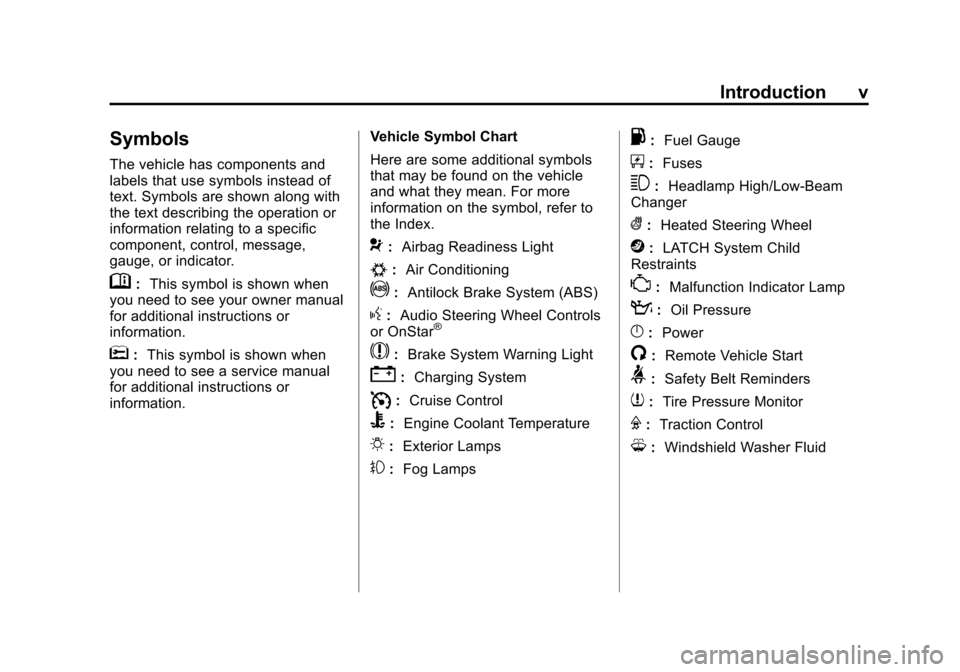
Symbols
The vehicle has components and
labels that use symbols instead of
text. Symbols are shown along with
the text describing the operation or
information relating to a specific
component, control, message,
gauge, or indicator.
M:This symbol is shown when
you need to see your owner manual
for additional instructions or
information.
*: This symbol is shown when
you need to see a service manual
for additional instructions or
information. Vehicle Symbol Chart
Here are some additional symbols
that may be found on the vehicle
and what they mean. For more
information on the symbol, refer to
the Index.
9:
Airbag Readiness Light
#:Air Conditioning
!:Antilock Brake System (ABS)
g:Audio Steering Wheel Controls
or OnStar®
$: Brake System Warning Light
":Charging System
I:Cruise Control
B: Engine Coolant Temperature
O:Exterior Lamps
#:Fog Lamps
.: Fuel Gauge
+:Fuses
3: Headlamp High/Low-Beam
Changer
(: Heated Steering Wheel
j:LATCH System Child
Restraints
*: Malfunction Indicator Lamp
::Oil Pressure
}:Power
/:Remote Vehicle Start
>:Safety Belt Reminders
7:Tire Pressure Monitor
F:Traction Control
M:Windshield Washer Fluid
Page 9 of 496

Black plate (3,1)Cadillac CTS/CTS-V Owner Manual - 2011
In Brief 1-3
A.Air Vents on page 8‑6.
B. Driver Information Center (DIC)
on page 5‑27.
C. Instrument Panel Illumination
Control on page 6‑5.
D. Turn and Lane-Change Signals
on page 6‑4.
E. Instrument Cluster
on
page 5‑11.
F. Windshield Wiper/Washer
on
page 5‑4.
Rear Window Wiper/Washer
on
page 5‑6(If Equipped).
G. Navigation Button (If Equipped). See Navigation System Manual.
H. Traction Control System (TCS)
on page 9‑37.
Magnetic Ride Control
on
page 9‑39(CTS‐V
Model Only).
I. Clock on page 5‑8.
J. Passenger Sensing System
on
page 3‑37. K.
Hazard Warning Flashers
on
page 6‑4.
L. Navigation Display Brightness Control (If Equipped). See
Navigation System Manual.
M. AM-FM Radio
on page 7‑9(Base Audio System).
Navigation/Radio System (If
Equipped). See Navigation
System Manual.
N. Parking Brake Release Lever. See Parking Brake (Manual)
on
page 9‑33or Parking Brake
(Electric) on page 9‑34.
O. Hood Release. See Hood
on
page 10‑5.
P. Cruise Control
on page 9‑40.
Heated Steering Wheel
on
page 5‑4(If Equipped).
Traction Control System (TCS)
Disable Button (CTS-V Model
Only). See Traction Control
System (TCS) on page 9‑37. Q. Tap Shift Controls (If Equipped).
See Manual Mode
on
page 9‑28.
R. Data Link Connector. See
Malfunction Indicator Lamp
on
page 5‑19.
S. Steering Wheel Adjustmenton
page 5‑2.
T. Horn on page 5‑4.
U. Steering Wheel Controls (Audio)
on page 5‑3.
V. Heated and Ventilated Front
Seats on page 3‑12.
W. Dual Automatic Climate Control
System on page 8‑1.
X. Parking Brake Button. See Parking Brake (Manual)
on
page 9‑33or Parking Brake
(Electric) on page 9‑34.
Y. Shift Lever. See Automatic
Transmission
on page 9‑26or
Manual Transmissionon
page 9‑30.
Z. Instrument Panel Storageon
page 4‑1.
Power Outlets on page 5‑9.
AA. Glove Box
on page 4‑1.
Page 14 of 496
Black plate (8,1)Cadillac CTS/CTS-V Owner Manual - 2011
1-8 In Brief
Press the top or bottom of the
control (A) to increase or decrease
support in the seat cushion bolsters.
Press the top or bottom of the
control (C) to increase or decrease
support in the seatback bolsters.
SeeLumbar Adjustment
on
page 3‑7.
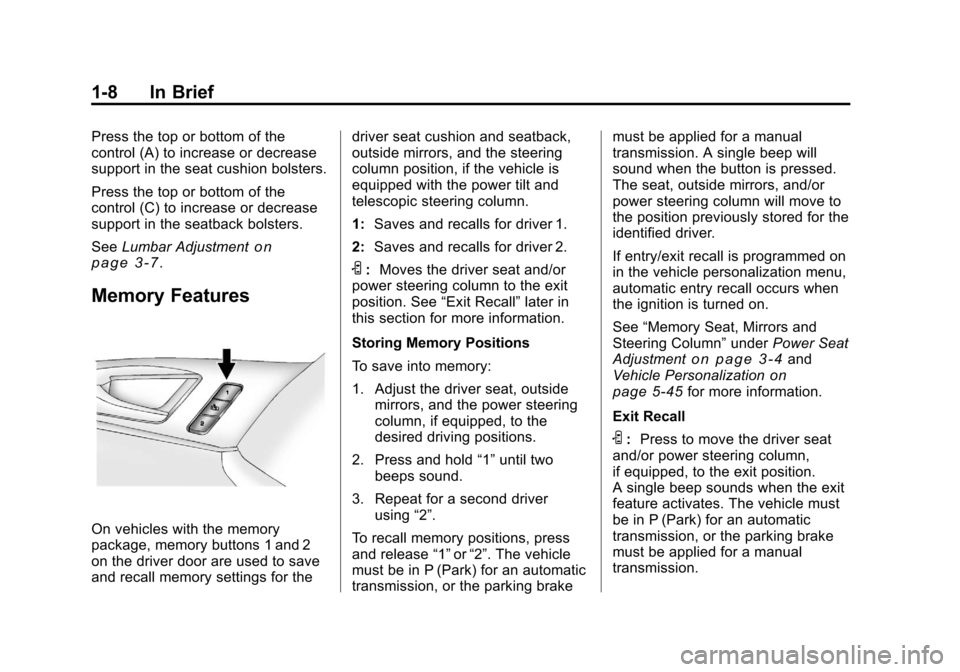
Memory Features
On vehicles with the memory
package, memory buttons 1 and 2
on the driver door are used to save
and recall memory settings for the driver seat cushion and seatback,
outside mirrors, and the steering
column position, if the vehicle is
equipped with the power tilt and
telescopic steering column.
1:
Saves and recalls for driver 1.
2: Saves and recalls for driver 2.
S:Moves the driver seat and/or
power steering column to the exit
position. See “Exit Recall”later in
this section for more information.
Storing Memory Positions
To save into memory:
1. Adjust the driver seat, outside mirrors, and the power steering
column, if equipped, to the
desired driving positions.
2. Press and hold “1”until two
beeps sound.
3. Repeat for a second driver using “2”.
To recall memory positions, press
and release “1”or“2”. The vehicle
must be in P (Park) for an automatic
transmission, or the parking brake must be applied for a manual
transmission. A single beep will
sound when the button is pressed.
The seat, outside mirrors, and/or
power steering column will move to
the position previously stored for the
identified driver.
If entry/exit recall is programmed on
in the vehicle personalization menu,
automatic entry recall occurs when
the ignition is turned on.
See
“Memory Seat, Mirrors and
Steering Column” underPower Seat
Adjustment
on page 3‑4and
Vehicle Personalizationon
page 5‑45for more information.
Exit Recall
S: Press to move the driver seat
and/or power steering column,
if equipped, to the exit position.
A single beep sounds when the exit
feature activates. The vehicle must
be in P (Park) for an automatic
transmission, or the parking brake
must be applied for a manual
transmission.
Page 29 of 496
Black plate (23,1)Cadillac CTS/CTS-V Owner Manual - 2011
In Brief 1-23
Driving for Better Fuel
Economy
Driving habits can affect fuel
mileage. Here are some driving tips
to get the best fuel economy
possible.
.Avoid fast starts and accelerate
smoothly.
.Brake gradually and avoid
abrupt stops.
.Avoid idling the engine for long
periods of time.
.When road and weather
conditions are appropriate, use
cruise control, if equipped.
.Always follow posted speed
limits or drive more slowly when
conditions require.
.Keep vehicle tires properly
inflated.
.Combine several trips into a
single trip.
.Replace the vehicle's tires with
the same TPC Spec number
molded into the tire's sidewall
near the size.
.Follow recommended scheduled
maintenance.
Roadside Service
U.S. or Canada:1-800-882-1112
TTY Users: 1-888-889-2438
As the owner of a new Cadillac, you
are automatically enrolled in the
Roadside Service program which is
available 24 hours a day, 365 days
a year. Roadside Service and OnStar
If you have a current OnStar
subscription, press the OnStar
button and the current GPS location
will be sent to an OnStar Advisor
who will assess your problem,
contact Roadside Service, and relay
exact location to get you the help
you need.
Online Owner Center
The Online Owner Center is a
complimentary service that includes
online service reminders, vehicle
maintenance tips, online owner
manual, special privileges
and more.
Sign up today at:
www.gmownercenter.com/cadillac
(U.S.) or
www.gm.ca (Canada).
Page 37 of 496
Black plate (5,1)Cadillac CTS/CTS-V Owner Manual - 2011
Keys, Doors and Windows 2-5
Remote Keyless Entry
(RKE) System Operation
(Key Access)
The Remote Keyless Entry (RKE)
transmitter works up to 20 m
(65 feet) away .
There are other conditions that can
affect the performance of the
transmitter. SeeRemote Keyless
Entry (RKE) System on page 2‑4.
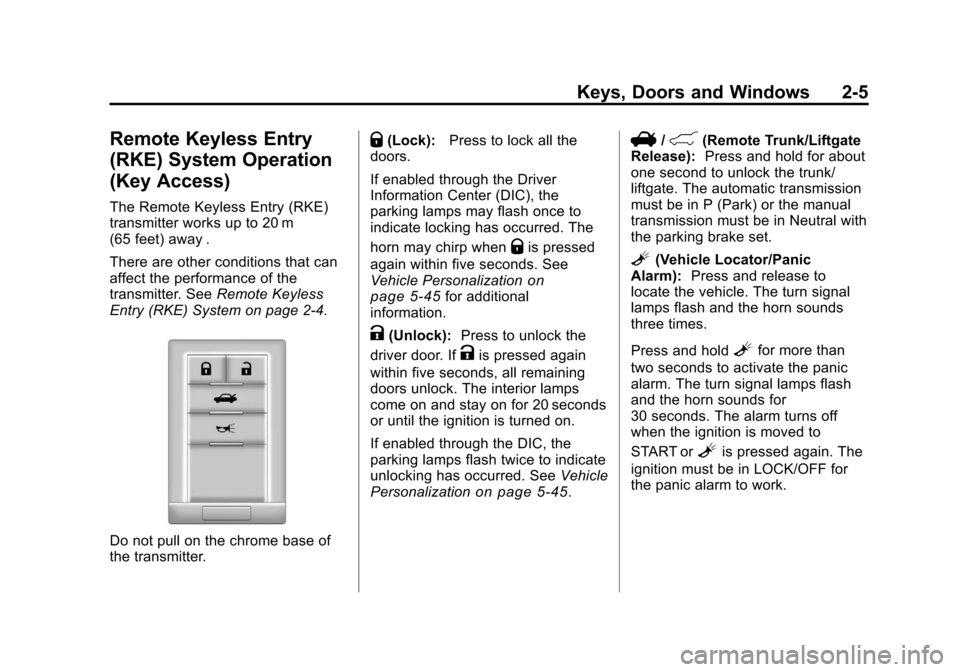
Do not pull on the chrome base of
the transmitter.
Q(Lock): Press to lock all the
doors.
If enabled through the Driver
Information Center (DIC), the
parking lamps may flash once to
indicate locking has occurred. The
horn may chirp when
Qis pressed
again within five seconds. See
Vehicle Personalization
on
page 5‑45for additional
information.
K(Unlock): Press to unlock the
driver door. If
Kis pressed again
within five seconds, all remaining
doors unlock. The interior lamps
come on and stay on for 20 seconds
or until the ignition is turned on.
If enabled through the DIC, the
parking lamps flash twice to indicate
unlocking has occurred. See Vehicle
Personalization
on page 5‑45.
V/&(Remote Trunk/Liftgate
Release): Press and hold for about
one second to unlock the trunk/
liftgate. The automatic transmission
must be in P (Park) or the manual
transmission must be in Neutral with
the parking brake set.
L(Vehicle Locator/Panic
Alarm): Press and release to
locate the vehicle. The turn signal
lamps flash and the horn sounds
three times.
Press and hold
Lfor more than
two seconds to activate the panic
alarm. The turn signal lamps flash
and the horn sounds for
30 seconds. The alarm turns off
when the ignition is moved to
START or
Lis pressed again. The
ignition must be in LOCK/OFF for
the panic alarm to work.
Page 40 of 496
Black plate (8,1)Cadillac CTS/CTS-V Owner Manual - 2011
2-8 Keys, Doors and Windows
To program the vehicle so the turn
signal indicators do not flash and
the horn does not sound when
pressing
Qon the keyless access
transmitter, see “Remote Door Lock
Feedback” underVehicle
Personalization on page 5‑45.
K(Unlock): Press once to unlock
only the driver door. The turn signal
indicators flash twice.
Press
Ktwice within five seconds
to unlock all the doors. The interior
lamps may come on.
To program the vehicle so the turn
signal indicators do not flash and
the fog lamps and reverse lamps
remain on steady for about
20 seconds when the keyless
access transmitter is used to unlock
the vehicle, see “Remote Door
Unlock Feedback” underVehicle
Personalization on page 5‑45.
For vehicles with the memory
feature, press
Kon the keyless
access transmitter to program and
recall the memory settings. See “Memory Seat”
underPower Seat
Adjustment
on page 3‑4for more
information.
/(Remote Start): Press to
operate the remote start feature.
See Remote Vehicle Start
on
page 2‑11for additional
information.
V/&(Remote Trunk/Liftgate
Release): Press and hold for about
one second to unlock the trunk/
liftgate. The automatic transmission
must be in P (Park) or the manual
transmission must be in Neutral with
the parking brake set.
L(Vehicle Locator/Panic
Alarm): Press and release to
locate the vehicle. The horn sounds
three times and the turn signal
lamps flash three times.
Press and hold
Lfor
three seconds to sound the panic
alarm. The horn sounds and the
turn signal lamps flash for
30 seconds. Press and release
L
again to stop the alarm. The vehicle comes with two
transmitters. Each transmitter will
have a number on top of it,
“1”
or“2”. These numbers
correspond to the driver of the
vehicle. For example, the memory
seat position for driver 1 will be
recalled when using the transmitter
labeled “1”, if enabled through the
DIC. See “Memory Seat” under
Power Seat Adjustment
on
page 3‑4and Vehicle
Personalizationon page 5‑45for
more information.
Programming Transmitters to
the Vehicle
Only keyless access transmitters
programmed to the vehicle will work.
If a transmitter is lost or stolen, a
replacement can be purchased and
programmed through your dealer.
The vehicle can be reprogrammed
so that lost or stolen transmitters no
longer work. Each vehicle can have
up to four transmitters matched to it.
Page 43 of 496
Black plate (11,1)Cadillac CTS/CTS-V Owner Manual - 2011
Keys, Doors and Windows 2-11
Starting the Vehicle with a Low
Transmitter Battery
Replace the battery if the Replace
Battery In Remote Key message
displays in the DIC. See“Replace
Battery In Remote Key” underKey
and Lock Messages
on page 5‑36for additional information.
If the transmitter battery is weak, the
DIC may display Electronic Key Not
Detected when you try to start the
vehicle. To start the vehicle, place
the transmitter in the center console
storage area transmitter pocket with
the buttons facing to the front of the
vehicle. Then, with the vehicle in
P (Park) or Neutral, press the brake
pedal and the ignition control knob.
See Starting the Engine
on
page 9‑19, for additional
information about the vehicle's
electronic keyless ignition with push
start. Replace the transmitter battery
as soon as possible.
Battery Replacement
Notice: When replacing the
battery, do not touch any of the
circuitry on the transmitter. Static
from your body could damage the
transmitter.
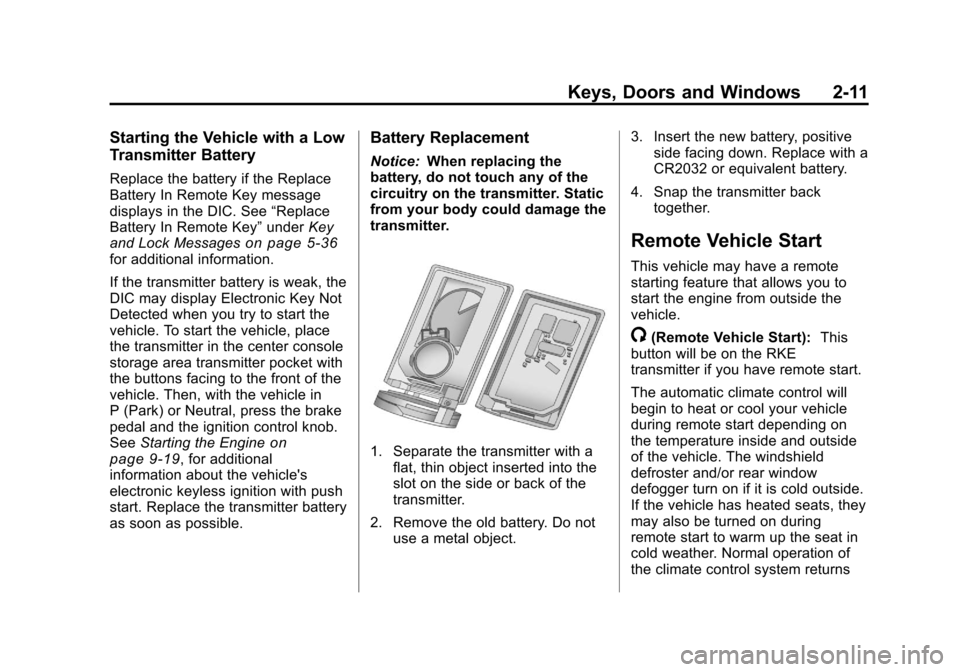
1. Separate the transmitter with a flat, thin object inserted into the
slot on the side or back of the
transmitter.
2. Remove the old battery. Do not use a metal object. 3. Insert the new battery, positive
side facing down. Replace with a
CR2032 or equivalent battery.
4. Snap the transmitter back together.
Remote Vehicle Start
This vehicle may have a remote
starting feature that allows you to
start the engine from outside the
vehicle.
/(Remote Vehicle Start): This
button will be on the RKE
transmitter if you have remote start.
The automatic climate control will
begin to heat or cool your vehicle
during remote start depending on
the temperature inside and outside
of the vehicle. The windshield
defroster and/or rear window
defogger turn on if it is cold outside.
If the vehicle has heated seats, they
may also be turned on during
remote start to warm up the seat in
cold weather. Normal operation of
the climate control system returns
Page 44 of 496
Black plate (12,1)Cadillac CTS/CTS-V Owner Manual - 2011
2-12 Keys, Doors and Windows
after the ignition is turned to ON/
RUN. SeeDual Automatic Climate
Control System on page 8‑1.
Laws in some local communities
may restrict the use of remote
starters. For example, some laws
may require a person using remote
start to have the vehicle in view
when doing so. Check local
regulations for any requirements on
remote starting of vehicles.
If your vehicle is low on fuel, do not
use the remote start feature. The
vehicle may run out of fuel.
If your vehicle has the remote start
feature, the RKE transmitter
functions will have an increased
range of operation. However, the
range may be less while the vehicle
is running.
There are other conditions which
can affect the performance of the
transmitter, see Remote Keyless
Entry (RKE) System
on page 2‑4for additional information. Starting the Engine Using Remote
Start
To start the engine using the remote
start feature:
1. Aim the transmitter at the vehicle
and press
Qon the transmitter.
2. Press and hold
/for at least
four seconds or until the
vehicle's turn signal lamps flash.
The parking lamps will turn on
and remain on as long as the
engine is running. The vehicle's
doors will be locked.
3. After entering the vehicle during a remote start, press the brake
pedal and turn the ignition to
ON/RUN to drive the vehicle.
After a remote start, the engine
will automatically shut off after
10 minutes unless a time
extension has been done or the
ignition has been turned to
ON/RUN. Extending Engine Run Time
To extend the engine run time by
10 minutes, repeat Steps 1 and 2
while the engine is still running. The
engine run time can only be
extended if it is the first remote start
since the vehicle has been driven.
Remote start can be extended
one time.
If the remote start procedure is
used again before the first
10 minute time frame has ended,
the first 10 minutes will immediately
expire and the second 10 minute
time frame will start.
For example, if the lock button and
then the remote start buttons are
pressed again after the vehicle has
been running for five minutes,
10 minutes are added, allowing the
engine to run for a total of
15 minutes.
A maximum of two remote starts or
remote start attempts are allowed
between ignition cycles.
Page 50 of 496

Black plate (18,1)Cadillac CTS/CTS-V Owner Manual - 2011
2-18 Keys, Doors and Windows
Trunk Lock Release
The remote trunk release button is
on the driver door.
For vehicles with an automatic
transmission, the shift lever must be
in P (Park) or N (Neutral). For
vehicles with a manual
transmission, the shift lever must be
in N (Neutral), and the parking
brake set.
Press the button to open the trunk
or press the button with the trunk
symbol on the Remote Keyless
Entry (RKE) transmitter.With the Keyless Access System,
when you have the transmitter, the
trunk can be opened by the trunk
release button located above the
license plate. The vehicle must be in
P (Park) and the valet mode
turned off.
If the vehicle is locked, the keyless
access transmitter must be within
1 m (3 ft) of the trunk opening for it
to be recognized.
If the vehicle is ever without power,
the trunk area can still be accessed.
On vehicles with a rear seat
pass-through door:
1. Fold the rear armrest down and
open the pass-through door. See
“Rear-Seat Pass Through”
following for more information. 2. Reach upward through the
opening to locate the emergency
trunk release handle. See
“Emergency Trunk Release
Handle” following for more
information.
3. Pull forward on the trunk release handle to open the trunk lid.
On vehicles with a split folding
rear seat:
1. Fold down the rear seatback. See Rear Seats
on page 3‑13for more information.
2. Reach upward through the opening to locate the trunk
release handle.
3. Pull forward on the trunk release handle to open the trunk lid.
Close the trunk by pulling on the
handle. Do not use the handle as a
tie-down.