ignition CADILLAC CTS V 2007 1.G Repair Manual
[x] Cancel search | Manufacturer: CADILLAC, Model Year: 2007, Model line: CTS V, Model: CADILLAC CTS V 2007 1.GPages: 518, PDF Size: 2.77 MB
Page 273 of 518
Do not add any label to a CD, it could get caught
in the CD player. If a CD is recorded on a
personal computer and a description label is
needed, try labeling the top of the recorded CD
with a marking pen.
Notice:If a label is added to a CD, or more
than one CD is inserted into the slot at a time,
or an attempt is made to play scratched or
damaged CDs, the CD player could be
damaged. While using the CD player, use only
CDs in good condition without any label,
load one CD at a time, and keep the CD player
and the loading slot free of foreign materials,
liquids, and debris.
If an error appears on the display, see “CD
Messages” later in this section.
When a CD is inserted the CD functions appear
on the display above the rm keys, in place of the
preset stations, if programmed.LOAD:Press the LOAD button to load CDs into
the CD player. This CD player holds up to six CDs.
To insert one CD, do the following:
1. The ignition and the radio can be on or off.
2. Press and release the LOAD button.
Please Wait appears on the display.
3. Load the CD, when INSERT appears on the
display, insert a CD partway into the slot,
label side up. The player pulls the CD in.
When a CD is inserted, CD appears on the
display, the number of the CD and the track
number appears on the display if the radio is on.
If the radio is on, the CD begins to play
automatically.
To insert multiple CDs, do the following:
1. The ignition and the radio can be on or off.
2. Press and hold the LOAD button for
two seconds. Please Wait appears on
the display and you will hear a beep.
273
Page 275 of 518

RDM TRK (Random Track):Plays the tracks
on the current CD in random, rather than
sequential, order. RDM TRK appears on the
display. Press the MODE rm key again to turn
off random play. RDM TRK disappears from
the display.
RDM ALL (Random All CDs):Plays all of the
CDs loaded in random, rather than sequential,
order. RDM ALL appears on the display.
Press the MODE rm key again to turn off
random play. RDM ALL disappears from
the display.
F6 DISP (Display):Press this rm key to display
the time of the track. Press this rm key again
to display CD PLAY and press this rm key once
more to clear the display.
QSEEKR:Press the up or the down arrow to go
to the next or to the previous track on the CD.
QSCANR:Press this button to listen to each
track for 10 seconds. The CD goes to a track,
plays for 10 seconds, then goes to the next track.
Press this button again to stop scanning.
X(Eject):Press this button to eject the CD that
is currently playing, or press and hold this button
to eject all of the CDs loaded. You will hear a
beep. Eject may be activated with the ignition or
radio off.
CD Messages
If the CD comes out, it could be for one of the
following reasons:
If it is very hot. When the temperature returns
to normal, the CD should play.
If you are driving on a very rough road.
When the road becomes smoother, the
CD should play.
The CD is dirty, scratched, wet, or
upside down.
The air is very humid. If so, wait about an
hour and try again.
There may have been a problem while
burning the CD.
The label may be caught in the CD player.
If the CD is not playing correctly, for any other
reason, try a known good CD.
275
Page 296 of 518

If you press the TC button once, the traction
control system will turn off and the TCS warning
light will come on. If you press the TC button again
within ve seconds, the traction control system
will remain off, the warning light will stay on, and
the stability system will enter Competitive
Driving Mode. Competitive Driving will be displayed
on the Driver Information Center (DIC). See
Competitive Driving Mode (CTS-V) on page 296
and “Driver Information Center (DIC)” in the
Navigation Supplement for more information.
Press the TC button again to turn the system back
on. If you press and hold the TC button for
ve seconds, the StabiliTrak
®and Traction Control
systems will turn off. Press the TC button again
to turn StabiliTrak
®and Traction Control back on.
For more information, seeStabiliTrak®System
on page 297.
Adding non-GM accessories can affect your
vehicle’s performance. SeeAccessories and
Modications on page 332for more information.
Competitive Driving Mode (CTS-V)
The driver can select this optional handling
mode by pressing the Traction Control (TC) button
on the steering wheel twice within ve seconds.
COMPETITIVE DRIVING will be displayed in
the DIC. Competitive driving mode allows
the driver to have control of the power applied to
the rear wheels, while the StabiliTrak
®system
helps steer the vehicle by selective brake
application. In competitive mode, the levels at
which StabiliTrak
®is engaged have been modied
to better suit a performance driving environment.
When the traction control warning light is on,
the Traction Control System will not be operating.
Adjust your driving accordingly.
When you press the TC button again, or turn
the ignition to ACCESSORY, the TCS will
be on. The traction engaged symbol will be
displayed temporarily in the DIC and a chime
will be heard.
296
Page 315 of 518
{CAUTION:
Coasting downhill in NEUTRAL (N) or with
the ignition off is dangerous. The brakes
will have to do all the work of slowing
down. They could get so hot that they
would not work well. You would then have
poor braking or even none going down a
hill. You could crash. Always have the
engine running and your vehicle in gear
when you go downhill.
Know how to go down hills. The most
important thing to know is this: let the engine
do some of the slowing down. Shift to a
lower gear when you go down a steep or
long hill.
Know how to go uphill. You may want to shift
down to a lower gear. The lower gears help
cool the engine and transmission, and you can
climb the hill better.
Stay in your own lane when driving on
two-lane roads in hills or mountains. Do not
swing wide or cut across the center of the
road. Drive at speeds that let you stay in your
own lane.
As you go over the top of a hill, be alert.
There could be something in your lane, like a
stalled car or an accident.
You may see highway signs on mountains
that warn of special problems. Examples
are long grades, passing or no-passing zones,
a falling rocks area, or winding roads.
Be alert to these and take appropriate action.
315
Page 371 of 518

Brakes
Brake Fluid
Your brake master
cylinder reservoir is
lled with DOT-3 brake
uid. SeeEngine
Compartment Overview
on page 342for the
location of the reservoir.
There are only two reasons why the brake uid
level in the reservoir might go down. The rst
is that the brake uid goes down to an acceptable
level during normal brake lining wear. When
new linings are put in, the uid level goes back
up. The other reason is that uid is leaking out of
the brake system. If it is, you should have your
brake system xed, since a leak means that
sooner or later your brakes will not work well, or
will not work at all.So, it is not a good idea to top off your brake uid.
Adding brake uid will not correct a leak. If you add
uid when your linings are worn, then you will have
too much uid when you get new brake linings. You
should add or remove brake uid, as necessary,
only when work is done on the brake hydraulic
system.
{CAUTION:
If your vehicle has too much brake uid, it
can spill on the engine. The uid will burn if
the engine is hot enough. You or others
could be burned, and your vehicle could be
damaged. Add brake uid only when work
is done on the brake hydraulic system.
If the ignition is in ON and the brake uid is low, the
“Check Brake Fluid” message will be displayed in
the DIC. See “Check Brake Fluid Message” under
DIC Warnings and Messages on page 232.
When your brake uid falls to a low level, your
brake warning light will come on. SeeBrake
System Warning Light on page 205.
371
Page 375 of 518

Battery
Your vehicle has a maintenance free battery.
When it is time for a new battery, get one that has
the replacement number shown on the original
battery’s label. We recommend an ACDelco
®
replacement battery. SeeEngine Compartment
Overview on page 342for battery location.
Warning:Battery posts, terminals, and related
accessories contain lead and lead compounds,
chemicals known to the State of California
to cause cancer and reproductive harm. Wash
hands after handling.
{CAUTION:
Batteries have acid that can burn you and
gas that can explode. You can be badly
hurt if you are not careful. SeeJump
Starting on page 376for tips on working
around a battery without getting hurt.
After a power loss, such as disconnecting the
battery or removing the maxi fuses in the power
distribution fuse block, the following steps must be
performed to calibrate the electronic throttle control.
If this is not done, the engine will not run properly.
1. Turn the ignition key to ON. Do not start the
engine.
2. Leave the ignition in ON for at least
three minutes so that the electronic throttle
control will cycle and re-learn its home
position.
3. Turn the ignition to OFF.
4. Start and run the engine for at least
30 seconds.
375
Page 377 of 518

Notice:If you leave your radio or other
accessories on during the jump starting
procedure, they could be damaged. The repairs
would not be covered by your warranty.
Always turn off your radio and other
accessories when jump starting your vehicle.
3. Turn off the ignition on both vehicles.
Unplug unnecessary accessories plugged into
the cigarette lighter or the accessory power
outlets. Turn off the radio and all lamps
that are not needed. This will avoid sparks
and help save both batteries. And it could
save the radio!
4. Open the hoods and locate the positive (+)
and negative (−) terminal locations of the
other vehicle, as well as the positive (+)
terminal location on your vehicle’s battery.
SeeEngine Compartment Overview on
page 342for more information on the location
of the battery.
377
Page 390 of 518
Windshield Wiper Blade
Replacement
Windshield wiper blades should be inspected for
wear or cracking. SeeOwner Checks and Services
on page 469.
It is a good idea to clean or replace the wiper
blade assembly on a regular basis or when worn.
For proper windshield wiper blade length and
type, seeNormal Maintenance Replacement Parts
on page 475.
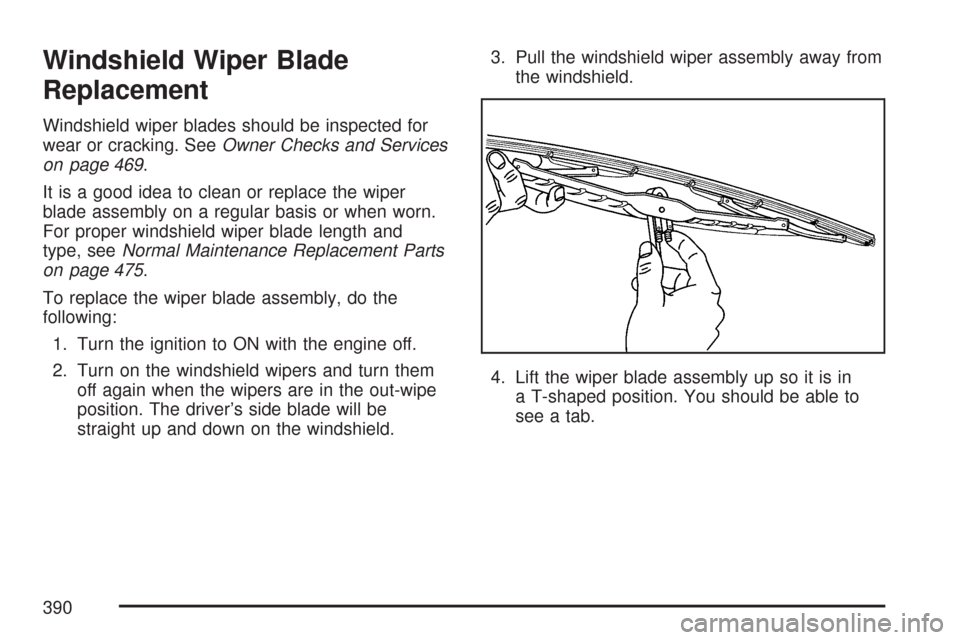
To replace the wiper blade assembly, do the
following:
1. Turn the ignition to ON with the engine off.
2. Turn on the windshield wipers and turn them
off again when the wipers are in the out-wipe
position. The driver’s side blade will be
straight up and down on the windshield.3. Pull the windshield wiper assembly away from
the windshield.
4. Lift the wiper blade assembly up so it is in
a T-shaped position. You should be able to
see a tab.
390
Page 407 of 518
Your vehicle’s TPMS can alert you about a low
tire pressure condition but it does not replace
normal tire maintenance. SeeTire Inspection and
Rotation on page 409andTires on page 392.
Notice:Do not use a tire sealant if your vehicle
has Tire Pressure Monitors. The liquid sealant
can damage the tire pressure monitor sensors.
Resetting the TPMS Identication
Codes
Each TPMS sensor has a unique identication
code. Any time you replace one or more of
the TPMS sensors or rotate the tires, the
identication codes will need to be matched to the
new tire and wheel position. The sensors are
matched to the tire and wheel positions in
the following order: driver’s side front tire,
passenger’s side front tire, passenger’s side rear
tire, and driver’s side rear tire using a TPMS
diagnostic tool. See your GM dealer for service.
The TPMS sensors may also be matched to each
tire and wheel position by increasing or
decreasing the tire’s air pressure. When increasing
tire pressure do not exceed the maximum
ination pressure indicated on the tire’s sidewall.You will have two minutes to match the rst tire
and wheel position, and ve minutes overall
to match all four tire and wheel positions. If it takes
longer than two minutes, to match the rst tire
and wheel, or more than ve minutes to match all
four tire and wheel positions the matching
process stops and you will need to start over.
The TPM matching process is outlined below:
1. Set the parking brake.
2. Turn the ignition switch to ON with the
engine off.
3. Using the Remote Keyless Entry (RKE)
transmitter, lock and unlock the vehicle’s
doors.
4. Press the lock and unlock buttons, at the
same time, on the RKE transmitter. A single
horn chirp will sound, indicating that the
TPMS system is ready, and the sensor
matching process can begin.
5. Start with the driver’s side front tire.
407
Page 408 of 518
6. Remove the valve cap from the valve stem.
Activate the TPMS sensor by increasing
or decreasing the tire’s air pressure for
ve seconds, or until a horn chirp sounds. The
horn chirp, which may take up to 30 seconds,
conrms that the sensor identication code has
been matched to this tire position. To decrease
the tire’s air-pressure use the pointed end of
the valve cap, a pencil-style air pressure gage,
or a key.
7. Proceed to the passenger’s side front tire, and
repeat the procedure in Step 6.
8. Proceed to the passenger’s side rear tire, and
repeat the procedure in Step 6.
9. Proceed to the driver’s side rear tire, and
repeat the procedure in Step 6.
10. After hearing the conrming double horn
chirp, for the left rear tire, exit the matching
process by turning the ignition switch to OFF.
11. Set all four tires to the recommended
air pressure level as indicated on the tire and
loading information label.
12. Put the valve caps back on the valve stems.The TPMS will not function properly, if one or
more of the TPMS sensors are missing or
inoperable. If your vehicle has a compact spare
tire, the spare tire and wheel assembly does
not contain a TPMS sensor. If you replace one of
the road tires with the spare, or if the system
detects a missing or inoperable sensor, the
Service Tire Monitor System message will be
displayed on the DIC. If you have replaced a tire
and wheel assembly without transferring the
TPMS sensors, the error message will be
displayed. Once you re-install the TPMS sensors,
the message should go off. See your GM
dealer for service if all TPMS sensors are installed
and the error message comes on and stays on.
Have your vehicle serviced as soon as possible.
If your vehicle has a message center and the
system detects a missing or inoperable sensor an
error message of several dashes–––will be
shown on the message center display. If you have
replaced a tire and wheel assembly without
transferring the TPMS sensors, the error message
will be displayed. Once you re-install the TPMS
sensors, the error message should go off.
See your GM dealer for service if all TPMS
sensors are installed and the error message
comes on and stays on.
408