night vision CADILLAC DEVILLE 2005 8.G Owners Manual
[x] Cancel search | Manufacturer: CADILLAC, Model Year: 2005, Model line: DEVILLE, Model: CADILLAC DEVILLE 2005 8.GPages: 420, PDF Size: 2.63 MB
Page 121 of 420
Instrument Panel Overview...............................3-4
Hazard Warning Flashers................................3-6
Other Warning Devices...................................3-6
Horn.............................................................3-6
Tilt Wheel.....................................................3-6
Power Tilt Wheel and Telescopic Steering
Column......................................................3-7
Heated Steering Wheel...................................3-7
Turn Signal/Multifunction Lever.........................3-8
Turn and Lane-Change Signals........................3-8
Headlamp High/Low-Beam Changer..................3-9
Flash-to-Pass.................................................3-9
Windshield Wipers..........................................3-9
Rainsense™ II Wipers...................................3-10
Windshield Washer.......................................3-11
Cruise Control..............................................3-12
Exterior Lamps.............................................3-15
Wiper Activated Headlamps............................3-16
Headlamps on Reminder................................3-16
Daytime Running Lamps (DRL).......................3-16
Fog Lamps..................................................3-18
Cornering Lamps..........................................3-18
Twilight Sentinel
®..........................................3-18
Exterior Lighting Battery Saver........................3-20
Instrument Panel Brightness...........................3-20
Courtesy Lamps...........................................3-21
Entry Lighting...............................................3-21Parade Dimming...........................................3-21
Reading Lamps............................................3-21
Battery Load Management.............................3-22
Inadvertent Power Battery Saver.....................3-22
Night Vision System......................................3-22
Ultrasonic Parking Assist................................3-26
Accessory Power Outlets...............................3-28
Ashtrays and Cigarette Lighter........................3-29
Climate Controls............................................3-30
Dual Climate Control System..........................3-30
Outlet Adjustment.........................................3-34
Rear Climate Control System.........................3-35
Passenger Compartment Air Filter...................3-36
Steering Wheel Climate Controls.....................3-38
Climate Controls Personalization.....................3-39
Warning Lights, Gages, and Indicators............3-40
Instrument Panel Cluster................................3-41
Speedometer and Odometer...........................3-43
Trip Odometer..............................................3-43
Tachometer (Analog Cluster Only)...................3-44
Engine Speed Limiter....................................3-44
Safety Belt Reminder Light.............................3-45
Airbag Readiness Light..................................3-45
Charging System Light..................................3-46
Brake System Warning and Parking Brake
Indicator Light...........................................3-47
Section 3 Instrument Panel
3-1
Page 125 of 420
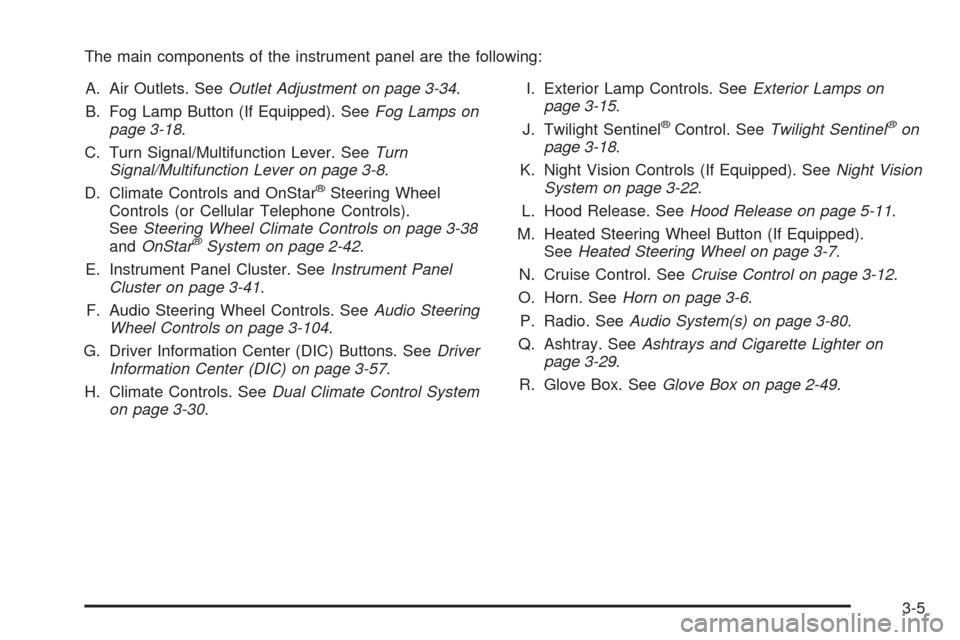
The main components of the instrument panel are the following:
A. Air Outlets. SeeOutlet Adjustment on page 3-34.
B. Fog Lamp Button (If Equipped). SeeFog Lamps on
page 3-18.
C. Turn Signal/Multifunction Lever. SeeTurn
Signal/Multifunction Lever on page 3-8.
D. Climate Controls and OnStar
®Steering Wheel
Controls (or Cellular Telephone Controls).
SeeSteering Wheel Climate Controls on page 3-38
andOnStar
®System on page 2-42.
E. Instrument Panel Cluster. SeeInstrument Panel
Cluster on page 3-41.
F. Audio Steering Wheel Controls. SeeAudio Steering
Wheel Controls on page 3-104.
G. Driver Information Center (DIC) Buttons. SeeDriver
Information Center (DIC) on page 3-57.
H. Climate Controls. SeeDual Climate Control System
on page 3-30.I. Exterior Lamp Controls. SeeExterior Lamps on
page 3-15.
J. Twilight Sentinel
®Control. SeeTwilight Sentinel®on
page 3-18.
K. Night Vision Controls (If Equipped). SeeNight Vision
System on page 3-22.
L. Hood Release. SeeHood Release on page 5-11.
M. Heated Steering Wheel Button (If Equipped).
SeeHeated Steering Wheel on page 3-7.
N. Cruise Control. SeeCruise Control on page 3-12.
O. Horn. SeeHorn on page 3-6.
P. Radio. SeeAudio System(s) on page 3-80.
Q. Ashtray. SeeAshtrays and Cigarette Lighter on
page 3-29.
R. Glove Box. SeeGlove Box on page 2-49.
3-5
Page 142 of 420

Battery Load Management
The battery load management feature is designed to
monitor the vehicle’s electrical load and determine when
the battery is in a heavy discharge condition. During
times of high electrical loading, the engine may idle at a
higher revolutions per minute (rpm) setting than
normal to make sure the battery charges. High electrical
loads may occur when several of the following are
on: headlamps, high beams, fog lamps, rear window
defogger, the climate control fan at high speeds, heated
seats and engine cooling fans.
If the battery continues to discharge, even with the
engine idling at a higher rpm setting, some electrical
loads will automatically be reduced. When this occurs,
the rear window defogger may take slightly longer
to clear the glass, the heated seats may not get as warm
as they usually do and the fan may cut back to a
lower speed. For more battery saving information, see
“Battery Saver Active Message” underDIC Warnings
and Messages on page 3-60.
Inadvertent Power Battery Saver
This feature is designed to protect your vehicle’s battery
against drainage from the interior lamps, trunk lamp,
glove box lamp, or the garage door opener. When the
ignition is turned off, the power to these features will
automatically turn off after 10 minutes (three minutes if
a new car has 15 miles (24 km) or less). Power will
be restored for an additional 10 minutes if any door is
opened, the trunk is opened or the courtesy lamp switch
is turned on.
Night Vision System
If your vehicle is equipped with the Night Vision System,
it can help you see better when you drive at night.
The system works by sensing heat given off by objects
in its eld of view. Warmer objects, such as pedestrians,
animals, and other moving vehicles, will appear
whiter. Colder objects, such as the sky, signs, and
parked vehicles, will appear darker.
3-22
Page 143 of 420

Use this system as an aid to help you in seeing objects
beyond the headlamps. Do this by occasionally
glancing at the image as you would a rearview mirror.
Do not stare at the image.
The Night Vision System can be operated if:
The instrument panel brightness knob is in any
position except OFF.
It is dark enough outside.
The headlamps or fog lamps (if equipped) are on.
The ignition is turned to ON.
3-23
Page 144 of 420
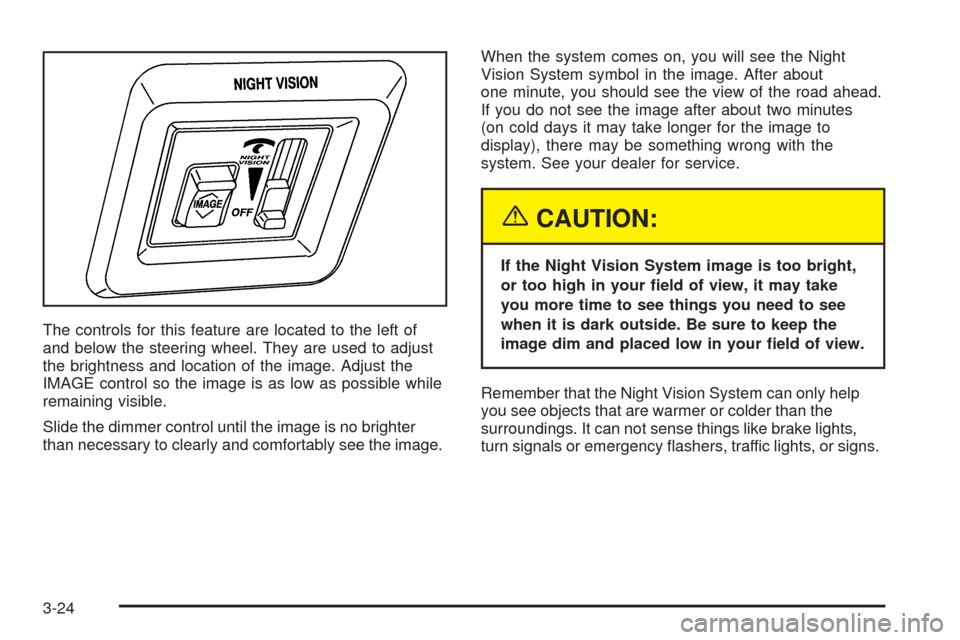
The controls for this feature are located to the left of
and below the steering wheel. They are used to adjust
the brightness and location of the image. Adjust the
IMAGE control so the image is as low as possible while
remaining visible.
Slide the dimmer control until the image is no brighter
than necessary to clearly and comfortably see the image.When the system comes on, you will see the Night
Vision System symbol in the image. After about
one minute, you should see the view of the road ahead.
If you do not see the image after about two minutes
(on cold days it may take longer for the image to
display), there may be something wrong with the
system. See your dealer for service.
{CAUTION:
If the Night Vision System image is too bright,
or too high in your eld of view, it may take
you more time to see things you need to see
when it is dark outside. Be sure to keep the
image dim and placed low in your eld of view.
Remember that the Night Vision System can only help
you see objects that are warmer or colder than the
surroundings. It can not sense things like brake lights,
turn signals or emergency ashers, traffic lights, or signs.
3-24
Page 145 of 420

In dry, clear weather, the system can see pedestrians,
animals, and the direction of the road ahead. In light
rain, light snow, or light fog the image may not be
as clear and you may not be able to see the direction of
the road ahead. In more severe weather conditions,
the image may be unclear and not usable.
{CAUTION:
Do not use the Night Vision System to replace
your normal view of the road ahead. It can not
tell you how far away things are. It senses only
warmer or colder objects, not all objects.
Driving by staring at the image might cause
you not to see important objects in the road
ahead. If you do not see something in time,
you could have a crash in which you and
others could be injured. Use the Night Vision
System only as a driving aid.It is also important to keep your windshield, the HUD
(Head-Up Display for the Night Vision System) lens, and
the camera lens clean. If you do not keep everything
clean, system performance may be affected.
The HUD system is located on the driver’s side of the
instrument panel, next to the windshield and the camera
is located behind the center of the front grille.
Use only household glass cleaner and a soft cloth to
clean the HUD or camera lens. Wipe gently and
dry thoroughly.
Notice:When cleaning, be careful not to scratch
the HUD or camera lenses. Do not spray glass
cleaner directly on the HUD lens because the
cleaner could leak inside the unit and cause
damage.
The camera must also be aligned to work correctly.
If the camera needs adjustment, see your dealer. Do not
attempt to adjust the camera yourself.
3-25
Page 244 of 420

Driving at Night
Night driving is more dangerous than day driving. One
reason is that some drivers are likely to be impaired — by
alcohol or drugs, with night vision problems, or by fatigue.Here are some tips on night driving.
Drive defensively.
Do not drink and drive.
Since you cannot see as well, you may need to
slow down and keep more space between you
and other vehicles.
Slow down, especially on higher speed roads. Your
headlamps can light up only so much road ahead.
In remote areas, watch for animals.
If you are tired, pull off the road in a safe place
and rest.
No one can see as well at night as in the daytime. But
as we get older these differences increase. A
50-year-old driver may require at least twice as much
light to see the same thing at night as a 20-year-old.
What you do in the daytime can also affect your
night vision. For example, if you spend the day in bright
sunshine you are wise to wear sunglasses. Your
eyes will have less trouble adjusting to night. But if you
are driving, do not wear sunglasses at night. They
may cut down on glare from headlamps, but they also
make a lot of things invisible.
4-16
Page 283 of 420
Hood Release
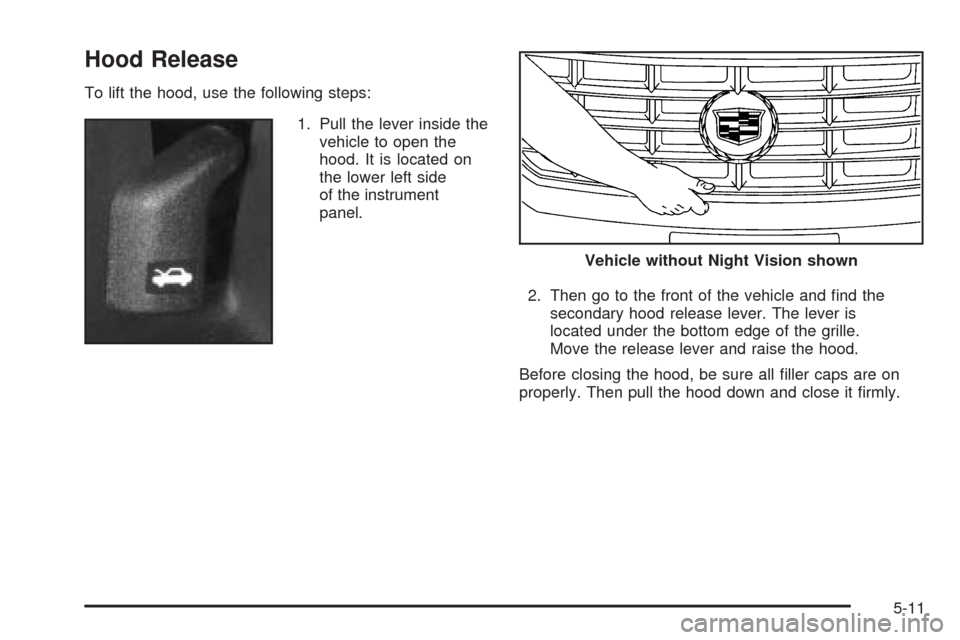
To lift the hood, use the following steps:
1. Pull the lever inside the
vehicle to open the
hood. It is located on
the lower left side
of the instrument
panel.
2. Then go to the front of the vehicle and nd the
secondary hood release lever. The lever is
located under the bottom edge of the grille.
Move the release lever and raise the hood.
Before closing the hood, be sure all ller caps are on
properly. Then pull the hood down and close it rmly.
Vehicle without Night Vision shown
5-11
Page 375 of 420
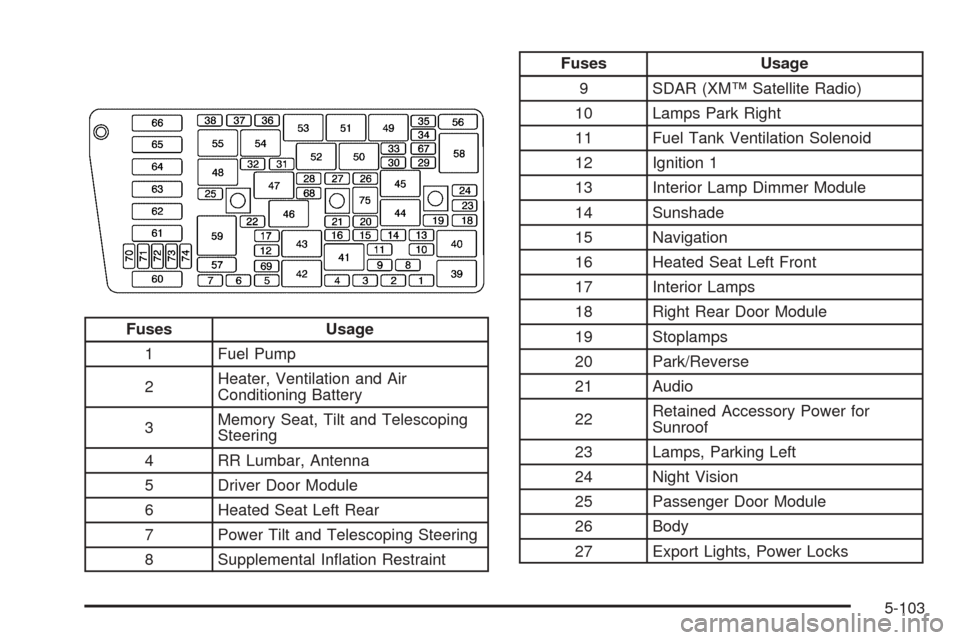
Fuses Usage
1 Fuel Pump
2Heater, Ventilation and Air
Conditioning Battery
3Memory Seat, Tilt and Telescoping
Steering
4 RR Lumbar, Antenna
5 Driver Door Module
6 Heated Seat Left Rear
7 Power Tilt and Telescoping Steering
8 Supplemental Ination Restraint
Fuses Usage
9 SDAR (XM™ Satellite Radio)
10 Lamps Park Right
11 Fuel Tank Ventilation Solenoid
12 Ignition 1
13 Interior Lamp Dimmer Module
14 Sunshade
15 Navigation
16 Heated Seat Left Front
17 Interior Lamps
18 Right Rear Door Module
19 Stoplamps
20 Park/Reverse
21 Audio
22Retained Accessory Power for
Sunroof
23 Lamps, Parking Left
24 Night Vision
25 Passenger Door Module
26 Body
27 Export Lights, Power Locks
5-103
Page 415 of 420

N
Navigation/Radio System, see Navigation
Manual......................................................3-99
New Vehicle Break-In......................................2-24
Night Vision System........................................3-22
Normal Maintenance Replacement Parts............6-13
O
Odometer......................................................3-43
Odometer, Trip...............................................3-43
Off-Road Recovery..........................................4-12
Oil
Engine.......................................................5-14
Life Indicator...............................................3-79
Pressure Light.............................................3-53
Oil, Engine Oil Life System..............................5-17
Older Children, Restraints................................1-28
Online Owner Center........................................ 7-3
OnStar
®System, see OnStar®Manual...............2-42
Other Warning Devices...................................... 3-6
Outlet Adjustment............................................3-34
Outside
Automatic Dimming Mirror.............................2-41
Convex Mirror.............................................2-41
Curb View Assist Mirror................................2-41
Heated Mirrors............................................2-41
Power Mirrors.............................................2-40Overheated Engine Protection
Operating Mode..........................................5-29
Owner Checks and Services.............................. 6-9
Owners, Canadian............................................... ii
P
Parade Dimming.............................................3-21
Park Aid........................................................3-26
Park (P)
Shifting Into................................................2-32
Shifting Out of............................................2-34
Parking
Assist........................................................3-26
Brake........................................................2-31
Brake Indicator Light....................................3-47
Over Things That Burn.................................2-35
Passenger Compartment Air Filter.....................3-36
Passing.........................................................4-13
PASS-Key
®III ................................................2-21
PASS-Key®III Operation..................................2-22
Performance Shifting.......................................2-31
Personalization, Climate Controls......................3-39
Power
Accessory Outlets........................................3-28
Door Locks.................................................2-10
Electrical System.........................................5-97
Inadvertent Battery Saver.............................3-22
9