light CADILLAC DTS 2009 1.G Owner's Manual
[x] Cancel search | Manufacturer: CADILLAC, Model Year: 2009, Model line: DTS, Model: CADILLAC DTS 2009 1.GPages: 462, PDF Size: 2.46 MB
Page 108 of 462
Performance Shifting
If the vehicle has this feature, it can detect a change in
driving patterns. If you make an aggressive driving
maneuver, the vehicle’s transmission automatically
shifts to the lowest possible gear to maximize vehicle
performance. The vehicle will automatically return
to normal operation when you return to normal driving
patterns.
Parking Brake
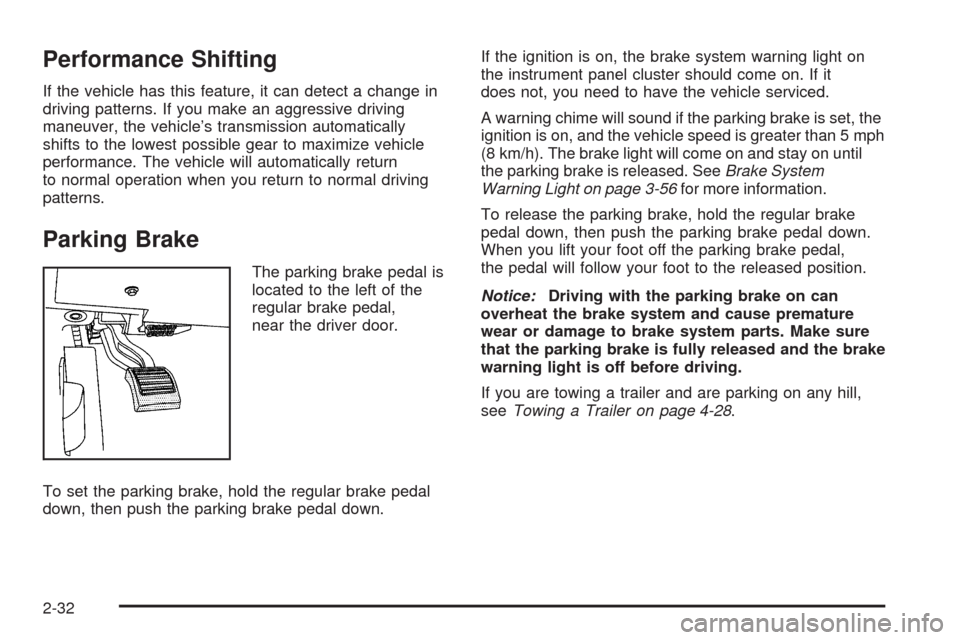
The parking brake pedal is
located to the left of the
regular brake pedal,
near the driver door.
To set the parking brake, hold the regular brake pedal
down, then push the parking brake pedal down.If the ignition is on, the brake system warning light on
the instrument panel cluster should come on. If it
does not, you need to have the vehicle serviced.
A warning chime will sound if the parking brake is set, the
ignition is on, and the vehicle speed is greater than 5 mph
(8 km/h). The brake light will come on and stay on until
the parking brake is released. SeeBrake System
Warning Light on page 3-56for more information.
To release the parking brake, hold the regular brake
pedal down, then push the parking brake pedal down.
When you lift your foot off the parking brake pedal,
the pedal will follow your foot to the released position.
Notice:Driving with the parking brake on can
overheat the brake system and cause premature
wear or damage to brake system parts. Make sure
that the parking brake is fully released and the brake
warning light is off before driving.
If you are towing a trailer and are parking on any hill,
seeTowing a Trailer on page 4-28.
2-32
Page 114 of 462
Mirrors
Automatic Dimming Rearview Mirror
The vehicle has an automatic dimming inside rearview
mirror with a compass display. The mirror may also
have OnStar
®controls and Intellibeam™. For more
information on Intellibeam™, see “Intellibeam Intelligent
High-Beam Headlamp Control System” underExterior
Lamps on page 3-29. For more information about
OnStar
®, seeOnStar®System on page 2-51.
Automatic Dimming Mirror Operation
Automatic dimming reduces the glare of lights from
behind the vehicle. The dimming feature comes on and
the indicator light illuminates each time the vehicle is
started.
O(On/Off):Press and holdOfor about three seconds
to turn the dimming feature and compass display on
or off.
AUTO
3(Vehicles with Intellibeam™):Press and
hold for approximately three seconds to turn the
compass display on or off.
Cleaning the Mirror
Do not spray glass cleaner directly on the mirror.
Use a soft towel dampened with water.
Compass
Compass Operation
PressOor AUTO3, depending on the vehicle,
to turn the compass on or off.
When the ignition and the compass feature are on, after
a few seconds, the mirror will display the compass
heading. The compass automatically calibrates as the
vehicle is driven.
Compass Calibration
If after a few seconds, the display does not show the
correct direction, (for example, N for North), there
may be a strong magnetic eld interfering with the
compass. Interference can be caused by a magnetic
antenna mount, magnetic note pad holder or a
similar magnetic item.
2-38
Page 119 of 462
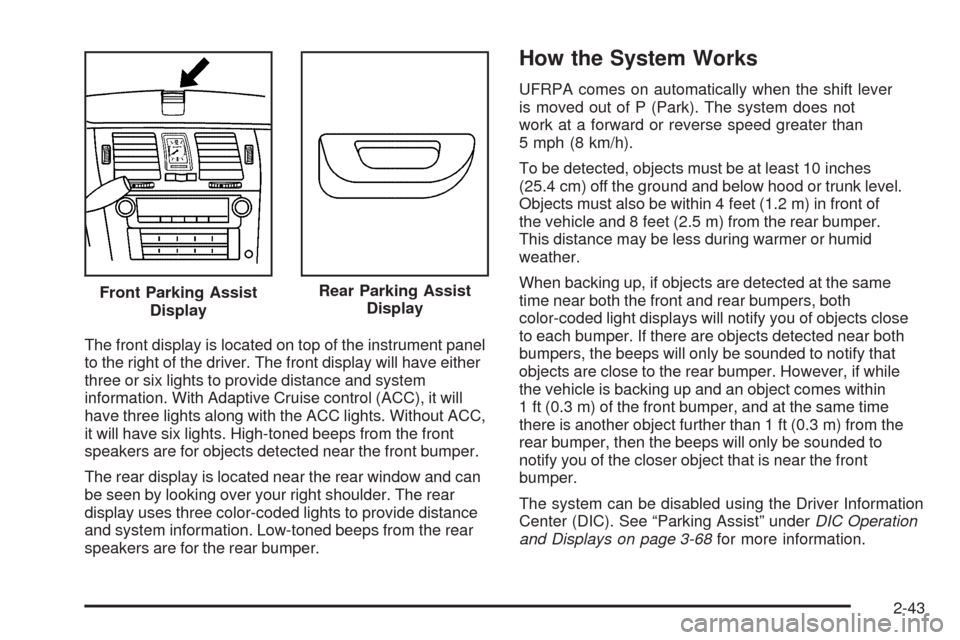
The front display is located on top of the instrument panel
to the right of the driver. The front display will have either
three or six lights to provide distance and system
information. With Adaptive Cruise control (ACC), it will
have three lights along with the ACC lights. Without ACC,
it will have six lights. High-toned beeps from the front
speakers are for objects detected near the front bumper.
The rear display is located near the rear window and can
be seen by looking over your right shoulder. The rear
display uses three color-coded lights to provide distance
and system information. Low-toned beeps from the rear
speakers are for the rear bumper.
How the System Works
UFRPA comes on automatically when the shift lever
is moved out of P (Park). The system does not
work at a forward or reverse speed greater than
5 mph (8 km/h).
To be detected, objects must be at least 10 inches
(25.4 cm) off the ground and below hood or trunk level.
Objects must also be within 4 feet (1.2 m) in front of
the vehicle and 8 feet (2.5 m) from the rear bumper.
This distance may be less during warmer or humid
weather.
When backing up, if objects are detected at the same
time near both the front and rear bumpers, both
color-coded light displays will notify you of objects close
to each bumper. If there are objects detected near both
bumpers, the beeps will only be sounded to notify that
objects are close to the rear bumper. However, if while
the vehicle is backing up and an object comes within
1 ft (0.3 m) of the front bumper, and at the same time
there is another object further than 1 ft (0.3 m) from the
rear bumper, then the beeps will only be sounded to
notify you of the closer object that is near the front
bumper.
The system can be disabled using the Driver Information
Center (DIC). See “Parking Assist” underDIC Operation
and Displays on page 3-68for more information. Front Parking Assist
Display
Rear Parking Assist
Display
2-43
Page 120 of 462
Moving Forward
When the vehicle is started, the front display will briey
illuminate to let you know the system is working.
The following describes what will occur with the front
display as you get closer to a object detected in the
front of the vehicle:
Description English Metric
amber/amber lights
ACC — one amber light4 ft 1.2 m
four amber lights
ACC — two amber lights40 in 1.0 m
four amber/ two red lights
ACC — two amber
lights/one red light23 in 0.6 m
four amber/ two red lights
ashing and beep for
ve seconds
ACC — two amber
lights/one red light
ashing and beep for
ve seconds1 ft 0.3 m
Backing
Ultrasonic Rear Parking Assist (URPA) comes on
automatically when the shift lever is moved into
R (Reverse). The rear display will then briey illuminate
to let you know the system is working.
The following describes what will occur with the rear
display as you get closer to an object detected in
the rear of your vehicle:
Description English Metric
amber light 8 ft 2.5 m
amber/amber lights 40 in 1.0 m
amber/amber/red lights 23 in 0.6 m
amber/amber/red lights
ashing and beep for
ve seconds1 ft 0.3 m
The system can be disabled through the Driver
Information Center (DIC). See “Parking Assist” under
DIC Operation and Displays on page 3-68for more
information.
2-44
Page 121 of 462
When the System Does Not Seem to
Work Properly
If the URPA system will not activate due to a temporary
condition, the message PARK ASSIST OFF will be
displayed on the DIC and a red light will be shown on
the rear URPA display when the shift lever is moved into
R (Reverse). This occurs under the following conditions:
The driver disables the system.
The ultrasonic sensors are not clean. Keep the
vehicle’s rear bumper free of mud, dirt, snow,
ice and slush. For cleaning instructions, see
Washing Your Vehicle on page 5-90.
A trailer was attached to the vehicle, or a bicycle or
an object was hanging out of the trunk during the
last drive cycle, the red light may illuminate in
the rear display. Once the attached object is
removed, URPA will return to normal operation.
A tow bar is attached to the vehicle.
The vehicle’s bumper is damaged. Take the vehicle
to your dealer/retailer to repair the system.
Other conditions may affect system performance,
such as vibrations from a jackhammer or the
compression of air brakes on a very large truck.
If the system is still disabled after driving forward at
least 15 mph (25 km/h), take the vehicle to your
dealer/retailer.
Side Blind Zone Alert (SBZA)
The vehicle may have a Side Blind Zone Alert (SBZA)
system. Read this entire section before using the system.
The SBZA system operates on a radio frequency
subject to Federal Communications Commission (FCC)
Rules and with Industry Canada.
This device complies with Part 15 of the FCC Rules.
Operation is subject to the following two conditions:
1. This device may not cause harmful interference.
2. This device must accept any interference received,
including interference that may cause undesired
operation.
This device complies with RSS-310 of Industry Canada.
Operation is subject to the following two conditions:
1. This device may not cause harmful interference.
2. This device must accept any interference received,
including interference that may cause undesired
operation.
Frequency of operation: 24.05GHz – 24.25GHz
Field Strength: Not greater than 2.5V/m peak (0.25V/m
average) at a distance of 3m
2-45
Page 122 of 462
The manufacturer is not responsible for any radio or
TV interference caused by unauthorized modications
to this equipment. Such modications could void
the user’s authority to operate the equipment.
{CAUTION:
SBZA is only a lane changing aid and does not
replace driver vision. SBZA does not detect:
Vehicles outside the side blind zones which
may be rapidly approaching.
Pedestrians, bicyclists, or animals.
Failure to use proper care when changing lanes
may result in damage to the vehicle, injury, or
death. Always check the outside and rearview
mirrors, glance over your shoulder, and use the
turn signal before changing lanes.
When the system detects a vehicle in the side blind
zone, amber SBZA displays will light up in the side
mirrors. This indicates that it may be unsafe to change
lanes. Before making a lane change, always check
the SBZA display, check the outside and rearview
mirrors, look over your shoulder for vehicles and
hazards, and use the turn signal.
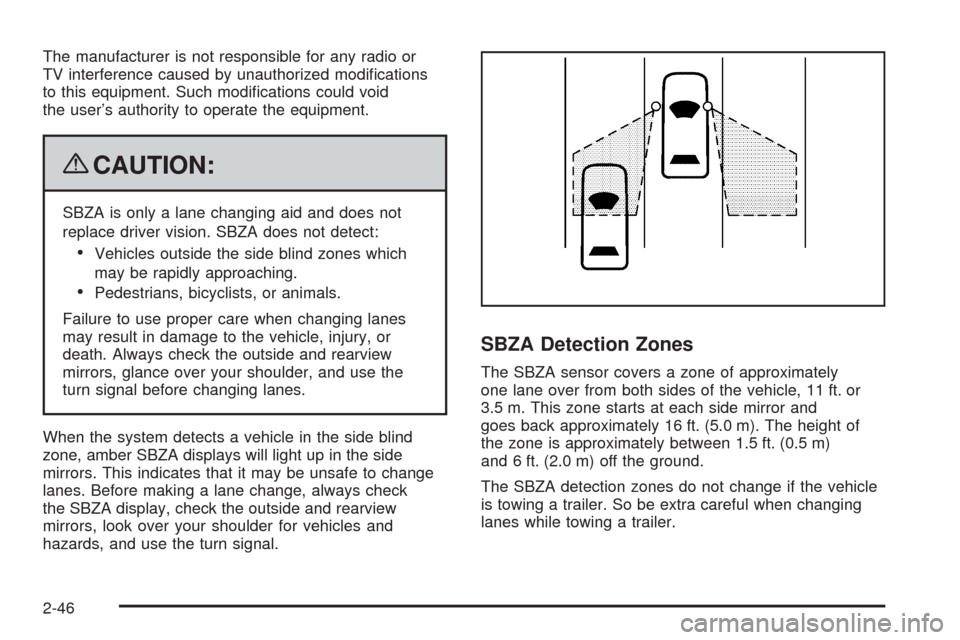
SBZA Detection Zones
The SBZA sensor covers a zone of approximately
one lane over from both sides of the vehicle, 11 ft. or
3.5 m. This zone starts at each side mirror and
goes back approximately 16 ft. (5.0 m). The height of
the zone is approximately between 1.5 ft. (0.5 m)
and 6 ft. (2.0 m) off the ground.
The SBZA detection zones do not change if the vehicle
is towing a trailer. So be extra careful when changing
lanes while towing a trailer.
2-46
Page 123 of 462

How the System Works
When the vehicle is started, both outside mirror displays
will briey come on to indicate that the system is
operating. While driving forward, the left or right side
mirror SBZA display will light up if a vehicle is detected
in that blind zone. If you activate a turn signal and a
vehicle has been detected on the same side, the SBZA
display will ash to give you extra warning not to
change lanes.
SBZA displays do not come on while the vehicle is
approaching or passing other vehicles. At speeds
greater then 20 mph (32 km/h), SBZA displays may
come on when a vehicle you have passed remains in
or drops back into the detection zone.SBZA can be disabled through the Driver Information
Center (DIC). SeeDriver Information Center (DIC)
on page 3-67for more information. If the SBZA
is disabled by the driver, the SBZA mirror displays
will not light up during normal driving.
When the System Does Not Seem To
Work Properly
Occasional missed alerts can occur under normal
circumstances and will increase in wet conditions.
The system does not need to be serviced due to an
occasional missed alert. The number of missed
alerts will increase with increased rainfall or road spray.
If the SBZA displays do not light up when the system
is on and vehicles are in the blind zone, the system may
need service. Take the vehicle to your dealer/retailer.
SBZA is designed to ignore stationary objects; however,
the system may occasionally light up due to guard
rails, signs, trees, shrubs, and other stationary objects.
This is normal system operation, the vehicle does
not need service. Left Side Mirror
DisplayRight Side Mirror
Display
2-47
Page 126 of 462

How the System Works
LDW uses a camera located between the inside rearview
mirror and the windshield to detect the lane markings.
@(Lane Departure Warning):To turn LDW on and off,
press the LDW control, located by the exterior headlamp
control. An indicator on the control will light to indicate
that LDW is on.
When the vehicle is started, the LDW symbol, located in
the instrument panel cluster, will briey come on to
indicate that the light is operational.LDW only operates at speeds of 35 mph (56 km) or
greater. If LDW is turned on when traveling at these
speeds, the LDW symbol will appear green if the system
detects a left or right lane marking. This symbol will
change to amber and ash and three beeps will sound if
you cross a detected lane marking without using the
turn signal.
If the LDW symbol does not appear, LDW is not currently
operating and will not warn you.
To change the volume of the warning chime, see Chime
Volume underDIC Vehicle Customization on page 3-86
for more information.
When the System Does Not Seem To
Work Properly
The LDW symbol will not appear when the system is
having difficulty seeing the lines on the road or if
the view of the camera on the windshield is blocked
with mud, dirt, snow, ice, or slush, if the windshield
is damaged, or when weather limits visibility, such as
while driving in fog, rain, or snow conditions. This is
normal operation, the vehicle does not need service.
For cleaning instructions, seeWashing Your Vehicle
on page 5-90.
2-50
Page 130 of 462

How OnStar Service Works
The OnStar system can record and transmit vehicle
information. This information is automatically sent to
an OnStar Call Center when the OnStar button is
pressed, the emergency button is pressed, or if the
airbags or AACN system deploy. This information usually
includes the vehicle’s GPS location and, in the event of
a crash, additional information regarding the crash that
the vehicle was involved in (e.g. the direction from which
the vehicle was hit). When the Virtual Advisor feature of
OnStar Hands-Free Calling is used, the vehicle also
sends OnStar the vehicle’s GPS location so they can
provide services where it is located.
OnStar service cannot work unless the vehicle is in a
place where OnStar has an agreement with a wireless
service provider for service in that area. OnStar service
also cannot work unless the vehicle is in a place where
the wireless service provider OnStar has hired for that
area has coverage, network capacity and reception when
the service is needed, and technology that is compatible
with the OnStar service. Not all services are available
everywhere, particularly in remote or enclosed areas,
or at all times.Location information about the vehicle is only available
if the GPS satellite signals are unobstructed and
available.
The vehicle must have a working electrical system,
including adequate battery power, for the OnStar
equipment to operate. There are other problems OnStar
cannot control that may prevent OnStar from providing
OnStar service at any particular time or place. Some
examples are damage to important parts of the vehicle
in a crash, hills, tall buildings, tunnels, weather or
wireless phone network congestion.
Your Responsibility
Increase the volume of the radio if the OnStar advisor
cannot be heard. If the light next to the OnStar buttons
is red, the system may not be functioning properly.
Press the OnStar button and request a vehicle
diagnostic. If the light appears clear (no light is
appearing), your OnStar subscription has expired and
all services have been deactivated. Press the OnStar
button to conrm that the OnStar equipment is active.
2-54
Page 131 of 462

Universal Home Remote
System
The Universal Home Remote System provides a way to
replace up to three hand-held Radio-Frequency (RF)
transmitters used to activate devices such as garage
door openers, security systems, and home lighting.
This device complies with Part 15 of the FCC Rules.
Operation is subject to the following two conditions:
1. This device may not cause harmful interference.
2. This device must accept any interference received,
including interference that may cause undesired
operation.
This device complies with RSS-210 of Industry Canada.
Operation is subject to the following two conditions:
1. This device may not cause interference.
2. This device must accept any interference received,
including interference that may cause undesired
operation of the device.
Changes or modications to this system by other than
an authorized service facility could void authorization to
use this equipment.
Universal Home Remote System
Operation (With Three Round LED)
This vehicle may have the Universal Home Remote
System. If there are three round Light Emitting Diode
(LED) indicator lights above the Universal Home Remote
buttons, follow the instructions below.
This system provides a way to replace up to three
remote control transmitters used to activate devices
such as garage door openers, security systems,
and home automation devices.
Do not use this system with any garage door opener
that does not have the stop and reverse feature.
This includes any garage door opener model
manufactured before April 1, 1982.
2-55