reset CADILLAC DTS 2010 1.G Owner's Guide
[x] Cancel search | Manufacturer: CADILLAC, Model Year: 2010, Model line: DTS, Model: CADILLAC DTS 2010 1.GPages: 480, PDF Size: 17.56 MB
Page 254 of 480
FACTORY SETTINGS
This feature allows you to set all of the customizationfeatures back to their factory default settings.
Press the customization button until FACTORYSETTINGS appears on the DIC display. Press theset/reset button once to access the settings forthis feature. Then press the menu up/down button toscroll through the following settings:
RESTORE ALL (default):The customization featureswill be set to their factory default settings.
DO NOT RESTORE:The customization features willnot be set to their factory default settings.
To select a setting, press the set/reset button while thedesired setting is displayed on the DIC.
Exiting the Feature Settings Menu
The feature settings menu will be exited when any ofthe following occurs:
•The vehicle is shifted out of P (Park).
•The vehicle is no longer in ON/RUN.
•The trip/fuel or vehicle information DIC buttons
are pressed.
•The end of the feature settings menu is reached
and exited.
•A 40 second time period has elapsed with no
selection made.
Audio System(s)
Determine which radio the vehicle has and read thefollowing pages to become familiar with its features.
{WARNING:
Taking your eyes off the road for extended periods
could cause a crash resulting in injury or death to
you or others. Do not give extended attention to
entertainment tasks while driving.
This system provides access to many audio and nonaudio listings.
To minimize taking your eyes off the road while driving,do the following while the vehicle is parked:
•Become familiar with the operation and controls of
the audio system.
•Set up the tone, speaker adjustments, and preset
radio stations.
For more information, seeDefensive Driving onpage 5-2.
4-88
Page 260 of 480

Finding a Station
BAND:Press to switch between AM, FM, or XM™.The selection displays.
a(Tune):Turn to select radio stations.
©SEEK¨:Press the arrows to go to the next or to
the previous station and stay there.
To scan stations, press and hold either arrow forthree seconds until a beep sounds. The radio goes to astation, plays for a few seconds, then goes to thenext station. Press either arrow again to stop scanning.
The radio only seeks and scans stations with astrong signal that are in the selected band.
4(Information) (XM™ Satellite Radio Service,
MP3/WMA, and RDS Features):Press this button todisplay additional text information related to thecurrent FM-RDS or XM station, or MP3/WMA song. Achoice of additional information such as: Channel, Song,Artist, CAT (category) can display. Continue pressingthe information button to highlight the desired label,or press the pushbutton positioned under any one of thetabs and the information about that tab displays.
When information is not available, No Info displays.
Storing a Radio Station as a Favorite
Drivers are encouraged to set up their radio stationfavorites while the vehicle is in P (Park). Tune to favoritestations using the presets, favorites button, andsteering wheel controls, if the vehicle has this feature.SeeDefensive Driving on page 5-2.
FAV (Favorites):A maximum of 36 stations can beprogrammed as favorites using the six pushbuttonspositioned below the radio station frequency tabs andby using the radio favorites page button. Press theFAV button to go through up to six pages of favorites,each having six favorite stations available per page.Each page of favorites can contain any combination ofAM, FM, or XM stations. To store a station as afavorite:
1. Tune to the desired radio station.
2. Press the FAV button to display the page whereyou want the station stored.
3. Press and hold one of the six pushbuttons until abeep sounds. When that pushbutton is pressedand released, the station that was set, returns.
4. Repeat the steps for each pushbutton radio stationyou want stored as a favorite.
4-94
Page 273 of 480

XM Radio Messages
XL (Explicit Language Channels):These channels, orany others, can be blocked at a customer’s request,by calling 1-800-852-XMXM (9696).
XM Updating:The encryption code in the receiver isbeing updated, and no action is required. This processshould take no longer than 30 seconds.
No XM Signal:The system is functioning correctly, butthe vehicle is in a location that is blocking the XM™signal. When the vehicle is moved into an open area, thesignal should return.
Loading XM:The audio system is acquiring andprocessing audio and text data. No action is needed.This message should disappear shortly.
Channel Off Air:This channel is not currently inservice. Tune in to another channel.
Channel Unauth:This channel is blocked or cannot bereceived with your XM Subscription package.
Channel Unavail:This previously assigned channel isno longer assigned. Tune to another station. If thisstation was one of the presets, choose another stationfor that preset button.
No Artist Info:No artist information is available at thistime on this channel. The system is working properly.
No Title Info:No song title information is availableat this time on this channel. The system is workingproperly.
No CAT Info:No category information is available atthis time on this channel. The system is workingproperly.
No Information:No text or informational messages areavailable at this time on this channel. The system isworking properly.
CAT Not Found:There are no channels available forthe selected category. The system is working properly.
XM Theftlocked:The XM receiver in the vehiclecould have previously been in another vehicle. Forsecurity purposes, XM receivers cannot be swappedbetween vehicles. If this message is received afterhaving the vehicle serviced, check with yourdealer/retailer.
XM Radio ID:If tuned to channel 0, this messagealternates with the XM™ Radio 8 digit radio ID label.This label is needed to activate the service.
Unknown:If this message is received when tuned tochannel 0, there could be a receiver fault. Consultwith your dealer/retailer.
4-107
Page 336 of 480

Engine Oil Additives / Engine Oil
Flushes
Do not add anything to the oil. The recommended oilswith the starburst symbol that meet GM standards are allthat is needed for good performance and engineprotection.
Engine oil system flushes are not recommended andcould cause engine damage not covered by the vehiclewarranty.
Engine Oil Life System
When to Change Engine Oil
This vehicle has a computer system that indicates whento change the engine oil and filter. This is based onengine revolutions and engine temperature, and not onmileage. Based on driving conditions, the mileage atwhich an oil change is indicated can vary considerably.For the oil life system to work properly, the systemmust be reset every time the oil is changed.
When the system has calculated that oil life has beendiminished, it indicates that an oil change is necessary.A CHANGE ENGINE OIL SOON message in theDriver Information Center (DIC) comes on. Change theoil as soon as possible within the next 600 miles(1 000 km). It is possible that, if driving under the bestconditions, the oil life system might not indicate thatan oil change is necessary for over a year. However, theengine oil and filter must be changed at least once ayear and at this time the system must be reset.Your dealer/retailer has trained people who will performthis work using genuine parts and reset the system.It is also important to check the oil regularly and keep itat the proper level.
If the system is ever reset accidentally, the oil must bechanged at 3,000 miles (5 000 km) since the last oilchange. Remember to reset the oil life system wheneverthe oil is changed.
6-16
Page 337 of 480

How to Reset the Engine Oil Life
System
The Engine Oil Life System calculates when to changethe engine oil and filter based on vehicle use. Wheneverthe oil is changed, reset the system so it can calculatewhen the next oil change is required. If a situation occurswhere the oil is changed prior to a CHANGE ENGINE OILSOON message in the Driver Information Center (DIC)being turned on, reset the system.
After the oil has been changed, the CHANGE ENGINEOIL SOON message must be reset:
1. Turn the key to the ON/RUN position withoutstarting the engine.
2. Press the INFO button on the Driver InformationCenter (DIC) until OIL LIFE REMAINING isdisplayed. SeeDIC Operation and Displays onpage 4-62.
3. Press and hold the INFO RESET button until 100%is displayed. This resets the oil life indicator.
4. Turn the key to LOCK/OFF.
If the CHANGE ENGINE OIL SOON message comesback on when the vehicle is started, the engine oillife system has not reset. Repeat the procedure.
What to Do with Used Oil
Used engine oil contains certain elements that can beunhealthy for your skin and could even cause cancer.Do not let used oil stay on your skin for very long. Cleanyour skin and nails with soap and water, or a goodhand cleaner. Wash or properly dispose of clothing orrags containing used engine oil. See the manufacturer’swarnings about the use and disposal of oil products.
Used oil can be a threat to the environment. If youchange your own oil, be sure to drain all the oil from thefilter before disposal. Never dispose of oil by putting itin the trash, pouring it on the ground, into sewers, or intostreams or bodies of water. Recycle it by taking it to aplace that collects used oil.
Engine Air Cleaner/Filter
SeeEngine Compartment Overview on page 6-12forthe location of the engine air cleaner/filter.
When to Inspect the Engine Air
Cleaner/Filter
Inspect the air cleaner/filter at the MaintenanceIIintervals and replace it at the first oil change after each50,000 mile (80 000 km) interval. SeeScheduledMaintenance on page 7-3for more information. If youare driving in dusty/dirty conditions, inspect the filterat each engine oil change.
6-17
Page 349 of 480

If No Steam Is Coming From The
Engine Compartment
If an engine overheat warning is displayed but no steamcan be seen or heard, the problem may not be tooserious. Sometimes the engine can get a little too hotwhen the vehicle:
•Climbs a long hill on a hot day.
•Stops after high-speed driving.
•Idles for long periods in traffic.
•Tows a trailer.
If the overheat warning is displayed with no sign ofsteam:
1. Turn the air conditioning off.
2. Turn the heater on to the highest temperature andto the highest fan speed. Open the windows asnecessary.
3. In heavy traffic, let the engine idle in N (Neutral) whilestopped. If it safe to do so, pull off the road, shift toP (Park) or N (Neutral) and let the engine idle.
If the temperature overheat gage is no longer in theoverheat zone or an overheat warning no longer displays,the vehicle can be driven. Continue to drive the vehicleslow for about 10 minutes. Keep a safe vehicle distancefrom the car in front of you. If the warning does not comeback on, continue to drive normally.
If the warning continues, pull over, stop, and park thevehicle right away.
If there is no sign of steam, idle the engine for threeminutes while parked. If the warning is still displayed, turnoff the engine until it cools down. Also, see!OverheatedEngine Protection Operating Mode!next in this section.
Overheated Engine Protection
Operating Mode
If an overheated engine condition exists and themessage ENGINE OVERHEATED STOP ENGINE isdisplayed, an overheat protection mode which alternatesfiring groups of cylinders helps prevent engine damage.In this mode, you will notice a loss in power andengine performance. This operating mode allows yourvehicle to be driven to a safe place in an emergency.Driving extended miles (km) and/or towing a trailer in theoverheat protection mode should be avoided.
Notice:After driving in the overheated engineprotection operating mode, to avoid engine damage,allow the engine to cool before attempting anyrepair. The engine oil will be severely degraded.Repair the cause of coolant loss, change the oil andreset the oil life system. SeeEngine Oil onpage 6-13.
6-29
Page 360 of 480

Notice:If the jumper cables are connected orremoved in the wrong order, electrical shorting mayoccur and damage the vehicle. The repairs wouldnot be covered by the vehicle warranty. Alwaysconnect and remove the jumper cables in the correctorder, making sure that the cables do not toucheach other or other metal.
A. Heavy, Unpainted Metal Engine Part or RemoteNegative (!) Terminal (GND)
B. Good Battery or Remote Positive (+) and RemoteNegative (!) Terminals
C. Dead Battery or Remote Positive (+) Terminal
To disconnect the jumper cables from both vehicles, dothe following:
1. Disconnect the black negative (!) cable from thevehicle that had the dead battery.
2. Disconnect the black negative (!) cable from thevehicle with the good battery.
3. Disconnect the red positive (+) cable from thevehicle with the good battery.
4. Disconnect the red positive (+) cable from the othervehicle.
5. Return the remote positive (+) terminal cover to itsoriginal position.
Headlamp Aiming
The vehicle has a visual optical headlamp aimingsystem. The aim has been preset at the factory andshould need no further adjustment.
However, if the vehicle is damaged in a crash, theheadlamp aim may be affected and adjustment may benecessary.
If oncoming vehicles flash their high beams at you, thismay also mean the vertical aim needs to be adjusted.
Jumper Cable Removal
6-40
Page 383 of 480
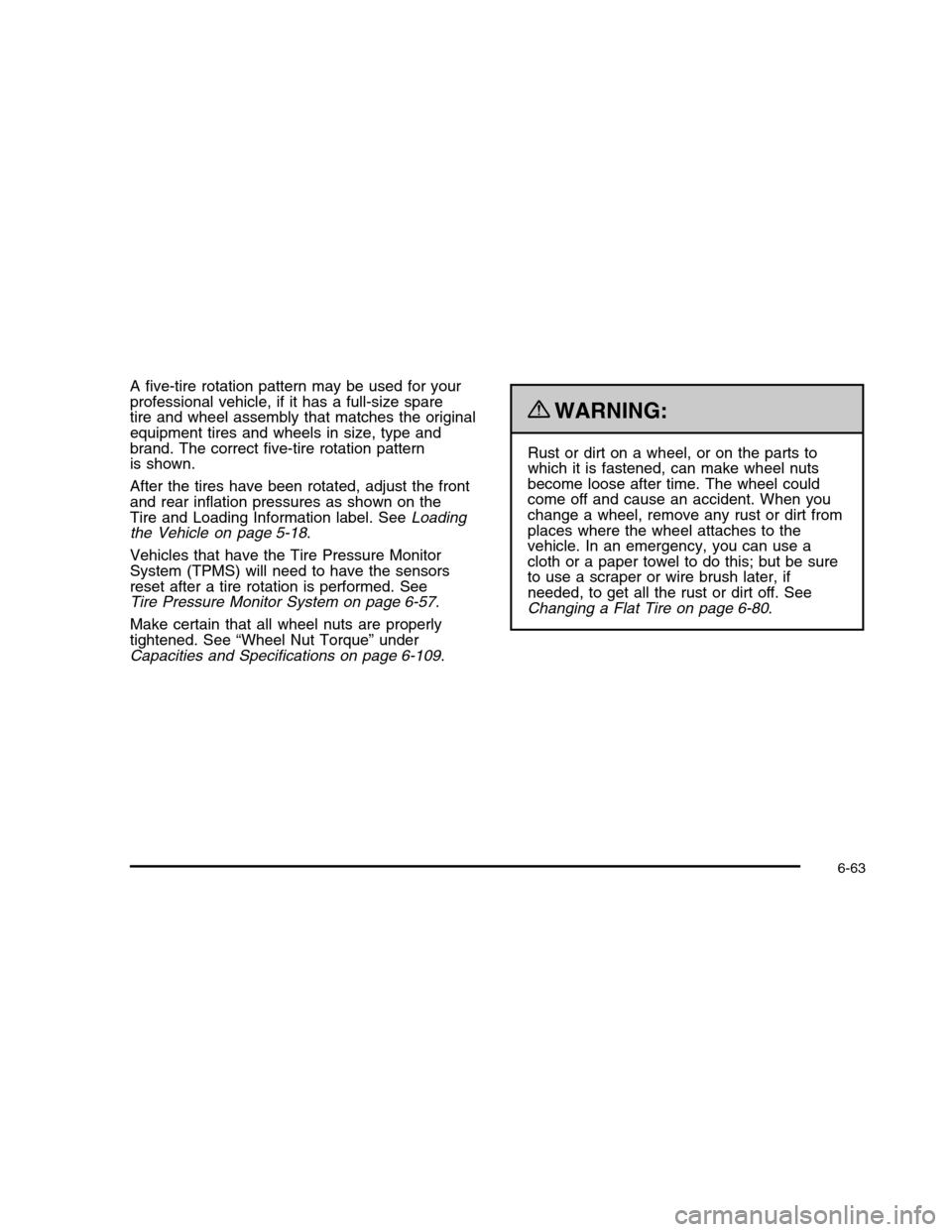
A five-tire rotation pattern may be used for yourprofessional vehicle, if it has a full-size sparetire and wheel assembly that matches the originalequipment tires and wheels in size, type andbrand. The correct five-tire rotation patternis shown.
After the tires have been rotated, adjust the frontand rear inflation pressures as shown on theTire and Loading Information label. SeeLoadingthe Vehicle on page 5-18.
Vehicles that have the Tire Pressure MonitorSystem (TPMS) will need to have the sensorsreset after a tire rotation is performed. SeeTire Pressure Monitor System on page 6-57.
Make certain that all wheel nuts are properlytightened. See “Wheel Nut Torque” underCapacities and Specifications on page 6-109.
{WARNING:
Rust or dirt on a wheel, or on the parts towhich it is fastened, can make wheel nutsbecome loose after time. The wheel couldcome off and cause an accident. When youchange a wheel, remove any rust or dirt fromplaces where the wheel attaches to thevehicle. In an emergency, you can use acloth or a paper towel to do this; but be sureto use a scraper or wire brush later, ifneeded, to get all the rust or dirt off. SeeChanging a Flat Tire on page 6-80.
6-63
Page 433 of 480

Rotation of New Tires
To maintain ride, handling, and performance of thevehicle, it is important that the first rotation service fornew tires be performed when they have 8 000 to13 000 km (5,000 to 8,000 miles). SeeTire Inspectionand Rotation on page 6-62.
Scheduled Maintenance
When the Change Engine Oil Soon
Message Displays
Change engine oil and filter. SeeEngine Oil onpage 6-13.An Emission Control Service.
When the Change Engine Oil Soon message displays,service is required for the vehicle as soon as possible,within the next 1 000 km/600 miles. If driving underthe best conditions, the engine oil life system might notindicate the need for vehicle service for more than ayear. The engine oil and filter must be changed at leastonce a year and the oil life system must be reset.Your dealer/retailer has trained service technicians whowill perform this work and reset the system.
If the engine oil life system is reset accidentally, servicethe vehicle within 5 000 km/3,000 miles since the lastservice. Reset the oil life system whenever the oilis changed. SeeEngine Oil Life System on page 6-16.
When the Change Engine Oil Soon message displays,certain services, checks, and inspections are required.
Every Engine Oil Change
•Change engine oil and filter. SeeEngine Oil on
page 6-13.An Emission Control Service.
•Engine coolant level check. SeeEngine Coolant on
page 6-23.
•Windshield washer fluid level check. SeeWindshield
Washer Fluid on page 6-31.
•Tire inflation check. SeeInflation - Tire Pressure on
page 6-54.
•Tire wear inspection. SeeTire Inspection and
Rotation on page 6-62.
•Rotate tires. SeeTire Inspection and Rotation on
page 6-62.
7-3