ECU CADILLAC DTS 2010 1.G Workshop Manual
[x] Cancel search | Manufacturer: CADILLAC, Model Year: 2010, Model line: DTS, Model: CADILLAC DTS 2010 1.GPages: 480, PDF Size: 17.56 MB
Page 316 of 480

Maximum trailer weight is calculated assuming only thedriver is in the tow vehicle and it has all the requiredtrailering equipment. The weight of additional optionalequipment, passengers and cargo in the tow vehiclemust be subtracted from the maximum trailer weight.
Ask your dealer/retailer for trailering information oradvice, or write us at our Customer Assistance Offices.SeeCustomer Assistance Offices on page 8-6formore information.
Weight of the Trailer Tongue
The tongue load (A) of any trailer is an important weightto measure because it affects the total gross weightof the vehicle. The Gross Vehicle Weight (GVW)includes the curb weight of the vehicle, any cargocarried in it, and the people who will be riding in thevehicle. If there are a lot of options, equipment,passengers or cargo in the vehicle, it will reduce thetongue weight the vehicle can carry, which will alsoreduce the trailer weight the vehicle can tow. If towing atrailer, the tongue load must be added to the GVWbecause the vehicle will be carrying that weight, too.SeeLoading the Vehicle on page 5-18for moreinformation about the vehicle’s maximum load capacity.
Using a weight-carrying hitch, the trailer tongue (A)should weigh 10 to 15 percent of the total loaded trailerweight (B).
After loading the trailer, weigh the trailer and then thetongue, separately, to see if the weights are proper.If they are not, adjustments might be made by movingsome items around in the trailer.
Total Weight on the Vehicle’s Tires
Be sure the vehicle’s tires are inflated to the upper limitfor cold tires. These numbers can be found on theCertification/Tire label. SeeLoading the Vehicle onpage 5-18. Make sure not to go over the GVW limit for thevehicle, including the weight of the trailer tongue.
5-28
Page 317 of 480

Hitches
It is important to have the correct hitch equipment.Crosswinds, large trucks going by and rough roads are afew reasons why the right hitch is needed. Here are somerules to follow:
•The rear bumper on the vehicle is not intended for
hitches. Do not attach rental hitches or otherbumper-type hitches to it. Use only a frame-mountedhitch that does not attach to the bumper.
•Will any holes be made in the body of the vehicle
when the trailer hitch is installed? If there are, thenbe sure to seal the holes later when the hitch isremoved. If the holes are not sealed, dirt, water, anddeadly carbon monoxide (CO) from the exhaust canget into the vehicle. SeeEngine Exhaust onpage 3-34for more information.
Safety Chains
Always attach chains between the vehicle and thetrailer. Cross the safety chains under the tongue of thetrailer to help prevent the tongue from contactingthe road if it becomes separated from the hitch.Instructions about safety chains may be provided by thehitch manufacturer or by the trailer manufacturer.Follow the manufacturer’s recommendation for attachingsafety chains and do not attach them to the bumper.Always leave just enough slack so the rig can turn.Never allow safety chains to drag on the ground.
Trailer Brakes
Because the vehicle has StabiliTrak®, do not tap intothe vehicle’s hydraulic brake system. If you do,both brake systems will not work well, or at all.
Be sure to read and follow the instructions for the trailerbrakes so they are installed, adjusted and maintainedproperly.
Driving with a Trailer
Towing a trailer requires a certain amount of experience.Get to know the rig before setting out for the openroad. Get acquainted with the feel of handling andbraking with the added weight of the trailer. And alwayskeep in mind that the vehicle you are driving is nowlonger and not as responsive as the vehicle is by itself.
Before starting, check all trailer hitch parts andattachments, safety chains, electrical connectors, lamps,tires and mirror adjustments. If the trailer has electricbrakes, start the vehicle and trailer moving andthen apply the trailer brake controller by hand to be surethe brakes are working. This checks the electricalconnection at the same time.
During the trip, check occasionally to be sure that theload is secure, and that the lamps and any trailer brakesare still working.
5-29
Page 320 of 480

Leaving After Parking on a Hill
1. Apply and hold the brake pedal while you:
•start the engine,
•shift into a gear, and
•release the parking brake.
2. Let up on the brake pedal.
3. Drive slowly until the trailer is clear of the chocks.
4. Stop and have someone pick up and storethe chocks.
Maintenance When Trailer Towing
The vehicle needs service more often when pulling atrailer. SeeScheduled Maintenance on page 7-3for moreinformation. Things that are especially important in traileroperation are automatic transmission fluid, engine oil,belts, cooling system and brake system. It is a good ideato inspect these before and during the trip.
Check periodically to see that all hitch nuts and boltsare tight.
Engine Cooling When Trailer Towing
The cooling system may temporarily overheat duringsevere operating conditions. SeeEngine Overheating onpage 6-27.
Changing a Tire When Trailer Towing
If the vehicle gets a flat tire while towing a trailer,be sure to secure the trailer and disconnect it from thevehicle before changing the tire.
5-32
Page 347 of 480

4. With the coolant surge tank cap off, start the engineand let it run until you can feel the upper radiatorhose getting hot. Watch out for the enginecooling fans.
By this time, the coolant level inside the coolantsurge tank may be lower. If the level is lower, addmore of the proper mixture to the coolant surge tankuntil the level reaches the FULL COLD mark onthe side of the coolant surge tank.
5. Replace the cap. Be sure the cap is hand-tight andfully seated.
Notice:If the pressure cap is not tightly installed,coolant loss and possible engine damage mayoccur. Be sure the cap is properly and tightlysecured.
If coolant is needed, add the proper DEX-COOL®
coolant mixture at the coolant recovery tank.
Engine Overheating
The vehicle has several indicators to warn of engineoverheating.
There is an engine temperature warning light and/orgage on the instrument panel cluster. SeeEngineCoolant Temperature Warning Light on page 4-55andEngine Coolant Temperature Gage on page 4-56.
The vehicle may also display a ENGINE OVERHEATEDIDLE ENGINE message or an ENGINE OVERHEATEDSTOP ENGINE message displayed in the DriverInformation Center (DIC). SeeDIC Warnings andMessages on page 4-67for more information. You willalso hear a chime.
4.6L L37 Engine shown, 4.6L LD8 Engine similar
6-27
Page 355 of 480
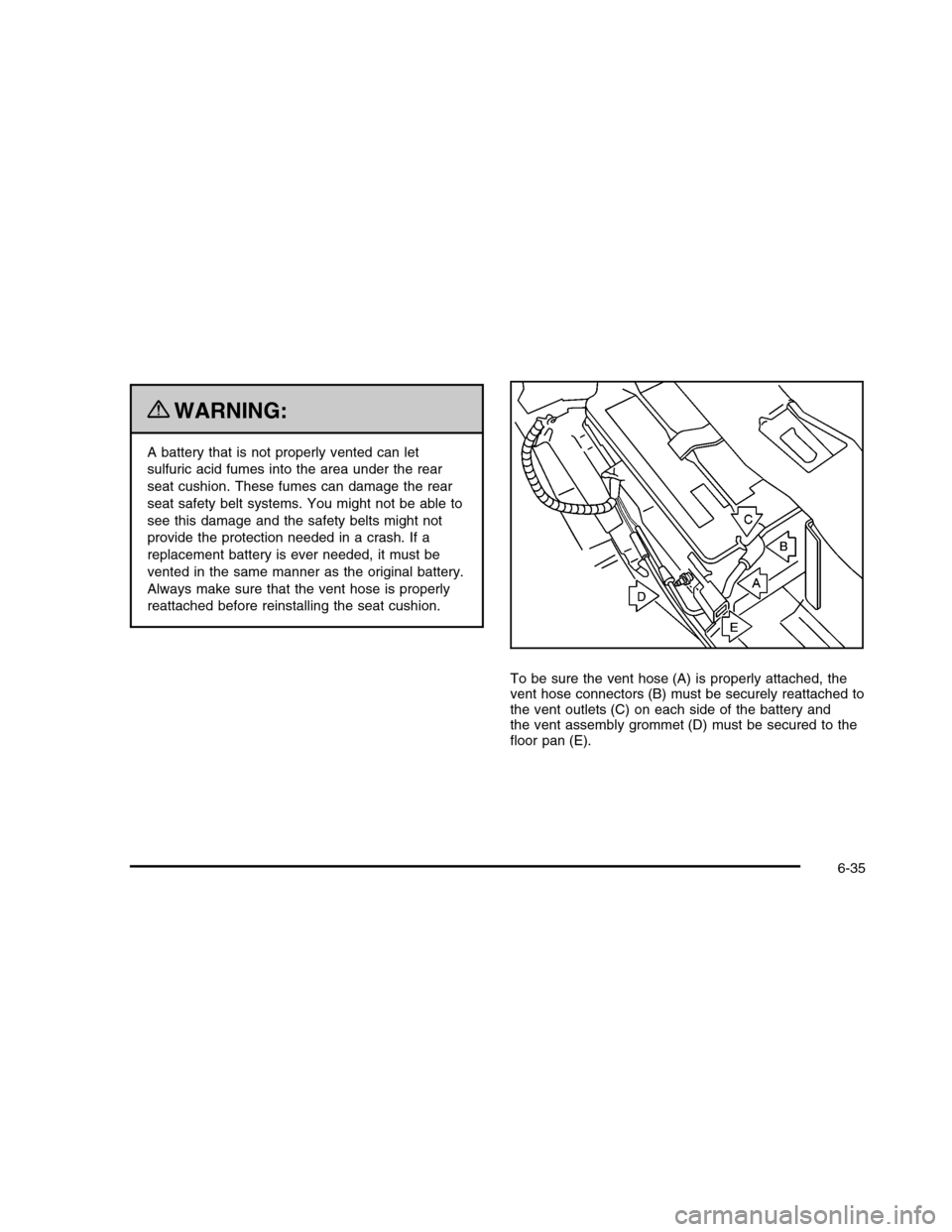
{WARNING:
A battery that is not properly vented can let
sulfuric acid fumes into the area under the rear
seat cushion. These fumes can damage the rear
seat safety belt systems. You might not be able to
see this damage and the safety belts might not
provide the protection needed in a crash. If a
replacement battery is ever needed, it must be
vented in the same manner as the original battery.
Always make sure that the vent hose is properly
reattached before reinstalling the seat cushion.
To be sure the vent hose (A) is properly attached, thevent hose connectors (B) must be securely reattached tothe vent outlets (C) on each side of the battery andthe vent assembly grommet (D) must be secured to thefloor pan (E).
6-35
Page 409 of 480

A. Cover
B. Wing Nut
C. Retainer
D. Jack and Wheel Wrench
E. Jack Container
F. Spare Tire
G. Bolt
1. Open the trunk. SeeTrunk on page 3-12.
2. Reinstall the spare tire (F), face down, making sureto line up the wheel center hole with the bolt (G)and place it on the compartment floor.
3. Insert the jack container (E) into the spare tire (F).Then insert the jack and wheel wrench (D) into thecenter of the spare tire making sure to line upthe wheel nut hole with the bolt (G) on thecompartment floor.
4. Secure the spare tire and the jack container withthe retainer (C) and then the wing nut (B).
5. Reinstall the spare tire cover (A).
6-89
Page 425 of 480

To reinstall the rear seat cushion, do the following:
{WARNING:
A safety belt that is not properly routed through
the seat cushion or is twisted will not provide the
protection needed in a crash. If the safety belt has
WARNING: (Continued)
WARNING: (Continued)
not been routed through the seat cushion at all, it
will not be there to work for the next passenger.
The person sitting in that position could be badly
injured. After reinstalling the seat cushion, always
check to be sure that the safety belts are properly
routed and are not twisted.
1. Buckle the center passenger position safety belt,then route the safety belts through the proper slotsin the seat cushion. Do not let the safety beltsget twisted.
2. Slide the rear of the cushion up and under theseatback so the rear-locating guides hook intothe wire loops on the back frame.
3. With the seat cushion lowered, push rearward andthen press down on the seat cushion until thespring locks on both ends engage.
4. Check to make sure the safety belts are properlyrouted and that no portion of any safety belt istrapped under the seat. Also make sure the seatcushion is secured.
6-105
Page 453 of 480

Cadillac Owner Privileges™
•Emergency Fuel Delivery:Delivery of enough fuel
for the vehicle to get to the nearest service station.
•Lock-Out Service:Service is provided to unlock the
vehicle if you are locked out. A remote unlock maybe available if you have OnStar®. For securityreasons, the driver must present identificationbefore this service is given.
•Emergency Tow From a Public Road or
Highway:Tow to the nearest Cadillac dealer forwarranty service, or if the vehicle was in a crash andcannot be driven. Assistance is also given whenthe vehicle is stuck in the sand, mud, or snow.
•Flat Tire Change:Service is provided to change a
flat tire with spare tire. The spare tire, if equipped,must be in good condition and properly inflated.It is your responsibility for the repair or replacementof the tire if it is not covered by the warranty.
•Battery Jump Start:Service is provided to jump
start a dead battery.
•Trip Routing Service:Detailed maps of North
America are provided when requested eitherwith the most direct route or the most scenic route.Additional travel information is also available.Allow three weeks for delivery.
•Trip Interruption Benefits and Assistance:If your
trip is interrupted due to a warranty failure, incidentalexpenses may be reimbursed during the 5 year/100,000 miles (160 000 km) Powertrain warrantyperiod. Items considered are hotel, meals, andrental car.
8-9
Page 464 of 480

OnStar®
If the vehicle has OnStar and you subscribe to the OnStarservices, please refer to the OnStar Terms andConditions for information on data collection and use.
Navigation System
If your vehicle has a navigation system, use of thesystem may result in the storage of destinations,addresses, telephone numbers, and other tripinformation. Refer to the navigation system operatingmanual for information on stored data and for deletioninstructions.
Radio Frequency
Identification (RFID)
RFID technology is used in some vehicles for functionssuch as tire pressure monitoring and ignition systemsecurity, as well as in connection with conveniencessuch as key fobs for remote door locking/unlocking and
starting, and in-vehicle transmitters for garage dooropeners. RFID technology in GM vehicles does not useor record personal information or link with any otherGM system containing personal information.
Radio Frequency Statement
This vehicle has systems that operate on a radiofrequency that comply with Part 15 of the FederalCommunications Commission (FCC) Rules and withRSS-210/211 of Industry and Science Canada.
Operation is subject to the following two conditions:
1. The device may not cause interference.
2. The device must accept any interference received,including interference that may cause undesiredoperation of the device.
Changes or modifications to any of these systems byother than an authorized service facility could voidauthorization to use this equipment.
8-20
Page 467 of 480

Care ofSafety Belts . . . . . . . . . . . . . . . . . . . . . . . . . . . . . . . . . . . . . . . . . . . . . . . . 6-95CD, MP3 . . . . . . . . . . . . . . . . . . . . . . . . . . . . . . . . . . . . . . . . . . . . . . . . . . . . . 4-102Center Console Storage . . . . . . . . . . . . . . . . . . . . . . . . . . . . . . . . . . . 3-55Center Flex Storage Unit . . . . . . . . . . . . . . . . . . . . . . . . . . . . . . . . . 3-56Center Seat . . . . . . . . . . . . . . . . . . . . . . . . . . . . . . . . . . . . . . . . . . . . . . . . . . . . . 2-9Central Door Unlock System . . . . . . . . . . . . . . . . . . . . . . . . . . . . . 3-10Chains, Tire . . . . . . . . . . . . . . . . . . . . . . . . . . . . . . . . . . . . . . . . . . . . . . . . . . . 6-70Charging System Light . . . . . . . . . . . . . . . . . . . . . . . . . . . . . . . . . . . . 4-52CheckEngine Lamp . . . . . . . . . . . . . . . . . . . . . . . . . . . . . . . . . . . . . . . . . . . . . . 4-57Checking Things Under the Hood . . . . . . . . . . . . . . . . . . . . . . 6-10Chemical Paint Spotting . . . . . . . . . . . . . . . . . . . . . . . . . . . . . . . . . . . 6-99Child RestraintsInfants and Young Children . . . . . . . . . . . . . . . . . . . . . . . . . . . 2-37Lower Anchors and Tethers for Children . . . . . . . . . . 2-45Older Children . . . . . . . . . . . . . . . . . . . . . . . . . . . . . . . . . . . . . . . . . . . . . 2-33Securing a Child Restraint in aRear Seat Position . . . . . . . . . . . . . . . . . . . . . . . . . . . . . . . . . . . 2-51Securing a Child Restraint in theCenter Front Seat Position . . . . . . . . . . . . . . . . . . . . . . . . 2-53Securing a Child Restraint in theRight Front Seat Position . . . . . . . . . . . . . . . . . . . . . . . . . . 2-54Systems . . . . . . . . . . . . . . . . . . . . . . . . . . . . . . . . . . . . . . . . . . . . . . . . . . . . . 2-41Where to Put the Restraint . . . . . . . . . . . . . . . . . . . . . . . . . . . 2-44Circuit Breakers . . . . . . . . . . . . . . . . . . . . . . . . . . . . . . . . . . . . . . . . . . . . 6-101
CleaningAluminum or Chrome-Plated Wheels . . . . . . . . . . . . . . 6-97Exterior Lamps/Lenses . . . . . . . . . . . . . . . . . . . . . . . . . . . . . . . . . 6-96Fabric/Carpet . . . . . . . . . . . . . . . . . . . . . . . . . . . . . . . . . . . . . . . . . . . . . . 6-92Finish Care . . . . . . . . . . . . . . . . . . . . . . . . . . . . . . . . . . . . . . . . . . . . . . . . . 6-96Instrument Panel, Vinyl, and OtherPlastic Surfaces . . . . . . . . . . . . . . . . . . . . . . . . . . . . . . . . . . . . . . . 6-94Interior . . . . . . . . . . . . . . . . . . . . . . . . . . . . . . . . . . . . . . . . . . . . . . . . . . . . . . . 6-91Leather . . . . . . . . . . . . . . . . . . . . . . . . . . . . . . . . . . . . . . . . . . . . . . . . . . . . . . 6-93Speaker Covers . . . . . . . . . . . . . . . . . . . . . . . . . . . . . . . . . . . . . . . . . . 6-94Tires . . . . . . . . . . . . . . . . . . . . . . . . . . . . . . . . . . . . . . . . . . . . . . . . . . . . . . . . . . 6-98Underbody Maintenance . . . . . . . . . . . . . . . . . . . . . . . . . . . . . . . 6-98Washing Your Vehicle . . . . . . . . . . . . . . . . . . . . . . . . . . . . . . . . . . . 6-95Weatherstrips . . . . . . . . . . . . . . . . . . . . . . . . . . . . . . . . . . . . . . . . . . . . . .6-95Windshield and Wiper Blades . . . . . . . . . . . . . . . . . . . . . . . . 6-97Wood Panels . . . . . . . . . . . . . . . . . . . . . . . . . . . . . . . . . . . . . . . . . . . . . . 6-94Climate Control SystemOutlet Adjustment . . . . . . . . . . . . . . . . . . . . . . . . . . . . . . . . . . . . . . . . 4-41Climate Control SystemsDual . . . . . . . . . . . . . . . . . . . . . . . . . . . . . . . . . . . . . . . . . . . . . . . . . . . . . . . . . . 4-36Rear . . . . . . . . . . . . . . . . . . . . . . . . . . . . . . . . . . . . . . . . . . . . . . . . . . . . . . . . . . 4-42Climate Controls . . . . . . . . . . . . . . . . . . . . . . . . . . . . . . . . . . . . . . . . . . . . . 1-14Clock . . . . . . . . . . . . . . . . . . . . . . . . . . . . . . . . . . . . . . . . . . . . . . . . . . . . . . . . . . . . 4-35Clock, Setting . . . . . . . . . . . . . . . . . . . . . . . . . . . . . . . . . . . . . . . . . . . . . . . . . 4-89Collision Damage Repair . . . . . . . . . . . . . . . . . . . . . . . . . . . . . . . . . . 8-13Compass . . . . . . . . . . . . . . . . . . . . . . . . . . . . . . . . . . . . . . . . . . . . . . . 2-11, 3-36
3