brake CADILLAC DTS 2011 1.G User Guide
[x] Cancel search | Manufacturer: CADILLAC, Model Year: 2011, Model line: DTS, Model: CADILLAC DTS 2011 1.GPages: 470, PDF Size: 4.72 MB
Page 134 of 470

Black plate (30,1)Cadillac DTS Owner Manual - 2011
A warning chime will sound if the parking brake is set,
the ignition is on, and the vehicle speed is greater than
5 mph (8 km/h). The brake light will come on and stay
on until the parking brake is released. SeeBrake
System Warning Light
on page 4‑50for more
information.
To release the parking brake, hold the regular brake
pedal down, then push the parking brake pedal down.
When you lift your foot off the parking brake pedal, the
pedal will follow your foot to the released position.
Notice: Driving with the parking brake on can
overheat the brake system and cause premature
wear or damage to brake system parts. Make sure
that the parking brake is fully released and the
brake warning light is off before driving.
If you are towing a trailer and are parking on any hill,
see Towing a Trailer on page 5‑26.
Shifting Into Park
{WARNING:
It can be dangerous to get out of the vehicle if the
shift lever is not fully in P (Park) with the parking
brake firmly set. The vehicle can roll. If you have
left the engine running, the vehicle can move
suddenly. You or others could be injured. To be
sure the vehicle will not move, even when you are
on fairly level ground, use the steps that follow.
If you are pulling a trailer, see Towing a Trailer
on
page 5‑26
.
Steering Column Shift Lever
If the vehicle has a steering column shift lever, use this
procedure to shift the vehicle into P (Park):
1. Hold the brake pedal down.
2. Move the shift lever into P (Park) by pulling the shift lever toward you and moving it up as far as it
will go.
3. With your foot still holding the brake pedal down, set the parking brake. See Parking Brake
on
page 3‑29for more information.
3-30
Page 135 of 470

Black plate (31,1)Cadillac DTS Owner Manual - 2011
4. Turn the ignition key to LOCK/OFF.
5. Remove the key and take it with you. If you canleave the vehicle with the ignition key in your hand,
the vehicle is in P (Park).
Console Shift Lever
If the vehicle is equipped with a console shift lever, use
this procedure to shift the vehicle into P (Park):
1. Hold the brake pedal down.
2. Move the shift lever into P (Park) by pushing the lever all the way toward the front of the vehicle and
then to the left.
3. While keeping the brake pedal applied, set the parking brake. See Parking Brake
on page 3‑29for more information.
4. Turn the ignition key to LOCK/OFF.
5. Remove the key and take it with you. If you can leave the vehicle with the ignition key in your hand,
the vehicle is in P (Park).
Leaving the Vehicle With the Engine
Running
{WARNING:
It can be dangerous to leave the vehicle with the
engine running. The vehicle could move suddenly
if the shift lever is not fully in P (Park) with the
parking brake firmly set. And, if you leave the
vehicle with the engine running, it could overheat
and even catch fire. You or others could be
injured. Do not leave the vehicle with the engine
running.
If you have to leave the vehicle with the engine running,
be sure your vehicle is in P (Park) and the parking
brake is firmly set before you leave it. See Parking
Brake
on page 3‑29for more information.
3-31
Page 136 of 470

Black plate (32,1)Cadillac DTS Owner Manual - 2011
Torque Lock
Torque lock is when the weight of the vehicle puts too
much force on the parking pawl in the transmission.
This happens when parking on a hill and shifting the
transmission into P (Park) is not done properly and then
it is difficult to shift out of P (Park). To prevent torque
lock, set the parking brake and then shift into P (Park).
To find out how, see“Shifting Into Park”in this section.
If torque lock does occur, your vehicle may need to be
pushed uphill by another vehicle to relieve the parking
pawl pressure, so you can shift out of P (Park).
Shifting Out of Park
Automatic Transmission Shift Lock
This vehicle has an electronic shift lock release system.
The shift lock release is designed to:
.Prevent ignition key removal unless the shift lever
is in P (Park)
.Prevent movement of the shift lever out of P (Park),
unless the ignition is in ON/RUN or ACC/
ACCESSORY and the regular brake pedal is
applied.
The shift lock is always functional except in the case of
a an uncharged or low voltage (less than 9 volt) battery. If the vehicle has an uncharged battery or a battery with
low voltage, try charging or jump starting the battery.
See
Jump Starting on page 6‑38.
Console Shift
If the console shift cannot be moved out of P (Park)
1. Apply the regular brakes.
2. Turn the ignition to ON/RUN or ACC/ACCESSORY position. See Ignition Positions
on page 3‑22for
more information.
3. Push the shift lever all the way into P (Park).
4. Then, shift into the desired gear.
If you still cannot move the shift lever from P (Park),
consult your dealer or a professional towing service.
Column Shift
If the column shift cannot be moved out of P (Park) 1. Apply the regular brakes.
2. Turn the ignition key to the ON/RUN or ACC/ACCESSORY position. See Ignition
Positions
on page 3‑22for more information.
3. Shift out of the P (Park) position to the N (Neutral) position.
4. Move the column shift to the desired gear.
If you still cannot move the shift lever from P (Park),
consult your dealer or a professional towing service.
3-32
Page 138 of 470

Black plate (34,1)Cadillac DTS Owner Manual - 2011
Running the Vehicle While Parked
It is better not to park with the engine running. But if you
ever have to, here are some things to know.
{WARNING:
Idling a vehicle in an enclosed area with poor
ventilation is dangerous. Engine exhaust may
enter the vehicle. Engine exhaust contains
Carbon Monoxide (CO) which cannot be seen or
smelled. It can cause unconsciousness and even
death. Never run the engine in an enclosed area
that has no fresh air ventilation. For more
information, seeEngine Exhaust on page 3‑33.
{WARNING:
It can be dangerous to get out of the vehicle if the
automatic transmission shift lever is not fully in
P (Park) with the parking brake firmly set. The
vehicle can roll. Do not leave the vehicle when the
engine is running unless you have to. If you have
left the engine running, the vehicle can move
suddenly. You or others could be injured. To be
sure the vehicle will not move, even when you are
on fairly level ground, always set the parking
brake after you move the shift lever to P (Park).
Follow the proper steps to be sure the vehicle will not
move. See Shifting Into Park on page 3‑30.
If parking on a hill and pulling a trailer, see Towing a
Trailer on page 5‑26.
3-34
Page 145 of 470

Black plate (41,1)Cadillac DTS Owner Manual - 2011
Backing
Ultrasonic Rear Parking Assist (URPA) comes on
automatically when the shift lever is moved into
R (Reverse). The rear display will then briefly illuminate
to let you know the system is working.
The following describes what will occur with the rear
display as you get closer to an object detected in the
rear of your vehicle:Description Metric English
amber light 2.5 m 8 ft.
amber/amber lights 1.0 m 40 in.
amber/amber/red lights and continuous beeping for five seconds 0.6 m 23 in.
amber/amber/red lights
flashing and continuous
beeping for five seconds 0.3 m 1 ft.
The system can be disabled through the Driver
Information Center (DIC). See
“Parking Assist”under
DIC Operation and Displays
on page 4‑60for more
information.
When the System Does Not Seem to
Work Properly
If the URPA system will not activate due to a temporary
condition, the message PARK ASSIST OFF will be
displayed on the DIC and a red light will be shown on
the rear URPA display when the shift lever is moved
into R (Reverse). This occurs under the following
conditions:
.The driver disables the system.
.The ultrasonic sensors are not clean. Keep the
vehicle's rear bumper free of mud, dirt, snow, ice
and slush. For cleaning instructions, see Washing
Your Vehicle on page 6‑98.
.A trailer was attached to the vehicle, or a bicycle or
an object was hanging out of the trunk during the
last drive cycle, the red light may illuminate in the
rear display. Once the attached object is removed,
URPA will return to normal operation.
.A tow bar is attached to the vehicle.
.The vehicle's bumper is damaged. Take the vehicle
to your dealer to repair the system.
.Other conditions may affect system performance,
such as vibrations from a jackhammer or the
compression of air brakes on a very large truck.
If the system is still disabled after driving forward at
least 25 km/h (15 mph), take the vehicle to your dealer.
3-41
Page 158 of 470

Black plate (54,1)Cadillac DTS Owner Manual - 2011
Storage Areas
Glove Box
Lift up the glove box handle to open it. Use the key to
lock and unlock the glove box.
Cupholders
There are cupholders located in the full floor console,
or in the front of the center seat console. Cupholders
are also located in the rear armrest. Slide the cover
back to access the full floor console cupholder. Fold
open the front of the console to access the center seat
console cupholder.
Front Storage Area
To access the front storage area, push down and then
release. Push up and forward to remove.
Center Console Storage
If the vehicle has a full floor console it has two storage
areas. Lift the left lever located in the front of the
armrest lid to access the upper storage tray . Lift
the right lever to access the lower storage area.
If the vehicle has a center seat console it will have
two storage areas. Press the button located on thefront of the armrest and lift the armrest cover to access
the upper storage area. Pull the strap located behind
the cup holder to access the lower storage area.
Center Flex Storage Unit
This vehicle may have a center flex storage unit that
includes a front center seat with a lap belt and an
underseat storage compartment. The center seatback
can also be used as an armrest. Cupholders are also
located at the front edge of the storage unit and can be
accessed by folding the compartment forward.
Pull the handle rearward to open a storage
compartment and access the accessory power outlet.
Pull out to remove.
When not being used, the center seat lap belt can be
stored in the underseat storage compartment.
Floor Mats
{WARNING:
If a floor mat is the wrong size or is not properly
installed, it can interfere with the accelerator pedal
and/or brake pedal. Interference with the pedals
can cause unintended acceleration and/or
(Continued)
3-54
Page 159 of 470
Black plate (55,1)Cadillac DTS Owner Manual - 2011
WARNING: (Continued)
increased stopping distance which can cause a
crash and injury. Make sure the floor mat does not
interfere with the accelerator or brake pedal.
Use the following guidelines for proper floor mat usage.
.The original equipment floor mats were designed
for your vehicle. If the floor mats need replacing, it
is recommended that GM certified floor mats be
purchased. Non-GM floor mats may not fit properly
and may interfere with the accelerator or brake
pedal. Always check that the floor mats do not
interfere with the pedals.
.Use the floor mat with the correct side up. Do not
turn it over.
.Do not place anything on top of the driver side
floor mat.
.Use only a single floor mat on the driver side.
.Do not place one floor mat on top of another.
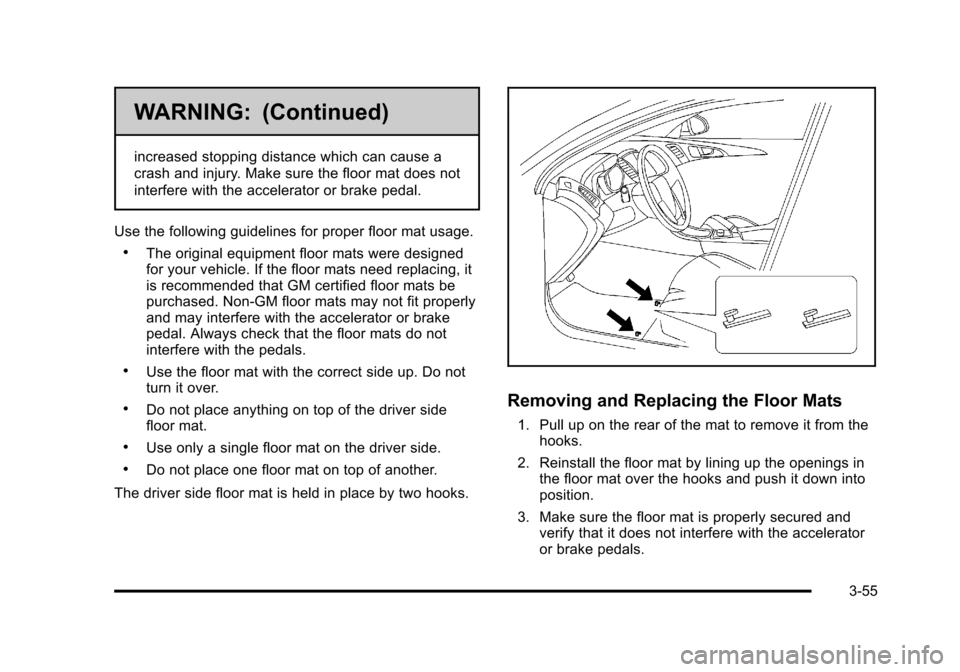
The driver side floor mat is held in place by two hooks.
Removing and Replacing the Floor Mats
1. Pull up on the rear of the mat to remove it from the hooks.
2. Reinstall the floor mat by lining up the openings in the floor mat over the hooks and push it down into
position.
3. Make sure the floor mat is properly secured and verify that it does not interfere with the accelerator
or brake pedals.
3-55
Page 163 of 470

Black plate (1,1)Cadillac DTS Owner Manual - 2011
Section 4 Instrument Panel
Instrument Panel Overview. . . . . . . . . . . . . . . . . . . . . . . .4-3
Hazard Warning Flashers . . . . . . . . . . . . . . . . . . . . . . . 4-3
Horn . . . . . . . . . . . . . . . . . . . . . . . . . . . . . . . . . . . . . . . . . . . . 4-3
Tilt Wheel . . . . . . . . . . . . . . . . . . . . . . . . . . . . . . . . . . . . . . . 4-3
Power Tilt Wheel and Telescopic Steering Column . . . . . . . . . . . . . . . . . . . . . . . . . . . . . . . . . . . . . . . 4-4
Heated Steering Wheel . . . . . . . . . . . . . . . . . . . . . . . . . 4-4
Turn Signal/Multifunction Lever . . . . . . . . . . . . . . . . . . 4-5
Turn and Lane-Change Signals . . . . . . . . . . . . . . . . . 4-5
Headlamp High/Low-Beam Changer . . . . . . . . . . . . 4-6
Forward Collision Alert (FCA) System . . . . . . . . . . . 4-6
Flash-to-Pass . . . . . . . . . . . . . . . . . . . . . . . . . . . . . . . . . . 4-10
Windshield Wipers . . . . . . . . . . . . . . . . . . . . . . . . . . . . . 4-10
Windshield Washer . . . . . . . . . . . . . . . . . . . . . . . . . . . . 4-11
Cruise Control . . . . . . . . . . . . . . . . . . . . . . . . . . . . . . . . . 4-12
Adaptive Cruise Control . . . . . . . . . . . . . . . . . . . . . . . 4-14
Exterior Lamps . . . . . . . . . . . . . . . . . . . . . . . . . . . . . . . . 4-25
Wiper Activated Headlamps . . . . . . . . . . . . . . . . . . . 4-28
Headlamps on Reminder . . . . . . . . . . . . . . . . . . . . . . 4-28
Daytime Running Lamps (DRL) . . . . . . . . . . . . . . . . 4-28
Fog Lamps . . . . . . . . . . . . . . . . . . . . . . . . . . . . . . . . . . . . 4-29
Cornering Lamps . . . . . . . . . . . . . . . . . . . . . . . . . . . . . . 4-29
Exterior Lighting Battery Saver . . . . . . . . . . . . . . . . . 4-30
Instrument Panel Brightness . . . . . . . . . . . . . . . . . . . 4-30
Courtesy Lamps . . . . . . . . . . . . . . . . . . . . . . . . . . . . . . . 4-30 Entry Lighting . . . . . . . . . . . . . . . . . . . . . . . . . . . . . . . . . . 4-30
Parade Dimming . . . . . . . . . . . . . . . . . . . . . . . . . . . . . . . 4-31
Reading Lamps . . . . . . . . . . . . . . . . . . . . . . . . . . . . . . . . 4-31
Footwell Lamps . . . . . . . . . . . . . . . . . . . . . . . . . . . . . . . . 4-31
Battery Load Management . . . . . . . . . . . . . . . . . . . . . 4-31
Electric Power Management . . . . . . . . . . . . . . . . . . . 4-32
Inadvertent Power Battery Saver . . . . . . . . . . . . . . . 4-32
Battery Run-Down Protection . . . . . . . . . . . . . . . . . . 4-33
Accessory Power Outlet(s) . . . . . . . . . . . . . . . . . . . . . 4-33
Analog Clock . . . . . . . . . . . . . . . . . . . . . . . . . . . . . . . . . . 4-34
Climate Controls . . . . . . . . . . . . . . . . . . . . . . . . . . . . . . . . . . 4-34
Dual Climate Control System . . . . . . . . . . . . . . . . . . 4-34
Outlet Adjustment . . . . . . . . . . . . . . . . . . . . . . . . . . . . . . 4-40
Rear Climate Control System . . . . . . . . . . . . . . . . . . 4-40
Passenger Compartment Air Filter . . . . . . . . . . . . . 4-42
Warning Lights, Gauges, and Indicators . . . . . . . .4-44
Instrument Panel Cluster . . . . . . . . . . . . . . . . . . . . . . . 4-45
Speedometer and Odometer . . . . . . . . . . . . . . . . . . . 4-46
Tachometer . . . . . . . . . . . . . . . . . . . . . . . . . . . . . . . . . . . . 4-46
Safety Belt Reminders . . . . . . . . . . . . . . . . . . . . . . . . . 4-47
Airbag Readiness Light . . . . . . . . . . . . . . . . . . . . . . . . 4-48
Passenger Airbag Status Indicator . . . . . . . . . . . . . 4-48
Charging System Light . . . . . . . . . . . . . . . . . . . . . . . . 4-49
Brake System Warning Light . . . . . . . . . . . . . . . . . . . 4-50
4-1
Page 164 of 470
Black plate (2,1)Cadillac DTS Owner Manual - 2011
Section 4 Instrument Panel
Antilock Brake System (ABS) Warning Light . . . 4-51
Traction Control System (TCS) WarningLight . . . . . . . . . . . . . . . . . . . . . . . . . . . . . . . . . . . . . . . . . 4-51
StabiliTrak
®Indicator Light . . . . . . . . . . . . . . . . . . . . . 4-52
Lane Departure Warning (LDW) Light . . . . . . . . . . 4-52
Engine Coolant Temperature Warning Light . . . . 4-53
Engine Coolant Temperature Gauge . . . . . . . . . . . 4-53
Tire Pressure Light . . . . . . . . . . . . . . . . . . . . . . . . . . . . 4-54
Malfunction Indicator Lamp . . . . . . . . . . . . . . . . . . . . 4-54
Oil Pressure Light . . . . . . . . . . . . . . . . . . . . . . . . . . . . . 4-57
Security Light . . . . . . . . . . . . . . . . . . . . . . . . . . . . . . . . . . 4-57
Front Fog Lamp Light . . . . . . . . . . . . . . . . . . . . . . . . . . 4-58
Lights On Reminder . . . . . . . . . . . . . . . . . . . . . . . . . . . 4-58
Cruise Control Light . . . . . . . . . . . . . . . . . . . . . . . . . . . 4-58
Highbeam On Light . . . . . . . . . . . . . . . . . . . . . . . . . . . . 4-58
Fuel Gauge . . . . . . . . . . . . . . . . . . . . . . . . . . . . . . . . . . . . 4-59 Driver Information Center (DIC)
. . . . . . . . . . . . . . . . . .4-59
DIC Operation and Displays . . . . . . . . . . . . . . . . . . . 4-60
DIC Warnings and Messages . . . . . . . . . . . . . . . . . . 4-65
DIC Vehicle Customization . . . . . . . . . . . . . . . . . . . . 4-77
Audio System(s) . . . . . . . . . . . . . . . . . . . . . . . . . . . . . . . . . . 4-86
Setting the Clock . . . . . . . . . . . . . . . . . . . . . . . . . . . . . . 4-87
Radio(s) . . . . . . . . . . . . . . . . . . . . . . . . . . . . . . . . . . . . . . . 4-90
Using an MP3 . . . . . . . . . . . . . . . . . . . . . . . . . . . . . . . . 4-100
XM Radio Messages . . . . . . . . . . . . . . . . . . . . . . . . . 4-105
Navigation/Radio System . . . . . . . . . . . . . . . . . . . . . 4-106
Bluetooth
®. . . . . . . . . . . . . . . . . . . . . . . . . . . . . . . . . . . . 4-107
Theft-Deterrent Feature . . . . . . . . . . . . . . . . . . . . . . . 4-114
Audio Steering Wheel Controls . . . . . . . . . . . . . . . 4-114
Radio Reception . . . . . . . . . . . . . . . . . . . . . . . . . . . . . . 4-115
Backglass Antenna . . . . . . . . . . . . . . . . . . . . . . . . . . . 4-116
XM™ Satellite Radio Antenna System . . . . . . . . 4-116
4-2
Page 169 of 470
Black plate (7,1)Cadillac DTS Owner Manual - 2011
The Forward Collision Alert (FCA) system provides an
audible and visual alert if you approach a vehicle too
quickly that is directly ahead. FCA also provides a
visual alert with no audible alert if you are following
another vehicle much too closely. The FCA alert symbol
is located on top of the instrument panel to the right of
the driver. FCA uses the Adaptive Cruise Control radar
to detect a vehicle directly ahead, in your path, within a
distance of 328 ft (100 m) and operates at speeds
above 20 mph (32 km/h).
{WARNING:
FCA is only a warning system and does not apply
the brakes. When you are approaching a vehicle
or object too rapidly or when you are following a
vehicle too closely that is ahead of you, FCA may
not provide you with enough time to avoid a
collision. FCA is not designed to warn the driver of
pedestrians or animals. Your complete attention is
always required while driving and you should be
ready to take action and apply the brakes. For
more information, seeDefensive Driving
on
page 5‑2
.
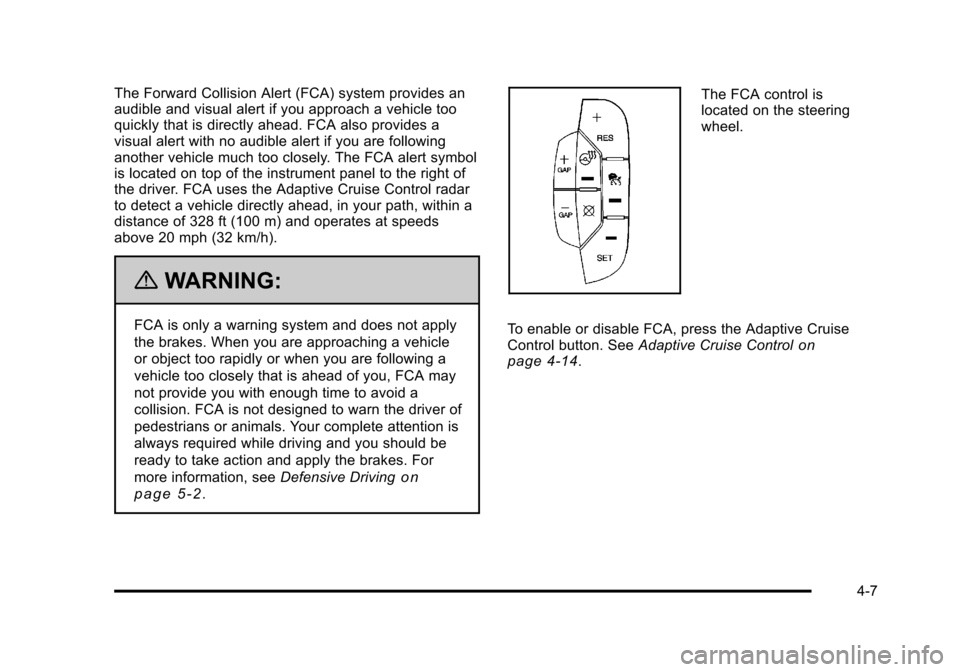
The FCA control is
located on the steering
wheel.
To enable or disable FCA, press the Adaptive Cruise
Control button. See Adaptive Cruise Control
on
page 4‑14.
4-7