phone CADILLAC ESCALADE 2007 3.G User Guide
[x] Cancel search | Manufacturer: CADILLAC, Model Year: 2007, Model line: ESCALADE, Model: CADILLAC ESCALADE 2007 3.GPages: 574, PDF Size: 2.89 MB
Page 308 of 574
The RSE system will always transmit the audio
signal to the wireless headphones, if there is audio
available. See “Headphones” earlier in this
section for more information.
The DVD player is capable of outputting audio to
the wired headphone jacks on the RSA system,
if your vehicle has this feature. The DVD
player may be selected as an audio source on the
RSA system. SeeRear Seat Audio (RSA) on
page 314for more information.
When a device is connected to the radio’s auxiliary
input jack, if your vehicle has this feature, or A/V
jacks, the rear seat passengers will be able to hear
audio from the auxiliary device through the wireless
or wired headphones. The front seat passengers
will be able to listen to playback from this device
through the vehicle speakers by selecting AUX as
the source on the radio.Video Screen
The video screen is located in the RSE overhead
console.
To use the video screen, do the following:
1. Push the release button located on the RSE
overhead console.
2. Rotate the screen to the desired position.
When the video screen is not in use, push it up
into its locked position.
If a DVD is playing and the screen is raised to its
locked position, the screen will remain on, this
is normal, and the DVD will continue to play
through the previous audio source. Use the remote
control power button or eject the disc to turn off
the screen.
The RSE overhead console contains the IR
transmitters for the wireless headphones and the
IR receivers for the remote control. They are
located at the rear of the console.
Notice:Avoid directly touching the video
screen, as damage may occur. See “Cleaning
the Video Screen” later in this section for
more information.
308
Page 313 of 574
Problem Recommended Action
The auxiliary source is
running but there is no
picture or sound.Check that the RSE video
screen is in the auxiliary
source mode.
Check the auxiliary input
connections at both
devices.
Sometimes the wireless
headphone audio cuts out
or buzzes.Check for obstructions,
low batteries, reception
range, and interference
from cellular telephone
towers or by using your
cellular telephone in
the vehicle.
Check that the
headphones are on
correctly using the L (left)
and R (right) on the
headphones.
I lost the remote and/or
the headphones.See your dealer for
assistance.
The DVD is playing, but
there is no picture or
sound.Check that the RSE video
screen is sourced to the
DVD player.DVD Display Error Messages
The DVD display error message depends on
which radio you have. The video screen may
display one of the following:
Disc Load/Eject Error:This message is
displayed when there are disc load or eject
problems.
Disc Format Error:This message will be
displayed, if the disc is inserted with the disc label
wrong side up, or if the disc is damaged.
Disc Region Error:This message will be
displayed, if the disc is not from a correct region.
No Disc Inserted:This message will be
displayed, if no disc is present when the EJECT
button is pressed on the radio.
DVD Distortion
Video distortion may occur when operating cellular
phones, scanners, CB radios, Global Position
Systems (GPS)*, two-way radios, mobile fax, or
walkie talkies.
313
Page 314 of 574
It may be necessary to turn off the DVD player
when operating one of these devices in or near the
vehicle.
*Excludes the OnStar
®System.
Cleaning the RSE Overhead Console
When cleaning the RSE overhead console surface,
use only a clean cloth dampened with clean
water.
Cleaning the Video Screen
When cleaning the video screen, use only a clean
cloth dampened with clean water. Use care
when directly touching or cleaning the screen, as
damage may result.
Rear Seat Audio (RSA)
This feature allows rear seat passengers to listen
to and control any of the music sources: radio,
CDs, DVDs, or other auxiliary sources. The
rear seat passengers can control the same music
sources the front seat passengers are listening
to (dual control) or a different source. For example,
rear seat passengers can listen to and control a
CD through the headphones, while the driver
listens to the radio through the speakers. The rear
seat passengers have control of the volume for
each set of headphones.
You can operate the RSA functions even when
the main radio is off.
Audio can be heard through wired headphones
(not included) plugged into the jacks on the RSA.
If your vehicle has this feature, audio can also
be heard on Channel 2 of the wireless
headphones.
The audio system allows the rear speakers to
continue playing even when the RSA audio
is active through the headphones.
314
Page 315 of 574
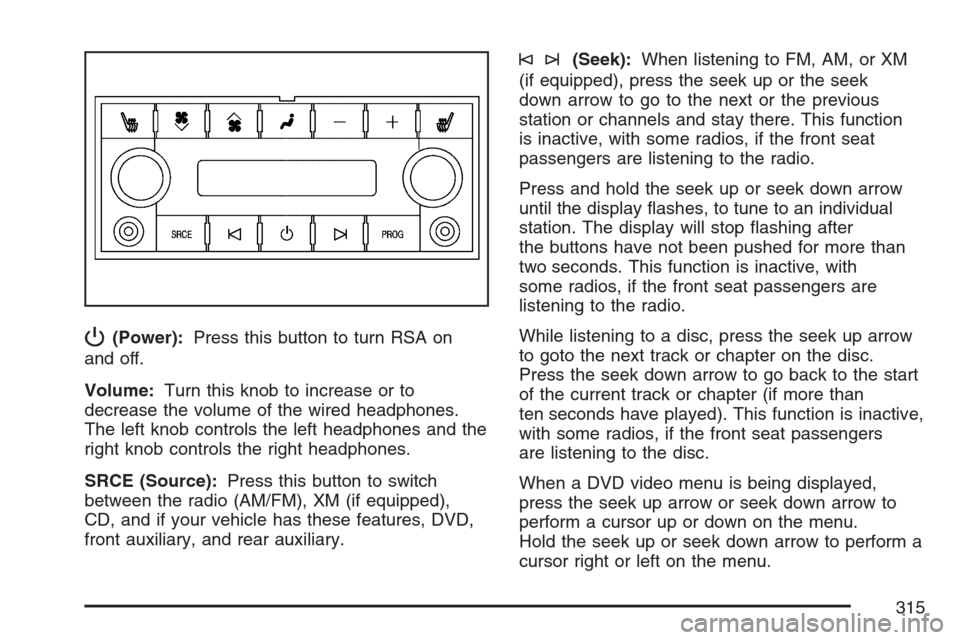
P(Power):Press this button to turn RSA on
and off.
Volume:Turn this knob to increase or to
decrease the volume of the wired headphones.
The left knob controls the left headphones and the
right knob controls the right headphones.
SRCE (Source):Press this button to switch
between the radio (AM/FM), XM (if equipped),
CD, and if your vehicle has these features, DVD,
front auxiliary, and rear auxiliary.
©¨(Seek):When listening to FM, AM, or XM
(if equipped), press the seek up or the seek
down arrow to go to the next or the previous
station or channels and stay there. This function
is inactive, with some radios, if the front seat
passengers are listening to the radio.
Press and hold the seek up or seek down arrow
until the display ashes, to tune to an individual
station. The display will stop ashing after
the buttons have not been pushed for more than
two seconds. This function is inactive, with
some radios, if the front seat passengers are
listening to the radio.
While listening to a disc, press the seek up arrow
to goto the next track or chapter on the disc.
Press the seek down arrow to go back to the start
of the current track or chapter (if more than
ten seconds have played). This function is inactive,
with some radios, if the front seat passengers
are listening to the disc.
When a DVD video menu is being displayed,
press the seek up arrow or seek down arrow to
perform a cursor up or down on the menu.
Hold the seek up or seek down arrow to perform a
cursor right or left on the menu.
315
Page 317 of 574
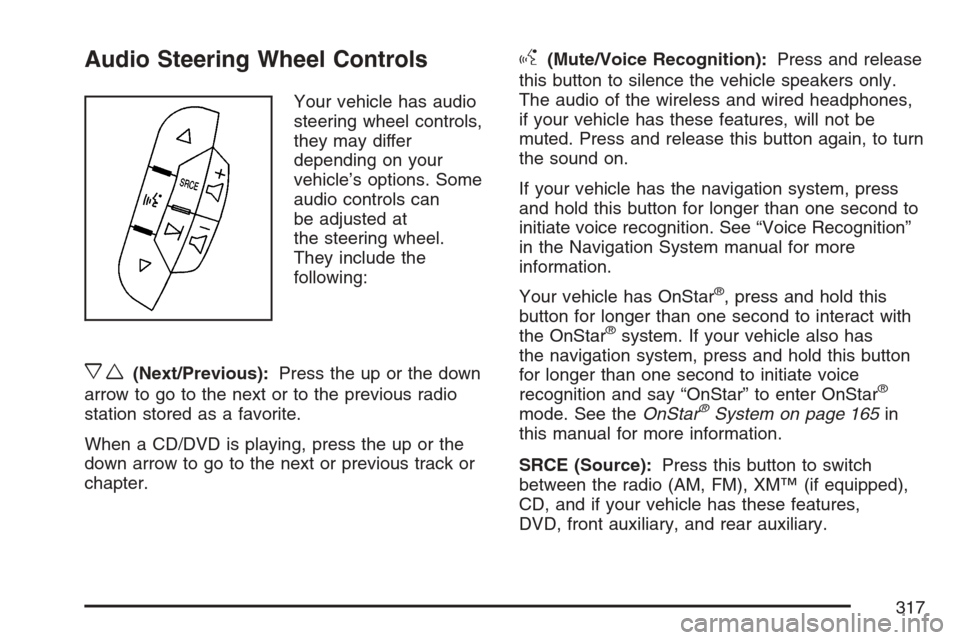
Audio Steering Wheel Controls
Your vehicle has audio
steering wheel controls,
they may differ
depending on your
vehicle’s options. Some
audio controls can
be adjusted at
the steering wheel.
They include the
following:
xw(Next/Previous):Press the up or the down
arrow to go to the next or to the previous radio
station stored as a favorite.
When a CD/DVD is playing, press the up or the
down arrow to go to the next or previous track or
chapter.
g(Mute/Voice Recognition):Press and release
this button to silence the vehicle speakers only.
The audio of the wireless and wired headphones,
if your vehicle has these features, will not be
muted. Press and release this button again, to turn
the sound on.
If your vehicle has the navigation system, press
and hold this button for longer than one second to
initiate voice recognition. See “Voice Recognition”
in the Navigation System manual for more
information.
Your vehicle has OnStar
®, press and hold this
button for longer than one second to interact with
the OnStar
®system. If your vehicle also has
the navigation system, press and hold this button
for longer than one second to initiate voice
recognition and say “OnStar” to enter OnStar
®
mode. See theOnStar®System on page 165in
this manual for more information.
SRCE (Source):Press this button to switch
between the radio (AM, FM), XM™ (if equipped),
CD, and if your vehicle has these features,
DVD, front auxiliary, and rear auxiliary.
317
Page 318 of 574
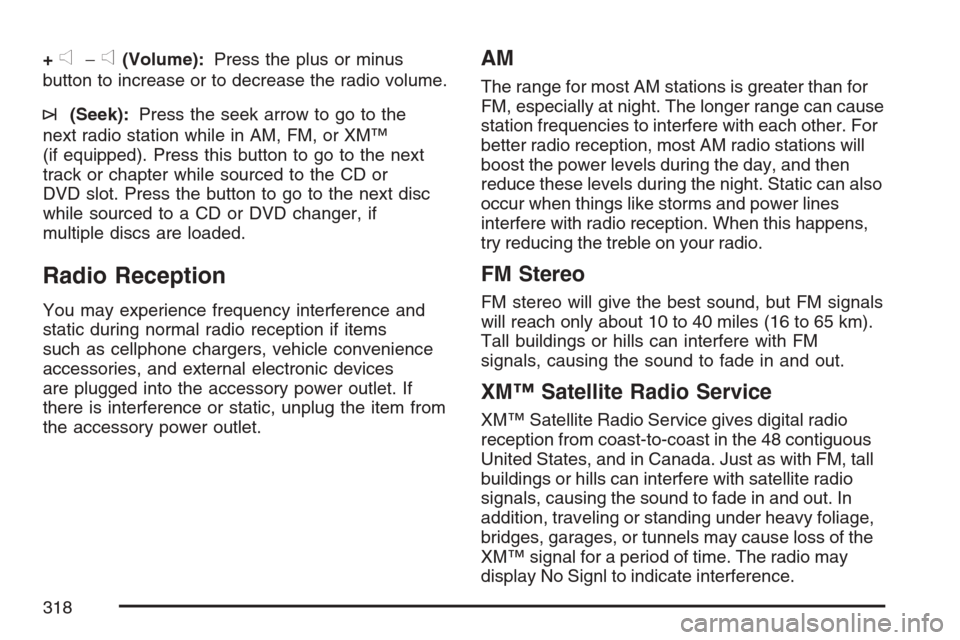
+e−e(Volume):Press the plus or minus
button to increase or to decrease the radio volume.
¨(Seek):Press the seek arrow to go to the
next radio station while in AM, FM, or XM™
(if equipped). Press this button to go to the next
track or chapter while sourced to the CD or
DVD slot. Press the button to go to the next disc
while sourced to a CD or DVD changer, if
multiple discs are loaded.
Radio Reception
You may experience frequency interference and
static during normal radio reception if items
such as cellphone chargers, vehicle convenience
accessories, and external electronic devices
are plugged into the accessory power outlet. If
there is interference or static, unplug the item from
the accessory power outlet.
AM
The range for most AM stations is greater than for
FM, especially at night. The longer range can cause
station frequencies to interfere with each other. For
better radio reception, most AM radio stations will
boost the power levels during the day, and then
reduce these levels during the night. Static can also
occur when things like storms and power lines
interfere with radio reception. When this happens,
try reducing the treble on your radio.
FM Stereo
FM stereo will give the best sound, but FM signals
will reach only about 10 to 40 miles (16 to 65 km).
Tall buildings or hills can interfere with FM
signals, causing the sound to fade in and out.
XM™ Satellite Radio Service
XM™ Satellite Radio Service gives digital radio
reception from coast-to-coast in the 48 contiguous
United States, and in Canada. Just as with FM, tall
buildings or hills can interfere with satellite radio
signals, causing the sound to fade in and out. In
addition, traveling or standing under heavy foliage,
bridges, garages, or tunnels may cause loss of the
XM™ signal for a period of time. The radio may
display No Signl to indicate interference.
318
Page 320 of 574
If you choose to add an aftermarket cellular
telephone to your vehicle, and the antenna needs
to be attached to the glass, be sure that you
do not damage the grid lines for the AM-FM
antennas or place the cellular telephone antenna
over the grid lines.
XM™ Satellite Radio Antenna
System
The XM™ Satellite Radio antenna is located on
the roof of your vehicle. Keep this antenna clear of
snow and ice build up for clear radio reception.
If your vehicle has a sunroof, the performance of
the XM™ system may be affected if the sunroof
is open.
Loading items onto the roof of your vehicle can
interfere with the performance of the XM™ system.
Make sure the XM™ Satellite Radio antenna is
not obstructed.
Chime Level Adjustment
The radio is used to adjust the vehicle’s chime
level. To change the volume level of the chime,
press and hold pushbutton 6 with the ignition
on and the radio power off. The volume level will
change from the normal level to loud, and
LOUD will appear on the radio display. To change
back to the default or normal setting, press and
hold pushbutton 6 again. The volume level
will change from the loud level to normal, and
NORMAL will appear on the radio display. Each
time the chime volume is changed, three
chimes will sound to indicate the new volume
selected. Removing the radio and not replacing it
with a factory radio or chime module will disable
vehicle chimes.
320
Page 356 of 574
The heavier the rain, the harder it is to see. Even
if your windshield wiper blades are in good
shape, a heavy rain can make it harder to see
road signs and traffic signals, pavement markings,
the edge of the road, and even people walking.
It is wise to keep your wiping equipment in
good shape and keep your windshield washer uid
reservoir lled with washer uid. Replace your
windshield wiper inserts when they show signs of
streaking or missing areas on the windshield,
or when strips of rubber start to separate from the
inserts.
{CAUTION:
Wet brakes can cause accidents. They may
not work as well in a quick stop and may
cause pulling to one side. You could lose
control of the vehicle.
After driving through a large puddle of
water or a car wash, apply your brake pedal
lightly until your brakes work normally.Driving too fast through large water puddles or
even going through some car washes can cause
problems, too. The water may affect your
brakes. Try to avoid puddles. But if you cannot,
try to slow down before you hit them.
Hydroplaning
Hydroplaning is dangerous. So much water can
build up under your tires that they can actually ride
on the water. This can happen if the road is wet
enough and you are going fast enough. When your
vehicle is hydroplaning, it has little or no contact
with the road.
Hydroplaning does not happen often. But it can
if your tires do not have much tread or if the
pressure in one or more is low. It can happen if
a lot of water is standing on the road. If you
can see reections from trees, telephone poles,
or other vehicles, and raindrops dimple the water’s
surface, there could be hydroplaning.
Hydroplaning usually happens at higher speeds.
There just is not a hard and fast rule about
hydroplaning. The best advice is to slow down
when it is raining.
356
Page 539 of 574
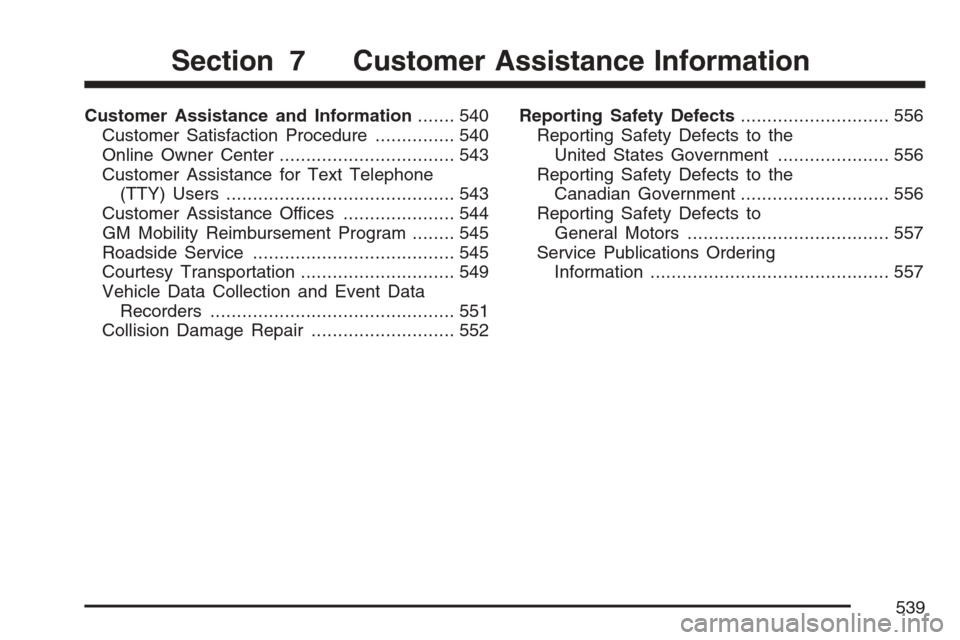
Customer Assistance and Information....... 540
Customer Satisfaction Procedure............... 540
Online Owner Center................................. 543
Customer Assistance for Text Telephone
(TTY) Users........................................... 543
Customer Assistance Offices..................... 544
GM Mobility Reimbursement Program........ 545
Roadside Service...................................... 545
Courtesy Transportation............................. 549
Vehicle Data Collection and Event Data
Recorders.............................................. 551
Collision Damage Repair........................... 552Reporting Safety Defects............................ 556
Reporting Safety Defects to the
United States Government..................... 556
Reporting Safety Defects to the
Canadian Government............................ 556
Reporting Safety Defects to
General Motors...................................... 557
Service Publications Ordering
Information............................................. 557
Section 7 Customer Assistance Information
539
Page 541 of 574
STEP THREE (US Owners):Both General
Motors and your dealer are committed to making
sure you are completely satised with your
new vehicle. However, if you continue to remain
unsatised after following the procedure outlined in
Steps One and Two, you should le with the
BBB Auto Line Program to enforce your rights.
The BBB Auto Line Program is an out of court
program administered by the Council of Better
Business Bureaus to settle automotive disputes
regarding vehicle repairs or the interpretation of
the New Vehicle Limited Warranty. Although you
may be required to resort to this informal dispute
resolution program prior to ling a court action,
use of the program is free of charge and your case
will generally be heard within 40 days. If you do
not agree with the decision given in your case,
you may reject it and proceed with any other venue
for relief available to you.You may contact the BBB Auto Line Program using
the toll-free telephone number or write them at the
following address:
BBB Auto Line Program
Council of Better Business Bureaus, Inc.
4200 Wilson Boulevard
Suite 800
Arlington, VA 22203-1838
Telephone: 1-800-955-5100
This program is available in all 50 states and
the District of Columbia. Eligibility is limited
by vehicle age, mileage and other factors.
General Motors reserves the right to change
eligibility limitations and/or discontinue its
participation in this program.
541