service CADILLAC ESCALADE 2007 3.G Owner's Guide
[x] Cancel search | Manufacturer: CADILLAC, Model Year: 2007, Model line: ESCALADE, Model: CADILLAC ESCALADE 2007 3.GPages: 574, PDF Size: 2.89 MB
Page 255 of 574
REPLACE BATTERY IN REMOTE KEY
If a remote keyless entry transmitter battery is low,
this message will display. The battery needs to
be replaced in the transmitter. See “Battery
Replacement” underRemote Keyless Entry
System Operation on page 115.
RIGHT REAR DOOR OPEN
If the passenger’s side rear door is not fully closed
and the vehicle is in a drive gear, this message
will display and a chime will sound. Stop and turn
off the vehicle, check the door for obstructions,
and close the door again. Check to see if the
message still appears on the DIC.
SERVICE AIR BAG
If there is a problem with the airbag system, this
message will display. Have your dealer inspect
the system for problems. SeeAirbag Readiness
Light on page 232andAirbag System on page 90
for more information.
SERVICE BATTERY CHARGING
SYSTEM
On some vehicles, if there is a problem with the
battery charging system, this message will display.
Under certain conditions, the battery warning
light may also turn on in the instrument panel
cluster. SeeCharging System Light on page 235.
Driving with this problem could drain the battery.
Turn off all unnecessary accessories. Have
the electrical system checked as soon as possible.
See your dealer.
SERVICE BRAKE SYSTEM
If there is a problem with the brake system, this
message will display along with the brake system
warning light. SeeBrake System Warning Light
on page 235. If this message appears, stop
as soon as possible and turn off the vehicle.
Restart the vehicle and check for the message on
the DIC display. If the message is still displayed
or appears again when you begin driving, the
brake system needs service as soon as possible.
See your dealer.
255
Page 256 of 574
SERVICE BRAKES SOON
If there is a problem with the brake system, this
message will display. If this message appears,
stop as soon as possible and turn off the vehicle.
Restart the vehicle and check for the message
on the DIC display. If the message is still displayed
or appears again when you begin driving, the
brake system needs service. See your dealer.
SERVICE PARKING ASSIST
This message will display if there is a problem
with the Ultrasonic Rear Parking Assist (URPA)
system. Do not use this system to help you park.
SeeUltrasonic Rear Parking Assist (URPA) on
page 214for more information. See your dealer
for service.
SERVICE STABILITRAK
If your vehicle has StabiliTrak®and this message
displays, it means there may be a problem with the
StabiliTrak
®system. If you see this message, try to
reset the system. Stop; turn off the engine for at
least 15 seconds; then start the engine again.
If this message still comes on, it means there is a
problem. You should see your dealer for service.
The vehicle is safe to drive, however, you do not
have the benet of StabiliTrak
®, so reduce your
speed and drive accordingly.
SERVICE SUSPENSION SYSTEM
This message will display when the Road Sensing
Suspension (RSS) system is not operating
properly. Have your vehicle serviced by your
dealer.
SERVICE THEFT DETERRENT SYSTEM
This message will display when there is a
problem with the theft-deterrent system. The
vehicle may or may not restart so you may want
to take the vehicle to your dealer before turning off
the engine. SeePASS-Key
®III+ Operation on
page 137for more information.
256
Page 257 of 574
SERVICE TIRE MONITOR SYSTEM
If your vehicle has the Tire Pressure Monitor
(TPM) system, this message will display if a part
on the system is not working properly. If you
drive your vehicle while any of the four sensors
are missing or inoperable, the warning will
come on in about 20 minutes. A sensor would be
missing, for example, if you put different wheels
on your vehicle without transferring the sensors.
If the warning comes on and stays on, there
may be a problem with the TPM. See your dealer.
SERVICE TRACTION CONTROL
If your vehicle has StabiliTrak®, this message will
display when there is a problem with the traction
control system. When this message is displayed,
the system will not limit wheel spin. Adjust
your driving accordingly. See your dealer for
service. SeeStabiliTrak
®System on page 330
for more information.
STABILITRAK OFF
If your vehicle has StabiliTrak®, this message will
display when you turn off StabiliTrak®, or when
the stability control has been automatically
disabled. To limit wheel spin and realize the full
benets of the stability enhancement system, you
should normally leave StabiliTrak
®on. However,
you should turn StabiliTrak®off if your vehicle gets
stuck in sand, mud, ice, or snow and you want
to rock your vehicle to attempt to free it, or if you
are driving in extreme off-road conditions and
require more wheel spin. SeeIf Your Vehicle is
Stuck in Sand, Mud, Ice, or Snow on page 368.
To turn the StabiliTrak
®system on or off, see
StabiliTrak®System on page 330.
There are several conditions that can cause this
message to appear.
One condition is overheating, which could
occur if StabiliTrak®activates continuously
for an extended period of time.
The message will also be displayed if the
brake system warning light is on. See
Brake System Warning Light on page 235.
257
Page 258 of 574
The message could be displayed if the
stability system takes longer than usual
to complete its diagnostic checks due to
driving conditions.
If an engine or vehicle related problem has
been detected and the vehicle needs
service, the message will appear. See your
dealer.
The message will also appear if the vehicle is
shifted into 4LO.
The message will turn off as soon as the
conditions that caused the message to be
displayed are no longer present.
TIGHTEN GAS CAP
If the vehicle’s fuel cap is not tightened properly,
this message may display along with the check
engine light on the instrument panel cluster.
SeeMalfunction Indicator Lamp on page 239.
Reinstall the fuel cap fully. SeeFilling the Tank on
page 401. The diagnostic system can determine
if the fuel cap has been left off or improperly
installed. A loose or missing fuel cap will allow fuel
to evaporate into the atmosphere. A few driving
trips with the cap properly installed should turn this
light and message off.
TIRE LEARNING ACTIVE
If your vehicle has a Tire Pressure Monitor (TPM)
system, this message will display when the
system is re-learning the tire positions on your
vehicle. SeeDIC Operation and Displays on
page 245for more information. The tire positions
must be re-learned after rotating the tires or
after replacing a tire or sensor. SeeTire Inspection
and Rotation on page 467,Tire Pressure Monitor
System on page 462, andInation - Tire
Pressure on page 460for more information.
TRACTION CONTROL OFF
If your vehicle has StabiliTrak®, this message will
display when the traction control system is
turned off. Adjust your driving accordingly. See
StabiliTrak
®System on page 330for more
information.
258
Page 280 of 574
XM™ Satellite Radio Service
XM™ is a satellite radio service that is based in
the 48 contiguous United States and Canada.
XM™ offers a large variety of coast-to-coast
channels including music, news, sports, talk,
traffic/weather (U.S. subscribers), and children’s
programming. XM™ provides digital quality
audio and text information that includes song title
and artist name. A service fee is required in
order to receive the XM™ service. For more
information, contact XM™; In the U.S. at
www.xmradio.com or call 1-800-852-XMXM (9696)
or in Canada at www.xmradio.ca or call
1-877-GET-XMSR (438-9677).
4(Information):Press this button while in XM™
mode to retrieve three different categories of
information related to the current song or channel:
Artist, Song Title, Category or PTY. To view
this information, perform the following:
1. Press the tune/sel knob to enter the
main menu.
2. Turn the tune/sel knob until INFO (information)
appears on the display.
3. Press the tune/sel knob to select INFO. The
display will change to show the additional
XM™ information.4. Press the BACK (F6) button to exit the
display. To return to the original display,
repeatedly press the BACK (F6) button or wait
for the display to time out.
Radio Data System (RDS)
The audio system has a Radio Data System
(RDS). RDS features are available for use only on
FM stations that broadcast RDS information.
With RDS, the radio can do the following:
Seek to stations broadcasting the selected
type of programming
Receive announcements concerning local and
national emergencies
Display messages from radio stations
Seek to stations with traffic announcements
This system relies upon receiving specic
information from these stations and will only work
when the information is available. In rare cases, a
radio station may broadcast incorrect information
that will cause the radio features to work
improperly. If this happens, contact the radio
station.
280
Page 284 of 574
Radio Message
THEFTLOCK:This message is displayed when
the THEFTLOCK®system has been activated.
Take the vehicle to the dealer for service.
Radio Messages for XM™ Only
SeeXM Radio Messages on page 302later in this
section for further detail.
Using the Six-Disc CD Changer
The CD player can play the smaller 3 inch (8 cm)
single CDs with an adapter ring. Full-size CDs
and the smaller CDs are loaded in the same
manner.
If playing a CD-R, the sound quality may be
reduced due to CD-R quality, the method of
recording, the quality of the music that has been
recorded, and the way the CD-R has been
handled. There may be an increase in skipping,
difficulty in nding tracks, and/or difficulty in loading
and ejecting. If these problems occur, check the
bottom surface of the CD. If the surface of the
CD is damaged, such as cracked, broken,
or scratched, the CD will not play properly. If the
surface of the CD is soiled, seeCare of Your CDs
and DVDs on page 319for more information.If there is no apparent damage, try a known
good CD.
Notice:If you add any label to a CD, insert
more than one CD into the slot at a time, or
attempt to play scratched or damaged CDs, you
could damage the CD player. When using the
CD player, use only CDs in good condition
without any label, load one CD at a time, and
keep the CD player and the loading slot free of
foreign materials, liquids, and debris.
Do not add any label to a CD; it could get caught
in the CD player. If a CD is recorded on a
personal computer and a description label is
needed, try labeling the top of the recorded CD
with a marking pen instead.
If an error appears on the display, see “CD
Messages” later in this section.
When a CD is inserted, the CD functions will
appear on the display above the pushbuttons, in
place of the preset stations, if programmed.
M(Load):Press this button to load CDs into
the CD player. This CD player will hold up to
six CDs.
284
Page 302 of 574
XM Radio Messages
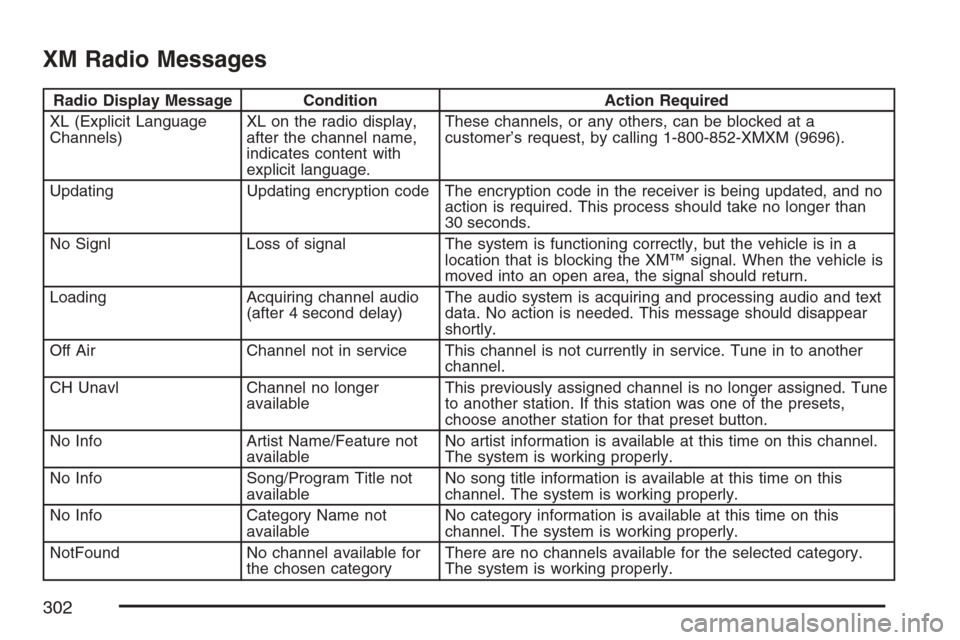
Radio Display Message Condition Action Required
XL (Explicit Language
Channels)XL on the radio display,
after the channel name,
indicates content with
explicit language.These channels, or any others, can be blocked at a
customer’s request, by calling 1-800-852-XMXM (9696).
Updating Updating encryption code The encryption code in the receiver is being updated, and no
action is required. This process should take no longer than
30 seconds.
No Signl Loss of signal The system is functioning correctly, but the vehicle is in a
location that is blocking the XM™ signal. When the vehicle is
moved into an open area, the signal should return.
Loading Acquiring channel audio
(after 4 second delay)The audio system is acquiring and processing audio and text
data. No action is needed. This message should disappear
shortly.
Off Air Channel not in service This channel is not currently in service. Tune in to another
channel.
CH Unavl Channel no longer
availableThis previously assigned channel is no longer assigned. Tune
to another station. If this station was one of the presets,
choose another station for that preset button.
No Info Artist Name/Feature not
availableNo artist information is available at this time on this channel.
The system is working properly.
No Info Song/Program Title not
availableNo song title information is available at this time on this
channel. The system is working properly.
No Info Category Name not
availableNo category information is available at this time on this
channel. The system is working properly.
NotFound No channel available for
the chosen categoryThere are no channels available for the selected category.
The system is working properly.
302
Page 303 of 574
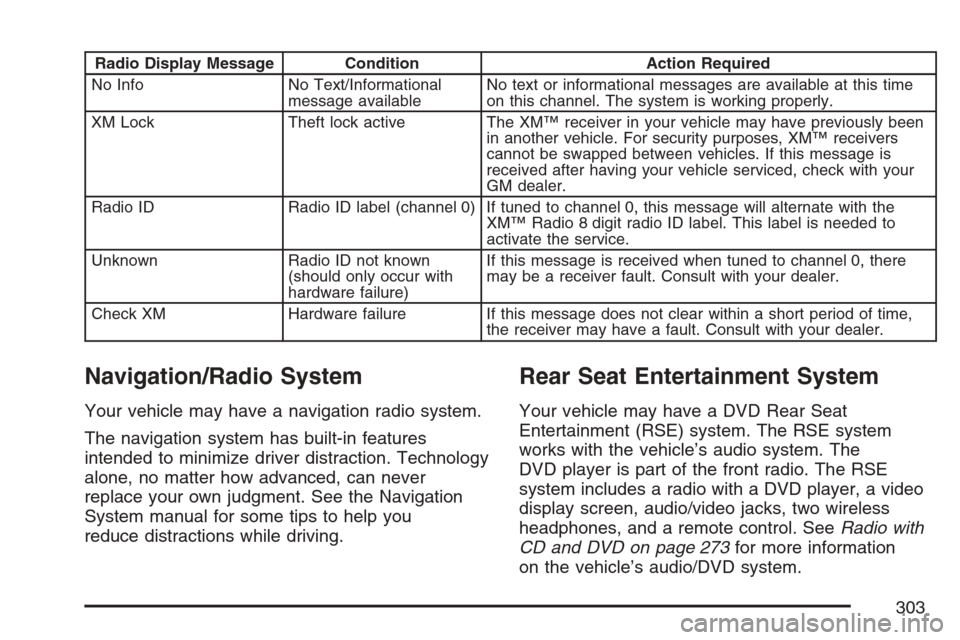
Radio Display Message Condition Action Required
No Info No Text/Informational
message availableNo text or informational messages are available at this time
on this channel. The system is working properly.
XM Lock Theft lock active The XM™ receiver in your vehicle may have previously been
in another vehicle. For security purposes, XM™ receivers
cannot be swapped between vehicles. If this message is
received after having your vehicle serviced, check with your
GM dealer.
Radio ID Radio ID label (channel 0) If tuned to channel 0, this message will alternate with the
XM™ Radio 8 digit radio ID label. This label is needed to
activate the service.
Unknown Radio ID not known
(should only occur with
hardware failure)If this message is received when tuned to channel 0, there
may be a receiver fault. Consult with your dealer.
Check XM Hardware failure If this message does not clear within a short period of time,
the receiver may have a fault. Consult with your dealer.
Navigation/Radio System
Your vehicle may have a navigation radio system.
The navigation system has built-in features
intended to minimize driver distraction. Technology
alone, no matter how advanced, can never
replace your own judgment. See the Navigation
System manual for some tips to help you
reduce distractions while driving.
Rear Seat Entertainment System
Your vehicle may have a DVD Rear Seat
Entertainment (RSE) system. The RSE system
works with the vehicle’s audio system. The
DVD player is part of the front radio. The RSE
system includes a radio with a DVD player, a video
display screen, audio/video jacks, two wireless
headphones, and a remote control. SeeRadio with
CD and DVD on page 273for more information
on the vehicle’s audio/DVD system.
303
Page 318 of 574
+e−e(Volume):Press the plus or minus
button to increase or to decrease the radio volume.
¨(Seek):Press the seek arrow to go to the
next radio station while in AM, FM, or XM™
(if equipped). Press this button to go to the next
track or chapter while sourced to the CD or
DVD slot. Press the button to go to the next disc
while sourced to a CD or DVD changer, if
multiple discs are loaded.
Radio Reception
You may experience frequency interference and
static during normal radio reception if items
such as cellphone chargers, vehicle convenience
accessories, and external electronic devices
are plugged into the accessory power outlet. If
there is interference or static, unplug the item from
the accessory power outlet.
AM
The range for most AM stations is greater than for
FM, especially at night. The longer range can cause
station frequencies to interfere with each other. For
better radio reception, most AM radio stations will
boost the power levels during the day, and then
reduce these levels during the night. Static can also
occur when things like storms and power lines
interfere with radio reception. When this happens,
try reducing the treble on your radio.
FM Stereo
FM stereo will give the best sound, but FM signals
will reach only about 10 to 40 miles (16 to 65 km).
Tall buildings or hills can interfere with FM
signals, causing the sound to fade in and out.
XM™ Satellite Radio Service
XM™ Satellite Radio Service gives digital radio
reception from coast-to-coast in the 48 contiguous
United States, and in Canada. Just as with FM, tall
buildings or hills can interfere with satellite radio
signals, causing the sound to fade in and out. In
addition, traveling or standing under heavy foliage,
bridges, garages, or tunnels may cause loss of the
XM™ signal for a period of time. The radio may
display No Signl to indicate interference.
318
Page 327 of 574
Avoid needless heavy braking. Some people drive
in spurts — heavy acceleration followed by
heavy braking — rather than keeping pace with
traffic. This is a mistake. Your brakes may
not have time to cool between hard stops. Your
brakes will wear out much faster if you do a lot of
heavy braking. If you keep pace with the traffic
and allow realistic following distances, you
will eliminate a lot of unnecessary braking. That
means better braking and longer brake life.
If your engine ever stops while you are driving,
brake normally but do not pump your brakes.
If you do, the pedal may get harder to push down.
If your engine stops, you will still have some
power brake assist. But you will use it when you
brake. Once the power assist is used up, it
may take longer to stop and the brake pedal
will be harder to push.
Adding non-GM accessories can affect your
vehicle’s performance. SeeAccessories and
Modications on page 396.Anti-Lock Brake System (ABS)
Your vehicle has the Anti-Lock Brake System
(ABS), an advanced electronic braking system
that will help prevent a braking skid.
When you start your engine and begin to drive
away, ABS will check itself. You may hear a
momentary motor or clicking noise while this test
is going on. This is normal.
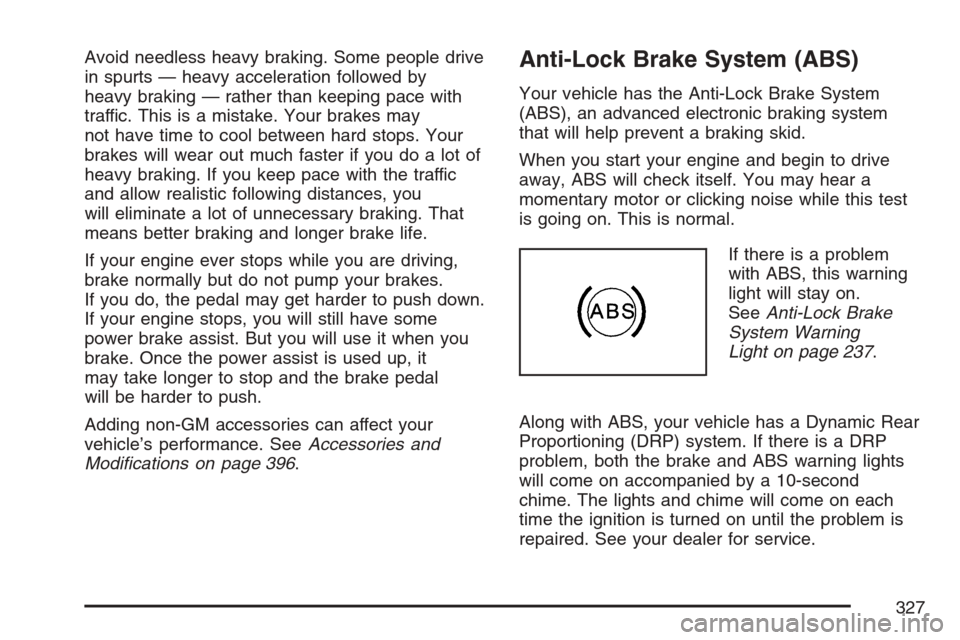
If there is a problem
with ABS, this warning
light will stay on.
SeeAnti-Lock Brake
System Warning
Light on page 237.
Along with ABS, your vehicle has a Dynamic Rear
Proportioning (DRP) system. If there is a DRP
problem, both the brake and ABS warning lights
will come on accompanied by a 10-second
chime. The lights and chime will come on each
time the ignition is turned on until the problem is
repaired. See your dealer for service.
327