warning CADILLAC ESCALADE 2010 3.G Owners Manual
[x] Cancel search | Manufacturer: CADILLAC, Model Year: 2010, Model line: ESCALADE, Model: CADILLAC ESCALADE 2010 3.GPages: 616, PDF Size: 39.41 MB
Page 466 of 616
Engine Oil Additives / Engine Oil
Flushes
Do not add anything to the oil. The recommended oilswith the starburst symbol that meet GM standards areall that is needed for good performance and engineprotection.
Engine oil system flushes are not recommended andcould cause engine damage not covered by the vehiclewarranty.
Engine Oil Life System
When to Change Engine Oil
This vehicle has a computer system that indicates whento change the engine oil and filter. This is based onengine revolutions and engine temperature, and not onmileage. Based on driving conditions, the mileage atwhich an oil change is indicated can vary considerably.For the oil life system to work properly, the system mustbe reset every time the oil is changed.
When the system has calculated that oil life has beendiminished, it indicates that an oil change is necessary.A CHANGE ENGINE OIL SOON message comes on.SeeDIC Warnings and Messageson page 4!48.Change the oil as soon as possible within the next600 miles (1 000 km). It is possible that, if driving underthe best conditions, the oil life system might not indicatethat an oil change is necessary for over a year.However, the engine oil and filter must be changed atleast once a year and at this time the system must bereset. Your dealer/retailer has trained service peoplewho will perform this work using genuine parts andreset the system. It is also important to check the oilregularly and keep it at the proper level.
If the system is ever reset accidentally, the oil must bechanged at 3,000 miles (5 000 km) since the last oilchange. Remember to reset the oil life systemwhenever the oil is changed.
7-20
Page 467 of 616
How to Reset the Engine Oil Life
System
The Engine Oil Life System calculates when to changethe engine oil and filter based on vehicle use.Whenever the oil is changed, reset the system so it cancalculate when the next oil change is required. If asituation occurs where the oil is changed prior to aCHANGE ENGINE OIL SOON message being turnedon, reset the system.
Always reset the engine oil life to 100% after every oilchange. It will not reset itself. To reset the Engine OilLife System:
1. Display the OIL LIFE REMAINING on the DIC.
2. Press and hold the SET/RESET button on the DICfor more than five seconds. The oil life will changeto 100%.
If the CHANGE ENGINE OIL SOON message comesback on when the vehicle is started, the Engine Oil LifeSystem has not reset. Repeat the procedure.
What to Do with Used Oil
Used engine oil contains certain elements that can beunhealthy for your skin and could even cause cancer.Do not let used oil stay on your skin for very long. Cleanyour skin and nails with soap and water, or a good handcleaner. Wash or properly dispose of clothing or ragscontaining used engine oil. See the manufacturer'swarnings about the use and disposal of oil products.
Used oil can be a threat to the environment. If youchange your own oil, be sure to drain all the oil from thefilter before disposal. Never dispose of oil by putting it inthe trash, pouring it on the ground, into sewers, or intostreams or bodies of water. Recycle it by taking it to aplace that collects used oil.
7-21
Page 469 of 616
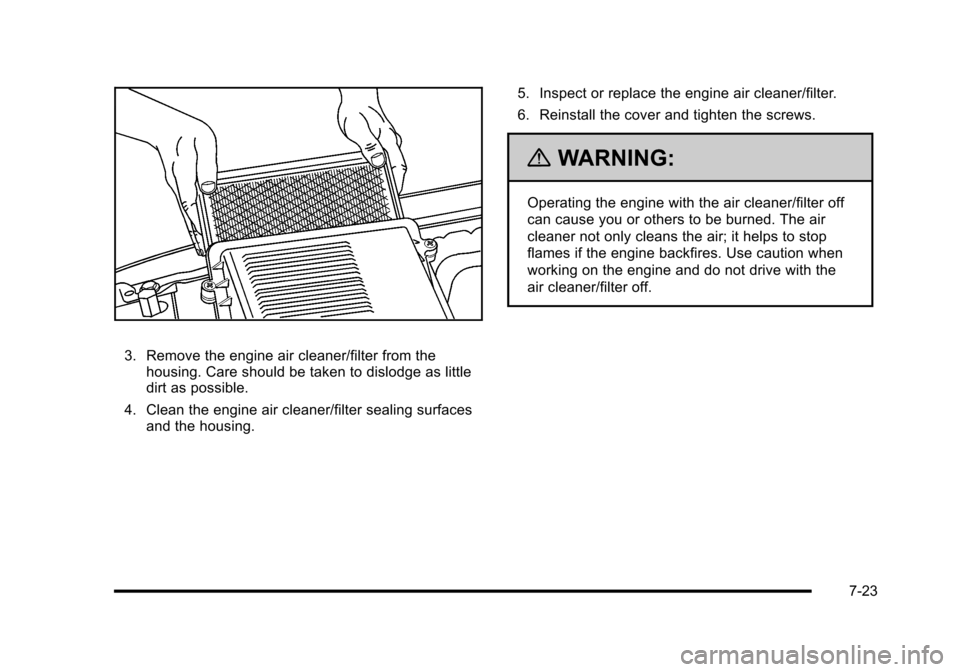
3. Remove the engine air cleaner/filter from thehousing. Care should be taken to dislodge as littledirt as possible.
4. Clean the engine air cleaner/filter sealing surfacesand the housing.
5. Inspect or replace the engine air cleaner/filter.
6. Reinstall the cover and tighten the screws.
{WARNING:
Operating the engine with the air cleaner/filter off
can cause you or others to be burned. The air
cleaner not only cleans the air; it helps to stop
flames if the engine backfires. Use caution when
working on the engine and do not drive with the
air cleaner/filter off.
7-23
Page 474 of 616
Cooling System
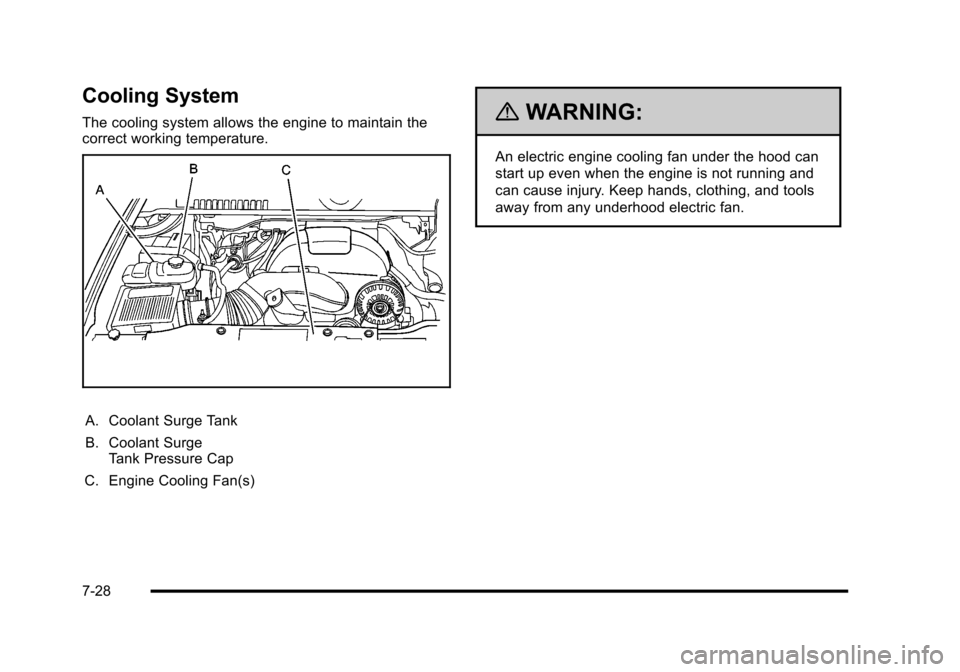
The cooling system allows the engine to maintain thecorrect working temperature.
A. Coolant Surge Tank
B. Coolant SurgeTank Pressure Cap
C. Engine Cooling Fan(s)
{WARNING:
An electric engine cooling fan under the hood can
start up even when the engine is not running and
can cause injury. Keep hands, clothing, and tools
away from any underhood electric fan.
7-28
Page 475 of 616

{WARNING:
Heater and radiator hoses, and other engine
parts, can be very hot. Do not touch them.
If you do, you can be burned.
Do not run the engine if there is a leak. If you run
the engine, it could lose all coolant. That could
cause an engine fire, and you could be burned.
Get any leak fixed before you drive the vehicle.
Notice:Using coolant other than DEX-COOL®cancause premature engine, heater core, or radiatorcorrosion. In addition, the engine coolant couldrequire changing sooner, at 50 000 km (30,000 miles)or 24 months, whichever occurs first. Any repairswould not be covered by the vehicle warranty.Always use DEX-COOL®(silicate-free) coolantin the vehicle.
Engine Coolant
The cooling system in the vehicle is filled withDEX-COOL®engine coolant. This coolant is designedto remain in the vehicle for five years or 150,000 miles(240 000 km), whichever occurs first.
The following explains the cooling system and how tocheck and add coolant when it is low. If there is aproblem with engine overheating, seeEngineOverheating on page 7!34.
7-29
Page 476 of 616
What to Use
{WARNING:
Adding only plain water to the cooling system can
be dangerous. Plain water, or some other liquid
such as alcohol, can boil before the proper
coolant mixture will. The vehicle's coolant warning
system is set for the proper coolant mixture. With
plain water or the wrong mixture, the engine could
get too hot but you would not get the overheat
warning. The engine could catch fire and you or
others could be burned. Use a 50/50 mixture of
clean, drinkable water and DEX-COOL®coolant.
Use a 50/50 mixture of clean, drinkable water andDEX-COOL®coolant. If using this mixture, nothingelse needs to be added. This mixture:
.Gives freezing protection down to!34°F (!37°C),outside temperature.
.Gives boiling protection up to 265°F (129°C),engine temperature.
.Protects against rust and corrosion.
.Will not damage aluminum parts.
.Helps keep the proper engine temperature.
Notice:If an improper coolant mixture is used, theengine could overheat and be badly damaged. Therepair cost would not be covered by the vehiclewarranty. Too much water in the mixture can freezeand crack the engine, radiator, heater core, andother parts.
Notice:If extra inhibitors and/or additives are usedin the vehicle's cooling system, the vehicle could bedamaged. Use only the proper mixture of the enginecoolant listed in this manual for the cooling system.SeeRecommended Fluids and Lubricantsonpage 8!10for more information.
7-30
Page 478 of 616
How to Add Coolant to the Surge Tank
{WARNING:
You can be burned if you spill coolant on hot
engine parts. Coolant contains ethylene glycol
and it will burn if the engine parts are hot enough.
Do not spill coolant on a hot engine.
Notice:This vehicle has a specific coolant fillprocedure. Failure to follow this procedure couldcause the engine to overheat and be severelydamaged.
{WARNING:
An electric engine cooling fan under the hood can
start up even when the engine is not running and
can cause injury. Keep hands, clothing, and tools
away from any underhood electric fan.
{WARNING:
Steam and scalding liquids from a hot cooling
system can blow out and burn you badly. They are
under pressure, and if you turn the surge tank
pressure cap—even a little—they can come out
at high speed. Never turn the cap when the
cooling system, including the surge tank pressure
cap, is hot. Wait for the cooling system and surge
tank pressure cap to cool if you ever have to turn
the pressure cap.
7-32
Page 480 of 616
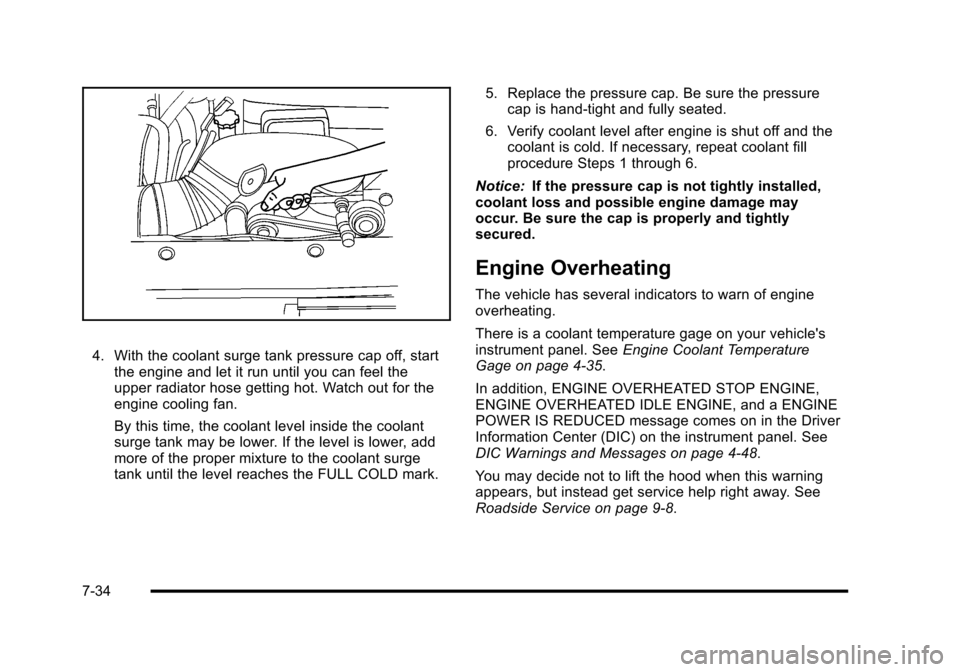
4. With the coolant surge tank pressure cap off, startthe engine and let it run until you can feel theupper radiator hose getting hot. Watch out for theengine cooling fan.
By this time, the coolant level inside the coolantsurge tank may be lower. If the level is lower, addmore of the proper mixture to the coolant surgetank until the level reaches the FULL COLD mark.
5. Replace the pressure cap. Be sure the pressurecap is hand-tight and fully seated.
6. Verify coolant level after engine is shut off and thecoolant is cold. If necessary, repeat coolant fillprocedure Steps 1 through 6.
Notice:If the pressure cap is not tightly installed,coolant loss and possible engine damage mayoccur. Be sure the cap is properly and tightlysecured.
Engine Overheating
The vehicle has several indicators to warn of engineoverheating.
There is a coolant temperature gage on your vehicle'sinstrument panel. SeeEngine Coolant TemperatureGage on page 4!35.
In addition, ENGINE OVERHEATED STOP ENGINE,ENGINE OVERHEATED IDLE ENGINE, and a ENGINEPOWER IS REDUCED message comes on in the DriverInformation Center (DIC) on the instrument panel. SeeDIC Warnings and Messages on page 4!48.
You may decide not to lift the hood when this warningappears, but instead get service help right away. SeeRoadside Service on page 9!8.
7-34
Page 481 of 616

If you do decide to lift the hood , make sure the vehicleis parked on a level surface.
Then check to see if the engine cooling fans arerunning. If the engine is overheating, both fans shouldbe running. If they are not, do not continue to run theengine and have the vehicle serviced.
Notice:Engine damage from running your enginewithout coolant is not covered by your warranty.SeeOverheated Engine Protection Operating Modeon page 7!37for information on driving to a safeplace in an emergency.
Notice:If the engine catches fire while driving withno coolant, the vehicle can be badly damaged. Thecostly repairs would not be covered by the vehiclewarranty. SeeOverheated Engine ProtectionOperating Modeon page 7!37for information ondriving to a safe place in an emergency.
If Steam Is Coming From The Engine
Compartment
{WARNING:
Steam from an overheated engine can burn you
badly, even if you just open the hood. Stay away
from the engine if you see or hear steam coming
from it. Turn it off and get everyone away from the
vehicle until it cools down. Wait until there is no
sign of steam or coolant before you open
the hood.
If you keep driving when the vehicles engine is
overheated, the liquids in it can catch fire. You or
others could be badly burned. Stop the engine if it
overheats, and get out of the vehicle until the
engine is cool.
SeeOverheated Engine Protection Operating
Modeon page 7!37for information on driving to
a safe place in an emergency.
7-35
Page 482 of 616
If No Steam Is Coming From The
Engine Compartment
The ENGINE OVERHEATED STOP ENGINE or theENGINE OVERHEATED IDLE ENGINE message, alongwith a low coolant condition, can indicate a seriousproblem.
If you get an engine overheat warning, but see or hearno steam, the problem may not be too serious.Sometimes the engine can get a little too hot when you:
.Climb a long hill on a hot day.
.Stop after high-speed driving.
.Idle for long periods in traffic.
.Tow a trailer. SeeTowing a Trailer on page 6!42.
If you get the ENGINE OVERHEATED STOP ENGINEor the ENGINE OVERHEATED IDLE ENGINE messagewith no sign of steam, try this for a minute or so:
If the overheat warning is displayed with no sign ofsteam:
1. Turn the air conditioning off.
2. Turn the heater on to the highest temperature andto the highest fan speed. Open the windows asnecessary.
3. In heavy traffic, let the engine idle in N (Neutral)while stopped. If it is safe to do so, pull off theroad, shift to P (Park) or N (Neutral) and let theengine idle.
If the temperature overheat gage is no longer in theoverheat zone or an overheat warning no longerdisplays, the vehicle can be driven. Continue to drivethe vehicle slow for about 10 minutes. Keep a safevehicle distance from the car in front of you. If thewarning does not come back on, continue to drivenormally.
If the warning continues, pull over, stop, and park thevehicle right away.
If there is no sign of steam, idle the engine forfive minutes while parked. If the warning is stilldisplayed, turn off the engine until it cools down. Also,see“Overheated Engine Protection Operating Mode”later in this section.
7-36