ECU CADILLAC ESCALADE 2010 3.G Service Manual
[x] Cancel search | Manufacturer: CADILLAC, Model Year: 2010, Model line: ESCALADE, Model: CADILLAC ESCALADE 2010 3.GPages: 616, PDF Size: 39.41 MB
Page 155 of 616
Engine Coolant Heater
The engine coolant heater can provide easier startingand better fuel economy during engine warm-up in coldweather conditions at or below!18°C (0°F). Vehicleswith an engine heater should be plugged in at leastfour hours before starting. An internal thermostat inthe plug-end of the cord may exist which will preventengine coolant heater operation at temperaturesabove!18°C (0°F).
To Use the Engine Coolant Heater
1. Turn off the engine.
2. Open the hood and unwrap the electrical cord.The cord is secured to the Engine CompartmentFuse Block with a clip. Carefully remove the wiretie which secures the electrical cord. Do not cut theelectrical cord.
3. Plug the cord into a normal, grounded 110-voltAC outlet.
{WARNING:
Plugging the cord into an ungrounded outlet could
cause an electrical shock. Also, the wrong kind of
extension cord could overheat and cause a fire.
You could be seriously injured. Plug the cord into
a properly grounded three-prong 110-volt AC
outlet. If the cord will not reach, use a heavy-duty
three-prong extension cord rated for at least
15 amps.
4. Before starting the engine, be sure to unplug andstore the cord as it was before to keep it away frommoving engine parts. If you do not, it could bedamaged.
The length of time the heater should remain plugged independs on several factors. Ask a dealer/retailer in thearea where you will be parking the vehicle for the bestadvice on this.
3-31
Page 179 of 616
When the System Does Not Seem To
Work Properly
The rear vision camera system might not work properlyor display a clear image if:
.The RVC is turned off. See“Turning the RearCamera System On or Off”earlier in this section.
.It is dark.
.The sun or the beam of headlights is shiningdirectly into the camera lens.
.Ice, snow, mud, or anything else builds up on thecamera lens. Clean the lens, rinse it with water,and wipe it with a soft cloth.
.The back of the vehicle is in an accident, theposition and mounting angle of the camera canchange or the camera can be affected. Be sure tohave the camera and its position and mountingangle checked at your dealer/retailer.
Universal Home Remote
System
SeeRadio Frequency Statementon page 9!20forinformation regarding Part 15 of the FederalCommunications Commission (FCC) Rules andRSS-210/211 of Industry and Science Canada.
Universal Home Remote System
Operation (With Three Round LED)
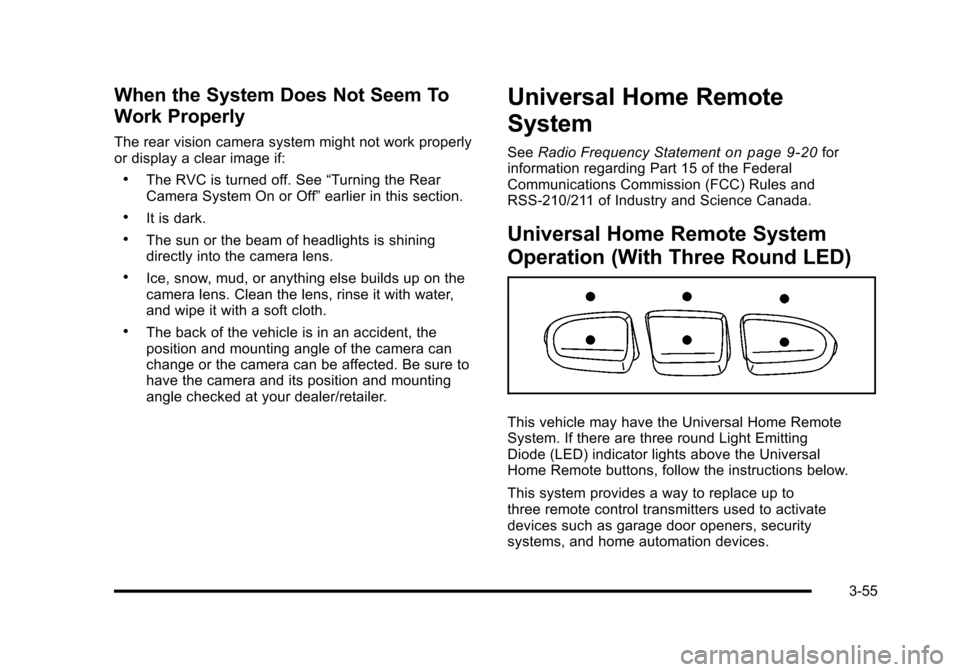
This vehicle may have the Universal Home RemoteSystem. If there are three round Light EmittingDiode (LED) indicator lights above the UniversalHome Remote buttons, follow the instructions below.
This system provides a way to replace up tothree remote control transmitters used to activatedevices such as garage door openers, securitysystems, and home automation devices.
3-55
Page 181 of 616
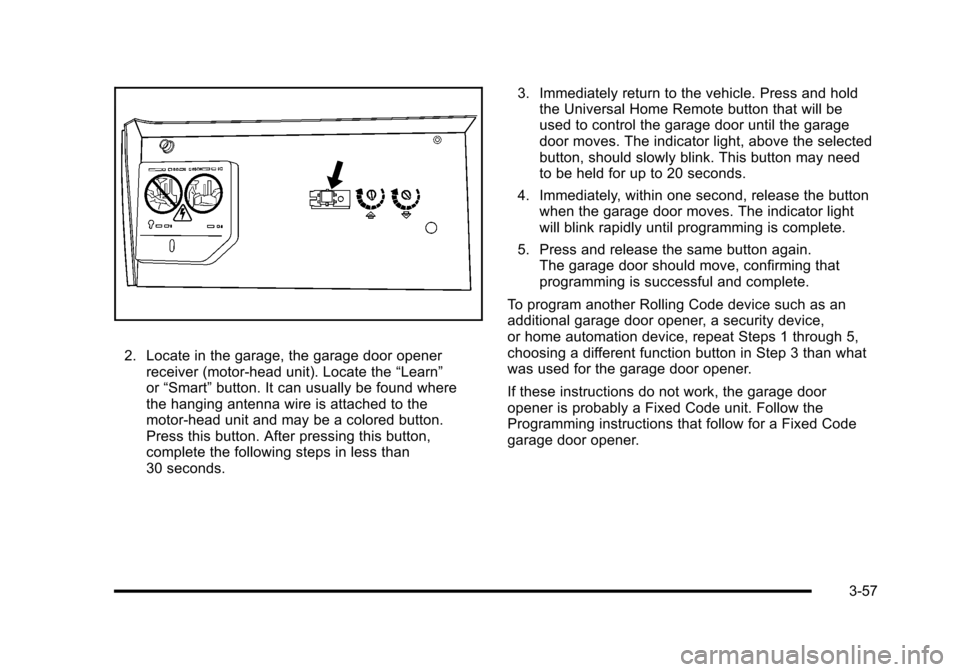
2. Locate in the garage, the garage door openerreceiver (motor-head unit). Locate the“Learn”or“Smart”button. It can usually be found wherethe hanging antenna wire is attached to themotor-head unit and may be a colored button.Press this button. After pressing this button,complete the following steps in less than30 seconds.
3. Immediately return to the vehicle. Press and holdthe Universal Home Remote button that will beused to control the garage door until the garagedoor moves. The indicator light, above the selectedbutton, should slowly blink. This button may needto be held for up to 20 seconds.
4. Immediately, within one second, release the buttonwhen the garage door moves. The indicator lightwill blink rapidly until programming is complete.
5. Press and release the same button again.The garage door should move, confirming thatprogramming is successful and complete.
To program another Rolling Code device such as anadditional garage door opener, a security device,or home automation device, repeat Steps 1 through 5,choosing a different function button in Step 3 than whatwas used for the garage door opener.
If these instructions do not work, the garage dooropener is probably a Fixed Code unit. Follow theProgramming instructions that follow for a Fixed Codegarage door opener.
3-57
Page 185 of 616
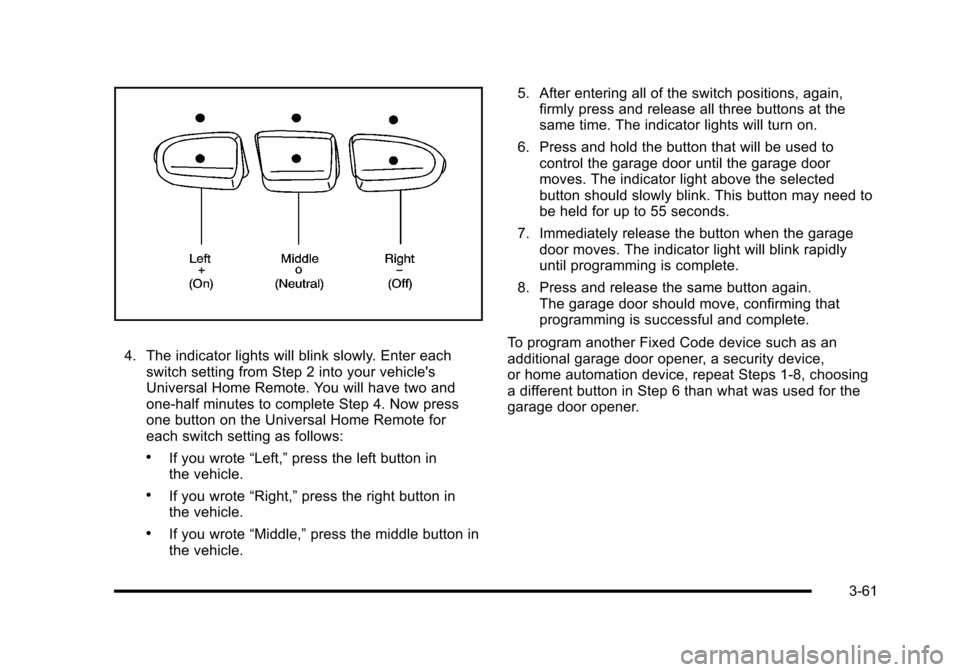
4. The indicator lights will blink slowly. Enter eachswitch setting from Step 2 into your vehicle'sUniversal Home Remote. You will have two andone-half minutes to complete Step 4. Now pressone button on the Universal Home Remote foreach switch setting as follows:
.If you wrote“Left,”press the left button inthe vehicle.
.If you wrote“Right,”press the right button inthe vehicle.
.If you wrote“Middle,”press the middle button inthe vehicle.
5. After entering all of the switch positions, again,firmly press and release all three buttons at thesame time. The indicator lights will turn on.
6. Press and hold the button that will be used tocontrol the garage door until the garage doormoves. The indicator light above the selectedbutton should slowly blink. This button may need tobe held for up to 55 seconds.
7. Immediately release the button when the garagedoor moves. The indicator light will blink rapidlyuntil programming is complete.
8. Press and release the same button again.The garage door should move, confirming thatprogramming is successful and complete.
To program another Fixed Code device such as anadditional garage door opener, a security device,or home automation device, repeat Steps 1-8, choosinga different button in Step 6 than what was used for thegarage door opener.
3-61
Page 188 of 616
Center Console Storage
A console compartment is located between thebucket seats.
The console has both an upper and lower storage binaccessed by lifting up on the latches located at the frontof the console lid.
The console may have an accessory power outletinside. SeeAccessory Power Outlet(s) on page 4!19.
The rear of the console also has a cupholder thatswings down for the rear seat passengers to use.
Assist Handles
Assist handles located above the rear passenger doorscan be used when getting out of the vehicle. Pull thehandles downward to use them.
Garment Hooks
There are garment hooks located on the assist handles.
Roof Rack System
{WARNING:
If something is carried on top of the vehicle that is
longer or wider than the roof rack—like paneling,
plywood, or a mattress—the wind can catch it
while the vehicle is being driven. The item being
carried could be violently torn off, and this could
cause a collision, and damage the vehicle. Never
carry something longer or wider than the roof rack
on top of the vehicle unless using a GM Certified
accessory carrier.
For vehicles with a roof rack, the rack can be used toload items. For roof racks that do not have crossrailsincluded, GM Certified crossrails can be purchased asan accessory. See your dealer/retailer for additionalinformation.
For vehicles with crossrails, they can be movedback and forth to help secure cargo. To adjust them,turn the knob located at each end of the crossrailcounterclockwise until the crossrail can move freely.To secure the crossrail, turn the knob located at eachend of the crossrail clockwise until tightened. Tie theload to the siderails or siderail supports.
3-64
Page 189 of 616
Notice:Loading cargo on the roof rack that weighsmore than 91 kg (200 lbs) or hangs over the rear orsides of the vehicle may damage the vehicle. Loadcargo so that it rests evenly between the crossrails,making sure to fasten cargo securely.
To prevent damage or loss of cargo when driving,check to make sure crossrails and cargo are securelyfastened. Loading cargo on the roof rack will make thevehicle’s center of gravity higher. Avoid high speeds,sudden starts, sharp turns, sudden braking or abruptmaneuvers, otherwise it may result in loss of control.If driving for a long distance, on rough roads, or at highspeeds, occasionally stop the vehicle to make sure thecargo remains in its place.
Do not exceed the maximum vehicle capacity whenloading the vehicle. For more information on vehiclecapacity and loading, seeLoading the Vehicleonpage 6!32.
To prevent damage or loss of cargo, check now andthen to make sure the luggage and cargo are stillsecurely fastened.
Be sure the cargo is properly loaded.
.If small heavy objects are placed on the roof, placethe load in the area over the rear wheels (behindthe rear side door on extended models). If needed,cut a piece of 3/8 inch plywood to fit inside thecrossrails and siderails to spread the load.If plywood is used, tie it to the siderail supports.
.Tie the load to the crossrails or the siderailsupports. Use the crossrails only to keep theload from sliding. To move the crossrails, pull outon the latch release handle at each end. Slide thecrossrail to the desired position balancing the forceside to side. Push the release handle back into thelatched position and slide the crossrail back andforth slightly to be sure the latch snaps securelyinto place.
.If needed to carry long items, move the crossrailsas far apart as they will go. Tie the load to thecrossrails and the siderails or siderail supports.Also tie the load to the bumpers. Do not tie theload so tightly that the crossrails or siderailsare damaged.
.After moving a crossrail, be sure it is securelylocked into the siderail.
A Center High-Mounted Stoplamp (CHMSL) is locatedabove the glass or above the rear load doors.
If items are loaded on the roof of the vehicle, careshould be taken not to block or damage theCHMSL unit.
3-65
Page 194 of 616
Section 4 Instrument Panel
StabiliTrak®Indicator Light . . . . . . . . . . . . . . . . . . . . . 4-34Engine Coolant Temperature Gage . . . . . . . . . . . . 4-35Tire Pressure Light . . . . . . . . . . . . . . . . . . . . . . . . . . . . 4-35Malfunction Indicator Lamp . . . . . . . . . . . . . . . . . . . . 4-36Oil Pressure Light . . . . . . . . . . . . . . . . . . . . . . . . . . . . . 4-38Security Light . . . . . . . . . . . . . . . . . . . . . . . . . . . . . . . . . . 4-39Fog Lamp Light . . . . . . . . . . . . . . . . . . . . . . . . . . . . . . . . 4-39Lights On Reminder . . . . . . . . . . . . . . . . . . . . . . . . . . . 4-39Cruise Control Light . . . . . . . . . . . . . . . . . . . . . . . . . . . 4-39Highbeam On Light . . . . . . . . . . . . . . . . . . . . . . . . . . . . 4-40Tow/Haul Mode Light . . . . . . . . . . . . . . . . . . . . . . . . . . 4-40Fuel Gage . . . . . . . . . . . . . . . . . . . . . . . . . . . . . . . . . . . . . 4-40
Driver Information Center (DIC). . . . . . . . . . . . . . . . . . 4-41DIC Operation and Displays . . . . . . . . . . . . . . . . . . . 4-41DIC Compass . . . . . . . . . . . . . . . . . . . . . . . . . . . . . . . . . . 4-47DIC Warnings and Messages . . . . . . . . . . . . . . . . . . 4-48DIC Vehicle Customization . . . . . . . . . . . . . . . . . . . . 4-57
Audio System(s). . . . . . . . . . . . . . . . . . . . . . . . . . . . . . . . . . 4-67Bluetooth®. . . . . . . . . . . . . . . . . . . . . . . . . . . . . . . . . . . . . 4-67Rear Seat Entertainment (RSE) System(Overhead) . . . . . . . . . . . . . . . . . . . . . . . . . . . . . . . . . . 4-77Rear Seat Entertainment (RSE) System(Headrest DVD) . . . . . . . . . . . . . . . . . . . . . . . . . . . . . 4-86Rear Seat Audio (RSA) . . . . . . . . . . . . . . . . . . . . . . . 4-103Theft-Deterrent Feature . . . . . . . . . . . . . . . . . . . . . . 4-105Audio Steering Wheel Controls . . . . . . . . . . . . . . . 4-105Radio Reception . . . . . . . . . . . . . . . . . . . . . . . . . . . . . . 4-107Rear Side Window Antenna . . . . . . . . . . . . . . . . . . 4-108XM™Satellite Radio Antenna System . . . . . . . . 4-108
4-2
Page 207 of 616
Headlamps on Reminder
If a door is open, a reminder chime sounds when theheadlamps or parking lamps are manually turned onand the key is out of the ignition. To turn off the chime,turn the headlamp switch to off or AUTO and then backon, or close and re-open the door. In the AUTO mode,the headlamps turn off once the ignition is in LOCK/OFFor remains on until the headlamp delay ends (if enabledin the DIC). See“Exit Lighting”underDIC VehicleCustomization on page 4!57.
Daytime Running Lamps (DRL)
Daytime Running Lamps (DRL) can make it easier forothers to see the front of your vehicle during the day.Fully functional daytime running lamps are required onall vehicles first sold in Canada.
The DRL system comes on when the followingconditions are met:
.The ignition is on.
.The exterior lamps control is in AUTO.
.The engine is running.
.The light sensor determines it is daytime.
When the DRL system is on, only the DRL lamps areon. The taillamps, sidemarker, instrument panel lights,and other lamps will not be on.
When it begins to get dark, the automatic headlampsystem switches from DRL to the headlamps.
To turn off the DRL lamps, turn the exterior lampscontrol to the OFF position and then release. Forvehicles first sold in Canada, the transmission must bein the P (Park) position, before the DRL lamps can beturned off.
Automatic Headlamp System
When it is dark enough outside, the automaticheadlamp system turns on the headlamps at the normalbrightness, along with the taillamps, sidemarker, parkinglamps, and the instrument panel lights. The radio lightswill also be dim.
To turn off the automatic headlamp system, turn theexterior lamps switch to the off position and thenrelease it. For vehicles first sold in Canada, thetransmission must be in the P (Park) position, beforethe automatic headlamp system can be turned off.
The vehicle has a light sensor located on the top of theinstrument panel in the defroster grille that regulateswhen the automatic headlamps turn on. Do not coverthe sensor or the headlamps will come on whenever theignition is on.
The system may also turn on the headlamps whendriving through a parking garage, heavy overcastweather, or a tunnel. This is normal.
4-15
Page 208 of 616
There is a delay in the transition between the daytimeand nighttime operation of the Daytime Running Lamps(DRL) and the automatic headlamp systems so thatdriving under bridges or bright overhead street lightsdoes not affect the system. The DRL and automaticheadlamp system is only affected when the light sensordetects a change in lighting lasting longer than thedelay.
If the vehicle is started in a dark garage, the automaticheadlamp system will come on immediately. Once thevehicle leaves the garage, it takes approximatelyone minute for the automatic headlamp system tochange to DRL if it is bright enough outside. During thatdelay, the instrument panel cluster may not be as brightas usual. Make sure the instrument panel brightnesscontrol is in the full bright position. SeeInstrumentPanel Brightness on page 4!16.
To idle the vehicle with the automatic headlamp systemoff, turn the control to the off position.
The headlamps will also stay on after you exit thevehicle. This feature can be programmed using theDriver Information Center (DIC). SeeDIC VehicleCustomization on page 4!57.
The regular headlamp system can be turned on whenneeded.
Fog Lamps
For vehicles with fog lamps, the control is located nextto the exterior lamps control on the instrument panel tothe left of the steering column.
#(Fog Lamps):Press the button to turn the fog lampson or off. A indicator light comes on in the instrumentpanel cluster. The ignition must be in the ON/RUNposition for the fog lamps to come on.
When the fog lamps are turned on, the headlampsautomatically turn on.
When the headlamps are changed to high-beam, thefog lamps also go off. When the high-beam headlampsgo off, the fog lamps will come on again.
Some localities have laws that require the headlamps tobe on along with the fog lamps.
Instrument Panel Brightness
D(Instrument Panel Brightness) :This featurecontrols the brightness of the instrument panel lightsand is located next to the exterior lamp control.
Push the knob to extend out and then it can be turned.
Turn the knob clockwise or counterclockwise to brightenor dim the instrument panel lights. Turning the knob tothe farthest clockwise position turns on the dome lamps.
4-16
Page 212 of 616
Ashtray(s) and Cigarette Lighter
The front ashtray and cigarette lighter are located in thecenter console near the cupholders, if the vehicle hasthem. Press on the access door to open it and use theashtray and lighter.
Notice:If papers, pins, or other flammable items areput in the ashtray, hot cigarettes or other smokingmaterials could ignite them and possibly damagethe vehicle. Never put flammable items in theashtray.
To remove the ashtray, pull it from the center console.Slide it back in and push down to be sure it is secure.
To use the cigarette lighter, push it in all the way, and letgo. When it is ready, it will pop back out by itself.
Notice:Holding a cigarette lighter in while it isheating does not let the lighter back away from theheating element when it is hot. Damage fromoverheating can occur to the lighter or heatingelement, or a fuse could be blown. Do not hold acigarette lighter in while it is heating.
Analog Clock
The analog clock is not connected with any othervehicle system and runs by itself.
To adjust the clock, do the following:
1. Locate the adjustment button, near the lower leftcorner of the clock.
2. Push and hold the adjustment button to advancethe clock hands. Holding the button down willcause the clock to advance faster. Release thebutton before you get to the desired time.
3. Push and release the button to increase the timeby one minute increments until the desired time isreached.
Climate Controls
Dual Automatic Climate Control
System
The heating, cooling, and ventilation in the vehicle canbe controlled with this system. The vehicle also has aflow-through ventilation system described later in thissection.
4-20