ECU CADILLAC ESCALADE 2010 3.G Repair Manual
[x] Cancel search | Manufacturer: CADILLAC, Model Year: 2010, Model line: ESCALADE, Model: CADILLAC ESCALADE 2010 3.GPages: 616, PDF Size: 39.41 MB
Page 368 of 616

No Artist Info :No artist information is available.The system is working properly.
No Title Info :No song title information is available.The system is working properly.
No CAT Info :No category information is available.The system is working properly.
CAT Not Found :There are no channels available forthe selected category. The system is working properly.
No Information :No text or informational messages areavailable. The system is working properly.
XM Theftlocked :The XM™receiver may havepreviously been in another vehicle. For securitypurposes, XM™receivers cannot be swapped betweenvehicles. If this message is received after having yourvehicle serviced, check with your dealer/retailer.
XM Radio ID :If tuned to channel 0, this message willalternate with the XM™Radio eight digit radio ID label.This label is needed to activate the service.
Unknown :If this message is received when tuned tochannel 0, there may be a receiver fault. Consult withyour dealer/retailer.
Check XM Receiver :If this message does not clearwithin a short period of time, the receiver may have afault. Consult with your dealer/retailer.
CD Player
The player can be used for CD, MP3, DVD audio, andas a DVD video player. SeeDVD Playeron page 5!75for more information about DVD audio and video.
Six-Disc CD Player
While playing a CD, the navigation system is available.
When you insert a CD, the CD tab displays. If a DSPsetting is selected for the CD, it activates each time youplay a CD.
If the ignition or radio is turned off with a CD in theplayer, it stays in the player. When the ignition or radiois turned on, the CD starts playing where it stopped, if itwas the last selected audio source.
As each new track starts to play, the track numberdisplays.
If an error appears on the display, see“CD Messages”later in this section.
If viewing a map screen, touch the CD screen button.The display will split between the audio screen and themap screen. If you do not want to view a split screen oryou are not on a map screen, press the AUDIO keythen press the AUDIO key repeatedly until CD isselected or touch the CD screen button.
5-68
Page 387 of 616
.When the system recognizes the command thesystem does one of the following:
!Perform the function.
!Ask you to confirm your choice.
!Issue an error message“Did not recognize.Voice Recognition Canceled.”
.If you experience difficulty with the systemrecognizing a command, try saying it more softly,and wait for a few seconds after the beep,or repeat the command.
.Background noise may cause voice commands tobe misunderstood, including airflow noisefrom wind.
.To use the voice recognition system, the map DVDmust be loaded and the navigation system mustbe on.
This system is able to recognize commands in threedifferent languages. The system only recognizescommands based on the language selected from theDriver Information Center (DIC). SeeDIC VehicleCustomizationon page 4!57for more information.
Voice Recognition Commands
The following list shows all of the voice commandsavailable for the navigation system with a briefdescription of each. The commands are listed withthe optional words in brackets. To use the voicecommands, refer to the instructions listed previously.
Voice Tag Commands
The following are voice tag commands that can beaccessed by clearly stating the commands exactly asthey are written. There are up to 40 voice tag entries fordestinations.
Navigation go to [destination], navigation select :These commands instruct the system to select adestination saved under the voice tag you have stored.The system prompts for a destination name then waitsfor you to state the name.
If not currently driving on a route, the systemautomatically creates the voice tag destination as thefinal destination. If driving on a route, the systemautomatically creates the voice tag destination as astopover. Up to three stopovers can be created.
5-87
Page 400 of 616
Steering
Power Steering
If the vehicle is a Two!mode Hybrid, see the Two!modeHybrid manual for more information.
If power steering assist is lost because the engine stopsor the system is not functioning, the vehicle can besteered but it will take more effort.
Steering Tips
It is important to take curves at a reasonable speed.
Traction in a curve depends on the condition of the tiresand the road surface, the angle at which the curve isbanked, and vehicle speed. While in a curve, speed isthe one factor that can be controlled.
If there is a need to reduce speed, do it before enteringthe curve, while the front wheels are straight.
Try to adjust the speed so you can drive through thecurve. Maintain a reasonable, steady speed. Wait toaccelerate until out of the curve, and then accelerategently into the straightaway.
Steering in Emergencies
There are times when steering can be more effectivethan braking. For example, you come over a hill andfind a truck stopped in your lane, or a car suddenly pullsout from nowhere, or a child darts out from betweenparked cars and stops right in front of you. Theseproblems can be avoided by braking—if you can stopin time. But sometimes you cannot stop in time becausethere is no room. That is the time for evasiveaction—steering around the problem.
The vehicle can perform very well in emergencieslike these. First, apply the brakes. SeeBrakingonp a g e 6!4. It is better to remove as much speed aspossible from a collision. Then steer around theproblem, to the left or right depending on thespace available.
6-10
Page 405 of 616
Loading Your Vehicle for Off-Road
Driving
{WARNING:
.Cargo on the load floor piled higher than the
seatbacks can be thrown forward during a
sudden stop. You or your passengers could
be injured. Keep cargo below the top of
the seatbacks.
.Unsecured cargo on the load floor can be
tossed about when driving over rough terrain.
You or your passengers can be struck by
flying objects. Secure the cargo properly.
.Heavy loads on the roof raise the vehicle's
center of gravity, making it more likely to roll
over. You can be seriously or fatally injured if
the vehicle rolls over. Put heavy loads inside
the cargo area, not on the roof. Keep cargo
in the cargo area as far forward and low
as possible.
There are some important things to remember abouthow to load your vehicle.
.The heaviest things should be on the floor, forwardof the rear axle. Put heavier items as far forwardas you can.
.Be sure the load is properly secured, so things arenot tossed around.
You will find other important information underLoadingthe Vehicleon page 6!32andTires on page 7!58.
Environmental Concerns
Off-road driving can provide wholesome and satisfyingrecreation. However, it also raises environmentalconcerns. We recognize these concerns and urgeevery off-roader to follow these basic rules forprotecting the environment:
.Always use established trails, roads, and areasthat have been specially set aside for publicoff-road recreational driving and obey allposted regulations.
.Avoid any driving practice that could damageshrubs, flowers, trees, or grasses or disturbwildlife. This includes wheel-spinning, breakingdown trees, or unnecessary driving throughstreams or over soft ground.
6-15
Page 427 of 616
If you put things inside your vehicle—like
suitcases, tools, packages, or anything
else—they will go as fast as the vehicle goes.
If you have to stop or turn quickly, or if there is a
crash, they will keep going.
{WARNING:
Things you put inside your vehicle can strike
and injure people in a sudden stop or turn,
or in a crash.
.Put things in the cargo area of your
vehicle. Try to spread the weight evenly.
.Never stack heavier things, like
suitcases, inside the vehicle so that some
of them are above the tops of the seats.
.Do not leave an unsecured child restraint
in your vehicle.
.When you carry something inside the
vehicle, secure it whenever you can.
.Do not leave a seat folded down unless
you need to.
There is also important loading information for
off-road driving in this manual. See“Loading Your
Vehicle for Off-Road Driving”underOff-Road
Drivingon page 6!13.
Add-On Equipment
When you carry removable items, you may need
to put a limit on how many people you can carry
inside your vehicle. Be sure to weigh your vehicle
before you buy and install the new equipment.
Notice :Overloading the vehicle may cause
damage. Repairs would not be covered by the
vehicle warranty. Do not overload the vehicle.
Remember not to exceed the Gross Axle Weight
Rating (GAWR) of the front or rear axle.
Automatic Level Control
The automatic level control rear suspension
comes as a part of the Road Sensing Suspension.
SeeRoad Sensing Suspensionon page 6!9.
This type of level control is fully automatic and will
provide a better leveled riding position as well as
better handling under a variety of passenger and
loading conditions. An air compressor connected
to the rear shocks will raise or lower the rear of
the vehicle to maintain proper vehicle height.
6-37
Page 431 of 616
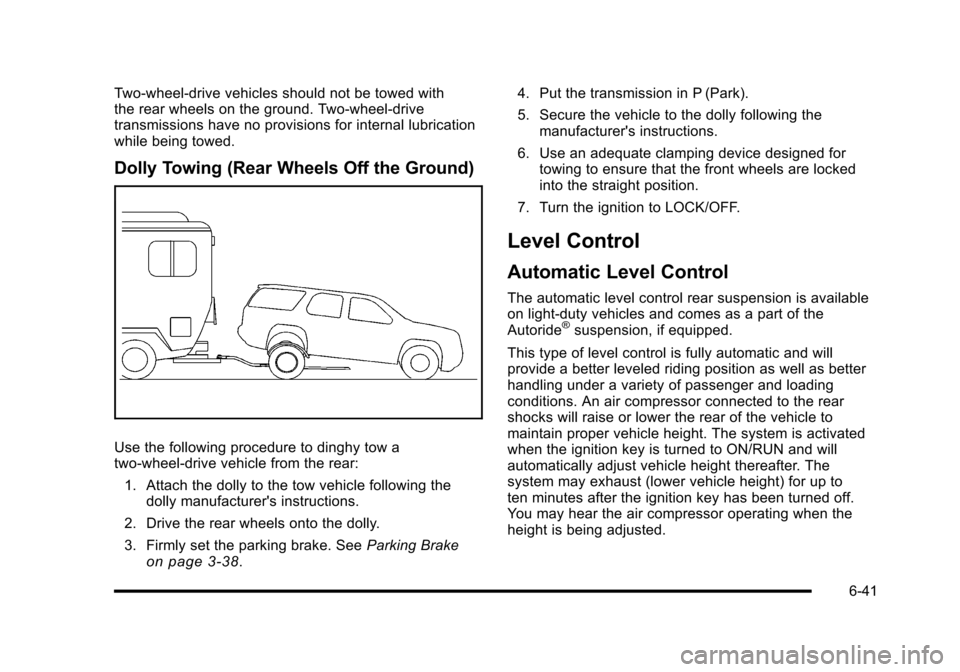
Two-wheel-drive vehicles should not be towed withthe rear wheels on the ground. Two-wheel-drivetransmissions have no provisions for internal lubricationwhile being towed.
Dolly Towing (Rear Wheels Off the Ground)
Use the following procedure to dinghy tow atwo-wheel-drive vehicle from the rear:
1. Attach the dolly to the tow vehicle following thedolly manufacturer's instructions.
2. Drive the rear wheels onto the dolly.
3. Firmly set the parking brake. SeeParking Brakeon page 3!38.
4. Put the transmission in P (Park).
5. Secure the vehicle to the dolly following themanufacturer's instructions.
6. Use an adequate clamping device designed fortowing to ensure that the front wheels are lockedinto the straight position.
7. Turn the ignition to LOCK/OFF.
Level Control
Automatic Level Control
The automatic level control rear suspension is availableon light!duty vehicles and comes as a part of theAutoride®suspension, if equipped.
This type of level control is fully automatic and willprovide a better leveled riding position as well as betterhandling under a variety of passenger and loadingconditions. An air compressor connected to the rearshocks will raise or lower the rear of the vehicle tomaintain proper vehicle height. The system is activatedwhen the ignition key is turned to ON/RUN and willautomatically adjust vehicle height thereafter. Thesystem may exhaust (lower vehicle height) for up toten minutes after the ignition key has been turned off.You may hear the air compressor operating when theheight is being adjusted.
6-41
Page 434 of 616
Weight of the Trailer
How heavy can a trailer safely be?
It depends on how the rig is used. Speed, altitude, roadgrades, outside temperature and how much the vehicleis used to pull a trailer are all important. It can dependon any special equipment on the vehicle, and theamount of tongue weight the vehicle can carry. See“Weight of the Trailer Tongue”later in this section formore information.
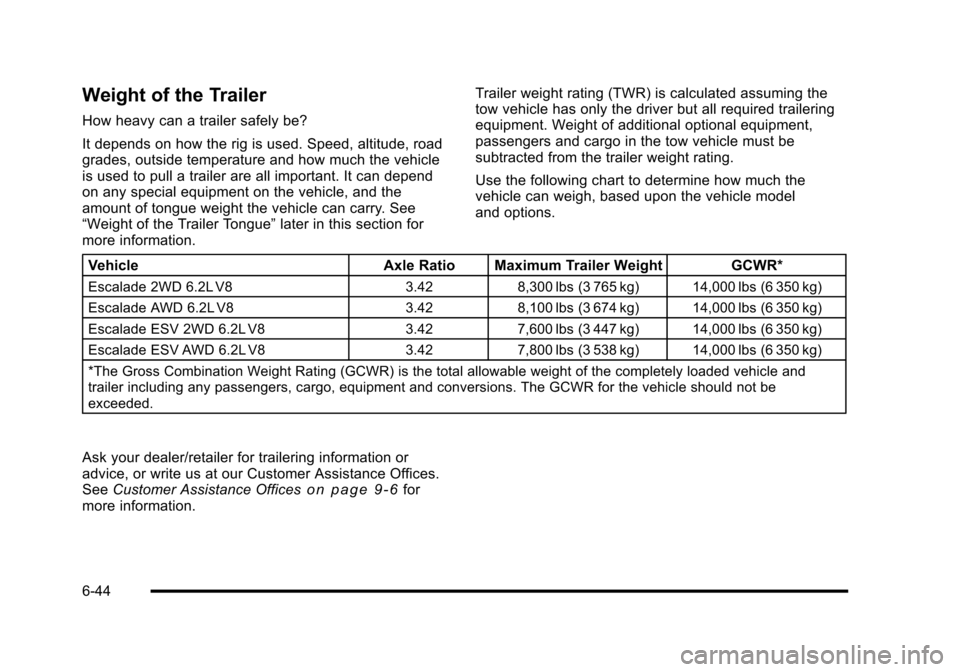
Trailer weight rating (TWR) is calculated assuming thetow vehicle has only the driver but all required traileringequipment. Weight of additional optional equipment,passengers and cargo in the tow vehicle must besubtracted from the trailer weight rating.
Use the following chart to determine how much thevehicle can weigh, based upon the vehicle modeland options.
VehicleAxle Ratio Maximum Trailer WeightGCWR*
Escalade 2WD 6.2L V83.428,300 lbs (3 765 kg)14,000 lbs (6 350 kg)
Escalade AWD 6.2L V83.428,100 lbs (3 674 kg)14,000 lbs (6 350 kg)
Escalade ESV 2WD 6.2L V83.427,600 lbs (3 447 kg)14,000 lbs (6 350 kg)
Escalade ESV AWD 6.2L V83.427,800 lbs (3 538 kg)14,000 lbs (6 350 kg)
*The Gross Combination Weight Rating (GCWR) is the total allowable weight of the completely loaded vehicle andtrailer including any passengers, cargo, equipment and conversions. The GCWR for the vehicle should not beexceeded.
Ask your dealer/retailer for trailering information oradvice, or write us at our Customer Assistance Offices.SeeCustomer Assistance Officeso n p a g e 9!6formore information.
6-44
Page 441 of 616
During the trip, check occasionally to be sure that theload is secure and the lamps and any trailer brakesstill work.
Following Distance
Stay at least twice as far behind the vehicle ahead asyou would when driving the vehicle without a trailer.This can help to avoid heavy braking and sudden turns.
Passing
More passing distance is needed when towing a trailer.The combination will not accelerate as quickly and islonger so it is necessary to go much farther beyond thepassed vehicle before returning to the lane.
Backing Up
Hold the bottom of the steering wheel with one hand.Then, to move the trailer to the left, move that hand tothe left. To move the trailer to the right, move your handto the right. Always back up slowly and, if possible,have someone guide you.
Making Turns
Notice:Making very sharp turns while traileringcould cause the trailer to come in contact with thevehicle. The vehicle could be damaged. Avoidmaking very sharp turns while trailering.
When turning with a trailer, make wider turns thannormal. Do this so the trailer will not strike softshoulders, curbs, road signs, trees or other objects.Avoid jerky or sudden maneuvers. Signal wellin advance.
If the trailer turn signal bulbs burn out, the arrowson the instrument panel will still flash for turns. It isimportant to check occasionally to be sure the trailerbulbs are still working.
6-51
Page 480 of 616
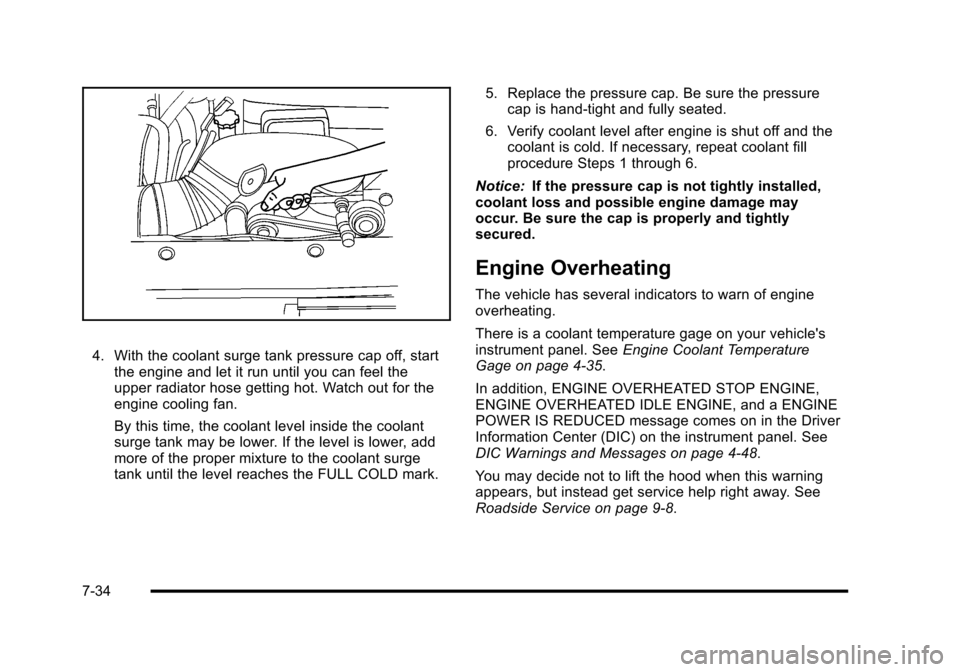
4. With the coolant surge tank pressure cap off, startthe engine and let it run until you can feel theupper radiator hose getting hot. Watch out for theengine cooling fan.
By this time, the coolant level inside the coolantsurge tank may be lower. If the level is lower, addmore of the proper mixture to the coolant surgetank until the level reaches the FULL COLD mark.
5. Replace the pressure cap. Be sure the pressurecap is hand-tight and fully seated.
6. Verify coolant level after engine is shut off and thecoolant is cold. If necessary, repeat coolant fillprocedure Steps 1 through 6.
Notice:If the pressure cap is not tightly installed,coolant loss and possible engine damage mayoccur. Be sure the cap is properly and tightlysecured.
Engine Overheating
The vehicle has several indicators to warn of engineoverheating.
There is a coolant temperature gage on your vehicle'sinstrument panel. SeeEngine Coolant TemperatureGage on page 4!35.
In addition, ENGINE OVERHEATED STOP ENGINE,ENGINE OVERHEATED IDLE ENGINE, and a ENGINEPOWER IS REDUCED message comes on in the DriverInformation Center (DIC) on the instrument panel. SeeDIC Warnings and Messages on page 4!48.
You may decide not to lift the hood when this warningappears, but instead get service help right away. SeeRoadside Service on page 9!8.
7-34
Page 518 of 616
Any time you notice unusual wear, rotate your
tires as soon as possible and check wheel
alignment. Also check for damaged tires or
wheels. SeeWhen It Is Time for New Tireson
page 7!73andWheel Replacementon page 7!77.
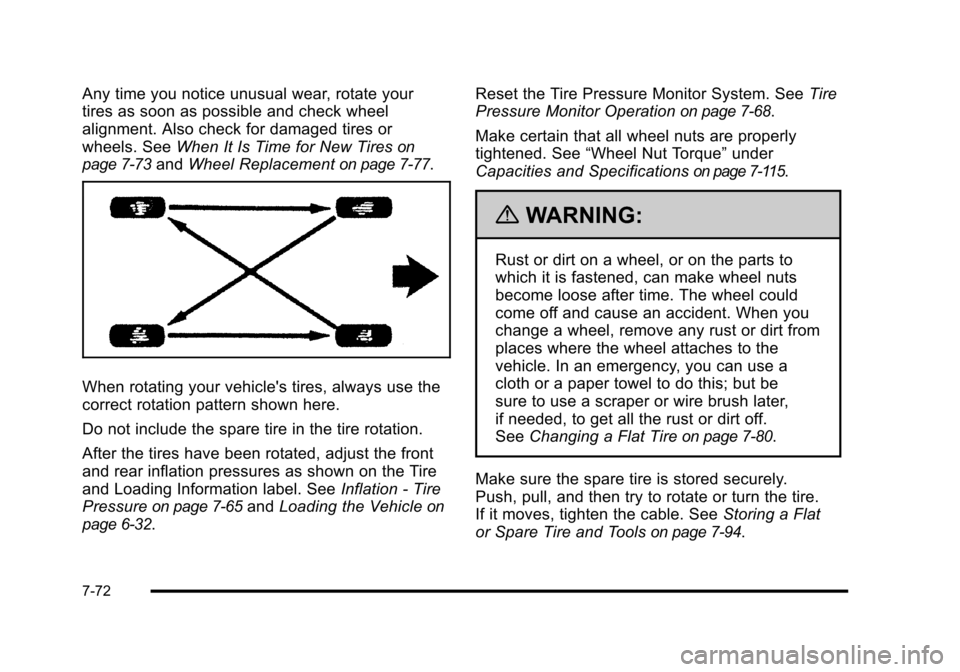
When rotating your vehicle's tires, always use the
correct rotation pattern shown here.
Do not include the spare tire in the tire rotation.
After the tires have been rotated, adjust the front
and rear inflation pressures as shown on the Tire
and Loading Information label. SeeInflation - Tire
Pressureon page 7!65andLoading the Vehicleon
page 6!32.
Reset the Tire Pressure Monitor System. SeeTire
Pressure Monitor Operationon page 7!68.
Make certain that all wheel nuts are properly
tightened. See“Wheel Nut Torque”under
Capacities and Specificationson page 7!115.
{WARNING:
Rust or dirt on a wheel, or on the parts to
which it is fastened, can make wheel nuts
become loose after time. The wheel could
come off and cause an accident. When you
change a wheel, remove any rust or dirt from
places where the wheel attaches to the
vehicle. In an emergency, you can use a
cloth or a paper towel to do this; but be
sure to use a scraper or wire brush later,
if needed, to get all the rust or dirt off.
SeeChanging a Flat Tireon page 7!80.
Make sure the spare tire is stored securely.
Push, pull, and then try to rotate or turn the tire.
If it moves, tighten the cable. SeeStoring a Flat
or Spare Tire and Toolson page 7!94.
7-72