ECU CADILLAC ESCALADE 2010 3.G Workshop Manual
[x] Cancel search | Manufacturer: CADILLAC, Model Year: 2010, Model line: ESCALADE, Model: CADILLAC ESCALADE 2010 3.GPages: 616, PDF Size: 39.41 MB
Page 231 of 616
If the light comes on and stays on, it means that oil isnot flowing through the engine properly. The vehiclecould be low on oil and it might have some othersystem problem.
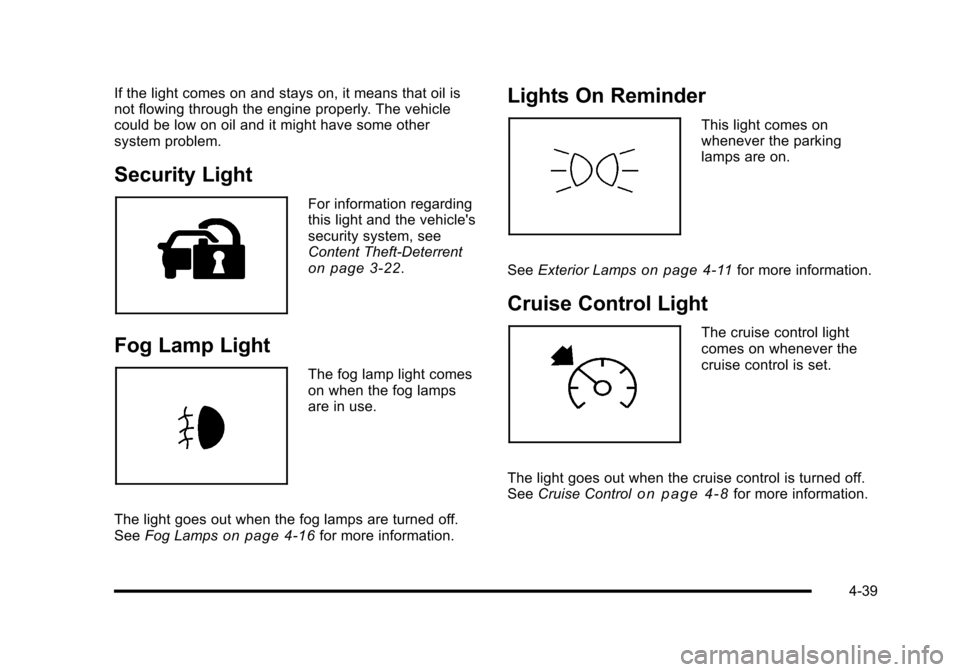
Security Light
For information regardingthis light and the vehicle'ssecurity system, seeContent Theft-Deterrenton page 3!22.
Fog Lamp Light
The fog lamp light comeson when the fog lampsare in use.
The light goes out when the fog lamps are turned off.SeeFog Lampson page 4!16for more information.
Lights On Reminder
This light comes onwhenever the parkinglamps are on.
SeeExterior Lampson page 4!11for more information.
Cruise Control Light
The cruise control lightcomes on whenever thecruise control is set.
The light goes out when the cruise control is turned off.SeeCruise Controlo n p a g e 4!8for more information.
4-39
Page 233 of 616
Here are some situations owners may experience withthe fuel gage. None of these indicate a problem with thefuel gage.
.At the gas station, the fuel pump shuts off beforethe gage reads full.
.It takes a little more or less fuel to fill up than thefuel gage indicated. For example, the gage mayhave indicated the tank was half full, but it actuallytook a little more or less than half the tank'scapacity to fill the tank.
.The gage goes back to empty when the ignition isturned off.
Driver Information Center (DIC)
Your vehicle has a Driver Information Center (DIC).
The DIC displays information about your vehicle. It alsodisplays warning messages if a system problem isdetected. The DIC also allows some features to becustomized. SeeDIC Vehicle Customizationonpage 4!57for more information.
All messages will appear in the DIC display located inthe center of the instrument panel cluster.
The DIC comes on when the ignition is on. After a shortdelay, the DIC will display the information that was lastdisplayed before the engine was turned off.
SeeDIC Operation and Displayson page 4!41andDIC Vehicle Customizationon page 4!57for thedisplays available.
DIC Operation and Displays
The DIC has different displays which can be accessedby pressing the DIC buttons located on the instrumentpanel, next to the steering wheel.
The DIC displays trip, fuel, and vehicle systeminformation, and warning messages if a system problemis detected. A digital speedometer also appears at thebottom of the DIC display. The digital speedometercan be enabled or disabled. See“DISPLAY DIGITALSPEED”underDIC Vehicle Customizationonpage 4!57for more information.
4-41
Page 234 of 616
DIC Buttons
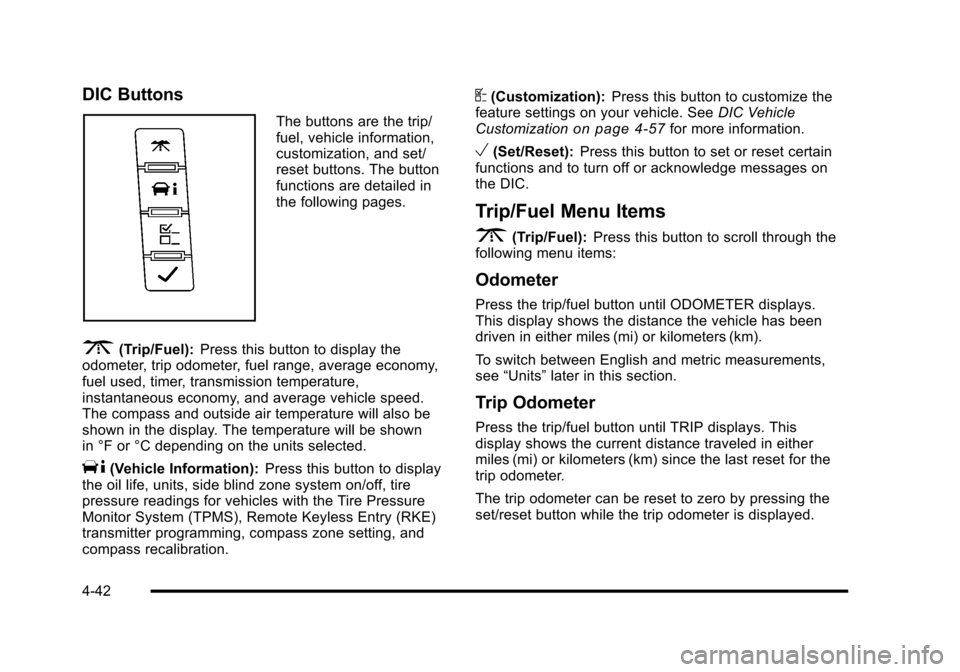
The buttons are the trip/fuel, vehicle information,customization, and set/reset buttons. The buttonfunctions are detailed inthe following pages.
3(Trip/Fuel):Press this button to display theodometer, trip odometer, fuel range, average economy,fuel used, timer, transmission temperature,instantaneous economy, and average vehicle speed.The compass and outside air temperature will also beshown in the display. The temperature will be shownin °F or °C depending on the units selected.
T(Vehicle Information):Press this button to displaythe oil life, units, side blind zone system on/off, tirepressure readings for vehicles with the Tire PressureMonitor System (TPMS), Remote Keyless Entry (RKE)transmitter programming, compass zone setting, andcompass recalibration.
U(Customization):Press this button to customize thefeature settings on your vehicle. SeeDIC VehicleCustomizationon page 4!57for more information.
V(Set/Reset):Press this button to set or reset certainfunctions and to turn off or acknowledge messages onthe DIC.
Trip/Fuel Menu Items
3(Trip/Fuel):Press this button to scroll through thefollowing menu items:
Odometer
Press the trip/fuel button until ODOMETER displays.This display shows the distance the vehicle has beendriven in either miles (mi) or kilometers (km).
To switch between English and metric measurements,see“Units”later in this section.
Trip Odometer
Press the trip/fuel button until TRIP displays. Thisdisplay shows the current distance traveled in eithermiles (mi) or kilometers (km) since the last reset for thetrip odometer.
The trip odometer can be reset to zero by pressing theset/reset button while the trip odometer is displayed.
4-42
Page 236 of 616
Transmission Temperature
Press the trip/fuel button until TRANS TEMP displays.This display shows the temperature of the automatictransmission fluid in either degrees Fahrenheit (°F) ordegrees Celsius (°C).
Instantaneous Economy
If your vehicle has this display, press the trip/fuel buttonuntil INST ECON displays. This display shows thecurrent fuel economy at a particular moment and willchange frequently as driving conditions change. Thisdisplay shows the instantaneous fuel economy in milesper gallon (mpg) or liters per 100 kilometers (L/100 km).Unlike average economy, this screen cannot be reset.
The display may also show if the vehicle is currentlyin V4, V6 or V8 mode.
Average Vehicle Speed
Press the trip/fuel button until AVERAGE SPEEDdisplays. This display shows the average speed inmiles per hour (MPH) or kilometers per hour (km/h).
Blank Display
This display shows no information.
Vehicle Information Menu Items
T(Vehicle Information):Press this button to scrollthrough the following menu items:
Oil Life
Press the vehicle information button until OIL LIFEREMAINING displays. This display shows an estimateof the oil's remaining useful life. If you see 99% OILLIFE REMAINING on the display, that means 99% ofthe current oil life remains. The engine oil life systemwill alert you to change the oil on a schedule consistentwith your driving conditions.
When the remaining oil life is low, the CHANGEENGINE OIL SOON message will appear on thedisplay. See“CHANGE ENGINE OIL SOON”underDICWarnings and Messageson page 4!48. You shouldchange the oil as soon as you can. SeeEngine Oilonpage 7!17. In addition to the engine oil life systemmonitoring the oil life, additional maintenance isrecommended in the Maintenance Schedule in thismanual. SeeScheduled Maintenanceo n p a g e 8!3formore information.
4-44
Page 281 of 616

STOPc:Press once to stop playing a DVD.
There is a pre-stop feature for DVD and video CD only.This feature resumes playback of the disc where it wasstopped. Press the stop button once during disc
playback andcdisplays on the DVD startup screen.
This icon disappears after a few seconds. Press thestop button a second time, or eject the disc, to cancelthe pre-stop feature and to clear the disc positionmemory.
SOURCE :Press to select between Monitor 3,Monitor 4, or the AV INPUT.
Each video display screen can be adjustedindependently, as well as display information from bothDVD players and both A/V inputs.
Infrared Remote Sensor :Located in the top center ofthe video display screen. Do not block the signal fromthe remote to the sensor.
Infrared Transmitters :Located in the top center of thevideo display screen. Do not block the signal from theheadphones to the transmitter.
Video Display Screen :Located on the back of eachheadrest.
AV OUTPUT (Audio/Video Output Jack) :Located onthe lower left side of the screen and is identified on thevideo screen panel as the AV OUTPUT.
Headphone Jack :Wired headphones can be pluggedinto the headphone jack with one-eighth inch stereoplugs.
AV INPUT: (Audio/Video Input Jack) :The audio/videoinput jack is located below the video display screen andallows viewing of auxiliary sources such as portableDVD players, game stations, or video cameras, on eachscreen.
.Video Input—The yellow connector is used forvideo input.
.L Audio—The white connector is used for the leftside audio.
.R Audio—The red connector is used for the rightside audio.
Level Lock and Release Latch :The viewing angle ofthe video screen can be adjusted by releasing the latchand gently moving the screen. Then lock it into a secureposition.
4-89
Page 292 of 616
Playing Audio CD
When an audio CD is playing, the display shows thecurrent track and the amount of time that track has beenplaying, the total amount of time on the disc, and thecurrent time running on the disc.
DISPLAY :Press to choose from the following displayoptions:
1. Press DISPLAY once and Single Elapsed appearsalong with the current track playing and the lengthof time for that track.
2. Press DISPLAY twice and Single Remain appearsalong with the current track playing and the amountof time left on the track.
3. Press DISPLAY three times and Total Elapsedappears along with the current track playing andthe total time that has played on the CD.
4. Press DISPLAY four times and Total Remainappears along with the current track playing andthe amount of time left on the CD.
REPEAT :Press to toggle between Track and All.The default for repeat is OFF.
.Track repeats the track that is playing.
.All repeats the disc that is playing.
Playing MP3 CD
MP3 is the format for storing digital audio. An audio CDquality song can be compressed into the MP3 formatwith very little loss of quality, while taking up much lessspace. CD-R/RW discs that have been encoded in MP3format can be played on the DVD player. See“Using anMP3”under the Audio System(s) section in the vehicle’sowner manual.
4-100
Page 294 of 616
Using the REPEAT Feature
REPEAT :Press to change between Repeat One andRepeat Folder.
.Repeat One—Repeats the song that is playing.
.Repeat Folder—Repeats the folder that isplaying.
Tips and Troubleshooting Chart
ProblemRecommended Action
IR Sensor Inoperative.Check that thebatteries are goodin the remotecontrol..Check that theremote Control IRSensor is notblocked..Aim the remotecontrol toward theIR Sensor beingcontrolled..Select the correctscreen, 3 or 4.
ProblemRecommended Action
No picture.Check that thecorrect video inputmode is selected..Check that thevideo cable isplugged into thejack securely.
No Sound.Check that thecorrect audio inputmode is selected..Check that theaudio cable issecurely pluggedinto the jack.
Cleaning the Video Screens
The video display screens are made of a speciallycoated glass and can be scratched or damaged byabrasive products, solvents, or ammonia-based windowcleaners. Clean with a soft, lint-free, cotton cloth thathas been slightly dampened with warm water. Dry thescreens by wiping with a clean dry cotton cloth.
4-102
Page 313 of 616
5(Phone):Press to access calling through OnStar®.See the OnStar®owner guide andBluetooth®onpage 4!67for more information.
e(Sound):Press to access the Sound screen toadjust bass, midrange, treble, and Digital SignalProcessing (DSP). See“Sound Menu”underNavigationAudio Systemon page 5!60for more information.
DEST (Destination) :Press to access the DestinationEntry screen to plan a destination. SeeDestinationonpage 5!24for more information.
CONFIG (Configure Menu) :Press to adjust featuresfor sound, radio, navigation, and the display. SeeConfigure Menuon page 5!42for more information.
NAV (Navigation) :Press to view your vehicle's currentposition on the map screen. Each press of this keycycles through Full Map and the tab that displays thecurrent audio source (AM, FM, CD, etc.). Full Mapdisplays the screen in full map view. Selecting the audiotab splits the screen between the map screen and thecurrent audio source screen menu. See“Audio”underNavigation Audio Systemon page 5!60for moreinformation.
RPT (Navigation Repeat) :Press to repeat the lastvoice guidance prompt.
y © ¨ z(Seek):Press the seek arrows to seekand scan radio stations, to seek tracks on a CD, and toseek chapters on a DVD. SeeNavigation Audio Systemon page 5!60,CD Playeron page 5!68, orDVDPlayeron page 5!75for more information.
Touch-Sensitive Screen Buttons
Touch-sensitive screen buttons are located on thescreen. When a screen button has been selected, abeep sounds. Screen buttons are highlighted when afeature is available.
Alpha-Numeric Keyboard
Letters of the alphabet, symbols, punctuation, andnumbers, when available, displays on the navigationscreen as an alpha or numeric keyboard. The alphakeyboard displays when the system requires entry of acity or street name.
All characters are touch-sensitive screen buttons.Touch a character to select it.
A-Y (Accent Alphabet) :Select to enter letters withaccent symbols. This button may toggle to A-Z.
A-Z (Alphabet) :Select to enter letters from thealphabet. This button may toggle to A-Y.
0-9 (Numbers) :Select to enter numbers.
5-13
Page 340 of 616

To delete a stopover from the current route:
1. Press the DEST hard key.
2. Select the Delete screen button for the desiredstopover to delete.
3. The system displays a pop-up confirmationmessage. Touch Yes to delete the stopover; touchNo to cancel this operation.
4. Select the route preference (Fastest, Shortest,or Other). The system calculates and highlightsthe route.
5. Select the Start Guidance screen button. The routeis now ready to be started.
Suspend Guidance
Press this screen button, from the Route screen, to putthe current route on hold.
Resume Guidance
Press this screen button, from the Route screen, toresume guidance on the current route.
Cancel Guidance
Press this screen button, from the Route screen, tocancel the current route.
Adding Destinations to the
Address Book
There are two ways to add a destination to theaddress book:
.To add the current vehicle position to the addressbook, press the Mark screen button from the mapscreen. The system automatically saves thecurrent vehicle information in the address book.When scrolling on the map the Mark screen buttonautomatically adds the current scrolled positioninformation in the address book.
.Press the Add to Address Book screen buttonwhen available on POI information screens,Destination Entry screens, or POI screens.The system automatically saves this informationin the address book.
See“Nav”underConfigure Menuon page 5!42forinformation on editing address book entries.
5-40
Page 355 of 616

Avoid :This button is used to avoid the location of anevent on the route. If selected, a new route is calculatedand the related traffic event is avoided. After the newroute has been calculated, the navigation system goesto the full map screen and shows the new route.
The Avoid button is only available if the event is onthe route ahead.
Traffic Voice Prompts
The traffic voice prompts are part of the currentnavigation voice prompts. If the navigation voiceprompts are turned off, all traffic prompts are alsoturned off.
If the voice prompts are on, whenever an Alert forApproaching Traffic is displayed, the system gives therelated voice prompt. The content of the voice promptdepends on actual traffic event data.
The RPT (Repeat) hard key is for navigation trafficmaneuvers only. It is not used to repeat traffic prompts.During a traffic voice prompt, if RPT is pressed, thecurrent prompt playback cancels.
Traffic prompts are disabled during OnStar®orVoice Recognition activity.
Display
Press the CONFIG key to enter the configure menuoptions, then press the CONFIG key repeatedly untilDisplay is selected or touch the Display screen button.
Display Off
Touch this screen button to turn the display off.Press any hard key to view the display.
5-55