ignition CADILLAC ESCALADE 2010 3.G Owners Manual
[x] Cancel search | Manufacturer: CADILLAC, Model Year: 2010, Model line: ESCALADE, Model: CADILLAC ESCALADE 2010 3.GPages: 616, PDF Size: 39.41 MB
Page 11 of 616
The engine will continue to run for 10 minutes.Repeat the steps for a 10-minute time extension.Remote start can be extended only once.
Canceling a Remote Start
To cancel a remote start:
.Aim the RKE transmitter at the vehicle and press
and hold/until the parking lamps turn off.
.Turn on the hazard warning flashers.
.Turn the ignition on and then back off.
SeeRemote Vehicle Start on page 3!7.
Door Locks
There are several ways to lock and unlock the vehicle.
From outside, use the Remote Keyless Entry (RKE)transmitter or the key in the driver door. From inside,use the power door locks or the manual door locks.To lock or unlock the door with the manual locks, pushdown or pull up on the manual lock knob.
Power Door Locks
If available, these switches are located on thefront doors.
K:Press to unlock the doors.
Q:Remove the key from the ignition and press tolock the doors.
For more information, see:
.Programmable Automatic Door Locksonpage 3!11.
.Rear Door Security Locks on page 3!11.
1-5
Page 27 of 616

Rear Vision Camera (RVC)
The rear vision camera displays a view of the areabehind the vehicle on the navigation screen when thevehicle is shifted into R (Reverse). Once shifted out ofR (Reverse), the navigation screen will go back to thelast screen that had been displayed, after a delay.
To clean the camera lens, located above the licenseplate, rinse it with water and wipe it with a soft cloth.
Ultrasonic Parking Assist
This feature uses sensors on the rear bumper to detectobjects while parking the vehicle. It operates at speedsless than 8 km/h (5 mph). URPA uses audio beeps toprovide distance and system information.
Keep the sensors on the vehicle's rear bumper clean toensure proper operation.
The system can be disabled by pressing the rear parkaid disable button located next to the radio.
SeeUltrasonic Rear Parking Assist (URPA)onpage 3!46for more information.
Power Outlets
The accessory power outlets let you plug in auxiliaryelectrical equipment, such as a cellular telephone.
The vehicle has three accessory power outlets located:
.Inside the floor console storage bin.
.On the rear of the floor console.
.In the rear cargo area on the passenger side.
The accessory power outlets are powered, even whenthe ignition is in LOCK/OFF. Continuing to use poweroutlets while the ignition is in LOCK/OFF may cause thevehicle's battery to run down.
Universal Remote System
The Universal Home Remote System allows for garagedoor openers, security systems, and home automationdevices to be programmed to work with these buttons inthe vehicle.
SeeUniversal Home Remote Systemon page 3!55.
1-21
Page 38 of 616
This symbol will appear on the climate control display toindicate that the feature is on. Press the button to cyclethrough the temperature settings of high, medium, andlow and to turn the cooled seat off. Indicator bars nextto the symbol designate the level of cooling selected:three for high, two for medium, and one for low.
+(Heated Seatback):To heat only the seatback,press the button with the heated seatback symbol.
This symbol will appear on the climate control display toindicate that the feature is on. Press the button to cyclethrough the temperature settings of high, medium, andlow and to turn the heated seatback off. Indicator barsnext to the symbol designate the level of heat selected:three for high, two for medium, and one for low.
z(Heated Seat and Seatback):To heat the entireseat, press the button with the heated seat andseatback symbol.
This symbol will appear on the climate control display toindicate that the feature is on. Press the button to cyclethrough the temperature settings of high, medium, andlow and to turn the heated seat off. Indicator bars nextto the symbol designate the level of heat selected: threefor high, two for medium, and one for low.
The heated and cooled seats will be canceled after theignition is turned off. If you want to use the heated andcooled seat feature after you restart your vehicle, youwill need to press the appropriate seat button again.
Memory Features
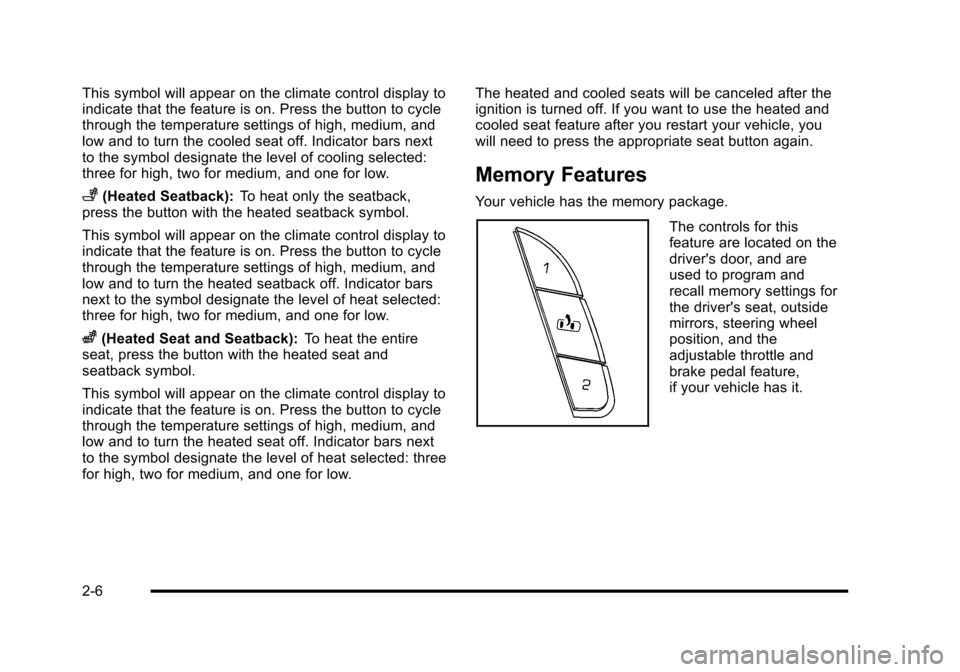
Your vehicle has the memory package.
The controls for thisfeature are located on thedriver's door, and areused to program andrecall memory settings forthe driver's seat, outsidemirrors, steering wheelposition, and theadjustable throttle andbrake pedal feature,if your vehicle has it.
2-6
Page 40 of 616
Easy Exit Seat
The control for this feature is located on the driver’sdoor between buttons 1 and 2.
With the vehicle in P (Park), the exit position can berecalled by pressing the exit button. You will hear asingle beep. The driver’s seat will move back.
If the easy exit seat feature is on in the DriverInformation Center (DIC), automatic seat movementwill occur when the key is removed from the ignition.See“EASY EXIT SEAT”underDIC VehicleCustomizationon page 4!57for more information.
Further programming for the memory seat feature canbe done using the DIC. You can select the automaticeasy exit seat feature or the remote memory seatrecall feature.
For programming information, seeDIC VehicleCustomization on page 4!57.
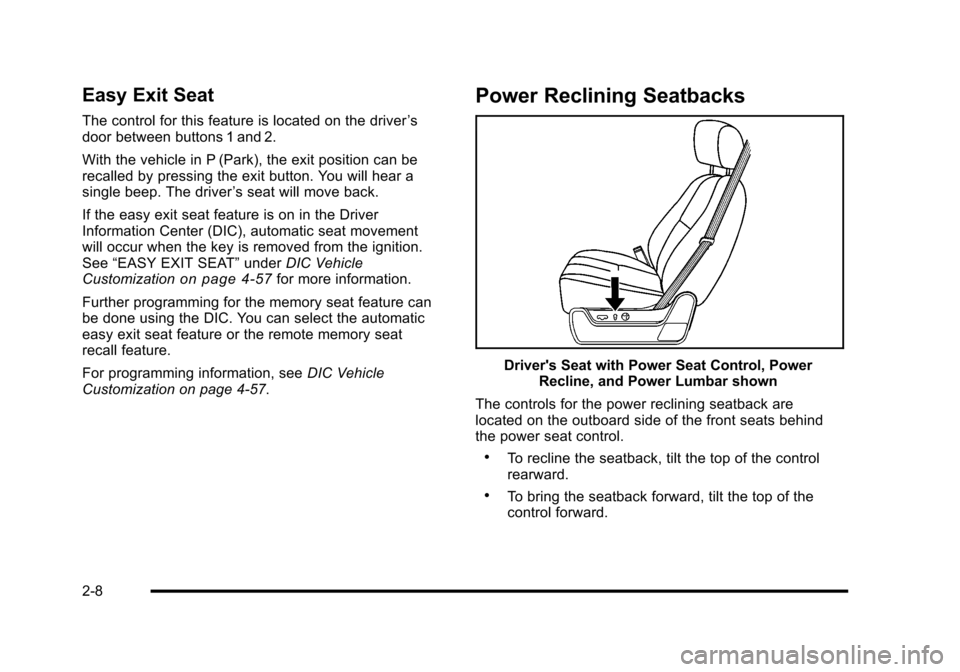
Power Reclining Seatbacks
Driver's Seat with Power Seat Control, PowerRecline, and Power Lumbar shown
The controls for the power reclining seatback arelocated on the outboard side of the front seats behindthe power seat control.
.To recline the seatback, tilt the top of the controlrearward.
.To bring the seatback forward, tilt the top of thecontrol forward.
2-8
Page 42 of 616

Rear Seats
Heated Seats
Driver's Side RSA HeatedSeat Button Only shown
The rear outboard seatshave the heated seatfeature. The buttons usedto control this feature arelocated on the Rear SeatAudio (RSA) panel.
M(Heated Seat):To heat the seat cushion, press thebutton with the heated seat symbol.
A heated seat symbol will be shown in the RSA displayto indicate that the feature is on. Press the button tocycle through the temperature settings of high, medium,and low, and to turn it off. Indicator bars next tothe symbol will designate the level of heat selected:three for high, two for medium, and one for low.
The heated seats will be canceled ten seconds afterthe ignition is turned off. If the vehicle is restarted, theheated seat button will need to be pressed again torestart the feature.
60/40 Split Bench Seat
If your vehicle has a 60/40 split bench, the seat(s) canbe folded for additional cargo space or folded andtumbled for easy entry and exit to the third row seats,if your vehicle has them. These seats will have eitherthe manual fold and tumble feature or the automaticseat release fold and tumble feature.
Manual Fold and Tumble Feature
Folding and Tumbling the Seat(s)
To fold and tumble the seat:
1. Make sure that there is nothing under, in front of,or on the seat.
Notice:Folding a rear seat with the safety beltsstill fastened may cause damage to the seat or thesafety belts. Always unbuckle the safety belts andreturn them to their normal stowed position beforefolding a rear seat.
2-10
Page 121 of 616

Servicing Your Airbag-Equipped
Vehicle
Airbags affect how the vehicle should be serviced.There are parts of the airbag system in several placesaround the vehicle. Your dealer/retailer and the servicemanual have information about servicing the vehicleand the airbag system. To purchase a service manual,seeService Publications Ordering Informationonpage 9!17.
{WARNING:
For up to 10 seconds after the ignition is turned off
and the battery is disconnected, an airbag can still
inflate during improper service. You can be injured
if you are close to an airbag when it inflates. Avoid
yellow connectors. They are probably part of the
airbag system. Be sure to follow proper service
procedures, and make sure the person performing
work for you is qualified to do so.
Adding Equipment to Your
Airbag-Equipped Vehicle
Q: Is there anything I might add to or change aboutthe vehicle that could keep the airbags fromworking properly?
A:Yes. If you add things that change the vehicle'sframe, bumper system, height, front end or sidesheet metal, they may keep the airbag system fromworking properly. Changing or moving any parts ofthe front seats, safety belts, the airbag sensing anddiagnostic module, steering wheel, instrument panel,roof-rail airbag modules, ceiling headliner or pillargarnish trim, overhead console, front sensors, sideimpact sensors, rollover sensor module, or airbagwiring can affect the operation of the airbag system.
In addition, the vehicle may have a passengersensing system for the right front passengerposition, which includes sensors that are part of thepassenger seat. The passenger sensing systemmay not operate properly if the original seat trim isreplaced with non-GM covers, upholstery or trim,or with GM covers, upholstery or trim designed for a
2-89
Page 125 of 616

Section 3 Features and Controls
Keys. . . . . . . . . . . . . . . . . . . . . . . . . . . . . . . . . . . . . . . . . . . . . . . . 3-3Remote Keyless Entry (RKE) System . . . . . . . . . . . 3-4Remote Keyless Entry (RKE) SystemOperation . . . . . . . . . . . . . . . . . . . . . . . . . . . . . . . . . . . . . 3-4Remote Vehicle Start . . . . . . . . . . . . . . . . . . . . . . . . . . . 3-7
Doors and Locks. . . . . . . . . . . . . . . . . . . . . . . . . . . . . . . . . 3-10Door Locks . . . . . . . . . . . . . . . . . . . . . . . . . . . . . . . . . . . . 3-10Power Door Locks . . . . . . . . . . . . . . . . . . . . . . . . . . . . . 3-10Delayed Locking . . . . . . . . . . . . . . . . . . . . . . . . . . . . . . . 3-11Programmable Automatic Door Locks . . . . . . . . . . 3-11Rear Door Security Locks . . . . . . . . . . . . . . . . . . . . . . 3-11Lockout Protection . . . . . . . . . . . . . . . . . . . . . . . . . . . . . 3-12Liftgate/Liftglass . . . . . . . . . . . . . . . . . . . . . . . . . . . . . . . 3-12Power Liftgate . . . . . . . . . . . . . . . . . . . . . . . . . . . . . . . . . 3-14Power Assist Steps . . . . . . . . . . . . . . . . . . . . . . . . . . . . 3-17
Windows. . . . . . . . . . . . . . . . . . . . . . . . . . . . . . . . . . . . . . . . . . 3-18Power Windows . . . . . . . . . . . . . . . . . . . . . . . . . . . . . . . 3-19Sun Visors . . . . . . . . . . . . . . . . . . . . . . . . . . . . . . . . . . . . . 3-21
Theft-Deterrent Systems. . . . . . . . . . . . . . . . . . . . . . . . . 3-22Content Theft-Deterrent . . . . . . . . . . . . . . . . . . . . . . . . 3-22PASS-Key®III+ Electronic Immobilizer . . . . . . . . . 3-24PASS-Key®III+ Electronic ImmobilizerOperation . . . . . . . . . . . . . . . . . . . . . . . . . . . . . . . . . . . . 3-24
Starting and Operating Your Vehicle. . . . . . . . . . . . 3-26New Vehicle Break-In . . . . . . . . . . . . . . . . . . . . . . . . . . 3-26Ignition Positions . . . . . . . . . . . . . . . . . . . . . . . . . . . . . . 3-27Retained Accessory Power (RAP) . . . . . . . . . . . . . 3-28Starting the Engine . . . . . . . . . . . . . . . . . . . . . . . . . . . . 3-29Adjustable Throttle and Brake Pedal . . . . . . . . . . . 3-30Engine Coolant Heater . . . . . . . . . . . . . . . . . . . . . . . . . 3-31Active Fuel Management™. . . . . . . . . . . . . . . . . . . . 3-32Automatic Transmission Operation . . . . . . . . . . . . . 3-32Tow/Haul Mode . . . . . . . . . . . . . . . . . . . . . . . . . . . . . . . . 3-36Parking Brake . . . . . . . . . . . . . . . . . . . . . . . . . . . . . . . . . 3-38Shifting Into Park . . . . . . . . . . . . . . . . . . . . . . . . . . . . . . 3-39Shifting Out of Park . . . . . . . . . . . . . . . . . . . . . . . . . . . . 3-40Parking Over Things That Burn . . . . . . . . . . . . . . . . 3-41Engine Exhaust . . . . . . . . . . . . . . . . . . . . . . . . . . . . . . . . 3-41Running the Vehicle While Parked . . . . . . . . . . . . . 3-42
3-1
Page 127 of 616
Keys
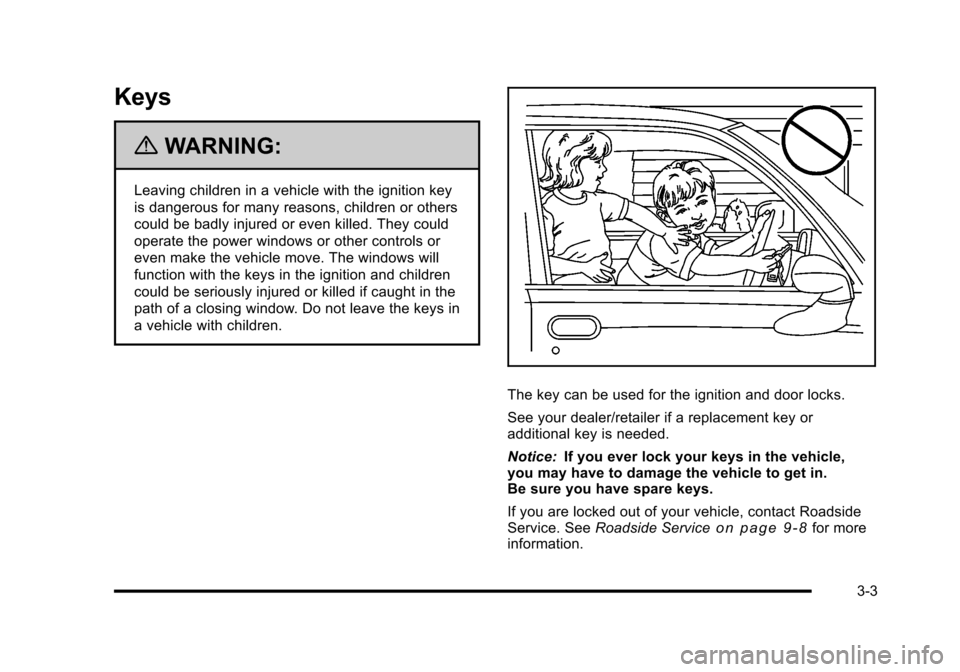
{WARNING:
Leaving children in a vehicle with the ignition key
is dangerous for many reasons, children or others
could be badly injured or even killed. They could
operate the power windows or other controls or
even make the vehicle move. The windows will
function with the keys in the ignition and children
could be seriously injured or killed if caught in the
path of a closing window. Do not leave the keys in
a vehicle with children.
The key can be used for the ignition and door locks.
See your dealer/retailer if a replacement key oradditional key is needed.
Notice:If you ever lock your keys in the vehicle,you may have to damage the vehicle to get in.Be sure you have spare keys.
If you are locked out of your vehicle, contact RoadsideService. SeeRoadside Serviceo n p a g e 9!8for moreinformation.
3-3
Page 129 of 616
The following functions may be available if this vehiclehas the RKE system:
Q(Lock):Press to lock all the doors.
If enabled through the Driver Information Center (DIC),the turn signal lamps flash once to indicate locking hasoccurred. If enabled through the DIC, the horn chirps
whenQis pressed again within three seconds. SeeDIC
Vehicle Customizationon page 4!57for additionalinformation.
PressingQarms the content theft!deterrent system.
SeeContent Theft-Deterrent on page 3!22.
K(Unlock):Press once to unlock only the driver door.
IfKis pressed again within three seconds, all
remaining doors unlock. The interior lamps maycome on and stay on for 20 seconds or until theignition is turned on.
If enabled through the DIC, the turn signal lamps flashtwice to indicate unlocking has occurred. SeeDICVehicle Customizationon page 4!57. If enabledthrough the DIC, the exterior lights turn on briefly if it isdark enough outside. See“APPROACH LIGHTING”underDIC Vehicle Customizationon page 4!57.
PressingKon the RKE transmitter disarms the content
theft!deterrent system. SeeContent Theft-Deterrentonpage 3!22.
/(Remote Vehicle Start):For vehicles with this
feature, press/to start the engine from outside the
vehicle using the RKE transmitter. SeeRemote VehicleStarto n p a g e 3!7for additional information.
&(Power Liftgate):Press and hold to open andclose the liftgate. The taillamps flash and a chimesounds to indicate when the liftgate is opening andclosing.
m(Liftglass):Press and hold to open the liftglass.
L(Vehicle Locator/Panic Alarm):Press and releaseto locate the vehicle. The turn signal lamps flash andthe horn sounds three times.
Press and holdLfor more than two seconds to
activate the panic alarm. The turn signal lamps flashand the horn sounds repeatedly for 30 seconds.The alarm turns off when the ignition is moved to
ON/RUN orLis pressed again. The ignition must
be in LOCK/OFF for the panic alarm to work.
3-5
Page 132 of 616

If your vehicle has the remote start feature, theRKE transmitter functions will have an increased rangeof operation. However, the range may be less while thevehicle is running.
There are other conditions which can affect theperformance of the transmitter, seeRemote KeylessEntry (RKE) Systemo n p a g e 3!4for additionalinformation.
/(Remote Start) :This button will be on theRKE transmitter if you have remote start.
To start the vehicle using the remote start feature:
1. Aim the transmitter at the vehicle.
2. Press and release the transmitter's lock button.The vehicle's doors will lock. Immediately pressand hold the transmitter's remote start button untilthe turn signal lights flash. If you cannot see thevehicle's lights, press and hold the remote startbutton for two to four seconds. Pressing the remotestart button again after the vehicle has started willturn the engine off.
When the vehicle starts, the parking lamps will turnon and remain on while the vehicle is running.
If the vehicle is left running it will automatically shutoff after 10 minutes unless a time extension hasbeen done.
3. If it is the first remote start since the vehicle hasbeen driven, repeat these steps, while the engineis still running, to extend the engine running timeby 10 minutes. Remote start can be extendedone time.
After entering the vehicle during a remote start, insertand turn the key to ON/RUN to drive the vehicle.
To manually shut off a remote start, do any of thefollowing:
.Aim the RKE transmitter at the vehicle and pressthe remote start button until the parking lampsturn off.
.Turn on the hazard warning flashers.
.Turn the ignition switch on and then off.
The vehicle can be remote started two separate timesbetween driving sequences. The engine will run for10 minutes after each remote start.
Or, you can extend the engine run time by another10 minutes within the first 10 minute remote start timeframe, and before the engine stops.
3-8