steering wheel CADILLAC ESCALADE 2019 User Guide
[x] Cancel search | Manufacturer: CADILLAC, Model Year: 2019, Model line: ESCALADE, Model: CADILLAC ESCALADE 2019Pages: 415, PDF Size: 6.66 MB
Page 69 of 415
Cadillac Escalade Owner Manual (GMNA-Localizing-U.S./Canada/Mexico-
12460268) - 2019 - crc - 9/14/18
68 SEATS AND RESTRAINTS
If the saved memory seat position
does not automatically recall or recalls
to the wrong positions, the driver’s
RKE transmitter number (1 or 2) may
not match the memory button
number that positions were saved to.
Try saving the position to the other
memory button or try the other RKE
transmitter.
Easy Exit Recall
Easy Exit Recall is not linked to an
RKE transmitter. The position saved to
Bis used for all drivers. To turn
Easy Exit Recall on or off, see "Vehicle
Personalization Settings" previously in
this section and Vehicle Personalization
0 155.
If turned on, the position saved to
B
is automatically recalled when one of
the following occurs:
. The vehicle is turned off and the
driver door is opened within a
short time.
. The vehicle is turned off with the
driver door open. To stop Easy Exit Recall movement,
press any of the following memory
controls:
.
Power seat
. Memory SET, 1, 2, or
B
.Power mirror, with the driver or
passenger side mirror selected
. Power steering wheel, if equipped
Obstructions
If something has blocked the driver
seat and/or power steering wheel
while recalling a memory position, the
recall may stop. Remove the
obstruction and try the recall again.
If the memory position still does not
recall, see your dealer for service.
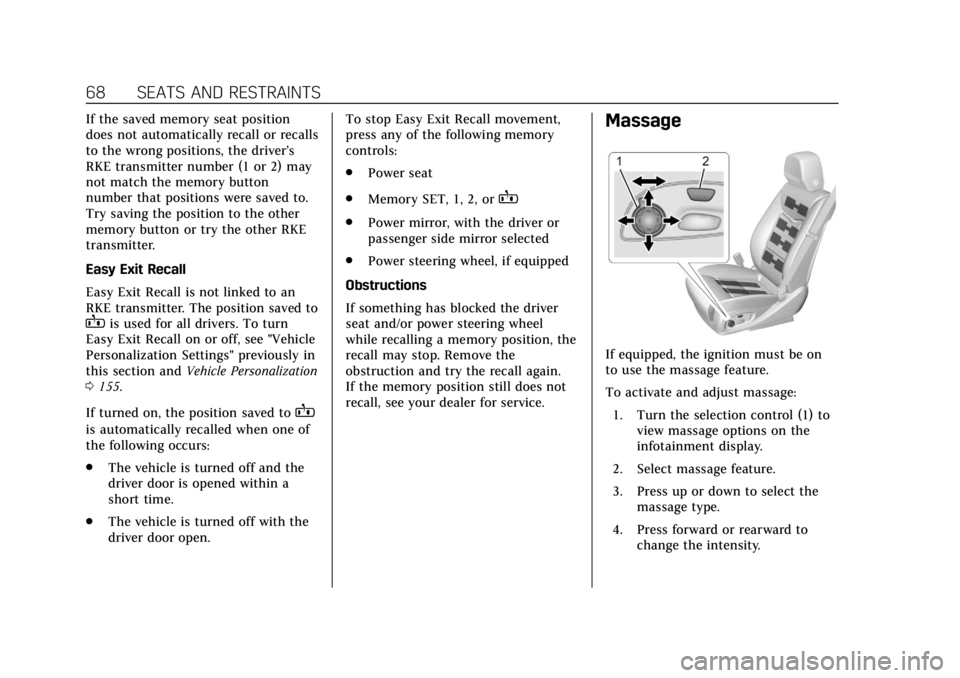
Massage
If equipped, the ignition must be on
to use the massage feature.
To activate and adjust massage: 1. Turn the selection control (1) to view massage options on the
infotainment display.
2. Select massage feature.
3. Press up or down to select the massage type.
4. Press forward or rearward to change the intensity.
Page 88 of 415

Cadillac Escalade Owner Manual (GMNA-Localizing-U.S./Canada/Mexico-
12460268) - 2019 - crc - 9/14/18
SEATS AND RESTRAINTS 87
After a minor crash, replacement of
seat belts may not be necessary. But
the seat belt assemblies that were
used during any crash may have been
stressed or damaged. See your dealer
to have the seat belt assemblies
inspected or replaced.
New parts and repairs may be
necessary even if the seat belt system
was not being used at the time of the
crash.
Have the seat belt pretensioners
checked if the vehicle has been in a
crash, or if the airbag readiness light
stays on after you start the vehicle or
while you are driving. SeeAirbag
Readiness Light 0138.Airbag System
The vehicle has the following airbags:
.
A frontal airbag for the driver
. A frontal airbag for the front
outboard passenger
. A front center airbag for the driver
and front outboard passenger
. A seat-mounted side impact airbag
for the driver
. A seat-mounted side impact airbag
for the front outboard passenger
. A roof-rail airbag for the driver
and for the second and third row
passengers seated directly behind
the driver
. A roof-rail airbag for the front
outboard passenger and the
second and third row passengers
seated directly behind the front
outboard passenger
All vehicle airbags have the word
AIRBAG on the trim or on a label near
the deployment opening. For frontal airbags, the word AIRBAG
is on the center of the steering wheel
for the driver and on the instrument
panel for the front outboard
passenger.
For the front center airbag, the word
AIRBAG is on the inboard side of the
driver seatback.
For seat-mounted side impact airbags,
the word AIRBAG is on the side of the
seat closest to the door.
For roof-rail airbags, the word AIRBAG
is on the ceiling or trim.
Airbags are designed to supplement
the protection provided by seat belts.
Even though today's airbags are also
designed to help reduce the risk of
injury from the force of an inflating
bag, all airbags must inflate very
quickly to do their job.
Page 90 of 415

Cadillac Escalade Owner Manual (GMNA-Localizing-U.S./Canada/Mexico-
12460268) - 2019 - crc - 9/14/18
SEATS AND RESTRAINTS 89
There is an airbag readiness light on
the instrument cluster, which shows
the airbag symbol.
The system checks the airbag
electrical system for malfunctions.
The light tells you if there is an
electrical problem. SeeAirbag
Readiness Light 0138.
Where Are the Airbags?
The driver frontal airbag is in the
center of the steering wheel.
The front outboard passenger frontal
airbag is in the passenger side
instrument panel.
The front center airbag is in the
inboard side of the driver seatback.
Driver Side Shown, Passenger Side
Similar
The driver and front outboard
passenger seat-mounted side impact
airbags are in the side of the
seatbacks closest to the door.
Page 91 of 415
Cadillac Escalade Owner Manual (GMNA-Localizing-U.S./Canada/Mexico-
12460268) - 2019 - crc - 9/14/18
90 SEATS AND RESTRAINTS
Driver Side Shown, Passenger SideSimilar
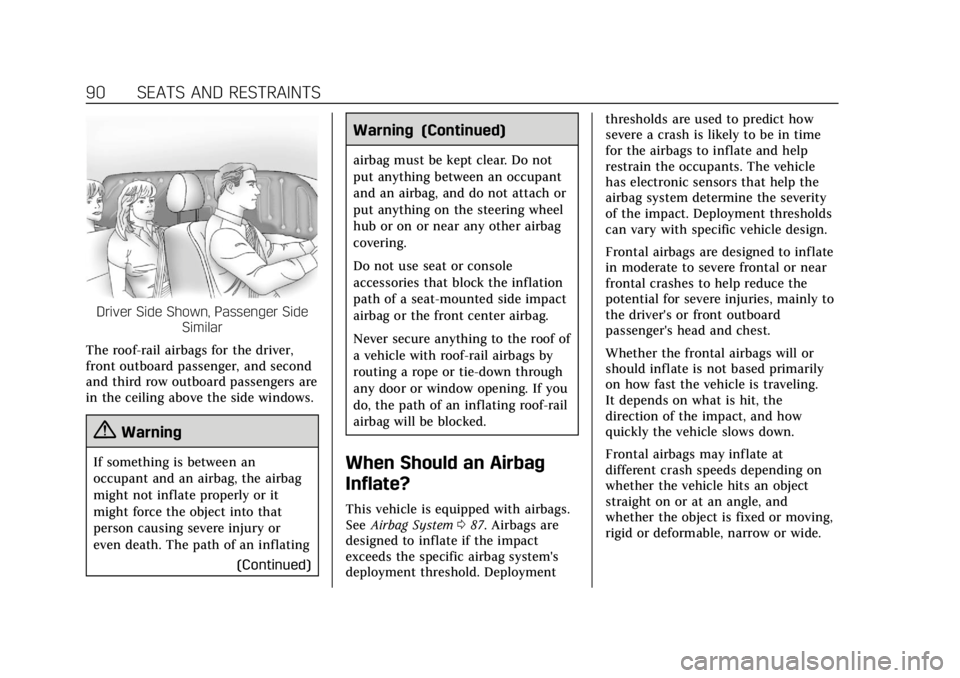
The roof-rail airbags for the driver,
front outboard passenger, and second
and third row outboard passengers are
in the ceiling above the side windows.
{Warning
If something is between an
occupant and an airbag, the airbag
might not inflate properly or it
might force the object into that
person causing severe injury or
even death. The path of an inflating (Continued)
Warning (Continued)
airbag must be kept clear. Do not
put anything between an occupant
and an airbag, and do not attach or
put anything on the steering wheel
hub or on or near any other airbag
covering.
Do not use seat or console
accessories that block the inflation
path of a seat-mounted side impact
airbag or the front center airbag.
Never secure anything to the roof of
a vehicle with roof-rail airbags by
routing a rope or tie-down through
any door or window opening. If you
do, the path of an inflating roof-rail
airbag will be blocked.
When Should an Airbag
Inflate?
This vehicle is equipped with airbags.
SeeAirbag System 087. Airbags are
designed to inflate if the impact
exceeds the specific airbag system's
deployment threshold. Deployment thresholds are used to predict how
severe a crash is likely to be in time
for the airbags to inflate and help
restrain the occupants. The vehicle
has electronic sensors that help the
airbag system determine the severity
of the impact. Deployment thresholds
can vary with specific vehicle design.
Frontal airbags are designed to inflate
in moderate to severe frontal or near
frontal crashes to help reduce the
potential for severe injuries, mainly to
the driver's or front outboard
passenger's head and chest.
Whether the frontal airbags will or
should inflate is not based primarily
on how fast the vehicle is traveling.
It depends on what is hit, the
direction of the impact, and how
quickly the vehicle slows down.
Frontal airbags may inflate at
different crash speeds depending on
whether the vehicle hits an object
straight on or at an angle, and
whether the object is fixed or moving,
rigid or deformable, narrow or wide.
Page 92 of 415
Cadillac Escalade Owner Manual (GMNA-Localizing-U.S./Canada/Mexico-
12460268) - 2019 - crc - 9/14/18
SEATS AND RESTRAINTS 91
Frontal airbags are not intended to
inflate during vehicle rollovers, rear
impacts, or many side impacts.
In addition, the vehicle has advanced
technology frontal airbags. Advanced
technology frontal airbags adjust the
restraint according to crash severity.
The vehicle also has a seat position
sensor that enables the sensing
system to monitor the position of the
driver seat. The seat position sensor
provides information that is used to
adjust the deployment of the driver
frontal airbag.
The front center airbag is designed to
inflate in moderate to severe side
crashes depending upon the location
of the impact, when either side of the
vehicle is struck. In addition, the front
center airbag is designed to inflate
when the sensing system predicts that
the vehicle is about to roll over on its
side. The front center airbag is not
designed to inflate in frontal impacts,
near frontal impacts, or rear impacts.
Seat-mounted side impact airbags are
designed to inflate in moderate to
severe side crashes depending on thelocation of the impact. Seat-mounted
side impact airbags are not designed
to inflate in frontal impacts, near
frontal impacts, rollovers, or rear
impacts. A seat-mounted side impact
airbag is designed to inflate on the
side of the vehicle that is struck.
Roof-rail airbags are designed to
inflate in moderate to severe side
crashes depending on the location of
the impact. In addition, these roof-rail
airbags are designed to inflate during
a rollover or in a severe frontal
impact. Roof-rail airbags are not
designed to inflate in rear impacts.
Both roof-rail airbags will inflate when
either side of the vehicle is struck,
if the sensing system predicts that the
vehicle is about to roll over on its
side, or in a severe frontal impact.
In any particular crash, no one can
say whether an airbag should have
inflated simply because of the vehicle
damage or the repair costs.What Makes an Airbag
Inflate?
In a deployment event, the sensing
system sends an electrical signal
triggering a release of gas from the
inflator. Gas from the inflator fills the
airbag causing the bag to break out of
the cover. The inflator, the airbag, and
related hardware are all part of the
airbag module.
For airbag locations, see
Where Are the
Airbags? 089.
How Does an Airbag
Restrain?
In moderate to severe frontal or near
frontal collisions, even belted
occupants can contact the steering
wheel or the instrument panel. In
moderate to severe side collisions,
even belted occupants can contact the
inside of the vehicle.
Airbags supplement the protection
provided by seat belts by distributing
the force of the impact more evenly
over the occupant's body.
Page 99 of 415
Cadillac Escalade Owner Manual (GMNA-Localizing-U.S./Canada/Mexico-
12460268) - 2019 - crc - 9/14/18
98 SEATS AND RESTRAINTS
.Airbag system, including airbag
modules, front or side impact
sensors, sensing and diagnostic
module, airbag wiring, or front
center console
. Front seats, including stitching,
seams or zippers
. Seat belts
. Steering wheel, instrument panel,
overhead console, ceiling trim,
or pillar garnish trim
. Inner door seals, including
speakers
Your dealer and the service manual
have information about the location of
the airbag modules and sensors,
sensing and diagnostic module, and
airbag wiring along with the proper
replacement procedures.
In addition, the vehicle has a
passenger sensing system for the front
outboard passenger position, which
includes sensors that are part of the
passenger's seat. The passenger
sensing system may not operate
properly if the original seat trim is
replaced with non-GM covers, upholstery, or trim, or with GM
covers, upholstery, or trim designed
for a different vehicle. Any object,
such as an aftermarket seat heater or
a comfort enhancing pad or device,
installed under or on top of the seat
fabric, could also interfere with the
operation of the passenger sensing
system. This could either prevent
proper deployment of the passenger
airbag(s) or prevent the passenger
sensing system from properly turning
off the passenger airbag(s). See
Passenger Sensing System
093.
If the vehicle has rollover roof-rail
airbags, see Different Size Tires and
Wheels 0327 for additional important
information.
If the vehicle must be modified
because you have a disability and you
have questions about whether the
modifications will affect the vehicle's
airbag system, or if you have
questions about whether the airbag
system will be affected if the vehicle is
modified for any other reason, call
Customer Assistance. See Customer
Assistance Offices 0379.Airbag System Check
The airbag system does not need
regularly scheduled maintenance or
replacement. Make sure the airbag
readiness light is working. See Airbag
Readiness Light 0138.
Caution
If an airbag covering is damaged,
opened, or broken, the airbag may
not work properly. Do not open or
break the airbag coverings. If there
are any opened or broken airbag
coverings, have the airbag covering
and/or airbag module replaced. For
the location of the airbags, see
Where Are the Airbags? 089. See
your dealer for service.
Page 124 of 415
Cadillac Escalade Owner Manual (GMNA-Localizing-U.S./Canada/Mexico-
12460268) - 2019 - crc - 9/14/18
INSTRUMENTS AND CONTROLS 123
Instruments and
Controls
Controls
Steering Wheel Adjustment . . . . . 124
Steering Wheel Controls . . . . . . . . . 124
Heated Steering Wheel . . . . . . . . . . 124
Horn . . . . . . . . . . . . . . . . . . . . . . . . . . . . . . . 124
Windshield Wiper/Washer . . . . . . . 124
Rear Window Wiper/Washer . . . . 126
Compass . . . . . . . . . . . . . . . . . . . . . . . . . . 127
Clock . . . . . . . . . . . . . . . . . . . . . . . . . . . . . . 127
Power Outlets . . . . . . . . . . . . . . . . . . . . . 128
Wireless Charging . . . . . . . . . . . . . . . . 130
Cigarette Lighter . . . . . . . . . . . . . . . . . . 132
Ashtrays . . . . . . . . . . . . . . . . . . . . . . . . . . 132
Warning Lights, Gauges, and
Indicators
Warning Lights, Gauges, andIndicators . . . . . . . . . . . . . . . . . . . . . . . 132
Instrument Cluster . . . . . . . . . . . . . . . 133
Speedometer . . . . . . . . . . . . . . . . . . . . . . 135
Odometer . . . . . . . . . . . . . . . . . . . . . . . . . 135
Trip Odometer . . . . . . . . . . . . . . . . . . . . 136
Tachometer . . . . . . . . . . . . . . . . . . . . . . . 136
Fuel Gauge . . . . . . . . . . . . . . . . . . . . . . . . 136 Engine Coolant Temperature
Gauge . . . . . . . . . . . . . . . . . . . . . . . . . . . . 137
Seat Belt Reminders . . . . . . . . . . . . . . 137
Airbag Readiness Light . . . . . . . . . . 138
Passenger Airbag Status Indicator . . . . . . . . . . . . . . . . . . . . . . . . . 138
Charging System Light . . . . . . . . . . . 139
Malfunction Indicator Lamp (Check Engine Light) . . . . . . . . . . . 140
Brake System Warning Light . . . . 141
Electric Parking Brake Light . . . . . 142
Service Electric Parking Brake Light . . . . . . . . . . . . . . . . . . . . . . . . . . . . . 142
Antilock Brake System (ABS) Warning Light . . . . . . . . . . . . . . . . . . 143
Sport Mode Light . . . . . . . . . . . . . . . . . 143
Tow/Haul Mode Light . . . . . . . . . . . . 143
Winter Driving Mode Light . . . . . . 143
Lane Keep Assist (LKA) Light . . . 143
Vehicle Ahead Indicator . . . . . . . . . 144
Traction Off Light . . . . . . . . . . . . . . . . 144
StabiliTrak OFF Light . . . . . . . . . . . . 144
Traction Control System (TCS)/ StabiliTrak Light . . . . . . . . . . . . . . . . 145
Engine Coolant Temperature Warning Light . . . . . . . . . . . . . . . . . . 145
Tire Pressure Light . . . . . . . . . . . . . . . 145
Engine Oil Pressure Light . . . . . . . . 146
Low Fuel Warning Light . . . . . . . . . 146
Security Light . . . . . . . . . . . . . . . . . . . . . 146 High-Beam On Light . . . . . . . . . . . . . 147
Lamps On Reminder . . . . . . . . . . . . . 147
Cruise Control Light . . . . . . . . . . . . . . 147
Door Ajar Light . . . . . . . . . . . . . . . . . . . 148
Information Displays
Driver Information
Center (DIC) . . . . . . . . . . . . . . . . . . . . . 148
Head-Up Display (HUD) . . . . . . . . . 150
Vehicle Messages
Vehicle Messages . . . . . . . . . . . . . . . . . 154
Engine Power Messages . . . . . . . . . . 154
Vehicle Speed Messages . . . . . . . . . 154
Vehicle Personalization
Vehicle Personalization . . . . . . . . . . 155
Universal Remote System
Universal Remote System . . . . . . . . 163
Universal Remote System Programming . . . . . . . . . . . . . . . . . . . 163
Universal Remote System Operation . . . . . . . . . . . . . . . . . . . . . . . . 165
Page 125 of 415
Cadillac Escalade Owner Manual (GMNA-Localizing-U.S./Canada/Mexico-
12460268) - 2019 - crc - 9/14/18
124 INSTRUMENTS AND CONTROLS
Controls
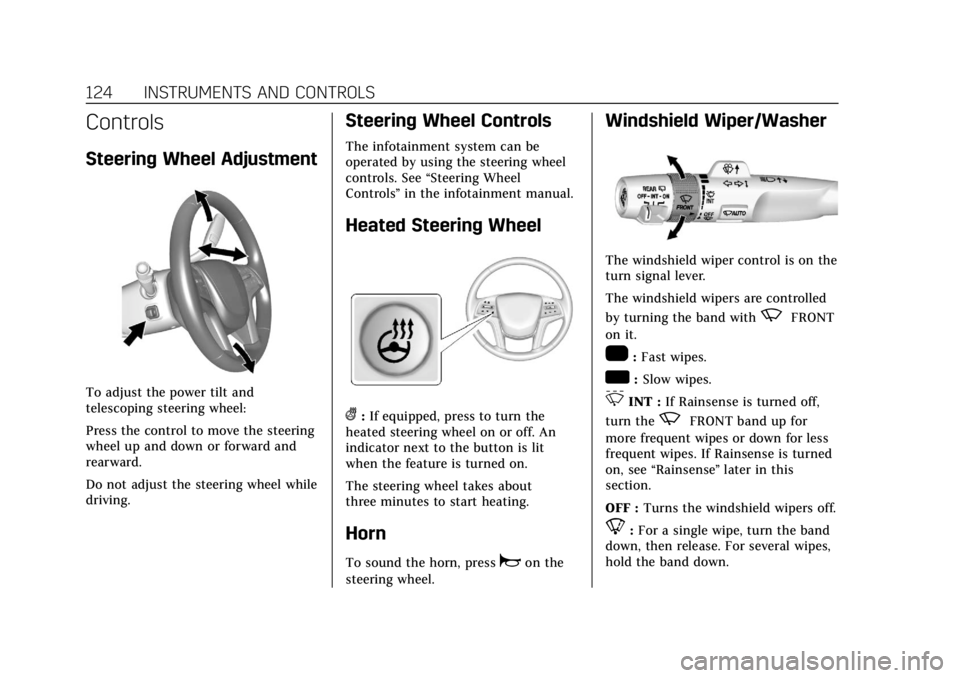
Steering Wheel Adjustment
To adjust the power tilt and
telescoping steering wheel:
Press the control to move the steering
wheel up and down or forward and
rearward.
Do not adjust the steering wheel while
driving.
Steering Wheel Controls
The infotainment system can be
operated by using the steering wheel
controls. See“Steering Wheel
Controls ”in the infotainment manual.
Heated Steering Wheel
(:If equipped, press to turn the
heated steering wheel on or off. An
indicator next to the button is lit
when the feature is turned on.
The steering wheel takes about
three minutes to start heating.
Horn
To sound the horn, pressaon the
steering wheel.
Windshield Wiper/Washer
The windshield wiper control is on the
turn signal lever.
The windshield wipers are controlled
by turning the band with
zFRONT
on it.
1: Fast wipes.
w: Slow wipes.
3INT : If Rainsense is turned off,
turn the
zFRONT band up for
more frequent wipes or down for less
frequent wipes. If Rainsense is turned
on, see “Rainsense ”later in this
section.
OFF : Turns the windshield wipers off.
8:For a single wipe, turn the band
down, then release. For several wipes,
hold the band down.
Page 135 of 415
Cadillac Escalade Owner Manual (GMNA-Localizing-U.S./Canada/Mexico-
12460268) - 2019 - crc - 9/14/18
134 INSTRUMENTS AND CONTROLS
Reconfigurable Instrument
Cluster
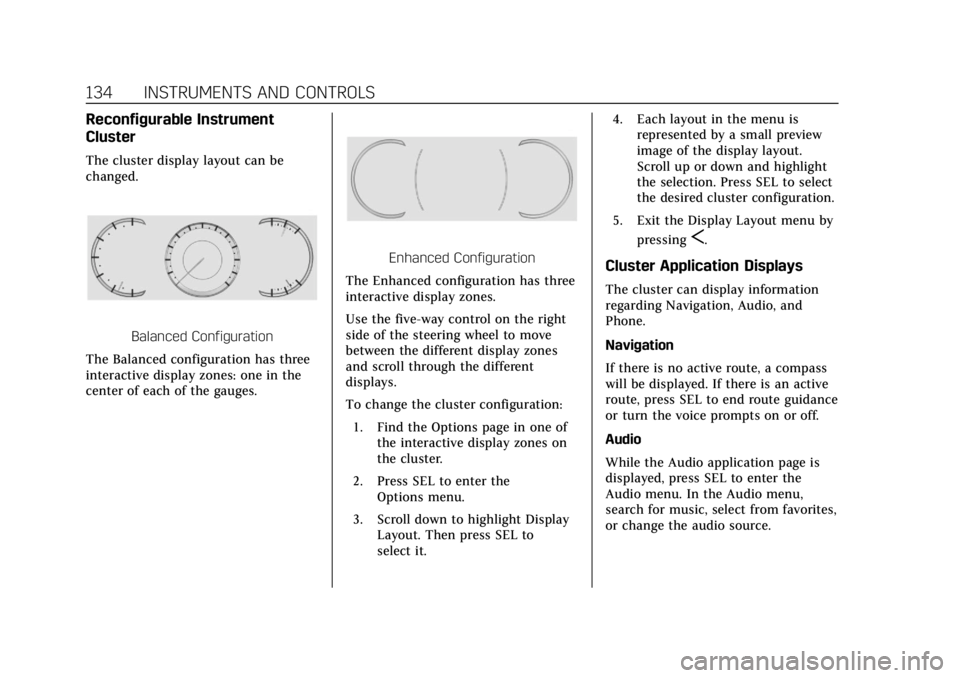
The cluster display layout can be
changed.
Balanced Configuration
The Balanced configuration has three
interactive display zones: one in the
center of each of the gauges.
Enhanced Configuration
The Enhanced configuration has three
interactive display zones.
Use the five-way control on the right
side of the steering wheel to move
between the different display zones
and scroll through the different
displays.
To change the cluster configuration:
1. Find the Options page in one of the interactive display zones on
the cluster.
2. Press SEL to enter the Options menu.
3. Scroll down to highlight Display Layout. Then press SEL to
select it. 4. Each layout in the menu is
represented by a small preview
image of the display layout.
Scroll up or down and highlight
the selection. Press SEL to select
the desired cluster configuration.
5. Exit the Display Layout menu by pressing
S.
Cluster Application Displays
The cluster can display information
regarding Navigation, Audio, and
Phone.
Navigation
If there is no active route, a compass
will be displayed. If there is an active
route, press SEL to end route guidance
or turn the voice prompts on or off.
Audio
While the Audio application page is
displayed, press SEL to enter the
Audio menu. In the Audio menu,
search for music, select from favorites,
or change the audio source.
Page 136 of 415

Cadillac Escalade Owner Manual (GMNA-Localizing-U.S./Canada/Mexico-
12460268) - 2019 - crc - 9/14/18
INSTRUMENTS AND CONTROLS 135
Phone
While the Phone application page is
displayed, press SEL to enter the
Phone menu. In the Phone menu,
if there is no active phone call, view
recent calls, select from favorites,
or scroll through contacts. If there is
an active call, mute the phone or
switch to handset operation.
Cluster Options Menu
To enter the cluster Options menu:1. Use the five-way control on the right side of the steering wheel
to find the Options page in one
of the interactive display zones
on the cluster.
2. Press SEL on the center of the five-way control to enter the
Options menu.
Units : Press SEL while Units is
highlighted to enter the Unit menu.
Choose US or metric units by pressing
SEL while the desired item is
highlighted. A checkmark will be
displayed next to the selected item. Info Pages :
Press SEL while Info
Pages is highlighted to select the
items to be displayed in the DIC info
displays. See Driver Information Center
(DIC) 0148.
Fav Button Options : Press SEL while
Fav Button Options is highlighted to
select between FAV Primary and SEEK
Primary. This selection allows for
configuration of the
CandB
steering wheel controls. When FAV
Primary is selected, pressing
Cand
Bwill go to the next or previous
favorite and pressing and holding
C
andBwill seek. When SEEK Primary
is selected, pressing
CandBwill
seek and pressing and holding
Cand
Bwill go to the next or previous
favorite.
Display Layout : Press SEL while
Display Layout is highlighted to
change the configuration of the
cluster. See “Reconfigurable
Instrument Cluster” earlier in this
section. Head-up Display (HUD) Rotation :
This feature allows for adjusting the
angle of the HUD image. Press SEL on
the steering wheel controls while
Head-up Display Rotation is
highlighted to enter Adjust Mode.
Press
yorzto adjust the angle of
the HUD display. Press
SorTto
highlight OK, then press SEL to save
the setting. Cancel can also be
selected to cancel the setting. The
vehicle must be in P (Park).
Open Source Software : Press SEL
while Open Source Software is
highlighted to display open source
software information.
Speedometer
The speedometer shows the vehicle's
speed in either kilometers per hour
(km/h) or miles per hour (mph).
Odometer
The odometer shows how far the
vehicle has been driven, in either
kilometers or miles.