wheel CADILLAC ESCALADE 2021 Owner's Guide
[x] Cancel search | Manufacturer: CADILLAC, Model Year: 2021, Model line: ESCALADE, Model: CADILLAC ESCALADE 2021Pages: 492, PDF Size: 7.92 MB
Page 137 of 492
Cadillac Escalade Owner Manual (GMNA-Localizing-U.S./Canada/Mexico-
13690472) - 2021 - CRC - 8/10/21
136 INSTRUMENTS AND CONTROLS
Some vehicle messages or alerts
displayed in the HUD may be cleared
by using the steering wheel controls.
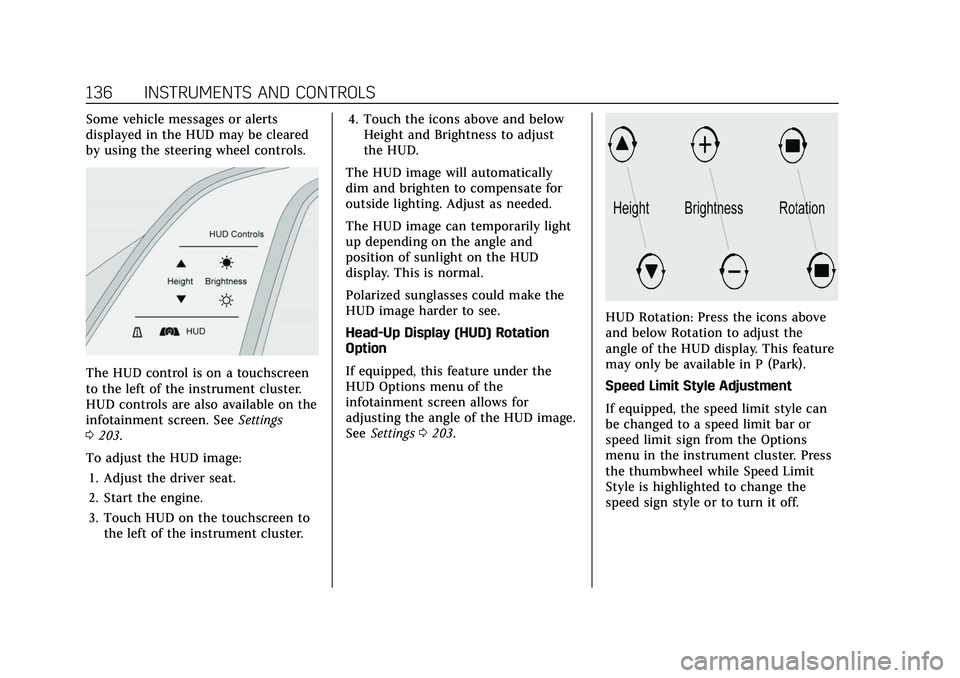
The HUD control is on a touchscreen
to the left of the instrument cluster.
HUD controls are also available on the
infotainment screen. SeeSettings
0 203.
To adjust the HUD image: 1. Adjust the driver seat.
2. Start the engine.
3. Touch HUD on the touchscreen to the left of the instrument cluster. 4. Touch the icons above and below
Height and Brightness to adjust
the HUD.
The HUD image will automatically
dim and brighten to compensate for
outside lighting. Adjust as needed.
The HUD image can temporarily light
up depending on the angle and
position of sunlight on the HUD
display. This is normal.
Polarized sunglasses could make the
HUD image harder to see.
Head-Up Display (HUD) Rotation
Option
If equipped, this feature under the
HUD Options menu of the
infotainment screen allows for
adjusting the angle of the HUD image.
See Settings 0203.
HUD Rotation: Press the icons above
and below Rotation to adjust the
angle of the HUD display. This feature
may only be available in P (Park).
Speed Limit Style Adjustment
If equipped, the speed limit style can
be changed to a speed limit bar or
speed limit sign from the Options
menu in the instrument cluster. Press
the thumbwheel while Speed Limit
Style is highlighted to change the
speed sign style or to turn it off.
Page 139 of 492

Cadillac Escalade Owner Manual (GMNA-Localizing-U.S./Canada/Mexico-
13690472) - 2021 - CRC - 8/10/21
138 INSTRUMENTS AND CONTROLS
Vehicle Messages
Messages displayed on the DIC
indicate the status of the vehicle or
some action that may be needed to
correct a condition. Multiple messages
may appear one after another.
The messages that do not require
immediate action can be
acknowledged and cleared by pressing
the thumbwheel. The messages that
require immediate action cannot be
cleared until that action is performed.
All messages should be taken
seriously; clearing the message does
not correct the problem.
If a SERVICE message appears, see
your dealer.
Follow the instructions given in the
messages. The system displays
messages regarding the following
topics:
.Service Messages
.Fluid Levels
.Vehicle Security
.Brakes
.Ride Control Systems
.Driver Assistance Systems
.Cruise Control
.Lighting and Bulb Replacement
.Wiper/Washer Systems
.Doors and Windows
.Seat Belts
.Airbag Systems
.Engine and Transmission
.Tire Pressure
.Battery
Engine Power Messages
REDUCED ACCELERATION DRIVE
WITH CARE
This message displays when the
vehicle's propulsion power is reduced.
A reduction in propulsion power can
affect the vehicle's ability to
accelerate. If this message is on, but
there is no observed reduction in
performance, proceed to your
destination. Under certain conditions
the performance may be reduced the
next time the vehicle is driven. The
vehicle may be driven while this
message is on, but maximum
acceleration and speed may be
reduced. Anytime this message stayson, or displays repeatedly, the vehicle
should be taken to your dealer for
service as soon as possible.
Under certain operating conditions,
propulsion will be disabled. Try
restarting after the ignition has been
off for two minutes.
Vehicle Speed Messages
SPEED LIMITED TO XXX
KM/H (MPH)
This message shows that the vehicle
speed has been limited to the speed
displayed. The limited speed is a
protection for various propulsion and
vehicle systems, such as lubrication,
thermal, brakes, suspension, Teen
Driver if equipped, or tires.
Vehicle Personalization
The following are all possible vehicle
personalization features. Depending
on the vehicle, some may not be
available.
For System and Search functions, see
Settings
0203.
Page 140 of 492
Cadillac Escalade Owner Manual (GMNA-Localizing-U.S./Canada/Mexico-
13690472) - 2021 - CRC - 8/10/21
INSTRUMENTS AND CONTROLS 139
To access the vehicle
personalization menu:1. Touch the Settings icon on the Home Page of the infotainment
display.
2. Touch Vehicle to display a list of available options.
3. Touch to select the desired feature setting.
4. Touch the options on the infotainment display to disable or
enable a setting.
The menu may contain the following:
Valet Mode
This will lock the infotainment system
and steering wheel controls. It may
also limit access to vehicle storage
locations, if equipped.
To enable valet mode: 1. Enter a four-digit code on the keypad.
2. Select Enter to go to the confirmation screen.
3. Re-enter the four-digit code. Touch Lock or Unlock to lock or
unlock the system. Touch Back to go
back to the previous menu.
Teen Driver
See
Teen Driver 0207.
Rear Seat Reminder
This allows for a chime and a message
when the rear door has been opened
before or during operation of the
vehicle.
Touch Off or On.
Climate
Touch and the following may display:
.Auto Fan Speed
.Auto Cooled Seats
.Auto Heated Seats
.Rear Climate On Startup
.Auto Defog
.Auto Rear Defog
.Ionizer
.Auto Air Distribution Auto Fan Speed
This setting controls the amount of
airf low when the climate control is set
to Auto.
Touch Low, Medium, or High.
Auto Cooled Seats
This feature will automatically turn on
seat cooling at vehicle start up when
the cabin temperature is significantly
warmer than desired. See
Heated and
Ventilated Front Seats 048.
Touch Off or On.
Auto Heated Seats
This feature will automatically turn on
seat heating at vehicle start up when
the cabin temperature is significantly
cooler than desired. See Heated and
Ventilated Front Seats 048.
If equipped with Auto Heated Steering
Wheel, this feature will turn on when
the Auto Heated Seats turn on.
Touch Off or On.
Page 143 of 492
Cadillac Escalade Owner Manual (GMNA-Localizing-U.S./Canada/Mexico-
13690472) - 2021 - CRC - 8/10/21
142 INSTRUMENTS AND CONTROLS
.Remote Mirror Folding
.Rain Sense Wipers
.Auto Wipe in Reverse Gear
.Extended Hill Start Assist
Chime Volume
This sets the chime volume level.
Touch the controls on the
infotainment display to adjust the
volume.
Power Liftgate
This allows the driver to decide what
happens when pressing the Power
Liftgate switch. .
Touch Open Fully, Open to Custom
Height, or Off.
Hands Free Liftgate/Trunk Control
This allows the liftgate to be operated
hands free. See Liftgate020.
Touch Off, Open and Close,
or Open Only.
Reverse Tilt Mirror
When on, the driver, passenger,
or both driver and passenger outside
mirrors will tilt downward when the
vehicle is shifted into R (Reverse) to improve visibility of the ground near
the rear wheels. They may move from
their tilted position when the vehicle
is shifted out of R (Reverse) or turned
off. See
Reverse Tilt Mirrors 033.
Touch Off, On - Driver and Passenger,
On - Driver, or On - Passenger.
Remote Mirror Folding
This allows the outside mirrors to be
folded in when the remote key
Q
button is pressed and held. Pressing
Kunfolds the mirrors. See Folding
Mirrors 032.
Touch Off or On.
Rain Sense Wipers
This setting automatically turns on
the windshield wipers when moisture
is detected and the wiper switch is in
intermittent mode.
Touch Disabled or Enabled.
Auto Wipe in Reverse Gear
This setting automatically turns on
the rear window wiper when the
vehicle is shifted to R (Reverse) and
moisture is detected.
Touch Off or On. Extended Hill Start Assist
This setting prevents the vehicle from
rolling backward on a steep hill if the
brake pedal is not depressed.
Touch Extended Hold or
Standard Hold.
Lighting
Touch and the following may display:
.Ambient Lighting
.Vehicle Locator Lights
.Exit Lighting
.Left or Right Hand Traffic
.Advanced Forward Lighting
.Daytime Tail Lights
.Automatic High Beam Assist
.Surround View Lighting
Ambient Lighting
This setting provides the ability to
customize the color and intensity of
the interior accent lighting.
Touch Off or On.
Page 145 of 492
Cadillac Escalade Owner Manual (GMNA-Localizing-U.S./Canada/Mexico-
13690472) - 2021 - CRC - 8/10/21
144 INSTRUMENTS AND CONTROLS
Remote Unlock Light Feedback
This setting will flash the exterior
lamps when unlocking the vehicle
with the remote key.
Touch Off or Flash Lights.
Remote Lock Feedback
This setting provides what type of
feedback is given when locking the
vehicle with the remote key.
Touch Off, Lights and Horn, Lights
Only, or Horn Only.
Remote Door Unlock
This setting allows selection of which
doors will unlock when pressing
Kon
the remote key.
Touch All Doors or Driver Door.
Relock Remotely Unlocked Doors
This setting secures the vehicle if
doors are not opened within
30 seconds of using the remote key to
unlock doors.
Touch Off or On. Remote Start Auto Cool Seats
This setting will automatically turn on
the cooled seats when using remote
start on warm days. See
Heated and
Ventilated Front Seats 048 and
Remote Vehicle Start 014.
Touch Off or On.
Remote Start Auto Heat Seats
This setting will automatically turn on
the heated seats when using remote
start on cold days. See Heated and
Ventilated Front Seats 048 and
Remote Vehicle Start 014.
If equipped with Auto Heated Steering
Wheel, this feature will turn on when
the Remote Start Auto Heated Seats
turn on.
Touch Off or On.
Remote Window Operation
This setting enables remote operation
of the windows with the remote key.
See Remote Keyless Entry (RKE) System
Operation 07.
Touch Off or On. Passive Door Unlock
This setting specifies which doors will
unlock when using the button on the
driver door handle to unlock the
vehicle.
Touch Off, All Doors, or Driver
Door Only.
Passive Door Lock
This setting specifies if the vehicle will
automatically lock or lock and provide
an alert after all the doors are closed
while walking away from the vehicle
with the remote key. See
Remote
Keyless Entry (RKE) System Operation
0 7.
Touch Off, On with Horn Chirp, or On.
Remote Left in Vehicle Alert
This setting sounds an alert when the
remote key is left in the vehicle that is
not running.
Touch Off or On.
Remote Removed From Vehicle
Alert
This setting beeps the horn three
times if exiting a running vehicle with
the remote key.
Page 146 of 492
Cadillac Escalade Owner Manual (GMNA-Localizing-U.S./Canada/Mexico-
13690472) - 2021 - CRC - 8/10/21
INSTRUMENTS AND CONTROLS 145
Touch Off or On.
Ride Height
Touch and the following may display:
.Automatic Entry/Egress
Automatic Entry/Egress
This feature specifies if the vehicle
will automatically lower to make it
easier to enter or exit the vehicle.
Touch Off or On.
Running Boards
Touch and the following may display:
.Automatic Running Boards
.Deploy Running Boards
Automatic Running Boards
This feature specifies the position and
use of the running boards.
Touch Off or On.
Deploy Running Boards
This feature moves the running
boards to a deployed position so they
can be used with the doors closed.
Touch Off or Deploy.
Seating Position
Touch and the following may display:
.Seat Entry Memory
.Seat Exit Memory
Seat Entry Memory
This feature automatically recalls the
previously stored 1 or 2 button
positions when the ignition is changed
from off to on or ACC/ACCESSORY.
See Memory Seats 045.
Touch Off or On.
Seat Exit Memory
This feature automatically recalls the
previously stored exit button position
when the ignition is changed from on
or ACC/ACCESSORY to off and the
driver door is open. See Memory Seats
0 45.
Touch Off or On.
Suspension
Touch and the following may display:
.Service Mode
.Alignment Mode Service Mode
This feature disables the air
suspension system and is used to
prevent unintended raising or
lowering of the suspension.
Touch Off or On.
Alignment Mode
This feature will optimize the vehicle
height to provide the most accurate
wheel alignment.
Touch Off or On.
Remote Key Relearn
This sets up a new or forgotten key
for use in the vehicle. Place the key in
the transmitter pocket. Make sure
vehicle is parked and touch Start.
Universal Remote
System
See
Radio Frequency Statement 0467.
Page 154 of 492

Cadillac Escalade Owner Manual (GMNA-Localizing-U.S./Canada/Mexico-
13690472) - 2021 - CRC - 8/10/21
LIGHTING 153
Hazard Warning Flashers
|:Press to make the front and rear
turn signal lamps flash on and off.
Press again to turn the flashers off.
When the hazard warning flashers are
on, the vehicle's turn signals will
not work.
Turn and Lane-Change
Signals
An arrow on the instrument cluster
flashes in the direction of the turn or
lane change.
Move the turn signal lever all the way
up or down to signal a turn.
Raise or lower the lever for less than
one second until the arrow starts to
flash to signal a lane change. This
causes the turn signals to
automatically flash three times. It will
flash six times if Tow/Haul Mode is
active. Holding the turn signal lever
for more than one second will cause
the turn signals to flash until the
lever is released.
The lever returns to its starting
position whenever it is released. If after signaling a turn or a lane
change the arrows flash rapidly or do
not come on, a signal bulb could be
burned out.
Replace any burned out bulbs. If a
bulb is not burned out, check the fuse.
See
Fuses and Circuit Breakers 0385.
Turn Signal On Chime
If the turn signal is left on for more
than 1.2 km (0.75 mi), a chime sounds
at each flash of the turn signal. The
message TURN SIGNAL ON will also
appear in the Driver Information
Center (DIC). To turn the chime and
message off, move the turn signal
lever to the off position.
Cornering Lamps
If equipped with cornering lamps, they
automatically come on when all of the
following occur:
.The low-beam headlamps are on.
.The turn signals are activated or the
steering wheel is at a turning angle.
.The vehicle speed is below 40 km/h
(25 mph) .
Page 155 of 492

Cadillac Escalade Owner Manual (GMNA-Localizing-U.S./Canada/Mexico-
13690472) - 2021 - CRC - 8/10/21
154 LIGHTING
Interior Lighting
Instrument Panel
Illumination Control
This feature adjusts the brightness of
all illuminated controls.
D:Move the thumbwheel up or
down to set the lowest level of
automatic brightness control.
The thumbwheel is functional at
night, or when the headlamps or
parking lamps are ON.
The brightness of the displays
automatically adjusts based on
outdoor lighting. The instrument
panel illumination control will set the
lowest level to which the displays will
be automatically adjusted.
Interior Lamps
Interior Ambient Lighting
If equipped, this feature allows the
color of the interior lighting in the
vehicle to be chosen.
To access, press
{on the
infotainment controls, then touch
AMBIENT LIGHTING to display the
settings screen.
Touch to select from the following:
OFF : Turns the feature off.
ON : Turns the feature on. Ambient
lighting provides the ability to
customize the color and intensity of
the interior accent lighting. Chose the
color on the display screen to make
change to interior lighting color.
DEMO MODE : When the shift lever
is in P (Park), touch to turn the
feature on in colors chosen by the
vehicle. When the shift lever is not in
P (Park) , the interior color will default
to the last active color selected.
LINK TO DRIVE MODE : The light
color is matched to the color being
used for the drive mode.
Dome Lamps
There are dome lamps in the overhead
console and the headliner.
To change the dome lamp settings,
press the following:
Press and hold any of the overhead
console lens to turn all dome lamps
on. Press and hold any of the
overhead consoles lens again to turn
all dome lamps off.
Press OFF
jto turn off the dome
lamps when any door is opened,
Kon
the remote key is pressed, or when the
ignition is switched off. An indicator
light on the button will turn on when
Page 158 of 492
Cadillac Escalade Owner Manual (GMNA-Localizing-U.S./Canada/Mexico-
13690472) - 2021 - CRC - 8/10/21
INFOTAINMENT SYSTEM 157
Infotainment System
Introduction
Introduction . . . . . . . . . . . . . . . . . . . . . . 158
Overview . . . . . . . . . . . . . . . . . . . . . . . . . . 158
Steering Wheel Controls . . . . . . . . . 160
Using the System . . . . . . . . . . . . . . . . . 160
Software Updates . . . . . . . . . . . . . . . . . 163
Radio
AM-FM Radio . . . . . . . . . . . . . . . . . . . . . 163
HD Radio Technology . . . . . . . . . . . . 165
Radio Data System (RDS) . . . . . . . . 166
Satellite Radio . . . . . . . . . . . . . . . . . . . . 166
Radio Reception . . . . . . . . . . . . . . . . . . 168
Multi-Band Antenna . . . . . . . . . . . . . 168
Audio Players
Avoiding Untrusted MediaDevices . . . . . . . . . . . . . . . . . . . . . . . . . . 169
USB Port . . . . . . . . . . . . . . . . . . . . . . . . . . 169
Bluetooth Audio . . . . . . . . . . . . . . . . . . 171
OnStar System
OnStar System . . . . . . . . . . . . . . . . . . . . 172
Rear Seat Infotainment
Rear Seat Infotainment (RSI) System . . . . . . . . . . . . . . . . . . . . . . . . . . 173
Navigation
Using the Navigation System . . . . 180
Maps . . . . . . . . . . . . . . . . . . . . . . . . . . . . . . 183
Navigation Symbols . . . . . . . . . . . . . . 184
Destination . . . . . . . . . . . . . . . . . . . . . . . 184
Global PositioningSystem (GPS) . . . . . . . . . . . . . . . . . . . 189
Vehicle Positioning . . . . . . . . . . . . . . . 189
Problems with Route Guidance . . . . . . . . . . . . . . . . . . . . . . . . 190
If the System Needs Service . . . . . 190
Map Data Updates . . . . . . . . . . . . . . . 190
Database Coverage Explanations . . . . . . . . . . . . . . . . . . . . 191
Voice Recognition
Voice Recognition . . . . . . . . . . . . . . . . 191
Phone
Bluetooth (Overview) . . . . . . . . . . . . . 196
Bluetooth (Pairing and Using aPhone) . . . . . . . . . . . . . . . . . . . . . . . . . . . 197
Apple CarPlay and Android Auto . . . . . . . . . . . . . . . . . . . 202
Settings
Settings . . . . . . . . . . . . . . . . . . . . . . . . . . . 203
Teen Driver . . . . . . . . . . . . . . . . . . . . . . . 207
Trademarks and License
Agreements
Trademarks and LicenseAgreements . . . . . . . . . . . . . . . . . . . . . 211
Page 159 of 492
Cadillac Escalade Owner Manual (GMNA-Localizing-U.S./Canada/Mexico-
13690472) - 2021 - CRC - 8/10/21
158 INFOTAINMENT SYSTEM
Introduction
Read the following pages to become
familiar with the features.
{Warning
Taking your eyes off the road for
too long or too often while using
any infotainment feature can cause
a crash. You or others could be
injured or killed. Do not give
extended attention to infotainment
tasks while driving. Limit your
glances at the vehicle displays and
focus your attention on driving. Use
voice commands whenever possible.
The infotainment system has built-in
features intended to help avoid
distraction by disabling some features
when driving. These features may gray
out when they are unavailable. Many
infotainment features are also
available through the instrument
cluster and steering wheel controls. Before driving:
.Become familiar with the operation,
center stack controls, steering wheel
controls, and infotainment display.
.Set up the audio by presetting
favorite stations, setting the tone,
and adjusting the speakers.
.Set up phone numbers in advance
so they can be called easily by
pressing a single control or by using
a single voice command.
See Distracted Driving 0230.
Overview
Infotainment System
The infotainment system is controlled
by using the infotainment display,
controls on the center console,
steering wheel controls, and voice
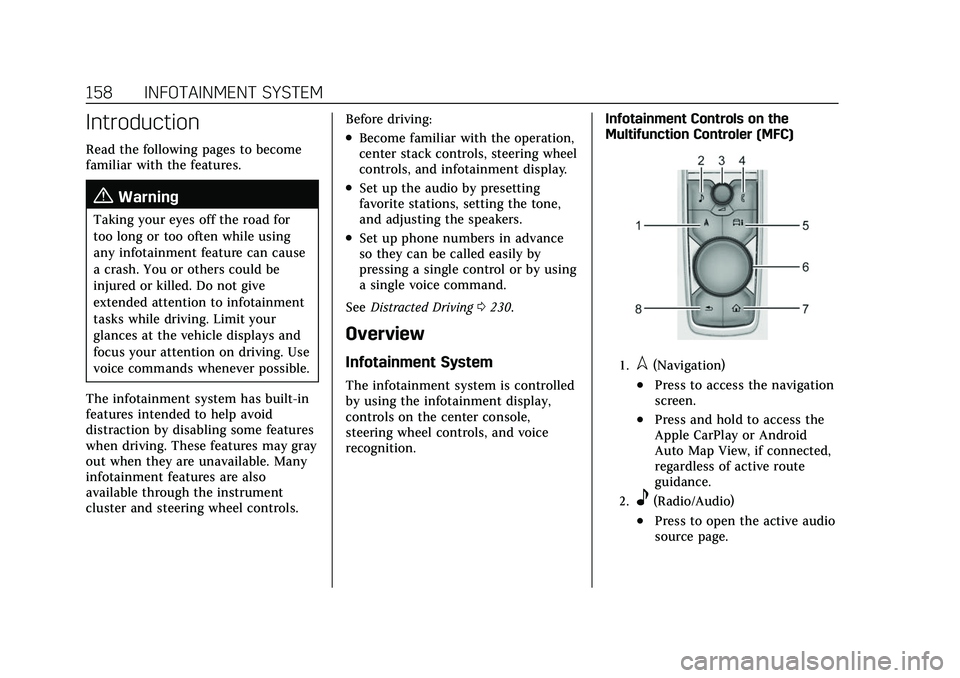
recognition. Infotainment Controls on the
Multifunction Controler (MFC)
1.l(Navigation)
.Press to access the navigation
screen.
.Press and hold to access the
Apple CarPlay or Android
Auto Map View, if connected,
regardless of active route
guidance.
2.e(Radio/Audio)
.Press to open the active audio
source page.